
591 lines
23 KiB
Markdown
591 lines
23 KiB
Markdown
# 🔥🕷️ Crawl4AI: LLM Friendly Web Crawler & Scraper
|
|
|
|
<a href="https://trendshift.io/repositories/11716" target="_blank"><img src="https://trendshift.io/api/badge/repositories/11716" alt="unclecode%2Fcrawl4ai | Trendshift" style="width: 250px; height: 55px;" width="250" height="55"/></a>
|
|
|
|
[](https://github.com/unclecode/crawl4ai/stargazers)
|
|

|
|
[](https://github.com/unclecode/crawl4ai/network/members)
|
|
[](https://github.com/unclecode/crawl4ai/issues)
|
|
[](https://github.com/unclecode/crawl4ai/pulls)
|
|
[](https://github.com/unclecode/crawl4ai/blob/main/LICENSE)
|
|
|
|
Crawl4AI simplifies asynchronous web crawling and data extraction, making it accessible for large language models (LLMs) and AI applications. 🆓🌐
|
|
|
|
## New in 0.3.743 ✨
|
|
|
|
🚀 **Improved ManagedBrowser Configuration**: Dynamic host and port support for more flexible browser management.
|
|
📝 **Enhanced Markdown Generation**: New generator class for better formatting and customization.
|
|
⚡ **Fast HTML Formatting**: Significantly optimized HTML formatting in the web crawler.
|
|
🛠️ **Utility & Sanitization Upgrades**: Improved sanitization and expanded utility functions for streamlined workflows.
|
|
👥 **Acknowledgments**: Added contributor details and pull request acknowledgments for better transparency.
|
|
📖 **Documentation Updates**: Clearer usage scenarios and updated guidance for better user onboarding.
|
|
🧪 **Test Adjustments**: Refined tests to align with recent class name changes.
|
|
|
|
|
|
## Try it Now!
|
|
|
|
✨ Play around with this [](https://colab.research.google.com/drive/1SgRPrByQLzjRfwoRNq1wSGE9nYY_EE8C?usp=sharing)
|
|
|
|
✨ Visit our [Documentation Website](https://crawl4ai.com/mkdocs/)
|
|
|
|
## Features ✨
|
|
|
|
<details open>
|
|
<summary>🚀 <strong>Performance & Scalability</strong></summary>
|
|
|
|
- ⚡ **Blazing Fast Scraping**: Outperforms many paid services with cutting-edge optimization.
|
|
- 🔄 **Asynchronous Architecture**: Enhanced performance for complex multi-page crawling.
|
|
- ⚡ **Dynamic HTML Formatting**: New, fast HTML formatting for streamlined workflows.
|
|
- 🗂️ **Large Dataset Optimization**: Improved caching for handling massive content sets.
|
|
|
|
</details>
|
|
|
|
<details>
|
|
<summary>🔎 <strong>Extraction Capabilities</strong></summary>
|
|
|
|
- 🖼️ **Comprehensive Media Support**: Extracts images, audio, video, and responsive image formats like `srcset` and `picture`.
|
|
- 📚 **Advanced Content Chunking**: Topic-based, regex, sentence-level, and cosine clustering strategies.
|
|
- 🎯 **Precise Data Extraction**: Supports CSS selectors and keyword-based refinements.
|
|
- 🔗 **All-Inclusive Link Crawling**: Extracts internal and external links.
|
|
- 📝 **Markdown Generation**: Enhanced markdown generator class for custom, clean, LLM-friendly outputs.
|
|
- 🏷️ **Metadata Extraction**: Fetches metadata directly from pages.
|
|
|
|
</details>
|
|
|
|
<details>
|
|
<summary>🌐 <strong>Browser Integration</strong></summary>
|
|
|
|
- 🌍 **Multi-Browser Support**: Works with Chromium, Firefox, and WebKit.
|
|
- 🖥️ **ManagedBrowser with Dynamic Config**: Flexible host/port control for tailored setups.
|
|
- ⚙️ **Custom Browser Hooks**: Authentication, headers, and page modifications.
|
|
- 🕶️ **Stealth Mode**: Bypasses bot detection with advanced techniques.
|
|
- 📸 **Screenshots & JavaScript Execution**: Takes screenshots and executes custom JavaScript before crawling.
|
|
|
|
</details>
|
|
|
|
<details>
|
|
<summary>📁 <strong>Input/Output Flexibility</strong></summary>
|
|
|
|
- 📂 **Local & Raw HTML Crawling**: Directly processes `file://` paths and raw HTML.
|
|
- 🌐 **Custom Headers for LLM**: Tailored headers for enhanced AI interactions.
|
|
- 🛠️ **Structured Output Options**: Supports JSON, cleaned HTML, and markdown outputs.
|
|
|
|
</details>
|
|
|
|
<details>
|
|
<summary>🔧 <strong>Utility & Debugging</strong></summary>
|
|
|
|
- 🛡️ **Error Handling**: Robust error management for seamless execution.
|
|
- 🔐 **Session Management**: Handles complex, multi-page interactions.
|
|
- 🧹 **Utility Functions**: Enhanced sanitization and flexible extraction helpers.
|
|
- 🕰️ **Delayed Content Loading**: Improved handling of lazy-loading and dynamic content.
|
|
|
|
</details>
|
|
|
|
<details>
|
|
<summary>🔐 <strong>Security & Accessibility</strong></summary>
|
|
|
|
- 🕵️ **Proxy Support**: Enables authenticated access for restricted pages.
|
|
- 🚪 **API Gateway**: Deploy as an API service with secure token authentication.
|
|
- 🌐 **CORS & Static Serving**: Enhanced support for filesystem-based caching and cross-origin requests.
|
|
|
|
</details>
|
|
|
|
<details>
|
|
<summary>🌟 <strong>Community & Documentation</strong></summary>
|
|
|
|
- 🙌 **Contributor Acknowledgments**: Recognition for pull requests and contributions.
|
|
- 📖 **Clear Documentation**: Simplified and updated for better onboarding and usage.
|
|
|
|
</details>
|
|
|
|
<details>
|
|
<summary>🎯 <strong>Cutting-Edge Features</strong></summary>
|
|
|
|
- 🛠️ **BM25-Based Markdown Filtering**: Extracts cleaner, context-relevant markdown.
|
|
- 📚 **LLM-Friendly Citations**: Auto-converts links to numbered citations with reference lists.
|
|
- 📡 **IFrame Content Extraction**: Comprehensive analysis for embedded content.
|
|
- 🕰️ **Flexible Content Retrieval**: Combines timing-based strategies for reliable extractions.
|
|
|
|
</details>
|
|
|
|
|
|
## Installation 🛠️
|
|
|
|
Crawl4AI offers flexible installation options to suit various use cases. You can install it as a Python package or use Docker.
|
|
|
|
### Using pip 🐍
|
|
|
|
Choose the installation option that best fits your needs:
|
|
|
|
#### Basic Installation
|
|
|
|
For basic web crawling and scraping tasks:
|
|
|
|
```bash
|
|
pip install crawl4ai
|
|
```
|
|
|
|
By default, this will install the asynchronous version of Crawl4AI, using Playwright for web crawling.
|
|
|
|
👉 Note: When you install Crawl4AI, the setup script should automatically install and set up Playwright. However, if you encounter any Playwright-related errors, you can manually install it using one of these methods:
|
|
|
|
1. Through the command line:
|
|
|
|
```bash
|
|
playwright install
|
|
```
|
|
|
|
2. If the above doesn't work, try this more specific command:
|
|
|
|
```bash
|
|
python -m playwright install chromium
|
|
```
|
|
|
|
This second method has proven to be more reliable in some cases.
|
|
|
|
#### Installation with Synchronous Version
|
|
|
|
If you need the synchronous version using Selenium:
|
|
|
|
```bash
|
|
pip install crawl4ai[sync]
|
|
```
|
|
|
|
#### Development Installation
|
|
|
|
For contributors who plan to modify the source code:
|
|
|
|
```bash
|
|
git clone https://github.com/unclecode/crawl4ai.git
|
|
cd crawl4ai
|
|
pip install -e . # Basic installation in editable mode
|
|
```
|
|
Install optional features:
|
|
```bash
|
|
pip install -e ".[torch]" # With PyTorch features
|
|
pip install -e ".[transformer]" # With Transformer features
|
|
pip install -e ".[cosine]" # With cosine similarity features
|
|
pip install -e ".[sync]" # With synchronous crawling (Selenium)
|
|
pip install -e ".[all]" # Install all optional features
|
|
```
|
|
|
|
## One-Click Deployment 🚀
|
|
|
|
Deploy your own instance of Crawl4AI with one click:
|
|
|
|
[](https://www.digitalocean.com/?repo=https://github.com/unclecode/crawl4ai/tree/0.3.74&refcode=a0780f1bdb3d&utm_campaign=Referral_Invite&utm_medium=Referral_Program&utm_source=badge)
|
|
|
|
> 💡 **Recommended specs**: 4GB RAM minimum. Select "professional-xs" or higher when deploying for stable operation.
|
|
|
|
The deploy will:
|
|
- Set up a Docker container with Crawl4AI
|
|
- Configure Playwright and all dependencies
|
|
- Start the FastAPI server on port 11235
|
|
- Set up health checks and auto-deployment
|
|
|
|
### Using Docker 🐳
|
|
|
|
Crawl4AI is available as Docker images for easy deployment. You can either pull directly from Docker Hub (recommended) or build from the repository.
|
|
|
|
#### Option 1: Docker Hub (Recommended)
|
|
|
|
```bash
|
|
# Pull and run from Docker Hub (choose one):
|
|
docker pull unclecode/crawl4ai:basic # Basic crawling features
|
|
docker pull unclecode/crawl4ai:all # Full installation (ML, LLM support)
|
|
docker pull unclecode/crawl4ai:gpu # GPU-enabled version
|
|
|
|
# Run the container
|
|
docker run -p 11235:11235 unclecode/crawl4ai:basic # Replace 'basic' with your chosen version
|
|
|
|
# In case you want to set platform to arm64
|
|
docker run --platform linux/arm64 -p 11235:11235 unclecode/crawl4ai:basic
|
|
|
|
# In case to allocate more shared memory for the container
|
|
docker run --shm-size=2gb -p 11235:11235 unclecode/crawl4ai:basic
|
|
```
|
|
|
|
#### Option 2: Build from Repository
|
|
|
|
```bash
|
|
# Clone the repository
|
|
git clone https://github.com/unclecode/crawl4ai.git
|
|
cd crawl4ai
|
|
|
|
# Build the image
|
|
docker build -t crawl4ai:local \
|
|
--build-arg INSTALL_TYPE=basic \ # Options: basic, all
|
|
.
|
|
|
|
# In case you want to set platform to arm64
|
|
docker build -t crawl4ai:local \
|
|
--build-arg INSTALL_TYPE=basic \ # Options: basic, all
|
|
--platform linux/arm64 \
|
|
.
|
|
|
|
# Run your local build
|
|
docker run -p 11235:11235 crawl4ai:local
|
|
```
|
|
|
|
Quick test (works for both options):
|
|
```python
|
|
import requests
|
|
|
|
# Submit a crawl job
|
|
response = requests.post(
|
|
"http://localhost:11235/crawl",
|
|
json={"urls": "https://example.com", "priority": 10}
|
|
)
|
|
task_id = response.json()["task_id"]
|
|
|
|
# Get results
|
|
result = requests.get(f"http://localhost:11235/task/{task_id}")
|
|
```
|
|
|
|
For advanced configuration, environment variables, and usage examples, see our [Docker Deployment Guide](https://crawl4ai.com/mkdocs/basic/docker-deployment/).
|
|
|
|
|
|
## Quick Start 🚀
|
|
|
|
```python
|
|
import asyncio
|
|
from crawl4ai import AsyncWebCrawler
|
|
|
|
async def main():
|
|
async with AsyncWebCrawler(verbose=True) as crawler:
|
|
result = await crawler.arun(url="https://www.nbcnews.com/business")
|
|
print(result.markdown)
|
|
|
|
if __name__ == "__main__":
|
|
asyncio.run(main())
|
|
```
|
|
|
|
## Advanced Usage 🔬
|
|
|
|
### Executing JavaScript and Using CSS Selectors
|
|
|
|
```python
|
|
import asyncio
|
|
from crawl4ai import AsyncWebCrawler
|
|
|
|
async def main():
|
|
async with AsyncWebCrawler(verbose=True) as crawler:
|
|
js_code = ["const loadMoreButton = Array.from(document.querySelectorAll('button')).find(button => button.textContent.includes('Load More')); loadMoreButton && loadMoreButton.click();"]
|
|
result = await crawler.arun(
|
|
url="https://www.nbcnews.com/business",
|
|
js_code=js_code,
|
|
css_selector=".wide-tease-item__description",
|
|
bypass_cache=True
|
|
)
|
|
print(result.extracted_content)
|
|
|
|
if __name__ == "__main__":
|
|
asyncio.run(main())
|
|
```
|
|
|
|
### Using a Proxy
|
|
|
|
```python
|
|
import asyncio
|
|
from crawl4ai import AsyncWebCrawler
|
|
|
|
async def main():
|
|
async with AsyncWebCrawler(verbose=True, proxy="http://127.0.0.1:7890") as crawler:
|
|
result = await crawler.arun(
|
|
url="https://www.nbcnews.com/business",
|
|
bypass_cache=True
|
|
)
|
|
print(result.markdown)
|
|
|
|
if __name__ == "__main__":
|
|
asyncio.run(main())
|
|
```
|
|
|
|
### Extracting Structured Data without LLM
|
|
|
|
The `JsonCssExtractionStrategy` allows for precise extraction of structured data from web pages using CSS selectors.
|
|
|
|
```python
|
|
import asyncio
|
|
import json
|
|
from crawl4ai import AsyncWebCrawler
|
|
from crawl4ai.extraction_strategy import JsonCssExtractionStrategy
|
|
|
|
async def extract_news_teasers():
|
|
schema = {
|
|
"name": "News Teaser Extractor",
|
|
"baseSelector": ".wide-tease-item__wrapper",
|
|
"fields": [
|
|
{
|
|
"name": "category",
|
|
"selector": ".unibrow span[data-testid='unibrow-text']",
|
|
"type": "text",
|
|
},
|
|
{
|
|
"name": "headline",
|
|
"selector": ".wide-tease-item__headline",
|
|
"type": "text",
|
|
},
|
|
{
|
|
"name": "summary",
|
|
"selector": ".wide-tease-item__description",
|
|
"type": "text",
|
|
},
|
|
{
|
|
"name": "time",
|
|
"selector": "[data-testid='wide-tease-date']",
|
|
"type": "text",
|
|
},
|
|
{
|
|
"name": "image",
|
|
"type": "nested",
|
|
"selector": "picture.teasePicture img",
|
|
"fields": [
|
|
{"name": "src", "type": "attribute", "attribute": "src"},
|
|
{"name": "alt", "type": "attribute", "attribute": "alt"},
|
|
],
|
|
},
|
|
{
|
|
"name": "link",
|
|
"selector": "a[href]",
|
|
"type": "attribute",
|
|
"attribute": "href",
|
|
},
|
|
],
|
|
}
|
|
|
|
extraction_strategy = JsonCssExtractionStrategy(schema, verbose=True)
|
|
|
|
async with AsyncWebCrawler(verbose=True) as crawler:
|
|
result = await crawler.arun(
|
|
url="https://www.nbcnews.com/business",
|
|
extraction_strategy=extraction_strategy,
|
|
bypass_cache=True,
|
|
)
|
|
|
|
assert result.success, "Failed to crawl the page"
|
|
|
|
news_teasers = json.loads(result.extracted_content)
|
|
print(f"Successfully extracted {len(news_teasers)} news teasers")
|
|
print(json.dumps(news_teasers[0], indent=2))
|
|
|
|
if __name__ == "__main__":
|
|
asyncio.run(extract_news_teasers())
|
|
```
|
|
|
|
For more advanced usage examples, check out our [Examples](https://crawl4ai.com/mkdocs/extraction/css-advanced/) section in the documentation.
|
|
|
|
### Extracting Structured Data with OpenAI
|
|
|
|
```python
|
|
import os
|
|
import asyncio
|
|
from crawl4ai import AsyncWebCrawler
|
|
from crawl4ai.extraction_strategy import LLMExtractionStrategy
|
|
from pydantic import BaseModel, Field
|
|
|
|
class OpenAIModelFee(BaseModel):
|
|
model_name: str = Field(..., description="Name of the OpenAI model.")
|
|
input_fee: str = Field(..., description="Fee for input token for the OpenAI model.")
|
|
output_fee: str = Field(..., description="Fee for output token for the OpenAI model.")
|
|
|
|
async def main():
|
|
async with AsyncWebCrawler(verbose=True) as crawler:
|
|
result = await crawler.arun(
|
|
url='https://openai.com/api/pricing/',
|
|
word_count_threshold=1,
|
|
extraction_strategy=LLMExtractionStrategy(
|
|
provider="openai/gpt-4o", api_token=os.getenv('OPENAI_API_KEY'),
|
|
schema=OpenAIModelFee.schema(),
|
|
extraction_type="schema",
|
|
instruction="""From the crawled content, extract all mentioned model names along with their fees for input and output tokens.
|
|
Do not miss any models in the entire content. One extracted model JSON format should look like this:
|
|
{"model_name": "GPT-4", "input_fee": "US$10.00 / 1M tokens", "output_fee": "US$30.00 / 1M tokens"}."""
|
|
),
|
|
bypass_cache=True,
|
|
)
|
|
print(result.extracted_content)
|
|
|
|
if __name__ == "__main__":
|
|
asyncio.run(main())
|
|
```
|
|
|
|
### Session Management and Dynamic Content Crawling
|
|
|
|
Crawl4AI excels at handling complex scenarios, such as crawling multiple pages with dynamic content loaded via JavaScript. Here's an example of crawling GitHub commits across multiple pages:
|
|
|
|
```python
|
|
import asyncio
|
|
import re
|
|
from bs4 import BeautifulSoup
|
|
from crawl4ai import AsyncWebCrawler
|
|
|
|
async def crawl_typescript_commits():
|
|
first_commit = ""
|
|
async def on_execution_started(page):
|
|
nonlocal first_commit
|
|
try:
|
|
while True:
|
|
await page.wait_for_selector('li.Box-sc-g0xbh4-0 h4')
|
|
commit = await page.query_selector('li.Box-sc-g0xbh4-0 h4')
|
|
commit = await commit.evaluate('(element) => element.textContent')
|
|
commit = re.sub(r'\s+', '', commit)
|
|
if commit and commit != first_commit:
|
|
first_commit = commit
|
|
break
|
|
await asyncio.sleep(0.5)
|
|
except Exception as e:
|
|
print(f"Warning: New content didn't appear after JavaScript execution: {e}")
|
|
|
|
async with AsyncWebCrawler(verbose=True) as crawler:
|
|
crawler.crawler_strategy.set_hook('on_execution_started', on_execution_started)
|
|
|
|
url = "https://github.com/microsoft/TypeScript/commits/main"
|
|
session_id = "typescript_commits_session"
|
|
all_commits = []
|
|
|
|
js_next_page = """
|
|
const button = document.querySelector('a[data-testid="pagination-next-button"]');
|
|
if (button) button.click();
|
|
"""
|
|
|
|
for page in range(3): # Crawl 3 pages
|
|
result = await crawler.arun(
|
|
url=url,
|
|
session_id=session_id,
|
|
css_selector="li.Box-sc-g0xbh4-0",
|
|
js=js_next_page if page > 0 else None,
|
|
bypass_cache=True,
|
|
js_only=page > 0
|
|
)
|
|
|
|
assert result.success, f"Failed to crawl page {page + 1}"
|
|
|
|
soup = BeautifulSoup(result.cleaned_html, 'html.parser')
|
|
commits = soup.select("li")
|
|
all_commits.extend(commits)
|
|
|
|
print(f"Page {page + 1}: Found {len(commits)} commits")
|
|
|
|
await crawler.crawler_strategy.kill_session(session_id)
|
|
print(f"Successfully crawled {len(all_commits)} commits across 3 pages")
|
|
|
|
if __name__ == "__main__":
|
|
asyncio.run(crawl_typescript_commits())
|
|
```
|
|
|
|
This example demonstrates Crawl4AI's ability to handle complex scenarios where content is loaded asynchronously. It crawls multiple pages of GitHub commits, executing JavaScript to load new content and using custom hooks to ensure data is loaded before proceeding.
|
|
|
|
For more advanced usage examples, check out our [Examples](https://crawl4ai.com/mkdocs/tutorial/episode_12_Session-Based_Crawling_for_Dynamic_Websites/) section in the documentation.
|
|
</details>
|
|
|
|
|
|
## Speed Comparison 🚀
|
|
|
|
Crawl4AI is designed with speed as a primary focus. Our goal is to provide the fastest possible response with high-quality data extraction, minimizing abstractions between the data and the user.
|
|
|
|
We've conducted a speed comparison between Crawl4AI and Firecrawl, a paid service. The results demonstrate Crawl4AI's superior performance:
|
|
|
|
```bash
|
|
Firecrawl:
|
|
Time taken: 7.02 seconds
|
|
Content length: 42074 characters
|
|
Images found: 49
|
|
|
|
Crawl4AI (simple crawl):
|
|
Time taken: 1.60 seconds
|
|
Content length: 18238 characters
|
|
Images found: 49
|
|
|
|
Crawl4AI (with JavaScript execution):
|
|
Time taken: 4.64 seconds
|
|
Content length: 40869 characters
|
|
Images found: 89
|
|
```
|
|
|
|
As you can see, Crawl4AI outperforms Firecrawl significantly:
|
|
|
|
- Simple crawl: Crawl4AI is over 4 times faster than Firecrawl.
|
|
- With JavaScript execution: Even when executing JavaScript to load more content (doubling the number of images found), Crawl4AI is still faster than Firecrawl's simple crawl.
|
|
|
|
You can find the full comparison code in our repository at `docs/examples/crawl4ai_vs_firecrawl.py`.
|
|
|
|
## Documentation 📚
|
|
|
|
For detailed documentation, including installation instructions, advanced features, and API reference, visit our [Documentation Website](https://crawl4ai.com/mkdocs/).
|
|
|
|
## Crawl4AI Roadmap 🗺️
|
|
|
|
For detailed information on our development plans and upcoming features, check out our [Roadmap](https://github.com/unclecode/crawl4ai/blob/main/ROADMAP.md).
|
|
|
|
### Advanced Crawling Systems 🔧
|
|
- [x] 0. Graph Crawler: Smart website traversal using graph search algorithms for comprehensive nested page extraction
|
|
- [ ] 1. Question-Based Crawler: Natural language driven web discovery and content extraction
|
|
- [ ] 2. Knowledge-Optimal Crawler: Smart crawling that maximizes knowledge while minimizing data extraction
|
|
- [ ] 3. Agentic Crawler: Autonomous system for complex multi-step crawling operations
|
|
|
|
### Specialized Features 🛠️
|
|
- [ ] 4. Automated Schema Generator: Convert natural language to extraction schemas
|
|
- [ ] 5. Domain-Specific Scrapers: Pre-configured extractors for common platforms (academic, e-commerce)
|
|
- [ ] 6. Web Embedding Index: Semantic search infrastructure for crawled content
|
|
|
|
### Development Tools 🔨
|
|
- [ ] 7. Interactive Playground: Web UI for testing, comparing strategies with AI assistance
|
|
- [ ] 8. Performance Monitor: Real-time insights into crawler operations
|
|
- [ ] 9. Cloud Integration: One-click deployment solutions across cloud providers
|
|
|
|
### Community & Growth 🌱
|
|
- [ ] 10. Sponsorship Program: Structured support system with tiered benefits
|
|
- [ ] 11. Educational Content: "How to Crawl" video series and interactive tutorials
|
|
|
|
## Contributing 🤝
|
|
|
|
We welcome contributions from the open-source community. Check out our [contribution guidelines](https://github.com/unclecode/crawl4ai/blob/main/CONTRIBUTING.md) for more information.
|
|
|
|
## License 📄
|
|
|
|
Crawl4AI is released under the [Apache 2.0 License](https://github.com/unclecode/crawl4ai/blob/main/LICENSE).
|
|
|
|
## Contact 📧
|
|
|
|
For questions, suggestions, or feedback, feel free to reach out:
|
|
|
|
- GitHub: [unclecode](https://github.com/unclecode)
|
|
- Twitter: [@unclecode](https://twitter.com/unclecode)
|
|
- Website: [crawl4ai.com](https://crawl4ai.com)
|
|
|
|
Happy Crawling! 🕸️🚀
|
|
|
|
|
|
# Mission
|
|
|
|
Our mission is to unlock the untapped potential of personal and enterprise data in the digital age. In today's world, individuals and organizations generate vast amounts of valuable digital footprints, yet this data remains largely uncapitalized as a true asset.
|
|
|
|
Our open-source solution empowers developers and innovators to build tools for data extraction and structuring, laying the foundation for a new era of data ownership. By transforming personal and enterprise data into structured, tradeable assets, we're creating opportunities for individuals to capitalize on their digital footprints and for organizations to unlock the value of their collective knowledge.
|
|
|
|
This democratization of data represents the first step toward a shared data economy, where willing participation in data sharing drives AI advancement while ensuring the benefits flow back to data creators. Through this approach, we're building a future where AI development is powered by authentic human knowledge rather than synthetic alternatives.
|
|
|
|

|
|
|
|
For a detailed exploration of our vision, opportunities, and pathway forward, please see our [full mission statement](./MISSION.md).
|
|
|
|
## Key Opportunities
|
|
|
|
- **Data Capitalization**: Transform digital footprints into valuable assets that can appear on personal and enterprise balance sheets
|
|
- **Authentic Data**: Unlock the vast reservoir of real human insights and knowledge for AI advancement
|
|
- **Shared Economy**: Create new value streams where data creators directly benefit from their contributions
|
|
|
|
## Development Pathway
|
|
|
|
1. **Open-Source Foundation**: Building transparent, community-driven data extraction tools
|
|
2. **Data Capitalization Platform**: Creating tools to structure and value digital assets
|
|
3. **Shared Data Marketplace**: Establishing an economic platform for ethical data exchange
|
|
|
|
For a detailed exploration of our vision, challenges, and solutions, please see our [full mission statement](./MISSION.md).
|
|
|
|
|
|
## Star History
|
|
|
|
[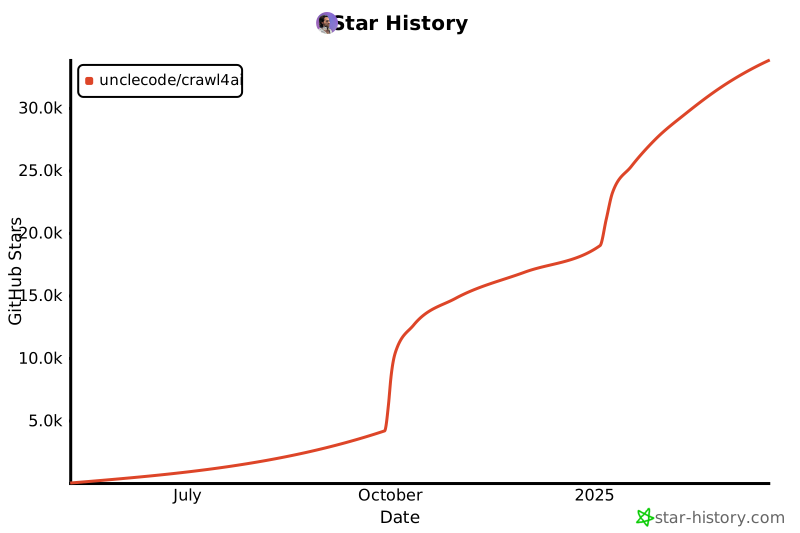](https://star-history.com/#unclecode/crawl4ai&Date)
|