Compare commits
19 Commits
release/v0
...
claude/imp
| Author | SHA1 | Date | |
|---|---|---|---|

|
f0cfd884a9 | ||
|
|
52da8d72bc | ||
|
|
8b7e67566e | ||
|
|
7388baa205 | ||
|
|
897bc3a493 | ||
|
|
8a37710313 | ||
|
|
fdbcddbf1a | ||
|
|
564d437d97 | ||
|
|
9cd06ea7eb | ||
|
|
eb257c2ba3 | ||
|
|
8d364a0731 | ||
|
|
6aff0e55aa | ||
|
|
38a0742708 | ||
|
|
a720a3a9fe | ||
|
|
017144c2dd | ||
|
|
32887ea40d | ||
|
|
eea41bf1ca | ||
|
|
21c302f439 | ||
|
|
e651e045c4 |
30
README.md
30
README.md
@@ -919,6 +919,36 @@ We envision a future where AI is powered by real human knowledge, ensuring data
|
||||
For more details, see our [full mission statement](./MISSION.md).
|
||||
</details>
|
||||
|
||||
## 🌟 Current Sponsors
|
||||
|
||||
### 🏢 Enterprise Sponsors & Partners
|
||||
|
||||
Our enterprise sponsors and technology partners help scale Crawl4AI to power production-grade data pipelines.
|
||||
|
||||
| Company | About | Sponsorship Tier |
|
||||
|------|------|----------------------------|
|
||||
| <a href="https://dashboard.capsolver.com/passport/register?inviteCode=ESVSECTX5Q23" target="_blank"><picture><source width="120" media="(prefers-color-scheme: dark)" srcset="https://docs.crawl4ai.com/uploads/sponsors/20251013045338_72a71fa4ee4d2f40.png"><source width="120" media="(prefers-color-scheme: light)" srcset="https://www.capsolver.com/assets/images/logo-text.png"><img alt="Capsolver" src="https://www.capsolver.com/assets/images/logo-text.png"></picture></a> | AI-powered Captcha solving service. Supports all major Captcha types, including reCAPTCHA, Cloudflare, and more | 🥈 Silver |
|
||||
| <a href="https://kipo.ai" target="_blank"><img src="https://docs.crawl4ai.com/uploads/sponsors/20251013045751_2d54f57f117c651e.png" alt="DataSync" width="120"/></a> | Helps engineers and buyers find, compare, and source electronic & industrial parts in seconds, with specs, pricing, lead times & alternatives.| 🥇 Gold |
|
||||
| <a href="https://www.kidocode.com/" target="_blank"><img src="https://docs.crawl4ai.com/uploads/sponsors/20251013045045_bb8dace3f0440d65.svg" alt="Kidocode" width="120"/><p align="center">KidoCode</p></a> | Kidocode is a hybrid technology and entrepreneurship school for kids aged 5–18, offering both online and on-campus education. | 🥇 Gold |
|
||||
| <a href="https://www.alephnull.sg/" target="_blank"><img src="https://docs.crawl4ai.com/uploads/sponsors/20251013050323_a9e8e8c4c3650421.svg" alt="Aleph null" width="120"/></a> | Singapore-based Aleph Null is Asia’s leading edtech hub, dedicated to student-centric, AI-driven education—empowering learners with the tools to thrive in a fast-changing world. | 🥇 Gold |
|
||||
|
||||
### 🧑🤝 Individual Sponsors
|
||||
|
||||
A heartfelt thanks to our individual supporters! Every contribution helps us keep our opensource mission alive and thriving!
|
||||
|
||||
<p align="left">
|
||||
<a href="https://github.com/hafezparast"><img src="https://avatars.githubusercontent.com/u/14273305?s=60&v=4" style="border-radius:50%;" width="64px;"/></a>
|
||||
<a href="https://github.com/ntohidi"><img src="https://avatars.githubusercontent.com/u/17140097?s=60&v=4" style="border-radius:50%;"width="64px;"/></a>
|
||||
<a href="https://github.com/Sjoeborg"><img src="https://avatars.githubusercontent.com/u/17451310?s=60&v=4" style="border-radius:50%;"width="64px;"/></a>
|
||||
<a href="https://github.com/romek-rozen"><img src="https://avatars.githubusercontent.com/u/30595969?s=60&v=4" style="border-radius:50%;"width="64px;"/></a>
|
||||
<a href="https://github.com/Kourosh-Kiyani"><img src="https://avatars.githubusercontent.com/u/34105600?s=60&v=4" style="border-radius:50%;"width="64px;"/></a>
|
||||
<a href="https://github.com/Etherdrake"><img src="https://avatars.githubusercontent.com/u/67021215?s=60&v=4" style="border-radius:50%;"width="64px;"/></a>
|
||||
<a href="https://github.com/shaman247"><img src="https://avatars.githubusercontent.com/u/211010067?s=60&v=4" style="border-radius:50%;"width="64px;"/></a>
|
||||
<a href="https://github.com/work-flow-manager"><img src="https://avatars.githubusercontent.com/u/217665461?s=60&v=4" style="border-radius:50%;"width="64px;"/></a>
|
||||
</p>
|
||||
|
||||
> Want to join them? [Sponsor Crawl4AI →](https://github.com/sponsors/unclecode)
|
||||
|
||||
## Star History
|
||||
|
||||
[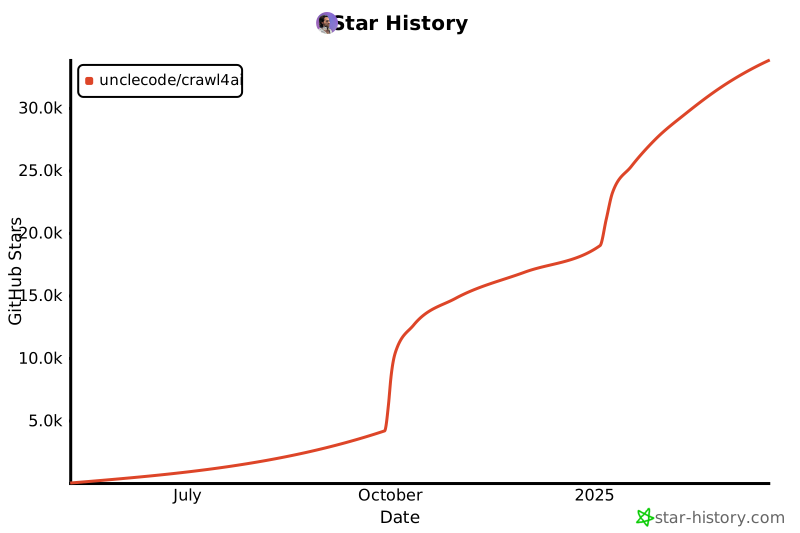](https://star-history.com/#unclecode/crawl4ai&Date)
|
||||
|
||||
@@ -12,6 +12,7 @@
|
||||
- [Python SDK](#python-sdk)
|
||||
- [Understanding Request Schema](#understanding-request-schema)
|
||||
- [REST API Examples](#rest-api-examples)
|
||||
- [Asynchronous Jobs with Webhooks](#asynchronous-jobs-with-webhooks)
|
||||
- [Additional API Endpoints](#additional-api-endpoints)
|
||||
- [HTML Extraction Endpoint](#html-extraction-endpoint)
|
||||
- [Screenshot Endpoint](#screenshot-endpoint)
|
||||
@@ -648,6 +649,146 @@ async def test_stream_crawl(token: str = None): # Made token optional
|
||||
# asyncio.run(test_stream_crawl())
|
||||
```
|
||||
|
||||
### Asynchronous Jobs with Webhooks
|
||||
|
||||
For long-running crawls or when you want to avoid keeping connections open, use the job queue endpoints. Instead of polling for results, configure a webhook to receive notifications when jobs complete.
|
||||
|
||||
#### Why Use Jobs & Webhooks?
|
||||
|
||||
- **No Polling Required** - Get notified when crawls complete instead of constantly checking status
|
||||
- **Better Resource Usage** - Free up client connections while jobs run in the background
|
||||
- **Scalable Architecture** - Ideal for high-volume crawling with TypeScript/Node.js clients or microservices
|
||||
- **Reliable Delivery** - Automatic retry with exponential backoff (5 attempts: 1s → 2s → 4s → 8s → 16s)
|
||||
|
||||
#### How It Works
|
||||
|
||||
1. **Submit Job** → POST to `/crawl/job` with optional `webhook_config`
|
||||
2. **Get Task ID** → Receive a `task_id` immediately
|
||||
3. **Job Runs** → Crawl executes in the background
|
||||
4. **Webhook Fired** → Server POSTs completion notification to your webhook URL
|
||||
5. **Fetch Results** → If data wasn't included in webhook, GET `/crawl/job/{task_id}`
|
||||
|
||||
#### Quick Example
|
||||
|
||||
```bash
|
||||
# Submit a crawl job with webhook notification
|
||||
curl -X POST http://localhost:11235/crawl/job \
|
||||
-H "Content-Type: application/json" \
|
||||
-d '{
|
||||
"urls": ["https://example.com"],
|
||||
"webhook_config": {
|
||||
"webhook_url": "https://myapp.com/webhooks/crawl-complete",
|
||||
"webhook_data_in_payload": false
|
||||
}
|
||||
}'
|
||||
|
||||
# Response: {"task_id": "crawl_a1b2c3d4"}
|
||||
```
|
||||
|
||||
**Your webhook receives:**
|
||||
```json
|
||||
{
|
||||
"task_id": "crawl_a1b2c3d4",
|
||||
"task_type": "crawl",
|
||||
"status": "completed",
|
||||
"timestamp": "2025-10-21T10:30:00.000000+00:00",
|
||||
"urls": ["https://example.com"]
|
||||
}
|
||||
```
|
||||
|
||||
Then fetch the results:
|
||||
```bash
|
||||
curl http://localhost:11235/crawl/job/crawl_a1b2c3d4
|
||||
```
|
||||
|
||||
#### Include Data in Webhook
|
||||
|
||||
Set `webhook_data_in_payload: true` to receive the full crawl results directly in the webhook:
|
||||
|
||||
```bash
|
||||
curl -X POST http://localhost:11235/crawl/job \
|
||||
-H "Content-Type: application/json" \
|
||||
-d '{
|
||||
"urls": ["https://example.com"],
|
||||
"webhook_config": {
|
||||
"webhook_url": "https://myapp.com/webhooks/crawl-complete",
|
||||
"webhook_data_in_payload": true
|
||||
}
|
||||
}'
|
||||
```
|
||||
|
||||
**Your webhook receives the complete data:**
|
||||
```json
|
||||
{
|
||||
"task_id": "crawl_a1b2c3d4",
|
||||
"task_type": "crawl",
|
||||
"status": "completed",
|
||||
"timestamp": "2025-10-21T10:30:00.000000+00:00",
|
||||
"urls": ["https://example.com"],
|
||||
"data": {
|
||||
"markdown": "...",
|
||||
"html": "...",
|
||||
"links": {...},
|
||||
"metadata": {...}
|
||||
}
|
||||
}
|
||||
```
|
||||
|
||||
#### Webhook Authentication
|
||||
|
||||
Add custom headers for authentication:
|
||||
|
||||
```json
|
||||
{
|
||||
"urls": ["https://example.com"],
|
||||
"webhook_config": {
|
||||
"webhook_url": "https://myapp.com/webhooks/crawl",
|
||||
"webhook_data_in_payload": false,
|
||||
"webhook_headers": {
|
||||
"X-Webhook-Secret": "your-secret-token",
|
||||
"X-Service-ID": "crawl4ai-prod"
|
||||
}
|
||||
}
|
||||
}
|
||||
```
|
||||
|
||||
#### Global Default Webhook
|
||||
|
||||
Configure a default webhook URL in `config.yml` for all jobs:
|
||||
|
||||
```yaml
|
||||
webhooks:
|
||||
enabled: true
|
||||
default_url: "https://myapp.com/webhooks/default"
|
||||
data_in_payload: false
|
||||
retry:
|
||||
max_attempts: 5
|
||||
initial_delay_ms: 1000
|
||||
max_delay_ms: 32000
|
||||
timeout_ms: 30000
|
||||
```
|
||||
|
||||
Now jobs without `webhook_config` automatically use the default webhook.
|
||||
|
||||
#### Job Status Polling (Without Webhooks)
|
||||
|
||||
If you prefer polling instead of webhooks, just omit `webhook_config`:
|
||||
|
||||
```bash
|
||||
# Submit job
|
||||
curl -X POST http://localhost:11235/crawl/job \
|
||||
-H "Content-Type: application/json" \
|
||||
-d '{"urls": ["https://example.com"]}'
|
||||
# Response: {"task_id": "crawl_xyz"}
|
||||
|
||||
# Poll for status
|
||||
curl http://localhost:11235/crawl/job/crawl_xyz
|
||||
```
|
||||
|
||||
The response includes `status` field: `"processing"`, `"completed"`, or `"failed"`.
|
||||
|
||||
> 💡 **Pro tip**: See [WEBHOOK_EXAMPLES.md](./WEBHOOK_EXAMPLES.md) for detailed examples including TypeScript client code, Flask webhook handlers, and failure handling.
|
||||
|
||||
---
|
||||
|
||||
## Metrics & Monitoring
|
||||
@@ -827,10 +968,11 @@ We're here to help you succeed with Crawl4AI! Here's how to get support:
|
||||
|
||||
In this guide, we've covered everything you need to get started with Crawl4AI's Docker deployment:
|
||||
- Building and running the Docker container
|
||||
- Configuring the environment
|
||||
- Configuring the environment
|
||||
- Using the interactive playground for testing
|
||||
- Making API requests with proper typing
|
||||
- Using the Python SDK
|
||||
- Asynchronous job queues with webhook notifications
|
||||
- Leveraging specialized endpoints for screenshots, PDFs, and JavaScript execution
|
||||
- Connecting via the Model Context Protocol (MCP)
|
||||
- Monitoring your deployment
|
||||
|
||||
281
deploy/docker/WEBHOOK_EXAMPLES.md
Normal file
281
deploy/docker/WEBHOOK_EXAMPLES.md
Normal file
@@ -0,0 +1,281 @@
|
||||
# Webhook Feature Examples
|
||||
|
||||
This document provides examples of how to use the webhook feature for crawl jobs in Crawl4AI.
|
||||
|
||||
## Overview
|
||||
|
||||
The webhook feature allows you to receive notifications when crawl jobs complete, eliminating the need for polling. Webhooks are sent with exponential backoff retry logic to ensure reliable delivery.
|
||||
|
||||
## Configuration
|
||||
|
||||
### Global Configuration (config.yml)
|
||||
|
||||
You can configure default webhook settings in `config.yml`:
|
||||
|
||||
```yaml
|
||||
webhooks:
|
||||
enabled: true
|
||||
default_url: null # Optional: default webhook URL for all jobs
|
||||
data_in_payload: false # Optional: default behavior for including data
|
||||
retry:
|
||||
max_attempts: 5
|
||||
initial_delay_ms: 1000 # 1s, 2s, 4s, 8s, 16s exponential backoff
|
||||
max_delay_ms: 32000
|
||||
timeout_ms: 30000 # 30s timeout per webhook call
|
||||
headers: # Optional: default headers to include
|
||||
User-Agent: "Crawl4AI-Webhook/1.0"
|
||||
```
|
||||
|
||||
## API Usage Examples
|
||||
|
||||
### Example 1: Basic Webhook (Notification Only)
|
||||
|
||||
Send a webhook notification without including the crawl data in the payload.
|
||||
|
||||
**Request:**
|
||||
```bash
|
||||
curl -X POST http://localhost:11235/crawl/job \
|
||||
-H "Content-Type: application/json" \
|
||||
-d '{
|
||||
"urls": ["https://example.com"],
|
||||
"webhook_config": {
|
||||
"webhook_url": "https://myapp.com/webhooks/crawl-complete",
|
||||
"webhook_data_in_payload": false
|
||||
}
|
||||
}'
|
||||
```
|
||||
|
||||
**Response:**
|
||||
```json
|
||||
{
|
||||
"task_id": "crawl_a1b2c3d4"
|
||||
}
|
||||
```
|
||||
|
||||
**Webhook Payload Received:**
|
||||
```json
|
||||
{
|
||||
"task_id": "crawl_a1b2c3d4",
|
||||
"task_type": "crawl",
|
||||
"status": "completed",
|
||||
"timestamp": "2025-10-21T10:30:00.000000+00:00",
|
||||
"urls": ["https://example.com"]
|
||||
}
|
||||
```
|
||||
|
||||
Your webhook handler should then fetch the results:
|
||||
```bash
|
||||
curl http://localhost:11235/crawl/job/crawl_a1b2c3d4
|
||||
```
|
||||
|
||||
### Example 2: Webhook with Data Included
|
||||
|
||||
Include the full crawl results in the webhook payload.
|
||||
|
||||
**Request:**
|
||||
```bash
|
||||
curl -X POST http://localhost:11235/crawl/job \
|
||||
-H "Content-Type: application/json" \
|
||||
-d '{
|
||||
"urls": ["https://example.com"],
|
||||
"webhook_config": {
|
||||
"webhook_url": "https://myapp.com/webhooks/crawl-complete",
|
||||
"webhook_data_in_payload": true
|
||||
}
|
||||
}'
|
||||
```
|
||||
|
||||
**Webhook Payload Received:**
|
||||
```json
|
||||
{
|
||||
"task_id": "crawl_a1b2c3d4",
|
||||
"task_type": "crawl",
|
||||
"status": "completed",
|
||||
"timestamp": "2025-10-21T10:30:00.000000+00:00",
|
||||
"urls": ["https://example.com"],
|
||||
"data": {
|
||||
"markdown": "...",
|
||||
"html": "...",
|
||||
"links": {...},
|
||||
"metadata": {...}
|
||||
}
|
||||
}
|
||||
```
|
||||
|
||||
### Example 3: Webhook with Custom Headers
|
||||
|
||||
Include custom headers for authentication or identification.
|
||||
|
||||
**Request:**
|
||||
```bash
|
||||
curl -X POST http://localhost:11235/crawl/job \
|
||||
-H "Content-Type: application/json" \
|
||||
-d '{
|
||||
"urls": ["https://example.com"],
|
||||
"webhook_config": {
|
||||
"webhook_url": "https://myapp.com/webhooks/crawl-complete",
|
||||
"webhook_data_in_payload": false,
|
||||
"webhook_headers": {
|
||||
"X-Webhook-Secret": "my-secret-token",
|
||||
"X-Service-ID": "crawl4ai-production"
|
||||
}
|
||||
}
|
||||
}'
|
||||
```
|
||||
|
||||
The webhook will be sent with these additional headers plus the default headers from config.
|
||||
|
||||
### Example 4: Failure Notification
|
||||
|
||||
When a crawl job fails, a webhook is sent with error details.
|
||||
|
||||
**Webhook Payload on Failure:**
|
||||
```json
|
||||
{
|
||||
"task_id": "crawl_a1b2c3d4",
|
||||
"task_type": "crawl",
|
||||
"status": "failed",
|
||||
"timestamp": "2025-10-21T10:30:00.000000+00:00",
|
||||
"urls": ["https://example.com"],
|
||||
"error": "Connection timeout after 30s"
|
||||
}
|
||||
```
|
||||
|
||||
### Example 5: Using Global Default Webhook
|
||||
|
||||
If you set a `default_url` in config.yml, jobs without webhook_config will use it:
|
||||
|
||||
**config.yml:**
|
||||
```yaml
|
||||
webhooks:
|
||||
enabled: true
|
||||
default_url: "https://myapp.com/webhooks/default"
|
||||
data_in_payload: false
|
||||
```
|
||||
|
||||
**Request (no webhook_config needed):**
|
||||
```bash
|
||||
curl -X POST http://localhost:11235/crawl/job \
|
||||
-H "Content-Type: application/json" \
|
||||
-d '{
|
||||
"urls": ["https://example.com"]
|
||||
}'
|
||||
```
|
||||
|
||||
The webhook will be sent to the default URL configured in config.yml.
|
||||
|
||||
## Webhook Handler Example
|
||||
|
||||
Here's a simple Python Flask webhook handler:
|
||||
|
||||
```python
|
||||
from flask import Flask, request, jsonify
|
||||
import requests
|
||||
|
||||
app = Flask(__name__)
|
||||
|
||||
@app.route('/webhooks/crawl-complete', methods=['POST'])
|
||||
def handle_crawl_webhook():
|
||||
payload = request.json
|
||||
|
||||
task_id = payload['task_id']
|
||||
status = payload['status']
|
||||
|
||||
if status == 'completed':
|
||||
# If data not in payload, fetch it
|
||||
if 'data' not in payload:
|
||||
response = requests.get(f'http://localhost:11235/crawl/job/{task_id}')
|
||||
data = response.json()
|
||||
else:
|
||||
data = payload['data']
|
||||
|
||||
# Process the crawl data
|
||||
print(f"Processing crawl results for {task_id}")
|
||||
# Your business logic here...
|
||||
|
||||
elif status == 'failed':
|
||||
error = payload.get('error', 'Unknown error')
|
||||
print(f"Crawl job {task_id} failed: {error}")
|
||||
# Handle failure...
|
||||
|
||||
return jsonify({"status": "received"}), 200
|
||||
|
||||
if __name__ == '__main__':
|
||||
app.run(port=8080)
|
||||
```
|
||||
|
||||
## Retry Logic
|
||||
|
||||
The webhook delivery service uses exponential backoff retry logic:
|
||||
|
||||
- **Attempts:** Up to 5 attempts by default
|
||||
- **Delays:** 1s → 2s → 4s → 8s → 16s
|
||||
- **Timeout:** 30 seconds per attempt
|
||||
- **Retry Conditions:**
|
||||
- Server errors (5xx status codes)
|
||||
- Network errors
|
||||
- Timeouts
|
||||
- **No Retry:**
|
||||
- Client errors (4xx status codes)
|
||||
- Successful delivery (2xx status codes)
|
||||
|
||||
## Benefits
|
||||
|
||||
1. **No Polling Required** - Eliminates constant API calls to check job status
|
||||
2. **Real-time Notifications** - Immediate notification when jobs complete
|
||||
3. **Reliable Delivery** - Exponential backoff ensures webhooks are delivered
|
||||
4. **Flexible** - Choose between notification-only or full data delivery
|
||||
5. **Secure** - Support for custom headers for authentication
|
||||
6. **Configurable** - Global defaults or per-job configuration
|
||||
|
||||
## TypeScript Client Example
|
||||
|
||||
```typescript
|
||||
interface WebhookConfig {
|
||||
webhook_url: string;
|
||||
webhook_data_in_payload?: boolean;
|
||||
webhook_headers?: Record<string, string>;
|
||||
}
|
||||
|
||||
interface CrawlJobRequest {
|
||||
urls: string[];
|
||||
browser_config?: Record<string, any>;
|
||||
crawler_config?: Record<string, any>;
|
||||
webhook_config?: WebhookConfig;
|
||||
}
|
||||
|
||||
async function createCrawlJob(request: CrawlJobRequest) {
|
||||
const response = await fetch('http://localhost:11235/crawl/job', {
|
||||
method: 'POST',
|
||||
headers: { 'Content-Type': 'application/json' },
|
||||
body: JSON.stringify(request)
|
||||
});
|
||||
|
||||
const { task_id } = await response.json();
|
||||
return task_id;
|
||||
}
|
||||
|
||||
// Usage
|
||||
const taskId = await createCrawlJob({
|
||||
urls: ['https://example.com'],
|
||||
webhook_config: {
|
||||
webhook_url: 'https://myapp.com/webhooks/crawl-complete',
|
||||
webhook_data_in_payload: false,
|
||||
webhook_headers: {
|
||||
'X-Webhook-Secret': 'my-secret'
|
||||
}
|
||||
}
|
||||
});
|
||||
```
|
||||
|
||||
## Monitoring and Debugging
|
||||
|
||||
Webhook delivery attempts are logged at INFO level:
|
||||
- Successful deliveries
|
||||
- Retry attempts with delays
|
||||
- Final failures after max attempts
|
||||
|
||||
Check the application logs for webhook delivery status:
|
||||
```bash
|
||||
docker logs crawl4ai-container | grep -i webhook
|
||||
```
|
||||
@@ -44,6 +44,7 @@ from utils import (
|
||||
get_llm_api_key,
|
||||
validate_llm_provider
|
||||
)
|
||||
from webhook import WebhookDeliveryService
|
||||
|
||||
import psutil, time
|
||||
|
||||
@@ -567,6 +568,7 @@ async def handle_crawl_job(
|
||||
browser_config: Dict,
|
||||
crawler_config: Dict,
|
||||
config: Dict,
|
||||
webhook_config: Optional[Dict] = None,
|
||||
) -> Dict:
|
||||
"""
|
||||
Fire-and-forget version of handle_crawl_request.
|
||||
@@ -574,13 +576,24 @@ async def handle_crawl_job(
|
||||
lets /crawl/job/{task_id} polling fetch the result.
|
||||
"""
|
||||
task_id = f"crawl_{uuid4().hex[:8]}"
|
||||
await redis.hset(f"task:{task_id}", mapping={
|
||||
|
||||
# Store task data in Redis
|
||||
task_data = {
|
||||
"status": TaskStatus.PROCESSING, # <-- keep enum values consistent
|
||||
"created_at": datetime.utcnow().isoformat(),
|
||||
"url": json.dumps(urls), # store list as JSON string
|
||||
"result": "",
|
||||
"error": "",
|
||||
})
|
||||
}
|
||||
|
||||
# Store webhook config if provided
|
||||
if webhook_config:
|
||||
task_data["webhook_config"] = json.dumps(webhook_config)
|
||||
|
||||
await redis.hset(f"task:{task_id}", mapping=task_data)
|
||||
|
||||
# Initialize webhook service
|
||||
webhook_service = WebhookDeliveryService(config)
|
||||
|
||||
async def _runner():
|
||||
try:
|
||||
@@ -594,6 +607,17 @@ async def handle_crawl_job(
|
||||
"status": TaskStatus.COMPLETED,
|
||||
"result": json.dumps(result),
|
||||
})
|
||||
|
||||
# Send webhook notification on successful completion
|
||||
await webhook_service.notify_job_completion(
|
||||
task_id=task_id,
|
||||
task_type="crawl",
|
||||
status="completed",
|
||||
urls=urls,
|
||||
webhook_config=webhook_config,
|
||||
result=result
|
||||
)
|
||||
|
||||
await asyncio.sleep(5) # Give Redis time to process the update
|
||||
except Exception as exc:
|
||||
await redis.hset(f"task:{task_id}", mapping={
|
||||
@@ -601,5 +625,15 @@ async def handle_crawl_job(
|
||||
"error": str(exc),
|
||||
})
|
||||
|
||||
# Send webhook notification on failure
|
||||
await webhook_service.notify_job_completion(
|
||||
task_id=task_id,
|
||||
task_type="crawl",
|
||||
status="failed",
|
||||
urls=urls,
|
||||
webhook_config=webhook_config,
|
||||
error=str(exc)
|
||||
)
|
||||
|
||||
background_tasks.add_task(_runner)
|
||||
return {"task_id": task_id}
|
||||
@@ -88,4 +88,17 @@ observability:
|
||||
enabled: True
|
||||
endpoint: "/metrics"
|
||||
health_check:
|
||||
endpoint: "/health"
|
||||
endpoint: "/health"
|
||||
|
||||
# Webhook Configuration
|
||||
webhooks:
|
||||
enabled: true
|
||||
default_url: null # Optional: default webhook URL for all jobs
|
||||
data_in_payload: false # Optional: default behavior for including data
|
||||
retry:
|
||||
max_attempts: 5
|
||||
initial_delay_ms: 1000 # 1s, 2s, 4s, 8s, 16s exponential backoff
|
||||
max_delay_ms: 32000
|
||||
timeout_ms: 30000 # 30s timeout per webhook call
|
||||
headers: # Optional: default headers to include
|
||||
User-Agent: "Crawl4AI-Webhook/1.0"
|
||||
@@ -12,6 +12,7 @@ from api import (
|
||||
handle_crawl_job,
|
||||
handle_task_status,
|
||||
)
|
||||
from schemas import WebhookConfig
|
||||
|
||||
# ------------- dependency placeholders -------------
|
||||
_redis = None # will be injected from server.py
|
||||
@@ -43,6 +44,7 @@ class CrawlJobPayload(BaseModel):
|
||||
urls: list[HttpUrl]
|
||||
browser_config: Dict = {}
|
||||
crawler_config: Dict = {}
|
||||
webhook_config: Optional[WebhookConfig] = None
|
||||
|
||||
|
||||
# ---------- LLM job ---------------------------------------------------------
|
||||
@@ -82,6 +84,10 @@ async def crawl_job_enqueue(
|
||||
background_tasks: BackgroundTasks,
|
||||
_td: Dict = Depends(lambda: _token_dep()),
|
||||
):
|
||||
webhook_config = None
|
||||
if payload.webhook_config:
|
||||
webhook_config = payload.webhook_config.dict()
|
||||
|
||||
return await handle_crawl_job(
|
||||
_redis,
|
||||
background_tasks,
|
||||
@@ -89,6 +95,7 @@ async def crawl_job_enqueue(
|
||||
payload.browser_config,
|
||||
payload.crawler_config,
|
||||
config=_config,
|
||||
webhook_config=webhook_config,
|
||||
)
|
||||
|
||||
|
||||
|
||||
@@ -1,6 +1,6 @@
|
||||
from typing import List, Optional, Dict
|
||||
from enum import Enum
|
||||
from pydantic import BaseModel, Field
|
||||
from pydantic import BaseModel, Field, HttpUrl
|
||||
from utils import FilterType
|
||||
|
||||
|
||||
@@ -39,4 +39,22 @@ class JSEndpointRequest(BaseModel):
|
||||
scripts: List[str] = Field(
|
||||
...,
|
||||
description="List of separated JavaScript snippets to execute"
|
||||
)
|
||||
)
|
||||
|
||||
|
||||
class WebhookConfig(BaseModel):
|
||||
"""Configuration for webhook notifications."""
|
||||
webhook_url: HttpUrl
|
||||
webhook_data_in_payload: bool = False
|
||||
webhook_headers: Optional[Dict[str, str]] = None
|
||||
|
||||
|
||||
class WebhookPayload(BaseModel):
|
||||
"""Payload sent to webhook endpoints."""
|
||||
task_id: str
|
||||
task_type: str # "crawl", "llm_extraction", etc.
|
||||
status: str # "completed" or "failed"
|
||||
timestamp: str # ISO 8601 format
|
||||
urls: List[str]
|
||||
error: Optional[str] = None
|
||||
data: Optional[Dict] = None # Included only if webhook_data_in_payload=True
|
||||
159
deploy/docker/webhook.py
Normal file
159
deploy/docker/webhook.py
Normal file
@@ -0,0 +1,159 @@
|
||||
"""
|
||||
Webhook delivery service for Crawl4AI.
|
||||
|
||||
This module provides webhook notification functionality with exponential backoff retry logic.
|
||||
"""
|
||||
import asyncio
|
||||
import httpx
|
||||
import logging
|
||||
from typing import Dict, Optional
|
||||
from datetime import datetime, timezone
|
||||
|
||||
logger = logging.getLogger(__name__)
|
||||
|
||||
|
||||
class WebhookDeliveryService:
|
||||
"""Handles webhook delivery with exponential backoff retry logic."""
|
||||
|
||||
def __init__(self, config: Dict):
|
||||
"""
|
||||
Initialize the webhook delivery service.
|
||||
|
||||
Args:
|
||||
config: Application configuration dictionary containing webhook settings
|
||||
"""
|
||||
self.config = config.get("webhooks", {})
|
||||
self.max_attempts = self.config.get("retry", {}).get("max_attempts", 5)
|
||||
self.initial_delay = self.config.get("retry", {}).get("initial_delay_ms", 1000) / 1000
|
||||
self.max_delay = self.config.get("retry", {}).get("max_delay_ms", 32000) / 1000
|
||||
self.timeout = self.config.get("retry", {}).get("timeout_ms", 30000) / 1000
|
||||
|
||||
async def send_webhook(
|
||||
self,
|
||||
webhook_url: str,
|
||||
payload: Dict,
|
||||
headers: Optional[Dict[str, str]] = None
|
||||
) -> bool:
|
||||
"""
|
||||
Send webhook with exponential backoff retry logic.
|
||||
|
||||
Args:
|
||||
webhook_url: The URL to send the webhook to
|
||||
payload: The JSON payload to send
|
||||
headers: Optional custom headers
|
||||
|
||||
Returns:
|
||||
bool: True if delivered successfully, False otherwise
|
||||
"""
|
||||
default_headers = self.config.get("headers", {})
|
||||
merged_headers = {**default_headers, **(headers or {})}
|
||||
merged_headers["Content-Type"] = "application/json"
|
||||
|
||||
async with httpx.AsyncClient(timeout=self.timeout) as client:
|
||||
for attempt in range(self.max_attempts):
|
||||
try:
|
||||
logger.info(
|
||||
f"Sending webhook (attempt {attempt + 1}/{self.max_attempts}) to {webhook_url}"
|
||||
)
|
||||
|
||||
response = await client.post(
|
||||
webhook_url,
|
||||
json=payload,
|
||||
headers=merged_headers
|
||||
)
|
||||
|
||||
# Success or client error (don't retry client errors)
|
||||
if response.status_code < 500:
|
||||
if 200 <= response.status_code < 300:
|
||||
logger.info(f"Webhook delivered successfully to {webhook_url}")
|
||||
return True
|
||||
else:
|
||||
logger.warning(
|
||||
f"Webhook rejected with status {response.status_code}: {response.text[:200]}"
|
||||
)
|
||||
return False # Client error - don't retry
|
||||
|
||||
# Server error - retry with backoff
|
||||
logger.warning(
|
||||
f"Webhook failed with status {response.status_code}, will retry"
|
||||
)
|
||||
|
||||
except httpx.TimeoutException as exc:
|
||||
logger.error(f"Webhook timeout (attempt {attempt + 1}): {exc}")
|
||||
except httpx.RequestError as exc:
|
||||
logger.error(f"Webhook request error (attempt {attempt + 1}): {exc}")
|
||||
except Exception as exc:
|
||||
logger.error(f"Webhook delivery error (attempt {attempt + 1}): {exc}")
|
||||
|
||||
# Calculate exponential backoff delay
|
||||
if attempt < self.max_attempts - 1:
|
||||
delay = min(self.initial_delay * (2 ** attempt), self.max_delay)
|
||||
logger.info(f"Retrying in {delay}s...")
|
||||
await asyncio.sleep(delay)
|
||||
|
||||
logger.error(
|
||||
f"Webhook delivery failed after {self.max_attempts} attempts to {webhook_url}"
|
||||
)
|
||||
return False
|
||||
|
||||
async def notify_job_completion(
|
||||
self,
|
||||
task_id: str,
|
||||
task_type: str,
|
||||
status: str,
|
||||
urls: list,
|
||||
webhook_config: Optional[Dict],
|
||||
result: Optional[Dict] = None,
|
||||
error: Optional[str] = None
|
||||
):
|
||||
"""
|
||||
Notify webhook of job completion.
|
||||
|
||||
Args:
|
||||
task_id: The task identifier
|
||||
task_type: Type of task (e.g., "crawl", "llm_extraction")
|
||||
status: Task status ("completed" or "failed")
|
||||
urls: List of URLs that were crawled
|
||||
webhook_config: Webhook configuration from the job request
|
||||
result: Optional crawl result data
|
||||
error: Optional error message if failed
|
||||
"""
|
||||
# Determine webhook URL
|
||||
webhook_url = None
|
||||
data_in_payload = self.config.get("data_in_payload", False)
|
||||
custom_headers = None
|
||||
|
||||
if webhook_config:
|
||||
webhook_url = webhook_config.get("webhook_url")
|
||||
data_in_payload = webhook_config.get("webhook_data_in_payload", data_in_payload)
|
||||
custom_headers = webhook_config.get("webhook_headers")
|
||||
|
||||
if not webhook_url:
|
||||
webhook_url = self.config.get("default_url")
|
||||
|
||||
if not webhook_url:
|
||||
logger.debug("No webhook URL configured, skipping notification")
|
||||
return
|
||||
|
||||
# Check if webhooks are enabled
|
||||
if not self.config.get("enabled", True):
|
||||
logger.debug("Webhooks are disabled, skipping notification")
|
||||
return
|
||||
|
||||
# Build payload
|
||||
payload = {
|
||||
"task_id": task_id,
|
||||
"task_type": task_type,
|
||||
"status": status,
|
||||
"timestamp": datetime.now(timezone.utc).isoformat(),
|
||||
"urls": urls
|
||||
}
|
||||
|
||||
if error:
|
||||
payload["error"] = error
|
||||
|
||||
if data_in_payload and result:
|
||||
payload["data"] = result
|
||||
|
||||
# Send webhook (fire and forget - don't block on completion)
|
||||
await self.send_webhook(webhook_url, payload, custom_headers)
|
||||
1222
docs/PRD_PLATFORM_DEPLOYMENT.md
Normal file
1222
docs/PRD_PLATFORM_DEPLOYMENT.md
Normal file
File diff suppressed because it is too large
Load Diff
285
docs/examples/docker_webhook_example.py
Normal file
285
docs/examples/docker_webhook_example.py
Normal file
@@ -0,0 +1,285 @@
|
||||
"""
|
||||
Docker Webhook Example for Crawl4AI
|
||||
|
||||
This example demonstrates how to use webhooks with the Crawl4AI job queue API.
|
||||
Instead of polling for results, webhooks notify your application when crawls complete.
|
||||
|
||||
Prerequisites:
|
||||
1. Crawl4AI Docker container running on localhost:11235
|
||||
2. Flask installed: pip install flask requests
|
||||
|
||||
Usage:
|
||||
1. Run this script: python docker_webhook_example.py
|
||||
2. The webhook server will start on http://localhost:8080
|
||||
3. Jobs will be submitted and webhooks will be received automatically
|
||||
"""
|
||||
|
||||
import requests
|
||||
import json
|
||||
import time
|
||||
from flask import Flask, request, jsonify
|
||||
from threading import Thread
|
||||
|
||||
# Configuration
|
||||
CRAWL4AI_BASE_URL = "http://localhost:11235"
|
||||
WEBHOOK_BASE_URL = "http://localhost:8080" # Your webhook receiver URL
|
||||
|
||||
# Initialize Flask app for webhook receiver
|
||||
app = Flask(__name__)
|
||||
|
||||
# Store received webhook data for demonstration
|
||||
received_webhooks = []
|
||||
|
||||
|
||||
@app.route('/webhooks/crawl-complete', methods=['POST'])
|
||||
def handle_crawl_webhook():
|
||||
"""
|
||||
Webhook handler that receives notifications when crawl jobs complete.
|
||||
|
||||
Payload structure:
|
||||
{
|
||||
"task_id": "crawl_abc123",
|
||||
"task_type": "crawl",
|
||||
"status": "completed" or "failed",
|
||||
"timestamp": "2025-10-21T10:30:00.000000+00:00",
|
||||
"urls": ["https://example.com"],
|
||||
"error": "error message" (only if failed),
|
||||
"data": {...} (only if webhook_data_in_payload=True)
|
||||
}
|
||||
"""
|
||||
payload = request.json
|
||||
print(f"\n{'='*60}")
|
||||
print(f"📬 Webhook received for task: {payload['task_id']}")
|
||||
print(f" Status: {payload['status']}")
|
||||
print(f" Timestamp: {payload['timestamp']}")
|
||||
print(f" URLs: {payload['urls']}")
|
||||
|
||||
if payload['status'] == 'completed':
|
||||
# If data is in payload, process it directly
|
||||
if 'data' in payload:
|
||||
print(f" ✅ Data included in webhook")
|
||||
data = payload['data']
|
||||
# Process the crawl results here
|
||||
for result in data.get('results', []):
|
||||
print(f" - Crawled: {result.get('url')}")
|
||||
print(f" - Markdown length: {len(result.get('markdown', ''))}")
|
||||
else:
|
||||
# Fetch results from API if not included
|
||||
print(f" 📥 Fetching results from API...")
|
||||
task_id = payload['task_id']
|
||||
result_response = requests.get(f"{CRAWL4AI_BASE_URL}/crawl/job/{task_id}")
|
||||
if result_response.ok:
|
||||
data = result_response.json()
|
||||
print(f" ✅ Results fetched successfully")
|
||||
# Process the crawl results here
|
||||
for result in data['result'].get('results', []):
|
||||
print(f" - Crawled: {result.get('url')}")
|
||||
print(f" - Markdown length: {len(result.get('markdown', ''))}")
|
||||
|
||||
elif payload['status'] == 'failed':
|
||||
print(f" ❌ Job failed: {payload.get('error', 'Unknown error')}")
|
||||
|
||||
print(f"{'='*60}\n")
|
||||
|
||||
# Store webhook for demonstration
|
||||
received_webhooks.append(payload)
|
||||
|
||||
# Return 200 OK to acknowledge receipt
|
||||
return jsonify({"status": "received"}), 200
|
||||
|
||||
|
||||
def start_webhook_server():
|
||||
"""Start the Flask webhook server in a separate thread"""
|
||||
app.run(host='0.0.0.0', port=8080, debug=False, use_reloader=False)
|
||||
|
||||
|
||||
def submit_crawl_job_with_webhook(urls, webhook_url, include_data=False):
|
||||
"""
|
||||
Submit a crawl job with webhook notification.
|
||||
|
||||
Args:
|
||||
urls: List of URLs to crawl
|
||||
webhook_url: URL to receive webhook notifications
|
||||
include_data: Whether to include full results in webhook payload
|
||||
|
||||
Returns:
|
||||
task_id: The job's task identifier
|
||||
"""
|
||||
payload = {
|
||||
"urls": urls,
|
||||
"browser_config": {"headless": True},
|
||||
"crawler_config": {"cache_mode": "bypass"},
|
||||
"webhook_config": {
|
||||
"webhook_url": webhook_url,
|
||||
"webhook_data_in_payload": include_data,
|
||||
# Optional: Add custom headers for authentication
|
||||
# "webhook_headers": {
|
||||
# "X-Webhook-Secret": "your-secret-token"
|
||||
# }
|
||||
}
|
||||
}
|
||||
|
||||
print(f"\n🚀 Submitting crawl job...")
|
||||
print(f" URLs: {urls}")
|
||||
print(f" Webhook: {webhook_url}")
|
||||
print(f" Include data: {include_data}")
|
||||
|
||||
response = requests.post(
|
||||
f"{CRAWL4AI_BASE_URL}/crawl/job",
|
||||
json=payload,
|
||||
headers={"Content-Type": "application/json"}
|
||||
)
|
||||
|
||||
if response.ok:
|
||||
data = response.json()
|
||||
task_id = data['task_id']
|
||||
print(f" ✅ Job submitted successfully")
|
||||
print(f" Task ID: {task_id}")
|
||||
return task_id
|
||||
else:
|
||||
print(f" ❌ Failed to submit job: {response.text}")
|
||||
return None
|
||||
|
||||
|
||||
def submit_job_without_webhook(urls):
|
||||
"""
|
||||
Submit a job without webhook (traditional polling approach).
|
||||
|
||||
Args:
|
||||
urls: List of URLs to crawl
|
||||
|
||||
Returns:
|
||||
task_id: The job's task identifier
|
||||
"""
|
||||
payload = {
|
||||
"urls": urls,
|
||||
"browser_config": {"headless": True},
|
||||
"crawler_config": {"cache_mode": "bypass"}
|
||||
}
|
||||
|
||||
print(f"\n🚀 Submitting crawl job (without webhook)...")
|
||||
print(f" URLs: {urls}")
|
||||
|
||||
response = requests.post(
|
||||
f"{CRAWL4AI_BASE_URL}/crawl/job",
|
||||
json=payload
|
||||
)
|
||||
|
||||
if response.ok:
|
||||
data = response.json()
|
||||
task_id = data['task_id']
|
||||
print(f" ✅ Job submitted successfully")
|
||||
print(f" Task ID: {task_id}")
|
||||
return task_id
|
||||
else:
|
||||
print(f" ❌ Failed to submit job: {response.text}")
|
||||
return None
|
||||
|
||||
|
||||
def poll_job_status(task_id, timeout=60):
|
||||
"""
|
||||
Poll for job status (used when webhook is not configured).
|
||||
|
||||
Args:
|
||||
task_id: The job's task identifier
|
||||
timeout: Maximum time to wait in seconds
|
||||
"""
|
||||
print(f"\n⏳ Polling for job status...")
|
||||
start_time = time.time()
|
||||
|
||||
while time.time() - start_time < timeout:
|
||||
response = requests.get(f"{CRAWL4AI_BASE_URL}/crawl/job/{task_id}")
|
||||
|
||||
if response.ok:
|
||||
data = response.json()
|
||||
status = data.get('status', 'unknown')
|
||||
|
||||
if status == 'completed':
|
||||
print(f" ✅ Job completed!")
|
||||
return data
|
||||
elif status == 'failed':
|
||||
print(f" ❌ Job failed: {data.get('error', 'Unknown error')}")
|
||||
return data
|
||||
else:
|
||||
print(f" ⏳ Status: {status}, waiting...")
|
||||
time.sleep(2)
|
||||
else:
|
||||
print(f" ❌ Failed to get status: {response.text}")
|
||||
return None
|
||||
|
||||
print(f" ⏰ Timeout reached")
|
||||
return None
|
||||
|
||||
|
||||
def main():
|
||||
"""Run the webhook demonstration"""
|
||||
|
||||
# Check if Crawl4AI is running
|
||||
try:
|
||||
health = requests.get(f"{CRAWL4AI_BASE_URL}/health", timeout=5)
|
||||
print(f"✅ Crawl4AI is running: {health.json()}")
|
||||
except:
|
||||
print(f"❌ Cannot connect to Crawl4AI at {CRAWL4AI_BASE_URL}")
|
||||
print(" Please make sure Docker container is running:")
|
||||
print(" docker run -d -p 11235:11235 --name crawl4ai unclecode/crawl4ai:latest")
|
||||
return
|
||||
|
||||
# Start webhook server in background thread
|
||||
print(f"\n🌐 Starting webhook server at {WEBHOOK_BASE_URL}...")
|
||||
webhook_thread = Thread(target=start_webhook_server, daemon=True)
|
||||
webhook_thread.start()
|
||||
time.sleep(2) # Give server time to start
|
||||
|
||||
# Example 1: Job with webhook (notification only, fetch data separately)
|
||||
print(f"\n{'='*60}")
|
||||
print("Example 1: Webhook Notification Only")
|
||||
print(f"{'='*60}")
|
||||
task_id_1 = submit_crawl_job_with_webhook(
|
||||
urls=["https://example.com"],
|
||||
webhook_url=f"{WEBHOOK_BASE_URL}/webhooks/crawl-complete",
|
||||
include_data=False
|
||||
)
|
||||
|
||||
# Example 2: Job with webhook (data included in payload)
|
||||
time.sleep(5) # Wait a bit between requests
|
||||
print(f"\n{'='*60}")
|
||||
print("Example 2: Webhook with Full Data")
|
||||
print(f"{'='*60}")
|
||||
task_id_2 = submit_crawl_job_with_webhook(
|
||||
urls=["https://www.python.org"],
|
||||
webhook_url=f"{WEBHOOK_BASE_URL}/webhooks/crawl-complete",
|
||||
include_data=True
|
||||
)
|
||||
|
||||
# Example 3: Traditional polling (no webhook)
|
||||
time.sleep(5) # Wait a bit between requests
|
||||
print(f"\n{'='*60}")
|
||||
print("Example 3: Traditional Polling (No Webhook)")
|
||||
print(f"{'='*60}")
|
||||
task_id_3 = submit_job_without_webhook(
|
||||
urls=["https://github.com"]
|
||||
)
|
||||
if task_id_3:
|
||||
result = poll_job_status(task_id_3)
|
||||
if result and result.get('status') == 'completed':
|
||||
print(f" ✅ Results retrieved via polling")
|
||||
|
||||
# Wait for webhooks to arrive
|
||||
print(f"\n⏳ Waiting for webhooks to be received...")
|
||||
time.sleep(20) # Give jobs time to complete and webhooks to arrive
|
||||
|
||||
# Summary
|
||||
print(f"\n{'='*60}")
|
||||
print("Summary")
|
||||
print(f"{'='*60}")
|
||||
print(f"Total webhooks received: {len(received_webhooks)}")
|
||||
for i, webhook in enumerate(received_webhooks, 1):
|
||||
print(f"{i}. Task {webhook['task_id']}: {webhook['status']}")
|
||||
|
||||
print(f"\n✅ Demo completed!")
|
||||
print(f"\n💡 Pro tip: In production, your webhook URL should be publicly accessible")
|
||||
print(f" (e.g., https://myapp.com/webhooks/crawl) or use a service like ngrok for testing.")
|
||||
|
||||
|
||||
if __name__ == "__main__":
|
||||
main()
|
||||
305
test_webhook_implementation.py
Normal file
305
test_webhook_implementation.py
Normal file
@@ -0,0 +1,305 @@
|
||||
"""
|
||||
Simple test script to validate webhook implementation without running full server.
|
||||
|
||||
This script tests:
|
||||
1. Webhook module imports and syntax
|
||||
2. WebhookDeliveryService initialization
|
||||
3. Payload construction logic
|
||||
4. Configuration parsing
|
||||
"""
|
||||
|
||||
import sys
|
||||
import os
|
||||
import json
|
||||
from datetime import datetime, timezone
|
||||
|
||||
# Add deploy/docker to path to import modules
|
||||
sys.path.insert(0, '/home/user/crawl4ai/deploy/docker')
|
||||
|
||||
def test_imports():
|
||||
"""Test that all webhook-related modules can be imported"""
|
||||
print("=" * 60)
|
||||
print("TEST 1: Module Imports")
|
||||
print("=" * 60)
|
||||
|
||||
try:
|
||||
from webhook import WebhookDeliveryService
|
||||
print("✅ webhook.WebhookDeliveryService imported successfully")
|
||||
except Exception as e:
|
||||
print(f"❌ Failed to import webhook module: {e}")
|
||||
return False
|
||||
|
||||
try:
|
||||
from schemas import WebhookConfig, WebhookPayload
|
||||
print("✅ schemas.WebhookConfig imported successfully")
|
||||
print("✅ schemas.WebhookPayload imported successfully")
|
||||
except Exception as e:
|
||||
print(f"❌ Failed to import schemas: {e}")
|
||||
return False
|
||||
|
||||
return True
|
||||
|
||||
def test_webhook_service_init():
|
||||
"""Test WebhookDeliveryService initialization"""
|
||||
print("\n" + "=" * 60)
|
||||
print("TEST 2: WebhookDeliveryService Initialization")
|
||||
print("=" * 60)
|
||||
|
||||
try:
|
||||
from webhook import WebhookDeliveryService
|
||||
|
||||
# Test with default config
|
||||
config = {
|
||||
"webhooks": {
|
||||
"enabled": True,
|
||||
"default_url": None,
|
||||
"data_in_payload": False,
|
||||
"retry": {
|
||||
"max_attempts": 5,
|
||||
"initial_delay_ms": 1000,
|
||||
"max_delay_ms": 32000,
|
||||
"timeout_ms": 30000
|
||||
},
|
||||
"headers": {
|
||||
"User-Agent": "Crawl4AI-Webhook/1.0"
|
||||
}
|
||||
}
|
||||
}
|
||||
|
||||
service = WebhookDeliveryService(config)
|
||||
|
||||
print(f"✅ Service initialized successfully")
|
||||
print(f" - Max attempts: {service.max_attempts}")
|
||||
print(f" - Initial delay: {service.initial_delay}s")
|
||||
print(f" - Max delay: {service.max_delay}s")
|
||||
print(f" - Timeout: {service.timeout}s")
|
||||
|
||||
# Verify calculations
|
||||
assert service.max_attempts == 5, "Max attempts should be 5"
|
||||
assert service.initial_delay == 1.0, "Initial delay should be 1.0s"
|
||||
assert service.max_delay == 32.0, "Max delay should be 32.0s"
|
||||
assert service.timeout == 30.0, "Timeout should be 30.0s"
|
||||
|
||||
print("✅ All configuration values correct")
|
||||
|
||||
return True
|
||||
except Exception as e:
|
||||
print(f"❌ Service initialization failed: {e}")
|
||||
import traceback
|
||||
traceback.print_exc()
|
||||
return False
|
||||
|
||||
def test_webhook_config_model():
|
||||
"""Test WebhookConfig Pydantic model"""
|
||||
print("\n" + "=" * 60)
|
||||
print("TEST 3: WebhookConfig Model Validation")
|
||||
print("=" * 60)
|
||||
|
||||
try:
|
||||
from schemas import WebhookConfig
|
||||
from pydantic import ValidationError
|
||||
|
||||
# Test valid config
|
||||
valid_config = {
|
||||
"webhook_url": "https://example.com/webhook",
|
||||
"webhook_data_in_payload": True,
|
||||
"webhook_headers": {"X-Secret": "token123"}
|
||||
}
|
||||
|
||||
config = WebhookConfig(**valid_config)
|
||||
print(f"✅ Valid config accepted:")
|
||||
print(f" - URL: {config.webhook_url}")
|
||||
print(f" - Data in payload: {config.webhook_data_in_payload}")
|
||||
print(f" - Headers: {config.webhook_headers}")
|
||||
|
||||
# Test minimal config
|
||||
minimal_config = {
|
||||
"webhook_url": "https://example.com/webhook"
|
||||
}
|
||||
|
||||
config2 = WebhookConfig(**minimal_config)
|
||||
print(f"✅ Minimal config accepted (defaults applied):")
|
||||
print(f" - URL: {config2.webhook_url}")
|
||||
print(f" - Data in payload: {config2.webhook_data_in_payload}")
|
||||
print(f" - Headers: {config2.webhook_headers}")
|
||||
|
||||
# Test invalid URL
|
||||
try:
|
||||
invalid_config = {
|
||||
"webhook_url": "not-a-url"
|
||||
}
|
||||
config3 = WebhookConfig(**invalid_config)
|
||||
print(f"❌ Invalid URL should have been rejected")
|
||||
return False
|
||||
except ValidationError as e:
|
||||
print(f"✅ Invalid URL correctly rejected")
|
||||
|
||||
return True
|
||||
except Exception as e:
|
||||
print(f"❌ Model validation test failed: {e}")
|
||||
import traceback
|
||||
traceback.print_exc()
|
||||
return False
|
||||
|
||||
def test_payload_construction():
|
||||
"""Test webhook payload construction logic"""
|
||||
print("\n" + "=" * 60)
|
||||
print("TEST 4: Payload Construction")
|
||||
print("=" * 60)
|
||||
|
||||
try:
|
||||
# Simulate payload construction from notify_job_completion
|
||||
task_id = "crawl_abc123"
|
||||
task_type = "crawl"
|
||||
status = "completed"
|
||||
urls = ["https://example.com"]
|
||||
|
||||
payload = {
|
||||
"task_id": task_id,
|
||||
"task_type": task_type,
|
||||
"status": status,
|
||||
"timestamp": datetime.now(timezone.utc).isoformat(),
|
||||
"urls": urls
|
||||
}
|
||||
|
||||
print(f"✅ Basic payload constructed:")
|
||||
print(json.dumps(payload, indent=2))
|
||||
|
||||
# Test with error
|
||||
error_payload = {
|
||||
"task_id": "crawl_xyz789",
|
||||
"task_type": "crawl",
|
||||
"status": "failed",
|
||||
"timestamp": datetime.now(timezone.utc).isoformat(),
|
||||
"urls": ["https://example.com"],
|
||||
"error": "Connection timeout"
|
||||
}
|
||||
|
||||
print(f"\n✅ Error payload constructed:")
|
||||
print(json.dumps(error_payload, indent=2))
|
||||
|
||||
# Test with data
|
||||
data_payload = {
|
||||
"task_id": "crawl_def456",
|
||||
"task_type": "crawl",
|
||||
"status": "completed",
|
||||
"timestamp": datetime.now(timezone.utc).isoformat(),
|
||||
"urls": ["https://example.com"],
|
||||
"data": {
|
||||
"results": [
|
||||
{"url": "https://example.com", "markdown": "# Example"}
|
||||
]
|
||||
}
|
||||
}
|
||||
|
||||
print(f"\n✅ Data payload constructed:")
|
||||
print(json.dumps(data_payload, indent=2))
|
||||
|
||||
return True
|
||||
except Exception as e:
|
||||
print(f"❌ Payload construction failed: {e}")
|
||||
import traceback
|
||||
traceback.print_exc()
|
||||
return False
|
||||
|
||||
def test_exponential_backoff():
|
||||
"""Test exponential backoff calculation"""
|
||||
print("\n" + "=" * 60)
|
||||
print("TEST 5: Exponential Backoff Calculation")
|
||||
print("=" * 60)
|
||||
|
||||
try:
|
||||
initial_delay = 1.0 # 1 second
|
||||
max_delay = 32.0 # 32 seconds
|
||||
|
||||
print("Backoff delays for 5 attempts:")
|
||||
for attempt in range(5):
|
||||
delay = min(initial_delay * (2 ** attempt), max_delay)
|
||||
print(f" Attempt {attempt + 1}: {delay}s")
|
||||
|
||||
# Verify the sequence: 1s, 2s, 4s, 8s, 16s
|
||||
expected = [1.0, 2.0, 4.0, 8.0, 16.0]
|
||||
actual = [min(initial_delay * (2 ** i), max_delay) for i in range(5)]
|
||||
|
||||
assert actual == expected, f"Expected {expected}, got {actual}"
|
||||
print("✅ Exponential backoff sequence correct")
|
||||
|
||||
return True
|
||||
except Exception as e:
|
||||
print(f"❌ Backoff calculation failed: {e}")
|
||||
return False
|
||||
|
||||
def test_api_integration():
|
||||
"""Test that api.py imports webhook module correctly"""
|
||||
print("\n" + "=" * 60)
|
||||
print("TEST 6: API Integration")
|
||||
print("=" * 60)
|
||||
|
||||
try:
|
||||
# Check if api.py can import webhook module
|
||||
with open('/home/user/crawl4ai/deploy/docker/api.py', 'r') as f:
|
||||
api_content = f.read()
|
||||
|
||||
if 'from webhook import WebhookDeliveryService' in api_content:
|
||||
print("✅ api.py imports WebhookDeliveryService")
|
||||
else:
|
||||
print("❌ api.py missing webhook import")
|
||||
return False
|
||||
|
||||
if 'WebhookDeliveryService(config)' in api_content:
|
||||
print("✅ api.py initializes WebhookDeliveryService")
|
||||
else:
|
||||
print("❌ api.py doesn't initialize WebhookDeliveryService")
|
||||
return False
|
||||
|
||||
if 'notify_job_completion' in api_content:
|
||||
print("✅ api.py calls notify_job_completion")
|
||||
else:
|
||||
print("❌ api.py doesn't call notify_job_completion")
|
||||
return False
|
||||
|
||||
return True
|
||||
except Exception as e:
|
||||
print(f"❌ API integration check failed: {e}")
|
||||
return False
|
||||
|
||||
def main():
|
||||
"""Run all tests"""
|
||||
print("\n🧪 Webhook Implementation Validation Tests")
|
||||
print("=" * 60)
|
||||
|
||||
results = []
|
||||
|
||||
# Run tests
|
||||
results.append(("Module Imports", test_imports()))
|
||||
results.append(("Service Initialization", test_webhook_service_init()))
|
||||
results.append(("Config Model", test_webhook_config_model()))
|
||||
results.append(("Payload Construction", test_payload_construction()))
|
||||
results.append(("Exponential Backoff", test_exponential_backoff()))
|
||||
results.append(("API Integration", test_api_integration()))
|
||||
|
||||
# Print summary
|
||||
print("\n" + "=" * 60)
|
||||
print("TEST SUMMARY")
|
||||
print("=" * 60)
|
||||
|
||||
passed = sum(1 for _, result in results if result)
|
||||
total = len(results)
|
||||
|
||||
for test_name, result in results:
|
||||
status = "✅ PASS" if result else "❌ FAIL"
|
||||
print(f"{status} - {test_name}")
|
||||
|
||||
print(f"\n{'=' * 60}")
|
||||
print(f"Results: {passed}/{total} tests passed")
|
||||
print(f"{'=' * 60}")
|
||||
|
||||
if passed == total:
|
||||
print("\n🎉 All tests passed! Webhook implementation is valid.")
|
||||
return 0
|
||||
else:
|
||||
print(f"\n⚠️ {total - passed} test(s) failed. Please review the output above.")
|
||||
return 1
|
||||
|
||||
if __name__ == "__main__":
|
||||
exit(main())
|
||||
251
tests/WEBHOOK_TEST_README.md
Normal file
251
tests/WEBHOOK_TEST_README.md
Normal file
@@ -0,0 +1,251 @@
|
||||
# Webhook Feature Test Script
|
||||
|
||||
This directory contains a comprehensive test script for the webhook feature implementation.
|
||||
|
||||
## Overview
|
||||
|
||||
The `test_webhook_feature.sh` script automates the entire process of testing the webhook feature:
|
||||
|
||||
1. ✅ Fetches and switches to the webhook feature branch
|
||||
2. ✅ Activates the virtual environment
|
||||
3. ✅ Installs all required dependencies
|
||||
4. ✅ Starts Redis server in background
|
||||
5. ✅ Starts Crawl4AI server in background
|
||||
6. ✅ Runs webhook integration test
|
||||
7. ✅ Verifies job completion via webhook
|
||||
8. ✅ Cleans up and returns to original branch
|
||||
|
||||
## Prerequisites
|
||||
|
||||
- Python 3.10+
|
||||
- Virtual environment already created (`venv/` in project root)
|
||||
- Git repository with the webhook feature branch
|
||||
- `redis-server` (script will attempt to install if missing)
|
||||
- `curl` and `lsof` commands available
|
||||
|
||||
## Usage
|
||||
|
||||
### Quick Start
|
||||
|
||||
From the project root:
|
||||
|
||||
```bash
|
||||
./tests/test_webhook_feature.sh
|
||||
```
|
||||
|
||||
Or from the tests directory:
|
||||
|
||||
```bash
|
||||
cd tests
|
||||
./test_webhook_feature.sh
|
||||
```
|
||||
|
||||
### What the Script Does
|
||||
|
||||
#### Step 1: Branch Management
|
||||
- Saves your current branch
|
||||
- Fetches the webhook feature branch from remote
|
||||
- Switches to the webhook feature branch
|
||||
|
||||
#### Step 2: Environment Setup
|
||||
- Activates your existing virtual environment
|
||||
- Installs dependencies from `deploy/docker/requirements.txt`
|
||||
- Installs Flask for the webhook receiver
|
||||
|
||||
#### Step 3: Service Startup
|
||||
- Starts Redis server on port 6379
|
||||
- Starts Crawl4AI server on port 11235
|
||||
- Waits for server health check to pass
|
||||
|
||||
#### Step 4: Webhook Test
|
||||
- Creates a webhook receiver on port 8080
|
||||
- Submits a crawl job for `https://example.com` with webhook config
|
||||
- Waits for webhook notification (60s timeout)
|
||||
- Verifies webhook payload contains expected data
|
||||
|
||||
#### Step 5: Cleanup
|
||||
- Stops webhook receiver
|
||||
- Stops Crawl4AI server
|
||||
- Stops Redis server
|
||||
- Returns to your original branch
|
||||
|
||||
## Expected Output
|
||||
|
||||
```
|
||||
[INFO] Starting webhook feature test script
|
||||
[INFO] Project root: /path/to/crawl4ai
|
||||
[INFO] Step 1: Fetching PR branch...
|
||||
[INFO] Current branch: develop
|
||||
[SUCCESS] Branch fetched
|
||||
[INFO] Step 2: Switching to branch: claude/implement-webhook-crawl-feature-011CULZY1Jy8N5MUkZqXkRVp
|
||||
[SUCCESS] Switched to webhook feature branch
|
||||
[INFO] Step 3: Activating virtual environment...
|
||||
[SUCCESS] Virtual environment activated
|
||||
[INFO] Step 4: Installing server dependencies...
|
||||
[SUCCESS] Dependencies installed
|
||||
[INFO] Step 5a: Starting Redis...
|
||||
[SUCCESS] Redis started (PID: 12345)
|
||||
[INFO] Step 5b: Starting server on port 11235...
|
||||
[INFO] Server started (PID: 12346)
|
||||
[INFO] Waiting for server to be ready...
|
||||
[SUCCESS] Server is ready!
|
||||
[INFO] Step 6: Creating webhook test script...
|
||||
[INFO] Running webhook test...
|
||||
|
||||
🚀 Submitting crawl job with webhook...
|
||||
✅ Job submitted successfully, task_id: crawl_abc123
|
||||
⏳ Waiting for webhook notification...
|
||||
|
||||
✅ Webhook received: {
|
||||
"task_id": "crawl_abc123",
|
||||
"task_type": "crawl",
|
||||
"status": "completed",
|
||||
"timestamp": "2025-10-22T00:00:00.000000+00:00",
|
||||
"urls": ["https://example.com"],
|
||||
"data": { ... }
|
||||
}
|
||||
|
||||
✅ Webhook received!
|
||||
Task ID: crawl_abc123
|
||||
Status: completed
|
||||
URLs: ['https://example.com']
|
||||
✅ Data included in webhook payload
|
||||
📄 Crawled 1 URL(s)
|
||||
- https://example.com: 1234 chars
|
||||
|
||||
🎉 Webhook test PASSED!
|
||||
|
||||
[INFO] Step 7: Verifying test results...
|
||||
[SUCCESS] ✅ Webhook test PASSED!
|
||||
[SUCCESS] All tests completed successfully! 🎉
|
||||
[INFO] Cleanup will happen automatically...
|
||||
[INFO] Starting cleanup...
|
||||
[INFO] Stopping webhook receiver...
|
||||
[INFO] Stopping server...
|
||||
[INFO] Stopping Redis...
|
||||
[INFO] Switching back to branch: develop
|
||||
[SUCCESS] Cleanup complete
|
||||
```
|
||||
|
||||
## Troubleshooting
|
||||
|
||||
### Server Failed to Start
|
||||
|
||||
If the server fails to start, check the logs:
|
||||
|
||||
```bash
|
||||
tail -100 /tmp/crawl4ai_server.log
|
||||
```
|
||||
|
||||
Common issues:
|
||||
- Port 11235 already in use: `lsof -ti:11235 | xargs kill -9`
|
||||
- Missing dependencies: Check that all packages are installed
|
||||
|
||||
### Redis Connection Failed
|
||||
|
||||
Check if Redis is running:
|
||||
|
||||
```bash
|
||||
redis-cli ping
|
||||
# Should return: PONG
|
||||
```
|
||||
|
||||
If not running:
|
||||
|
||||
```bash
|
||||
redis-server --port 6379 --daemonize yes
|
||||
```
|
||||
|
||||
### Webhook Not Received
|
||||
|
||||
The script has a 60-second timeout for webhook delivery. If the webhook isn't received:
|
||||
|
||||
1. Check server logs: `/tmp/crawl4ai_server.log`
|
||||
2. Verify webhook receiver is running on port 8080
|
||||
3. Check network connectivity between components
|
||||
|
||||
### Script Interruption
|
||||
|
||||
If the script is interrupted (Ctrl+C), cleanup happens automatically via trap. The script will:
|
||||
- Kill all background processes
|
||||
- Stop Redis
|
||||
- Return to your original branch
|
||||
|
||||
To manually cleanup if needed:
|
||||
|
||||
```bash
|
||||
# Kill processes by port
|
||||
lsof -ti:11235 | xargs kill -9 # Server
|
||||
lsof -ti:8080 | xargs kill -9 # Webhook receiver
|
||||
lsof -ti:6379 | xargs kill -9 # Redis
|
||||
|
||||
# Return to your branch
|
||||
git checkout develop # or your branch name
|
||||
```
|
||||
|
||||
## Testing Different URLs
|
||||
|
||||
To test with a different URL, modify the script or create a custom test:
|
||||
|
||||
```python
|
||||
payload = {
|
||||
"urls": ["https://your-url-here.com"],
|
||||
"browser_config": {"headless": True},
|
||||
"crawler_config": {"cache_mode": "bypass"},
|
||||
"webhook_config": {
|
||||
"webhook_url": "http://localhost:8080/webhook",
|
||||
"webhook_data_in_payload": True
|
||||
}
|
||||
}
|
||||
```
|
||||
|
||||
## Files Generated
|
||||
|
||||
The script creates temporary files:
|
||||
|
||||
- `/tmp/crawl4ai_server.log` - Server output logs
|
||||
- `/tmp/test_webhook.py` - Webhook test Python script
|
||||
|
||||
These are not cleaned up automatically so you can review them after the test.
|
||||
|
||||
## Exit Codes
|
||||
|
||||
- `0` - All tests passed successfully
|
||||
- `1` - Test failed (check output for details)
|
||||
|
||||
## Safety Features
|
||||
|
||||
- ✅ Automatic cleanup on exit, interrupt, or error
|
||||
- ✅ Returns to original branch on completion
|
||||
- ✅ Kills all background processes
|
||||
- ✅ Comprehensive error handling
|
||||
- ✅ Colored output for easy reading
|
||||
- ✅ Detailed logging at each step
|
||||
|
||||
## Notes
|
||||
|
||||
- The script uses `set -e` to exit on any command failure
|
||||
- All background processes are tracked and cleaned up
|
||||
- The virtual environment must exist before running
|
||||
- Redis must be available (installed or installable via apt-get/brew)
|
||||
|
||||
## Integration with CI/CD
|
||||
|
||||
This script can be integrated into CI/CD pipelines:
|
||||
|
||||
```yaml
|
||||
# Example GitHub Actions
|
||||
- name: Test Webhook Feature
|
||||
run: |
|
||||
chmod +x tests/test_webhook_feature.sh
|
||||
./tests/test_webhook_feature.sh
|
||||
```
|
||||
|
||||
## Support
|
||||
|
||||
If you encounter issues:
|
||||
|
||||
1. Check the troubleshooting section above
|
||||
2. Review server logs at `/tmp/crawl4ai_server.log`
|
||||
3. Ensure all prerequisites are met
|
||||
4. Open an issue with the full output of the script
|
||||
305
tests/test_webhook_feature.sh
Executable file
305
tests/test_webhook_feature.sh
Executable file
@@ -0,0 +1,305 @@
|
||||
#!/bin/bash
|
||||
|
||||
#############################################################################
|
||||
# Webhook Feature Test Script
|
||||
#
|
||||
# This script tests the webhook feature implementation by:
|
||||
# 1. Switching to the webhook feature branch
|
||||
# 2. Installing dependencies
|
||||
# 3. Starting the server
|
||||
# 4. Running webhook tests
|
||||
# 5. Cleaning up and returning to original branch
|
||||
#
|
||||
# Usage: ./test_webhook_feature.sh
|
||||
#############################################################################
|
||||
|
||||
set -e # Exit on error
|
||||
|
||||
# Colors for output
|
||||
RED='\033[0;31m'
|
||||
GREEN='\033[0;32m'
|
||||
YELLOW='\033[1;33m'
|
||||
BLUE='\033[0;34m'
|
||||
NC='\033[0m' # No Color
|
||||
|
||||
# Configuration
|
||||
BRANCH_NAME="claude/implement-webhook-crawl-feature-011CULZY1Jy8N5MUkZqXkRVp"
|
||||
VENV_PATH="venv"
|
||||
SERVER_PORT=11235
|
||||
WEBHOOK_PORT=8080
|
||||
PROJECT_ROOT="$(cd "$(dirname "$0")/.." && pwd)"
|
||||
|
||||
# PID files for cleanup
|
||||
REDIS_PID=""
|
||||
SERVER_PID=""
|
||||
WEBHOOK_PID=""
|
||||
|
||||
#############################################################################
|
||||
# Utility Functions
|
||||
#############################################################################
|
||||
|
||||
log_info() {
|
||||
echo -e "${BLUE}[INFO]${NC} $1"
|
||||
}
|
||||
|
||||
log_success() {
|
||||
echo -e "${GREEN}[SUCCESS]${NC} $1"
|
||||
}
|
||||
|
||||
log_warning() {
|
||||
echo -e "${YELLOW}[WARNING]${NC} $1"
|
||||
}
|
||||
|
||||
log_error() {
|
||||
echo -e "${RED}[ERROR]${NC} $1"
|
||||
}
|
||||
|
||||
cleanup() {
|
||||
log_info "Starting cleanup..."
|
||||
|
||||
# Kill webhook receiver if running
|
||||
if [ ! -z "$WEBHOOK_PID" ] && kill -0 $WEBHOOK_PID 2>/dev/null; then
|
||||
log_info "Stopping webhook receiver (PID: $WEBHOOK_PID)..."
|
||||
kill $WEBHOOK_PID 2>/dev/null || true
|
||||
fi
|
||||
|
||||
# Kill server if running
|
||||
if [ ! -z "$SERVER_PID" ] && kill -0 $SERVER_PID 2>/dev/null; then
|
||||
log_info "Stopping server (PID: $SERVER_PID)..."
|
||||
kill $SERVER_PID 2>/dev/null || true
|
||||
fi
|
||||
|
||||
# Kill Redis if running
|
||||
if [ ! -z "$REDIS_PID" ] && kill -0 $REDIS_PID 2>/dev/null; then
|
||||
log_info "Stopping Redis (PID: $REDIS_PID)..."
|
||||
kill $REDIS_PID 2>/dev/null || true
|
||||
fi
|
||||
|
||||
# Also kill by port if PIDs didn't work
|
||||
lsof -ti:$SERVER_PORT | xargs kill -9 2>/dev/null || true
|
||||
lsof -ti:$WEBHOOK_PORT | xargs kill -9 2>/dev/null || true
|
||||
lsof -ti:6379 | xargs kill -9 2>/dev/null || true
|
||||
|
||||
# Return to original branch
|
||||
if [ ! -z "$ORIGINAL_BRANCH" ]; then
|
||||
log_info "Switching back to branch: $ORIGINAL_BRANCH"
|
||||
git checkout $ORIGINAL_BRANCH 2>/dev/null || true
|
||||
fi
|
||||
|
||||
log_success "Cleanup complete"
|
||||
}
|
||||
|
||||
# Set trap to cleanup on exit
|
||||
trap cleanup EXIT INT TERM
|
||||
|
||||
#############################################################################
|
||||
# Main Script
|
||||
#############################################################################
|
||||
|
||||
log_info "Starting webhook feature test script"
|
||||
log_info "Project root: $PROJECT_ROOT"
|
||||
|
||||
cd "$PROJECT_ROOT"
|
||||
|
||||
# Step 1: Save current branch and fetch PR
|
||||
log_info "Step 1: Fetching PR branch..."
|
||||
ORIGINAL_BRANCH=$(git rev-parse --abbrev-ref HEAD)
|
||||
log_info "Current branch: $ORIGINAL_BRANCH"
|
||||
|
||||
git fetch origin $BRANCH_NAME
|
||||
log_success "Branch fetched"
|
||||
|
||||
# Step 2: Switch to new branch
|
||||
log_info "Step 2: Switching to branch: $BRANCH_NAME"
|
||||
git checkout $BRANCH_NAME
|
||||
log_success "Switched to webhook feature branch"
|
||||
|
||||
# Step 3: Activate virtual environment
|
||||
log_info "Step 3: Activating virtual environment..."
|
||||
if [ ! -d "$VENV_PATH" ]; then
|
||||
log_error "Virtual environment not found at $VENV_PATH"
|
||||
log_info "Creating virtual environment..."
|
||||
python3 -m venv $VENV_PATH
|
||||
fi
|
||||
|
||||
source $VENV_PATH/bin/activate
|
||||
log_success "Virtual environment activated: $(which python)"
|
||||
|
||||
# Step 4: Install server dependencies
|
||||
log_info "Step 4: Installing server dependencies..."
|
||||
pip install -q -r deploy/docker/requirements.txt
|
||||
log_success "Dependencies installed"
|
||||
|
||||
# Check if Redis is available
|
||||
log_info "Checking Redis availability..."
|
||||
if ! command -v redis-server &> /dev/null; then
|
||||
log_warning "Redis not found, attempting to install..."
|
||||
if command -v apt-get &> /dev/null; then
|
||||
sudo apt-get update && sudo apt-get install -y redis-server
|
||||
elif command -v brew &> /dev/null; then
|
||||
brew install redis
|
||||
else
|
||||
log_error "Cannot install Redis automatically. Please install Redis manually."
|
||||
exit 1
|
||||
fi
|
||||
fi
|
||||
|
||||
# Step 5: Start Redis in background
|
||||
log_info "Step 5a: Starting Redis..."
|
||||
redis-server --port 6379 --daemonize yes
|
||||
sleep 2
|
||||
REDIS_PID=$(pgrep redis-server)
|
||||
log_success "Redis started (PID: $REDIS_PID)"
|
||||
|
||||
# Step 5b: Start server in background
|
||||
log_info "Step 5b: Starting server on port $SERVER_PORT..."
|
||||
cd deploy/docker
|
||||
|
||||
# Start server in background
|
||||
python3 -m uvicorn server:app --host 0.0.0.0 --port $SERVER_PORT > /tmp/crawl4ai_server.log 2>&1 &
|
||||
SERVER_PID=$!
|
||||
cd "$PROJECT_ROOT"
|
||||
|
||||
log_info "Server started (PID: $SERVER_PID)"
|
||||
|
||||
# Wait for server to be ready
|
||||
log_info "Waiting for server to be ready..."
|
||||
for i in {1..30}; do
|
||||
if curl -s http://localhost:$SERVER_PORT/health > /dev/null 2>&1; then
|
||||
log_success "Server is ready!"
|
||||
break
|
||||
fi
|
||||
if [ $i -eq 30 ]; then
|
||||
log_error "Server failed to start within 30 seconds"
|
||||
log_info "Server logs:"
|
||||
tail -50 /tmp/crawl4ai_server.log
|
||||
exit 1
|
||||
fi
|
||||
echo -n "."
|
||||
sleep 1
|
||||
done
|
||||
echo ""
|
||||
|
||||
# Step 6: Create and run webhook test
|
||||
log_info "Step 6: Creating webhook test script..."
|
||||
|
||||
cat > /tmp/test_webhook.py << 'PYTHON_SCRIPT'
|
||||
import requests
|
||||
import json
|
||||
import time
|
||||
from flask import Flask, request, jsonify
|
||||
from threading import Thread, Event
|
||||
|
||||
# Configuration
|
||||
CRAWL4AI_BASE_URL = "http://localhost:11235"
|
||||
WEBHOOK_BASE_URL = "http://localhost:8080"
|
||||
|
||||
# Flask app for webhook receiver
|
||||
app = Flask(__name__)
|
||||
webhook_received = Event()
|
||||
webhook_data = {}
|
||||
|
||||
@app.route('/webhook', methods=['POST'])
|
||||
def handle_webhook():
|
||||
global webhook_data
|
||||
webhook_data = request.json
|
||||
webhook_received.set()
|
||||
print(f"\n✅ Webhook received: {json.dumps(webhook_data, indent=2)}")
|
||||
return jsonify({"status": "received"}), 200
|
||||
|
||||
def start_webhook_server():
|
||||
app.run(host='0.0.0.0', port=8080, debug=False, use_reloader=False)
|
||||
|
||||
# Start webhook server in background
|
||||
webhook_thread = Thread(target=start_webhook_server, daemon=True)
|
||||
webhook_thread.start()
|
||||
time.sleep(2)
|
||||
|
||||
print("🚀 Submitting crawl job with webhook...")
|
||||
|
||||
# Submit job with webhook
|
||||
payload = {
|
||||
"urls": ["https://example.com"],
|
||||
"browser_config": {"headless": True},
|
||||
"crawler_config": {"cache_mode": "bypass"},
|
||||
"webhook_config": {
|
||||
"webhook_url": f"{WEBHOOK_BASE_URL}/webhook",
|
||||
"webhook_data_in_payload": True
|
||||
}
|
||||
}
|
||||
|
||||
response = requests.post(
|
||||
f"{CRAWL4AI_BASE_URL}/crawl/job",
|
||||
json=payload,
|
||||
headers={"Content-Type": "application/json"}
|
||||
)
|
||||
|
||||
if not response.ok:
|
||||
print(f"❌ Failed to submit job: {response.text}")
|
||||
exit(1)
|
||||
|
||||
task_id = response.json()['task_id']
|
||||
print(f"✅ Job submitted successfully, task_id: {task_id}")
|
||||
|
||||
# Wait for webhook (with timeout)
|
||||
print("⏳ Waiting for webhook notification...")
|
||||
if webhook_received.wait(timeout=60):
|
||||
print(f"✅ Webhook received!")
|
||||
print(f" Task ID: {webhook_data.get('task_id')}")
|
||||
print(f" Status: {webhook_data.get('status')}")
|
||||
print(f" URLs: {webhook_data.get('urls')}")
|
||||
|
||||
if webhook_data.get('status') == 'completed':
|
||||
if 'data' in webhook_data:
|
||||
print(f" ✅ Data included in webhook payload")
|
||||
results = webhook_data['data'].get('results', [])
|
||||
if results:
|
||||
print(f" 📄 Crawled {len(results)} URL(s)")
|
||||
for result in results:
|
||||
print(f" - {result.get('url')}: {len(result.get('markdown', ''))} chars")
|
||||
print("\n🎉 Webhook test PASSED!")
|
||||
exit(0)
|
||||
else:
|
||||
print(f" ❌ Job failed: {webhook_data.get('error')}")
|
||||
exit(1)
|
||||
else:
|
||||
print("❌ Webhook not received within 60 seconds")
|
||||
# Try polling as fallback
|
||||
print("⏳ Trying to poll job status...")
|
||||
for i in range(10):
|
||||
status_response = requests.get(f"{CRAWL4AI_BASE_URL}/crawl/job/{task_id}")
|
||||
if status_response.ok:
|
||||
status = status_response.json()
|
||||
print(f" Status: {status.get('status')}")
|
||||
if status.get('status') in ['completed', 'failed']:
|
||||
break
|
||||
time.sleep(2)
|
||||
exit(1)
|
||||
PYTHON_SCRIPT
|
||||
|
||||
# Install Flask for webhook receiver
|
||||
pip install -q flask
|
||||
|
||||
# Run the webhook test
|
||||
log_info "Running webhook test..."
|
||||
python3 /tmp/test_webhook.py &
|
||||
WEBHOOK_PID=$!
|
||||
|
||||
# Wait for test to complete
|
||||
wait $WEBHOOK_PID
|
||||
TEST_EXIT_CODE=$?
|
||||
|
||||
# Step 7: Verify results
|
||||
log_info "Step 7: Verifying test results..."
|
||||
if [ $TEST_EXIT_CODE -eq 0 ]; then
|
||||
log_success "✅ Webhook test PASSED!"
|
||||
else
|
||||
log_error "❌ Webhook test FAILED (exit code: $TEST_EXIT_CODE)"
|
||||
log_info "Server logs:"
|
||||
tail -100 /tmp/crawl4ai_server.log
|
||||
exit 1
|
||||
fi
|
||||
|
||||
# Step 8: Cleanup happens automatically via trap
|
||||
log_success "All tests completed successfully! 🎉"
|
||||
log_info "Cleanup will happen automatically..."
|
||||
Reference in New Issue
Block a user