Compare commits
252 Commits
| Author | SHA1 | Date | |
|---|---|---|---|

|
7af1d32ef6 | ||
|
|
399af801a1 | ||
|
|
4a72c5ea6e | ||
|
|
20d6f5fdf4 | ||
|
|
3d69715dba | ||
|
|
de1766d565 | ||
|
|
0982c639ae | ||
|
|
5188b7a6a0 | ||
|
|
759164831d | ||
|
|
5431fa2d0c | ||
|
|
e130fd8db9 | ||
|
|
ded554d334 | ||
|
|
2d31915f0a | ||
|
|
ba3e808802 | ||
|
|
e3488da194 | ||
|
|
740214e021 | ||
|
|
c51e901f68 | ||
|
|
8c611dcb4b | ||
|
|
a45b8b1eb1 | ||
|
|
56f82f3e7f | ||
|
|
486db3a771 | ||
|
|
b02544bc0b | ||
|
|
e9639ad189 | ||
|
|
95a4f74d2a | ||
|
|
293f299c08 | ||
|
|
80d58ad24c | ||
|
|
3e83893b3f | ||
|
|
8c76a8c7dc | ||
|
|
0780db55e1 | ||
|
|
1ed7c15118 | ||
|
|
569bdb6073 | ||
|
|
1def53b7fe | ||
|
|
f9c98a377d | ||
|
|
93bf3e8a1f | ||
|
|
d202f3539b | ||
|
|
12e73d4898 | ||
|
|
449dd7cc0b | ||
|
|
b0419edda6 | ||
|
|
c0e87abaee | ||
|
|
c8485776fe | ||
|
|
aa3e2d0fe6 | ||
|
|
98c64f9d5f | ||
|
|
7d81c17cca | ||
|
|
652d396a81 | ||
|
|
1d83c493af | ||
|
|
cf35cbe59e | ||
|
|
9221c08418 | ||
|
|
48d43c14b1 | ||
|
|
776efa74a4 | ||
|
|
b14e83f499 | ||
|
|
a9b6b65238 | ||
|
|
a036b7f122 | ||
|
|
0bccf23db3 | ||
|
|
0cbd594512 | ||
|
|
efe93a5f57 | ||
|
|
3fda66b85b | ||
|
|
ddfb6707b4 | ||
|
|
a69f7a9531 | ||
|
|
d583aa43ca | ||
|
|
3abb573142 | ||
|
|
d556dada9f | ||
|
|
ce7d49484f | ||
|
|
e4acd18429 | ||
|
|
c2d4784810 | ||
|
|
76bea6c577 | ||
|
|
3ff0b0b2c4 | ||
|
|
a1c7dc17ce | ||
|
|
24723b2f10 | ||
|
|
f998e9e949 | ||
|
|
73661f7d1f | ||
|
|
b5d4db07d1 | ||
|
|
c6a022132b | ||
|
|
195c0ccf8a | ||
|
|
b09a86c0c1 | ||
|
|
de43505ae4 | ||
|
|
d7c5b900b8 | ||
|
|
edad7b6a74 | ||
|
|
829a1f7992 | ||
|
|
d729aa7d5e | ||
|
|
0d0cef3438 | ||
|
|
d7a112fefe | ||
|
|
a5decaa7cf | ||
|
|
8dea3f470f | ||
|
|
e02935dc5b | ||
|
|
24ad2fe2dd | ||
|
|
571dda6549 | ||
|
|
006bee4a5a | ||
|
|
dbb751c8f0 | ||
|
|
3439f7886d | ||
|
|
d418a04602 | ||
|
|
7047422e48 | ||
|
|
2bdec1fa5a | ||
|
|
b654c49e55 | ||
|
|
f2cb7d506d | ||
|
|
a6dad3fc6d | ||
|
|
fbcff85ecb | ||
|
|
788c67c29a | ||
|
|
2f19d38693 | ||
|
|
3aae30ed2a | ||
|
|
593c7ad307 | ||
|
|
73658c758a | ||
|
|
b6af94cbbb | ||
|
|
852729ff38 | ||
|
|
152ac35bc2 | ||
|
|
df63a40606 | ||
|
|
a59c107b23 | ||
|
|
f9fe6f89fe | ||
|
|
2a82455b3d | ||
|
|
3a524a3bdd | ||
|
|
3a66aa8a60 | ||
|
|
4b45b28f25 | ||
|
|
9139ef3125 | ||
|
|
6360d0545a | ||
|
|
1961adb530 | ||
|
|
79feab89c4 | ||
|
|
5d0b13294c | ||
|
|
67edc2d641 | ||
|
|
6b569cceb5 | ||
|
|
6f2fe5954f | ||
|
|
fca1319b7d | ||
|
|
f77f06a3bd | ||
|
|
e62c807295 | ||
|
|
90df6921b7 | ||
|
|
5098442086 | ||
|
|
d0014c6793 | ||
|
|
ae7ebc0bd8 | ||
|
|
1f269f9834 | ||
|
|
7f1ae5adcf | ||
|
|
3d00fee6c2 | ||
|
|
17913f5acf | ||
|
|
c38ac29edb | ||
|
|
38044d4afe | ||
|
|
61b93ebf36 | ||
|
|
bf91adf3f8 | ||
|
|
00026b5f8b | ||
|
|
8c22396d8b | ||
|
|
b6d6631b12 | ||
|
|
a098483cbb | ||
|
|
f9a297e08d | ||
|
|
bcdd80911f | ||
|
|
b120965b6a | ||
|
|
16f918621f | ||
|
|
f7574230a1 | ||
|
|
2879344d9c | ||
|
|
9f5eef1f38 | ||
|
|
c5aa1bec18 | ||
|
|
b51263664e | ||
|
|
1e7db0d293 | ||
|
|
2a54f3c048 | ||
|
|
1c20b815b3 | ||
|
|
43a2b26f63 | ||
|
|
3cf19a1bc2 | ||
|
|
67a23c3182 | ||
|
|
796dbaf08c | ||
|
|
3a3c88a2d0 | ||
|
|
870296fa7e | ||
|
|
a28046c233 | ||
|
|
0bba0e074f | ||
|
|
c4c6227962 | ||
|
|
e6c914d2fa | ||
|
|
be8f4fc59a | ||
|
|
fbdf870fbf | ||
|
|
7b0cca41b4 | ||
|
|
33d0e9ec8c | ||
|
|
42f1c67ca8 | ||
|
|
e28c49a8fe | ||
|
|
54d5a3a259 | ||
|
|
de6b43f334 | ||
|
|
07f508bd0c | ||
|
|
62a86dbe8d | ||
|
|
492ada0ed4 | ||
|
|
d8eef02867 | ||
|
|
6c7235d6a7 | ||
|
|
0a09d78fa5 | ||
|
|
19c3f3efb2 | ||
|
|
e97e8df6ba | ||
|
|
cb6f5323ae | ||
|
|
47464cedec | ||
|
|
982d203d91 | ||
|
|
9307c19f35 | ||
|
|
605a82793b | ||
|
|
df9ee44d42 | ||
|
|
e9f7d5e73a | ||
|
|
3529c2e732 | ||
|
|
d9e0b7abab | ||
|
|
b2800fefc6 | ||
|
|
d913e20edc | ||
|
|
c2a71a5abe | ||
|
|
d61615e0b0 | ||
|
|
ac9d83c72f | ||
|
|
ff9149b5c9 | ||
|
|
4239654722 | ||
|
|
38474bd66a | ||
|
|
bcfe83f702 | ||
|
|
32f57c49d6 | ||
|
|
60ba131ac8 | ||
|
|
a5f627ba1a | ||
|
|
04d16e6d2b | ||
|
|
1dd36f9035 | ||
|
|
6ec4cb33ca | ||
|
|
e7cd8a1c2d | ||
|
|
4e2852d5ff | ||
|
|
b309bc34e1 | ||
|
|
b8147b64e0 | ||
|
|
aab6ea022e | ||
|
|
dd17ed0e63 | ||
|
|
dbb587d681 | ||
|
|
768aa06ceb | ||
|
|
9ffa34b697 | ||
|
|
740802c491 | ||
|
|
b9ac96c332 | ||
|
|
d06535388a | ||
|
|
2b73bdf6b0 | ||
|
|
6aa803d712 | ||
|
|
320afdea64 | ||
|
|
ccbe72cfc1 | ||
|
|
b9bbd42373 | ||
|
|
68e9144ce3 | ||
|
|
9b2b267820 | ||
|
|
ff3524d9b1 | ||
|
|
b99d20b725 | ||
|
|
768b93140f | ||
|
|
4750810a67 | ||
|
|
e0e0db4247 | ||
|
|
bccadec887 | ||
|
|
0759503e50 | ||
|
|
7f1c020746 | ||
|
|
5d4e92db7d | ||
|
|
8b6e88c85c | ||
|
|
64190dd0c4 | ||
|
|
7100bcdf04 | ||
|
|
10cdad039d | ||
|
|
f1eee09cf4 | ||
|
|
4d48bd31ca | ||
|
|
d628bc4034 | ||
|
|
b179aa9b6f | ||
|
|
30807f5535 | ||
|
|
396f430022 | ||
|
|
eb131bebdf | ||
|
|
5c15837677 | ||
|
|
2fada16abb | ||
|
|
c37614cbc8 | ||
|
|
3116f95c1a | ||
|
|
b0e8b66666 | ||
|
|
3caf48c9be | ||
|
|
0d9b638636 | ||
|
|
2ba70b9501 | ||
|
|
16f98cebc0 | ||
|
|
fe9ff498ce | ||
|
|
eba831ca30 | ||
|
|
dec3d44224 | ||
|
|
9ed1551125 |
19
.do/app.yaml
Normal file
19
.do/app.yaml
Normal file
@@ -0,0 +1,19 @@
|
||||
alerts:
|
||||
- rule: DEPLOYMENT_FAILED
|
||||
- rule: DOMAIN_FAILED
|
||||
name: crawl4ai
|
||||
region: nyc
|
||||
services:
|
||||
- dockerfile_path: Dockerfile
|
||||
github:
|
||||
branch: 0.3.74
|
||||
deploy_on_push: true
|
||||
repo: unclecode/crawl4ai
|
||||
health_check:
|
||||
http_path: /health
|
||||
http_port: 11235
|
||||
instance_count: 1
|
||||
instance_size_slug: professional-xs
|
||||
name: web
|
||||
routes:
|
||||
- path: /
|
||||
22
.do/deploy.template.yaml
Normal file
22
.do/deploy.template.yaml
Normal file
@@ -0,0 +1,22 @@
|
||||
spec:
|
||||
name: crawl4ai
|
||||
services:
|
||||
- name: crawl4ai
|
||||
git:
|
||||
branch: 0.3.74
|
||||
repo_clone_url: https://github.com/unclecode/crawl4ai.git
|
||||
dockerfile_path: Dockerfile
|
||||
http_port: 11235
|
||||
instance_count: 1
|
||||
instance_size_slug: professional-xs
|
||||
health_check:
|
||||
http_path: /health
|
||||
envs:
|
||||
- key: INSTALL_TYPE
|
||||
value: "basic"
|
||||
- key: PYTHON_VERSION
|
||||
value: "3.10"
|
||||
- key: ENABLE_GPU
|
||||
value: "false"
|
||||
routes:
|
||||
- path: /
|
||||
30
.gitignore
vendored
30
.gitignore
vendored
@@ -189,4 +189,32 @@ a.txt
|
||||
.lambda_function.py
|
||||
ec2*
|
||||
|
||||
update_changelog.sh
|
||||
update_changelog.sh
|
||||
|
||||
.DS_Store
|
||||
docs/.DS_Store
|
||||
tmp/
|
||||
test_env/
|
||||
**/.DS_Store
|
||||
**/.DS_Store
|
||||
|
||||
todo.md
|
||||
todo_executor.md
|
||||
git_changes.py
|
||||
git_changes.md
|
||||
pypi_build.sh
|
||||
git_issues.py
|
||||
git_issues.md
|
||||
|
||||
.next/
|
||||
.tests/
|
||||
.issues/
|
||||
.docs/
|
||||
.issues/
|
||||
.gitboss/
|
||||
todo_executor.md
|
||||
protect-all-except-feature.sh
|
||||
manage-collab.sh
|
||||
publish.sh
|
||||
combine.sh
|
||||
combined_output.txt
|
||||
882
CHANGELOG.md
882
CHANGELOG.md
@@ -1,5 +1,887 @@
|
||||
# Changelog
|
||||
|
||||
## [0.4.1] December 8, 2024
|
||||
|
||||
### **File: `crawl4ai/async_crawler_strategy.py`**
|
||||
|
||||
#### **New Parameters and Attributes Added**
|
||||
- **`text_only` (boolean)**: Enables text-only mode, disables images, JavaScript, and GPU-related features for faster, minimal rendering.
|
||||
- **`light_mode` (boolean)**: Optimizes the browser by disabling unnecessary background processes and features for efficiency.
|
||||
- **`viewport_width` and `viewport_height`**: Dynamically adjusts based on `text_only` mode (default values: 800x600 for `text_only`, 1920x1080 otherwise).
|
||||
- **`extra_args`**: Adds browser-specific flags for `text_only` mode.
|
||||
- **`adjust_viewport_to_content`**: Dynamically adjusts the viewport to the content size for accurate rendering.
|
||||
|
||||
#### **Browser Context Adjustments**
|
||||
- Added **`viewport` adjustments**: Dynamically computed based on `text_only` or custom configuration.
|
||||
- Enhanced support for `light_mode` and `text_only` by adding specific browser arguments to reduce resource consumption.
|
||||
|
||||
#### **Dynamic Content Handling**
|
||||
- **Full Page Scan Feature**:
|
||||
- Scrolls through the entire page while dynamically detecting content changes.
|
||||
- Ensures scrolling stops when no new dynamic content is loaded.
|
||||
|
||||
#### **Session Management**
|
||||
- Added **`create_session`** method:
|
||||
- Creates a new browser session and assigns a unique ID.
|
||||
- Supports persistent and non-persistent contexts with full compatibility for cookies, headers, and proxies.
|
||||
|
||||
#### **Improved Content Loading and Adjustment**
|
||||
- **`adjust_viewport_to_content`**:
|
||||
- Automatically adjusts viewport to match content dimensions.
|
||||
- Includes scaling via Chrome DevTools Protocol (CDP).
|
||||
- Enhanced content loading:
|
||||
- Waits for images to load and ensures network activity is idle before proceeding.
|
||||
|
||||
#### **Error Handling and Logging**
|
||||
- Improved error handling and detailed logging for:
|
||||
- Viewport adjustment (`adjust_viewport_to_content`).
|
||||
- Full page scanning (`scan_full_page`).
|
||||
- Dynamic content loading.
|
||||
|
||||
#### **Refactoring and Cleanup**
|
||||
- Removed hardcoded viewport dimensions in multiple places, replaced with dynamic values (`self.viewport_width`, `self.viewport_height`).
|
||||
- Removed commented-out and unused code for better readability.
|
||||
- Added default value for `delay_before_return_html` parameter.
|
||||
|
||||
#### **Optimizations**
|
||||
- Reduced resource usage in `light_mode` by disabling unnecessary browser features such as extensions, background timers, and sync.
|
||||
- Improved compatibility for different browser types (`chrome`, `firefox`, `webkit`).
|
||||
|
||||
---
|
||||
|
||||
### **File: `docs/examples/quickstart_async.py`**
|
||||
|
||||
#### **Schema Adjustment**
|
||||
- Changed schema reference for `LLMExtractionStrategy`:
|
||||
- **Old**: `OpenAIModelFee.schema()`
|
||||
- **New**: `OpenAIModelFee.model_json_schema()`
|
||||
- This likely ensures better compatibility with the `OpenAIModelFee` class and its JSON schema.
|
||||
|
||||
#### **Documentation Comments Updated**
|
||||
- Improved extraction instruction for schema-based LLM strategies.
|
||||
|
||||
---
|
||||
|
||||
### **New Features Added**
|
||||
1. **Text-Only Mode**:
|
||||
- Focuses on minimal resource usage by disabling non-essential browser features.
|
||||
2. **Light Mode**:
|
||||
- Optimizes browser for performance by disabling background tasks and unnecessary services.
|
||||
3. **Full Page Scanning**:
|
||||
- Ensures the entire content of a page is crawled, including dynamic elements loaded during scrolling.
|
||||
4. **Dynamic Viewport Adjustment**:
|
||||
- Automatically resizes the viewport to match content dimensions, improving compatibility and rendering accuracy.
|
||||
5. **Session Management**:
|
||||
- Simplifies session handling with better support for persistent and non-persistent contexts.
|
||||
|
||||
---
|
||||
|
||||
### **Bug Fixes**
|
||||
- Fixed potential viewport mismatches by ensuring consistent use of `self.viewport_width` and `self.viewport_height` throughout the code.
|
||||
- Improved robustness of dynamic content loading to avoid timeouts and failed evaluations.
|
||||
|
||||
|
||||
|
||||
|
||||
|
||||
|
||||
|
||||
## [0.3.75] December 1, 2024
|
||||
|
||||
### PruningContentFilter
|
||||
|
||||
#### 1. Introduced PruningContentFilter (Dec 01, 2024) (Dec 01, 2024)
|
||||
A new content filtering strategy that removes less relevant nodes based on metrics like text and link density.
|
||||
|
||||
**Affected Files:**
|
||||
- `crawl4ai/content_filter_strategy.py`: Enhancement of content filtering capabilities.
|
||||
```diff
|
||||
Implemented effective pruning algorithm with comprehensive scoring.
|
||||
```
|
||||
- `README.md`: Improved documentation regarding new features.
|
||||
```diff
|
||||
Updated to include usage and explanation for the PruningContentFilter.
|
||||
```
|
||||
- `docs/md_v2/basic/content_filtering.md`: Expanded documentation for users.
|
||||
```diff
|
||||
Added detailed section explaining the PruningContentFilter.
|
||||
```
|
||||
|
||||
#### 2. Added Unit Tests for PruningContentFilter (Dec 01, 2024) (Dec 01, 2024)
|
||||
Comprehensive tests added to ensure correct functionality of PruningContentFilter
|
||||
|
||||
**Affected Files:**
|
||||
- `tests/async/test_content_filter_prune.py`: Increased test coverage for content filtering strategies.
|
||||
```diff
|
||||
Created test cases for various scenarios using the PruningContentFilter.
|
||||
```
|
||||
|
||||
### Development Updates
|
||||
|
||||
#### 3. Enhanced BM25ContentFilter tests (Dec 01, 2024) (Dec 01, 2024)
|
||||
Extended testing to cover additional edge cases and performance metrics.
|
||||
|
||||
**Affected Files:**
|
||||
- `tests/async/test_content_filter_bm25.py`: Improved reliability and performance assurance.
|
||||
```diff
|
||||
Added tests for new extraction scenarios including malformed HTML.
|
||||
```
|
||||
|
||||
### Infrastructure & Documentation
|
||||
|
||||
#### 4. Updated Examples (Dec 01, 2024) (Dec 01, 2024)
|
||||
Altered examples in documentation to promote the use of PruningContentFilter alongside existing strategies.
|
||||
|
||||
**Affected Files:**
|
||||
- `docs/examples/quickstart_async.py`: Enhanced usability and clarity for new users.
|
||||
- Revised example to illustrate usage of PruningContentFilter.
|
||||
|
||||
## [0.3.746] November 29, 2024
|
||||
|
||||
### Major Features
|
||||
1. Enhanced Docker Support (Nov 29, 2024)
|
||||
- Improved GPU support in Docker images.
|
||||
- Dockerfile refactored for better platform-specific installations.
|
||||
- Introduced new Docker commands for different platforms:
|
||||
- `basic-amd64`, `all-amd64`, `gpu-amd64` for AMD64.
|
||||
- `basic-arm64`, `all-arm64`, `gpu-arm64` for ARM64.
|
||||
|
||||
### Infrastructure & Documentation
|
||||
- Enhanced README.md to improve user guidance and installation instructions.
|
||||
- Added installation instructions for Playwright setup in README.
|
||||
- Created and updated examples in `docs/examples/quickstart_async.py` to be more useful and user-friendly.
|
||||
- Updated `requirements.txt` with a new `pydantic` dependency.
|
||||
- Bumped version number in `crawl4ai/__version__.py` to 0.3.746.
|
||||
|
||||
### Breaking Changes
|
||||
- Streamlined application structure:
|
||||
- Removed static pages and related code from `main.py` which might affect existing deployments relying on static content.
|
||||
|
||||
### Development Updates
|
||||
- Developed `post_install` method in `crawl4ai/install.py` to streamline post-installation setup tasks.
|
||||
- Refined migration processes in `crawl4ai/migrations.py` with enhanced logging for better error visibility.
|
||||
- Updated `docker-compose.yml` to support local and hub services for different architectures, enhancing build and deploy capabilities.
|
||||
- Refactored example test cases in `docs/examples/docker_example.py` to facilitate comprehensive testing.
|
||||
|
||||
### README.md
|
||||
Updated README with new docker commands and setup instructions.
|
||||
Enhanced installation instructions and guidance.
|
||||
|
||||
### crawl4ai/install.py
|
||||
Added post-install script functionality.
|
||||
Introduced `post_install` method for automation of post-installation tasks.
|
||||
|
||||
### crawl4ai/migrations.py
|
||||
Improved migration logging.
|
||||
Refined migration processes and added better logging.
|
||||
|
||||
### docker-compose.yml
|
||||
Refactored docker-compose for better service management.
|
||||
Updated to define services for different platforms and versions.
|
||||
|
||||
### requirements.txt
|
||||
Updated dependencies.
|
||||
Added `pydantic` to requirements file.
|
||||
|
||||
### crawler/__version__.py
|
||||
Updated version number.
|
||||
Bumped version number to 0.3.746.
|
||||
|
||||
### docs/examples/quickstart_async.py
|
||||
Enhanced example scripts.
|
||||
Uncommented example usage in async guide for user functionality.
|
||||
|
||||
### main.py
|
||||
Refactored code to improve maintainability.
|
||||
Streamlined app structure by removing static pages code.
|
||||
|
||||
## [0.3.743] November 27, 2024
|
||||
|
||||
Enhance features and documentation
|
||||
- Updated version to 0.3.743
|
||||
- Improved ManagedBrowser configuration with dynamic host/port
|
||||
- Implemented fast HTML formatting in web crawler
|
||||
- Enhanced markdown generation with a new generator class
|
||||
- Improved sanitization and utility functions
|
||||
- Added contributor details and pull request acknowledgments
|
||||
- Updated documentation for clearer usage scenarios
|
||||
- Adjusted tests to reflect class name changes
|
||||
|
||||
### CONTRIBUTORS.md
|
||||
Added new contributors and pull request details.
|
||||
Updated community contributions and acknowledged pull requests.
|
||||
|
||||
### crawl4ai/__version__.py
|
||||
Version update.
|
||||
Bumped version to 0.3.743.
|
||||
|
||||
### crawl4ai/async_crawler_strategy.py
|
||||
Improved ManagedBrowser configuration.
|
||||
Enhanced browser initialization with configurable host and debugging port; improved hook execution.
|
||||
|
||||
### crawl4ai/async_webcrawler.py
|
||||
Optimized HTML processing.
|
||||
Implemented 'fast_format_html' for optimized HTML formatting; applied it when 'prettiify' is enabled.
|
||||
|
||||
### crawl4ai/content_scraping_strategy.py
|
||||
Enhanced markdown generation strategy.
|
||||
Updated to use DefaultMarkdownGenerator and improved markdown generation with filters option.
|
||||
|
||||
### crawl4ai/markdown_generation_strategy.py
|
||||
Refactored markdown generation class.
|
||||
Renamed DefaultMarkdownGenerationStrategy to DefaultMarkdownGenerator; added content filter handling.
|
||||
|
||||
### crawl4ai/utils.py
|
||||
Enhanced utility functions.
|
||||
Improved input sanitization and enhanced HTML formatting method.
|
||||
|
||||
### docs/md_v2/advanced/hooks-auth.md
|
||||
Improved documentation for hooks.
|
||||
Updated code examples to include cookies in crawler strategy initialization.
|
||||
|
||||
### tests/async/test_markdown_genertor.py
|
||||
Refactored tests to match class renaming.
|
||||
Updated tests to use renamed DefaultMarkdownGenerator class.
|
||||
|
||||
## [0.3.74] November 17, 2024
|
||||
|
||||
This changelog details the updates and changes introduced in Crawl4AI version 0.3.74. It's designed to inform developers about new features, modifications to existing components, removals, and other important information.
|
||||
|
||||
### 1. File Download Processing
|
||||
|
||||
- Users can now specify download folders using the `downloads_path` parameter in the `AsyncWebCrawler` constructor or the `arun` method. If not specified, downloads are saved to a "downloads" folder within the `.crawl4ai` directory.
|
||||
- File download tracking is integrated into the `CrawlResult` object. Successfully downloaded files are listed in the `downloaded_files` attribute, providing their paths.
|
||||
- Added `accept_downloads` parameter to the crawler strategies (defaults to `False`). If set to True you can add JS code and `wait_for` parameter for file download.
|
||||
|
||||
**Example:**
|
||||
|
||||
```python
|
||||
import asyncio
|
||||
import os
|
||||
from pathlib import Path
|
||||
from crawl4ai import AsyncWebCrawler
|
||||
|
||||
async def download_example():
|
||||
downloads_path = os.path.join(Path.home(), ".crawl4ai", "downloads")
|
||||
os.makedirs(downloads_path, exist_ok=True)
|
||||
|
||||
async with AsyncWebCrawler(
|
||||
accept_downloads=True,
|
||||
downloads_path=downloads_path,
|
||||
verbose=True
|
||||
) as crawler:
|
||||
result = await crawler.arun(
|
||||
url="https://www.python.org/downloads/",
|
||||
js_code="""
|
||||
const downloadLink = document.querySelector('a[href$=".exe"]');
|
||||
if (downloadLink) { downloadLink.click(); }
|
||||
""",
|
||||
wait_for=5 # To ensure download has started
|
||||
)
|
||||
|
||||
if result.downloaded_files:
|
||||
print("Downloaded files:")
|
||||
for file in result.downloaded_files:
|
||||
print(f"- {file}")
|
||||
|
||||
asyncio.run(download_example())
|
||||
|
||||
```
|
||||
|
||||
### 2. Refined Content Filtering
|
||||
|
||||
- Introduced the `RelevanceContentFilter` strategy (and its implementation `BM25ContentFilter`) for extracting relevant content from web pages, replacing Fit Markdown and other content cleaning strategy. This new strategy leverages the BM25 algorithm to identify chunks of text relevant to the page's title, description, keywords, or a user-provided query.
|
||||
- The `fit_markdown` flag in the content scraper is used to filter content based on title, meta description, and keywords.
|
||||
|
||||
**Example:**
|
||||
|
||||
```python
|
||||
from crawl4ai import AsyncWebCrawler
|
||||
from crawl4ai.content_filter_strategy import BM25ContentFilter
|
||||
|
||||
async def filter_content(url, query):
|
||||
async with AsyncWebCrawler() as crawler:
|
||||
content_filter = BM25ContentFilter(user_query=query)
|
||||
result = await crawler.arun(url=url, extraction_strategy=content_filter, fit_markdown=True)
|
||||
print(result.extracted_content) # Or result.fit_markdown for the markdown version
|
||||
print(result.fit_html) # Or result.fit_html to show HTML with only the filtered content
|
||||
|
||||
asyncio.run(filter_content("https://en.wikipedia.org/wiki/Apple", "fruit nutrition health"))
|
||||
```
|
||||
|
||||
### 3. Raw HTML and Local File Support
|
||||
|
||||
- Added support for crawling local files and raw HTML content directly.
|
||||
- Use the `file://` prefix for local file paths.
|
||||
- Use the `raw:` prefix for raw HTML strings.
|
||||
|
||||
**Example:**
|
||||
|
||||
```python
|
||||
async def crawl_local_or_raw(crawler, content, content_type):
|
||||
prefix = "file://" if content_type == "local" else "raw:"
|
||||
url = f"{prefix}{content}"
|
||||
result = await crawler.arun(url=url)
|
||||
if result.success:
|
||||
print(f"Markdown Content from {content_type.title()} Source:")
|
||||
print(result.markdown)
|
||||
|
||||
# Example usage with local file and raw HTML
|
||||
async def main():
|
||||
async with AsyncWebCrawler() as crawler:
|
||||
# Local File
|
||||
await crawl_local_or_raw(
|
||||
crawler, os.path.abspath('tests/async/sample_wikipedia.html'), "local"
|
||||
)
|
||||
# Raw HTML
|
||||
await crawl_raw_html(crawler, "<h1>Raw Test</h1><p>This is raw HTML.</p>")
|
||||
|
||||
|
||||
asyncio.run(main())
|
||||
```
|
||||
|
||||
### 4. Browser Management
|
||||
|
||||
- New asynchronous crawler strategy implemented using Playwright.
|
||||
- `ManagedBrowser` class introduced for improved browser session handling, offering features like persistent browser sessions between requests (using `session_id` parameter) and browser process monitoring.
|
||||
- Updated to tf-playwright-stealth for enhanced stealth capabilities.
|
||||
- Added `use_managed_browser`, `use_persistent_context`, and `chrome_channel` parameters to AsyncPlaywrightCrawlerStrategy.
|
||||
|
||||
|
||||
**Example:**
|
||||
```python
|
||||
async def browser_management_demo():
|
||||
user_data_dir = os.path.join(Path.home(), ".crawl4ai", "user-data-dir")
|
||||
os.makedirs(user_data_dir, exist_ok=True) # Ensure directory exists
|
||||
async with AsyncWebCrawler(
|
||||
use_managed_browser=True,
|
||||
user_data_dir=user_data_dir,
|
||||
use_persistent_context=True,
|
||||
verbose=True
|
||||
) as crawler:
|
||||
result1 = await crawler.arun(
|
||||
url="https://example.com", session_id="my_session"
|
||||
)
|
||||
result2 = await crawler.arun(
|
||||
url="https://example.com/anotherpage", session_id="my_session"
|
||||
)
|
||||
|
||||
asyncio.run(browser_management_demo())
|
||||
```
|
||||
|
||||
|
||||
### 5. API Server & Cache Improvements
|
||||
|
||||
- Added CORS support to API server.
|
||||
- Implemented static file serving.
|
||||
- Enhanced root redirect functionality.
|
||||
- Cache database updated to store response headers and downloaded files information. It utilizes a file system approach to manage large content efficiently.
|
||||
- New, more efficient caching database built using xxhash and file system approach.
|
||||
- Introduced `CacheMode` enum (`ENABLED`, `DISABLED`, `READ_ONLY`, `WRITE_ONLY`, `BYPASS`) and `always_bypass_cache` parameter in AsyncWebCrawler for fine-grained cache control. This replaces `bypass_cache`, `no_cache_read`, `no_cache_write`, and `always_by_pass_cache`.
|
||||
|
||||
|
||||
### 🗑️ Removals
|
||||
|
||||
- Removed deprecated: `crawl4ai/content_cleaning_strategy.py`.
|
||||
- Removed internal class ContentCleaningStrategy
|
||||
- Removed legacy cache control flags: `bypass_cache`, `disable_cache`, `no_cache_read`, `no_cache_write`, and `always_by_pass_cache`. These have been superseded by `cache_mode`.
|
||||
|
||||
|
||||
### ⚙️ Other Changes
|
||||
|
||||
- Moved version file to `crawl4ai/__version__.py`.
|
||||
- Added `crawl4ai/cache_context.py`.
|
||||
- Added `crawl4ai/version_manager.py`.
|
||||
- Added `crawl4ai/migrations.py`.
|
||||
- Added `crawl4ai-migrate` entry point.
|
||||
- Added config `NEED_MIGRATION` and `SHOW_DEPRECATION_WARNINGS`.
|
||||
- API server now requires an API token for authentication, configurable with the `CRAWL4AI_API_TOKEN` environment variable. This enhances API security.
|
||||
- Added synchronous crawl endpoint `/crawl_sync` for immediate result retrieval, and direct crawl endpoint `/crawl_direct` bypassing the task queue.
|
||||
|
||||
|
||||
### ⚠️ Deprecation Notices
|
||||
|
||||
- The synchronous version of `WebCrawler` is being phased out. While still available via `crawl4ai[sync]`, it will eventually be removed. Transition to `AsyncWebCrawler` is strongly recommended. Boolean cache control flags in `arun` are also deprecated, migrate to using the `cache_mode` parameter. See examples in the "New Features" section above for correct usage.
|
||||
|
||||
|
||||
### 🐛 Bug Fixes
|
||||
|
||||
- Resolved issue with browser context closing unexpectedly in Docker. This significantly improves stability, particularly within containerized environments.
|
||||
- Fixed memory leaks associated with incorrect asynchronous cleanup by removing the `__del__` method and ensuring the browser context is closed explicitly using context managers.
|
||||
- Improved error handling in `WebScrapingStrategy`. More detailed error messages and suggestions for debugging will minimize frustration when running into unexpected issues.
|
||||
- Fixed issue with incorrect text parsing in specific HTML structures.
|
||||
|
||||
|
||||
### Example of migrating to the new CacheMode:
|
||||
|
||||
**Old way:**
|
||||
|
||||
```python
|
||||
crawler = AsyncWebCrawler(always_by_pass_cache=True)
|
||||
result = await crawler.arun(url="https://example.com", bypass_cache=True)
|
||||
```
|
||||
|
||||
**New way:**
|
||||
|
||||
```python
|
||||
from crawl4ai import CacheMode
|
||||
|
||||
crawler = AsyncWebCrawler(always_bypass_cache=True)
|
||||
result = await crawler.arun(url="https://example.com", cache_mode=CacheMode.BYPASS)
|
||||
```
|
||||
|
||||
|
||||
## [0.3.74] - November 13, 2024
|
||||
|
||||
1. **File Download Processing** (Nov 14, 2024)
|
||||
- Added capability for users to specify download folders
|
||||
- Implemented file download tracking in crowd result object
|
||||
- Created new file: `tests/async/test_async_doanloader.py`
|
||||
|
||||
2. **Content Filtering Improvements** (Nov 14, 2024)
|
||||
- Introduced Relevance Content Filter as an improvement over Fit Markdown
|
||||
- Implemented BM25 algorithm for content relevance matching
|
||||
- Added new file: `crawl4ai/content_filter_strategy.py`
|
||||
- Removed deprecated: `crawl4ai/content_cleaning_strategy.py`
|
||||
|
||||
3. **Local File and Raw HTML Support** (Nov 13, 2024)
|
||||
- Added support for processing local files
|
||||
- Implemented raw HTML input handling in AsyncWebCrawler
|
||||
- Enhanced `crawl4ai/async_webcrawler.py` with significant performance improvements
|
||||
|
||||
4. **Browser Management Enhancements** (Nov 12, 2024)
|
||||
- Implemented new async crawler strategy using Playwright
|
||||
- Introduced ManagedBrowser for better browser session handling
|
||||
- Added support for persistent browser sessions
|
||||
- Updated from playwright_stealth to tf-playwright-stealth
|
||||
|
||||
5. **API Server Component**
|
||||
- Added CORS support
|
||||
- Implemented static file serving
|
||||
- Enhanced root redirect functionality
|
||||
|
||||
|
||||
|
||||
## [0.3.731] - November 13, 2024
|
||||
|
||||
### Added
|
||||
- Support for raw HTML and local file crawling via URL prefixes ('raw:', 'file://')
|
||||
- Browser process monitoring for managed browser instances
|
||||
- Screenshot capability for raw HTML and local file content
|
||||
- Response headers storage in cache database
|
||||
- New `fit_markdown` flag for optional markdown generation
|
||||
|
||||
### Changed
|
||||
- Switched HTML parser from 'html.parser' to 'lxml' for ~4x performance improvement
|
||||
- Optimized BeautifulSoup text conversion and element selection
|
||||
- Pre-compiled regular expressions for better performance
|
||||
- Improved metadata extraction efficiency
|
||||
- Response headers now stored alongside HTML in cache
|
||||
|
||||
### Removed
|
||||
- `__del__` method from AsyncPlaywrightCrawlerStrategy to prevent async cleanup issues
|
||||
|
||||
### Fixed
|
||||
- Issue #256: Added support for crawling raw HTML content
|
||||
- Issue #253: Implemented file:// protocol handling
|
||||
- Missing response headers in cached results
|
||||
- Memory leaks from improper async cleanup
|
||||
|
||||
## [v0.3.731] - 2024-11-13 Changelog for Issue 256 Fix
|
||||
- Fixed: Browser context unexpectedly closing in Docker environment during crawl operations.
|
||||
- Removed: __del__ method from AsyncPlaywrightCrawlerStrategy to prevent unreliable asynchronous cleanup, ensuring - browser context is closed explicitly within context managers.
|
||||
- Added: Monitoring for ManagedBrowser subprocess to detect and log unexpected terminations.
|
||||
- Updated: Dockerfile configurations to expose debugging port (9222) and allocate additional shared memory for improved browser stability.
|
||||
- Improved: Error handling and resource cleanup processes for browser lifecycle management within the Docker environment.
|
||||
|
||||
## [v0.3.73] - 2024-11-05
|
||||
|
||||
### Major Features
|
||||
- **New Doctor Feature**
|
||||
- Added comprehensive system diagnostics tool
|
||||
- Available through package hub and CLI
|
||||
- Provides automated troubleshooting and system health checks
|
||||
- Includes detailed reporting of configuration issues
|
||||
|
||||
- **Dockerized API Server**
|
||||
- Released complete Docker implementation for API server
|
||||
- Added comprehensive documentation for Docker deployment
|
||||
- Implemented container communication protocols
|
||||
- Added environment configuration guides
|
||||
|
||||
- **Managed Browser Integration**
|
||||
- Added support for user-controlled browser instances
|
||||
- Implemented `ManagedBrowser` class for better browser lifecycle management
|
||||
- Added ability to connect to existing Chrome DevTools Protocol (CDP) endpoints
|
||||
- Introduced user data directory support for persistent browser profiles
|
||||
|
||||
- **Enhanced HTML Processing**
|
||||
- Added HTML tag preservation feature during markdown conversion
|
||||
- Introduced configurable tag preservation system
|
||||
- Improved pre-tag and code block handling
|
||||
- Added support for nested preserved tags with attribute retention
|
||||
|
||||
### Improvements
|
||||
- **Browser Handling**
|
||||
- Added flag to ignore body visibility for problematic pages
|
||||
- Improved browser process cleanup and management
|
||||
- Enhanced temporary directory handling for browser profiles
|
||||
- Added configurable browser launch arguments
|
||||
|
||||
- **Database Management**
|
||||
- Implemented connection pooling for better performance
|
||||
- Added retry logic for database operations
|
||||
- Improved error handling and logging
|
||||
- Enhanced cleanup procedures for database connections
|
||||
|
||||
- **Resource Management**
|
||||
- Added memory and CPU monitoring
|
||||
- Implemented dynamic task slot allocation based on system resources
|
||||
- Added configurable cleanup intervals
|
||||
|
||||
### Technical Improvements
|
||||
- **Code Structure**
|
||||
- Moved version management to dedicated _version.py file
|
||||
- Improved error handling throughout the codebase
|
||||
- Enhanced logging system with better error reporting
|
||||
- Reorganized core components for better maintainability
|
||||
|
||||
### Bug Fixes
|
||||
- Fixed issues with browser process termination
|
||||
- Improved handling of connection timeouts
|
||||
- Enhanced error recovery in database operations
|
||||
- Fixed memory leaks in long-running processes
|
||||
|
||||
### Dependencies
|
||||
- Updated Playwright to v1.47
|
||||
- Updated core dependencies with more flexible version constraints
|
||||
- Added new development dependencies for testing
|
||||
|
||||
### Breaking Changes
|
||||
- Changed default browser handling behavior
|
||||
- Modified database connection management approach
|
||||
- Updated API response structure for better consistency
|
||||
|
||||
### Migration Guide
|
||||
When upgrading to v0.3.73, be aware of the following changes:
|
||||
|
||||
1. Docker Deployment:
|
||||
- Review Docker documentation for new deployment options
|
||||
- Update environment configurations as needed
|
||||
- Check container communication settings
|
||||
|
||||
2. If using custom browser management:
|
||||
- Update browser initialization code to use new ManagedBrowser class
|
||||
- Review browser cleanup procedures
|
||||
|
||||
3. For database operations:
|
||||
- Check custom database queries for compatibility with new connection pooling
|
||||
- Update error handling to work with new retry logic
|
||||
|
||||
4. Using the Doctor:
|
||||
- Run doctor command for system diagnostics: `crawl4ai doctor`
|
||||
- Review generated reports for potential issues
|
||||
- Follow recommended fixes for any identified problems
|
||||
|
||||
|
||||
## [v0.3.73] - 2024-11-04
|
||||
This commit introduces several key enhancements, including improved error handling and robust database operations in `async_database.py`, which now features a connection pool and retry logic for better reliability. Updates to the README.md provide clearer instructions and a better user experience with links to documentation sections. The `.gitignore` file has been refined to include additional directories, while the async web crawler now utilizes a managed browser for more efficient crawling. Furthermore, multiple dependency updates and introduction of the `CustomHTML2Text` class enhance text extraction capabilities.
|
||||
|
||||
## [v0.3.73] - 2024-10-24
|
||||
|
||||
### Added
|
||||
- preserve_tags: Added support for preserving specific HTML tags during markdown conversion.
|
||||
- Smart overlay removal system in AsyncPlaywrightCrawlerStrategy:
|
||||
- Automatic removal of popups, modals, and cookie notices
|
||||
- Detection and removal of fixed/sticky position elements
|
||||
- Cleaning of empty block elements
|
||||
- Configurable via `remove_overlay_elements` parameter
|
||||
- Enhanced screenshot capabilities:
|
||||
- Added `screenshot_wait_for` parameter to control timing
|
||||
- Improved screenshot handling with existing page context
|
||||
- Better error handling with fallback error images
|
||||
- New URL normalization utilities:
|
||||
- `normalize_url` function for consistent URL formatting
|
||||
- `is_external_url` function for better link classification
|
||||
- Custom base directory support for cache storage:
|
||||
- New `base_directory` parameter in AsyncWebCrawler
|
||||
- Allows specifying alternative locations for `.crawl4ai` folder
|
||||
|
||||
### Enhanced
|
||||
- Link handling improvements:
|
||||
- Better duplicate link detection
|
||||
- Enhanced internal/external link classification
|
||||
- Improved handling of special URL protocols
|
||||
- Support for anchor links and protocol-relative URLs
|
||||
- Configuration refinements:
|
||||
- Streamlined social media domain list
|
||||
- More focused external content filtering
|
||||
- LLM extraction strategy:
|
||||
- Added support for separate API base URL via `api_base` parameter
|
||||
- Better handling of base URLs in configuration
|
||||
|
||||
### Fixed
|
||||
- Screenshot functionality:
|
||||
- Resolved issues with screenshot timing and context
|
||||
- Improved error handling and recovery
|
||||
- Link processing:
|
||||
- Fixed URL normalization edge cases
|
||||
- Better handling of invalid URLs
|
||||
- Improved error messages for link processing failures
|
||||
|
||||
### Developer Notes
|
||||
- The overlay removal system uses advanced JavaScript injection for better compatibility
|
||||
- URL normalization handles special cases like mailto:, tel:, and protocol-relative URLs
|
||||
- Screenshot system now reuses existing page context for better performance
|
||||
- Link processing maintains separate dictionaries for internal and external links to ensure uniqueness
|
||||
|
||||
## [v0.3.72] - 2024-10-22
|
||||
|
||||
### Added
|
||||
- New `ContentCleaningStrategy` class:
|
||||
- Smart content extraction based on text density and element scoring
|
||||
- Automatic removal of boilerplate content
|
||||
- DOM tree analysis for better content identification
|
||||
- Configurable thresholds for content detection
|
||||
- Advanced proxy support:
|
||||
- Added `proxy_config` option for authenticated proxy connections
|
||||
- Support for username/password in proxy configuration
|
||||
- New content output formats:
|
||||
- `fit_markdown`: Optimized markdown output with main content focus
|
||||
- `fit_html`: Clean HTML with only essential content
|
||||
|
||||
### Enhanced
|
||||
- Image source detection:
|
||||
- Support for multiple image source attributes (`src`, `data-src`, `srcset`, etc.)
|
||||
- Automatic fallback through potential source attributes
|
||||
- Smart handling of srcset attribute
|
||||
- External content handling:
|
||||
- Made external link exclusion optional (disabled by default)
|
||||
- Improved detection and handling of social media links
|
||||
- Better control over external image filtering
|
||||
|
||||
### Fixed
|
||||
- Image extraction reliability with multiple source attribute checks
|
||||
- External link and image handling logic for better accuracy
|
||||
|
||||
### Developer Notes
|
||||
- The new `ContentCleaningStrategy` uses configurable thresholds for customization
|
||||
- Proxy configuration now supports more complex authentication scenarios
|
||||
- Content extraction process now provides both regular and optimized outputs
|
||||
|
||||
## [v0.3.72] - 2024-10-20
|
||||
|
||||
### Fixed
|
||||
- Added support for parsing Base64 encoded images in WebScrapingStrategy
|
||||
|
||||
### Added
|
||||
- Forked and integrated a customized version of the html2text library for more control over Markdown generation
|
||||
- New configuration options for controlling external content:
|
||||
- Ability to exclude all external links
|
||||
- Option to specify domains to exclude (default includes major social media platforms)
|
||||
- Control over excluding external images
|
||||
|
||||
### Changed
|
||||
- Improved Markdown generation process:
|
||||
- Added fine-grained control over character escaping in Markdown output
|
||||
- Enhanced handling of code blocks and pre-formatted text
|
||||
- Updated `AsyncPlaywrightCrawlerStrategy.close()` method to use a shorter sleep time (0.5 seconds instead of 500)
|
||||
- Enhanced flexibility in `CosineStrategy` with a more generic `load_HF_embedding_model` function
|
||||
|
||||
### Improved
|
||||
- Optimized content scraping and processing for better efficiency
|
||||
- Enhanced error handling and logging in various components
|
||||
|
||||
### Developer Notes
|
||||
- The customized html2text library is now located within the crawl4ai package
|
||||
- New configuration options are available in the `config.py` file for external content handling
|
||||
- The `WebScrapingStrategy` class has been updated to accommodate new external content exclusion options
|
||||
|
||||
## [v0.3.71] - 2024-10-19
|
||||
|
||||
### Added
|
||||
- New chunking strategies:
|
||||
- `OverlappingWindowChunking`: Allows for overlapping chunks of text, useful for maintaining context between chunks.
|
||||
- Enhanced `SlidingWindowChunking`: Improved to handle edge cases and last chunks more effectively.
|
||||
|
||||
### Changed
|
||||
- Updated `CHUNK_TOKEN_THRESHOLD` in config to 2048 tokens (2^11) for better compatibility with most LLM models.
|
||||
- Improved `AsyncPlaywrightCrawlerStrategy.close()` method to use a shorter sleep time (0.5 seconds instead of 500), significantly reducing wait time when closing the crawler.
|
||||
- Enhanced flexibility in `CosineStrategy`:
|
||||
- Now uses a more generic `load_HF_embedding_model` function, allowing for easier swapping of embedding models.
|
||||
- Updated `JsonCssExtractionStrategy` and `JsonXPATHExtractionStrategy` for better JSON-based extraction.
|
||||
|
||||
### Fixed
|
||||
- Addressed potential issues with the sliding window chunking strategy to ensure all text is properly chunked.
|
||||
|
||||
### Developer Notes
|
||||
- Added more comprehensive docstrings to chunking strategies for better code documentation.
|
||||
- Removed hardcoded device setting in `CosineStrategy`, now using the automatically detected device.
|
||||
- Added a new example in `quickstart_async.py` for generating a knowledge graph from crawled content.
|
||||
|
||||
These updates aim to provide more flexibility in text processing, improve performance, and enhance the overall capabilities of the crawl4ai library. The new chunking strategies, in particular, offer more options for handling large texts in various scenarios.
|
||||
|
||||
## [v0.3.71] - 2024-10-18
|
||||
|
||||
### Changes
|
||||
1. **Version Update**:
|
||||
- Updated version number from 0.3.7 to 0.3.71.
|
||||
|
||||
2. **Crawler Enhancements**:
|
||||
- Added `sleep_on_close` option to AsyncPlaywrightCrawlerStrategy for delayed browser closure.
|
||||
- Improved context creation with additional options:
|
||||
- Enabled `accept_downloads` and `java_script_enabled`.
|
||||
- Added a cookie to enable cookies by default.
|
||||
|
||||
3. **Error Handling Improvements**:
|
||||
- Enhanced error messages in AsyncWebCrawler's `arun` method.
|
||||
- Updated error reporting format for better visibility and consistency.
|
||||
|
||||
4. **Performance Optimization**:
|
||||
- Commented out automatic page and context closure in `crawl` method to potentially improve performance in certain scenarios.
|
||||
|
||||
### Documentation
|
||||
- Updated quickstart notebook:
|
||||
- Changed installation command to use the released package instead of GitHub repository.
|
||||
- Updated kernel display name.
|
||||
|
||||
### Developer Notes
|
||||
- Minor code refactoring and cleanup.
|
||||
|
||||
## [v0.3.7] - 2024-10-17
|
||||
|
||||
### New Features
|
||||
1. **Enhanced Browser Stealth**:
|
||||
- Implemented `playwright_stealth` for improved bot detection avoidance.
|
||||
- Added `StealthConfig` for fine-tuned control over stealth parameters.
|
||||
|
||||
2. **User Simulation**:
|
||||
- New `simulate_user` option to mimic human-like interactions (mouse movements, clicks, keyboard presses).
|
||||
|
||||
3. **Navigator Override**:
|
||||
- Added `override_navigator` option to modify navigator properties, further improving bot detection evasion.
|
||||
|
||||
4. **Improved iframe Handling**:
|
||||
- New `process_iframes` parameter to extract and integrate iframe content into the main page.
|
||||
|
||||
5. **Flexible Browser Selection**:
|
||||
- Support for choosing between Chromium, Firefox, and WebKit browsers.
|
||||
|
||||
6. **Include Links in Markdown**:
|
||||
- Added support for including links in Markdown content, by definin g a new flag `include_links_on_markdown` in `crawl` method.
|
||||
|
||||
### Improvements
|
||||
1. **Better Error Handling**:
|
||||
- Enhanced error reporting in WebScrapingStrategy with detailed error messages and suggestions.
|
||||
- Added console message and error logging for better debugging.
|
||||
|
||||
2. **Image Processing Enhancements**:
|
||||
- Improved image dimension updating and filtering logic.
|
||||
|
||||
3. **Crawling Flexibility**:
|
||||
- Added support for custom viewport sizes.
|
||||
- Implemented delayed content retrieval with `delay_before_return_html` parameter.
|
||||
|
||||
4. **Performance Optimization**:
|
||||
- Adjusted default semaphore count for parallel crawling.
|
||||
|
||||
### Bug Fixes
|
||||
- Fixed an issue where the HTML content could be empty after processing.
|
||||
|
||||
### Examples
|
||||
- Added new example `crawl_with_user_simulation()` demonstrating the use of user simulation and navigator override features.
|
||||
|
||||
### Developer Notes
|
||||
- Refactored code for better maintainability and readability.
|
||||
- Updated browser launch arguments for improved compatibility and performance.
|
||||
|
||||
## [v0.3.6] - 2024-10-12
|
||||
|
||||
### 1. Improved Crawling Control
|
||||
- **New Hook**: Added `before_retrieve_html` hook in `AsyncPlaywrightCrawlerStrategy`.
|
||||
- **Delayed HTML Retrieval**: Introduced `delay_before_return_html` parameter to allow waiting before retrieving HTML content.
|
||||
- Useful for pages with delayed content loading.
|
||||
- **Flexible Timeout**: `smart_wait` function now uses `page_timeout` (default 60 seconds) instead of a fixed 30-second timeout.
|
||||
- Provides better handling for slow-loading pages.
|
||||
- **How to use**: Set `page_timeout=your_desired_timeout` (in milliseconds) when calling `crawler.arun()`.
|
||||
|
||||
### 2. Browser Type Selection
|
||||
- Added support for different browser types (Chromium, Firefox, WebKit).
|
||||
- Users can now specify the browser type when initializing AsyncWebCrawler.
|
||||
- **How to use**: Set `browser_type="firefox"` or `browser_type="webkit"` when initializing AsyncWebCrawler.
|
||||
|
||||
### 3. Screenshot Capture
|
||||
- Added ability to capture screenshots during crawling.
|
||||
- Useful for debugging and content verification.
|
||||
- **How to use**: Set `screenshot=True` when calling `crawler.arun()`.
|
||||
|
||||
### 4. Enhanced LLM Extraction Strategy
|
||||
- Added support for multiple LLM providers (OpenAI, Hugging Face, Ollama).
|
||||
- **Custom Arguments**: Added support for passing extra arguments to LLM providers via `extra_args` parameter.
|
||||
- **Custom Headers**: Users can now pass custom headers to the extraction strategy.
|
||||
- **How to use**: Specify the desired provider and custom arguments when using `LLMExtractionStrategy`.
|
||||
|
||||
### 5. iframe Content Extraction
|
||||
- New feature to process and extract content from iframes.
|
||||
- **How to use**: Set `process_iframes=True` in the crawl method.
|
||||
|
||||
### 6. Delayed Content Retrieval
|
||||
- Introduced `get_delayed_content` method in `AsyncCrawlResponse`.
|
||||
- Allows retrieval of content after a specified delay, useful for dynamically loaded content.
|
||||
- **How to use**: Access `result.get_delayed_content(delay_in_seconds)` after crawling.
|
||||
|
||||
### Improvements and Optimizations
|
||||
|
||||
#### 1. AsyncWebCrawler Enhancements
|
||||
- **Flexible Initialization**: Now accepts arbitrary keyword arguments, passed directly to the crawler strategy.
|
||||
- Allows for more customized setups.
|
||||
|
||||
#### 2. Image Processing Optimization
|
||||
- Enhanced image handling in WebScrapingStrategy.
|
||||
- Added filtering for small, invisible, or irrelevant images.
|
||||
- Improved image scoring system for better content relevance.
|
||||
- Implemented JavaScript-based image dimension updating for more accurate representation.
|
||||
|
||||
#### 3. Database Schema Auto-updates
|
||||
- Automatic database schema updates ensure compatibility with the latest version.
|
||||
|
||||
#### 4. Enhanced Error Handling and Logging
|
||||
- Improved error messages and logging for easier debugging.
|
||||
|
||||
#### 5. Content Extraction Refinements
|
||||
- Refined HTML sanitization process.
|
||||
- Improved handling of base64 encoded images.
|
||||
- Enhanced Markdown conversion process.
|
||||
- Optimized content extraction algorithms.
|
||||
|
||||
#### 6. Utility Function Enhancements
|
||||
- `perform_completion_with_backoff` function now supports additional arguments for more customized API calls to LLM providers.
|
||||
|
||||
### Bug Fixes
|
||||
- Fixed an issue where image tags were being prematurely removed during content extraction.
|
||||
|
||||
### Examples and Documentation
|
||||
- Updated `quickstart_async.py` with examples of:
|
||||
- Using custom headers in LLM extraction.
|
||||
- Different LLM provider usage (OpenAI, Hugging Face, Ollama).
|
||||
- Custom browser type usage.
|
||||
|
||||
### Developer Notes
|
||||
- Refactored code for better maintainability, flexibility, and performance.
|
||||
- Enhanced type hinting throughout the codebase for improved development experience.
|
||||
- Expanded error handling for more robust operation.
|
||||
|
||||
These updates significantly enhance the flexibility, accuracy, and robustness of crawl4ai, providing users with more control and options for their web crawling and content extraction tasks.
|
||||
|
||||
## [v0.3.5] - 2024-09-02
|
||||
|
||||
Enhance AsyncWebCrawler with smart waiting and screenshot capabilities
|
||||
|
||||
- Implement smart_wait function in AsyncPlaywrightCrawlerStrategy
|
||||
- Add screenshot support to AsyncCrawlResponse and AsyncWebCrawler
|
||||
- Improve error handling and timeout management in crawling process
|
||||
- Fix typo in CrawlResult model (responser_headers -> response_headers)
|
||||
|
||||
## [v0.2.77] - 2024-08-04
|
||||
|
||||
Significant improvements in text processing and performance:
|
||||
|
||||
@@ -6,12 +6,24 @@ We would like to thank the following people for their contributions to Crawl4AI:
|
||||
|
||||
- [Unclecode](https://github.com/unclecode) - Project Creator and Main Developer
|
||||
- [Nasrin](https://github.com/ntohidi) - Project Manager and Developer
|
||||
- [Aravind Karnam](https://github.com/aravindkarnam) - Developer
|
||||
|
||||
## Community Contributors
|
||||
|
||||
- [Aravind Karnam](https://github.com/aravindkarnam) - Developed textual description extraction feature
|
||||
- [aadityakanjolia4](https://github.com/aadityakanjolia4) - Fix for `CustomHTML2Text` is not defined.
|
||||
- [FractalMind](https://github.com/FractalMind) - Created the first official Docker Hub image and fixed Dockerfile errors
|
||||
- [ketonkss4](https://github.com/ketonkss4) - Identified Selenium's new capabilities, helping reduce dependencies
|
||||
- [jonymusky](https://github.com/jonymusky) - Javascript execution documentation, and wait_for
|
||||
- [datehoer](https://github.com/datehoer) - Add browser prxy support
|
||||
|
||||
## Pull Requests
|
||||
|
||||
- [dvschuyl](https://github.com/dvschuyl) - AsyncPlaywrightCrawlerStrategy page-evaluate context destroyed by navigation [#304](https://github.com/unclecode/crawl4ai/pull/304)
|
||||
- [nelzomal](https://github.com/nelzomal) - Enhance development installation instructions [#286](https://github.com/unclecode/crawl4ai/pull/286)
|
||||
- [HamzaFarhan](https://github.com/HamzaFarhan) - Handled the cases where markdown_with_citations, references_markdown, and filtered_html might not be defined [#293](https://github.com/unclecode/crawl4ai/pull/293)
|
||||
- [NanmiCoder](https://github.com/NanmiCoder) - fix: crawler strategy exception handling and fixes [#271](https://github.com/unclecode/crawl4ai/pull/271)
|
||||
- [paulokuong](https://github.com/paulokuong) - fix: RAWL4_AI_BASE_DIRECTORY should be Path object instead of string [#298](https://github.com/unclecode/crawl4ai/pull/298)
|
||||
|
||||
|
||||
## Other Contributors
|
||||
|
||||
@@ -19,7 +31,6 @@ We would like to thank the following people for their contributions to Crawl4AI:
|
||||
- [Shiv Kumar](https://github.com/shivkumar0757)
|
||||
- [QIN2DIM](https://github.com/QIN2DIM)
|
||||
|
||||
|
||||
## Acknowledgements
|
||||
|
||||
We also want to thank all the users who have reported bugs, suggested features, or helped in any other way to make Crawl4AI better.
|
||||
|
||||
175
Dockerfile
175
Dockerfile
@@ -1,67 +1,136 @@
|
||||
# First stage: Build and install dependencies
|
||||
FROM python:3.10-slim-bookworm
|
||||
# syntax=docker/dockerfile:1.4
|
||||
|
||||
# Set the working directory in the container
|
||||
WORKDIR /usr/src/app
|
||||
ARG TARGETPLATFORM
|
||||
ARG BUILDPLATFORM
|
||||
|
||||
# Define build arguments
|
||||
ARG INSTALL_OPTION=default
|
||||
# Other build arguments
|
||||
ARG PYTHON_VERSION=3.10
|
||||
|
||||
# Install build dependencies
|
||||
RUN apt-get update && \
|
||||
apt-get install -y --no-install-recommends \
|
||||
wget \
|
||||
git \
|
||||
# Base stage with system dependencies
|
||||
FROM python:${PYTHON_VERSION}-slim as base
|
||||
|
||||
# Declare ARG variables again within the build stage
|
||||
ARG INSTALL_TYPE=all
|
||||
ARG ENABLE_GPU=false
|
||||
|
||||
# Platform-specific labels
|
||||
LABEL maintainer="unclecode"
|
||||
LABEL description="🔥🕷️ Crawl4AI: Open-source LLM Friendly Web Crawler & scraper"
|
||||
LABEL version="1.0"
|
||||
|
||||
# Environment setup
|
||||
ENV PYTHONUNBUFFERED=1 \
|
||||
PYTHONDONTWRITEBYTECODE=1 \
|
||||
PIP_NO_CACHE_DIR=1 \
|
||||
PIP_DISABLE_PIP_VERSION_CHECK=1 \
|
||||
PIP_DEFAULT_TIMEOUT=100 \
|
||||
DEBIAN_FRONTEND=noninteractive
|
||||
|
||||
# Install system dependencies
|
||||
RUN apt-get update && apt-get install -y --no-install-recommends \
|
||||
build-essential \
|
||||
curl \
|
||||
unzip \
|
||||
wget \
|
||||
gnupg \
|
||||
xvfb \
|
||||
ca-certificates \
|
||||
apt-transport-https \
|
||||
software-properties-common && \
|
||||
rm -rf /var/lib/apt/lists/*
|
||||
git \
|
||||
cmake \
|
||||
pkg-config \
|
||||
python3-dev \
|
||||
libjpeg-dev \
|
||||
libpng-dev \
|
||||
&& rm -rf /var/lib/apt/lists/*
|
||||
|
||||
# Copy the application code
|
||||
# Playwright system dependencies for Linux
|
||||
RUN apt-get update && apt-get install -y --no-install-recommends \
|
||||
libglib2.0-0 \
|
||||
libnss3 \
|
||||
libnspr4 \
|
||||
libatk1.0-0 \
|
||||
libatk-bridge2.0-0 \
|
||||
libcups2 \
|
||||
libdrm2 \
|
||||
libdbus-1-3 \
|
||||
libxcb1 \
|
||||
libxkbcommon0 \
|
||||
libx11-6 \
|
||||
libxcomposite1 \
|
||||
libxdamage1 \
|
||||
libxext6 \
|
||||
libxfixes3 \
|
||||
libxrandr2 \
|
||||
libgbm1 \
|
||||
libpango-1.0-0 \
|
||||
libcairo2 \
|
||||
libasound2 \
|
||||
libatspi2.0-0 \
|
||||
&& rm -rf /var/lib/apt/lists/*
|
||||
|
||||
# GPU support if enabled and architecture is supported
|
||||
RUN if [ "$ENABLE_GPU" = "true" ] && [ "$TARGETPLATFORM" = "linux/amd64" ] ; then \
|
||||
apt-get update && apt-get install -y --no-install-recommends \
|
||||
nvidia-cuda-toolkit \
|
||||
&& rm -rf /var/lib/apt/lists/* ; \
|
||||
else \
|
||||
echo "Skipping NVIDIA CUDA Toolkit installation (unsupported platform or GPU disabled)"; \
|
||||
fi
|
||||
|
||||
# Create and set working directory
|
||||
WORKDIR /app
|
||||
|
||||
# Copy the entire project
|
||||
COPY . .
|
||||
|
||||
# Install Crawl4AI using the local setup.py with the specified option
|
||||
# and download models only for torch, transformer, or all options
|
||||
RUN if [ "$INSTALL_OPTION" = "all" ]; then \
|
||||
pip install --no-cache-dir .[all] && \
|
||||
crawl4ai-download-models; \
|
||||
elif [ "$INSTALL_OPTION" = "torch" ]; then \
|
||||
pip install --no-cache-dir .[torch] && \
|
||||
crawl4ai-download-models; \
|
||||
elif [ "$INSTALL_OPTION" = "transformer" ]; then \
|
||||
pip install --no-cache-dir .[transformer] && \
|
||||
crawl4ai-download-models; \
|
||||
else \
|
||||
pip install --no-cache-dir .; \
|
||||
# Install base requirements
|
||||
RUN pip install --no-cache-dir -r requirements.txt
|
||||
|
||||
# Install required library for FastAPI
|
||||
RUN pip install fastapi uvicorn psutil
|
||||
|
||||
# Install ML dependencies first for better layer caching
|
||||
RUN if [ "$INSTALL_TYPE" = "all" ] ; then \
|
||||
pip install --no-cache-dir \
|
||||
torch \
|
||||
torchvision \
|
||||
torchaudio \
|
||||
scikit-learn \
|
||||
nltk \
|
||||
transformers \
|
||||
tokenizers && \
|
||||
python -m nltk.downloader punkt stopwords ; \
|
||||
fi
|
||||
|
||||
# Install Google Chrome
|
||||
RUN wget -q -O - https://dl-ssl.google.com/linux/linux_signing_key.pub | apt-key add - && \
|
||||
sh -c 'echo "deb [arch=amd64] http://dl.google.com/linux/chrome/deb/ stable main" >> /etc/apt/sources.list.d/google-chrome.list' && \
|
||||
apt-get update && \
|
||||
apt-get install -y google-chrome-stable
|
||||
# Install the package
|
||||
RUN if [ "$INSTALL_TYPE" = "all" ] ; then \
|
||||
pip install ".[all]" && \
|
||||
python -m crawl4ai.model_loader ; \
|
||||
elif [ "$INSTALL_TYPE" = "torch" ] ; then \
|
||||
pip install ".[torch]" ; \
|
||||
elif [ "$INSTALL_TYPE" = "transformer" ] ; then \
|
||||
pip install ".[transformer]" && \
|
||||
python -m crawl4ai.model_loader ; \
|
||||
else \
|
||||
pip install "." ; \
|
||||
fi
|
||||
|
||||
# Set environment to use Chrome properly
|
||||
ENV CHROME_BIN=/usr/bin/google-chrome \
|
||||
DISPLAY=:99 \
|
||||
DBUS_SESSION_BUS_ADDRESS=/dev/null \
|
||||
PYTHONUNBUFFERED=1
|
||||
# Install MkDocs and required plugins
|
||||
RUN pip install --no-cache-dir \
|
||||
mkdocs \
|
||||
mkdocs-material \
|
||||
mkdocs-terminal \
|
||||
pymdown-extensions
|
||||
|
||||
# Ensure the PATH environment variable includes the location of the installed packages
|
||||
ENV PATH=/opt/conda/bin:$PATH
|
||||
|
||||
# Make port 80 available to the world outside this container
|
||||
EXPOSE 80
|
||||
|
||||
# Install mkdocs
|
||||
RUN pip install mkdocs mkdocs-terminal
|
||||
|
||||
# Call mkdocs to build the documentation
|
||||
# Build MkDocs documentation
|
||||
RUN mkdocs build
|
||||
|
||||
# Run uvicorn
|
||||
CMD ["uvicorn", "main:app", "--host", "0.0.0.0", "--port", "80", "--workers", "4"]
|
||||
# Install Playwright and browsers
|
||||
RUN if [ "$TARGETPLATFORM" = "linux/amd64" ]; then \
|
||||
playwright install chromium; \
|
||||
elif [ "$TARGETPLATFORM" = "linux/arm64" ]; then \
|
||||
playwright install chromium; \
|
||||
fi
|
||||
|
||||
# Expose port
|
||||
EXPOSE 8000 11235 9222 8080
|
||||
|
||||
# Start the FastAPI server
|
||||
CMD ["uvicorn", "main:app", "--host", "0.0.0.0", "--port", "11235"]
|
||||
@@ -1,44 +0,0 @@
|
||||
# Use an official Python runtime as a parent image
|
||||
FROM python:3.10-slim
|
||||
|
||||
# Set the working directory in the container
|
||||
WORKDIR /usr/src/app
|
||||
|
||||
# Copy the current directory contents into the container at /usr/src/app
|
||||
COPY . .
|
||||
|
||||
# Install any needed packages specified in requirements.txt
|
||||
RUN pip install --no-cache-dir -r requirements.txt
|
||||
|
||||
# Install dependencies for Chrome and ChromeDriver
|
||||
RUN apt-get update && apt-get install -y --no-install-recommends \
|
||||
wget \
|
||||
xvfb \
|
||||
unzip \
|
||||
curl \
|
||||
gnupg2 \
|
||||
ca-certificates \
|
||||
apt-transport-https \
|
||||
software-properties-common \
|
||||
&& wget -q -O - https://dl-ssl.google.com/linux/linux_signing_key.pub | apt-key add - \
|
||||
&& echo "deb [arch=amd64] http://dl.google.com/linux/chrome/deb/ stable main" >> /etc/apt/sources.list.d/google-chrome.list \
|
||||
&& apt-get update \
|
||||
&& apt-get install -y google-chrome-stable \
|
||||
&& rm -rf /var/lib/apt/lists/* \
|
||||
&& apt install chromium-chromedriver -y
|
||||
|
||||
# Install spacy library using pip
|
||||
RUN pip install spacy
|
||||
|
||||
# Set display port and dbus env to avoid hanging
|
||||
ENV DISPLAY=:99
|
||||
ENV DBUS_SESSION_BUS_ADDRESS=/dev/null
|
||||
|
||||
# Make port 80 available to the world outside this container
|
||||
EXPOSE 80
|
||||
|
||||
# Define environment variable
|
||||
ENV PYTHONUNBUFFERED 1
|
||||
|
||||
# Run uvicorn
|
||||
CMD ["uvicorn", "main:app", "--host", "0.0.0.0", "--port", "80", "--workers", "4"]
|
||||
1
MANIFEST.in
Normal file
1
MANIFEST.in
Normal file
@@ -0,0 +1 @@
|
||||
include requirements.txt
|
||||
46
MISSION.md
Normal file
46
MISSION.md
Normal file
@@ -0,0 +1,46 @@
|
||||
# Mission
|
||||
|
||||

|
||||
|
||||
### 1. The Data Capitalization Opportunity
|
||||
|
||||
We live in an unprecedented era of digital wealth creation. Every day, individuals and enterprises generate massive amounts of valuable digital footprints across various platforms, social media channels, messenger apps, and cloud services. While people can interact with their data within these platforms, there's an immense untapped opportunity to transform this data into true capital assets. Just as physical property became a foundational element of wealth creation, personal and enterprise data has the potential to become a new form of capital on balance sheets.
|
||||
|
||||
For individuals, this represents an opportunity to transform their digital activities into valuable assets. For enterprises, their internal communications, team discussions, and collaborative documents contain rich insights that could be structured and valued as intellectual capital. This wealth of information represents an unprecedented opportunity for value creation in the digital age.
|
||||
|
||||
### 2. The Potential of Authentic Data
|
||||
|
||||
While synthetic data has played a crucial role in AI development, there's an enormous untapped potential in the authentic data generated by individuals and organizations. Every message, document, and interaction contains unique insights and patterns that could enhance AI development. The challenge isn't a lack of data - it's that most authentic human-generated data remains inaccessible for productive use.
|
||||
|
||||
By enabling willing participation in data sharing, we can unlock this vast reservoir of authentic human knowledge. This represents an opportunity to enhance AI development with diverse, real-world data that reflects the full spectrum of human experience and knowledge.
|
||||
|
||||
## Our Pathway to Data Democracy
|
||||
|
||||
### 1. Open-Source Foundation
|
||||
|
||||
Our first step is creating an open-source data extraction engine that empowers developers and innovators to build tools for data structuring and organization. This foundation ensures transparency, security, and community-driven development. By making these tools openly available, we enable the technical infrastructure needed for true data ownership and capitalization.
|
||||
|
||||
### 2. Data Capitalization Platform
|
||||
|
||||
Building on this open-source foundation, we're developing a platform that helps individuals and enterprises transform their digital footprints into structured, valuable assets. This platform will provide the tools and frameworks needed to organize, understand, and value personal and organizational data as true capital assets.
|
||||
|
||||
### 3. Creating a Data Marketplace
|
||||
|
||||
The final piece is establishing a marketplace where individuals and organizations can willingly share their data assets. This creates opportunities for:
|
||||
- Individuals to earn equity, revenue, or other forms of value from their data
|
||||
- Enterprises to access diverse, high-quality data for AI development
|
||||
- Researchers to work with authentic human-generated data
|
||||
- Startups to build innovative solutions using real-world data
|
||||
|
||||
## Economic Vision: A Shared Data Economy
|
||||
|
||||
We envision a future where data becomes a fundamental asset class in a thriving shared economy. This transformation will democratize AI development by enabling willing participation in data sharing, ensuring that the benefits of AI advancement flow back to data creators. Just as property rights revolutionized economic systems, establishing data as a capital asset will create new opportunities for wealth creation and economic participation.
|
||||
|
||||
This shared data economy will:
|
||||
- Enable individuals to capitalize on their digital footprints
|
||||
- Create new revenue streams for data creators
|
||||
- Provide AI developers with access to diverse, authentic data
|
||||
- Foster innovation through broader access to real-world data
|
||||
- Ensure more equitable distribution of AI's economic benefits
|
||||
|
||||
Our vision is to facilitate this transformation from the ground up - starting with open-source tools, progressing to data capitalization platforms, and ultimately creating a thriving marketplace where data becomes a true asset class in a shared economy. This approach ensures that the future of AI is built on a foundation of authentic human knowledge, with benefits flowing back to the individuals and organizations who create and share their valuable data.
|
||||
774
README.md
774
README.md
@@ -1,208 +1,680 @@
|
||||
# Crawl4AI v0.2.77 🕷️🤖
|
||||
# 🚀🤖 Crawl4AI: Crawl Smarter, Faster, Freely. For AI.
|
||||
|
||||
<a href="https://trendshift.io/repositories/11716" target="_blank"><img src="https://trendshift.io/api/badge/repositories/11716" alt="unclecode%2Fcrawl4ai | Trendshift" style="width: 250px; height: 55px;" width="250" height="55"/></a>
|
||||
|
||||
[](https://github.com/unclecode/crawl4ai/stargazers)
|
||||

|
||||
[](https://github.com/unclecode/crawl4ai/network/members)
|
||||
[](https://github.com/unclecode/crawl4ai/issues)
|
||||
[](https://github.com/unclecode/crawl4ai/pulls)
|
||||
[](https://github.com/unclecode/crawl4ai/blob/main/LICENSE)
|
||||
|
||||
Crawl4AI simplifies web crawling and data extraction, making it accessible for large language models (LLMs) and AI applications. 🆓🌐
|
||||
Crawl4AI is the #1 trending GitHub repository, actively maintained by a vibrant community. It delivers blazing-fast, AI-ready web crawling tailored for LLMs, AI agents, and data pipelines. Open source, flexible, and built for real-time performance, Crawl4AI empowers developers with unmatched speed, precision, and deployment ease.
|
||||
|
||||
#### [v0.2.77] - 2024-08-02
|
||||
[✨ Check out latest update v0.4.2](#-recent-updates)
|
||||
|
||||
Major improvements in functionality, performance, and cross-platform compatibility! 🚀
|
||||
🎉 **Version 0.4.2 is out!** Introducing our experimental PruningContentFilter - a powerful new algorithm for smarter Markdown generation. Test it out and [share your feedback](https://github.com/unclecode/crawl4ai/issues)! [Read the release notes →](https://crawl4ai.com/mkdocs/blog)
|
||||
|
||||
## 🧐 Why Crawl4AI?
|
||||
|
||||
1. **Built for LLMs**: Creates smart, concise Markdown optimized for RAG and fine-tuning applications.
|
||||
2. **Lightning Fast**: Delivers results 6x faster with real-time, cost-efficient performance.
|
||||
3. **Flexible Browser Control**: Offers session management, proxies, and custom hooks for seamless data access.
|
||||
4. **Heuristic Intelligence**: Uses advanced algorithms for efficient extraction, reducing reliance on costly models.
|
||||
5. **Open Source & Deployable**: Fully open-source with no API keys—ready for Docker and cloud integration.
|
||||
6. **Thriving Community**: Actively maintained by a vibrant community and the #1 trending GitHub repository.
|
||||
|
||||
## 🚀 Quick Start
|
||||
|
||||
1. Install Crawl4AI:
|
||||
```bash
|
||||
pip install crawl4ai
|
||||
crawl4ai-setup # Setup the browser
|
||||
```
|
||||
|
||||
2. Run a simple web crawl:
|
||||
```python
|
||||
import asyncio
|
||||
from crawl4ai import AsyncWebCrawler, CacheMode
|
||||
|
||||
async def main():
|
||||
async with AsyncWebCrawler(verbose=True) as crawler:
|
||||
result = await crawler.arun(url="https://www.nbcnews.com/business")
|
||||
# Soone will be change to result.markdown
|
||||
print(result.markdown_v2.raw_markdown)
|
||||
|
||||
if __name__ == "__main__":
|
||||
asyncio.run(main())
|
||||
```
|
||||
|
||||
## ✨ Features
|
||||
|
||||
<details>
|
||||
<summary>📝 <strong>Markdown Generation</strong></summary>
|
||||
|
||||
- 🧹 **Clean Markdown**: Generates clean, structured Markdown with accurate formatting.
|
||||
- 🎯 **Fit Markdown**: Heuristic-based filtering to remove noise and irrelevant parts for AI-friendly processing.
|
||||
- 🔗 **Citations and References**: Converts page links into a numbered reference list with clean citations.
|
||||
- 🛠️ **Custom Strategies**: Users can create their own Markdown generation strategies tailored to specific needs.
|
||||
- 📚 **BM25 Algorithm**: Employs BM25-based filtering for extracting core information and removing irrelevant content.
|
||||
</details>
|
||||
|
||||
<details>
|
||||
<summary>📊 <strong>Structured Data Extraction</strong></summary>
|
||||
|
||||
- 🤖 **LLM-Driven Extraction**: Supports all LLMs (open-source and proprietary) for structured data extraction.
|
||||
- 🧱 **Chunking Strategies**: Implements chunking (topic-based, regex, sentence-level) for targeted content processing.
|
||||
- 🌌 **Cosine Similarity**: Find relevant content chunks based on user queries for semantic extraction.
|
||||
- 🔎 **CSS-Based Extraction**: Fast schema-based data extraction using XPath and CSS selectors.
|
||||
- 🔧 **Schema Definition**: Define custom schemas for extracting structured JSON from repetitive patterns.
|
||||
|
||||
</details>
|
||||
|
||||
<details>
|
||||
<summary>🌐 <strong>Browser Integration</strong></summary>
|
||||
|
||||
- 🖥️ **Managed Browser**: Use user-owned browsers with full control, avoiding bot detection.
|
||||
- 🔄 **Remote Browser Control**: Connect to Chrome Developer Tools Protocol for remote, large-scale data extraction.
|
||||
- 🔒 **Session Management**: Preserve browser states and reuse them for multi-step crawling.
|
||||
- 🧩 **Proxy Support**: Seamlessly connect to proxies with authentication for secure access.
|
||||
- ⚙️ **Full Browser Control**: Modify headers, cookies, user agents, and more for tailored crawling setups.
|
||||
- 🌍 **Multi-Browser Support**: Compatible with Chromium, Firefox, and WebKit.
|
||||
- 📐 **Dynamic Viewport Adjustment**: Automatically adjusts the browser viewport to match page content, ensuring complete rendering and capturing of all elements.
|
||||
|
||||
</details>
|
||||
|
||||
<details>
|
||||
<summary>🔎 <strong>Crawling & Scraping</strong></summary>
|
||||
|
||||
- 🖼️ **Media Support**: Extract images, audio, videos, and responsive image formats like `srcset` and `picture`.
|
||||
- 🚀 **Dynamic Crawling**: Execute JS and wait for async or sync for dynamic content extraction.
|
||||
- 📸 **Screenshots**: Capture page screenshots during crawling for debugging or analysis.
|
||||
- 📂 **Raw Data Crawling**: Directly process raw HTML (`raw:`) or local files (`file://`).
|
||||
- 🔗 **Comprehensive Link Extraction**: Extracts internal, external links, and embedded iframe content.
|
||||
- 🛠️ **Customizable Hooks**: Define hooks at every step to customize crawling behavior.
|
||||
- 💾 **Caching**: Cache data for improved speed and to avoid redundant fetches.
|
||||
- 📄 **Metadata Extraction**: Retrieve structured metadata from web pages.
|
||||
- 📡 **IFrame Content Extraction**: Seamless extraction from embedded iframe content.
|
||||
- 🕵️ **Lazy Load Handling**: Waits for images to fully load, ensuring no content is missed due to lazy loading.
|
||||
- 🔄 **Full-Page Scanning**: Simulates scrolling to load and capture all dynamic content, perfect for infinite scroll pages.
|
||||
|
||||
</details>
|
||||
|
||||
<details>
|
||||
<summary>🚀 <strong>Deployment</strong></summary>
|
||||
|
||||
- 🐳 **Dockerized Setup**: Optimized Docker image with API server for easy deployment.
|
||||
- 🔄 **API Gateway**: One-click deployment with secure token authentication for API-based workflows.
|
||||
- 🌐 **Scalable Architecture**: Designed for mass-scale production and optimized server performance.
|
||||
- ⚙️ **DigitalOcean Deployment**: Ready-to-deploy configurations for DigitalOcean and similar platforms.
|
||||
|
||||
</details>
|
||||
|
||||
<details>
|
||||
<summary>🎯 <strong>Additional Features</strong></summary>
|
||||
|
||||
- 🕶️ **Stealth Mode**: Avoid bot detection by mimicking real users.
|
||||
- 🏷️ **Tag-Based Content Extraction**: Refine crawling based on custom tags, headers, or metadata.
|
||||
- 🔗 **Link Analysis**: Extract and analyze all links for detailed data exploration.
|
||||
- 🛡️ **Error Handling**: Robust error management for seamless execution.
|
||||
- 🔐 **CORS & Static Serving**: Supports filesystem-based caching and cross-origin requests.
|
||||
- 📖 **Clear Documentation**: Simplified and updated guides for onboarding and advanced usage.
|
||||
- 🙌 **Community Recognition**: Acknowledges contributors and pull requests for transparency.
|
||||
|
||||
</details>
|
||||
|
||||
- 🐳 **Docker enhancements**:
|
||||
- Significantly improved Dockerfile for easy installation on Linux, Mac, and Windows.
|
||||
- 🌐 **Official Docker Hub image**:
|
||||
- Launched our first official image on Docker Hub for streamlined deployment (unclecode/crawl4ai).
|
||||
- 🔧 **Selenium upgrade**:
|
||||
- Removed dependency on ChromeDriver, now using Selenium's built-in capabilities for better compatibility.
|
||||
- 🖼️ **Image description**:
|
||||
- Implemented ability to generate textual descriptions for extracted images from web pages.
|
||||
- ⚡ **Performance boost**:
|
||||
- Various improvements to enhance overall speed and performance.
|
||||
|
||||
## Try it Now!
|
||||
|
||||
✨ Play around with this [](https://colab.research.google.com/drive/1sJPAmeLj5PMrg2VgOwMJ2ubGIcK0cJeX?usp=sharing)
|
||||
✨ Play around with this [](https://colab.research.google.com/drive/1SgRPrByQLzjRfwoRNq1wSGE9nYY_EE8C?usp=sharing)
|
||||
|
||||
✨ visit our [Documentation Website](https://crawl4ai.com/mkdocs/)
|
||||
✨ Visit our [Documentation Website](https://crawl4ai.com/mkdocs/)
|
||||
|
||||
✨ Check [Demo](https://crawl4ai.com/mkdocs/demo)
|
||||
## Installation 🛠️
|
||||
|
||||
## Features ✨
|
||||
Crawl4AI offers flexible installation options to suit various use cases. You can install it as a Python package or use Docker.
|
||||
|
||||
- 🆓 Completely free and open-source
|
||||
- 🤖 LLM-friendly output formats (JSON, cleaned HTML, markdown)
|
||||
- 🌍 Supports crawling multiple URLs simultaneously
|
||||
- 🎨 Extracts and returns all media tags (Images, Audio, and Video)
|
||||
- 🔗 Extracts all external and internal links
|
||||
- 📚 Extracts metadata from the page
|
||||
- 🔄 Custom hooks for authentication, headers, and page modifications before crawling
|
||||
- 🕵️ User-agent customization
|
||||
- 🖼️ Takes screenshots of the page
|
||||
- 📜 Executes multiple custom JavaScripts before crawling
|
||||
- 📚 Various chunking strategies: topic-based, regex, sentence, and more
|
||||
- 🧠 Advanced extraction strategies: cosine clustering, LLM, and more
|
||||
- 🎯 CSS selector support
|
||||
- 📝 Passes instructions/keywords to refine extraction
|
||||
<details>
|
||||
<summary>🐍 <strong>Using pip</strong></summary>
|
||||
|
||||
# Crawl4AI
|
||||
Choose the installation option that best fits your needs:
|
||||
|
||||
## 🌟 Shoutout to Contributors of v0.2.77!
|
||||
### Basic Installation
|
||||
|
||||
A big thank you to the amazing contributors who've made this release possible:
|
||||
For basic web crawling and scraping tasks:
|
||||
|
||||
- [@aravindkarnam](https://github.com/aravindkarnam) for the new image description feature
|
||||
- [@FractalMind](https://github.com/FractalMind) for our official Docker Hub image
|
||||
- [@ketonkss4](https://github.com/ketonkss4) for helping streamline our Selenium setup
|
||||
```bash
|
||||
pip install crawl4ai
|
||||
crawl4ai-setup # Setup the browser
|
||||
```
|
||||
|
||||
Your contributions are driving Crawl4AI forward! 🚀
|
||||
By default, this will install the asynchronous version of Crawl4AI, using Playwright for web crawling.
|
||||
|
||||
## Cool Examples 🚀
|
||||
👉 **Note**: When you install Crawl4AI, the `crawl4ai-setup` should automatically install and set up Playwright. However, if you encounter any Playwright-related errors, you can manually install it using one of these methods:
|
||||
|
||||
### Quick Start
|
||||
1. Through the command line:
|
||||
|
||||
```bash
|
||||
playwright install
|
||||
```
|
||||
|
||||
2. If the above doesn't work, try this more specific command:
|
||||
|
||||
```bash
|
||||
python -m playwright install chromium
|
||||
```
|
||||
|
||||
This second method has proven to be more reliable in some cases.
|
||||
|
||||
---
|
||||
|
||||
### Installation with Synchronous Version
|
||||
|
||||
The sync version is deprecated and will be removed in future versions. If you need the synchronous version using Selenium:
|
||||
|
||||
```bash
|
||||
pip install crawl4ai[sync]
|
||||
```
|
||||
|
||||
---
|
||||
|
||||
### Development Installation
|
||||
|
||||
For contributors who plan to modify the source code:
|
||||
|
||||
```bash
|
||||
git clone https://github.com/unclecode/crawl4ai.git
|
||||
cd crawl4ai
|
||||
pip install -e . # Basic installation in editable mode
|
||||
```
|
||||
|
||||
Install optional features:
|
||||
|
||||
```bash
|
||||
pip install -e ".[torch]" # With PyTorch features
|
||||
pip install -e ".[transformer]" # With Transformer features
|
||||
pip install -e ".[cosine]" # With cosine similarity features
|
||||
pip install -e ".[sync]" # With synchronous crawling (Selenium)
|
||||
pip install -e ".[all]" # Install all optional features
|
||||
```
|
||||
|
||||
</details>
|
||||
|
||||
<details>
|
||||
<summary>🚀 <strong>One-Click Deployment</strong></summary>
|
||||
|
||||
Deploy your own instance of Crawl4AI with one click:
|
||||
|
||||
[](https://www.digitalocean.com/?repo=https://github.com/unclecode/crawl4ai/tree/0.3.74&refcode=a0780f1bdb3d&utm_campaign=Referral_Invite&utm_medium=Referral_Program&utm_source=badge)
|
||||
|
||||
> 💡 **Recommended specs**: 4GB RAM minimum. Select "professional-xs" or higher when deploying for stable operation.
|
||||
|
||||
The deploy will:
|
||||
- Set up a Docker container with Crawl4AI
|
||||
- Configure Playwright and all dependencies
|
||||
- Start the FastAPI server on port `11235`
|
||||
- Set up health checks and auto-deployment
|
||||
|
||||
</details>
|
||||
|
||||
<details>
|
||||
<summary>🐳 <strong>Using Docker</strong></summary>
|
||||
|
||||
Crawl4AI is available as Docker images for easy deployment. You can either pull directly from Docker Hub (recommended) or build from the repository.
|
||||
|
||||
---
|
||||
|
||||
<details>
|
||||
<summary>🐳 <strong>Option 1: Docker Hub (Recommended)</strong></summary>
|
||||
|
||||
Choose the appropriate image based on your platform and needs:
|
||||
|
||||
### For AMD64 (Regular Linux/Windows):
|
||||
```bash
|
||||
# Basic version (recommended)
|
||||
docker pull unclecode/crawl4ai:basic-amd64
|
||||
docker run -p 11235:11235 unclecode/crawl4ai:basic-amd64
|
||||
|
||||
# Full ML/LLM support
|
||||
docker pull unclecode/crawl4ai:all-amd64
|
||||
docker run -p 11235:11235 unclecode/crawl4ai:all-amd64
|
||||
|
||||
# With GPU support
|
||||
docker pull unclecode/crawl4ai:gpu-amd64
|
||||
docker run -p 11235:11235 unclecode/crawl4ai:gpu-amd64
|
||||
```
|
||||
|
||||
### For ARM64 (M1/M2 Macs, ARM servers):
|
||||
```bash
|
||||
# Basic version (recommended)
|
||||
docker pull unclecode/crawl4ai:basic-arm64
|
||||
docker run -p 11235:11235 unclecode/crawl4ai:basic-arm64
|
||||
|
||||
# Full ML/LLM support
|
||||
docker pull unclecode/crawl4ai:all-arm64
|
||||
docker run -p 11235:11235 unclecode/crawl4ai:all-arm64
|
||||
|
||||
# With GPU support
|
||||
docker pull unclecode/crawl4ai:gpu-arm64
|
||||
docker run -p 11235:11235 unclecode/crawl4ai:gpu-arm64
|
||||
```
|
||||
|
||||
Need more memory? Add `--shm-size`:
|
||||
```bash
|
||||
docker run --shm-size=2gb -p 11235:11235 unclecode/crawl4ai:basic-amd64
|
||||
```
|
||||
|
||||
Test the installation:
|
||||
```bash
|
||||
curl http://localhost:11235/health
|
||||
```
|
||||
|
||||
### For Raspberry Pi (32-bit) (coming soon):
|
||||
```bash
|
||||
# Pull and run basic version (recommended for Raspberry Pi)
|
||||
docker pull unclecode/crawl4ai:basic-armv7
|
||||
docker run -p 11235:11235 unclecode/crawl4ai:basic-armv7
|
||||
|
||||
# With increased shared memory if needed
|
||||
docker run --shm-size=2gb -p 11235:11235 unclecode/crawl4ai:basic-armv7
|
||||
```
|
||||
|
||||
Note: Due to hardware constraints, only the basic version is recommended for Raspberry Pi.
|
||||
|
||||
</details>
|
||||
|
||||
<details>
|
||||
<summary>🐳 <strong>Option 2: Build from Repository</strong></summary>
|
||||
|
||||
Build the image locally based on your platform:
|
||||
|
||||
```bash
|
||||
# Clone the repository
|
||||
git clone https://github.com/unclecode/crawl4ai.git
|
||||
cd crawl4ai
|
||||
|
||||
# For AMD64 (Regular Linux/Windows)
|
||||
docker build --platform linux/amd64 \
|
||||
--tag crawl4ai:local \
|
||||
--build-arg INSTALL_TYPE=basic \
|
||||
.
|
||||
|
||||
# For ARM64 (M1/M2 Macs, ARM servers)
|
||||
docker build --platform linux/arm64 \
|
||||
--tag crawl4ai:local \
|
||||
--build-arg INSTALL_TYPE=basic \
|
||||
.
|
||||
```
|
||||
|
||||
Build options:
|
||||
- INSTALL_TYPE=basic (default): Basic crawling features
|
||||
- INSTALL_TYPE=all: Full ML/LLM support
|
||||
- ENABLE_GPU=true: Add GPU support
|
||||
|
||||
Example with all options:
|
||||
```bash
|
||||
docker build --platform linux/amd64 \
|
||||
--tag crawl4ai:local \
|
||||
--build-arg INSTALL_TYPE=all \
|
||||
--build-arg ENABLE_GPU=true \
|
||||
.
|
||||
```
|
||||
|
||||
Run your local build:
|
||||
```bash
|
||||
# Regular run
|
||||
docker run -p 11235:11235 crawl4ai:local
|
||||
|
||||
# With increased shared memory
|
||||
docker run --shm-size=2gb -p 11235:11235 crawl4ai:local
|
||||
```
|
||||
|
||||
Test the installation:
|
||||
```bash
|
||||
curl http://localhost:11235/health
|
||||
```
|
||||
|
||||
</details>
|
||||
|
||||
<details>
|
||||
<summary>🐳 <strong>Option 3: Using Docker Compose</strong></summary>
|
||||
|
||||
Docker Compose provides a more structured way to run Crawl4AI, especially when dealing with environment variables and multiple configurations.
|
||||
|
||||
```bash
|
||||
# Clone the repository
|
||||
git clone https://github.com/unclecode/crawl4ai.git
|
||||
cd crawl4ai
|
||||
```
|
||||
|
||||
### For AMD64 (Regular Linux/Windows):
|
||||
```bash
|
||||
# Build and run locally
|
||||
docker-compose --profile local-amd64 up
|
||||
|
||||
# Run from Docker Hub
|
||||
VERSION=basic docker-compose --profile hub-amd64 up # Basic version
|
||||
VERSION=all docker-compose --profile hub-amd64 up # Full ML/LLM support
|
||||
VERSION=gpu docker-compose --profile hub-amd64 up # GPU support
|
||||
```
|
||||
|
||||
### For ARM64 (M1/M2 Macs, ARM servers):
|
||||
```bash
|
||||
# Build and run locally
|
||||
docker-compose --profile local-arm64 up
|
||||
|
||||
# Run from Docker Hub
|
||||
VERSION=basic docker-compose --profile hub-arm64 up # Basic version
|
||||
VERSION=all docker-compose --profile hub-arm64 up # Full ML/LLM support
|
||||
VERSION=gpu docker-compose --profile hub-arm64 up # GPU support
|
||||
```
|
||||
|
||||
Environment variables (optional):
|
||||
```bash
|
||||
# Create a .env file
|
||||
CRAWL4AI_API_TOKEN=your_token
|
||||
OPENAI_API_KEY=your_openai_key
|
||||
CLAUDE_API_KEY=your_claude_key
|
||||
```
|
||||
|
||||
The compose file includes:
|
||||
- Memory management (4GB limit, 1GB reserved)
|
||||
- Shared memory volume for browser support
|
||||
- Health checks
|
||||
- Auto-restart policy
|
||||
- All necessary port mappings
|
||||
|
||||
Test the installation:
|
||||
```bash
|
||||
curl http://localhost:11235/health
|
||||
```
|
||||
|
||||
</details>
|
||||
|
||||
---
|
||||
|
||||
### Quick Test
|
||||
|
||||
Run a quick test (works for both Docker options):
|
||||
|
||||
```python
|
||||
from crawl4ai import WebCrawler
|
||||
import requests
|
||||
|
||||
# Create an instance of WebCrawler
|
||||
crawler = WebCrawler()
|
||||
# Submit a crawl job
|
||||
response = requests.post(
|
||||
"http://localhost:11235/crawl",
|
||||
json={"urls": "https://example.com", "priority": 10}
|
||||
)
|
||||
task_id = response.json()["task_id"]
|
||||
|
||||
# Warm up the crawler (load necessary models)
|
||||
crawler.warmup()
|
||||
|
||||
# Run the crawler on a URL
|
||||
result = crawler.run(url="https://www.nbcnews.com/business")
|
||||
|
||||
# Print the extracted content
|
||||
print(result.markdown)
|
||||
# Continue polling until the task is complete (status="completed")
|
||||
result = requests.get(f"http://localhost:11235/task/{task_id}")
|
||||
```
|
||||
|
||||
## How to install 🛠
|
||||
For more examples, see our [Docker Examples](https://github.com/unclecode/crawl4ai/blob/main/docs/examples/docker_example.py). For advanced configuration, environment variables, and usage examples, see our [Docker Deployment Guide](https://crawl4ai.com/mkdocs/basic/docker-deployment/).
|
||||
|
||||
### Using pip 🐍
|
||||
```bash
|
||||
virtualenv venv
|
||||
source venv/bin/activate
|
||||
pip install "crawl4ai @ git+https://github.com/unclecode/crawl4ai.git"
|
||||
```
|
||||
|
||||
### Using Docker 🐳
|
||||
|
||||
```bash
|
||||
# For Mac users (M1/M2)
|
||||
# docker build --platform linux/amd64 -t crawl4ai .
|
||||
docker build -t crawl4ai .
|
||||
docker run -d -p 8000:80 crawl4ai
|
||||
```
|
||||
|
||||
### Using Docker Hub 🐳
|
||||
|
||||
```bash
|
||||
docker pull unclecode/crawl4ai:latest
|
||||
docker run -d -p 8000:80 unclecode/crawl4ai:latest
|
||||
```
|
||||
</details>
|
||||
|
||||
|
||||
## Speed-First Design 🚀
|
||||
## 🔬 Advanced Usage Examples 🔬
|
||||
|
||||
Perhaps the most important design principle for this library is speed. We need to ensure it can handle many links and resources in parallel as quickly as possible. By combining this speed with fast LLMs like Groq, the results will be truly amazing.
|
||||
You can check the project structure in the directory [https://github.com/unclecode/crawl4ai/docs/examples](docs/examples). Over there, you can find a variety of examples; here, some popular examples are shared.
|
||||
|
||||
<details>
|
||||
<summary>📝 <strong>Heuristic Markdown Generation with Clean and Fit Markdown</strong></summary>
|
||||
|
||||
```python
|
||||
import time
|
||||
from crawl4ai.web_crawler import WebCrawler
|
||||
crawler = WebCrawler()
|
||||
crawler.warmup()
|
||||
import asyncio
|
||||
from crawl4ai import AsyncWebCrawler, CacheMode
|
||||
from crawl4ai.content_filter_strategy import PruningContentFilter, BM25ContentFilter
|
||||
from crawl4ai.markdown_generation_strategy import DefaultMarkdownGenerator
|
||||
|
||||
start = time.time()
|
||||
url = r"https://www.nbcnews.com/business"
|
||||
result = crawler.run( url, word_count_threshold=10, bypass_cache=True)
|
||||
end = time.time()
|
||||
print(f"Time taken: {end - start}")
|
||||
async def main():
|
||||
async with AsyncWebCrawler(
|
||||
headless=True,
|
||||
verbose=True,
|
||||
) as crawler:
|
||||
result = await crawler.arun(
|
||||
url="https://docs.micronaut.io/4.7.6/guide/",
|
||||
cache_mode=CacheMode.ENABLED,
|
||||
markdown_generator=DefaultMarkdownGenerator(
|
||||
content_filter=PruningContentFilter(threshold=0.48, threshold_type="fixed", min_word_threshold=0)
|
||||
),
|
||||
# markdown_generator=DefaultMarkdownGenerator(
|
||||
# content_filter=BM25ContentFilter(user_query="WHEN_WE_FOCUS_BASED_ON_A_USER_QUERY", bm25_threshold=1.0)
|
||||
# ),
|
||||
)
|
||||
print(len(result.markdown))
|
||||
print(len(result.fit_markdown))
|
||||
print(len(result.markdown_v2.fit_markdown))
|
||||
|
||||
if __name__ == "__main__":
|
||||
asyncio.run(main())
|
||||
```
|
||||
|
||||
Let's take a look the calculated time for the above code snippet:
|
||||
</details>
|
||||
|
||||
```bash
|
||||
[LOG] 🚀 Crawling done, success: True, time taken: 1.3623387813568115 seconds
|
||||
[LOG] 🚀 Content extracted, success: True, time taken: 0.05715131759643555 seconds
|
||||
[LOG] 🚀 Extraction, time taken: 0.05750393867492676 seconds.
|
||||
Time taken: 1.439958095550537
|
||||
<details>
|
||||
<summary>🖥️ <strong>Executing JavaScript & Extract Structured Data without LLMs</strong></summary>
|
||||
|
||||
```python
|
||||
import asyncio
|
||||
from crawl4ai import AsyncWebCrawler, CacheMode
|
||||
from crawl4ai.extraction_strategy import JsonCssExtractionStrategy
|
||||
import json
|
||||
|
||||
async def main():
|
||||
schema = {
|
||||
"name": "KidoCode Courses",
|
||||
"baseSelector": "section.charge-methodology .w-tab-content > div",
|
||||
"fields": [
|
||||
{
|
||||
"name": "section_title",
|
||||
"selector": "h3.heading-50",
|
||||
"type": "text",
|
||||
},
|
||||
{
|
||||
"name": "section_description",
|
||||
"selector": ".charge-content",
|
||||
"type": "text",
|
||||
},
|
||||
{
|
||||
"name": "course_name",
|
||||
"selector": ".text-block-93",
|
||||
"type": "text",
|
||||
},
|
||||
{
|
||||
"name": "course_description",
|
||||
"selector": ".course-content-text",
|
||||
"type": "text",
|
||||
},
|
||||
{
|
||||
"name": "course_icon",
|
||||
"selector": ".image-92",
|
||||
"type": "attribute",
|
||||
"attribute": "src"
|
||||
}
|
||||
]
|
||||
}
|
||||
|
||||
extraction_strategy = JsonCssExtractionStrategy(schema, verbose=True)
|
||||
|
||||
async with AsyncWebCrawler(
|
||||
headless=False,
|
||||
verbose=True
|
||||
) as crawler:
|
||||
|
||||
# Create the JavaScript that handles clicking multiple times
|
||||
js_click_tabs = """
|
||||
(async () => {
|
||||
const tabs = document.querySelectorAll("section.charge-methodology .tabs-menu-3 > div");
|
||||
|
||||
for(let tab of tabs) {
|
||||
// scroll to the tab
|
||||
tab.scrollIntoView();
|
||||
tab.click();
|
||||
// Wait for content to load and animations to complete
|
||||
await new Promise(r => setTimeout(r, 500));
|
||||
}
|
||||
})();
|
||||
"""
|
||||
|
||||
result = await crawler.arun(
|
||||
url="https://www.kidocode.com/degrees/technology",
|
||||
extraction_strategy=JsonCssExtractionStrategy(schema, verbose=True),
|
||||
js_code=[js_click_tabs],
|
||||
cache_mode=CacheMode.BYPASS
|
||||
)
|
||||
|
||||
companies = json.loads(result.extracted_content)
|
||||
print(f"Successfully extracted {len(companies)} companies")
|
||||
print(json.dumps(companies[0], indent=2))
|
||||
|
||||
|
||||
if __name__ == "__main__":
|
||||
asyncio.run(main())
|
||||
```
|
||||
Fetching the content from the page took 1.3623 seconds, and extracting the content took 0.0575 seconds. 🚀
|
||||
|
||||
### Extract Structured Data from Web Pages 📊
|
||||
</details>
|
||||
|
||||
Crawl all OpenAI models and their fees from the official page.
|
||||
<details>
|
||||
<summary>📚 <strong>Extracting Structured Data with LLMs</strong></summary>
|
||||
|
||||
```python
|
||||
import os
|
||||
from crawl4ai import WebCrawler
|
||||
import asyncio
|
||||
from crawl4ai import AsyncWebCrawler, CacheMode
|
||||
from crawl4ai.extraction_strategy import LLMExtractionStrategy
|
||||
from pydantic import BaseModel, Field
|
||||
|
||||
class OpenAIModelFee(BaseModel):
|
||||
model_name: str = Field(..., description="Name of the OpenAI model.")
|
||||
input_fee: str = Field(..., description="Fee for input token for the OpenAI model.")
|
||||
output_fee: str = Field(..., description="Fee for output token ßfor the OpenAI model.")
|
||||
output_fee: str = Field(..., description="Fee for output token for the OpenAI model.")
|
||||
|
||||
url = 'https://openai.com/api/pricing/'
|
||||
crawler = WebCrawler()
|
||||
crawler.warmup()
|
||||
async def main():
|
||||
async with AsyncWebCrawler(verbose=True) as crawler:
|
||||
result = await crawler.arun(
|
||||
url='https://openai.com/api/pricing/',
|
||||
word_count_threshold=1,
|
||||
extraction_strategy=LLMExtractionStrategy(
|
||||
# Here you can use any provider that Litellm library supports, for instance: ollama/qwen2
|
||||
# provider="ollama/qwen2", api_token="no-token",
|
||||
provider="openai/gpt-4o", api_token=os.getenv('OPENAI_API_KEY'),
|
||||
schema=OpenAIModelFee.schema(),
|
||||
extraction_type="schema",
|
||||
instruction="""From the crawled content, extract all mentioned model names along with their fees for input and output tokens.
|
||||
Do not miss any models in the entire content. One extracted model JSON format should look like this:
|
||||
{"model_name": "GPT-4", "input_fee": "US$10.00 / 1M tokens", "output_fee": "US$30.00 / 1M tokens"}."""
|
||||
),
|
||||
cache_mode=CacheMode.BYPASS,
|
||||
)
|
||||
print(result.extracted_content)
|
||||
|
||||
result = crawler.run(
|
||||
url=url,
|
||||
word_count_threshold=1,
|
||||
extraction_strategy= LLMExtractionStrategy(
|
||||
provider= "openai/gpt-4o", api_token = os.getenv('OPENAI_API_KEY'),
|
||||
schema=OpenAIModelFee.schema(),
|
||||
extraction_type="schema",
|
||||
instruction="""From the crawled content, extract all mentioned model names along with their fees for input and output tokens.
|
||||
Do not miss any models in the entire content. One extracted model JSON format should look like this:
|
||||
{"model_name": "GPT-4", "input_fee": "US$10.00 / 1M tokens", "output_fee": "US$30.00 / 1M tokens"}."""
|
||||
),
|
||||
bypass_cache=True,
|
||||
)
|
||||
|
||||
print(result.extracted_content)
|
||||
if __name__ == "__main__":
|
||||
asyncio.run(main())
|
||||
```
|
||||
|
||||
### Execute JS, Filter Data with CSS Selector, and Clustering
|
||||
</details>
|
||||
|
||||
<details>
|
||||
<summary>🤖 <strong>Using You own Browswer with Custome User Profile</strong></summary>
|
||||
|
||||
```python
|
||||
from crawl4ai import WebCrawler
|
||||
from crawl4ai.chunking_strategy import CosineStrategy
|
||||
import os, sys
|
||||
from pathlib import Path
|
||||
import asyncio, time
|
||||
from crawl4ai import AsyncWebCrawler
|
||||
|
||||
js_code = ["const loadMoreButton = Array.from(document.querySelectorAll('button')).find(button => button.textContent.includes('Load More')); loadMoreButton && loadMoreButton.click();"]
|
||||
async def test_news_crawl():
|
||||
# Create a persistent user data directory
|
||||
user_data_dir = os.path.join(Path.home(), ".crawl4ai", "browser_profile")
|
||||
os.makedirs(user_data_dir, exist_ok=True)
|
||||
|
||||
crawler = WebCrawler()
|
||||
crawler.warmup()
|
||||
|
||||
result = crawler.run(
|
||||
url="https://www.nbcnews.com/business",
|
||||
js=js_code,
|
||||
css_selector="p",
|
||||
extraction_strategy=CosineStrategy(semantic_filter="technology")
|
||||
)
|
||||
|
||||
print(result.extracted_content)
|
||||
async with AsyncWebCrawler(
|
||||
verbose=True,
|
||||
headless=True,
|
||||
user_data_dir=user_data_dir,
|
||||
use_persistent_context=True,
|
||||
headers={
|
||||
"Accept": "text/html,application/xhtml+xml,application/xml;q=0.9,image/webp,*/*;q=0.8",
|
||||
"Accept-Language": "en-US,en;q=0.5",
|
||||
"Accept-Encoding": "gzip, deflate, br",
|
||||
"DNT": "1",
|
||||
"Connection": "keep-alive",
|
||||
"Upgrade-Insecure-Requests": "1",
|
||||
"Sec-Fetch-Dest": "document",
|
||||
"Sec-Fetch-Mode": "navigate",
|
||||
"Sec-Fetch-Site": "none",
|
||||
"Sec-Fetch-User": "?1",
|
||||
"Cache-Control": "max-age=0",
|
||||
}
|
||||
) as crawler:
|
||||
url = "ADDRESS_OF_A_CHALLENGING_WEBSITE"
|
||||
|
||||
result = await crawler.arun(
|
||||
url,
|
||||
cache_mode=CacheMode.BYPASS,
|
||||
magic=True,
|
||||
)
|
||||
|
||||
print(f"Successfully crawled {url}")
|
||||
print(f"Content length: {len(result.markdown)}")
|
||||
```
|
||||
|
||||
## Documentation 📚
|
||||
</details>
|
||||
|
||||
For detailed documentation, including installation instructions, advanced features, and API reference, visit our [Documentation Website](https://crawl4ai.com/mkdocs/).
|
||||
|
||||
## Contributing 🤝
|
||||
## ✨ Recent Updates
|
||||
|
||||
- 🔧 **Configurable Crawlers and Browsers**: Simplified crawling with `BrowserConfig` and `CrawlerRunConfig`, making setups cleaner and more scalable.
|
||||
- 🔐 **Session Management Enhancements**: Import/export local storage for personalized crawling with seamless session reuse.
|
||||
- 📸 **Supercharged Screenshots**: Take lightning-fast, full-page screenshots of very long pages.
|
||||
- 📜 **Full-Page PDF Export**: Convert any web page into a PDF for easy sharing or archiving.
|
||||
- 🖼️ **Lazy Load Handling**: Improved support for websites with lazy-loaded images. The crawler now waits for all images to fully load, ensuring no content is missed.
|
||||
- ⚡ **Text-Only Mode**: New mode for fast, lightweight crawling. Disables images, JavaScript, and GPU rendering, improving speed by 3-4x for text-focused crawls.
|
||||
- 📐 **Dynamic Viewport Adjustment**: Automatically adjusts the browser viewport to fit page content, ensuring accurate rendering and capturing of all elements.
|
||||
- 🔄 **Full-Page Scanning**: Added scrolling support for pages with infinite scroll or dynamic content loading. Ensures every part of the page is captured.
|
||||
- 🧑💻 **Session Reuse**: Introduced `create_session` for efficient crawling by reusing the same browser session across multiple requests.
|
||||
- 🌟 **Light Mode**: Optimized browser performance by disabling unnecessary features like extensions, background timers, and sync processes.
|
||||
|
||||
|
||||
Read the full details of this release in our [0.4.2 Release Notes](https://github.com/unclecode/crawl4ai/blob/main/docs/md_v2/blog/releases/0.4.2.md).
|
||||
|
||||
## 📖 Documentation & Roadmap
|
||||
|
||||
> 🚨 **Documentation Update Alert**: We're undertaking a major documentation overhaul next week to reflect recent updates and improvements. Stay tuned for a more comprehensive and up-to-date guide!
|
||||
|
||||
For current documentation, including installation instructions, advanced features, and API reference, visit our [Documentation Website](https://crawl4ai.com/mkdocs/).
|
||||
|
||||
To check our development plans and upcoming features, visit our [Roadmap](https://github.com/unclecode/crawl4ai/blob/main/ROADMAP.md).
|
||||
|
||||
<details>
|
||||
<summary>📈 <strong>Development TODOs</strong></summary>
|
||||
|
||||
- [x] 0. Graph Crawler: Smart website traversal using graph search algorithms for comprehensive nested page extraction
|
||||
- [ ] 1. Question-Based Crawler: Natural language driven web discovery and content extraction
|
||||
- [ ] 2. Knowledge-Optimal Crawler: Smart crawling that maximizes knowledge while minimizing data extraction
|
||||
- [ ] 3. Agentic Crawler: Autonomous system for complex multi-step crawling operations
|
||||
- [ ] 4. Automated Schema Generator: Convert natural language to extraction schemas
|
||||
- [ ] 5. Domain-Specific Scrapers: Pre-configured extractors for common platforms (academic, e-commerce)
|
||||
- [ ] 6. Web Embedding Index: Semantic search infrastructure for crawled content
|
||||
- [ ] 7. Interactive Playground: Web UI for testing, comparing strategies with AI assistance
|
||||
- [ ] 8. Performance Monitor: Real-time insights into crawler operations
|
||||
- [ ] 9. Cloud Integration: One-click deployment solutions across cloud providers
|
||||
- [ ] 10. Sponsorship Program: Structured support system with tiered benefits
|
||||
- [ ] 11. Educational Content: "How to Crawl" video series and interactive tutorials
|
||||
|
||||
</details>
|
||||
|
||||
## 🤝 Contributing
|
||||
|
||||
We welcome contributions from the open-source community. Check out our [contribution guidelines](https://github.com/unclecode/crawl4ai/blob/main/CONTRIBUTING.md) for more information.
|
||||
|
||||
## License 📄
|
||||
## 📄 License
|
||||
|
||||
Crawl4AI is released under the [Apache 2.0 License](https://github.com/unclecode/crawl4ai/blob/main/LICENSE).
|
||||
|
||||
## Contact 📧
|
||||
## 📧 Contact
|
||||
|
||||
For questions, suggestions, or feedback, feel free to reach out:
|
||||
|
||||
@@ -212,6 +684,34 @@ For questions, suggestions, or feedback, feel free to reach out:
|
||||
|
||||
Happy Crawling! 🕸️🚀
|
||||
|
||||
## 🗾 Mission
|
||||
|
||||
Our mission is to unlock the value of personal and enterprise data by transforming digital footprints into structured, tradeable assets. Crawl4AI empowers individuals and organizations with open-source tools to extract and structure data, fostering a shared data economy.
|
||||
|
||||
We envision a future where AI is powered by real human knowledge, ensuring data creators directly benefit from their contributions. By democratizing data and enabling ethical sharing, we are laying the foundation for authentic AI advancement.
|
||||
|
||||
<details>
|
||||
<summary>🔑 <strong>Key Opportunities</strong></summary>
|
||||
|
||||
- **Data Capitalization**: Transform digital footprints into measurable, valuable assets.
|
||||
- **Authentic AI Data**: Provide AI systems with real human insights.
|
||||
- **Shared Economy**: Create a fair data marketplace that benefits data creators.
|
||||
|
||||
</details>
|
||||
|
||||
<details>
|
||||
<summary>🚀 <strong>Development Pathway</strong></summary>
|
||||
|
||||
1. **Open-Source Tools**: Community-driven platforms for transparent data extraction.
|
||||
2. **Digital Asset Structuring**: Tools to organize and value digital knowledge.
|
||||
3. **Ethical Data Marketplace**: A secure, fair platform for exchanging structured data.
|
||||
|
||||
For more details, see our [full mission statement](./MISSION.md).
|
||||
</details>
|
||||
|
||||
|
||||
|
||||
|
||||
## Star History
|
||||
|
||||
[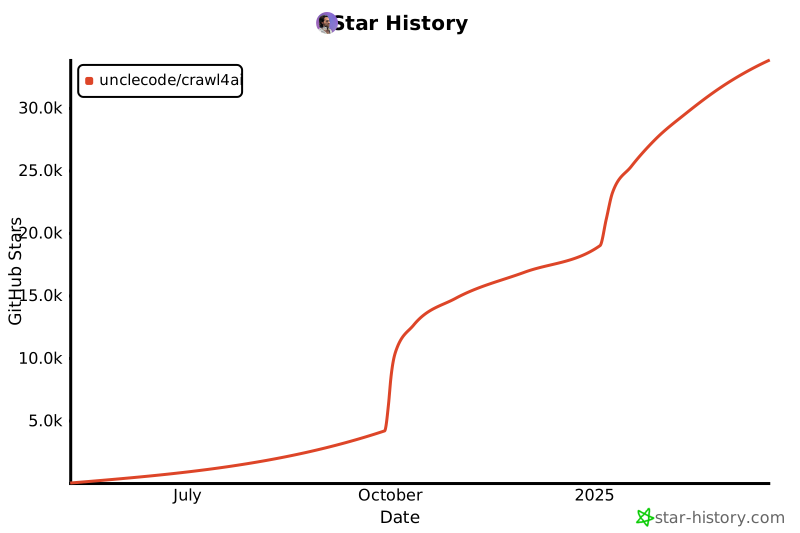](https://star-history.com/#unclecode/crawl4ai&Date)
|
||||
[](https://star-history.com/#unclecode/crawl4ai&Date)
|
||||
|
||||
503
ROADMAP.md
Normal file
503
ROADMAP.md
Normal file
@@ -0,0 +1,503 @@
|
||||
# Crawl4AI Strategic Roadmap
|
||||
|
||||
```mermaid
|
||||
%%{init: {'themeVariables': { 'fontSize': '14px'}}}%%
|
||||
graph TD
|
||||
subgraph A1[Advanced Crawling Systems 🔧]
|
||||
A["`
|
||||
• Graph Crawler ✓
|
||||
• Question-Based Crawler
|
||||
• Knowledge-Optimal Crawler
|
||||
• Agentic Crawler
|
||||
`"]
|
||||
end
|
||||
|
||||
subgraph A2[Specialized Features 🛠️]
|
||||
B["`
|
||||
• Automated Schema Generator
|
||||
• Domain-Specific Scrapers
|
||||
•
|
||||
•
|
||||
`"]
|
||||
end
|
||||
|
||||
subgraph A3[Development Tools 🔨]
|
||||
C["`
|
||||
• Interactive Playground
|
||||
• Performance Monitor
|
||||
• Cloud Integration
|
||||
•
|
||||
`"]
|
||||
end
|
||||
|
||||
subgraph A4[Community & Growth 🌱]
|
||||
D["`
|
||||
• Sponsorship Program
|
||||
• Educational Content
|
||||
•
|
||||
•
|
||||
`"]
|
||||
end
|
||||
|
||||
classDef default fill:#f9f9f9,stroke:#333,stroke-width:2px
|
||||
classDef section fill:#f0f0f0,stroke:#333,stroke-width:4px,rx:10
|
||||
class A1,A2,A3,A4 section
|
||||
|
||||
%% Layout hints
|
||||
A1 --> A2[" "]
|
||||
A3 --> A4[" "]
|
||||
linkStyle 0,1 stroke:none
|
||||
```
|
||||
|
||||
Crawl4AI is evolving to provide more intelligent, efficient, and versatile web crawling capabilities. This roadmap outlines the key developments and features planned for the project, organized into strategic sections that build upon our current foundation.
|
||||
|
||||
## 1. Advanced Crawling Systems 🔧
|
||||
|
||||
This section introduces three powerful crawling systems that extend Crawl4AI's capabilities from basic web crawling to intelligent, purpose-driven data extraction.
|
||||
|
||||
### 1.1 Question-Based Crawler
|
||||
The Question-Based Crawler enhances our core engine by enabling automatic discovery and extraction of relevant web content based on natural language questions.
|
||||
|
||||
Key Features:
|
||||
- SerpiAPI integration for intelligent web search
|
||||
- Relevancy scoring for search results
|
||||
- Automatic URL discovery and prioritization
|
||||
- Cross-source validation
|
||||
|
||||
```python
|
||||
from crawl4ai import AsyncWebCrawler
|
||||
from crawl4ai.discovery import QuestionBasedDiscovery
|
||||
|
||||
async with AsyncWebCrawler() as crawler:
|
||||
discovery = QuestionBasedDiscovery(crawler)
|
||||
results = await discovery.arun(
|
||||
question="What are the system requirements for major cloud providers' GPU instances?",
|
||||
max_urls=5,
|
||||
relevance_threshold=0.7
|
||||
)
|
||||
|
||||
for result in results:
|
||||
print(f"Source: {result.url} (Relevance: {result.relevance_score})")
|
||||
print(f"Content: {result.markdown}\n")
|
||||
```
|
||||
|
||||
### 1.2 Knowledge-Optimal Crawler
|
||||
An intelligent crawling system that solves the optimization problem of minimizing data extraction while maximizing knowledge acquisition for specific objectives.
|
||||
|
||||
Key Features:
|
||||
- Smart content prioritization
|
||||
- Minimal data extraction for maximum knowledge
|
||||
- Probabilistic relevance assessment
|
||||
- Objective-driven crawling paths
|
||||
|
||||
```python
|
||||
from crawl4ai import AsyncWebCrawler
|
||||
from crawl4ai.optimization import KnowledgeOptimizer
|
||||
|
||||
async with AsyncWebCrawler() as crawler:
|
||||
optimizer = KnowledgeOptimizer(
|
||||
objective="Understand GPU instance pricing and limitations across cloud providers",
|
||||
required_knowledge=[
|
||||
"pricing structure",
|
||||
"GPU specifications",
|
||||
"usage limits",
|
||||
"availability zones"
|
||||
],
|
||||
confidence_threshold=0.85
|
||||
)
|
||||
|
||||
result = await crawler.arun(
|
||||
urls=[
|
||||
"https://aws.amazon.com/ec2/pricing/",
|
||||
"https://cloud.google.com/gpu",
|
||||
"https://azure.microsoft.com/pricing/"
|
||||
],
|
||||
optimizer=optimizer,
|
||||
optimization_mode="minimal_extraction"
|
||||
)
|
||||
|
||||
print(f"Knowledge Coverage: {result.knowledge_coverage}")
|
||||
print(f"Data Efficiency: {result.efficiency_ratio}")
|
||||
print(f"Extracted Content: {result.optimal_content}")
|
||||
```
|
||||
|
||||
### 1.3 Agentic Crawler
|
||||
An autonomous system capable of understanding complex goals and automatically planning and executing multi-step crawling operations.
|
||||
|
||||
Key Features:
|
||||
- Autonomous goal interpretation
|
||||
- Dynamic step planning
|
||||
- Interactive navigation capabilities
|
||||
- Visual recognition and interaction
|
||||
- Automatic error recovery
|
||||
|
||||
```python
|
||||
from crawl4ai import AsyncWebCrawler
|
||||
from crawl4ai.agents import CrawlerAgent
|
||||
|
||||
async with AsyncWebCrawler() as crawler:
|
||||
agent = CrawlerAgent(crawler)
|
||||
|
||||
# Automatic planning and execution
|
||||
result = await agent.arun(
|
||||
goal="Find research papers about quantum computing published in 2023 with more than 50 citations",
|
||||
auto_retry=True
|
||||
)
|
||||
print("Generated Plan:", result.executed_steps)
|
||||
print("Extracted Data:", result.data)
|
||||
|
||||
# Using custom steps with automatic execution
|
||||
result = await agent.arun(
|
||||
goal="Extract conference deadlines from ML conferences",
|
||||
custom_plan=[
|
||||
"Navigate to conference page",
|
||||
"Find important dates section",
|
||||
"Extract submission deadlines",
|
||||
"Verify dates are for 2024"
|
||||
]
|
||||
)
|
||||
|
||||
# Monitoring execution
|
||||
print("Step Completion:", result.step_status)
|
||||
print("Execution Time:", result.execution_time)
|
||||
print("Success Rate:", result.success_rate)
|
||||
```
|
||||
|
||||
# Section 2: Specialized Features 🛠️
|
||||
|
||||
This section introduces specialized tools and features that enhance Crawl4AI's capabilities for specific use cases and data extraction needs.
|
||||
|
||||
### 2.1 Automated Schema Generator
|
||||
A system that automatically generates JsonCssExtractionStrategy schemas from natural language descriptions, making structured data extraction accessible to all users.
|
||||
|
||||
Key Features:
|
||||
- Natural language schema generation
|
||||
- Automatic pattern detection
|
||||
- Predefined schema templates
|
||||
- Chrome extension for visual schema building
|
||||
|
||||
```python
|
||||
from crawl4ai import AsyncWebCrawler
|
||||
from crawl4ai.schema import SchemaGenerator
|
||||
|
||||
# Generate schema from natural language description
|
||||
generator = SchemaGenerator()
|
||||
schema = await generator.generate(
|
||||
url="https://news-website.com",
|
||||
description="For each news article on the page, I need the headline, publication date, and main image"
|
||||
)
|
||||
|
||||
# Use generated schema with crawler
|
||||
async with AsyncWebCrawler() as crawler:
|
||||
result = await crawler.arun(
|
||||
url="https://news-website.com",
|
||||
extraction_strategy=schema
|
||||
)
|
||||
|
||||
# Example of generated schema:
|
||||
"""
|
||||
{
|
||||
"name": "News Article Extractor",
|
||||
"baseSelector": "article.news-item",
|
||||
"fields": [
|
||||
{
|
||||
"name": "headline",
|
||||
"selector": "h2.article-title",
|
||||
"type": "text"
|
||||
},
|
||||
{
|
||||
"name": "date",
|
||||
"selector": "span.publish-date",
|
||||
"type": "text"
|
||||
},
|
||||
{
|
||||
"name": "image",
|
||||
"selector": "img.article-image",
|
||||
"type": "attribute",
|
||||
"attribute": "src"
|
||||
}
|
||||
]
|
||||
}
|
||||
"""
|
||||
```
|
||||
|
||||
### 2.2 Domain Specific Scrapers
|
||||
Specialized extraction strategies optimized for common website types and platforms, providing consistent and reliable data extraction without additional configuration.
|
||||
|
||||
Key Features:
|
||||
- Pre-configured extractors for popular platforms
|
||||
- Academic site specialization (arXiv, NCBI)
|
||||
- E-commerce standardization
|
||||
- Documentation site handling
|
||||
|
||||
```python
|
||||
from crawl4ai import AsyncWebCrawler
|
||||
from crawl4ai.extractors import AcademicExtractor, EcommerceExtractor
|
||||
|
||||
async with AsyncWebCrawler() as crawler:
|
||||
# Academic paper extraction
|
||||
papers = await crawler.arun(
|
||||
url="https://arxiv.org/list/cs.AI/recent",
|
||||
extractor="academic", # Built-in extractor type
|
||||
site_type="arxiv", # Specific site optimization
|
||||
extract_fields=[
|
||||
"title",
|
||||
"authors",
|
||||
"abstract",
|
||||
"citations"
|
||||
]
|
||||
)
|
||||
|
||||
# E-commerce product data
|
||||
products = await crawler.arun(
|
||||
url="https://store.example.com/products",
|
||||
extractor="ecommerce",
|
||||
extract_fields=[
|
||||
"name",
|
||||
"price",
|
||||
"availability",
|
||||
"reviews"
|
||||
]
|
||||
)
|
||||
```
|
||||
|
||||
### 2.3 Web Embedding Index
|
||||
Creates and maintains a semantic search infrastructure for crawled content, enabling efficient retrieval and querying of web content through vector embeddings.
|
||||
|
||||
Key Features:
|
||||
- Automatic embedding generation
|
||||
- Intelligent content chunking
|
||||
- Efficient vector storage and indexing
|
||||
- Semantic search capabilities
|
||||
|
||||
```python
|
||||
from crawl4ai import AsyncWebCrawler
|
||||
from crawl4ai.indexing import WebIndex
|
||||
|
||||
# Initialize and build index
|
||||
index = WebIndex(model="efficient-mini")
|
||||
|
||||
async with AsyncWebCrawler() as crawler:
|
||||
# Crawl and index content
|
||||
await index.build(
|
||||
urls=["https://docs.example.com"],
|
||||
crawler=crawler,
|
||||
options={
|
||||
"chunk_method": "semantic",
|
||||
"update_policy": "incremental",
|
||||
"embedding_batch_size": 100
|
||||
}
|
||||
)
|
||||
|
||||
# Search through indexed content
|
||||
results = await index.search(
|
||||
query="How to implement OAuth authentication?",
|
||||
filters={
|
||||
"content_type": "technical",
|
||||
"recency": "6months"
|
||||
},
|
||||
top_k=5
|
||||
)
|
||||
|
||||
# Get similar content
|
||||
similar = await index.find_similar(
|
||||
url="https://docs.example.com/auth/oauth",
|
||||
threshold=0.85
|
||||
)
|
||||
```
|
||||
|
||||
Each of these specialized features builds upon Crawl4AI's core functionality while providing targeted solutions for specific use cases. They can be used independently or combined for more complex data extraction and processing needs.
|
||||
|
||||
# Section 3: Development Tools 🔧
|
||||
|
||||
This section covers tools designed to enhance the development experience, monitoring, and deployment of Crawl4AI applications.
|
||||
|
||||
### 3.1 Crawl4AI Playground 🎮
|
||||
|
||||
The Crawl4AI Playground is an interactive web-based development environment that simplifies web scraping experimentation, development, and deployment. With its intuitive interface and AI-powered assistance, users can quickly prototype, test, and deploy web scraping solutions.
|
||||
|
||||
#### Key Features 🌟
|
||||
|
||||
##### Visual Strategy Builder
|
||||
- Interactive point-and-click interface for building extraction strategies
|
||||
- Real-time preview of selected elements
|
||||
- Side-by-side comparison of different extraction approaches
|
||||
- Visual validation of CSS selectors and XPath queries
|
||||
|
||||
##### AI Assistant Integration
|
||||
- Strategy recommendations based on target website analysis
|
||||
- Parameter optimization suggestions
|
||||
- Best practices guidance for specific use cases
|
||||
- Automated error detection and resolution
|
||||
- Performance optimization tips
|
||||
|
||||
##### Real-Time Testing & Validation
|
||||
- Live preview of extraction results
|
||||
- Side-by-side comparison of multiple strategies
|
||||
- Performance metrics visualization
|
||||
- Automatic validation of extracted data
|
||||
- Error detection and debugging tools
|
||||
|
||||
##### Project Management
|
||||
- Save and organize multiple scraping projects
|
||||
- Version control for configurations
|
||||
- Export/import project settings
|
||||
- Share configurations with team members
|
||||
- Project templates for common use cases
|
||||
|
||||
##### Deployment Pipeline
|
||||
- One-click deployment to various environments
|
||||
- Docker container generation
|
||||
- Cloud deployment templates (AWS, GCP, Azure)
|
||||
- Scaling configuration management
|
||||
- Monitoring setup automation
|
||||
|
||||
|
||||
### 3.2 Performance Monitoring System
|
||||
A comprehensive monitoring solution providing real-time insights into crawler operations, resource usage, and system health through both CLI and GUI interfaces.
|
||||
|
||||
Key Features:
|
||||
- Real-time resource tracking
|
||||
- Active crawl monitoring
|
||||
- Performance statistics
|
||||
- Customizable alerting system
|
||||
|
||||
```python
|
||||
from crawl4ai import AsyncWebCrawler
|
||||
from crawl4ai.monitor import CrawlMonitor
|
||||
|
||||
# Initialize monitoring
|
||||
monitor = CrawlMonitor()
|
||||
|
||||
# Start monitoring with CLI interface
|
||||
await monitor.start(
|
||||
mode="cli", # or "gui"
|
||||
refresh_rate="1s",
|
||||
metrics={
|
||||
"resources": ["cpu", "memory", "network"],
|
||||
"crawls": ["active", "queued", "completed"],
|
||||
"performance": ["success_rate", "response_times"]
|
||||
}
|
||||
)
|
||||
|
||||
# Example CLI output:
|
||||
"""
|
||||
Crawl4AI Monitor (Live) - Press Q to exit
|
||||
────────────────────────────────────────
|
||||
System Usage:
|
||||
├─ CPU: ███████░░░ 70%
|
||||
└─ Memory: ████░░░░░ 2.1GB/8GB
|
||||
|
||||
Active Crawls:
|
||||
ID URL Status Progress
|
||||
001 docs.example.com 🟢 Active 75%
|
||||
002 api.service.com 🟡 Queue -
|
||||
|
||||
Metrics (Last 5min):
|
||||
├─ Success Rate: 98%
|
||||
├─ Avg Response: 0.6s
|
||||
└─ Pages/sec: 8.5
|
||||
"""
|
||||
```
|
||||
|
||||
### 3.3 Cloud Integration
|
||||
Streamlined deployment tools for setting up Crawl4AI in various cloud environments, with support for scaling and monitoring.
|
||||
|
||||
Key Features:
|
||||
- One-click deployment solutions
|
||||
- Auto-scaling configuration
|
||||
- Load balancing setup
|
||||
- Cloud-specific optimizations
|
||||
- Monitoring integration
|
||||
|
||||
```python
|
||||
from crawl4ai import AsyncWebCrawler
|
||||
from crawl4ai.deploy import CloudDeployer
|
||||
|
||||
# Initialize deployer
|
||||
deployer = CloudDeployer()
|
||||
|
||||
# Deploy crawler service
|
||||
deployment = await deployer.deploy(
|
||||
service_name="crawler-cluster",
|
||||
platform="aws", # or "gcp", "azure"
|
||||
config={
|
||||
"instance_type": "compute-optimized",
|
||||
"auto_scaling": {
|
||||
"min_instances": 2,
|
||||
"max_instances": 10,
|
||||
"scale_based_on": "cpu_usage"
|
||||
},
|
||||
"region": "us-east-1",
|
||||
"monitoring": True
|
||||
}
|
||||
)
|
||||
|
||||
# Get deployment status and endpoints
|
||||
print(f"Service Status: {deployment.status}")
|
||||
print(f"API Endpoint: {deployment.endpoint}")
|
||||
print(f"Monitor URL: {deployment.monitor_url}")
|
||||
```
|
||||
|
||||
These development tools work together to provide a comprehensive environment for developing, testing, monitoring, and deploying Crawl4AI applications. The Playground helps users experiment and generate optimal configurations, the Performance Monitor ensures smooth operation, and the Cloud Integration tools simplify deployment and scaling.
|
||||
|
||||
# Section 4: Community & Growth 🌱
|
||||
|
||||
This section outlines initiatives designed to build and support the Crawl4AI community, provide educational resources, and ensure sustainable project growth.
|
||||
|
||||
### 4.1 Sponsorship Program
|
||||
A structured program to support ongoing development and maintenance of Crawl4AI while providing valuable benefits to sponsors.
|
||||
|
||||
Key Features:
|
||||
- Multiple sponsorship tiers
|
||||
- Sponsor recognition system
|
||||
- Priority support for sponsors
|
||||
- Early access to new features
|
||||
- Custom feature development opportunities
|
||||
|
||||
Program Structure (not yet finalized):
|
||||
```
|
||||
Sponsorship Tiers:
|
||||
|
||||
🥉 Bronze Supporter
|
||||
- GitHub Sponsor badge
|
||||
- Priority issue response
|
||||
- Community Discord role
|
||||
|
||||
🥈 Silver Supporter
|
||||
- All Bronze benefits
|
||||
- Technical support channel
|
||||
- Vote on roadmap priorities
|
||||
- Early access to beta features
|
||||
|
||||
🥇 Gold Supporter
|
||||
- All Silver benefits
|
||||
- Custom feature requests
|
||||
- Direct developer access
|
||||
- Private support sessions
|
||||
|
||||
💎 Diamond Partner
|
||||
- All Gold benefits
|
||||
- Custom development
|
||||
- On-demand consulting
|
||||
- Integration support
|
||||
```
|
||||
|
||||
### 4.2 "How to Crawl" Video Series
|
||||
A comprehensive educational resource teaching users how to effectively use Crawl4AI for various web scraping and data extraction scenarios.
|
||||
|
||||
Key Features:
|
||||
- Step-by-step tutorials
|
||||
- Real-world use cases
|
||||
- Best practices
|
||||
- Integration guides
|
||||
- Advanced feature deep-dives
|
||||
|
||||
These community initiatives are designed to:
|
||||
- Provide comprehensive learning resources
|
||||
- Foster a supportive user community
|
||||
- Ensure sustainable project development
|
||||
- Share knowledge and best practices
|
||||
- Create opportunities for collaboration
|
||||
|
||||
The combination of structured support through sponsorship, educational content through video series, and interactive learning through the playground creates a robust ecosystem for both new and experienced users of Crawl4AI.
|
||||
@@ -1 +1,46 @@
|
||||
from .web_crawler import WebCrawler
|
||||
# __init__.py
|
||||
|
||||
from .async_webcrawler import AsyncWebCrawler, CacheMode
|
||||
from .async_configs import BrowserConfig, CrawlerRunConfig
|
||||
from .extraction_strategy import ExtractionStrategy, LLMExtractionStrategy, CosineStrategy, JsonCssExtractionStrategy
|
||||
from .chunking_strategy import ChunkingStrategy, RegexChunking
|
||||
from .markdown_generation_strategy import DefaultMarkdownGenerator
|
||||
from .content_filter_strategy import PruningContentFilter, BM25ContentFilter
|
||||
from .models import CrawlResult
|
||||
from .__version__ import __version__
|
||||
|
||||
__all__ = [
|
||||
"AsyncWebCrawler",
|
||||
"CrawlResult",
|
||||
"CacheMode",
|
||||
'BrowserConfig',
|
||||
'CrawlerRunConfig',
|
||||
'ExtractionStrategy',
|
||||
'LLMExtractionStrategy',
|
||||
'CosineStrategy',
|
||||
'JsonCssExtractionStrategy',
|
||||
'ChunkingStrategy',
|
||||
'RegexChunking',
|
||||
'DefaultMarkdownGenerator',
|
||||
'PruningContentFilter',
|
||||
'BM25ContentFilter',
|
||||
]
|
||||
|
||||
def is_sync_version_installed():
|
||||
try:
|
||||
import selenium
|
||||
return True
|
||||
except ImportError:
|
||||
return False
|
||||
|
||||
if is_sync_version_installed():
|
||||
try:
|
||||
from .web_crawler import WebCrawler
|
||||
__all__.append("WebCrawler")
|
||||
except ImportError:
|
||||
import warnings
|
||||
print("Warning: Failed to import WebCrawler even though selenium is installed. This might be due to other missing dependencies.")
|
||||
else:
|
||||
WebCrawler = None
|
||||
# import warnings
|
||||
# print("Warning: Synchronous WebCrawler is not available. Install crawl4ai[sync] for synchronous support. However, please note that the synchronous version will be deprecated soon.")
|
||||
2
crawl4ai/__version__.py
Normal file
2
crawl4ai/__version__.py
Normal file
@@ -0,0 +1,2 @@
|
||||
# crawl4ai/_version.py
|
||||
__version__ = "0.4.2"
|
||||
402
crawl4ai/async_configs.py
Normal file
402
crawl4ai/async_configs.py
Normal file
@@ -0,0 +1,402 @@
|
||||
from .config import (
|
||||
MIN_WORD_THRESHOLD,
|
||||
IMAGE_DESCRIPTION_MIN_WORD_THRESHOLD,
|
||||
SCREENSHOT_HEIGHT_TRESHOLD,
|
||||
PAGE_TIMEOUT
|
||||
)
|
||||
from .user_agent_generator import UserAgentGenerator
|
||||
from .extraction_strategy import ExtractionStrategy
|
||||
from .chunking_strategy import ChunkingStrategy
|
||||
|
||||
class BrowserConfig:
|
||||
"""
|
||||
Configuration class for setting up a browser instance and its context in AsyncPlaywrightCrawlerStrategy.
|
||||
|
||||
This class centralizes all parameters that affect browser and context creation. Instead of passing
|
||||
scattered keyword arguments, users can instantiate and modify this configuration object. The crawler
|
||||
code will then reference these settings to initialize the browser in a consistent, documented manner.
|
||||
|
||||
Attributes:
|
||||
browser_type (str): The type of browser to launch. Supported values: "chromium", "firefox", "webkit".
|
||||
Default: "chromium".
|
||||
headless (bool): Whether to run the browser in headless mode (no visible GUI).
|
||||
Default: True.
|
||||
use_managed_browser (bool): Launch the browser using a managed approach (e.g., via CDP), allowing
|
||||
advanced manipulation. Default: False.
|
||||
use_persistent_context (bool): Use a persistent browser context (like a persistent profile).
|
||||
Automatically sets use_managed_browser=True. Default: False.
|
||||
user_data_dir (str or None): Path to a user data directory for persistent sessions. If None, a
|
||||
temporary directory may be used. Default: None.
|
||||
chrome_channel (str): The Chrome channel to launch (e.g., "chrome", "msedge"). Only applies if browser_type
|
||||
is "chromium". Default: "chrome".
|
||||
proxy (str or None): Proxy server URL (e.g., "http://username:password@proxy:port"). If None, no proxy is used.
|
||||
Default: None.
|
||||
proxy_config (dict or None): Detailed proxy configuration, e.g. {"server": "...", "username": "..."}.
|
||||
If None, no additional proxy config. Default: None.
|
||||
viewport_width (int): Default viewport width for pages. Default: 1920.
|
||||
viewport_height (int): Default viewport height for pages. Default: 1080.
|
||||
verbose (bool): Enable verbose logging.
|
||||
Default: True.
|
||||
accept_downloads (bool): Whether to allow file downloads. If True, requires a downloads_path.
|
||||
Default: False.
|
||||
downloads_path (str or None): Directory to store downloaded files. If None and accept_downloads is True,
|
||||
a default path will be created. Default: None.
|
||||
storage_state (str or dict or None): Path or object describing storage state (cookies, localStorage).
|
||||
Default: None.
|
||||
ignore_https_errors (bool): Ignore HTTPS certificate errors. Default: True.
|
||||
java_script_enabled (bool): Enable JavaScript execution in pages. Default: True.
|
||||
cookies (list): List of cookies to add to the browser context. Each cookie is a dict with fields like
|
||||
{"name": "...", "value": "...", "url": "..."}.
|
||||
Default: [].
|
||||
headers (dict): Extra HTTP headers to apply to all requests in this context.
|
||||
Default: {}.
|
||||
user_agent (str): Custom User-Agent string to use. Default: "Mozilla/5.0 (Macintosh; Intel Mac OS X 10_15_7) "
|
||||
"AppleWebKit/537.36 (KHTML, like Gecko) Chrome/116.0.0.0 Safari/537.36".
|
||||
user_agent_mode (str or None): Mode for generating the user agent (e.g., "random"). If None, use the provided
|
||||
user_agent as-is. Default: None.
|
||||
user_agent_generator_config (dict or None): Configuration for user agent generation if user_agent_mode is set.
|
||||
Default: None.
|
||||
text_only (bool): If True, disables images and other rich content for potentially faster load times.
|
||||
Default: False.
|
||||
light_mode (bool): Disables certain background features for performance gains. Default: False.
|
||||
extra_args (list): Additional command-line arguments passed to the browser.
|
||||
Default: [].
|
||||
"""
|
||||
|
||||
def __init__(
|
||||
self,
|
||||
browser_type: str = "chromium",
|
||||
headless: bool = True,
|
||||
use_managed_browser: bool = False,
|
||||
use_persistent_context: bool = False,
|
||||
user_data_dir: str = None,
|
||||
chrome_channel: str = "chrome",
|
||||
proxy: str = None,
|
||||
proxy_config: dict = None,
|
||||
viewport_width: int = 1920,
|
||||
viewport_height: int = 1080,
|
||||
accept_downloads: bool = False,
|
||||
downloads_path: str = None,
|
||||
storage_state=None,
|
||||
ignore_https_errors: bool = True,
|
||||
java_script_enabled: bool = True,
|
||||
sleep_on_close: bool = False,
|
||||
verbose: bool = True,
|
||||
cookies: list = None,
|
||||
headers: dict = None,
|
||||
user_agent: str = (
|
||||
"Mozilla/5.0 (Macintosh; Intel Mac OS X 10.15; rv:109.0) AppleWebKit/537.36 "
|
||||
"(KHTML, like Gecko) Chrome/116.0.5845.187 Safari/604.1 Edg/117.0.2045.47"
|
||||
),
|
||||
user_agent_mode: str = None,
|
||||
user_agent_generator_config: dict = None,
|
||||
text_only: bool = False,
|
||||
light_mode: bool = False,
|
||||
extra_args: list = None,
|
||||
):
|
||||
self.browser_type = browser_type
|
||||
self.headless = headless
|
||||
self.use_managed_browser = use_managed_browser
|
||||
self.use_persistent_context = use_persistent_context
|
||||
self.user_data_dir = user_data_dir
|
||||
if self.browser_type == "chromium":
|
||||
self.chrome_channel = "chrome"
|
||||
elif self.browser_type == "firefox":
|
||||
self.chrome_channel = "firefox"
|
||||
elif self.browser_type == "webkit":
|
||||
self.chrome_channel = "webkit"
|
||||
else:
|
||||
self.chrome_channel = chrome_channel or "chrome"
|
||||
self.proxy = proxy
|
||||
self.proxy_config = proxy_config
|
||||
self.viewport_width = viewport_width
|
||||
self.viewport_height = viewport_height
|
||||
self.accept_downloads = accept_downloads
|
||||
self.downloads_path = downloads_path
|
||||
self.storage_state = storage_state
|
||||
self.ignore_https_errors = ignore_https_errors
|
||||
self.java_script_enabled = java_script_enabled
|
||||
self.cookies = cookies if cookies is not None else []
|
||||
self.headers = headers if headers is not None else {}
|
||||
self.user_agent = user_agent
|
||||
self.user_agent_mode = user_agent_mode
|
||||
self.user_agent_generator_config = user_agent_generator_config
|
||||
self.text_only = text_only
|
||||
self.light_mode = light_mode
|
||||
self.extra_args = extra_args if extra_args is not None else []
|
||||
self.sleep_on_close = sleep_on_close
|
||||
self.verbose = verbose
|
||||
|
||||
user_agenr_generator = UserAgentGenerator()
|
||||
if self.user_agent_mode != "random":
|
||||
self.user_agent = user_agenr_generator.generate(
|
||||
**(self.user_agent_generator_config or {})
|
||||
)
|
||||
self.browser_hint = user_agenr_generator.generate_client_hints(self.user_agent)
|
||||
self.headers.setdefault("sec-ch-ua", self.browser_hint)
|
||||
|
||||
# If persistent context is requested, ensure managed browser is enabled
|
||||
if self.use_persistent_context:
|
||||
self.use_managed_browser = True
|
||||
|
||||
@staticmethod
|
||||
def from_kwargs(kwargs: dict) -> "BrowserConfig":
|
||||
return BrowserConfig(
|
||||
browser_type=kwargs.get("browser_type", "chromium"),
|
||||
headless=kwargs.get("headless", True),
|
||||
use_managed_browser=kwargs.get("use_managed_browser", False),
|
||||
use_persistent_context=kwargs.get("use_persistent_context", False),
|
||||
user_data_dir=kwargs.get("user_data_dir"),
|
||||
chrome_channel=kwargs.get("chrome_channel", "chrome"),
|
||||
proxy=kwargs.get("proxy"),
|
||||
proxy_config=kwargs.get("proxy_config"),
|
||||
viewport_width=kwargs.get("viewport_width", 1920),
|
||||
viewport_height=kwargs.get("viewport_height", 1080),
|
||||
accept_downloads=kwargs.get("accept_downloads", False),
|
||||
downloads_path=kwargs.get("downloads_path"),
|
||||
storage_state=kwargs.get("storage_state"),
|
||||
ignore_https_errors=kwargs.get("ignore_https_errors", True),
|
||||
java_script_enabled=kwargs.get("java_script_enabled", True),
|
||||
cookies=kwargs.get("cookies", []),
|
||||
headers=kwargs.get("headers", {}),
|
||||
user_agent=kwargs.get("user_agent",
|
||||
"Mozilla/5.0 (Macintosh; Intel Mac OS X 10_15_7) "
|
||||
"AppleWebKit/537.36 (KHTML, like Gecko) Chrome/116.0.0.0 Safari/537.36"
|
||||
),
|
||||
user_agent_mode=kwargs.get("user_agent_mode"),
|
||||
user_agent_generator_config=kwargs.get("user_agent_generator_config"),
|
||||
text_only=kwargs.get("text_only", False),
|
||||
light_mode=kwargs.get("light_mode", False),
|
||||
extra_args=kwargs.get("extra_args", [])
|
||||
)
|
||||
|
||||
|
||||
class CrawlerRunConfig:
|
||||
"""
|
||||
Configuration class for controlling how the crawler runs each crawl operation.
|
||||
This includes parameters for content extraction, page manipulation, waiting conditions,
|
||||
caching, and other runtime behaviors.
|
||||
|
||||
This centralizes parameters that were previously scattered as kwargs to `arun()` and related methods.
|
||||
By using this class, you have a single place to understand and adjust the crawling options.
|
||||
|
||||
Attributes:
|
||||
word_count_threshold (int): Minimum word count threshold before processing content.
|
||||
Default: MIN_WORD_THRESHOLD (typically 200).
|
||||
extraction_strategy (ExtractionStrategy or None): Strategy to extract structured data from crawled pages.
|
||||
Default: None (NoExtractionStrategy is used if None).
|
||||
chunking_strategy (ChunkingStrategy): Strategy to chunk content before extraction.
|
||||
Default: RegexChunking().
|
||||
content_filter (RelevantContentFilter or None): Optional filter to prune irrelevant content.
|
||||
Default: None.
|
||||
cache_mode (CacheMode or None): Defines how caching is handled.
|
||||
If None, defaults to CacheMode.ENABLED internally.
|
||||
Default: None.
|
||||
session_id (str or None): Optional session ID to persist the browser context and the created
|
||||
page instance. If the ID already exists, the crawler does not
|
||||
create a new page and uses the current page to preserve the state;
|
||||
if not, it creates a new page and context then stores it in
|
||||
memory with the given session ID.
|
||||
bypass_cache (bool): Legacy parameter, if True acts like CacheMode.BYPASS.
|
||||
Default: False.
|
||||
disable_cache (bool): Legacy parameter, if True acts like CacheMode.DISABLED.
|
||||
Default: False.
|
||||
no_cache_read (bool): Legacy parameter, if True acts like CacheMode.WRITE_ONLY.
|
||||
Default: False.
|
||||
no_cache_write (bool): Legacy parameter, if True acts like CacheMode.READ_ONLY.
|
||||
Default: False.
|
||||
css_selector (str or None): CSS selector to extract a specific portion of the page.
|
||||
Default: None.
|
||||
screenshot (bool): Whether to take a screenshot after crawling.
|
||||
Default: False.
|
||||
pdf (bool): Whether to generate a PDF of the page.
|
||||
Default: False.
|
||||
verbose (bool): Enable verbose logging.
|
||||
Default: True.
|
||||
only_text (bool): If True, attempt to extract text-only content where applicable.
|
||||
Default: False.
|
||||
image_description_min_word_threshold (int): Minimum words for image description extraction.
|
||||
Default: IMAGE_DESCRIPTION_MIN_WORD_THRESHOLD (e.g., 50).
|
||||
prettiify (bool): If True, apply `fast_format_html` to produce prettified HTML output.
|
||||
Default: False.
|
||||
js_code (str or list of str or None): JavaScript code/snippets to run on the page.
|
||||
Default: None.
|
||||
wait_for (str or None): A CSS selector or JS condition to wait for before extracting content.
|
||||
Default: None.
|
||||
js_only (bool): If True, indicates subsequent calls are JS-driven updates, not full page loads.
|
||||
Default: False.
|
||||
wait_until (str): The condition to wait for when navigating, e.g. "domcontentloaded".
|
||||
Default: "domcontentloaded".
|
||||
page_timeout (int): Timeout in ms for page operations like navigation.
|
||||
Default: 60000 (60 seconds).
|
||||
ignore_body_visibility (bool): If True, ignore whether the body is visible before proceeding.
|
||||
Default: True.
|
||||
wait_for_images (bool): If True, wait for images to load before extracting content.
|
||||
Default: True.
|
||||
adjust_viewport_to_content (bool): If True, adjust viewport according to the page content dimensions.
|
||||
Default: False.
|
||||
scan_full_page (bool): If True, scroll through the entire page to load all content.
|
||||
Default: False.
|
||||
scroll_delay (float): Delay in seconds between scroll steps if scan_full_page is True.
|
||||
Default: 0.2.
|
||||
process_iframes (bool): If True, attempts to process and inline iframe content.
|
||||
Default: False.
|
||||
remove_overlay_elements (bool): If True, remove overlays/popups before extracting HTML.
|
||||
Default: False.
|
||||
delay_before_return_html (float): Delay in seconds before retrieving final HTML.
|
||||
Default: 0.1.
|
||||
log_console (bool): If True, log console messages from the page.
|
||||
Default: False.
|
||||
simulate_user (bool): If True, simulate user interactions (mouse moves, clicks) for anti-bot measures.
|
||||
Default: False.
|
||||
override_navigator (bool): If True, overrides navigator properties for more human-like behavior.
|
||||
Default: False.
|
||||
magic (bool): If True, attempts automatic handling of overlays/popups.
|
||||
Default: False.
|
||||
screenshot_wait_for (float or None): Additional wait time before taking a screenshot.
|
||||
Default: None.
|
||||
screenshot_height_threshold (int): Threshold for page height to decide screenshot strategy.
|
||||
Default: SCREENSHOT_HEIGHT_TRESHOLD (from config, e.g. 20000).
|
||||
mean_delay (float): Mean base delay between requests when calling arun_many.
|
||||
Default: 0.1.
|
||||
max_range (float): Max random additional delay range for requests in arun_many.
|
||||
Default: 0.3.
|
||||
# session_id and semaphore_count might be set at runtime, not needed as defaults here.
|
||||
"""
|
||||
|
||||
def __init__(
|
||||
self,
|
||||
word_count_threshold: int = MIN_WORD_THRESHOLD ,
|
||||
extraction_strategy : ExtractionStrategy=None, # Will default to NoExtractionStrategy if None
|
||||
chunking_strategy : ChunkingStrategy= None, # Will default to RegexChunking if None
|
||||
content_filter=None,
|
||||
cache_mode=None,
|
||||
session_id: str = None,
|
||||
bypass_cache: bool = False,
|
||||
disable_cache: bool = False,
|
||||
no_cache_read: bool = False,
|
||||
no_cache_write: bool = False,
|
||||
css_selector: str = None,
|
||||
screenshot: bool = False,
|
||||
pdf: bool = False,
|
||||
verbose: bool = True,
|
||||
only_text: bool = False,
|
||||
image_description_min_word_threshold: int = IMAGE_DESCRIPTION_MIN_WORD_THRESHOLD,
|
||||
prettiify: bool = False,
|
||||
js_code=None,
|
||||
wait_for: str = None,
|
||||
js_only: bool = False,
|
||||
wait_until: str = "domcontentloaded",
|
||||
page_timeout: int = PAGE_TIMEOUT,
|
||||
ignore_body_visibility: bool = True,
|
||||
wait_for_images: bool = True,
|
||||
adjust_viewport_to_content: bool = False,
|
||||
scan_full_page: bool = False,
|
||||
scroll_delay: float = 0.2,
|
||||
process_iframes: bool = False,
|
||||
remove_overlay_elements: bool = False,
|
||||
delay_before_return_html: float = 0.1,
|
||||
log_console: bool = False,
|
||||
simulate_user: bool = False,
|
||||
override_navigator: bool = False,
|
||||
magic: bool = False,
|
||||
screenshot_wait_for: float = None,
|
||||
screenshot_height_threshold: int = SCREENSHOT_HEIGHT_TRESHOLD,
|
||||
mean_delay: float = 0.1,
|
||||
max_range: float = 0.3,
|
||||
semaphore_count: int = 5,
|
||||
):
|
||||
self.word_count_threshold = word_count_threshold
|
||||
self.extraction_strategy = extraction_strategy
|
||||
self.chunking_strategy = chunking_strategy
|
||||
self.content_filter = content_filter
|
||||
self.cache_mode = cache_mode
|
||||
self.session_id = session_id
|
||||
self.bypass_cache = bypass_cache
|
||||
self.disable_cache = disable_cache
|
||||
self.no_cache_read = no_cache_read
|
||||
self.no_cache_write = no_cache_write
|
||||
self.css_selector = css_selector
|
||||
self.screenshot = screenshot
|
||||
self.pdf = pdf
|
||||
self.verbose = verbose
|
||||
self.only_text = only_text
|
||||
self.image_description_min_word_threshold = image_description_min_word_threshold
|
||||
self.prettiify = prettiify
|
||||
self.js_code = js_code
|
||||
self.wait_for = wait_for
|
||||
self.js_only = js_only
|
||||
self.wait_until = wait_until
|
||||
self.page_timeout = page_timeout
|
||||
self.ignore_body_visibility = ignore_body_visibility
|
||||
self.wait_for_images = wait_for_images
|
||||
self.adjust_viewport_to_content = adjust_viewport_to_content
|
||||
self.scan_full_page = scan_full_page
|
||||
self.scroll_delay = scroll_delay
|
||||
self.process_iframes = process_iframes
|
||||
self.remove_overlay_elements = remove_overlay_elements
|
||||
self.delay_before_return_html = delay_before_return_html
|
||||
self.log_console = log_console
|
||||
self.simulate_user = simulate_user
|
||||
self.override_navigator = override_navigator
|
||||
self.magic = magic
|
||||
self.screenshot_wait_for = screenshot_wait_for
|
||||
self.screenshot_height_threshold = screenshot_height_threshold
|
||||
self.mean_delay = mean_delay
|
||||
self.max_range = max_range
|
||||
self.semaphore_count = semaphore_count
|
||||
|
||||
# Validate type of extraction strategy and chunking strategy if they are provided
|
||||
if self.extraction_strategy is not None and not isinstance(self.extraction_strategy, ExtractionStrategy):
|
||||
raise ValueError("extraction_strategy must be an instance of ExtractionStrategy")
|
||||
if self.chunking_strategy is not None and not isinstance(self.chunking_strategy, ChunkingStrategy):
|
||||
raise ValueError("chunking_strategy must be an instance of ChunkingStrategy")
|
||||
|
||||
# Set default chunking strategy if None
|
||||
if self.chunking_strategy is None:
|
||||
from .chunking_strategy import RegexChunking
|
||||
self.chunking_strategy = RegexChunking()
|
||||
|
||||
|
||||
@staticmethod
|
||||
def from_kwargs(kwargs: dict) -> "CrawlerRunConfig":
|
||||
return CrawlerRunConfig(
|
||||
word_count_threshold=kwargs.get("word_count_threshold", 200),
|
||||
extraction_strategy=kwargs.get("extraction_strategy"),
|
||||
chunking_strategy=kwargs.get("chunking_strategy"),
|
||||
content_filter=kwargs.get("content_filter"),
|
||||
cache_mode=kwargs.get("cache_mode"),
|
||||
session_id=kwargs.get("session_id"),
|
||||
bypass_cache=kwargs.get("bypass_cache", False),
|
||||
disable_cache=kwargs.get("disable_cache", False),
|
||||
no_cache_read=kwargs.get("no_cache_read", False),
|
||||
no_cache_write=kwargs.get("no_cache_write", False),
|
||||
css_selector=kwargs.get("css_selector"),
|
||||
screenshot=kwargs.get("screenshot", False),
|
||||
pdf=kwargs.get("pdf", False),
|
||||
verbose=kwargs.get("verbose", True),
|
||||
only_text=kwargs.get("only_text", False),
|
||||
image_description_min_word_threshold=kwargs.get("image_description_min_word_threshold", IMAGE_DESCRIPTION_MIN_WORD_THRESHOLD),
|
||||
prettiify=kwargs.get("prettiify", False),
|
||||
js_code=kwargs.get("js_code"), # If not provided here, will default inside constructor
|
||||
wait_for=kwargs.get("wait_for"),
|
||||
js_only=kwargs.get("js_only", False),
|
||||
wait_until=kwargs.get("wait_until", "domcontentloaded"),
|
||||
page_timeout=kwargs.get("page_timeout", 60000),
|
||||
ignore_body_visibility=kwargs.get("ignore_body_visibility", True),
|
||||
adjust_viewport_to_content=kwargs.get("adjust_viewport_to_content", False),
|
||||
scan_full_page=kwargs.get("scan_full_page", False),
|
||||
scroll_delay=kwargs.get("scroll_delay", 0.2),
|
||||
process_iframes=kwargs.get("process_iframes", False),
|
||||
remove_overlay_elements=kwargs.get("remove_overlay_elements", False),
|
||||
delay_before_return_html=kwargs.get("delay_before_return_html", 0.1),
|
||||
log_console=kwargs.get("log_console", False),
|
||||
simulate_user=kwargs.get("simulate_user", False),
|
||||
override_navigator=kwargs.get("override_navigator", False),
|
||||
magic=kwargs.get("magic", False),
|
||||
screenshot_wait_for=kwargs.get("screenshot_wait_for"),
|
||||
screenshot_height_threshold=kwargs.get("screenshot_height_threshold", 20000),
|
||||
mean_delay=kwargs.get("mean_delay", 0.1),
|
||||
max_range=kwargs.get("max_range", 0.3),
|
||||
semaphore_count=kwargs.get("semaphore_count", 5)
|
||||
)
|
||||
1270
crawl4ai/async_crawler_strategy.py
Normal file
1270
crawl4ai/async_crawler_strategy.py
Normal file
File diff suppressed because it is too large
Load Diff
472
crawl4ai/async_database.py
Normal file
472
crawl4ai/async_database.py
Normal file
@@ -0,0 +1,472 @@
|
||||
import os, sys
|
||||
from pathlib import Path
|
||||
import aiosqlite
|
||||
import asyncio
|
||||
from typing import Optional, Tuple, Dict
|
||||
from contextlib import asynccontextmanager
|
||||
import logging
|
||||
import json # Added for serialization/deserialization
|
||||
from .utils import ensure_content_dirs, generate_content_hash
|
||||
from .models import CrawlResult
|
||||
import xxhash
|
||||
import aiofiles
|
||||
from .config import NEED_MIGRATION
|
||||
from .version_manager import VersionManager
|
||||
from .async_logger import AsyncLogger
|
||||
from .utils import get_error_context, create_box_message
|
||||
# Set up logging
|
||||
logging.basicConfig(level=logging.INFO)
|
||||
logger = logging.getLogger(__name__)
|
||||
|
||||
base_directory = DB_PATH = os.path.join(os.getenv("CRAWL4_AI_BASE_DIRECTORY", Path.home()), ".crawl4ai")
|
||||
os.makedirs(DB_PATH, exist_ok=True)
|
||||
DB_PATH = os.path.join(base_directory, "crawl4ai.db")
|
||||
|
||||
class AsyncDatabaseManager:
|
||||
def __init__(self, pool_size: int = 10, max_retries: int = 3):
|
||||
self.db_path = DB_PATH
|
||||
self.content_paths = ensure_content_dirs(os.path.dirname(DB_PATH))
|
||||
self.pool_size = pool_size
|
||||
self.max_retries = max_retries
|
||||
self.connection_pool: Dict[int, aiosqlite.Connection] = {}
|
||||
self.pool_lock = asyncio.Lock()
|
||||
self.init_lock = asyncio.Lock()
|
||||
self.connection_semaphore = asyncio.Semaphore(pool_size)
|
||||
self._initialized = False
|
||||
self.version_manager = VersionManager()
|
||||
self.logger = AsyncLogger(
|
||||
log_file=os.path.join(base_directory, ".crawl4ai", "crawler_db.log"),
|
||||
verbose=False,
|
||||
tag_width=10
|
||||
)
|
||||
|
||||
|
||||
async def initialize(self):
|
||||
"""Initialize the database and connection pool"""
|
||||
try:
|
||||
self.logger.info("Initializing database", tag="INIT")
|
||||
# Ensure the database file exists
|
||||
os.makedirs(os.path.dirname(self.db_path), exist_ok=True)
|
||||
|
||||
# Check if version update is needed
|
||||
needs_update = self.version_manager.needs_update()
|
||||
|
||||
# Always ensure base table exists
|
||||
await self.ainit_db()
|
||||
|
||||
# Verify the table exists
|
||||
async with aiosqlite.connect(self.db_path, timeout=30.0) as db:
|
||||
async with db.execute(
|
||||
"SELECT name FROM sqlite_master WHERE type='table' AND name='crawled_data'"
|
||||
) as cursor:
|
||||
result = await cursor.fetchone()
|
||||
if not result:
|
||||
raise Exception("crawled_data table was not created")
|
||||
|
||||
# If version changed or fresh install, run updates
|
||||
if needs_update:
|
||||
self.logger.info("New version detected, running updates", tag="INIT")
|
||||
await self.update_db_schema()
|
||||
from .migrations import run_migration # Import here to avoid circular imports
|
||||
await run_migration()
|
||||
self.version_manager.update_version() # Update stored version after successful migration
|
||||
self.logger.success("Version update completed successfully", tag="COMPLETE")
|
||||
else:
|
||||
self.logger.success("Database initialization completed successfully", tag="COMPLETE")
|
||||
|
||||
|
||||
except Exception as e:
|
||||
self.logger.error(
|
||||
message="Database initialization error: {error}",
|
||||
tag="ERROR",
|
||||
params={"error": str(e)}
|
||||
)
|
||||
self.logger.info(
|
||||
message="Database will be initialized on first use",
|
||||
tag="INIT"
|
||||
)
|
||||
|
||||
raise
|
||||
|
||||
|
||||
async def cleanup(self):
|
||||
"""Cleanup connections when shutting down"""
|
||||
async with self.pool_lock:
|
||||
for conn in self.connection_pool.values():
|
||||
await conn.close()
|
||||
self.connection_pool.clear()
|
||||
|
||||
@asynccontextmanager
|
||||
async def get_connection(self):
|
||||
"""Connection pool manager with enhanced error handling"""
|
||||
if not self._initialized:
|
||||
async with self.init_lock:
|
||||
if not self._initialized:
|
||||
try:
|
||||
await self.initialize()
|
||||
self._initialized = True
|
||||
except Exception as e:
|
||||
import sys
|
||||
error_context = get_error_context(sys.exc_info())
|
||||
self.logger.error(
|
||||
message="Database initialization failed:\n{error}\n\nContext:\n{context}\n\nTraceback:\n{traceback}",
|
||||
tag="ERROR",
|
||||
force_verbose=True,
|
||||
params={
|
||||
"error": str(e),
|
||||
"context": error_context["code_context"],
|
||||
"traceback": error_context["full_traceback"]
|
||||
}
|
||||
)
|
||||
raise
|
||||
|
||||
await self.connection_semaphore.acquire()
|
||||
task_id = id(asyncio.current_task())
|
||||
|
||||
try:
|
||||
async with self.pool_lock:
|
||||
if task_id not in self.connection_pool:
|
||||
try:
|
||||
conn = await aiosqlite.connect(
|
||||
self.db_path,
|
||||
timeout=30.0
|
||||
)
|
||||
await conn.execute('PRAGMA journal_mode = WAL')
|
||||
await conn.execute('PRAGMA busy_timeout = 5000')
|
||||
|
||||
# Verify database structure
|
||||
async with conn.execute("PRAGMA table_info(crawled_data)") as cursor:
|
||||
columns = await cursor.fetchall()
|
||||
column_names = [col[1] for col in columns]
|
||||
expected_columns = {
|
||||
'url', 'html', 'cleaned_html', 'markdown', 'extracted_content',
|
||||
'success', 'media', 'links', 'metadata', 'screenshot',
|
||||
'response_headers', 'downloaded_files'
|
||||
}
|
||||
missing_columns = expected_columns - set(column_names)
|
||||
if missing_columns:
|
||||
raise ValueError(f"Database missing columns: {missing_columns}")
|
||||
|
||||
self.connection_pool[task_id] = conn
|
||||
except Exception as e:
|
||||
import sys
|
||||
error_context = get_error_context(sys.exc_info())
|
||||
error_message = (
|
||||
f"Unexpected error in db get_connection at line {error_context['line_no']} "
|
||||
f"in {error_context['function']} ({error_context['filename']}):\n"
|
||||
f"Error: {str(e)}\n\n"
|
||||
f"Code context:\n{error_context['code_context']}"
|
||||
)
|
||||
self.logger.error(
|
||||
message=create_box_message(error_message, type= "error"),
|
||||
)
|
||||
|
||||
raise
|
||||
|
||||
yield self.connection_pool[task_id]
|
||||
|
||||
except Exception as e:
|
||||
import sys
|
||||
error_context = get_error_context(sys.exc_info())
|
||||
error_message = (
|
||||
f"Unexpected error in db get_connection at line {error_context['line_no']} "
|
||||
f"in {error_context['function']} ({error_context['filename']}):\n"
|
||||
f"Error: {str(e)}\n\n"
|
||||
f"Code context:\n{error_context['code_context']}"
|
||||
)
|
||||
self.logger.error(
|
||||
message=create_box_message(error_message, type= "error"),
|
||||
)
|
||||
raise
|
||||
finally:
|
||||
async with self.pool_lock:
|
||||
if task_id in self.connection_pool:
|
||||
await self.connection_pool[task_id].close()
|
||||
del self.connection_pool[task_id]
|
||||
self.connection_semaphore.release()
|
||||
|
||||
|
||||
async def execute_with_retry(self, operation, *args):
|
||||
"""Execute database operations with retry logic"""
|
||||
for attempt in range(self.max_retries):
|
||||
try:
|
||||
async with self.get_connection() as db:
|
||||
result = await operation(db, *args)
|
||||
await db.commit()
|
||||
return result
|
||||
except Exception as e:
|
||||
if attempt == self.max_retries - 1:
|
||||
self.logger.error(
|
||||
message="Operation failed after {retries} attempts: {error}",
|
||||
tag="ERROR",
|
||||
force_verbose=True,
|
||||
params={
|
||||
"retries": self.max_retries,
|
||||
"error": str(e)
|
||||
}
|
||||
)
|
||||
raise
|
||||
await asyncio.sleep(1 * (attempt + 1)) # Exponential backoff
|
||||
|
||||
async def ainit_db(self):
|
||||
"""Initialize database schema"""
|
||||
async with aiosqlite.connect(self.db_path, timeout=30.0) as db:
|
||||
await db.execute('''
|
||||
CREATE TABLE IF NOT EXISTS crawled_data (
|
||||
url TEXT PRIMARY KEY,
|
||||
html TEXT,
|
||||
cleaned_html TEXT,
|
||||
markdown TEXT,
|
||||
extracted_content TEXT,
|
||||
success BOOLEAN,
|
||||
media TEXT DEFAULT "{}",
|
||||
links TEXT DEFAULT "{}",
|
||||
metadata TEXT DEFAULT "{}",
|
||||
screenshot TEXT DEFAULT "",
|
||||
response_headers TEXT DEFAULT "{}",
|
||||
downloaded_files TEXT DEFAULT "{}" -- New column added
|
||||
)
|
||||
''')
|
||||
await db.commit()
|
||||
|
||||
|
||||
|
||||
async def update_db_schema(self):
|
||||
"""Update database schema if needed"""
|
||||
async with aiosqlite.connect(self.db_path, timeout=30.0) as db:
|
||||
cursor = await db.execute("PRAGMA table_info(crawled_data)")
|
||||
columns = await cursor.fetchall()
|
||||
column_names = [column[1] for column in columns]
|
||||
|
||||
# List of new columns to add
|
||||
new_columns = ['media', 'links', 'metadata', 'screenshot', 'response_headers', 'downloaded_files']
|
||||
|
||||
for column in new_columns:
|
||||
if column not in column_names:
|
||||
await self.aalter_db_add_column(column, db)
|
||||
await db.commit()
|
||||
|
||||
async def aalter_db_add_column(self, new_column: str, db):
|
||||
"""Add new column to the database"""
|
||||
if new_column == 'response_headers':
|
||||
await db.execute(f'ALTER TABLE crawled_data ADD COLUMN {new_column} TEXT DEFAULT "{{}}"')
|
||||
else:
|
||||
await db.execute(f'ALTER TABLE crawled_data ADD COLUMN {new_column} TEXT DEFAULT ""')
|
||||
self.logger.info(
|
||||
message="Added column '{column}' to the database",
|
||||
tag="INIT",
|
||||
params={"column": new_column}
|
||||
)
|
||||
|
||||
|
||||
async def aget_cached_url(self, url: str) -> Optional[CrawlResult]:
|
||||
"""Retrieve cached URL data as CrawlResult"""
|
||||
async def _get(db):
|
||||
async with db.execute(
|
||||
'SELECT * FROM crawled_data WHERE url = ?', (url,)
|
||||
) as cursor:
|
||||
row = await cursor.fetchone()
|
||||
if not row:
|
||||
return None
|
||||
|
||||
# Get column names
|
||||
columns = [description[0] for description in cursor.description]
|
||||
# Create dict from row data
|
||||
row_dict = dict(zip(columns, row))
|
||||
|
||||
# Load content from files using stored hashes
|
||||
content_fields = {
|
||||
'html': row_dict['html'],
|
||||
'cleaned_html': row_dict['cleaned_html'],
|
||||
'markdown': row_dict['markdown'],
|
||||
'extracted_content': row_dict['extracted_content'],
|
||||
'screenshot': row_dict['screenshot'],
|
||||
'screenshots': row_dict['screenshot'],
|
||||
}
|
||||
|
||||
for field, hash_value in content_fields.items():
|
||||
if hash_value:
|
||||
content = await self._load_content(
|
||||
hash_value,
|
||||
field.split('_')[0] # Get content type from field name
|
||||
)
|
||||
row_dict[field] = content or ""
|
||||
else:
|
||||
row_dict[field] = ""
|
||||
|
||||
# Parse JSON fields
|
||||
json_fields = ['media', 'links', 'metadata', 'response_headers']
|
||||
for field in json_fields:
|
||||
try:
|
||||
row_dict[field] = json.loads(row_dict[field]) if row_dict[field] else {}
|
||||
except json.JSONDecodeError:
|
||||
row_dict[field] = {}
|
||||
|
||||
# Parse downloaded_files
|
||||
try:
|
||||
row_dict['downloaded_files'] = json.loads(row_dict['downloaded_files']) if row_dict['downloaded_files'] else []
|
||||
except json.JSONDecodeError:
|
||||
row_dict['downloaded_files'] = []
|
||||
|
||||
# Remove any fields not in CrawlResult model
|
||||
valid_fields = CrawlResult.__annotations__.keys()
|
||||
filtered_dict = {k: v for k, v in row_dict.items() if k in valid_fields}
|
||||
|
||||
return CrawlResult(**filtered_dict)
|
||||
|
||||
try:
|
||||
return await self.execute_with_retry(_get)
|
||||
except Exception as e:
|
||||
self.logger.error(
|
||||
message="Error retrieving cached URL: {error}",
|
||||
tag="ERROR",
|
||||
force_verbose=True,
|
||||
params={"error": str(e)}
|
||||
)
|
||||
return None
|
||||
|
||||
async def acache_url(self, result: CrawlResult):
|
||||
"""Cache CrawlResult data"""
|
||||
# Store content files and get hashes
|
||||
content_map = {
|
||||
'html': (result.html, 'html'),
|
||||
'cleaned_html': (result.cleaned_html or "", 'cleaned'),
|
||||
'markdown': (result.markdown or "", 'markdown'),
|
||||
'extracted_content': (result.extracted_content or "", 'extracted'),
|
||||
'screenshot': (result.screenshot or "", 'screenshots')
|
||||
}
|
||||
|
||||
content_hashes = {}
|
||||
for field, (content, content_type) in content_map.items():
|
||||
content_hashes[field] = await self._store_content(content, content_type)
|
||||
|
||||
async def _cache(db):
|
||||
await db.execute('''
|
||||
INSERT INTO crawled_data (
|
||||
url, html, cleaned_html, markdown,
|
||||
extracted_content, success, media, links, metadata,
|
||||
screenshot, response_headers, downloaded_files
|
||||
)
|
||||
VALUES (?, ?, ?, ?, ?, ?, ?, ?, ?, ?, ?, ?)
|
||||
ON CONFLICT(url) DO UPDATE SET
|
||||
html = excluded.html,
|
||||
cleaned_html = excluded.cleaned_html,
|
||||
markdown = excluded.markdown,
|
||||
extracted_content = excluded.extracted_content,
|
||||
success = excluded.success,
|
||||
media = excluded.media,
|
||||
links = excluded.links,
|
||||
metadata = excluded.metadata,
|
||||
screenshot = excluded.screenshot,
|
||||
response_headers = excluded.response_headers,
|
||||
downloaded_files = excluded.downloaded_files
|
||||
''', (
|
||||
result.url,
|
||||
content_hashes['html'],
|
||||
content_hashes['cleaned_html'],
|
||||
content_hashes['markdown'],
|
||||
content_hashes['extracted_content'],
|
||||
result.success,
|
||||
json.dumps(result.media),
|
||||
json.dumps(result.links),
|
||||
json.dumps(result.metadata or {}),
|
||||
content_hashes['screenshot'],
|
||||
json.dumps(result.response_headers or {}),
|
||||
json.dumps(result.downloaded_files or [])
|
||||
))
|
||||
|
||||
try:
|
||||
await self.execute_with_retry(_cache)
|
||||
except Exception as e:
|
||||
self.logger.error(
|
||||
message="Error caching URL: {error}",
|
||||
tag="ERROR",
|
||||
force_verbose=True,
|
||||
params={"error": str(e)}
|
||||
)
|
||||
|
||||
|
||||
async def aget_total_count(self) -> int:
|
||||
"""Get total number of cached URLs"""
|
||||
async def _count(db):
|
||||
async with db.execute('SELECT COUNT(*) FROM crawled_data') as cursor:
|
||||
result = await cursor.fetchone()
|
||||
return result[0] if result else 0
|
||||
|
||||
try:
|
||||
return await self.execute_with_retry(_count)
|
||||
except Exception as e:
|
||||
self.logger.error(
|
||||
message="Error getting total count: {error}",
|
||||
tag="ERROR",
|
||||
force_verbose=True,
|
||||
params={"error": str(e)}
|
||||
)
|
||||
return 0
|
||||
|
||||
async def aclear_db(self):
|
||||
"""Clear all data from the database"""
|
||||
async def _clear(db):
|
||||
await db.execute('DELETE FROM crawled_data')
|
||||
|
||||
try:
|
||||
await self.execute_with_retry(_clear)
|
||||
except Exception as e:
|
||||
self.logger.error(
|
||||
message="Error clearing database: {error}",
|
||||
tag="ERROR",
|
||||
force_verbose=True,
|
||||
params={"error": str(e)}
|
||||
)
|
||||
|
||||
async def aflush_db(self):
|
||||
"""Drop the entire table"""
|
||||
async def _flush(db):
|
||||
await db.execute('DROP TABLE IF EXISTS crawled_data')
|
||||
|
||||
try:
|
||||
await self.execute_with_retry(_flush)
|
||||
except Exception as e:
|
||||
self.logger.error(
|
||||
message="Error flushing database: {error}",
|
||||
tag="ERROR",
|
||||
force_verbose=True,
|
||||
params={"error": str(e)}
|
||||
)
|
||||
|
||||
|
||||
async def _store_content(self, content: str, content_type: str) -> str:
|
||||
"""Store content in filesystem and return hash"""
|
||||
if not content:
|
||||
return ""
|
||||
|
||||
content_hash = generate_content_hash(content)
|
||||
file_path = os.path.join(self.content_paths[content_type], content_hash)
|
||||
|
||||
# Only write if file doesn't exist
|
||||
if not os.path.exists(file_path):
|
||||
async with aiofiles.open(file_path, 'w', encoding='utf-8') as f:
|
||||
await f.write(content)
|
||||
|
||||
return content_hash
|
||||
|
||||
async def _load_content(self, content_hash: str, content_type: str) -> Optional[str]:
|
||||
"""Load content from filesystem by hash"""
|
||||
if not content_hash:
|
||||
return None
|
||||
|
||||
file_path = os.path.join(self.content_paths[content_type], content_hash)
|
||||
try:
|
||||
async with aiofiles.open(file_path, 'r', encoding='utf-8') as f:
|
||||
return await f.read()
|
||||
except:
|
||||
self.logger.error(
|
||||
message="Failed to load content: {file_path}",
|
||||
tag="ERROR",
|
||||
force_verbose=True,
|
||||
params={"file_path": file_path}
|
||||
)
|
||||
return None
|
||||
|
||||
# Create a singleton instance
|
||||
async_db_manager = AsyncDatabaseManager()
|
||||
231
crawl4ai/async_logger.py
Normal file
231
crawl4ai/async_logger.py
Normal file
@@ -0,0 +1,231 @@
|
||||
from enum import Enum
|
||||
from typing import Optional, Dict, Any, Union
|
||||
from colorama import Fore, Back, Style, init
|
||||
import time
|
||||
import os
|
||||
from datetime import datetime
|
||||
|
||||
class LogLevel(Enum):
|
||||
DEBUG = 1
|
||||
INFO = 2
|
||||
SUCCESS = 3
|
||||
WARNING = 4
|
||||
ERROR = 5
|
||||
|
||||
class AsyncLogger:
|
||||
"""
|
||||
Asynchronous logger with support for colored console output and file logging.
|
||||
Supports templated messages with colored components.
|
||||
"""
|
||||
|
||||
DEFAULT_ICONS = {
|
||||
'INIT': '→',
|
||||
'READY': '✓',
|
||||
'FETCH': '↓',
|
||||
'SCRAPE': '◆',
|
||||
'EXTRACT': '■',
|
||||
'COMPLETE': '●',
|
||||
'ERROR': '×',
|
||||
'DEBUG': '⋯',
|
||||
'INFO': 'ℹ',
|
||||
'WARNING': '⚠',
|
||||
}
|
||||
|
||||
DEFAULT_COLORS = {
|
||||
LogLevel.DEBUG: Fore.LIGHTBLACK_EX,
|
||||
LogLevel.INFO: Fore.CYAN,
|
||||
LogLevel.SUCCESS: Fore.GREEN,
|
||||
LogLevel.WARNING: Fore.YELLOW,
|
||||
LogLevel.ERROR: Fore.RED,
|
||||
}
|
||||
|
||||
def __init__(
|
||||
self,
|
||||
log_file: Optional[str] = None,
|
||||
log_level: LogLevel = LogLevel.INFO,
|
||||
tag_width: int = 10,
|
||||
icons: Optional[Dict[str, str]] = None,
|
||||
colors: Optional[Dict[LogLevel, str]] = None,
|
||||
verbose: bool = True
|
||||
):
|
||||
"""
|
||||
Initialize the logger.
|
||||
|
||||
Args:
|
||||
log_file: Optional file path for logging
|
||||
log_level: Minimum log level to display
|
||||
tag_width: Width for tag formatting
|
||||
icons: Custom icons for different tags
|
||||
colors: Custom colors for different log levels
|
||||
verbose: Whether to output to console
|
||||
"""
|
||||
init() # Initialize colorama
|
||||
self.log_file = log_file
|
||||
self.log_level = log_level
|
||||
self.tag_width = tag_width
|
||||
self.icons = icons or self.DEFAULT_ICONS
|
||||
self.colors = colors or self.DEFAULT_COLORS
|
||||
self.verbose = verbose
|
||||
|
||||
# Create log file directory if needed
|
||||
if log_file:
|
||||
os.makedirs(os.path.dirname(os.path.abspath(log_file)), exist_ok=True)
|
||||
|
||||
def _format_tag(self, tag: str) -> str:
|
||||
"""Format a tag with consistent width."""
|
||||
return f"[{tag}]".ljust(self.tag_width, ".")
|
||||
|
||||
def _get_icon(self, tag: str) -> str:
|
||||
"""Get the icon for a tag, defaulting to info icon if not found."""
|
||||
return self.icons.get(tag, self.icons['INFO'])
|
||||
|
||||
def _write_to_file(self, message: str):
|
||||
"""Write a message to the log file if configured."""
|
||||
if self.log_file:
|
||||
timestamp = datetime.now().strftime('%Y-%m-%d %H:%M:%S.%f')[:-3]
|
||||
with open(self.log_file, 'a', encoding='utf-8') as f:
|
||||
# Strip ANSI color codes for file output
|
||||
clean_message = message.replace(Fore.RESET, '').replace(Style.RESET_ALL, '')
|
||||
for color in vars(Fore).values():
|
||||
if isinstance(color, str):
|
||||
clean_message = clean_message.replace(color, '')
|
||||
f.write(f"[{timestamp}] {clean_message}\n")
|
||||
|
||||
def _log(
|
||||
self,
|
||||
level: LogLevel,
|
||||
message: str,
|
||||
tag: str,
|
||||
params: Optional[Dict[str, Any]] = None,
|
||||
colors: Optional[Dict[str, str]] = None,
|
||||
base_color: Optional[str] = None,
|
||||
**kwargs
|
||||
):
|
||||
"""
|
||||
Core logging method that handles message formatting and output.
|
||||
|
||||
Args:
|
||||
level: Log level for this message
|
||||
message: Message template string
|
||||
tag: Tag for the message
|
||||
params: Parameters to format into the message
|
||||
colors: Color overrides for specific parameters
|
||||
base_color: Base color for the entire message
|
||||
"""
|
||||
if level.value < self.log_level.value:
|
||||
return
|
||||
|
||||
# Format the message with parameters if provided
|
||||
if params:
|
||||
try:
|
||||
# First format the message with raw parameters
|
||||
formatted_message = message.format(**params)
|
||||
|
||||
# Then apply colors if specified
|
||||
if colors:
|
||||
for key, color in colors.items():
|
||||
# Find the formatted value in the message and wrap it with color
|
||||
if key in params:
|
||||
value_str = str(params[key])
|
||||
formatted_message = formatted_message.replace(
|
||||
value_str,
|
||||
f"{color}{value_str}{Style.RESET_ALL}"
|
||||
)
|
||||
|
||||
except KeyError as e:
|
||||
formatted_message = f"LOGGING ERROR: Missing parameter {e} in message template"
|
||||
level = LogLevel.ERROR
|
||||
else:
|
||||
formatted_message = message
|
||||
|
||||
# Construct the full log line
|
||||
color = base_color or self.colors[level]
|
||||
log_line = f"{color}{self._format_tag(tag)} {self._get_icon(tag)} {formatted_message}{Style.RESET_ALL}"
|
||||
|
||||
# Output to console if verbose
|
||||
if self.verbose or kwargs.get("force_verbose", False):
|
||||
print(log_line)
|
||||
|
||||
# Write to file if configured
|
||||
self._write_to_file(log_line)
|
||||
|
||||
def debug(self, message: str, tag: str = "DEBUG", **kwargs):
|
||||
"""Log a debug message."""
|
||||
self._log(LogLevel.DEBUG, message, tag, **kwargs)
|
||||
|
||||
def info(self, message: str, tag: str = "INFO", **kwargs):
|
||||
"""Log an info message."""
|
||||
self._log(LogLevel.INFO, message, tag, **kwargs)
|
||||
|
||||
def success(self, message: str, tag: str = "SUCCESS", **kwargs):
|
||||
"""Log a success message."""
|
||||
self._log(LogLevel.SUCCESS, message, tag, **kwargs)
|
||||
|
||||
def warning(self, message: str, tag: str = "WARNING", **kwargs):
|
||||
"""Log a warning message."""
|
||||
self._log(LogLevel.WARNING, message, tag, **kwargs)
|
||||
|
||||
def error(self, message: str, tag: str = "ERROR", **kwargs):
|
||||
"""Log an error message."""
|
||||
self._log(LogLevel.ERROR, message, tag, **kwargs)
|
||||
|
||||
def url_status(
|
||||
self,
|
||||
url: str,
|
||||
success: bool,
|
||||
timing: float,
|
||||
tag: str = "FETCH",
|
||||
url_length: int = 50
|
||||
):
|
||||
"""
|
||||
Convenience method for logging URL fetch status.
|
||||
|
||||
Args:
|
||||
url: The URL being processed
|
||||
success: Whether the operation was successful
|
||||
timing: Time taken for the operation
|
||||
tag: Tag for the message
|
||||
url_length: Maximum length for URL in log
|
||||
"""
|
||||
self._log(
|
||||
level=LogLevel.SUCCESS if success else LogLevel.ERROR,
|
||||
message="{url:.{url_length}}... | Status: {status} | Time: {timing:.2f}s",
|
||||
tag=tag,
|
||||
params={
|
||||
"url": url,
|
||||
"url_length": url_length,
|
||||
"status": success,
|
||||
"timing": timing
|
||||
},
|
||||
colors={
|
||||
"status": Fore.GREEN if success else Fore.RED,
|
||||
"timing": Fore.YELLOW
|
||||
}
|
||||
)
|
||||
|
||||
def error_status(
|
||||
self,
|
||||
url: str,
|
||||
error: str,
|
||||
tag: str = "ERROR",
|
||||
url_length: int = 50
|
||||
):
|
||||
"""
|
||||
Convenience method for logging error status.
|
||||
|
||||
Args:
|
||||
url: The URL being processed
|
||||
error: Error message
|
||||
tag: Tag for the message
|
||||
url_length: Maximum length for URL in log
|
||||
"""
|
||||
self._log(
|
||||
level=LogLevel.ERROR,
|
||||
message="{url:.{url_length}}... | Error: {error}",
|
||||
tag=tag,
|
||||
params={
|
||||
"url": url,
|
||||
"url_length": url_length,
|
||||
"error": error
|
||||
}
|
||||
)
|
||||
183
crawl4ai/async_tools.py
Normal file
183
crawl4ai/async_tools.py
Normal file
@@ -0,0 +1,183 @@
|
||||
import asyncio
|
||||
import base64
|
||||
import time
|
||||
from abc import ABC, abstractmethod
|
||||
from typing import Callable, Dict, Any, List, Optional, Awaitable
|
||||
import os, sys, shutil
|
||||
import tempfile, subprocess
|
||||
from playwright.async_api import async_playwright, Page, Browser, Error
|
||||
from playwright.async_api import TimeoutError as PlaywrightTimeoutError
|
||||
from io import BytesIO
|
||||
from PIL import Image, ImageDraw, ImageFont
|
||||
from pathlib import Path
|
||||
from playwright.async_api import ProxySettings
|
||||
from pydantic import BaseModel
|
||||
import hashlib
|
||||
import json
|
||||
import uuid
|
||||
from .models import AsyncCrawlResponse
|
||||
from .utils import create_box_message
|
||||
from .user_agent_generator import UserAgentGenerator
|
||||
from playwright_stealth import StealthConfig, stealth_async
|
||||
|
||||
|
||||
class ManagedBrowser:
|
||||
def __init__(self, browser_type: str = "chromium", user_data_dir: Optional[str] = None, headless: bool = False, logger = None, host: str = "localhost", debugging_port: int = 9222):
|
||||
self.browser_type = browser_type
|
||||
self.user_data_dir = user_data_dir
|
||||
self.headless = headless
|
||||
self.browser_process = None
|
||||
self.temp_dir = None
|
||||
self.debugging_port = debugging_port
|
||||
self.host = host
|
||||
self.logger = logger
|
||||
self.shutting_down = False
|
||||
|
||||
async def start(self) -> str:
|
||||
"""
|
||||
Starts the browser process and returns the CDP endpoint URL.
|
||||
If user_data_dir is not provided, creates a temporary directory.
|
||||
"""
|
||||
|
||||
# Create temp dir if needed
|
||||
if not self.user_data_dir:
|
||||
self.temp_dir = tempfile.mkdtemp(prefix="browser-profile-")
|
||||
self.user_data_dir = self.temp_dir
|
||||
|
||||
# Get browser path and args based on OS and browser type
|
||||
browser_path = self._get_browser_path()
|
||||
args = self._get_browser_args()
|
||||
|
||||
# Start browser process
|
||||
try:
|
||||
self.browser_process = subprocess.Popen(
|
||||
args,
|
||||
stdout=subprocess.PIPE,
|
||||
stderr=subprocess.PIPE
|
||||
)
|
||||
# Monitor browser process output for errors
|
||||
asyncio.create_task(self._monitor_browser_process())
|
||||
await asyncio.sleep(2) # Give browser time to start
|
||||
return f"http://{self.host}:{self.debugging_port}"
|
||||
except Exception as e:
|
||||
await self.cleanup()
|
||||
raise Exception(f"Failed to start browser: {e}")
|
||||
|
||||
async def _monitor_browser_process(self):
|
||||
"""Monitor the browser process for unexpected termination."""
|
||||
if self.browser_process:
|
||||
try:
|
||||
stdout, stderr = await asyncio.gather(
|
||||
asyncio.to_thread(self.browser_process.stdout.read),
|
||||
asyncio.to_thread(self.browser_process.stderr.read)
|
||||
)
|
||||
|
||||
# Check shutting_down flag BEFORE logging anything
|
||||
if self.browser_process.poll() is not None:
|
||||
if not self.shutting_down:
|
||||
self.logger.error(
|
||||
message="Browser process terminated unexpectedly | Code: {code} | STDOUT: {stdout} | STDERR: {stderr}",
|
||||
tag="ERROR",
|
||||
params={
|
||||
"code": self.browser_process.returncode,
|
||||
"stdout": stdout.decode(),
|
||||
"stderr": stderr.decode()
|
||||
}
|
||||
)
|
||||
await self.cleanup()
|
||||
else:
|
||||
self.logger.info(
|
||||
message="Browser process terminated normally | Code: {code}",
|
||||
tag="INFO",
|
||||
params={"code": self.browser_process.returncode}
|
||||
)
|
||||
except Exception as e:
|
||||
if not self.shutting_down:
|
||||
self.logger.error(
|
||||
message="Error monitoring browser process: {error}",
|
||||
tag="ERROR",
|
||||
params={"error": str(e)}
|
||||
)
|
||||
|
||||
def _get_browser_path(self) -> str:
|
||||
"""Returns the browser executable path based on OS and browser type"""
|
||||
if sys.platform == "darwin": # macOS
|
||||
paths = {
|
||||
"chromium": "/Applications/Google Chrome.app/Contents/MacOS/Google Chrome",
|
||||
"firefox": "/Applications/Firefox.app/Contents/MacOS/firefox",
|
||||
"webkit": "/Applications/Safari.app/Contents/MacOS/Safari"
|
||||
}
|
||||
elif sys.platform == "win32": # Windows
|
||||
paths = {
|
||||
"chromium": "C:\\Program Files\\Google\\Chrome\\Application\\chrome.exe",
|
||||
"firefox": "C:\\Program Files\\Mozilla Firefox\\firefox.exe",
|
||||
"webkit": None # WebKit not supported on Windows
|
||||
}
|
||||
else: # Linux
|
||||
paths = {
|
||||
"chromium": "google-chrome",
|
||||
"firefox": "firefox",
|
||||
"webkit": None # WebKit not supported on Linux
|
||||
}
|
||||
|
||||
return paths.get(self.browser_type)
|
||||
|
||||
def _get_browser_args(self) -> List[str]:
|
||||
"""Returns browser-specific command line arguments"""
|
||||
base_args = [self._get_browser_path()]
|
||||
|
||||
if self.browser_type == "chromium":
|
||||
args = [
|
||||
f"--remote-debugging-port={self.debugging_port}",
|
||||
f"--user-data-dir={self.user_data_dir}",
|
||||
]
|
||||
if self.headless:
|
||||
args.append("--headless=new")
|
||||
elif self.browser_type == "firefox":
|
||||
args = [
|
||||
"--remote-debugging-port", str(self.debugging_port),
|
||||
"--profile", self.user_data_dir,
|
||||
]
|
||||
if self.headless:
|
||||
args.append("--headless")
|
||||
else:
|
||||
raise NotImplementedError(f"Browser type {self.browser_type} not supported")
|
||||
|
||||
return base_args + args
|
||||
|
||||
async def cleanup(self):
|
||||
"""Cleanup browser process and temporary directory"""
|
||||
# Set shutting_down flag BEFORE any termination actions
|
||||
self.shutting_down = True
|
||||
|
||||
if self.browser_process:
|
||||
try:
|
||||
self.browser_process.terminate()
|
||||
# Wait for process to end gracefully
|
||||
for _ in range(10): # 10 attempts, 100ms each
|
||||
if self.browser_process.poll() is not None:
|
||||
break
|
||||
await asyncio.sleep(0.1)
|
||||
|
||||
# Force kill if still running
|
||||
if self.browser_process.poll() is None:
|
||||
self.browser_process.kill()
|
||||
await asyncio.sleep(0.1) # Brief wait for kill to take effect
|
||||
|
||||
except Exception as e:
|
||||
self.logger.error(
|
||||
message="Error terminating browser: {error}",
|
||||
tag="ERROR",
|
||||
params={"error": str(e)}
|
||||
)
|
||||
|
||||
if self.temp_dir and os.path.exists(self.temp_dir):
|
||||
try:
|
||||
shutil.rmtree(self.temp_dir)
|
||||
except Exception as e:
|
||||
self.logger.error(
|
||||
message="Error removing temporary directory: {error}",
|
||||
tag="ERROR",
|
||||
params={"error": str(e)}
|
||||
)
|
||||
|
||||
674
crawl4ai/async_webcrawler.py
Normal file
674
crawl4ai/async_webcrawler.py
Normal file
@@ -0,0 +1,674 @@
|
||||
import os, sys
|
||||
import time
|
||||
import warnings
|
||||
from enum import Enum
|
||||
from colorama import init, Fore, Back, Style
|
||||
from pathlib import Path
|
||||
from typing import Optional, List, Union
|
||||
import json
|
||||
import asyncio
|
||||
from contextlib import nullcontext, asynccontextmanager
|
||||
from .models import CrawlResult, MarkdownGenerationResult
|
||||
from .async_database import async_db_manager
|
||||
from .chunking_strategy import *
|
||||
from .content_filter_strategy import *
|
||||
from .extraction_strategy import *
|
||||
from .async_crawler_strategy import AsyncCrawlerStrategy, AsyncPlaywrightCrawlerStrategy, AsyncCrawlResponse
|
||||
from .cache_context import CacheMode, CacheContext, _legacy_to_cache_mode
|
||||
from .content_scraping_strategy import WebScrapingStrategy
|
||||
from .async_logger import AsyncLogger
|
||||
from .async_configs import BrowserConfig, CrawlerRunConfig
|
||||
from .config import (
|
||||
MIN_WORD_THRESHOLD,
|
||||
IMAGE_DESCRIPTION_MIN_WORD_THRESHOLD,
|
||||
URL_LOG_SHORTEN_LENGTH
|
||||
)
|
||||
from .utils import (
|
||||
sanitize_input_encode,
|
||||
InvalidCSSSelectorError,
|
||||
format_html,
|
||||
fast_format_html,
|
||||
create_box_message
|
||||
)
|
||||
|
||||
from urllib.parse import urlparse
|
||||
import random
|
||||
from .__version__ import __version__ as crawl4ai_version
|
||||
|
||||
|
||||
class AsyncWebCrawler:
|
||||
"""
|
||||
Asynchronous web crawler with flexible caching capabilities.
|
||||
|
||||
Migration Guide:
|
||||
Old way (deprecated):
|
||||
crawler = AsyncWebCrawler(always_by_pass_cache=True, browser_type="chromium", headless=True)
|
||||
|
||||
New way (recommended):
|
||||
browser_config = BrowserConfig(browser_type="chromium", headless=True)
|
||||
crawler = AsyncWebCrawler(browser_config=browser_config)
|
||||
"""
|
||||
_domain_last_hit = {}
|
||||
|
||||
def __init__(
|
||||
self,
|
||||
crawler_strategy: Optional[AsyncCrawlerStrategy] = None,
|
||||
config: Optional[BrowserConfig] = None,
|
||||
always_bypass_cache: bool = False,
|
||||
always_by_pass_cache: Optional[bool] = None, # Deprecated parameter
|
||||
base_directory: str = str(os.getenv("CRAWL4_AI_BASE_DIRECTORY", Path.home())),
|
||||
thread_safe: bool = False,
|
||||
**kwargs,
|
||||
):
|
||||
"""
|
||||
Initialize the AsyncWebCrawler.
|
||||
|
||||
Args:
|
||||
crawler_strategy: Strategy for crawling web pages. If None, will create AsyncPlaywrightCrawlerStrategy
|
||||
config: Configuration object for browser settings. If None, will be created from kwargs
|
||||
always_bypass_cache: Whether to always bypass cache (new parameter)
|
||||
always_by_pass_cache: Deprecated, use always_bypass_cache instead
|
||||
base_directory: Base directory for storing cache
|
||||
thread_safe: Whether to use thread-safe operations
|
||||
**kwargs: Additional arguments for backwards compatibility
|
||||
"""
|
||||
# Handle browser configuration
|
||||
browser_config = config
|
||||
if browser_config is not None:
|
||||
if any(k in kwargs for k in ["browser_type", "headless", "viewport_width", "viewport_height"]):
|
||||
self.logger.warning(
|
||||
message="Both browser_config and legacy browser parameters provided. browser_config will take precedence.",
|
||||
tag="WARNING"
|
||||
)
|
||||
else:
|
||||
# Create browser config from kwargs for backwards compatibility
|
||||
browser_config = BrowserConfig.from_kwargs(kwargs)
|
||||
|
||||
self.browser_config = browser_config
|
||||
|
||||
# Initialize logger first since other components may need it
|
||||
self.logger = AsyncLogger(
|
||||
log_file=os.path.join(base_directory, ".crawl4ai", "crawler.log"),
|
||||
verbose=self.browser_config.verbose,
|
||||
tag_width=10
|
||||
)
|
||||
|
||||
|
||||
# Initialize crawler strategy
|
||||
self.crawler_strategy = crawler_strategy or AsyncPlaywrightCrawlerStrategy(
|
||||
browser_config=browser_config,
|
||||
logger=self.logger,
|
||||
**kwargs # Pass remaining kwargs for backwards compatibility
|
||||
)
|
||||
|
||||
# Handle deprecated cache parameter
|
||||
if always_by_pass_cache is not None:
|
||||
if kwargs.get("warning", True):
|
||||
warnings.warn(
|
||||
"'always_by_pass_cache' is deprecated and will be removed in version 0.5.0. "
|
||||
"Use 'always_bypass_cache' instead. "
|
||||
"Pass warning=False to suppress this warning.",
|
||||
DeprecationWarning,
|
||||
stacklevel=2
|
||||
)
|
||||
self.always_bypass_cache = always_by_pass_cache
|
||||
else:
|
||||
self.always_bypass_cache = always_bypass_cache
|
||||
|
||||
# Thread safety setup
|
||||
self._lock = asyncio.Lock() if thread_safe else None
|
||||
|
||||
# Initialize directories
|
||||
self.crawl4ai_folder = os.path.join(base_directory, ".crawl4ai")
|
||||
os.makedirs(self.crawl4ai_folder, exist_ok=True)
|
||||
os.makedirs(f"{self.crawl4ai_folder}/cache", exist_ok=True)
|
||||
|
||||
self.ready = False
|
||||
|
||||
async def __aenter__(self):
|
||||
await self.crawler_strategy.__aenter__()
|
||||
await self.awarmup()
|
||||
return self
|
||||
|
||||
async def __aexit__(self, exc_type, exc_val, exc_tb):
|
||||
await self.crawler_strategy.__aexit__(exc_type, exc_val, exc_tb)
|
||||
|
||||
@asynccontextmanager
|
||||
async def nullcontext(self):
|
||||
yield
|
||||
|
||||
async def awarmup(self):
|
||||
"""Initialize the crawler with warm-up sequence."""
|
||||
self.logger.info(f"Crawl4AI {crawl4ai_version}", tag="INIT")
|
||||
self.ready = True
|
||||
|
||||
|
||||
@asynccontextmanager
|
||||
async def nullcontext(self):
|
||||
"""异步空上下文管理器"""
|
||||
yield
|
||||
|
||||
async def arun(
|
||||
self,
|
||||
url: str,
|
||||
config: Optional[CrawlerRunConfig] = None,
|
||||
# Legacy parameters maintained for backwards compatibility
|
||||
word_count_threshold=MIN_WORD_THRESHOLD,
|
||||
extraction_strategy: ExtractionStrategy = None,
|
||||
chunking_strategy: ChunkingStrategy = RegexChunking(),
|
||||
content_filter: RelevantContentFilter = None,
|
||||
cache_mode: Optional[CacheMode] = None,
|
||||
# Deprecated cache parameters
|
||||
bypass_cache: bool = False,
|
||||
disable_cache: bool = False,
|
||||
no_cache_read: bool = False,
|
||||
no_cache_write: bool = False,
|
||||
# Other legacy parameters
|
||||
css_selector: str = None,
|
||||
screenshot: bool = False,
|
||||
pdf: bool = False,
|
||||
user_agent: str = None,
|
||||
verbose=True,
|
||||
**kwargs,
|
||||
) -> CrawlResult:
|
||||
"""
|
||||
Runs the crawler for a single source: URL (web, local file, or raw HTML).
|
||||
|
||||
Migration Guide:
|
||||
Old way (deprecated):
|
||||
result = await crawler.arun(
|
||||
url="https://example.com",
|
||||
word_count_threshold=200,
|
||||
screenshot=True,
|
||||
...
|
||||
)
|
||||
|
||||
New way (recommended):
|
||||
config = CrawlerRunConfig(
|
||||
word_count_threshold=200,
|
||||
screenshot=True,
|
||||
...
|
||||
)
|
||||
result = await crawler.arun(url="https://example.com", crawler_config=config)
|
||||
|
||||
Args:
|
||||
url: The URL to crawl (http://, https://, file://, or raw:)
|
||||
crawler_config: Configuration object controlling crawl behavior
|
||||
[other parameters maintained for backwards compatibility]
|
||||
|
||||
Returns:
|
||||
CrawlResult: The result of crawling and processing
|
||||
"""
|
||||
crawler_config = config
|
||||
if not isinstance(url, str) or not url:
|
||||
raise ValueError("Invalid URL, make sure the URL is a non-empty string")
|
||||
|
||||
async with self._lock or self.nullcontext():
|
||||
try:
|
||||
# Handle configuration
|
||||
if crawler_config is not None:
|
||||
if any(param is not None for param in [
|
||||
word_count_threshold, extraction_strategy, chunking_strategy,
|
||||
content_filter, cache_mode, css_selector, screenshot, pdf
|
||||
]):
|
||||
self.logger.warning(
|
||||
message="Both crawler_config and legacy parameters provided. crawler_config will take precedence.",
|
||||
tag="WARNING"
|
||||
)
|
||||
config = crawler_config
|
||||
else:
|
||||
# Merge all parameters into a single kwargs dict for config creation
|
||||
config_kwargs = {
|
||||
"word_count_threshold": word_count_threshold,
|
||||
"extraction_strategy": extraction_strategy,
|
||||
"chunking_strategy": chunking_strategy,
|
||||
"content_filter": content_filter,
|
||||
"cache_mode": cache_mode,
|
||||
"bypass_cache": bypass_cache,
|
||||
"disable_cache": disable_cache,
|
||||
"no_cache_read": no_cache_read,
|
||||
"no_cache_write": no_cache_write,
|
||||
"css_selector": css_selector,
|
||||
"screenshot": screenshot,
|
||||
"pdf": pdf,
|
||||
"verbose": verbose,
|
||||
**kwargs
|
||||
}
|
||||
config = CrawlerRunConfig.from_kwargs(config_kwargs)
|
||||
|
||||
# Handle deprecated cache parameters
|
||||
if any([bypass_cache, disable_cache, no_cache_read, no_cache_write]):
|
||||
if kwargs.get("warning", True):
|
||||
warnings.warn(
|
||||
"Cache control boolean flags are deprecated and will be removed in version 0.5.0. "
|
||||
"Use 'cache_mode' parameter instead.",
|
||||
DeprecationWarning,
|
||||
stacklevel=2
|
||||
)
|
||||
|
||||
# Convert legacy parameters if cache_mode not provided
|
||||
if config.cache_mode is None:
|
||||
config.cache_mode = _legacy_to_cache_mode(
|
||||
disable_cache=disable_cache,
|
||||
bypass_cache=bypass_cache,
|
||||
no_cache_read=no_cache_read,
|
||||
no_cache_write=no_cache_write
|
||||
)
|
||||
|
||||
# Default to ENABLED if no cache mode specified
|
||||
if config.cache_mode is None:
|
||||
config.cache_mode = CacheMode.ENABLED
|
||||
|
||||
# Create cache context
|
||||
cache_context = CacheContext(url, config.cache_mode, self.always_bypass_cache)
|
||||
|
||||
# Initialize processing variables
|
||||
async_response: AsyncCrawlResponse = None
|
||||
cached_result = None
|
||||
screenshot_data = None
|
||||
pdf_data = None
|
||||
extracted_content = None
|
||||
start_time = time.perf_counter()
|
||||
|
||||
# Try to get cached result if appropriate
|
||||
if cache_context.should_read():
|
||||
cached_result = await async_db_manager.aget_cached_url(url)
|
||||
|
||||
if cached_result:
|
||||
html = sanitize_input_encode(cached_result.html)
|
||||
extracted_content = sanitize_input_encode(cached_result.extracted_content or "")
|
||||
# If screenshot is requested but its not in cache, then set cache_result to None
|
||||
screenshot_data = cached_result.screenshot
|
||||
pdf_data = cached_result.pdf
|
||||
if config.screenshot and not screenshot or config.pdf and not pdf:
|
||||
cached_result = None
|
||||
|
||||
self.logger.url_status(
|
||||
url=cache_context.display_url,
|
||||
success=bool(html),
|
||||
timing=time.perf_counter() - start_time,
|
||||
tag="FETCH"
|
||||
)
|
||||
|
||||
# Fetch fresh content if needed
|
||||
if not cached_result or not html:
|
||||
t1 = time.perf_counter()
|
||||
|
||||
if user_agent:
|
||||
self.crawler_strategy.update_user_agent(user_agent)
|
||||
|
||||
# Pass config to crawl method
|
||||
async_response = await self.crawler_strategy.crawl(
|
||||
url,
|
||||
config=config # Pass the entire config object
|
||||
)
|
||||
|
||||
html = sanitize_input_encode(async_response.html)
|
||||
screenshot_data = async_response.screenshot
|
||||
pdf_data = async_response.pdf_data
|
||||
|
||||
t2 = time.perf_counter()
|
||||
self.logger.url_status(
|
||||
url=cache_context.display_url,
|
||||
success=bool(html),
|
||||
timing=t2 - t1,
|
||||
tag="FETCH"
|
||||
)
|
||||
|
||||
# Process the HTML content
|
||||
crawl_result = await self.aprocess_html(
|
||||
url=url,
|
||||
html=html,
|
||||
extracted_content=extracted_content,
|
||||
config=config, # Pass the config object instead of individual parameters
|
||||
screenshot=screenshot_data,
|
||||
pdf_data=pdf_data,
|
||||
verbose=config.verbose
|
||||
)
|
||||
|
||||
# Set response data
|
||||
if async_response:
|
||||
crawl_result.status_code = async_response.status_code
|
||||
crawl_result.response_headers = async_response.response_headers
|
||||
crawl_result.downloaded_files = async_response.downloaded_files
|
||||
else:
|
||||
crawl_result.status_code = 200
|
||||
crawl_result.response_headers = cached_result.response_headers if cached_result else {}
|
||||
|
||||
crawl_result.success = bool(html)
|
||||
crawl_result.session_id = getattr(config, 'session_id', None)
|
||||
|
||||
self.logger.success(
|
||||
message="{url:.50}... | Status: {status} | Total: {timing}",
|
||||
tag="COMPLETE",
|
||||
params={
|
||||
"url": cache_context.display_url,
|
||||
"status": crawl_result.success,
|
||||
"timing": f"{time.perf_counter() - start_time:.2f}s"
|
||||
},
|
||||
colors={
|
||||
"status": Fore.GREEN if crawl_result.success else Fore.RED,
|
||||
"timing": Fore.YELLOW
|
||||
}
|
||||
)
|
||||
|
||||
# Update cache if appropriate
|
||||
if cache_context.should_write() and not bool(cached_result):
|
||||
await async_db_manager.acache_url(crawl_result)
|
||||
|
||||
return crawl_result
|
||||
|
||||
except Exception as e:
|
||||
error_context = get_error_context(sys.exc_info())
|
||||
|
||||
error_message = (
|
||||
f"Unexpected error in _crawl_web at line {error_context['line_no']} "
|
||||
f"in {error_context['function']} ({error_context['filename']}):\n"
|
||||
f"Error: {str(e)}\n\n"
|
||||
f"Code context:\n{error_context['code_context']}"
|
||||
)
|
||||
# if not hasattr(e, "msg"):
|
||||
# e.msg = str(e)
|
||||
|
||||
self.logger.error_status(
|
||||
url=url,
|
||||
error=create_box_message(error_message, type="error"),
|
||||
tag="ERROR"
|
||||
)
|
||||
|
||||
return CrawlResult(
|
||||
url=url,
|
||||
html="",
|
||||
success=False,
|
||||
error_message=error_message
|
||||
)
|
||||
|
||||
async def aprocess_html(
|
||||
self,
|
||||
url: str,
|
||||
html: str,
|
||||
extracted_content: str,
|
||||
config: CrawlerRunConfig,
|
||||
screenshot: str,
|
||||
pdf_data: str,
|
||||
verbose: bool,
|
||||
**kwargs,
|
||||
) -> CrawlResult:
|
||||
"""
|
||||
Process HTML content using the provided configuration.
|
||||
|
||||
Args:
|
||||
url: The URL being processed
|
||||
html: Raw HTML content
|
||||
extracted_content: Previously extracted content (if any)
|
||||
config: Configuration object controlling processing behavior
|
||||
screenshot: Screenshot data (if any)
|
||||
verbose: Whether to enable verbose logging
|
||||
**kwargs: Additional parameters for backwards compatibility
|
||||
|
||||
Returns:
|
||||
CrawlResult: Processed result containing extracted and formatted content
|
||||
"""
|
||||
try:
|
||||
_url = url if not kwargs.get("is_raw_html", False) else "Raw HTML"
|
||||
t1 = time.perf_counter()
|
||||
|
||||
# Initialize scraping strategy
|
||||
scrapping_strategy = WebScrapingStrategy(logger=self.logger)
|
||||
|
||||
# Process HTML content
|
||||
result = scrapping_strategy.scrap(
|
||||
url,
|
||||
html,
|
||||
word_count_threshold=config.word_count_threshold,
|
||||
css_selector=config.css_selector,
|
||||
only_text=config.only_text,
|
||||
image_description_min_word_threshold=config.image_description_min_word_threshold,
|
||||
content_filter=config.content_filter
|
||||
)
|
||||
|
||||
if result is None:
|
||||
raise ValueError(f"Process HTML, Failed to extract content from the website: {url}")
|
||||
|
||||
except InvalidCSSSelectorError as e:
|
||||
raise ValueError(str(e))
|
||||
except Exception as e:
|
||||
raise ValueError(f"Process HTML, Failed to extract content from the website: {url}, error: {str(e)}")
|
||||
|
||||
# Extract results
|
||||
markdown_v2 = result.get("markdown_v2", None)
|
||||
cleaned_html = sanitize_input_encode(result.get("cleaned_html", ""))
|
||||
markdown = sanitize_input_encode(result.get("markdown", ""))
|
||||
fit_markdown = sanitize_input_encode(result.get("fit_markdown", ""))
|
||||
fit_html = sanitize_input_encode(result.get("fit_html", ""))
|
||||
media = result.get("media", [])
|
||||
links = result.get("links", [])
|
||||
metadata = result.get("metadata", {})
|
||||
|
||||
# Log processing completion
|
||||
self.logger.info(
|
||||
message="Processed {url:.50}... | Time: {timing}ms",
|
||||
tag="SCRAPE",
|
||||
params={
|
||||
"url": _url,
|
||||
"timing": int((time.perf_counter() - t1) * 1000)
|
||||
}
|
||||
)
|
||||
|
||||
# Handle content extraction if needed
|
||||
if (extracted_content is None and
|
||||
config.extraction_strategy and
|
||||
config.chunking_strategy and
|
||||
not isinstance(config.extraction_strategy, NoExtractionStrategy)):
|
||||
|
||||
t1 = time.perf_counter()
|
||||
|
||||
# Handle different extraction strategy types
|
||||
if isinstance(config.extraction_strategy, (JsonCssExtractionStrategy, JsonCssExtractionStrategy)):
|
||||
config.extraction_strategy.verbose = verbose
|
||||
extracted_content = config.extraction_strategy.run(url, [html])
|
||||
extracted_content = json.dumps(extracted_content, indent=4, default=str, ensure_ascii=False)
|
||||
else:
|
||||
sections = config.chunking_strategy.chunk(markdown)
|
||||
extracted_content = config.extraction_strategy.run(url, sections)
|
||||
extracted_content = json.dumps(extracted_content, indent=4, default=str, ensure_ascii=False)
|
||||
|
||||
# Log extraction completion
|
||||
self.logger.info(
|
||||
message="Completed for {url:.50}... | Time: {timing}s",
|
||||
tag="EXTRACT",
|
||||
params={
|
||||
"url": _url,
|
||||
"timing": time.perf_counter() - t1
|
||||
}
|
||||
)
|
||||
|
||||
# Handle screenshot and PDF data
|
||||
screenshot_data = None if not screenshot else screenshot
|
||||
pdf_data = None if not pdf_data else pdf_data
|
||||
|
||||
# Apply HTML formatting if requested
|
||||
if config.prettiify:
|
||||
cleaned_html = fast_format_html(cleaned_html)
|
||||
|
||||
# Return complete crawl result
|
||||
return CrawlResult(
|
||||
url=url,
|
||||
html=html,
|
||||
cleaned_html=cleaned_html,
|
||||
markdown_v2=markdown_v2,
|
||||
markdown=markdown,
|
||||
fit_markdown=fit_markdown,
|
||||
fit_html=fit_html,
|
||||
media=media,
|
||||
links=links,
|
||||
metadata=metadata,
|
||||
screenshot=screenshot_data,
|
||||
pdf=pdf_data,
|
||||
extracted_content=extracted_content,
|
||||
success=True,
|
||||
error_message="",
|
||||
)
|
||||
|
||||
async def arun_many(
|
||||
self,
|
||||
urls: List[str],
|
||||
config: Optional[CrawlerRunConfig] = None,
|
||||
# Legacy parameters maintained for backwards compatibility
|
||||
word_count_threshold=MIN_WORD_THRESHOLD,
|
||||
extraction_strategy: ExtractionStrategy = None,
|
||||
chunking_strategy: ChunkingStrategy = RegexChunking(),
|
||||
content_filter: RelevantContentFilter = None,
|
||||
cache_mode: Optional[CacheMode] = None,
|
||||
bypass_cache: bool = False,
|
||||
css_selector: str = None,
|
||||
screenshot: bool = False,
|
||||
pdf: bool = False,
|
||||
user_agent: str = None,
|
||||
verbose=True,
|
||||
**kwargs,
|
||||
) -> List[CrawlResult]:
|
||||
"""
|
||||
Runs the crawler for multiple URLs concurrently.
|
||||
|
||||
Migration Guide:
|
||||
Old way (deprecated):
|
||||
results = await crawler.arun_many(
|
||||
urls,
|
||||
word_count_threshold=200,
|
||||
screenshot=True,
|
||||
...
|
||||
)
|
||||
|
||||
New way (recommended):
|
||||
config = CrawlerRunConfig(
|
||||
word_count_threshold=200,
|
||||
screenshot=True,
|
||||
...
|
||||
)
|
||||
results = await crawler.arun_many(urls, crawler_config=config)
|
||||
|
||||
Args:
|
||||
urls: List of URLs to crawl
|
||||
crawler_config: Configuration object controlling crawl behavior for all URLs
|
||||
[other parameters maintained for backwards compatibility]
|
||||
|
||||
Returns:
|
||||
List[CrawlResult]: Results for each URL
|
||||
"""
|
||||
crawler_config = config
|
||||
# Handle configuration
|
||||
if crawler_config is not None:
|
||||
if any(param is not None for param in [
|
||||
word_count_threshold, extraction_strategy, chunking_strategy,
|
||||
content_filter, cache_mode, css_selector, screenshot, pdf
|
||||
]):
|
||||
self.logger.warning(
|
||||
message="Both crawler_config and legacy parameters provided. crawler_config will take precedence.",
|
||||
tag="WARNING"
|
||||
)
|
||||
config = crawler_config
|
||||
else:
|
||||
# Merge all parameters into a single kwargs dict for config creation
|
||||
config_kwargs = {
|
||||
"word_count_threshold": word_count_threshold,
|
||||
"extraction_strategy": extraction_strategy,
|
||||
"chunking_strategy": chunking_strategy,
|
||||
"content_filter": content_filter,
|
||||
"cache_mode": cache_mode,
|
||||
"bypass_cache": bypass_cache,
|
||||
"css_selector": css_selector,
|
||||
"screenshot": screenshot,
|
||||
"pdf": pdf,
|
||||
"verbose": verbose,
|
||||
**kwargs
|
||||
}
|
||||
config = CrawlerRunConfig.from_kwargs(config_kwargs)
|
||||
|
||||
if bypass_cache:
|
||||
if kwargs.get("warning", True):
|
||||
warnings.warn(
|
||||
"'bypass_cache' is deprecated and will be removed in version 0.5.0. "
|
||||
"Use 'cache_mode=CacheMode.BYPASS' instead. "
|
||||
"Pass warning=False to suppress this warning.",
|
||||
DeprecationWarning,
|
||||
stacklevel=2
|
||||
)
|
||||
if config.cache_mode is None:
|
||||
config.cache_mode = CacheMode.BYPASS
|
||||
|
||||
semaphore_count = config.semaphore_count or 5
|
||||
semaphore = asyncio.Semaphore(semaphore_count)
|
||||
|
||||
async def crawl_with_semaphore(url):
|
||||
# Handle rate limiting per domain
|
||||
domain = urlparse(url).netloc
|
||||
current_time = time.time()
|
||||
|
||||
self.logger.debug(
|
||||
message="Started task for {url:.50}...",
|
||||
tag="PARALLEL",
|
||||
params={"url": url}
|
||||
)
|
||||
|
||||
# Get delay settings from config
|
||||
mean_delay = config.mean_delay
|
||||
max_range = config.max_range
|
||||
|
||||
# Apply rate limiting
|
||||
if domain in self._domain_last_hit:
|
||||
time_since_last = current_time - self._domain_last_hit[domain]
|
||||
if time_since_last < mean_delay:
|
||||
delay = mean_delay + random.uniform(0, max_range)
|
||||
await asyncio.sleep(delay)
|
||||
|
||||
self._domain_last_hit[domain] = current_time
|
||||
|
||||
async with semaphore:
|
||||
return await self.arun(
|
||||
url,
|
||||
crawler_config=config, # Pass the entire config object
|
||||
user_agent=user_agent # Maintain user_agent override capability
|
||||
)
|
||||
|
||||
# Log start of concurrent crawling
|
||||
self.logger.info(
|
||||
message="Starting concurrent crawling for {count} URLs...",
|
||||
tag="INIT",
|
||||
params={"count": len(urls)}
|
||||
)
|
||||
|
||||
# Execute concurrent crawls
|
||||
start_time = time.perf_counter()
|
||||
tasks = [crawl_with_semaphore(url) for url in urls]
|
||||
results = await asyncio.gather(*tasks, return_exceptions=True)
|
||||
end_time = time.perf_counter()
|
||||
|
||||
# Log completion
|
||||
self.logger.success(
|
||||
message="Concurrent crawling completed for {count} URLs | Total time: {timing}",
|
||||
tag="COMPLETE",
|
||||
params={
|
||||
"count": len(urls),
|
||||
"timing": f"{end_time - start_time:.2f}s"
|
||||
},
|
||||
colors={
|
||||
"timing": Fore.YELLOW
|
||||
}
|
||||
)
|
||||
|
||||
return [result if not isinstance(result, Exception) else str(result) for result in results]
|
||||
|
||||
async def aclear_cache(self):
|
||||
"""Clear the cache database."""
|
||||
await async_db_manager.cleanup()
|
||||
|
||||
async def aflush_cache(self):
|
||||
"""Flush the cache database."""
|
||||
await async_db_manager.aflush_db()
|
||||
|
||||
async def aget_cache_size(self):
|
||||
"""Get the total number of cached items."""
|
||||
return await async_db_manager.aget_total_count()
|
||||
|
||||
|
||||
79
crawl4ai/cache_context.py
Normal file
79
crawl4ai/cache_context.py
Normal file
@@ -0,0 +1,79 @@
|
||||
from enum import Enum
|
||||
|
||||
|
||||
class CacheMode(Enum):
|
||||
"""
|
||||
Defines the caching behavior for web crawling operations.
|
||||
|
||||
Modes:
|
||||
- ENABLED: Normal caching behavior (read and write)
|
||||
- DISABLED: No caching at all
|
||||
- READ_ONLY: Only read from cache, don't write
|
||||
- WRITE_ONLY: Only write to cache, don't read
|
||||
- BYPASS: Bypass cache for this operation
|
||||
"""
|
||||
ENABLED = "enabled"
|
||||
DISABLED = "disabled"
|
||||
READ_ONLY = "read_only"
|
||||
WRITE_ONLY = "write_only"
|
||||
BYPASS = "bypass"
|
||||
|
||||
|
||||
class CacheContext:
|
||||
"""
|
||||
Encapsulates cache-related decisions and URL handling.
|
||||
|
||||
This class centralizes all cache-related logic and URL type checking,
|
||||
making the caching behavior more predictable and maintainable.
|
||||
"""
|
||||
def __init__(self, url: str, cache_mode: CacheMode, always_bypass: bool = False):
|
||||
self.url = url
|
||||
self.cache_mode = cache_mode
|
||||
self.always_bypass = always_bypass
|
||||
self.is_cacheable = url.startswith(('http://', 'https://', 'file://'))
|
||||
self.is_web_url = url.startswith(('http://', 'https://'))
|
||||
self.is_local_file = url.startswith("file://")
|
||||
self.is_raw_html = url.startswith("raw:")
|
||||
self._url_display = url if not self.is_raw_html else "Raw HTML"
|
||||
|
||||
def should_read(self) -> bool:
|
||||
"""Determines if cache should be read based on context."""
|
||||
if self.always_bypass or not self.is_cacheable:
|
||||
return False
|
||||
return self.cache_mode in [CacheMode.ENABLED, CacheMode.READ_ONLY]
|
||||
|
||||
def should_write(self) -> bool:
|
||||
"""Determines if cache should be written based on context."""
|
||||
if self.always_bypass or not self.is_cacheable:
|
||||
return False
|
||||
return self.cache_mode in [CacheMode.ENABLED, CacheMode.WRITE_ONLY]
|
||||
|
||||
@property
|
||||
def display_url(self) -> str:
|
||||
"""Returns the URL in display format."""
|
||||
return self._url_display
|
||||
|
||||
|
||||
def _legacy_to_cache_mode(
|
||||
disable_cache: bool = False,
|
||||
bypass_cache: bool = False,
|
||||
no_cache_read: bool = False,
|
||||
no_cache_write: bool = False
|
||||
) -> CacheMode:
|
||||
"""
|
||||
Converts legacy cache parameters to the new CacheMode enum.
|
||||
|
||||
This is an internal function to help transition from the old boolean flags
|
||||
to the new CacheMode system.
|
||||
"""
|
||||
if disable_cache:
|
||||
return CacheMode.DISABLED
|
||||
if bypass_cache:
|
||||
return CacheMode.BYPASS
|
||||
if no_cache_read and no_cache_write:
|
||||
return CacheMode.DISABLED
|
||||
if no_cache_read:
|
||||
return CacheMode.WRITE_ONLY
|
||||
if no_cache_write:
|
||||
return CacheMode.READ_ONLY
|
||||
return CacheMode.ENABLED
|
||||
@@ -84,6 +84,12 @@ class TopicSegmentationChunking(ChunkingStrategy):
|
||||
# Fixed-length word chunks
|
||||
class FixedLengthWordChunking(ChunkingStrategy):
|
||||
def __init__(self, chunk_size=100, **kwargs):
|
||||
"""
|
||||
Initialize the fixed-length word chunking strategy with the given chunk size.
|
||||
|
||||
Args:
|
||||
chunk_size (int): The size of each chunk in words.
|
||||
"""
|
||||
self.chunk_size = chunk_size
|
||||
|
||||
def chunk(self, text: str) -> list:
|
||||
@@ -93,14 +99,64 @@ class FixedLengthWordChunking(ChunkingStrategy):
|
||||
# Sliding window chunking
|
||||
class SlidingWindowChunking(ChunkingStrategy):
|
||||
def __init__(self, window_size=100, step=50, **kwargs):
|
||||
"""
|
||||
Initialize the sliding window chunking strategy with the given window size and
|
||||
step size.
|
||||
|
||||
Args:
|
||||
window_size (int): The size of the sliding window in words.
|
||||
step (int): The step size for sliding the window in words.
|
||||
"""
|
||||
self.window_size = window_size
|
||||
self.step = step
|
||||
|
||||
def chunk(self, text: str) -> list:
|
||||
words = text.split()
|
||||
chunks = []
|
||||
for i in range(0, len(words), self.step):
|
||||
chunks.append(' '.join(words[i:i + self.window_size]))
|
||||
|
||||
if len(words) <= self.window_size:
|
||||
return [text]
|
||||
|
||||
for i in range(0, len(words) - self.window_size + 1, self.step):
|
||||
chunk = ' '.join(words[i:i + self.window_size])
|
||||
chunks.append(chunk)
|
||||
|
||||
# Handle the last chunk if it doesn't align perfectly
|
||||
if i + self.window_size < len(words):
|
||||
chunks.append(' '.join(words[-self.window_size:]))
|
||||
|
||||
return chunks
|
||||
|
||||
|
||||
class OverlappingWindowChunking(ChunkingStrategy):
|
||||
def __init__(self, window_size=1000, overlap=100, **kwargs):
|
||||
"""
|
||||
Initialize the overlapping window chunking strategy with the given window size and
|
||||
overlap size.
|
||||
|
||||
Args:
|
||||
window_size (int): The size of the window in words.
|
||||
overlap (int): The size of the overlap between consecutive chunks in words.
|
||||
"""
|
||||
self.window_size = window_size
|
||||
self.overlap = overlap
|
||||
|
||||
def chunk(self, text: str) -> list:
|
||||
words = text.split()
|
||||
chunks = []
|
||||
|
||||
if len(words) <= self.window_size:
|
||||
return [text]
|
||||
|
||||
start = 0
|
||||
while start < len(words):
|
||||
end = start + self.window_size
|
||||
chunk = ' '.join(words[start:end])
|
||||
chunks.append(chunk)
|
||||
|
||||
if end >= len(words):
|
||||
break
|
||||
|
||||
start = end - self.overlap
|
||||
|
||||
return chunks
|
||||
@@ -4,24 +4,23 @@ from dotenv import load_dotenv
|
||||
load_dotenv() # Load environment variables from .env file
|
||||
|
||||
# Default provider, ONLY used when the extraction strategy is LLMExtractionStrategy
|
||||
DEFAULT_PROVIDER = "openai/gpt-4-turbo"
|
||||
DEFAULT_PROVIDER = "openai/gpt-4o-mini"
|
||||
MODEL_REPO_BRANCH = "new-release-0.0.2"
|
||||
# Provider-model dictionary, ONLY used when the extraction strategy is LLMExtractionStrategy
|
||||
PROVIDER_MODELS = {
|
||||
"ollama/llama3": "no-token-needed", # Any model from Ollama no need for API token
|
||||
"groq/llama3-70b-8192": os.getenv("GROQ_API_KEY"),
|
||||
"groq/llama3-8b-8192": os.getenv("GROQ_API_KEY"),
|
||||
"openai/gpt-3.5-turbo": os.getenv("OPENAI_API_KEY"),
|
||||
"openai/gpt-4-turbo": os.getenv("OPENAI_API_KEY"),
|
||||
"openai/gpt-4o-mini": os.getenv("OPENAI_API_KEY"),
|
||||
"openai/gpt-4o": os.getenv("OPENAI_API_KEY"),
|
||||
"anthropic/claude-3-haiku-20240307": os.getenv("ANTHROPIC_API_KEY"),
|
||||
"anthropic/claude-3-opus-20240229": os.getenv("ANTHROPIC_API_KEY"),
|
||||
"anthropic/claude-3-sonnet-20240229": os.getenv("ANTHROPIC_API_KEY"),
|
||||
"anthropic/claude-3-5-sonnet-20240620": os.getenv("ANTHROPIC_API_KEY"),
|
||||
}
|
||||
|
||||
|
||||
# Chunk token threshold
|
||||
CHUNK_TOKEN_THRESHOLD = 500
|
||||
CHUNK_TOKEN_THRESHOLD = 2 ** 11 # 2048 tokens
|
||||
OVERLAP_RATE = 0.1
|
||||
WORD_TOKEN_RATE = 1.3
|
||||
|
||||
@@ -29,6 +28,20 @@ WORD_TOKEN_RATE = 1.3
|
||||
MIN_WORD_THRESHOLD = 1
|
||||
IMAGE_DESCRIPTION_MIN_WORD_THRESHOLD = 1
|
||||
|
||||
IMPORTANT_ATTRS = ['src', 'href', 'alt', 'title', 'width', 'height']
|
||||
ONLY_TEXT_ELIGIBLE_TAGS = ['b', 'i', 'u', 'span', 'del', 'ins', 'sub', 'sup', 'strong', 'em', 'code', 'kbd', 'var', 's', 'q', 'abbr', 'cite', 'dfn', 'time', 'small', 'mark']
|
||||
SOCIAL_MEDIA_DOMAINS = [
|
||||
'facebook.com',
|
||||
'twitter.com',
|
||||
'x.com',
|
||||
'linkedin.com',
|
||||
'instagram.com',
|
||||
'pinterest.com',
|
||||
'tiktok.com',
|
||||
'snapchat.com',
|
||||
'reddit.com',
|
||||
]
|
||||
|
||||
# Threshold for the Image extraction - Range is 1 to 6
|
||||
# Images are scored based on point based system, to filter based on usefulness. Points are assigned
|
||||
# to each image based on the following aspects.
|
||||
@@ -38,3 +51,12 @@ IMAGE_DESCRIPTION_MIN_WORD_THRESHOLD = 1
|
||||
# If image format is in jpg, png or webp
|
||||
# If image is in the first half of the total images extracted from the page
|
||||
IMAGE_SCORE_THRESHOLD = 2
|
||||
|
||||
MAX_METRICS_HISTORY = 1000
|
||||
|
||||
NEED_MIGRATION = True
|
||||
URL_LOG_SHORTEN_LENGTH = 30
|
||||
SHOW_DEPRECATION_WARNINGS = True
|
||||
SCREENSHOT_HEIGHT_TRESHOLD = 10000
|
||||
PAGE_TIMEOUT=60000
|
||||
DOWNLOAD_PAGE_TIMEOUT=60000
|
||||
543
crawl4ai/content_filter_strategy.py
Normal file
543
crawl4ai/content_filter_strategy.py
Normal file
@@ -0,0 +1,543 @@
|
||||
import re
|
||||
from bs4 import BeautifulSoup, Tag
|
||||
from typing import List, Tuple, Dict
|
||||
from rank_bm25 import BM25Okapi
|
||||
from time import perf_counter
|
||||
from collections import deque
|
||||
from bs4 import BeautifulSoup, NavigableString, Tag, Comment
|
||||
from .utils import clean_tokens
|
||||
from abc import ABC, abstractmethod
|
||||
import math
|
||||
from snowballstemmer import stemmer
|
||||
|
||||
|
||||
# import regex
|
||||
# def tokenize_text(text):
|
||||
# # Regular expression to match words or CJK (Chinese, Japanese, Korean) characters
|
||||
# pattern = r'\p{L}+|\p{N}+|[\p{Script=Han}\p{Script=Hiragana}\p{Script=Katakana}ー]|[\p{P}]'
|
||||
# return regex.findall(pattern, text)
|
||||
|
||||
# from nltk.stem import PorterStemmer
|
||||
# ps = PorterStemmer()
|
||||
class RelevantContentFilter(ABC):
|
||||
def __init__(self, user_query: str = None):
|
||||
self.user_query = user_query
|
||||
self.included_tags = {
|
||||
# Primary structure
|
||||
'article', 'main', 'section', 'div',
|
||||
# List structures
|
||||
'ul', 'ol', 'li', 'dl', 'dt', 'dd',
|
||||
# Text content
|
||||
'p', 'span', 'blockquote', 'pre', 'code',
|
||||
# Headers
|
||||
'h1', 'h2', 'h3', 'h4', 'h5', 'h6',
|
||||
# Tables
|
||||
'table', 'thead', 'tbody', 'tr', 'td', 'th',
|
||||
# Other semantic elements
|
||||
'figure', 'figcaption', 'details', 'summary',
|
||||
# Text formatting
|
||||
'em', 'strong', 'b', 'i', 'mark', 'small',
|
||||
# Rich content
|
||||
'time', 'address', 'cite', 'q'
|
||||
}
|
||||
self.excluded_tags = {
|
||||
'nav', 'footer', 'header', 'aside', 'script',
|
||||
'style', 'form', 'iframe', 'noscript'
|
||||
}
|
||||
self.header_tags = {'h1', 'h2', 'h3', 'h4', 'h5', 'h6'}
|
||||
self.negative_patterns = re.compile(
|
||||
r'nav|footer|header|sidebar|ads|comment|promo|advert|social|share',
|
||||
re.I
|
||||
)
|
||||
self.min_word_count = 2
|
||||
|
||||
@abstractmethod
|
||||
def filter_content(self, html: str) -> List[str]:
|
||||
"""Abstract method to be implemented by specific filtering strategies"""
|
||||
pass
|
||||
|
||||
def extract_page_query(self, soup: BeautifulSoup, body: Tag) -> str:
|
||||
"""Common method to extract page metadata with fallbacks"""
|
||||
if self.user_query:
|
||||
return self.user_query
|
||||
|
||||
query_parts = []
|
||||
|
||||
# Title
|
||||
try:
|
||||
title = soup.title.string
|
||||
if title:
|
||||
query_parts.append(title)
|
||||
except Exception:
|
||||
pass
|
||||
|
||||
if soup.find('h1'):
|
||||
query_parts.append(soup.find('h1').get_text())
|
||||
|
||||
# Meta tags
|
||||
temp = ""
|
||||
for meta_name in ['keywords', 'description']:
|
||||
meta = soup.find('meta', attrs={'name': meta_name})
|
||||
if meta and meta.get('content'):
|
||||
query_parts.append(meta['content'])
|
||||
temp += meta['content']
|
||||
|
||||
# If still empty, grab first significant paragraph
|
||||
if not temp:
|
||||
# Find the first tag P thatits text contains more than 50 characters
|
||||
for p in body.find_all('p'):
|
||||
if len(p.get_text()) > 150:
|
||||
query_parts.append(p.get_text()[:150])
|
||||
break
|
||||
|
||||
return ' '.join(filter(None, query_parts))
|
||||
|
||||
|
||||
def extract_text_chunks(self, body: Tag, min_word_threshold: int = None) -> List[Tuple[str, str]]:
|
||||
"""
|
||||
Extracts text chunks from a BeautifulSoup body element while preserving order.
|
||||
Returns list of tuples (text, tag_name) for classification.
|
||||
|
||||
Args:
|
||||
body: BeautifulSoup Tag object representing the body element
|
||||
|
||||
Returns:
|
||||
List of (text, tag_name) tuples
|
||||
"""
|
||||
# Tags to ignore - inline elements that shouldn't break text flow
|
||||
INLINE_TAGS = {
|
||||
'a', 'abbr', 'acronym', 'b', 'bdo', 'big', 'br', 'button', 'cite', 'code',
|
||||
'dfn', 'em', 'i', 'img', 'input', 'kbd', 'label', 'map', 'object', 'q',
|
||||
'samp', 'script', 'select', 'small', 'span', 'strong', 'sub', 'sup',
|
||||
'textarea', 'time', 'tt', 'var'
|
||||
}
|
||||
|
||||
# Tags that typically contain meaningful headers
|
||||
HEADER_TAGS = {'h1', 'h2', 'h3', 'h4', 'h5', 'h6', 'header'}
|
||||
|
||||
chunks = []
|
||||
current_text = []
|
||||
chunk_index = 0
|
||||
|
||||
def should_break_chunk(tag: Tag) -> bool:
|
||||
"""Determine if a tag should cause a break in the current text chunk"""
|
||||
return (
|
||||
tag.name not in INLINE_TAGS
|
||||
and not (tag.name == 'p' and len(current_text) == 0)
|
||||
)
|
||||
|
||||
# Use deque for efficient push/pop operations
|
||||
stack = deque([(body, False)])
|
||||
|
||||
while stack:
|
||||
element, visited = stack.pop()
|
||||
|
||||
if visited:
|
||||
# End of block element - flush accumulated text
|
||||
if current_text and should_break_chunk(element):
|
||||
text = ' '.join(''.join(current_text).split())
|
||||
if text:
|
||||
tag_type = 'header' if element.name in HEADER_TAGS else 'content'
|
||||
chunks.append((chunk_index, text, tag_type, element))
|
||||
chunk_index += 1
|
||||
current_text = []
|
||||
continue
|
||||
|
||||
if isinstance(element, NavigableString):
|
||||
if str(element).strip():
|
||||
current_text.append(str(element).strip())
|
||||
continue
|
||||
|
||||
# Pre-allocate children to avoid multiple list operations
|
||||
children = list(element.children)
|
||||
if not children:
|
||||
continue
|
||||
|
||||
# Mark block for revisit after processing children
|
||||
stack.append((element, True))
|
||||
|
||||
# Add children in reverse order for correct processing
|
||||
for child in reversed(children):
|
||||
if isinstance(child, (Tag, NavigableString)):
|
||||
stack.append((child, False))
|
||||
|
||||
# Handle any remaining text
|
||||
if current_text:
|
||||
text = ' '.join(''.join(current_text).split())
|
||||
if text:
|
||||
chunks.append((chunk_index, text, 'content', body))
|
||||
|
||||
if min_word_threshold:
|
||||
chunks = [chunk for chunk in chunks if len(chunk[1].split()) >= min_word_threshold]
|
||||
|
||||
return chunks
|
||||
|
||||
|
||||
def extract_text_chunks1(self, soup: BeautifulSoup) -> List[Tuple[int, str, Tag]]:
|
||||
"""Common method for extracting text chunks"""
|
||||
_text_cache = {}
|
||||
def fast_text(element: Tag) -> str:
|
||||
elem_id = id(element)
|
||||
if elem_id in _text_cache:
|
||||
return _text_cache[elem_id]
|
||||
texts = []
|
||||
for content in element.contents:
|
||||
if isinstance(content, str):
|
||||
text = content.strip()
|
||||
if text:
|
||||
texts.append(text)
|
||||
result = ' '.join(texts)
|
||||
_text_cache[elem_id] = result
|
||||
return result
|
||||
|
||||
candidates = []
|
||||
index = 0
|
||||
|
||||
def dfs(element):
|
||||
nonlocal index
|
||||
if isinstance(element, Tag):
|
||||
if element.name in self.included_tags:
|
||||
if not self.is_excluded(element):
|
||||
text = fast_text(element)
|
||||
word_count = len(text.split())
|
||||
|
||||
# Headers pass through with adjusted minimum
|
||||
if element.name in self.header_tags:
|
||||
if word_count >= 3: # Minimal sanity check for headers
|
||||
candidates.append((index, text, element))
|
||||
index += 1
|
||||
# Regular content uses standard minimum
|
||||
elif word_count >= self.min_word_count:
|
||||
candidates.append((index, text, element))
|
||||
index += 1
|
||||
|
||||
for child in element.children:
|
||||
dfs(child)
|
||||
|
||||
dfs(soup.body if soup.body else soup)
|
||||
return candidates
|
||||
|
||||
def is_excluded(self, tag: Tag) -> bool:
|
||||
"""Common method for exclusion logic"""
|
||||
if tag.name in self.excluded_tags:
|
||||
return True
|
||||
class_id = ' '.join(filter(None, [
|
||||
' '.join(tag.get('class', [])),
|
||||
tag.get('id', '')
|
||||
]))
|
||||
return bool(self.negative_patterns.search(class_id))
|
||||
|
||||
def clean_element(self, tag: Tag) -> str:
|
||||
"""Common method for cleaning HTML elements with minimal overhead"""
|
||||
if not tag or not isinstance(tag, Tag):
|
||||
return ""
|
||||
|
||||
unwanted_tags = {'script', 'style', 'aside', 'form', 'iframe', 'noscript'}
|
||||
unwanted_attrs = {'style', 'onclick', 'onmouseover', 'align', 'bgcolor', 'class', 'id'}
|
||||
|
||||
# Use string builder pattern for better performance
|
||||
builder = []
|
||||
|
||||
def render_tag(elem):
|
||||
if not isinstance(elem, Tag):
|
||||
if isinstance(elem, str):
|
||||
builder.append(elem.strip())
|
||||
return
|
||||
|
||||
if elem.name in unwanted_tags:
|
||||
return
|
||||
|
||||
# Start tag
|
||||
builder.append(f'<{elem.name}')
|
||||
|
||||
# Add cleaned attributes
|
||||
attrs = {k: v for k, v in elem.attrs.items() if k not in unwanted_attrs}
|
||||
for key, value in attrs.items():
|
||||
builder.append(f' {key}="{value}"')
|
||||
|
||||
builder.append('>')
|
||||
|
||||
# Process children
|
||||
for child in elem.children:
|
||||
render_tag(child)
|
||||
|
||||
# Close tag
|
||||
builder.append(f'</{elem.name}>')
|
||||
|
||||
try:
|
||||
render_tag(tag)
|
||||
return ''.join(builder)
|
||||
except Exception:
|
||||
return str(tag) # Fallback to original if anything fails
|
||||
|
||||
class BM25ContentFilter(RelevantContentFilter):
|
||||
def __init__(self, user_query: str = None, bm25_threshold: float = 1.0, language: str = 'english'):
|
||||
super().__init__(user_query=user_query)
|
||||
self.bm25_threshold = bm25_threshold
|
||||
self.priority_tags = {
|
||||
'h1': 5.0,
|
||||
'h2': 4.0,
|
||||
'h3': 3.0,
|
||||
'title': 4.0,
|
||||
'strong': 2.0,
|
||||
'b': 1.5,
|
||||
'em': 1.5,
|
||||
'blockquote': 2.0,
|
||||
'code': 2.0,
|
||||
'pre': 1.5,
|
||||
'th': 1.5, # Table headers
|
||||
}
|
||||
self.stemmer = stemmer(language)
|
||||
|
||||
def filter_content(self, html: str, min_word_threshold: int = None) -> List[str]:
|
||||
"""Implements content filtering using BM25 algorithm with priority tag handling"""
|
||||
if not html or not isinstance(html, str):
|
||||
return []
|
||||
|
||||
soup = BeautifulSoup(html, 'lxml')
|
||||
|
||||
# Check if body is present
|
||||
if not soup.body:
|
||||
# Wrap in body tag if missing
|
||||
soup = BeautifulSoup(f'<body>{html}</body>', 'lxml')
|
||||
body = soup.find('body')
|
||||
|
||||
query = self.extract_page_query(soup, body)
|
||||
|
||||
if not query:
|
||||
return []
|
||||
# return [self.clean_element(soup)]
|
||||
|
||||
candidates = self.extract_text_chunks(body, min_word_threshold)
|
||||
|
||||
if not candidates:
|
||||
return []
|
||||
|
||||
# Tokenize corpus
|
||||
# tokenized_corpus = [chunk.lower().split() for _, chunk, _, _ in candidates]
|
||||
# tokenized_query = query.lower().split()
|
||||
|
||||
# tokenized_corpus = [[ps.stem(word) for word in chunk.lower().split()]
|
||||
# for _, chunk, _, _ in candidates]
|
||||
# tokenized_query = [ps.stem(word) for word in query.lower().split()]
|
||||
|
||||
tokenized_corpus = [[self.stemmer.stemWord(word) for word in chunk.lower().split()]
|
||||
for _, chunk, _, _ in candidates]
|
||||
tokenized_query = [self.stemmer.stemWord(word) for word in query.lower().split()]
|
||||
|
||||
# tokenized_corpus = [[self.stemmer.stemWord(word) for word in tokenize_text(chunk.lower())]
|
||||
# for _, chunk, _, _ in candidates]
|
||||
# tokenized_query = [self.stemmer.stemWord(word) for word in tokenize_text(query.lower())]
|
||||
|
||||
# Clean from stop words and noise
|
||||
tokenized_corpus = [clean_tokens(tokens) for tokens in tokenized_corpus]
|
||||
tokenized_query = clean_tokens(tokenized_query)
|
||||
|
||||
bm25 = BM25Okapi(tokenized_corpus)
|
||||
scores = bm25.get_scores(tokenized_query)
|
||||
|
||||
# Adjust scores with tag weights
|
||||
adjusted_candidates = []
|
||||
for score, (index, chunk, tag_type, tag) in zip(scores, candidates):
|
||||
tag_weight = self.priority_tags.get(tag.name, 1.0)
|
||||
adjusted_score = score * tag_weight
|
||||
adjusted_candidates.append((adjusted_score, index, chunk, tag))
|
||||
|
||||
# Filter candidates by threshold
|
||||
selected_candidates = [
|
||||
(index, chunk, tag) for adjusted_score, index, chunk, tag in adjusted_candidates
|
||||
if adjusted_score >= self.bm25_threshold
|
||||
]
|
||||
|
||||
if not selected_candidates:
|
||||
return []
|
||||
|
||||
# Sort selected candidates by original document order
|
||||
selected_candidates.sort(key=lambda x: x[0])
|
||||
|
||||
return [self.clean_element(tag) for _, _, tag in selected_candidates]
|
||||
|
||||
|
||||
|
||||
|
||||
|
||||
|
||||
class PruningContentFilter(RelevantContentFilter):
|
||||
def __init__(self, user_query: str = None, min_word_threshold: int = None,
|
||||
threshold_type: str = 'fixed', threshold: float = 0.48):
|
||||
super().__init__(user_query)
|
||||
self.min_word_threshold = min_word_threshold
|
||||
self.threshold_type = threshold_type
|
||||
self.threshold = threshold
|
||||
|
||||
# Add tag importance for dynamic threshold
|
||||
self.tag_importance = {
|
||||
'article': 1.5,
|
||||
'main': 1.4,
|
||||
'section': 1.3,
|
||||
'p': 1.2,
|
||||
'h1': 1.4,
|
||||
'h2': 1.3,
|
||||
'h3': 1.2,
|
||||
'div': 0.7,
|
||||
'span': 0.6
|
||||
}
|
||||
|
||||
# Metric configuration
|
||||
self.metric_config = {
|
||||
'text_density': True,
|
||||
'link_density': True,
|
||||
'tag_weight': True,
|
||||
'class_id_weight': True,
|
||||
'text_length': True,
|
||||
}
|
||||
|
||||
self.metric_weights = {
|
||||
'text_density': 0.4,
|
||||
'link_density': 0.2,
|
||||
'tag_weight': 0.2,
|
||||
'class_id_weight': 0.1,
|
||||
'text_length': 0.1,
|
||||
}
|
||||
|
||||
self.tag_weights = {
|
||||
'div': 0.5,
|
||||
'p': 1.0,
|
||||
'article': 1.5,
|
||||
'section': 1.0,
|
||||
'span': 0.3,
|
||||
'li': 0.5,
|
||||
'ul': 0.5,
|
||||
'ol': 0.5,
|
||||
'h1': 1.2,
|
||||
'h2': 1.1,
|
||||
'h3': 1.0,
|
||||
'h4': 0.9,
|
||||
'h5': 0.8,
|
||||
'h6': 0.7,
|
||||
}
|
||||
|
||||
def filter_content(self, html: str, min_word_threshold: int = None) -> List[str]:
|
||||
if not html or not isinstance(html, str):
|
||||
return []
|
||||
|
||||
soup = BeautifulSoup(html, 'lxml')
|
||||
if not soup.body:
|
||||
soup = BeautifulSoup(f'<body>{html}</body>', 'lxml')
|
||||
|
||||
# Remove comments and unwanted tags
|
||||
self._remove_comments(soup)
|
||||
self._remove_unwanted_tags(soup)
|
||||
|
||||
# Prune tree starting from body
|
||||
body = soup.find('body')
|
||||
self._prune_tree(body)
|
||||
|
||||
# Extract remaining content as list of HTML strings
|
||||
content_blocks = []
|
||||
for element in body.children:
|
||||
if isinstance(element, str) or not hasattr(element, 'name'):
|
||||
continue
|
||||
if len(element.get_text(strip=True)) > 0:
|
||||
content_blocks.append(str(element))
|
||||
|
||||
return content_blocks
|
||||
|
||||
def _remove_comments(self, soup):
|
||||
for element in soup(text=lambda text: isinstance(text, Comment)):
|
||||
element.extract()
|
||||
|
||||
def _remove_unwanted_tags(self, soup):
|
||||
for tag in self.excluded_tags:
|
||||
for element in soup.find_all(tag):
|
||||
element.decompose()
|
||||
|
||||
def _prune_tree(self, node):
|
||||
if not node or not hasattr(node, 'name') or node.name is None:
|
||||
return
|
||||
|
||||
text_len = len(node.get_text(strip=True))
|
||||
tag_len = len(node.encode_contents().decode('utf-8'))
|
||||
link_text_len = sum(len(s.strip()) for s in (a.string for a in node.find_all('a', recursive=False)) if s)
|
||||
|
||||
metrics = {
|
||||
'node': node,
|
||||
'tag_name': node.name,
|
||||
'text_len': text_len,
|
||||
'tag_len': tag_len,
|
||||
'link_text_len': link_text_len
|
||||
}
|
||||
|
||||
score = self._compute_composite_score(metrics, text_len, tag_len, link_text_len)
|
||||
|
||||
if self.threshold_type == 'fixed':
|
||||
should_remove = score < self.threshold
|
||||
else: # dynamic
|
||||
tag_importance = self.tag_importance.get(node.name, 0.7)
|
||||
text_ratio = text_len / tag_len if tag_len > 0 else 0
|
||||
link_ratio = link_text_len / text_len if text_len > 0 else 1
|
||||
|
||||
threshold = self.threshold # base threshold
|
||||
if tag_importance > 1:
|
||||
threshold *= 0.8
|
||||
if text_ratio > 0.4:
|
||||
threshold *= 0.9
|
||||
if link_ratio > 0.6:
|
||||
threshold *= 1.2
|
||||
|
||||
should_remove = score < threshold
|
||||
|
||||
if should_remove:
|
||||
node.decompose()
|
||||
else:
|
||||
children = [child for child in node.children if hasattr(child, 'name')]
|
||||
for child in children:
|
||||
self._prune_tree(child)
|
||||
|
||||
def _compute_composite_score(self, metrics, text_len, tag_len, link_text_len):
|
||||
if self.min_word_threshold:
|
||||
# Get raw text from metrics node - avoid extra processing
|
||||
text = metrics['node'].get_text(strip=True)
|
||||
word_count = text.count(' ') + 1
|
||||
if word_count < self.min_word_threshold:
|
||||
return -1.0 # Guaranteed removal
|
||||
score = 0.0
|
||||
total_weight = 0.0
|
||||
|
||||
if self.metric_config['text_density']:
|
||||
density = text_len / tag_len if tag_len > 0 else 0
|
||||
score += self.metric_weights['text_density'] * density
|
||||
total_weight += self.metric_weights['text_density']
|
||||
|
||||
if self.metric_config['link_density']:
|
||||
density = 1 - (link_text_len / text_len if text_len > 0 else 0)
|
||||
score += self.metric_weights['link_density'] * density
|
||||
total_weight += self.metric_weights['link_density']
|
||||
|
||||
if self.metric_config['tag_weight']:
|
||||
tag_score = self.tag_weights.get(metrics['tag_name'], 0.5)
|
||||
score += self.metric_weights['tag_weight'] * tag_score
|
||||
total_weight += self.metric_weights['tag_weight']
|
||||
|
||||
if self.metric_config['class_id_weight']:
|
||||
class_score = self._compute_class_id_weight(metrics['node'])
|
||||
score += self.metric_weights['class_id_weight'] * max(0, class_score)
|
||||
total_weight += self.metric_weights['class_id_weight']
|
||||
|
||||
if self.metric_config['text_length']:
|
||||
score += self.metric_weights['text_length'] * math.log(text_len + 1)
|
||||
total_weight += self.metric_weights['text_length']
|
||||
|
||||
return score / total_weight if total_weight > 0 else 0
|
||||
|
||||
def _compute_class_id_weight(self, node):
|
||||
class_id_score = 0
|
||||
if 'class' in node.attrs:
|
||||
classes = ' '.join(node['class'])
|
||||
if self.negative_patterns.match(classes):
|
||||
class_id_score -= 0.5
|
||||
if 'id' in node.attrs:
|
||||
element_id = node['id']
|
||||
if self.negative_patterns.match(element_id):
|
||||
class_id_score -= 0.5
|
||||
return class_id_score
|
||||
620
crawl4ai/content_scraping_strategy.py
Normal file
620
crawl4ai/content_scraping_strategy.py
Normal file
@@ -0,0 +1,620 @@
|
||||
import re # Point 1: Pre-Compile Regular Expressions
|
||||
from abc import ABC, abstractmethod
|
||||
from typing import Dict, Any, Optional
|
||||
from bs4 import BeautifulSoup
|
||||
from concurrent.futures import ThreadPoolExecutor
|
||||
import asyncio, requests, re, os
|
||||
from .config import *
|
||||
from bs4 import element, NavigableString, Comment
|
||||
from bs4 import PageElement, Tag
|
||||
from urllib.parse import urljoin
|
||||
from requests.exceptions import InvalidSchema
|
||||
# from .content_cleaning_strategy import ContentCleaningStrategy
|
||||
from .content_filter_strategy import RelevantContentFilter, BM25ContentFilter#, HeuristicContentFilter
|
||||
from .markdown_generation_strategy import MarkdownGenerationStrategy, DefaultMarkdownGenerator
|
||||
from .models import MarkdownGenerationResult
|
||||
from .utils import (
|
||||
extract_metadata,
|
||||
normalize_url,
|
||||
is_external_url
|
||||
)
|
||||
|
||||
|
||||
# Pre-compile regular expressions for Open Graph and Twitter metadata
|
||||
OG_REGEX = re.compile(r'^og:')
|
||||
TWITTER_REGEX = re.compile(r'^twitter:')
|
||||
DIMENSION_REGEX = re.compile(r"(\d+)(\D*)")
|
||||
|
||||
# Function to parse image height/width value and units
|
||||
def parse_dimension(dimension):
|
||||
if dimension:
|
||||
# match = re.match(r"(\d+)(\D*)", dimension)
|
||||
match = DIMENSION_REGEX.match(dimension)
|
||||
if match:
|
||||
number = int(match.group(1))
|
||||
unit = match.group(2) or 'px' # Default unit is 'px' if not specified
|
||||
return number, unit
|
||||
return None, None
|
||||
|
||||
# Fetch image file metadata to extract size and extension
|
||||
def fetch_image_file_size(img, base_url):
|
||||
#If src is relative path construct full URL, if not it may be CDN URL
|
||||
img_url = urljoin(base_url,img.get('src'))
|
||||
try:
|
||||
response = requests.head(img_url)
|
||||
if response.status_code == 200:
|
||||
return response.headers.get('Content-Length',None)
|
||||
else:
|
||||
print(f"Failed to retrieve file size for {img_url}")
|
||||
return None
|
||||
except InvalidSchema as e:
|
||||
return None
|
||||
finally:
|
||||
return
|
||||
|
||||
class ContentScrapingStrategy(ABC):
|
||||
@abstractmethod
|
||||
def scrap(self, url: str, html: str, **kwargs) -> Dict[str, Any]:
|
||||
pass
|
||||
|
||||
@abstractmethod
|
||||
async def ascrap(self, url: str, html: str, **kwargs) -> Dict[str, Any]:
|
||||
pass
|
||||
|
||||
class WebScrapingStrategy(ContentScrapingStrategy):
|
||||
def __init__(self, logger=None):
|
||||
self.logger = logger
|
||||
|
||||
def _log(self, level, message, tag="SCRAPE", **kwargs):
|
||||
"""Helper method to safely use logger."""
|
||||
if self.logger:
|
||||
log_method = getattr(self.logger, level)
|
||||
log_method(message=message, tag=tag, **kwargs)
|
||||
|
||||
def scrap(self, url: str, html: str, **kwargs) -> Dict[str, Any]:
|
||||
return self._scrap(url, html, is_async=False, **kwargs)
|
||||
|
||||
async def ascrap(self, url: str, html: str, **kwargs) -> Dict[str, Any]:
|
||||
return await asyncio.to_thread(self._scrap, url, html, **kwargs)
|
||||
|
||||
def _generate_markdown_content(self,
|
||||
cleaned_html: str,
|
||||
html: str,
|
||||
url: str,
|
||||
success: bool,
|
||||
**kwargs) -> Dict[str, Any]:
|
||||
markdown_generator: Optional[MarkdownGenerationStrategy] = kwargs.get('markdown_generator', DefaultMarkdownGenerator())
|
||||
|
||||
if markdown_generator:
|
||||
try:
|
||||
if kwargs.get('fit_markdown', False) and not markdown_generator.content_filter:
|
||||
markdown_generator.content_filter = BM25ContentFilter(
|
||||
user_query=kwargs.get('fit_markdown_user_query', None),
|
||||
bm25_threshold=kwargs.get('fit_markdown_bm25_threshold', 1.0)
|
||||
)
|
||||
|
||||
markdown_result: MarkdownGenerationResult = markdown_generator.generate_markdown(
|
||||
cleaned_html=cleaned_html,
|
||||
base_url=url,
|
||||
html2text_options=kwargs.get('html2text', {})
|
||||
)
|
||||
|
||||
return {
|
||||
'markdown': markdown_result.raw_markdown,
|
||||
'fit_markdown': markdown_result.fit_markdown,
|
||||
'fit_html': markdown_result.fit_html,
|
||||
'markdown_v2': markdown_result
|
||||
}
|
||||
except Exception as e:
|
||||
self._log('error',
|
||||
message="Error using new markdown generation strategy: {error}",
|
||||
tag="SCRAPE",
|
||||
params={"error": str(e)}
|
||||
)
|
||||
markdown_generator = None
|
||||
return {
|
||||
'markdown': f"Error using new markdown generation strategy: {str(e)}",
|
||||
'fit_markdown': "Set flag 'fit_markdown' to True to get cleaned HTML content.",
|
||||
'fit_html': "Set flag 'fit_markdown' to True to get cleaned HTML content.",
|
||||
'markdown_v2': None
|
||||
}
|
||||
|
||||
# Legacy method
|
||||
"""
|
||||
# h = CustomHTML2Text()
|
||||
# h.update_params(**kwargs.get('html2text', {}))
|
||||
# markdown = h.handle(cleaned_html)
|
||||
# markdown = markdown.replace(' ```', '```')
|
||||
|
||||
# fit_markdown = "Set flag 'fit_markdown' to True to get cleaned HTML content."
|
||||
# fit_html = "Set flag 'fit_markdown' to True to get cleaned HTML content."
|
||||
|
||||
# if kwargs.get('content_filter', None) or kwargs.get('fit_markdown', False):
|
||||
# content_filter = kwargs.get('content_filter', None)
|
||||
# if not content_filter:
|
||||
# content_filter = BM25ContentFilter(
|
||||
# user_query=kwargs.get('fit_markdown_user_query', None),
|
||||
# bm25_threshold=kwargs.get('fit_markdown_bm25_threshold', 1.0)
|
||||
# )
|
||||
# fit_html = content_filter.filter_content(html)
|
||||
# fit_html = '\n'.join('<div>{}</div>'.format(s) for s in fit_html)
|
||||
# fit_markdown = h.handle(fit_html)
|
||||
|
||||
# markdown_v2 = MarkdownGenerationResult(
|
||||
# raw_markdown=markdown,
|
||||
# markdown_with_citations=markdown,
|
||||
# references_markdown=markdown,
|
||||
# fit_markdown=fit_markdown
|
||||
# )
|
||||
|
||||
# return {
|
||||
# 'markdown': markdown,
|
||||
# 'fit_markdown': fit_markdown,
|
||||
# 'fit_html': fit_html,
|
||||
# 'markdown_v2' : markdown_v2
|
||||
# }
|
||||
"""
|
||||
|
||||
def flatten_nested_elements(self, node):
|
||||
if isinstance(node, NavigableString):
|
||||
return node
|
||||
if len(node.contents) == 1 and isinstance(node.contents[0], Tag) and node.contents[0].name == node.name:
|
||||
return self.flatten_nested_elements(node.contents[0])
|
||||
node.contents = [self.flatten_nested_elements(child) for child in node.contents]
|
||||
return node
|
||||
|
||||
def find_closest_parent_with_useful_text(self, tag, **kwargs):
|
||||
image_description_min_word_threshold = kwargs.get('image_description_min_word_threshold', IMAGE_DESCRIPTION_MIN_WORD_THRESHOLD)
|
||||
current_tag = tag
|
||||
while current_tag:
|
||||
current_tag = current_tag.parent
|
||||
# Get the text content of the parent tag
|
||||
if current_tag:
|
||||
text_content = current_tag.get_text(separator=' ',strip=True)
|
||||
# Check if the text content has at least word_count_threshold
|
||||
if len(text_content.split()) >= image_description_min_word_threshold:
|
||||
return text_content
|
||||
return None
|
||||
|
||||
def remove_unwanted_attributes(self, element, important_attrs, keep_data_attributes=False):
|
||||
attrs_to_remove = []
|
||||
for attr in element.attrs:
|
||||
if attr not in important_attrs:
|
||||
if keep_data_attributes:
|
||||
if not attr.startswith('data-'):
|
||||
attrs_to_remove.append(attr)
|
||||
else:
|
||||
attrs_to_remove.append(attr)
|
||||
|
||||
for attr in attrs_to_remove:
|
||||
del element[attr]
|
||||
|
||||
def process_image(self, img, url, index, total_images, **kwargs):
|
||||
parse_srcset = lambda s: [{'url': u.strip().split()[0], 'width': u.strip().split()[-1].rstrip('w')
|
||||
if ' ' in u else None}
|
||||
for u in [f"http{p}" for p in s.split("http") if p]]
|
||||
|
||||
# Constants for checks
|
||||
classes_to_check = frozenset(['button', 'icon', 'logo'])
|
||||
tags_to_check = frozenset(['button', 'input'])
|
||||
|
||||
# Pre-fetch commonly used attributes
|
||||
style = img.get('style', '')
|
||||
alt = img.get('alt', '')
|
||||
src = img.get('src', '')
|
||||
data_src = img.get('data-src', '')
|
||||
width = img.get('width')
|
||||
height = img.get('height')
|
||||
parent = img.parent
|
||||
parent_classes = parent.get('class', [])
|
||||
|
||||
# Quick validation checks
|
||||
if ('display:none' in style or
|
||||
parent.name in tags_to_check or
|
||||
any(c in cls for c in parent_classes for cls in classes_to_check) or
|
||||
any(c in src for c in classes_to_check) or
|
||||
any(c in alt for c in classes_to_check)):
|
||||
return None
|
||||
|
||||
# Quick score calculation
|
||||
score = 0
|
||||
if width and width.isdigit():
|
||||
width_val = int(width)
|
||||
score += 1 if width_val > 150 else 0
|
||||
if height and height.isdigit():
|
||||
height_val = int(height)
|
||||
score += 1 if height_val > 150 else 0
|
||||
if alt:
|
||||
score += 1
|
||||
score += index/total_images < 0.5
|
||||
|
||||
image_format = ''
|
||||
if "data:image/" in src:
|
||||
image_format = src.split(',')[0].split(';')[0].split('/')[1].split(';')[0]
|
||||
else:
|
||||
image_format = os.path.splitext(src)[1].lower().strip('.').split('?')[0]
|
||||
|
||||
if image_format in ('jpg', 'png', 'webp', 'avif'):
|
||||
score += 1
|
||||
|
||||
if score <= kwargs.get('image_score_threshold', IMAGE_SCORE_THRESHOLD):
|
||||
return None
|
||||
|
||||
# Use set for deduplication
|
||||
unique_urls = set()
|
||||
image_variants = []
|
||||
|
||||
# Generate a unique group ID for this set of variants
|
||||
group_id = index
|
||||
|
||||
# Base image info template
|
||||
image_description_min_word_threshold = kwargs.get('image_description_min_word_threshold', IMAGE_DESCRIPTION_MIN_WORD_THRESHOLD)
|
||||
base_info = {
|
||||
'alt': alt,
|
||||
'desc': self.find_closest_parent_with_useful_text(img, **kwargs),
|
||||
'score': score,
|
||||
'type': 'image',
|
||||
'group_id': group_id # Group ID for this set of variants
|
||||
}
|
||||
|
||||
# Inline function for adding variants
|
||||
def add_variant(src, width=None):
|
||||
if src and not src.startswith('data:') and src not in unique_urls:
|
||||
unique_urls.add(src)
|
||||
image_variants.append({**base_info, 'src': src, 'width': width})
|
||||
|
||||
# Process all sources
|
||||
add_variant(src)
|
||||
add_variant(data_src)
|
||||
|
||||
# Handle srcset and data-srcset in one pass
|
||||
for attr in ('srcset', 'data-srcset'):
|
||||
if value := img.get(attr):
|
||||
for source in parse_srcset(value):
|
||||
add_variant(source['url'], source['width'])
|
||||
|
||||
# Quick picture element check
|
||||
if picture := img.find_parent('picture'):
|
||||
for source in picture.find_all('source'):
|
||||
if srcset := source.get('srcset'):
|
||||
for src in parse_srcset(srcset):
|
||||
add_variant(src['url'], src['width'])
|
||||
|
||||
# Framework-specific attributes in one pass
|
||||
for attr, value in img.attrs.items():
|
||||
if attr.startswith('data-') and ('src' in attr or 'srcset' in attr) and 'http' in value:
|
||||
add_variant(value)
|
||||
|
||||
return image_variants if image_variants else None
|
||||
|
||||
|
||||
def process_element(self, url, element: PageElement, **kwargs) -> Dict[str, Any]:
|
||||
media = {'images': [], 'videos': [], 'audios': []}
|
||||
internal_links_dict = {}
|
||||
external_links_dict = {}
|
||||
self._process_element(
|
||||
url,
|
||||
element,
|
||||
media,
|
||||
internal_links_dict,
|
||||
external_links_dict,
|
||||
**kwargs
|
||||
)
|
||||
return {
|
||||
'media': media,
|
||||
'internal_links_dict': internal_links_dict,
|
||||
'external_links_dict': external_links_dict
|
||||
}
|
||||
|
||||
def _process_element(self, url, element: PageElement, media: Dict[str, Any], internal_links_dict: Dict[str, Any], external_links_dict: Dict[str, Any], **kwargs) -> bool:
|
||||
try:
|
||||
if isinstance(element, NavigableString):
|
||||
if isinstance(element, Comment):
|
||||
element.extract()
|
||||
return False
|
||||
|
||||
# if element.name == 'img':
|
||||
# process_image(element, url, 0, 1)
|
||||
# return True
|
||||
|
||||
if element.name in ['script', 'style', 'link', 'meta', 'noscript']:
|
||||
element.decompose()
|
||||
return False
|
||||
|
||||
keep_element = False
|
||||
|
||||
exclude_social_media_domains = SOCIAL_MEDIA_DOMAINS + kwargs.get('exclude_social_media_domains', [])
|
||||
exclude_social_media_domains = list(set(exclude_social_media_domains))
|
||||
|
||||
try:
|
||||
if element.name == 'a' and element.get('href'):
|
||||
href = element.get('href', '').strip()
|
||||
if not href: # Skip empty hrefs
|
||||
return False
|
||||
|
||||
url_base = url.split('/')[2]
|
||||
|
||||
# Normalize the URL
|
||||
try:
|
||||
normalized_href = normalize_url(href, url)
|
||||
except ValueError as e:
|
||||
# logging.warning(f"Invalid URL format: {href}, Error: {str(e)}")
|
||||
return False
|
||||
|
||||
link_data = {
|
||||
'href': normalized_href,
|
||||
'text': element.get_text().strip(),
|
||||
'title': element.get('title', '').strip()
|
||||
}
|
||||
|
||||
# Check for duplicates and add to appropriate dictionary
|
||||
is_external = is_external_url(normalized_href, url_base)
|
||||
if is_external:
|
||||
if normalized_href not in external_links_dict:
|
||||
external_links_dict[normalized_href] = link_data
|
||||
else:
|
||||
if normalized_href not in internal_links_dict:
|
||||
internal_links_dict[normalized_href] = link_data
|
||||
|
||||
keep_element = True
|
||||
|
||||
# Handle external link exclusions
|
||||
if is_external:
|
||||
if kwargs.get('exclude_external_links', False):
|
||||
element.decompose()
|
||||
return False
|
||||
elif kwargs.get('exclude_social_media_links', False):
|
||||
if any(domain in normalized_href.lower() for domain in exclude_social_media_domains):
|
||||
element.decompose()
|
||||
return False
|
||||
elif kwargs.get('exclude_domains', []):
|
||||
if any(domain in normalized_href.lower() for domain in kwargs.get('exclude_domains', [])):
|
||||
element.decompose()
|
||||
return False
|
||||
|
||||
except Exception as e:
|
||||
raise Exception(f"Error processing links: {str(e)}")
|
||||
|
||||
try:
|
||||
if element.name == 'img':
|
||||
potential_sources = ['src', 'data-src', 'srcset' 'data-lazy-src', 'data-original']
|
||||
src = element.get('src', '')
|
||||
while not src and potential_sources:
|
||||
src = element.get(potential_sources.pop(0), '')
|
||||
if not src:
|
||||
element.decompose()
|
||||
return False
|
||||
|
||||
# If it is srcset pick up the first image
|
||||
if 'srcset' in element.attrs:
|
||||
src = element.attrs['srcset'].split(',')[0].split(' ')[0]
|
||||
|
||||
# Check flag if we should remove external images
|
||||
if kwargs.get('exclude_external_images', False):
|
||||
src_url_base = src.split('/')[2]
|
||||
url_base = url.split('/')[2]
|
||||
if url_base not in src_url_base:
|
||||
element.decompose()
|
||||
return False
|
||||
|
||||
if not kwargs.get('exclude_external_images', False) and kwargs.get('exclude_social_media_links', False):
|
||||
src_url_base = src.split('/')[2]
|
||||
url_base = url.split('/')[2]
|
||||
if any(domain in src for domain in exclude_social_media_domains):
|
||||
element.decompose()
|
||||
return False
|
||||
|
||||
# Handle exclude domains
|
||||
if kwargs.get('exclude_domains', []):
|
||||
if any(domain in src for domain in kwargs.get('exclude_domains', [])):
|
||||
element.decompose()
|
||||
return False
|
||||
|
||||
return True # Always keep image elements
|
||||
except Exception as e:
|
||||
raise "Error processing images"
|
||||
|
||||
|
||||
# Check if flag to remove all forms is set
|
||||
if kwargs.get('remove_forms', False) and element.name == 'form':
|
||||
element.decompose()
|
||||
return False
|
||||
|
||||
if element.name in ['video', 'audio']:
|
||||
media[f"{element.name}s"].append({
|
||||
'src': element.get('src'),
|
||||
'alt': element.get('alt'),
|
||||
'type': element.name,
|
||||
'description': self.find_closest_parent_with_useful_text(element, **kwargs)
|
||||
})
|
||||
source_tags = element.find_all('source')
|
||||
for source_tag in source_tags:
|
||||
media[f"{element.name}s"].append({
|
||||
'src': source_tag.get('src'),
|
||||
'alt': element.get('alt'),
|
||||
'type': element.name,
|
||||
'description': self.find_closest_parent_with_useful_text(element, **kwargs)
|
||||
})
|
||||
return True # Always keep video and audio elements
|
||||
|
||||
if element.name in ONLY_TEXT_ELIGIBLE_TAGS:
|
||||
if kwargs.get('only_text', False):
|
||||
element.replace_with(element.get_text())
|
||||
|
||||
try:
|
||||
self.remove_unwanted_attributes(element, IMPORTANT_ATTRS, kwargs.get('keep_data_attributes', False))
|
||||
except Exception as e:
|
||||
# print('Error removing unwanted attributes:', str(e))
|
||||
self._log('error',
|
||||
message="Error removing unwanted attributes: {error}",
|
||||
tag="SCRAPE",
|
||||
params={"error": str(e)}
|
||||
)
|
||||
# Process children
|
||||
for child in list(element.children):
|
||||
if isinstance(child, NavigableString) and not isinstance(child, Comment):
|
||||
if len(child.strip()) > 0:
|
||||
keep_element = True
|
||||
else:
|
||||
if self._process_element(url, child, media, internal_links_dict, external_links_dict, **kwargs):
|
||||
keep_element = True
|
||||
|
||||
|
||||
# Check word count
|
||||
word_count_threshold = kwargs.get('word_count_threshold', MIN_WORD_THRESHOLD)
|
||||
if not keep_element:
|
||||
word_count = len(element.get_text(strip=True).split())
|
||||
keep_element = word_count >= word_count_threshold
|
||||
|
||||
if not keep_element:
|
||||
element.decompose()
|
||||
|
||||
return keep_element
|
||||
except Exception as e:
|
||||
# print('Error processing element:', str(e))
|
||||
self._log('error',
|
||||
message="Error processing element: {error}",
|
||||
tag="SCRAPE",
|
||||
params={"error": str(e)}
|
||||
)
|
||||
return False
|
||||
|
||||
def _scrap(self, url: str, html: str, word_count_threshold: int = MIN_WORD_THRESHOLD, css_selector: str = None, **kwargs) -> Dict[str, Any]:
|
||||
success = True
|
||||
if not html:
|
||||
return None
|
||||
|
||||
soup = BeautifulSoup(html, 'lxml')
|
||||
body = soup.body
|
||||
|
||||
try:
|
||||
meta = extract_metadata("", soup)
|
||||
except Exception as e:
|
||||
self._log('error',
|
||||
message="Error extracting metadata: {error}",
|
||||
tag="SCRAPE",
|
||||
params={"error": str(e)}
|
||||
)
|
||||
meta = {}
|
||||
|
||||
# Handle tag-based removal first - faster than CSS selection
|
||||
excluded_tags = set(kwargs.get('excluded_tags', []) or [])
|
||||
if excluded_tags:
|
||||
for element in body.find_all(lambda tag: tag.name in excluded_tags):
|
||||
element.extract()
|
||||
|
||||
# Handle CSS selector-based removal
|
||||
excluded_selector = kwargs.get('excluded_selector', '')
|
||||
if excluded_selector:
|
||||
is_single_selector = ',' not in excluded_selector and ' ' not in excluded_selector
|
||||
if is_single_selector:
|
||||
while element := body.select_one(excluded_selector):
|
||||
element.extract()
|
||||
else:
|
||||
for element in body.select(excluded_selector):
|
||||
element.extract()
|
||||
|
||||
if css_selector:
|
||||
selected_elements = body.select(css_selector)
|
||||
if not selected_elements:
|
||||
return {
|
||||
'markdown': '',
|
||||
'cleaned_html': '',
|
||||
'success': True,
|
||||
'media': {'images': [], 'videos': [], 'audios': []},
|
||||
'links': {'internal': [], 'external': []},
|
||||
'metadata': {},
|
||||
'message': f"No elements found for CSS selector: {css_selector}"
|
||||
}
|
||||
# raise InvalidCSSSelectorError(f"Invalid CSS selector, No elements found for CSS selector: {css_selector}")
|
||||
body = soup.new_tag('div')
|
||||
for el in selected_elements:
|
||||
body.append(el)
|
||||
|
||||
result_obj = self.process_element(
|
||||
url,
|
||||
body,
|
||||
word_count_threshold = word_count_threshold,
|
||||
**kwargs
|
||||
)
|
||||
|
||||
links = {'internal': [], 'external': []}
|
||||
media = result_obj['media']
|
||||
internal_links_dict = result_obj['internal_links_dict']
|
||||
external_links_dict = result_obj['external_links_dict']
|
||||
|
||||
# Update the links dictionary with unique links
|
||||
links['internal'] = list(internal_links_dict.values())
|
||||
links['external'] = list(external_links_dict.values())
|
||||
|
||||
# # Process images using ThreadPoolExecutor
|
||||
imgs = body.find_all('img')
|
||||
|
||||
media['images'] = [
|
||||
img for result in (self.process_image(img, url, i, len(imgs))
|
||||
for i, img in enumerate(imgs))
|
||||
if result is not None
|
||||
for img in result
|
||||
]
|
||||
|
||||
body = self.flatten_nested_elements(body)
|
||||
base64_pattern = re.compile(r'data:image/[^;]+;base64,([^"]+)')
|
||||
for img in imgs:
|
||||
src = img.get('src', '')
|
||||
if base64_pattern.match(src):
|
||||
# Replace base64 data with empty string
|
||||
img['src'] = base64_pattern.sub('', src)
|
||||
|
||||
str_body = ""
|
||||
try:
|
||||
str_body = body.encode_contents().decode('utf-8')
|
||||
except Exception as e:
|
||||
# Reset body to the original HTML
|
||||
success = False
|
||||
body = BeautifulSoup(html, 'html.parser')
|
||||
|
||||
# Create a new div with a special ID
|
||||
error_div = body.new_tag('div', id='crawl4ai_error_message')
|
||||
error_div.string = '''
|
||||
Crawl4AI Error: This page is not fully supported.
|
||||
|
||||
Possible reasons:
|
||||
1. The page may have restrictions that prevent crawling.
|
||||
2. The page might not be fully loaded.
|
||||
|
||||
Suggestions:
|
||||
- Try calling the crawl function with these parameters:
|
||||
magic=True,
|
||||
- Set headless=False to visualize what's happening on the page.
|
||||
|
||||
If the issue persists, please check the page's structure and any potential anti-crawling measures.
|
||||
'''
|
||||
|
||||
# Append the error div to the body
|
||||
body.body.append(error_div)
|
||||
str_body = body.encode_contents().decode('utf-8')
|
||||
|
||||
print(f"[LOG] 😧 Error: After processing the crawled HTML and removing irrelevant tags, nothing was left in the page. Check the markdown for further details.")
|
||||
self._log('error',
|
||||
message="After processing the crawled HTML and removing irrelevant tags, nothing was left in the page. Check the markdown for further details.",
|
||||
tag="SCRAPE"
|
||||
)
|
||||
|
||||
cleaned_html = str_body.replace('\n\n', '\n').replace(' ', ' ')
|
||||
|
||||
markdown_content = self._generate_markdown_content(
|
||||
cleaned_html=cleaned_html,
|
||||
html=html,
|
||||
url=url,
|
||||
success=success,
|
||||
**kwargs
|
||||
)
|
||||
|
||||
return {
|
||||
**markdown_content,
|
||||
'cleaned_html': cleaned_html,
|
||||
'success': success,
|
||||
'media': media,
|
||||
'links': links,
|
||||
'metadata': meta
|
||||
}
|
||||
@@ -82,6 +82,8 @@ class LocalSeleniumCrawlerStrategy(CrawlerStrategy):
|
||||
print("[LOG] 🚀 Initializing LocalSeleniumCrawlerStrategy")
|
||||
self.options = Options()
|
||||
self.options.headless = True
|
||||
if kwargs.get("proxy"):
|
||||
self.options.add_argument("--proxy-server={}".format(kwargs.get("proxy")))
|
||||
if kwargs.get("user_agent"):
|
||||
self.options.add_argument("--user-agent=" + kwargs.get("user_agent"))
|
||||
else:
|
||||
@@ -130,7 +132,7 @@ class LocalSeleniumCrawlerStrategy(CrawlerStrategy):
|
||||
|
||||
# chromedriver_autoinstaller.install()
|
||||
# import chromedriver_autoinstaller
|
||||
# crawl4ai_folder = os.path.join(Path.home(), ".crawl4ai")
|
||||
# crawl4ai_folder = os.path.join(os.getenv("CRAWL4_AI_BASE_DIRECTORY", Path.home()), ".crawl4ai")
|
||||
# driver = webdriver.Chrome(service=ChromeService(ChromeDriverManager().install()), options=self.options)
|
||||
# chromedriver_path = chromedriver_autoinstaller.install()
|
||||
# chromedriver_path = chromedriver_autoinstaller.utils.download_chromedriver()
|
||||
@@ -203,7 +205,7 @@ class LocalSeleniumCrawlerStrategy(CrawlerStrategy):
|
||||
url_hash = hashlib.md5(url.encode()).hexdigest()
|
||||
|
||||
if self.use_cached_html:
|
||||
cache_file_path = os.path.join(Path.home(), ".crawl4ai", "cache", url_hash)
|
||||
cache_file_path = os.path.join(os.getenv("CRAWL4_AI_BASE_DIRECTORY", Path.home()), ".crawl4ai", "cache", url_hash)
|
||||
if os.path.exists(cache_file_path):
|
||||
with open(cache_file_path, "r") as f:
|
||||
return sanitize_input_encode(f.read())
|
||||
@@ -242,6 +244,7 @@ class LocalSeleniumCrawlerStrategy(CrawlerStrategy):
|
||||
driver.quit()
|
||||
|
||||
# Execute JS code if provided
|
||||
self.js_code = kwargs.get("js_code", self.js_code)
|
||||
if self.js_code and type(self.js_code) == str:
|
||||
self.driver.execute_script(self.js_code)
|
||||
# Optionally, wait for some condition after executing the JS code
|
||||
@@ -255,12 +258,24 @@ class LocalSeleniumCrawlerStrategy(CrawlerStrategy):
|
||||
lambda driver: driver.execute_script("return document.readyState") == "complete"
|
||||
)
|
||||
|
||||
# Optionally, wait for some condition after executing the JS code : Contributed by (https://github.com/jonymusky)
|
||||
wait_for = kwargs.get('wait_for', False)
|
||||
if wait_for:
|
||||
if callable(wait_for):
|
||||
print("[LOG] 🔄 Waiting for condition...")
|
||||
WebDriverWait(self.driver, 20).until(wait_for)
|
||||
else:
|
||||
print("[LOG] 🔄 Waiting for condition...")
|
||||
WebDriverWait(self.driver, 20).until(
|
||||
EC.presence_of_element_located((By.CSS_SELECTOR, wait_for))
|
||||
)
|
||||
|
||||
if not can_not_be_done_headless:
|
||||
html = sanitize_input_encode(self.driver.page_source)
|
||||
self.driver = self.execute_hook('before_return_html', self.driver, html)
|
||||
|
||||
# Store in cache
|
||||
cache_file_path = os.path.join(Path.home(), ".crawl4ai", "cache", url_hash)
|
||||
cache_file_path = os.path.join(os.getenv("CRAWL4_AI_BASE_DIRECTORY", Path.home()), ".crawl4ai", "cache", url_hash)
|
||||
with open(cache_file_path, "w", encoding="utf-8") as f:
|
||||
f.write(html)
|
||||
|
||||
@@ -268,7 +283,7 @@ class LocalSeleniumCrawlerStrategy(CrawlerStrategy):
|
||||
print(f"[LOG] ✅ Crawled {url} successfully!")
|
||||
|
||||
return html
|
||||
except InvalidArgumentException:
|
||||
except InvalidArgumentException as e:
|
||||
if not hasattr(e, 'msg'):
|
||||
e.msg = sanitize_input_encode(str(e))
|
||||
raise InvalidArgumentException(f"Failed to crawl {url}: {e.msg}")
|
||||
|
||||
@@ -3,7 +3,7 @@ from pathlib import Path
|
||||
import sqlite3
|
||||
from typing import Optional, Tuple
|
||||
|
||||
DB_PATH = os.path.join(Path.home(), ".crawl4ai")
|
||||
DB_PATH = os.path.join(os.getenv("CRAWL4_AI_BASE_DIRECTORY", Path.home()), ".crawl4ai")
|
||||
os.makedirs(DB_PATH, exist_ok=True)
|
||||
DB_PATH = os.path.join(DB_PATH, "crawl4ai.db")
|
||||
|
||||
|
||||
@@ -10,7 +10,7 @@ from functools import partial
|
||||
from .model_loader import *
|
||||
import math
|
||||
import numpy as np
|
||||
|
||||
from lxml import etree
|
||||
|
||||
class ExtractionStrategy(ABC):
|
||||
"""
|
||||
@@ -68,7 +68,7 @@ class LLMExtractionStrategy(ExtractionStrategy):
|
||||
"""
|
||||
super().__init__()
|
||||
self.provider = provider
|
||||
self.api_token = api_token or PROVIDER_MODELS.get(provider, None) or os.getenv("OPENAI_API_KEY")
|
||||
self.api_token = api_token or PROVIDER_MODELS.get(provider, "no-token") or os.getenv("OPENAI_API_KEY")
|
||||
self.instruction = instruction
|
||||
self.extract_type = extraction_type
|
||||
self.schema = schema
|
||||
@@ -79,6 +79,9 @@ class LLMExtractionStrategy(ExtractionStrategy):
|
||||
self.overlap_rate = kwargs.get("overlap_rate", OVERLAP_RATE)
|
||||
self.word_token_rate = kwargs.get("word_token_rate", WORD_TOKEN_RATE)
|
||||
self.apply_chunking = kwargs.get("apply_chunking", True)
|
||||
self.base_url = kwargs.get("base_url", None)
|
||||
self.api_base = kwargs.get("api_base", kwargs.get("base_url", None))
|
||||
self.extra_args = kwargs.get("extra_args", {})
|
||||
if not self.apply_chunking:
|
||||
self.chunk_token_threshold = 1e9
|
||||
|
||||
@@ -89,8 +92,10 @@ class LLMExtractionStrategy(ExtractionStrategy):
|
||||
|
||||
|
||||
def extract(self, url: str, ix:int, html: str) -> List[Dict[str, Any]]:
|
||||
# print("[LOG] Extracting blocks from URL:", url)
|
||||
print(f"[LOG] Call LLM for {url} - block index: {ix}")
|
||||
if self.verbose:
|
||||
# print("[LOG] Extracting blocks from URL:", url)
|
||||
print(f"[LOG] Call LLM for {url} - block index: {ix}")
|
||||
|
||||
variable_values = {
|
||||
"URL": url,
|
||||
"HTML": escape_json_string(sanitize_html(html)),
|
||||
@@ -101,7 +106,7 @@ class LLMExtractionStrategy(ExtractionStrategy):
|
||||
variable_values["REQUEST"] = self.instruction
|
||||
prompt_with_variables = PROMPT_EXTRACT_BLOCKS_WITH_INSTRUCTION
|
||||
|
||||
if self.extract_type == "schema":
|
||||
if self.extract_type == "schema" and self.schema:
|
||||
variable_values["SCHEMA"] = json.dumps(self.schema, indent=2)
|
||||
prompt_with_variables = PROMPT_EXTRACT_SCHEMA_WITH_INSTRUCTION
|
||||
|
||||
@@ -110,7 +115,13 @@ class LLMExtractionStrategy(ExtractionStrategy):
|
||||
"{" + variable + "}", variable_values[variable]
|
||||
)
|
||||
|
||||
response = perform_completion_with_backoff(self.provider, prompt_with_variables, self.api_token) # , json_response=self.extract_type == "schema")
|
||||
response = perform_completion_with_backoff(
|
||||
self.provider,
|
||||
prompt_with_variables,
|
||||
self.api_token,
|
||||
base_url=self.api_base or self.base_url,
|
||||
extra_args = self.extra_args
|
||||
) # , json_response=self.extract_type == "schema")
|
||||
try:
|
||||
blocks = extract_xml_data(["blocks"], response.choices[0].message.content)['blocks']
|
||||
blocks = json.loads(blocks)
|
||||
@@ -226,11 +237,12 @@ class CosineStrategy(ExtractionStrategy):
|
||||
"""
|
||||
Initialize the strategy with clustering parameters.
|
||||
|
||||
:param semantic_filter: A keyword filter for document filtering.
|
||||
:param word_count_threshold: Minimum number of words per cluster.
|
||||
:param max_dist: The maximum cophenetic distance on the dendrogram to form clusters.
|
||||
:param linkage_method: The linkage method for hierarchical clustering.
|
||||
:param top_k: Number of top categories to extract.
|
||||
Args:
|
||||
semantic_filter (str): A keyword filter for document filtering.
|
||||
word_count_threshold (int): Minimum number of words per cluster.
|
||||
max_dist (float): The maximum cophenetic distance on the dendrogram to form clusters.
|
||||
linkage_method (str): The linkage method for hierarchical clustering.
|
||||
top_k (int): Number of top categories to extract.
|
||||
"""
|
||||
super().__init__()
|
||||
|
||||
@@ -249,8 +261,8 @@ class CosineStrategy(ExtractionStrategy):
|
||||
self.get_embedding_method = "direct"
|
||||
|
||||
self.device = get_device()
|
||||
import torch
|
||||
self.device = torch.device('cpu')
|
||||
# import torch
|
||||
# self.device = torch.device('cpu')
|
||||
|
||||
self.default_batch_size = calculate_batch_size(self.device)
|
||||
|
||||
@@ -263,7 +275,7 @@ class CosineStrategy(ExtractionStrategy):
|
||||
# self.get_embedding_method = "direct"
|
||||
# else:
|
||||
|
||||
self.tokenizer, self.model = load_bge_small_en_v1_5()
|
||||
self.tokenizer, self.model = load_HF_embedding_model(model_name)
|
||||
self.model.to(self.device)
|
||||
self.model.eval()
|
||||
|
||||
@@ -622,3 +634,240 @@ class ContentSummarizationStrategy(ExtractionStrategy):
|
||||
# Sort summaries by the original section index to maintain order
|
||||
summaries.sort(key=lambda x: x[0])
|
||||
return [summary for _, summary in summaries]
|
||||
|
||||
class JsonCssExtractionStrategy(ExtractionStrategy):
|
||||
def __init__(self, schema: Dict[str, Any], **kwargs):
|
||||
super().__init__(**kwargs)
|
||||
self.schema = schema
|
||||
|
||||
def extract(self, url: str, html: str, *q, **kwargs) -> List[Dict[str, Any]]:
|
||||
soup = BeautifulSoup(html, 'html.parser')
|
||||
base_elements = soup.select(self.schema['baseSelector'])
|
||||
|
||||
results = []
|
||||
for element in base_elements:
|
||||
item = self._extract_item(element, self.schema['fields'])
|
||||
if item:
|
||||
results.append(item)
|
||||
|
||||
return results
|
||||
|
||||
|
||||
|
||||
def _extract_field(self, element, field):
|
||||
try:
|
||||
if field['type'] == 'nested':
|
||||
nested_element = element.select_one(field['selector'])
|
||||
return self._extract_item(nested_element, field['fields']) if nested_element else {}
|
||||
|
||||
if field['type'] == 'list':
|
||||
elements = element.select(field['selector'])
|
||||
return [self._extract_list_item(el, field['fields']) for el in elements]
|
||||
|
||||
if field['type'] == 'nested_list':
|
||||
elements = element.select(field['selector'])
|
||||
return [self._extract_item(el, field['fields']) for el in elements]
|
||||
|
||||
return self._extract_single_field(element, field)
|
||||
except Exception as e:
|
||||
if self.verbose:
|
||||
print(f"Error extracting field {field['name']}: {str(e)}")
|
||||
return field.get('default')
|
||||
|
||||
def _extract_list_item(self, element, fields):
|
||||
item = {}
|
||||
for field in fields:
|
||||
value = self._extract_single_field(element, field)
|
||||
if value is not None:
|
||||
item[field['name']] = value
|
||||
return item
|
||||
|
||||
def _extract_single_field(self, element, field):
|
||||
if 'selector' in field:
|
||||
selected = element.select_one(field['selector'])
|
||||
if not selected:
|
||||
return field.get('default')
|
||||
else:
|
||||
selected = element
|
||||
|
||||
value = None
|
||||
if field['type'] == 'text':
|
||||
value = selected.get_text(strip=True)
|
||||
elif field['type'] == 'attribute':
|
||||
value = selected.get(field['attribute'])
|
||||
elif field['type'] == 'html':
|
||||
value = str(selected)
|
||||
elif field['type'] == 'regex':
|
||||
text = selected.get_text(strip=True)
|
||||
match = re.search(field['pattern'], text)
|
||||
value = match.group(1) if match else None
|
||||
|
||||
if 'transform' in field:
|
||||
value = self._apply_transform(value, field['transform'])
|
||||
|
||||
return value if value is not None else field.get('default')
|
||||
|
||||
def _extract_item(self, element, fields):
|
||||
item = {}
|
||||
for field in fields:
|
||||
if field['type'] == 'computed':
|
||||
value = self._compute_field(item, field)
|
||||
else:
|
||||
value = self._extract_field(element, field)
|
||||
if value is not None:
|
||||
item[field['name']] = value
|
||||
return item
|
||||
|
||||
def _apply_transform(self, value, transform):
|
||||
if transform == 'lowercase':
|
||||
return value.lower()
|
||||
elif transform == 'uppercase':
|
||||
return value.upper()
|
||||
elif transform == 'strip':
|
||||
return value.strip()
|
||||
return value
|
||||
|
||||
def _compute_field(self, item, field):
|
||||
try:
|
||||
if 'expression' in field:
|
||||
return eval(field['expression'], {}, item)
|
||||
elif 'function' in field:
|
||||
return field['function'](item)
|
||||
except Exception as e:
|
||||
if self.verbose:
|
||||
print(f"Error computing field {field['name']}: {str(e)}")
|
||||
return field.get('default')
|
||||
|
||||
def run(self, url: str, sections: List[str], *q, **kwargs) -> List[Dict[str, Any]]:
|
||||
combined_html = self.DEL.join(sections)
|
||||
return self.extract(url, combined_html, **kwargs)
|
||||
|
||||
class JsonXPATHExtractionStrategy(ExtractionStrategy):
|
||||
def __init__(self, schema: Dict[str, Any], **kwargs):
|
||||
super().__init__(**kwargs)
|
||||
self.schema = schema
|
||||
self.use_cssselect = self._check_cssselect()
|
||||
|
||||
def _check_cssselect(self):
|
||||
try:
|
||||
import cssselect
|
||||
return True
|
||||
except ImportError:
|
||||
print("Warning: cssselect is not installed. Falling back to XPath for all selectors.")
|
||||
return False
|
||||
|
||||
def extract(self, url: str, html: str, *q, **kwargs) -> List[Dict[str, Any]]:
|
||||
self.soup = BeautifulSoup(html, 'lxml')
|
||||
self.tree = etree.HTML(str(self.soup))
|
||||
|
||||
selector_type = 'xpath' if not self.use_cssselect else self.schema.get('selectorType', 'css')
|
||||
base_selector = self.schema.get('baseXPath' if selector_type == 'xpath' else 'baseSelector')
|
||||
base_elements = self._select_elements(base_selector, selector_type)
|
||||
|
||||
results = []
|
||||
for element in base_elements:
|
||||
item = self._extract_item(element, self.schema['fields'])
|
||||
if item:
|
||||
results.append(item)
|
||||
|
||||
return results
|
||||
|
||||
def _select_elements(self, selector, selector_type, element=None):
|
||||
if selector_type == 'xpath' or not self.use_cssselect:
|
||||
return self.tree.xpath(selector) if element is None else element.xpath(selector)
|
||||
else: # CSS
|
||||
return self.tree.cssselect(selector) if element is None else element.cssselect(selector)
|
||||
|
||||
def _extract_field(self, element, field):
|
||||
try:
|
||||
selector_type = 'xpath' if not self.use_cssselect else field.get('selectorType', 'css')
|
||||
selector = field.get('xpathSelector' if selector_type == 'xpath' else 'selector')
|
||||
|
||||
if field['type'] == 'nested':
|
||||
nested_element = self._select_elements(selector, selector_type, element)
|
||||
return self._extract_item(nested_element[0], field['fields']) if nested_element else {}
|
||||
|
||||
if field['type'] == 'list':
|
||||
elements = self._select_elements(selector, selector_type, element)
|
||||
return [self._extract_list_item(el, field['fields']) for el in elements]
|
||||
|
||||
if field['type'] == 'nested_list':
|
||||
elements = self._select_elements(selector, selector_type, element)
|
||||
return [self._extract_item(el, field['fields']) for el in elements]
|
||||
|
||||
return self._extract_single_field(element, field)
|
||||
except Exception as e:
|
||||
if self.verbose:
|
||||
print(f"Error extracting field {field['name']}: {str(e)}")
|
||||
return field.get('default')
|
||||
|
||||
def _extract_list_item(self, element, fields):
|
||||
item = {}
|
||||
for field in fields:
|
||||
value = self._extract_single_field(element, field)
|
||||
if value is not None:
|
||||
item[field['name']] = value
|
||||
return item
|
||||
|
||||
def _extract_single_field(self, element, field):
|
||||
selector_type = field.get('selectorType', 'css')
|
||||
|
||||
if 'selector' in field:
|
||||
selected = self._select_elements(field['selector'], selector_type, element)
|
||||
if not selected:
|
||||
return field.get('default')
|
||||
selected = selected[0]
|
||||
else:
|
||||
selected = element
|
||||
|
||||
value = None
|
||||
if field['type'] == 'text':
|
||||
value = selected.text_content().strip() if hasattr(selected, 'text_content') else selected.text.strip()
|
||||
elif field['type'] == 'attribute':
|
||||
value = selected.get(field['attribute'])
|
||||
elif field['type'] == 'html':
|
||||
value = etree.tostring(selected, encoding='unicode')
|
||||
elif field['type'] == 'regex':
|
||||
text = selected.text_content().strip() if hasattr(selected, 'text_content') else selected.text.strip()
|
||||
match = re.search(field['pattern'], text)
|
||||
value = match.group(1) if match else None
|
||||
|
||||
if 'transform' in field:
|
||||
value = self._apply_transform(value, field['transform'])
|
||||
|
||||
return value if value is not None else field.get('default')
|
||||
|
||||
def _extract_item(self, element, fields):
|
||||
item = {}
|
||||
for field in fields:
|
||||
if field['type'] == 'computed':
|
||||
value = self._compute_field(item, field)
|
||||
else:
|
||||
value = self._extract_field(element, field)
|
||||
if value is not None:
|
||||
item[field['name']] = value
|
||||
return item
|
||||
|
||||
def _apply_transform(self, value, transform):
|
||||
if transform == 'lowercase':
|
||||
return value.lower()
|
||||
elif transform == 'uppercase':
|
||||
return value.upper()
|
||||
elif transform == 'strip':
|
||||
return value.strip()
|
||||
return value
|
||||
|
||||
def _compute_field(self, item, field):
|
||||
try:
|
||||
if 'expression' in field:
|
||||
return eval(field['expression'], {}, item)
|
||||
elif 'function' in field:
|
||||
return field['function'](item)
|
||||
except Exception as e:
|
||||
if self.verbose:
|
||||
print(f"Error computing field {field['name']}: {str(e)}")
|
||||
return field.get('default')
|
||||
|
||||
def run(self, url: str, sections: List[str], *q, **kwargs) -> List[Dict[str, Any]]:
|
||||
combined_html = self.DEL.join(sections)
|
||||
return self.extract(url, combined_html, **kwargs)
|
||||
|
||||
1141
crawl4ai/html2text/__init__.py
Normal file
1141
crawl4ai/html2text/__init__.py
Normal file
File diff suppressed because it is too large
Load Diff
3
crawl4ai/html2text/__main__.py
Normal file
3
crawl4ai/html2text/__main__.py
Normal file
@@ -0,0 +1,3 @@
|
||||
from .cli import main
|
||||
|
||||
main()
|
||||
2
crawl4ai/html2text/_typing.py
Normal file
2
crawl4ai/html2text/_typing.py
Normal file
@@ -0,0 +1,2 @@
|
||||
class OutCallback:
|
||||
def __call__(self, s: str) -> None: ...
|
||||
330
crawl4ai/html2text/cli.py
Normal file
330
crawl4ai/html2text/cli.py
Normal file
@@ -0,0 +1,330 @@
|
||||
import argparse
|
||||
import sys
|
||||
|
||||
from . import HTML2Text, __version__, config
|
||||
|
||||
|
||||
def main() -> None:
|
||||
baseurl = ""
|
||||
|
||||
class bcolors:
|
||||
HEADER = "\033[95m"
|
||||
OKBLUE = "\033[94m"
|
||||
OKGREEN = "\033[92m"
|
||||
WARNING = "\033[93m"
|
||||
FAIL = "\033[91m"
|
||||
ENDC = "\033[0m"
|
||||
BOLD = "\033[1m"
|
||||
UNDERLINE = "\033[4m"
|
||||
|
||||
p = argparse.ArgumentParser()
|
||||
p.add_argument(
|
||||
"--default-image-alt",
|
||||
dest="default_image_alt",
|
||||
default=config.DEFAULT_IMAGE_ALT,
|
||||
help="The default alt string for images with missing ones",
|
||||
)
|
||||
p.add_argument(
|
||||
"--pad-tables",
|
||||
dest="pad_tables",
|
||||
action="store_true",
|
||||
default=config.PAD_TABLES,
|
||||
help="pad the cells to equal column width in tables",
|
||||
)
|
||||
p.add_argument(
|
||||
"--no-wrap-links",
|
||||
dest="wrap_links",
|
||||
action="store_false",
|
||||
default=config.WRAP_LINKS,
|
||||
help="don't wrap links during conversion",
|
||||
)
|
||||
p.add_argument(
|
||||
"--wrap-list-items",
|
||||
dest="wrap_list_items",
|
||||
action="store_true",
|
||||
default=config.WRAP_LIST_ITEMS,
|
||||
help="wrap list items during conversion",
|
||||
)
|
||||
p.add_argument(
|
||||
"--wrap-tables",
|
||||
dest="wrap_tables",
|
||||
action="store_true",
|
||||
default=config.WRAP_TABLES,
|
||||
help="wrap tables",
|
||||
)
|
||||
p.add_argument(
|
||||
"--ignore-emphasis",
|
||||
dest="ignore_emphasis",
|
||||
action="store_true",
|
||||
default=config.IGNORE_EMPHASIS,
|
||||
help="don't include any formatting for emphasis",
|
||||
)
|
||||
p.add_argument(
|
||||
"--reference-links",
|
||||
dest="inline_links",
|
||||
action="store_false",
|
||||
default=config.INLINE_LINKS,
|
||||
help="use reference style links instead of inline links",
|
||||
)
|
||||
p.add_argument(
|
||||
"--ignore-links",
|
||||
dest="ignore_links",
|
||||
action="store_true",
|
||||
default=config.IGNORE_ANCHORS,
|
||||
help="don't include any formatting for links",
|
||||
)
|
||||
p.add_argument(
|
||||
"--ignore-mailto-links",
|
||||
action="store_true",
|
||||
dest="ignore_mailto_links",
|
||||
default=config.IGNORE_MAILTO_LINKS,
|
||||
help="don't include mailto: links",
|
||||
)
|
||||
p.add_argument(
|
||||
"--protect-links",
|
||||
dest="protect_links",
|
||||
action="store_true",
|
||||
default=config.PROTECT_LINKS,
|
||||
help="protect links from line breaks surrounding them with angle brackets",
|
||||
)
|
||||
p.add_argument(
|
||||
"--ignore-images",
|
||||
dest="ignore_images",
|
||||
action="store_true",
|
||||
default=config.IGNORE_IMAGES,
|
||||
help="don't include any formatting for images",
|
||||
)
|
||||
p.add_argument(
|
||||
"--images-as-html",
|
||||
dest="images_as_html",
|
||||
action="store_true",
|
||||
default=config.IMAGES_AS_HTML,
|
||||
help=(
|
||||
"Always write image tags as raw html; preserves `height`, `width` and "
|
||||
"`alt` if possible."
|
||||
),
|
||||
)
|
||||
p.add_argument(
|
||||
"--images-to-alt",
|
||||
dest="images_to_alt",
|
||||
action="store_true",
|
||||
default=config.IMAGES_TO_ALT,
|
||||
help="Discard image data, only keep alt text",
|
||||
)
|
||||
p.add_argument(
|
||||
"--images-with-size",
|
||||
dest="images_with_size",
|
||||
action="store_true",
|
||||
default=config.IMAGES_WITH_SIZE,
|
||||
help=(
|
||||
"Write image tags with height and width attrs as raw html to retain "
|
||||
"dimensions"
|
||||
),
|
||||
)
|
||||
p.add_argument(
|
||||
"-g",
|
||||
"--google-doc",
|
||||
action="store_true",
|
||||
dest="google_doc",
|
||||
default=False,
|
||||
help="convert an html-exported Google Document",
|
||||
)
|
||||
p.add_argument(
|
||||
"-d",
|
||||
"--dash-unordered-list",
|
||||
action="store_true",
|
||||
dest="ul_style_dash",
|
||||
default=False,
|
||||
help="use a dash rather than a star for unordered list items",
|
||||
)
|
||||
p.add_argument(
|
||||
"-e",
|
||||
"--asterisk-emphasis",
|
||||
action="store_true",
|
||||
dest="em_style_asterisk",
|
||||
default=False,
|
||||
help="use an asterisk rather than an underscore for emphasized text",
|
||||
)
|
||||
p.add_argument(
|
||||
"-b",
|
||||
"--body-width",
|
||||
dest="body_width",
|
||||
type=int,
|
||||
default=config.BODY_WIDTH,
|
||||
help="number of characters per output line, 0 for no wrap",
|
||||
)
|
||||
p.add_argument(
|
||||
"-i",
|
||||
"--google-list-indent",
|
||||
dest="list_indent",
|
||||
type=int,
|
||||
default=config.GOOGLE_LIST_INDENT,
|
||||
help="number of pixels Google indents nested lists",
|
||||
)
|
||||
p.add_argument(
|
||||
"-s",
|
||||
"--hide-strikethrough",
|
||||
action="store_true",
|
||||
dest="hide_strikethrough",
|
||||
default=False,
|
||||
help="hide strike-through text. only relevant when -g is " "specified as well",
|
||||
)
|
||||
p.add_argument(
|
||||
"--escape-all",
|
||||
action="store_true",
|
||||
dest="escape_snob",
|
||||
default=False,
|
||||
help=(
|
||||
"Escape all special characters. Output is less readable, but avoids "
|
||||
"corner case formatting issues."
|
||||
),
|
||||
)
|
||||
p.add_argument(
|
||||
"--bypass-tables",
|
||||
action="store_true",
|
||||
dest="bypass_tables",
|
||||
default=config.BYPASS_TABLES,
|
||||
help="Format tables in HTML rather than Markdown syntax.",
|
||||
)
|
||||
p.add_argument(
|
||||
"--ignore-tables",
|
||||
action="store_true",
|
||||
dest="ignore_tables",
|
||||
default=config.IGNORE_TABLES,
|
||||
help="Ignore table-related tags (table, th, td, tr) " "while keeping rows.",
|
||||
)
|
||||
p.add_argument(
|
||||
"--single-line-break",
|
||||
action="store_true",
|
||||
dest="single_line_break",
|
||||
default=config.SINGLE_LINE_BREAK,
|
||||
help=(
|
||||
"Use a single line break after a block element rather than two line "
|
||||
"breaks. NOTE: Requires --body-width=0"
|
||||
),
|
||||
)
|
||||
p.add_argument(
|
||||
"--unicode-snob",
|
||||
action="store_true",
|
||||
dest="unicode_snob",
|
||||
default=config.UNICODE_SNOB,
|
||||
help="Use unicode throughout document",
|
||||
)
|
||||
p.add_argument(
|
||||
"--no-automatic-links",
|
||||
action="store_false",
|
||||
dest="use_automatic_links",
|
||||
default=config.USE_AUTOMATIC_LINKS,
|
||||
help="Do not use automatic links wherever applicable",
|
||||
)
|
||||
p.add_argument(
|
||||
"--no-skip-internal-links",
|
||||
action="store_false",
|
||||
dest="skip_internal_links",
|
||||
default=config.SKIP_INTERNAL_LINKS,
|
||||
help="Do not skip internal links",
|
||||
)
|
||||
p.add_argument(
|
||||
"--links-after-para",
|
||||
action="store_true",
|
||||
dest="links_each_paragraph",
|
||||
default=config.LINKS_EACH_PARAGRAPH,
|
||||
help="Put links after each paragraph instead of document",
|
||||
)
|
||||
p.add_argument(
|
||||
"--mark-code",
|
||||
action="store_true",
|
||||
dest="mark_code",
|
||||
default=config.MARK_CODE,
|
||||
help="Mark program code blocks with [code]...[/code]",
|
||||
)
|
||||
p.add_argument(
|
||||
"--decode-errors",
|
||||
dest="decode_errors",
|
||||
default=config.DECODE_ERRORS,
|
||||
help=(
|
||||
"What to do in case of decode errors.'ignore', 'strict' and 'replace' are "
|
||||
"acceptable values"
|
||||
),
|
||||
)
|
||||
p.add_argument(
|
||||
"--open-quote",
|
||||
dest="open_quote",
|
||||
default=config.OPEN_QUOTE,
|
||||
help="The character used to open quotes",
|
||||
)
|
||||
p.add_argument(
|
||||
"--close-quote",
|
||||
dest="close_quote",
|
||||
default=config.CLOSE_QUOTE,
|
||||
help="The character used to close quotes",
|
||||
)
|
||||
p.add_argument(
|
||||
"--version", action="version", version=".".join(map(str, __version__))
|
||||
)
|
||||
p.add_argument("filename", nargs="?")
|
||||
p.add_argument("encoding", nargs="?", default="utf-8")
|
||||
p.add_argument(
|
||||
"--include-sup-sub",
|
||||
dest="include_sup_sub",
|
||||
action="store_true",
|
||||
default=config.INCLUDE_SUP_SUB,
|
||||
help="Include the sup and sub tags",
|
||||
)
|
||||
args = p.parse_args()
|
||||
|
||||
if args.filename and args.filename != "-":
|
||||
with open(args.filename, "rb") as fp:
|
||||
data = fp.read()
|
||||
else:
|
||||
data = sys.stdin.buffer.read()
|
||||
|
||||
try:
|
||||
html = data.decode(args.encoding, args.decode_errors)
|
||||
except UnicodeDecodeError as err:
|
||||
warning = bcolors.WARNING + "Warning:" + bcolors.ENDC
|
||||
warning += " Use the " + bcolors.OKGREEN
|
||||
warning += "--decode-errors=ignore" + bcolors.ENDC + " flag."
|
||||
print(warning)
|
||||
raise err
|
||||
|
||||
h = HTML2Text(baseurl=baseurl)
|
||||
# handle options
|
||||
if args.ul_style_dash:
|
||||
h.ul_item_mark = "-"
|
||||
if args.em_style_asterisk:
|
||||
h.emphasis_mark = "*"
|
||||
h.strong_mark = "__"
|
||||
|
||||
h.body_width = args.body_width
|
||||
h.google_list_indent = args.list_indent
|
||||
h.ignore_emphasis = args.ignore_emphasis
|
||||
h.ignore_links = args.ignore_links
|
||||
h.ignore_mailto_links = args.ignore_mailto_links
|
||||
h.protect_links = args.protect_links
|
||||
h.ignore_images = args.ignore_images
|
||||
h.images_as_html = args.images_as_html
|
||||
h.images_to_alt = args.images_to_alt
|
||||
h.images_with_size = args.images_with_size
|
||||
h.google_doc = args.google_doc
|
||||
h.hide_strikethrough = args.hide_strikethrough
|
||||
h.escape_snob = args.escape_snob
|
||||
h.bypass_tables = args.bypass_tables
|
||||
h.ignore_tables = args.ignore_tables
|
||||
h.single_line_break = args.single_line_break
|
||||
h.inline_links = args.inline_links
|
||||
h.unicode_snob = args.unicode_snob
|
||||
h.use_automatic_links = args.use_automatic_links
|
||||
h.skip_internal_links = args.skip_internal_links
|
||||
h.links_each_paragraph = args.links_each_paragraph
|
||||
h.mark_code = args.mark_code
|
||||
h.wrap_links = args.wrap_links
|
||||
h.wrap_list_items = args.wrap_list_items
|
||||
h.wrap_tables = args.wrap_tables
|
||||
h.pad_tables = args.pad_tables
|
||||
h.default_image_alt = args.default_image_alt
|
||||
h.open_quote = args.open_quote
|
||||
h.close_quote = args.close_quote
|
||||
h.include_sup_sub = args.include_sup_sub
|
||||
|
||||
sys.stdout.write(h.handle(html))
|
||||
172
crawl4ai/html2text/config.py
Normal file
172
crawl4ai/html2text/config.py
Normal file
@@ -0,0 +1,172 @@
|
||||
import re
|
||||
|
||||
# Use Unicode characters instead of their ascii pseudo-replacements
|
||||
UNICODE_SNOB = False
|
||||
|
||||
# Marker to use for marking tables for padding post processing
|
||||
TABLE_MARKER_FOR_PAD = "special_marker_for_table_padding"
|
||||
# Escape all special characters. Output is less readable, but avoids
|
||||
# corner case formatting issues.
|
||||
ESCAPE_SNOB = False
|
||||
ESCAPE_BACKSLASH = False
|
||||
ESCAPE_DOT = False
|
||||
ESCAPE_PLUS = False
|
||||
ESCAPE_DASH = False
|
||||
|
||||
# Put the links after each paragraph instead of at the end.
|
||||
LINKS_EACH_PARAGRAPH = False
|
||||
|
||||
# Wrap long lines at position. 0 for no wrapping.
|
||||
BODY_WIDTH = 78
|
||||
|
||||
# Don't show internal links (href="#local-anchor") -- corresponding link
|
||||
# targets won't be visible in the plain text file anyway.
|
||||
SKIP_INTERNAL_LINKS = True
|
||||
|
||||
# Use inline, rather than reference, formatting for images and links
|
||||
INLINE_LINKS = True
|
||||
|
||||
# Protect links from line breaks surrounding them with angle brackets (in
|
||||
# addition to their square brackets)
|
||||
PROTECT_LINKS = False
|
||||
# WRAP_LINKS = True
|
||||
WRAP_LINKS = True
|
||||
|
||||
# Wrap list items.
|
||||
WRAP_LIST_ITEMS = False
|
||||
|
||||
# Wrap tables
|
||||
WRAP_TABLES = False
|
||||
|
||||
# Number of pixels Google indents nested lists
|
||||
GOOGLE_LIST_INDENT = 36
|
||||
|
||||
# Values Google and others may use to indicate bold text
|
||||
BOLD_TEXT_STYLE_VALUES = ("bold", "700", "800", "900")
|
||||
|
||||
IGNORE_ANCHORS = False
|
||||
IGNORE_MAILTO_LINKS = False
|
||||
IGNORE_IMAGES = False
|
||||
IMAGES_AS_HTML = False
|
||||
IMAGES_TO_ALT = False
|
||||
IMAGES_WITH_SIZE = False
|
||||
IGNORE_EMPHASIS = False
|
||||
MARK_CODE = False
|
||||
DECODE_ERRORS = "strict"
|
||||
DEFAULT_IMAGE_ALT = ""
|
||||
PAD_TABLES = False
|
||||
|
||||
# Convert links with same href and text to <href> format
|
||||
# if they are absolute links
|
||||
USE_AUTOMATIC_LINKS = True
|
||||
|
||||
# For checking space-only lines on line 771
|
||||
RE_SPACE = re.compile(r"\s\+")
|
||||
|
||||
RE_ORDERED_LIST_MATCHER = re.compile(r"\d+\.\s")
|
||||
RE_UNORDERED_LIST_MATCHER = re.compile(r"[-\*\+]\s")
|
||||
RE_MD_CHARS_MATCHER = re.compile(r"([\\\[\]\(\)])")
|
||||
RE_MD_CHARS_MATCHER_ALL = re.compile(r"([`\*_{}\[\]\(\)#!])")
|
||||
|
||||
# to find links in the text
|
||||
RE_LINK = re.compile(r"(\[.*?\] ?\(.*?\))|(\[.*?\]:.*?)")
|
||||
|
||||
# to find table separators
|
||||
RE_TABLE = re.compile(r" \| ")
|
||||
|
||||
RE_MD_DOT_MATCHER = re.compile(
|
||||
r"""
|
||||
^ # start of line
|
||||
(\s*\d+) # optional whitespace and a number
|
||||
(\.) # dot
|
||||
(?=\s) # lookahead assert whitespace
|
||||
""",
|
||||
re.MULTILINE | re.VERBOSE,
|
||||
)
|
||||
RE_MD_PLUS_MATCHER = re.compile(
|
||||
r"""
|
||||
^
|
||||
(\s*)
|
||||
(\+)
|
||||
(?=\s)
|
||||
""",
|
||||
flags=re.MULTILINE | re.VERBOSE,
|
||||
)
|
||||
RE_MD_DASH_MATCHER = re.compile(
|
||||
r"""
|
||||
^
|
||||
(\s*)
|
||||
(-)
|
||||
(?=\s|\-) # followed by whitespace (bullet list, or spaced out hr)
|
||||
# or another dash (header or hr)
|
||||
""",
|
||||
flags=re.MULTILINE | re.VERBOSE,
|
||||
)
|
||||
RE_SLASH_CHARS = r"\`*_{}[]()#+-.!"
|
||||
RE_MD_BACKSLASH_MATCHER = re.compile(
|
||||
r"""
|
||||
(\\) # match one slash
|
||||
(?=[%s]) # followed by a char that requires escaping
|
||||
"""
|
||||
% re.escape(RE_SLASH_CHARS),
|
||||
flags=re.VERBOSE,
|
||||
)
|
||||
|
||||
UNIFIABLE = {
|
||||
"rsquo": "'",
|
||||
"lsquo": "'",
|
||||
"rdquo": '"',
|
||||
"ldquo": '"',
|
||||
"copy": "(C)",
|
||||
"mdash": "--",
|
||||
"nbsp": " ",
|
||||
"rarr": "->",
|
||||
"larr": "<-",
|
||||
"middot": "*",
|
||||
"ndash": "-",
|
||||
"oelig": "oe",
|
||||
"aelig": "ae",
|
||||
"agrave": "a",
|
||||
"aacute": "a",
|
||||
"acirc": "a",
|
||||
"atilde": "a",
|
||||
"auml": "a",
|
||||
"aring": "a",
|
||||
"egrave": "e",
|
||||
"eacute": "e",
|
||||
"ecirc": "e",
|
||||
"euml": "e",
|
||||
"igrave": "i",
|
||||
"iacute": "i",
|
||||
"icirc": "i",
|
||||
"iuml": "i",
|
||||
"ograve": "o",
|
||||
"oacute": "o",
|
||||
"ocirc": "o",
|
||||
"otilde": "o",
|
||||
"ouml": "o",
|
||||
"ugrave": "u",
|
||||
"uacute": "u",
|
||||
"ucirc": "u",
|
||||
"uuml": "u",
|
||||
"lrm": "",
|
||||
"rlm": "",
|
||||
}
|
||||
|
||||
# Format tables in HTML rather than Markdown syntax
|
||||
BYPASS_TABLES = False
|
||||
# Ignore table-related tags (table, th, td, tr) while keeping rows
|
||||
IGNORE_TABLES = False
|
||||
|
||||
|
||||
# Use a single line break after a block element rather than two line breaks.
|
||||
# NOTE: Requires body width setting to be 0.
|
||||
SINGLE_LINE_BREAK = False
|
||||
|
||||
|
||||
# Use double quotation marks when converting the <q> tag.
|
||||
OPEN_QUOTE = '"'
|
||||
CLOSE_QUOTE = '"'
|
||||
|
||||
# Include the <sup> and <sub> tags
|
||||
INCLUDE_SUP_SUB = False
|
||||
18
crawl4ai/html2text/elements.py
Normal file
18
crawl4ai/html2text/elements.py
Normal file
@@ -0,0 +1,18 @@
|
||||
from typing import Dict, Optional
|
||||
|
||||
|
||||
class AnchorElement:
|
||||
__slots__ = ["attrs", "count", "outcount"]
|
||||
|
||||
def __init__(self, attrs: Dict[str, Optional[str]], count: int, outcount: int):
|
||||
self.attrs = attrs
|
||||
self.count = count
|
||||
self.outcount = outcount
|
||||
|
||||
|
||||
class ListElement:
|
||||
__slots__ = ["name", "num"]
|
||||
|
||||
def __init__(self, name: str, num: int):
|
||||
self.name = name
|
||||
self.num = num
|
||||
303
crawl4ai/html2text/utils.py
Normal file
303
crawl4ai/html2text/utils.py
Normal file
@@ -0,0 +1,303 @@
|
||||
import html.entities
|
||||
from typing import Dict, List, Optional
|
||||
|
||||
from . import config
|
||||
|
||||
unifiable_n = {
|
||||
html.entities.name2codepoint[k]: v
|
||||
for k, v in config.UNIFIABLE.items()
|
||||
if k != "nbsp"
|
||||
}
|
||||
|
||||
|
||||
def hn(tag: str) -> int:
|
||||
if tag[0] == "h" and len(tag) == 2:
|
||||
n = tag[1]
|
||||
if "0" < n <= "9":
|
||||
return int(n)
|
||||
return 0
|
||||
|
||||
|
||||
def dumb_property_dict(style: str) -> Dict[str, str]:
|
||||
"""
|
||||
:returns: A hash of css attributes
|
||||
"""
|
||||
return {
|
||||
x.strip().lower(): y.strip().lower()
|
||||
for x, y in [z.split(":", 1) for z in style.split(";") if ":" in z]
|
||||
}
|
||||
|
||||
|
||||
def dumb_css_parser(data: str) -> Dict[str, Dict[str, str]]:
|
||||
"""
|
||||
:type data: str
|
||||
|
||||
:returns: A hash of css selectors, each of which contains a hash of
|
||||
css attributes.
|
||||
:rtype: dict
|
||||
"""
|
||||
# remove @import sentences
|
||||
data += ";"
|
||||
importIndex = data.find("@import")
|
||||
while importIndex != -1:
|
||||
data = data[0:importIndex] + data[data.find(";", importIndex) + 1 :]
|
||||
importIndex = data.find("@import")
|
||||
|
||||
# parse the css. reverted from dictionary comprehension in order to
|
||||
# support older pythons
|
||||
pairs = [x.split("{") for x in data.split("}") if "{" in x.strip()]
|
||||
try:
|
||||
elements = {a.strip(): dumb_property_dict(b) for a, b in pairs}
|
||||
except ValueError:
|
||||
elements = {} # not that important
|
||||
|
||||
return elements
|
||||
|
||||
|
||||
def element_style(
|
||||
attrs: Dict[str, Optional[str]],
|
||||
style_def: Dict[str, Dict[str, str]],
|
||||
parent_style: Dict[str, str],
|
||||
) -> Dict[str, str]:
|
||||
"""
|
||||
:type attrs: dict
|
||||
:type style_def: dict
|
||||
:type style_def: dict
|
||||
|
||||
:returns: A hash of the 'final' style attributes of the element
|
||||
:rtype: dict
|
||||
"""
|
||||
style = parent_style.copy()
|
||||
if "class" in attrs:
|
||||
assert attrs["class"] is not None
|
||||
for css_class in attrs["class"].split():
|
||||
css_style = style_def.get("." + css_class, {})
|
||||
style.update(css_style)
|
||||
if "style" in attrs:
|
||||
assert attrs["style"] is not None
|
||||
immediate_style = dumb_property_dict(attrs["style"])
|
||||
style.update(immediate_style)
|
||||
|
||||
return style
|
||||
|
||||
|
||||
def google_list_style(style: Dict[str, str]) -> str:
|
||||
"""
|
||||
Finds out whether this is an ordered or unordered list
|
||||
|
||||
:type style: dict
|
||||
|
||||
:rtype: str
|
||||
"""
|
||||
if "list-style-type" in style:
|
||||
list_style = style["list-style-type"]
|
||||
if list_style in ["disc", "circle", "square", "none"]:
|
||||
return "ul"
|
||||
|
||||
return "ol"
|
||||
|
||||
|
||||
def google_has_height(style: Dict[str, str]) -> bool:
|
||||
"""
|
||||
Check if the style of the element has the 'height' attribute
|
||||
explicitly defined
|
||||
|
||||
:type style: dict
|
||||
|
||||
:rtype: bool
|
||||
"""
|
||||
return "height" in style
|
||||
|
||||
|
||||
def google_text_emphasis(style: Dict[str, str]) -> List[str]:
|
||||
"""
|
||||
:type style: dict
|
||||
|
||||
:returns: A list of all emphasis modifiers of the element
|
||||
:rtype: list
|
||||
"""
|
||||
emphasis = []
|
||||
if "text-decoration" in style:
|
||||
emphasis.append(style["text-decoration"])
|
||||
if "font-style" in style:
|
||||
emphasis.append(style["font-style"])
|
||||
if "font-weight" in style:
|
||||
emphasis.append(style["font-weight"])
|
||||
|
||||
return emphasis
|
||||
|
||||
|
||||
def google_fixed_width_font(style: Dict[str, str]) -> bool:
|
||||
"""
|
||||
Check if the css of the current element defines a fixed width font
|
||||
|
||||
:type style: dict
|
||||
|
||||
:rtype: bool
|
||||
"""
|
||||
font_family = ""
|
||||
if "font-family" in style:
|
||||
font_family = style["font-family"]
|
||||
return "courier new" == font_family or "consolas" == font_family
|
||||
|
||||
|
||||
def list_numbering_start(attrs: Dict[str, Optional[str]]) -> int:
|
||||
"""
|
||||
Extract numbering from list element attributes
|
||||
|
||||
:type attrs: dict
|
||||
|
||||
:rtype: int or None
|
||||
"""
|
||||
if "start" in attrs:
|
||||
assert attrs["start"] is not None
|
||||
try:
|
||||
return int(attrs["start"]) - 1
|
||||
except ValueError:
|
||||
pass
|
||||
|
||||
return 0
|
||||
|
||||
|
||||
def skipwrap(
|
||||
para: str, wrap_links: bool, wrap_list_items: bool, wrap_tables: bool
|
||||
) -> bool:
|
||||
# If it appears to contain a link
|
||||
# don't wrap
|
||||
if not wrap_links and config.RE_LINK.search(para):
|
||||
return True
|
||||
# If the text begins with four spaces or one tab, it's a code block;
|
||||
# don't wrap
|
||||
if para[0:4] == " " or para[0] == "\t":
|
||||
return True
|
||||
|
||||
# If the text begins with only two "--", possibly preceded by
|
||||
# whitespace, that's an emdash; so wrap.
|
||||
stripped = para.lstrip()
|
||||
if stripped[0:2] == "--" and len(stripped) > 2 and stripped[2] != "-":
|
||||
return False
|
||||
|
||||
# I'm not sure what this is for; I thought it was to detect lists,
|
||||
# but there's a <br>-inside-<span> case in one of the tests that
|
||||
# also depends upon it.
|
||||
if stripped[0:1] in ("-", "*") and not stripped[0:2] == "**":
|
||||
return not wrap_list_items
|
||||
|
||||
# If text contains a pipe character it is likely a table
|
||||
if not wrap_tables and config.RE_TABLE.search(para):
|
||||
return True
|
||||
|
||||
# If the text begins with a single -, *, or +, followed by a space,
|
||||
# or an integer, followed by a ., followed by a space (in either
|
||||
# case optionally proceeded by whitespace), it's a list; don't wrap.
|
||||
return bool(
|
||||
config.RE_ORDERED_LIST_MATCHER.match(stripped)
|
||||
or config.RE_UNORDERED_LIST_MATCHER.match(stripped)
|
||||
)
|
||||
|
||||
|
||||
def escape_md(text: str) -> str:
|
||||
"""
|
||||
Escapes markdown-sensitive characters within other markdown
|
||||
constructs.
|
||||
"""
|
||||
return config.RE_MD_CHARS_MATCHER.sub(r"\\\1", text)
|
||||
|
||||
|
||||
def escape_md_section(
|
||||
text: str,
|
||||
escape_backslash: bool = True,
|
||||
snob: bool = False,
|
||||
escape_dot: bool = True,
|
||||
escape_plus: bool = True,
|
||||
escape_dash: bool = True
|
||||
) -> str:
|
||||
"""
|
||||
Escapes markdown-sensitive characters across whole document sections.
|
||||
Each escaping operation can be controlled individually.
|
||||
"""
|
||||
if escape_backslash:
|
||||
text = config.RE_MD_BACKSLASH_MATCHER.sub(r"\\\1", text)
|
||||
|
||||
if snob:
|
||||
text = config.RE_MD_CHARS_MATCHER_ALL.sub(r"\\\1", text)
|
||||
|
||||
if escape_dot:
|
||||
text = config.RE_MD_DOT_MATCHER.sub(r"\1\\\2", text)
|
||||
|
||||
if escape_plus:
|
||||
text = config.RE_MD_PLUS_MATCHER.sub(r"\1\\\2", text)
|
||||
|
||||
if escape_dash:
|
||||
text = config.RE_MD_DASH_MATCHER.sub(r"\1\\\2", text)
|
||||
|
||||
return text
|
||||
|
||||
def reformat_table(lines: List[str], right_margin: int) -> List[str]:
|
||||
"""
|
||||
Given the lines of a table
|
||||
padds the cells and returns the new lines
|
||||
"""
|
||||
# find the maximum width of the columns
|
||||
max_width = [len(x.rstrip()) + right_margin for x in lines[0].split("|")]
|
||||
max_cols = len(max_width)
|
||||
for line in lines:
|
||||
cols = [x.rstrip() for x in line.split("|")]
|
||||
num_cols = len(cols)
|
||||
|
||||
# don't drop any data if colspan attributes result in unequal lengths
|
||||
if num_cols < max_cols:
|
||||
cols += [""] * (max_cols - num_cols)
|
||||
elif max_cols < num_cols:
|
||||
max_width += [len(x) + right_margin for x in cols[-(num_cols - max_cols) :]]
|
||||
max_cols = num_cols
|
||||
|
||||
max_width = [
|
||||
max(len(x) + right_margin, old_len) for x, old_len in zip(cols, max_width)
|
||||
]
|
||||
|
||||
# reformat
|
||||
new_lines = []
|
||||
for line in lines:
|
||||
cols = [x.rstrip() for x in line.split("|")]
|
||||
if set(line.strip()) == set("-|"):
|
||||
filler = "-"
|
||||
new_cols = [
|
||||
x.rstrip() + (filler * (M - len(x.rstrip())))
|
||||
for x, M in zip(cols, max_width)
|
||||
]
|
||||
new_lines.append("|-" + "|".join(new_cols) + "|")
|
||||
else:
|
||||
filler = " "
|
||||
new_cols = [
|
||||
x.rstrip() + (filler * (M - len(x.rstrip())))
|
||||
for x, M in zip(cols, max_width)
|
||||
]
|
||||
new_lines.append("| " + "|".join(new_cols) + "|")
|
||||
return new_lines
|
||||
|
||||
|
||||
def pad_tables_in_text(text: str, right_margin: int = 1) -> str:
|
||||
"""
|
||||
Provide padding for tables in the text
|
||||
"""
|
||||
lines = text.split("\n")
|
||||
table_buffer = [] # type: List[str]
|
||||
table_started = False
|
||||
new_lines = []
|
||||
for line in lines:
|
||||
# Toggle table started
|
||||
if config.TABLE_MARKER_FOR_PAD in line:
|
||||
table_started = not table_started
|
||||
if not table_started:
|
||||
table = reformat_table(table_buffer, right_margin)
|
||||
new_lines.extend(table)
|
||||
table_buffer = []
|
||||
new_lines.append("")
|
||||
continue
|
||||
# Process lines
|
||||
if table_started:
|
||||
table_buffer.append(line)
|
||||
else:
|
||||
new_lines.append(line)
|
||||
return "\n".join(new_lines)
|
||||
44
crawl4ai/install.py
Normal file
44
crawl4ai/install.py
Normal file
@@ -0,0 +1,44 @@
|
||||
import subprocess
|
||||
import sys
|
||||
import asyncio
|
||||
from .async_logger import AsyncLogger, LogLevel
|
||||
|
||||
# Initialize logger
|
||||
logger = AsyncLogger(log_level=LogLevel.DEBUG, verbose=True)
|
||||
|
||||
def post_install():
|
||||
"""Run all post-installation tasks"""
|
||||
logger.info("Running post-installation setup...", tag="INIT")
|
||||
install_playwright()
|
||||
run_migration()
|
||||
logger.success("Post-installation setup completed!", tag="COMPLETE")
|
||||
|
||||
def install_playwright():
|
||||
logger.info("Installing Playwright browsers...", tag="INIT")
|
||||
try:
|
||||
subprocess.check_call([sys.executable, "-m", "playwright", "install"])
|
||||
logger.success("Playwright installation completed successfully.", tag="COMPLETE")
|
||||
except subprocess.CalledProcessError as e:
|
||||
logger.error(f"Error during Playwright installation: {e}", tag="ERROR")
|
||||
logger.warning(
|
||||
"Please run 'python -m playwright install' manually after the installation."
|
||||
)
|
||||
except Exception as e:
|
||||
logger.error(f"Unexpected error during Playwright installation: {e}", tag="ERROR")
|
||||
logger.warning(
|
||||
"Please run 'python -m playwright install' manually after the installation."
|
||||
)
|
||||
|
||||
def run_migration():
|
||||
"""Initialize database during installation"""
|
||||
try:
|
||||
logger.info("Starting database initialization...", tag="INIT")
|
||||
from crawl4ai.async_database import async_db_manager
|
||||
|
||||
asyncio.run(async_db_manager.initialize())
|
||||
logger.success("Database initialization completed successfully.", tag="COMPLETE")
|
||||
except ImportError:
|
||||
logger.warning("Database module not found. Will initialize on first use.")
|
||||
except Exception as e:
|
||||
logger.warning(f"Database initialization failed: {e}")
|
||||
logger.warning("Database will be initialized on first use")
|
||||
15
crawl4ai/js_snippet/__init__.py
Normal file
15
crawl4ai/js_snippet/__init__.py
Normal file
@@ -0,0 +1,15 @@
|
||||
import os, sys
|
||||
|
||||
# Create a function get name of a js script, then load from the CURRENT folder of this script and return its content as string, make sure its error free
|
||||
def load_js_script(script_name):
|
||||
# Get the path of the current script
|
||||
current_script_path = os.path.dirname(os.path.realpath(__file__))
|
||||
# Get the path of the script to load
|
||||
script_path = os.path.join(current_script_path, script_name + '.js')
|
||||
# Check if the script exists
|
||||
if not os.path.exists(script_path):
|
||||
raise ValueError(f"Script {script_name} not found in the folder {current_script_path}")
|
||||
# Load the content of the script
|
||||
with open(script_path, 'r') as f:
|
||||
script_content = f.read()
|
||||
return script_content
|
||||
25
crawl4ai/js_snippet/navigator_overrider.js
Normal file
25
crawl4ai/js_snippet/navigator_overrider.js
Normal file
@@ -0,0 +1,25 @@
|
||||
// Pass the Permissions Test.
|
||||
const originalQuery = window.navigator.permissions.query;
|
||||
window.navigator.permissions.query = (parameters) =>
|
||||
parameters.name === "notifications"
|
||||
? Promise.resolve({ state: Notification.permission })
|
||||
: originalQuery(parameters);
|
||||
Object.defineProperty(navigator, "webdriver", {
|
||||
get: () => undefined,
|
||||
});
|
||||
window.navigator.chrome = {
|
||||
runtime: {},
|
||||
// Add other properties if necessary
|
||||
};
|
||||
Object.defineProperty(navigator, "plugins", {
|
||||
get: () => [1, 2, 3, 4, 5],
|
||||
});
|
||||
Object.defineProperty(navigator, "languages", {
|
||||
get: () => ["en-US", "en"],
|
||||
});
|
||||
Object.defineProperty(document, "hidden", {
|
||||
get: () => false,
|
||||
});
|
||||
Object.defineProperty(document, "visibilityState", {
|
||||
get: () => "visible",
|
||||
});
|
||||
119
crawl4ai/js_snippet/remove_overlay_elements.js
Normal file
119
crawl4ai/js_snippet/remove_overlay_elements.js
Normal file
@@ -0,0 +1,119 @@
|
||||
async () => {
|
||||
// Function to check if element is visible
|
||||
const isVisible = (elem) => {
|
||||
const style = window.getComputedStyle(elem);
|
||||
return style.display !== "none" && style.visibility !== "hidden" && style.opacity !== "0";
|
||||
};
|
||||
|
||||
// Common selectors for popups and overlays
|
||||
const commonSelectors = [
|
||||
// Close buttons first
|
||||
'button[class*="close" i]',
|
||||
'button[class*="dismiss" i]',
|
||||
'button[aria-label*="close" i]',
|
||||
'button[title*="close" i]',
|
||||
'a[class*="close" i]',
|
||||
'span[class*="close" i]',
|
||||
|
||||
// Cookie notices
|
||||
'[class*="cookie-banner" i]',
|
||||
'[id*="cookie-banner" i]',
|
||||
'[class*="cookie-consent" i]',
|
||||
'[id*="cookie-consent" i]',
|
||||
|
||||
// Newsletter/subscription dialogs
|
||||
'[class*="newsletter" i]',
|
||||
'[class*="subscribe" i]',
|
||||
|
||||
// Generic popups/modals
|
||||
'[class*="popup" i]',
|
||||
'[class*="modal" i]',
|
||||
'[class*="overlay" i]',
|
||||
'[class*="dialog" i]',
|
||||
'[role="dialog"]',
|
||||
'[role="alertdialog"]',
|
||||
];
|
||||
|
||||
// Try to click close buttons first
|
||||
for (const selector of commonSelectors.slice(0, 6)) {
|
||||
const closeButtons = document.querySelectorAll(selector);
|
||||
for (const button of closeButtons) {
|
||||
if (isVisible(button)) {
|
||||
try {
|
||||
button.click();
|
||||
await new Promise((resolve) => setTimeout(resolve, 100));
|
||||
} catch (e) {
|
||||
console.log("Error clicking button:", e);
|
||||
}
|
||||
}
|
||||
}
|
||||
}
|
||||
|
||||
// Remove remaining overlay elements
|
||||
const removeOverlays = () => {
|
||||
// Find elements with high z-index
|
||||
const allElements = document.querySelectorAll("*");
|
||||
for (const elem of allElements) {
|
||||
const style = window.getComputedStyle(elem);
|
||||
const zIndex = parseInt(style.zIndex);
|
||||
const position = style.position;
|
||||
|
||||
if (
|
||||
isVisible(elem) &&
|
||||
(zIndex > 999 || position === "fixed" || position === "absolute") &&
|
||||
(elem.offsetWidth > window.innerWidth * 0.5 ||
|
||||
elem.offsetHeight > window.innerHeight * 0.5 ||
|
||||
style.backgroundColor.includes("rgba") ||
|
||||
parseFloat(style.opacity) < 1)
|
||||
) {
|
||||
elem.remove();
|
||||
}
|
||||
}
|
||||
|
||||
// Remove elements matching common selectors
|
||||
for (const selector of commonSelectors) {
|
||||
const elements = document.querySelectorAll(selector);
|
||||
elements.forEach((elem) => {
|
||||
if (isVisible(elem)) {
|
||||
elem.remove();
|
||||
}
|
||||
});
|
||||
}
|
||||
};
|
||||
|
||||
// Remove overlay elements
|
||||
removeOverlays();
|
||||
|
||||
// Remove any fixed/sticky position elements at the top/bottom
|
||||
const removeFixedElements = () => {
|
||||
const elements = document.querySelectorAll("*");
|
||||
elements.forEach((elem) => {
|
||||
const style = window.getComputedStyle(elem);
|
||||
if ((style.position === "fixed" || style.position === "sticky") && isVisible(elem)) {
|
||||
elem.remove();
|
||||
}
|
||||
});
|
||||
};
|
||||
|
||||
removeFixedElements();
|
||||
|
||||
// Remove empty block elements as: div, p, span, etc.
|
||||
const removeEmptyBlockElements = () => {
|
||||
const blockElements = document.querySelectorAll(
|
||||
"div, p, span, section, article, header, footer, aside, nav, main, ul, ol, li, dl, dt, dd, h1, h2, h3, h4, h5, h6"
|
||||
);
|
||||
blockElements.forEach((elem) => {
|
||||
if (elem.innerText.trim() === "") {
|
||||
elem.remove();
|
||||
}
|
||||
});
|
||||
};
|
||||
|
||||
// Remove margin-right and padding-right from body (often added by modal scripts)
|
||||
document.body.style.marginRight = "0px";
|
||||
document.body.style.paddingRight = "0px";
|
||||
document.body.style.overflow = "auto";
|
||||
|
||||
// Wait a bit for any animations to complete
|
||||
await new Promise((resolve) => setTimeout(resolve, 100));
|
||||
};
|
||||
54
crawl4ai/js_snippet/update_image_dimensions.js
Normal file
54
crawl4ai/js_snippet/update_image_dimensions.js
Normal file
@@ -0,0 +1,54 @@
|
||||
() => {
|
||||
return new Promise((resolve) => {
|
||||
const filterImage = (img) => {
|
||||
// Filter out images that are too small
|
||||
if (img.width < 100 && img.height < 100) return false;
|
||||
|
||||
// Filter out images that are not visible
|
||||
const rect = img.getBoundingClientRect();
|
||||
if (rect.width === 0 || rect.height === 0) return false;
|
||||
|
||||
// Filter out images with certain class names (e.g., icons, thumbnails)
|
||||
if (img.classList.contains("icon") || img.classList.contains("thumbnail")) return false;
|
||||
|
||||
// Filter out images with certain patterns in their src (e.g., placeholder images)
|
||||
if (img.src.includes("placeholder") || img.src.includes("icon")) return false;
|
||||
|
||||
return true;
|
||||
};
|
||||
|
||||
const images = Array.from(document.querySelectorAll("img")).filter(filterImage);
|
||||
let imagesLeft = images.length;
|
||||
|
||||
if (imagesLeft === 0) {
|
||||
resolve();
|
||||
return;
|
||||
}
|
||||
|
||||
const checkImage = (img) => {
|
||||
if (img.complete && img.naturalWidth !== 0) {
|
||||
img.setAttribute("width", img.naturalWidth);
|
||||
img.setAttribute("height", img.naturalHeight);
|
||||
imagesLeft--;
|
||||
if (imagesLeft === 0) resolve();
|
||||
}
|
||||
};
|
||||
|
||||
images.forEach((img) => {
|
||||
checkImage(img);
|
||||
if (!img.complete) {
|
||||
img.onload = () => {
|
||||
checkImage(img);
|
||||
};
|
||||
img.onerror = () => {
|
||||
imagesLeft--;
|
||||
if (imagesLeft === 0) resolve();
|
||||
};
|
||||
}
|
||||
});
|
||||
|
||||
// Fallback timeout of 5 seconds
|
||||
// setTimeout(() => resolve(), 5000);
|
||||
resolve();
|
||||
});
|
||||
};
|
||||
131
crawl4ai/markdown_generation_strategy.py
Normal file
131
crawl4ai/markdown_generation_strategy.py
Normal file
@@ -0,0 +1,131 @@
|
||||
from abc import ABC, abstractmethod
|
||||
from typing import Optional, Dict, Any, Tuple
|
||||
from .models import MarkdownGenerationResult
|
||||
from .html2text import CustomHTML2Text
|
||||
from .content_filter_strategy import RelevantContentFilter, BM25ContentFilter
|
||||
import re
|
||||
from urllib.parse import urljoin
|
||||
|
||||
# Pre-compile the regex pattern
|
||||
LINK_PATTERN = re.compile(r'!?\[([^\]]+)\]\(([^)]+?)(?:\s+"([^"]*)")?\)')
|
||||
|
||||
def fast_urljoin(base: str, url: str) -> str:
|
||||
"""Fast URL joining for common cases."""
|
||||
if url.startswith(('http://', 'https://', 'mailto:', '//')):
|
||||
return url
|
||||
if url.startswith('/'):
|
||||
# Handle absolute paths
|
||||
if base.endswith('/'):
|
||||
return base[:-1] + url
|
||||
return base + url
|
||||
return urljoin(base, url)
|
||||
|
||||
class MarkdownGenerationStrategy(ABC):
|
||||
"""Abstract base class for markdown generation strategies."""
|
||||
def __init__(self, content_filter: Optional[RelevantContentFilter] = None, options: Optional[Dict[str, Any]] = None):
|
||||
self.content_filter = content_filter
|
||||
self.options = options or {}
|
||||
|
||||
@abstractmethod
|
||||
def generate_markdown(self,
|
||||
cleaned_html: str,
|
||||
base_url: str = "",
|
||||
html2text_options: Optional[Dict[str, Any]] = None,
|
||||
content_filter: Optional[RelevantContentFilter] = None,
|
||||
citations: bool = True,
|
||||
**kwargs) -> MarkdownGenerationResult:
|
||||
"""Generate markdown from cleaned HTML."""
|
||||
pass
|
||||
|
||||
class DefaultMarkdownGenerator(MarkdownGenerationStrategy):
|
||||
"""Default implementation of markdown generation strategy."""
|
||||
def __init__(self, content_filter: Optional[RelevantContentFilter] = None, options: Optional[Dict[str, Any]] = None):
|
||||
super().__init__(content_filter, options)
|
||||
|
||||
def convert_links_to_citations(self, markdown: str, base_url: str = "") -> Tuple[str, str]:
|
||||
link_map = {}
|
||||
url_cache = {} # Cache for URL joins
|
||||
parts = []
|
||||
last_end = 0
|
||||
counter = 1
|
||||
|
||||
for match in LINK_PATTERN.finditer(markdown):
|
||||
parts.append(markdown[last_end:match.start()])
|
||||
text, url, title = match.groups()
|
||||
|
||||
# Use cached URL if available, otherwise compute and cache
|
||||
if base_url and not url.startswith(('http://', 'https://', 'mailto:')):
|
||||
if url not in url_cache:
|
||||
url_cache[url] = fast_urljoin(base_url, url)
|
||||
url = url_cache[url]
|
||||
|
||||
if url not in link_map:
|
||||
desc = []
|
||||
if title: desc.append(title)
|
||||
if text and text != title: desc.append(text)
|
||||
link_map[url] = (counter, ": " + " - ".join(desc) if desc else "")
|
||||
counter += 1
|
||||
|
||||
num = link_map[url][0]
|
||||
parts.append(f"{text}⟨{num}⟩" if not match.group(0).startswith('!') else f"![{text}⟨{num}⟩]")
|
||||
last_end = match.end()
|
||||
|
||||
parts.append(markdown[last_end:])
|
||||
converted_text = ''.join(parts)
|
||||
|
||||
# Pre-build reference strings
|
||||
references = ["\n\n## References\n\n"]
|
||||
references.extend(
|
||||
f"⟨{num}⟩ {url}{desc}\n"
|
||||
for url, (num, desc) in sorted(link_map.items(), key=lambda x: x[1][0])
|
||||
)
|
||||
|
||||
return converted_text, ''.join(references)
|
||||
|
||||
def generate_markdown(self,
|
||||
cleaned_html: str,
|
||||
base_url: str = "",
|
||||
html2text_options: Optional[Dict[str, Any]] = None,
|
||||
options: Optional[Dict[str, Any]] = None,
|
||||
content_filter: Optional[RelevantContentFilter] = None,
|
||||
citations: bool = True,
|
||||
**kwargs) -> MarkdownGenerationResult:
|
||||
"""Generate markdown with citations from cleaned HTML."""
|
||||
# Initialize HTML2Text with options
|
||||
h = CustomHTML2Text()
|
||||
if html2text_options:
|
||||
h.update_params(**html2text_options)
|
||||
elif options:
|
||||
h.update_params(**options)
|
||||
elif self.options:
|
||||
h.update_params(**self.options)
|
||||
|
||||
# Generate raw markdown
|
||||
raw_markdown = h.handle(cleaned_html)
|
||||
raw_markdown = raw_markdown.replace(' ```', '```')
|
||||
|
||||
# Convert links to citations
|
||||
markdown_with_citations: str = ""
|
||||
references_markdown: str = ""
|
||||
if citations:
|
||||
markdown_with_citations, references_markdown = self.convert_links_to_citations(
|
||||
raw_markdown, base_url
|
||||
)
|
||||
|
||||
# Generate fit markdown if content filter is provided
|
||||
fit_markdown: Optional[str] = ""
|
||||
filtered_html: Optional[str] = ""
|
||||
if content_filter or self.content_filter:
|
||||
content_filter = content_filter or self.content_filter
|
||||
filtered_html = content_filter.filter_content(cleaned_html)
|
||||
filtered_html = '\n'.join('<div>{}</div>'.format(s) for s in filtered_html)
|
||||
fit_markdown = h.handle(filtered_html)
|
||||
|
||||
return MarkdownGenerationResult(
|
||||
raw_markdown=raw_markdown,
|
||||
markdown_with_citations=markdown_with_citations,
|
||||
references_markdown=references_markdown,
|
||||
fit_markdown=fit_markdown,
|
||||
fit_html=filtered_html,
|
||||
)
|
||||
|
||||
168
crawl4ai/migrations.py
Normal file
168
crawl4ai/migrations.py
Normal file
@@ -0,0 +1,168 @@
|
||||
import os
|
||||
import asyncio
|
||||
import logging
|
||||
from pathlib import Path
|
||||
import aiosqlite
|
||||
from typing import Optional
|
||||
import xxhash
|
||||
import aiofiles
|
||||
import shutil
|
||||
import time
|
||||
from datetime import datetime
|
||||
from .async_logger import AsyncLogger, LogLevel
|
||||
|
||||
# Initialize logger
|
||||
logger = AsyncLogger(log_level=LogLevel.DEBUG, verbose=True)
|
||||
|
||||
# logging.basicConfig(level=logging.INFO)
|
||||
# logger = logging.getLogger(__name__)
|
||||
|
||||
class DatabaseMigration:
|
||||
def __init__(self, db_path: str):
|
||||
self.db_path = db_path
|
||||
self.content_paths = self._ensure_content_dirs(os.path.dirname(db_path))
|
||||
|
||||
def _ensure_content_dirs(self, base_path: str) -> dict:
|
||||
dirs = {
|
||||
'html': 'html_content',
|
||||
'cleaned': 'cleaned_html',
|
||||
'markdown': 'markdown_content',
|
||||
'extracted': 'extracted_content',
|
||||
'screenshots': 'screenshots'
|
||||
}
|
||||
content_paths = {}
|
||||
for key, dirname in dirs.items():
|
||||
path = os.path.join(base_path, dirname)
|
||||
os.makedirs(path, exist_ok=True)
|
||||
content_paths[key] = path
|
||||
return content_paths
|
||||
|
||||
def _generate_content_hash(self, content: str) -> str:
|
||||
x = xxhash.xxh64()
|
||||
x.update(content.encode())
|
||||
content_hash = x.hexdigest()
|
||||
return content_hash
|
||||
# return hashlib.sha256(content.encode()).hexdigest()
|
||||
|
||||
async def _store_content(self, content: str, content_type: str) -> str:
|
||||
if not content:
|
||||
return ""
|
||||
|
||||
content_hash = self._generate_content_hash(content)
|
||||
file_path = os.path.join(self.content_paths[content_type], content_hash)
|
||||
|
||||
if not os.path.exists(file_path):
|
||||
async with aiofiles.open(file_path, 'w', encoding='utf-8') as f:
|
||||
await f.write(content)
|
||||
|
||||
return content_hash
|
||||
|
||||
async def migrate_database(self):
|
||||
"""Migrate existing database to file-based storage"""
|
||||
# logger.info("Starting database migration...")
|
||||
logger.info("Starting database migration...", tag="INIT")
|
||||
|
||||
try:
|
||||
async with aiosqlite.connect(self.db_path) as db:
|
||||
# Get all rows
|
||||
async with db.execute(
|
||||
'''SELECT url, html, cleaned_html, markdown,
|
||||
extracted_content, screenshot FROM crawled_data'''
|
||||
) as cursor:
|
||||
rows = await cursor.fetchall()
|
||||
|
||||
migrated_count = 0
|
||||
for row in rows:
|
||||
url, html, cleaned_html, markdown, extracted_content, screenshot = row
|
||||
|
||||
# Store content in files and get hashes
|
||||
html_hash = await self._store_content(html, 'html')
|
||||
cleaned_hash = await self._store_content(cleaned_html, 'cleaned')
|
||||
markdown_hash = await self._store_content(markdown, 'markdown')
|
||||
extracted_hash = await self._store_content(extracted_content, 'extracted')
|
||||
screenshot_hash = await self._store_content(screenshot, 'screenshots')
|
||||
|
||||
# Update database with hashes
|
||||
await db.execute('''
|
||||
UPDATE crawled_data
|
||||
SET html = ?,
|
||||
cleaned_html = ?,
|
||||
markdown = ?,
|
||||
extracted_content = ?,
|
||||
screenshot = ?
|
||||
WHERE url = ?
|
||||
''', (html_hash, cleaned_hash, markdown_hash,
|
||||
extracted_hash, screenshot_hash, url))
|
||||
|
||||
migrated_count += 1
|
||||
if migrated_count % 100 == 0:
|
||||
logger.info(f"Migrated {migrated_count} records...", tag="INIT")
|
||||
|
||||
|
||||
await db.commit()
|
||||
logger.success(f"Migration completed. {migrated_count} records processed.", tag="COMPLETE")
|
||||
|
||||
except Exception as e:
|
||||
# logger.error(f"Migration failed: {e}")
|
||||
logger.error(
|
||||
message="Migration failed: {error}",
|
||||
tag="ERROR",
|
||||
params={"error": str(e)}
|
||||
)
|
||||
raise e
|
||||
|
||||
async def backup_database(db_path: str) -> str:
|
||||
"""Create backup of existing database"""
|
||||
if not os.path.exists(db_path):
|
||||
logger.info("No existing database found. Skipping backup.", tag="INIT")
|
||||
return None
|
||||
|
||||
# Create backup with timestamp
|
||||
timestamp = datetime.now().strftime('%Y%m%d_%H%M%S')
|
||||
backup_path = f"{db_path}.backup_{timestamp}"
|
||||
|
||||
try:
|
||||
# Wait for any potential write operations to finish
|
||||
await asyncio.sleep(1)
|
||||
|
||||
# Create backup
|
||||
shutil.copy2(db_path, backup_path)
|
||||
logger.info(f"Database backup created at: {backup_path}", tag="COMPLETE")
|
||||
return backup_path
|
||||
except Exception as e:
|
||||
# logger.error(f"Backup failed: {e}")
|
||||
logger.error(
|
||||
message="Migration failed: {error}",
|
||||
tag="ERROR",
|
||||
params={"error": str(e)}
|
||||
)
|
||||
raise e
|
||||
|
||||
async def run_migration(db_path: Optional[str] = None):
|
||||
"""Run database migration"""
|
||||
if db_path is None:
|
||||
db_path = os.path.join(Path.home(), ".crawl4ai", "crawl4ai.db")
|
||||
|
||||
if not os.path.exists(db_path):
|
||||
logger.info("No existing database found. Skipping migration.", tag="INIT")
|
||||
return
|
||||
|
||||
# Create backup first
|
||||
backup_path = await backup_database(db_path)
|
||||
if not backup_path:
|
||||
return
|
||||
|
||||
migration = DatabaseMigration(db_path)
|
||||
await migration.migrate_database()
|
||||
|
||||
def main():
|
||||
"""CLI entry point for migration"""
|
||||
import argparse
|
||||
parser = argparse.ArgumentParser(description='Migrate Crawl4AI database to file-based storage')
|
||||
parser.add_argument('--db-path', help='Custom database path')
|
||||
args = parser.parse_args()
|
||||
|
||||
asyncio.run(run_migration(args.db_path))
|
||||
|
||||
if __name__ == "__main__":
|
||||
main()
|
||||
@@ -56,7 +56,7 @@ def set_model_device(model):
|
||||
|
||||
@lru_cache()
|
||||
def get_home_folder():
|
||||
home_folder = os.path.join(Path.home(), ".crawl4ai")
|
||||
home_folder = os.path.join(os.getenv("CRAWL4_AI_BASE_DIRECTORY", Path.home()), ".crawl4ai")
|
||||
os.makedirs(home_folder, exist_ok=True)
|
||||
os.makedirs(f"{home_folder}/cache", exist_ok=True)
|
||||
os.makedirs(f"{home_folder}/models", exist_ok=True)
|
||||
@@ -72,56 +72,22 @@ def load_bert_base_uncased():
|
||||
return tokenizer, model
|
||||
|
||||
@lru_cache()
|
||||
def load_bge_small_en_v1_5():
|
||||
def load_HF_embedding_model(model_name="BAAI/bge-small-en-v1.5") -> tuple:
|
||||
"""Load the Hugging Face model for embedding.
|
||||
|
||||
Args:
|
||||
model_name (str, optional): The model name to load. Defaults to "BAAI/bge-small-en-v1.5".
|
||||
|
||||
Returns:
|
||||
tuple: The tokenizer and model.
|
||||
"""
|
||||
from transformers import BertTokenizer, BertModel, AutoTokenizer, AutoModel
|
||||
tokenizer = AutoTokenizer.from_pretrained('BAAI/bge-small-en-v1.5', resume_download=None)
|
||||
model = AutoModel.from_pretrained('BAAI/bge-small-en-v1.5', resume_download=None)
|
||||
tokenizer = AutoTokenizer.from_pretrained(model_name, resume_download=None)
|
||||
model = AutoModel.from_pretrained(model_name, resume_download=None)
|
||||
model.eval()
|
||||
model, device = set_model_device(model)
|
||||
return tokenizer, model
|
||||
|
||||
@lru_cache()
|
||||
def load_onnx_all_MiniLM_l6_v2():
|
||||
from crawl4ai.onnx_embedding import DefaultEmbeddingModel
|
||||
|
||||
model_path = "models/onnx.tar.gz"
|
||||
model_url = "https://unclecode-files.s3.us-west-2.amazonaws.com/onnx.tar.gz"
|
||||
__location__ = os.path.realpath(
|
||||
os.path.join(os.getcwd(), os.path.dirname(__file__)))
|
||||
download_path = os.path.join(__location__, model_path)
|
||||
onnx_dir = os.path.join(__location__, "models/onnx")
|
||||
|
||||
# Create the models directory if it does not exist
|
||||
os.makedirs(os.path.dirname(download_path), exist_ok=True)
|
||||
|
||||
# Download the tar.gz file if it does not exist
|
||||
if not os.path.exists(download_path):
|
||||
def download_with_progress(url, filename):
|
||||
def reporthook(block_num, block_size, total_size):
|
||||
downloaded = block_num * block_size
|
||||
percentage = 100 * downloaded / total_size
|
||||
if downloaded < total_size:
|
||||
print(f"\rDownloading: {percentage:.2f}% ({downloaded / (1024 * 1024):.2f} MB of {total_size / (1024 * 1024):.2f} MB)", end='')
|
||||
else:
|
||||
print("\rDownload complete!")
|
||||
|
||||
urllib.request.urlretrieve(url, filename, reporthook)
|
||||
|
||||
download_with_progress(model_url, download_path)
|
||||
|
||||
# Extract the tar.gz file if the onnx directory does not exist
|
||||
if not os.path.exists(onnx_dir):
|
||||
with tarfile.open(download_path, "r:gz") as tar:
|
||||
tar.extractall(path=os.path.join(__location__, "models"))
|
||||
|
||||
# remove the tar.gz file
|
||||
os.remove(download_path)
|
||||
|
||||
|
||||
|
||||
model = DefaultEmbeddingModel()
|
||||
return model
|
||||
|
||||
@lru_cache()
|
||||
def load_text_classifier():
|
||||
from transformers import AutoTokenizer, AutoModelForSequenceClassification
|
||||
@@ -188,7 +154,6 @@ def load_nltk_punkt():
|
||||
nltk.download('punkt')
|
||||
return nltk.data.find('tokenizers/punkt')
|
||||
|
||||
|
||||
@lru_cache()
|
||||
def load_spacy_model():
|
||||
import spacy
|
||||
|
||||
@@ -1,10 +1,19 @@
|
||||
from pydantic import BaseModel, HttpUrl
|
||||
from typing import List, Dict, Optional
|
||||
from typing import List, Dict, Optional, Callable, Awaitable, Union
|
||||
|
||||
|
||||
|
||||
class UrlModel(BaseModel):
|
||||
url: HttpUrl
|
||||
forced: bool = False
|
||||
|
||||
class MarkdownGenerationResult(BaseModel):
|
||||
raw_markdown: str
|
||||
markdown_with_citations: str
|
||||
references_markdown: str
|
||||
fit_markdown: Optional[str] = None
|
||||
fit_html: Optional[str] = None
|
||||
|
||||
class CrawlResult(BaseModel):
|
||||
url: str
|
||||
html: str
|
||||
@@ -12,8 +21,30 @@ class CrawlResult(BaseModel):
|
||||
cleaned_html: Optional[str] = None
|
||||
media: Dict[str, List[Dict]] = {}
|
||||
links: Dict[str, List[Dict]] = {}
|
||||
downloaded_files: Optional[List[str]] = None
|
||||
screenshot: Optional[str] = None
|
||||
markdown: Optional[str] = None
|
||||
pdf : Optional[bytes] = None
|
||||
markdown: Optional[Union[str, MarkdownGenerationResult]] = None
|
||||
markdown_v2: Optional[MarkdownGenerationResult] = None
|
||||
fit_markdown: Optional[str] = None
|
||||
fit_html: Optional[str] = None
|
||||
extracted_content: Optional[str] = None
|
||||
metadata: Optional[dict] = None
|
||||
error_message: Optional[str] = None
|
||||
error_message: Optional[str] = None
|
||||
session_id: Optional[str] = None
|
||||
response_headers: Optional[dict] = None
|
||||
status_code: Optional[int] = None
|
||||
|
||||
class AsyncCrawlResponse(BaseModel):
|
||||
html: str
|
||||
response_headers: Dict[str, str]
|
||||
status_code: int
|
||||
screenshot: Optional[str] = None
|
||||
pdf_data: Optional[bytes] = None
|
||||
get_delayed_content: Optional[Callable[[Optional[float]], Awaitable[str]]] = None
|
||||
downloaded_files: Optional[List[str]] = None
|
||||
|
||||
class Config:
|
||||
arbitrary_types_allowed = True
|
||||
|
||||
|
||||
|
||||
@@ -1,25 +0,0 @@
|
||||
{
|
||||
"_name_or_path": "sentence-transformers/all-MiniLM-L6-v2",
|
||||
"architectures": [
|
||||
"BertModel"
|
||||
],
|
||||
"attention_probs_dropout_prob": 0.1,
|
||||
"classifier_dropout": null,
|
||||
"gradient_checkpointing": false,
|
||||
"hidden_act": "gelu",
|
||||
"hidden_dropout_prob": 0.1,
|
||||
"hidden_size": 384,
|
||||
"initializer_range": 0.02,
|
||||
"intermediate_size": 1536,
|
||||
"layer_norm_eps": 1e-12,
|
||||
"max_position_embeddings": 512,
|
||||
"model_type": "bert",
|
||||
"num_attention_heads": 12,
|
||||
"num_hidden_layers": 6,
|
||||
"pad_token_id": 0,
|
||||
"position_embedding_type": "absolute",
|
||||
"transformers_version": "4.27.4",
|
||||
"type_vocab_size": 2,
|
||||
"use_cache": true,
|
||||
"vocab_size": 30522
|
||||
}
|
||||
Binary file not shown.
@@ -1,7 +0,0 @@
|
||||
{
|
||||
"cls_token": "[CLS]",
|
||||
"mask_token": "[MASK]",
|
||||
"pad_token": "[PAD]",
|
||||
"sep_token": "[SEP]",
|
||||
"unk_token": "[UNK]"
|
||||
}
|
||||
File diff suppressed because it is too large
Load Diff
@@ -1,15 +0,0 @@
|
||||
{
|
||||
"cls_token": "[CLS]",
|
||||
"do_basic_tokenize": true,
|
||||
"do_lower_case": true,
|
||||
"mask_token": "[MASK]",
|
||||
"model_max_length": 512,
|
||||
"never_split": null,
|
||||
"pad_token": "[PAD]",
|
||||
"sep_token": "[SEP]",
|
||||
"special_tokens_map_file": "/Users/hammad/.cache/huggingface/hub/models--sentence-transformers--all-MiniLM-L6-v2/snapshots/7dbbc90392e2f80f3d3c277d6e90027e55de9125/special_tokens_map.json",
|
||||
"strip_accents": null,
|
||||
"tokenize_chinese_chars": true,
|
||||
"tokenizer_class": "BertTokenizer",
|
||||
"unk_token": "[UNK]"
|
||||
}
|
||||
File diff suppressed because it is too large
Load Diff
@@ -1,50 +0,0 @@
|
||||
# A dependency-light way to run the onnx model
|
||||
|
||||
|
||||
import numpy as np
|
||||
from typing import List
|
||||
import os
|
||||
|
||||
__location__ = os.path.realpath(os.path.join(os.getcwd(), os.path.dirname(__file__)))
|
||||
MODEL_ID = "sentence-transformers/all-MiniLM-L6-v2"
|
||||
|
||||
def normalize(v):
|
||||
norm = np.linalg.norm(v, axis=1)
|
||||
norm[norm == 0] = 1e-12
|
||||
return v / norm[:, np.newaxis]
|
||||
|
||||
# Sampel implementation of the default sentence-transformers model using ONNX
|
||||
class DefaultEmbeddingModel():
|
||||
|
||||
def __init__(self):
|
||||
from tokenizers import Tokenizer
|
||||
import onnxruntime as ort
|
||||
# max_seq_length = 256, for some reason sentence-transformers uses 256 even though the HF config has a max length of 128
|
||||
# https://github.com/UKPLab/sentence-transformers/blob/3e1929fddef16df94f8bc6e3b10598a98f46e62d/docs/_static/html/models_en_sentence_embeddings.html#LL480
|
||||
self.tokenizer = Tokenizer.from_file(os.path.join(__location__, "models/onnx/tokenizer.json"))
|
||||
self.tokenizer.enable_truncation(max_length=256)
|
||||
self.tokenizer.enable_padding(pad_id=0, pad_token="[PAD]", length=256)
|
||||
self.model = ort.InferenceSession(os.path.join(__location__,"models/onnx/model.onnx"))
|
||||
|
||||
|
||||
def __call__(self, documents: List[str], batch_size: int = 32):
|
||||
all_embeddings = []
|
||||
for i in range(0, len(documents), batch_size):
|
||||
batch = documents[i:i + batch_size]
|
||||
encoded = [self.tokenizer.encode(d) for d in batch]
|
||||
input_ids = np.array([e.ids for e in encoded])
|
||||
attention_mask = np.array([e.attention_mask for e in encoded])
|
||||
onnx_input = {
|
||||
"input_ids": np.array(input_ids, dtype=np.int64),
|
||||
"attention_mask": np.array(attention_mask, dtype=np.int64),
|
||||
"token_type_ids": np.array([np.zeros(len(e), dtype=np.int64) for e in input_ids], dtype=np.int64),
|
||||
}
|
||||
model_output = self.model.run(None, onnx_input)
|
||||
last_hidden_state = model_output[0]
|
||||
# Perform mean pooling with attention weighting
|
||||
input_mask_expanded = np.broadcast_to(np.expand_dims(attention_mask, -1), last_hidden_state.shape)
|
||||
embeddings = np.sum(last_hidden_state * input_mask_expanded, 1) / np.clip(input_mask_expanded.sum(1), a_min=1e-9, a_max=None)
|
||||
embeddings = normalize(embeddings).astype(np.float32)
|
||||
all_embeddings.append(embeddings)
|
||||
return np.concatenate(all_embeddings)
|
||||
|
||||
@@ -1,4 +1,4 @@
|
||||
PROMPT_EXTRACT_BLOCKS = """YHere is the URL of the webpage:
|
||||
PROMPT_EXTRACT_BLOCKS = """Here is the URL of the webpage:
|
||||
<url>{URL}</url>
|
||||
|
||||
And here is the cleaned HTML content of that webpage:
|
||||
@@ -29,7 +29,7 @@ To generate the JSON objects:
|
||||
|
||||
5. Make sure the generated JSON is complete and parsable, with no errors or omissions.
|
||||
|
||||
6. Make sur to escape any special characters in the HTML content, and also single or double quote to avoid JSON parsing issues.
|
||||
6. Make sure to escape any special characters in the HTML content, and also single or double quote to avoid JSON parsing issues.
|
||||
|
||||
Please provide your output within <blocks> tags, like this:
|
||||
|
||||
@@ -79,7 +79,7 @@ To generate the JSON objects:
|
||||
2. For each block:
|
||||
a. Assign it an index based on its order in the content.
|
||||
b. Analyze the content and generate ONE semantic tag that describe what the block is about.
|
||||
c. Extract the text content, EXACTLY SAME AS GIVE DATA, clean it up if needed, and store it as a list of strings in the "content" field.
|
||||
c. Extract the text content, EXACTLY SAME AS THE GIVE DATA, clean it up if needed, and store it as a list of strings in the "content" field.
|
||||
|
||||
3. Ensure that the order of the JSON objects matches the order of the blocks as they appear in the original HTML content.
|
||||
|
||||
@@ -87,7 +87,7 @@ To generate the JSON objects:
|
||||
|
||||
5. Make sure the generated JSON is complete and parsable, with no errors or omissions.
|
||||
|
||||
6. Make sur to escape any special characters in the HTML content, and also single or double quote to avoid JSON parsing issues.
|
||||
6. Make sure to escape any special characters in the HTML content, and also single or double quote to avoid JSON parsing issues.
|
||||
|
||||
7. Never alter the extracted content, just copy and paste it as it is.
|
||||
|
||||
@@ -142,7 +142,7 @@ To generate the JSON objects:
|
||||
|
||||
5. Make sure the generated JSON is complete and parsable, with no errors or omissions.
|
||||
|
||||
6. Make sur to escape any special characters in the HTML content, and also single or double quote to avoid JSON parsing issues.
|
||||
6. Make sure to escape any special characters in the HTML content, and also single or double quote to avoid JSON parsing issues.
|
||||
|
||||
7. Never alter the extracted content, just copy and paste it as it is.
|
||||
|
||||
@@ -201,4 +201,4 @@ Avoid Common Mistakes:
|
||||
- Do not generate the Python coee show me how to do the task, this is your task to extract the information and return it in JSON format.
|
||||
|
||||
Result
|
||||
Output the final list of JSON objects, wrapped in <blocks>...</blocks> XML tags. Make sure to close the tag properly."""
|
||||
Output the final list of JSON objects, wrapped in <blocks>...</blocks> XML tags. Make sure to close the tag properly."""
|
||||
|
||||
@@ -1,146 +0,0 @@
|
||||
import spacy
|
||||
from spacy.training import Example
|
||||
import random
|
||||
import nltk
|
||||
from nltk.corpus import reuters
|
||||
import torch
|
||||
|
||||
def save_spacy_model_as_torch(nlp, model_dir="models/reuters"):
|
||||
# Extract the TextCategorizer component
|
||||
textcat = nlp.get_pipe("textcat_multilabel")
|
||||
|
||||
# Convert the weights to a PyTorch state dictionary
|
||||
state_dict = {name: torch.tensor(param.data) for name, param in textcat.model.named_parameters()}
|
||||
|
||||
# Save the state dictionary
|
||||
torch.save(state_dict, f"{model_dir}/model_weights.pth")
|
||||
|
||||
# Extract and save the vocabulary
|
||||
vocab = extract_vocab(nlp)
|
||||
with open(f"{model_dir}/vocab.txt", "w") as vocab_file:
|
||||
for word, idx in vocab.items():
|
||||
vocab_file.write(f"{word}\t{idx}\n")
|
||||
|
||||
print(f"Model weights and vocabulary saved to: {model_dir}")
|
||||
|
||||
def extract_vocab(nlp):
|
||||
# Extract vocabulary from the SpaCy model
|
||||
vocab = {word: i for i, word in enumerate(nlp.vocab.strings)}
|
||||
return vocab
|
||||
|
||||
nlp = spacy.load("models/reuters")
|
||||
save_spacy_model_as_torch(nlp, model_dir="models")
|
||||
|
||||
def train_and_save_reuters_model(model_dir="models/reuters"):
|
||||
# Ensure the Reuters corpus is downloaded
|
||||
nltk.download('reuters')
|
||||
nltk.download('punkt')
|
||||
if not reuters.fileids():
|
||||
print("Reuters corpus not found.")
|
||||
return
|
||||
|
||||
# Load a blank English spaCy model
|
||||
nlp = spacy.blank("en")
|
||||
|
||||
# Create a TextCategorizer with the ensemble model for multi-label classification
|
||||
textcat = nlp.add_pipe("textcat_multilabel")
|
||||
|
||||
# Add labels to text classifier
|
||||
for label in reuters.categories():
|
||||
textcat.add_label(label)
|
||||
|
||||
# Prepare training data
|
||||
train_examples = []
|
||||
for fileid in reuters.fileids():
|
||||
categories = reuters.categories(fileid)
|
||||
text = reuters.raw(fileid)
|
||||
cats = {label: label in categories for label in reuters.categories()}
|
||||
# Prepare spacy Example objects
|
||||
doc = nlp.make_doc(text)
|
||||
example = Example.from_dict(doc, {'cats': cats})
|
||||
train_examples.append(example)
|
||||
|
||||
# Initialize the text categorizer with the example objects
|
||||
nlp.initialize(lambda: train_examples)
|
||||
|
||||
# Train the model
|
||||
random.seed(1)
|
||||
spacy.util.fix_random_seed(1)
|
||||
for i in range(5): # Adjust iterations for better accuracy
|
||||
random.shuffle(train_examples)
|
||||
losses = {}
|
||||
# Create batches of data
|
||||
batches = spacy.util.minibatch(train_examples, size=8)
|
||||
for batch in batches:
|
||||
nlp.update(batch, drop=0.2, losses=losses)
|
||||
print(f"Losses at iteration {i}: {losses}")
|
||||
|
||||
# Save the trained model
|
||||
nlp.to_disk(model_dir)
|
||||
print(f"Model saved to: {model_dir}")
|
||||
|
||||
def train_model(model_dir, additional_epochs=0):
|
||||
# Load the model if it exists, otherwise start with a blank model
|
||||
try:
|
||||
nlp = spacy.load(model_dir)
|
||||
print("Model loaded from disk.")
|
||||
except IOError:
|
||||
print("No existing model found. Starting with a new model.")
|
||||
nlp = spacy.blank("en")
|
||||
textcat = nlp.add_pipe("textcat_multilabel")
|
||||
for label in reuters.categories():
|
||||
textcat.add_label(label)
|
||||
|
||||
# Prepare training data
|
||||
train_examples = []
|
||||
for fileid in reuters.fileids():
|
||||
categories = reuters.categories(fileid)
|
||||
text = reuters.raw(fileid)
|
||||
cats = {label: label in categories for label in reuters.categories()}
|
||||
doc = nlp.make_doc(text)
|
||||
example = Example.from_dict(doc, {'cats': cats})
|
||||
train_examples.append(example)
|
||||
|
||||
# Initialize the model if it was newly created
|
||||
if 'textcat_multilabel' not in nlp.pipe_names:
|
||||
nlp.initialize(lambda: train_examples)
|
||||
else:
|
||||
print("Continuing training with existing model.")
|
||||
|
||||
# Train the model
|
||||
random.seed(1)
|
||||
spacy.util.fix_random_seed(1)
|
||||
num_epochs = 5 + additional_epochs
|
||||
for i in range(num_epochs):
|
||||
random.shuffle(train_examples)
|
||||
losses = {}
|
||||
batches = spacy.util.minibatch(train_examples, size=8)
|
||||
for batch in batches:
|
||||
nlp.update(batch, drop=0.2, losses=losses)
|
||||
print(f"Losses at iteration {i}: {losses}")
|
||||
|
||||
# Save the trained model
|
||||
nlp.to_disk(model_dir)
|
||||
print(f"Model saved to: {model_dir}")
|
||||
|
||||
def load_model_and_predict(model_dir, text, tok_k = 3):
|
||||
# Load the trained model from the specified directory
|
||||
nlp = spacy.load(model_dir)
|
||||
|
||||
# Process the text with the loaded model
|
||||
doc = nlp(text)
|
||||
|
||||
# gee top 3 categories
|
||||
top_categories = sorted(doc.cats.items(), key=lambda x: x[1], reverse=True)[:tok_k]
|
||||
print(f"Top {tok_k} categories:")
|
||||
|
||||
return top_categories
|
||||
|
||||
if __name__ == "__main__":
|
||||
train_and_save_reuters_model()
|
||||
train_model("models/reuters", additional_epochs=5)
|
||||
model_directory = "reuters_model_10"
|
||||
print(reuters.categories())
|
||||
example_text = "Apple Inc. is reportedly buying a startup for $1 billion"
|
||||
r =load_model_and_predict(model_directory, example_text)
|
||||
print(r)
|
||||
263
crawl4ai/user_agent_generator.py
Normal file
263
crawl4ai/user_agent_generator.py
Normal file
@@ -0,0 +1,263 @@
|
||||
import random
|
||||
from typing import Optional, Literal, List, Dict, Tuple
|
||||
import re
|
||||
|
||||
|
||||
class UserAgentGenerator:
|
||||
def __init__(self):
|
||||
# Previous platform definitions remain the same...
|
||||
self.desktop_platforms = {
|
||||
"windows": {
|
||||
"10_64": "(Windows NT 10.0; Win64; x64)",
|
||||
"10_32": "(Windows NT 10.0; WOW64)",
|
||||
},
|
||||
"macos": {
|
||||
"intel": "(Macintosh; Intel Mac OS X 10_15_7)",
|
||||
"newer": "(Macintosh; Intel Mac OS X 10.15; rv:109.0)",
|
||||
},
|
||||
"linux": {
|
||||
"generic": "(X11; Linux x86_64)",
|
||||
"ubuntu": "(X11; Ubuntu; Linux x86_64)",
|
||||
"chrome_os": "(X11; CrOS x86_64 14541.0.0)",
|
||||
}
|
||||
}
|
||||
|
||||
self.mobile_platforms = {
|
||||
"android": {
|
||||
"samsung": "(Linux; Android 13; SM-S901B)",
|
||||
"pixel": "(Linux; Android 12; Pixel 6)",
|
||||
"oneplus": "(Linux; Android 13; OnePlus 9 Pro)",
|
||||
"xiaomi": "(Linux; Android 12; M2102J20SG)",
|
||||
},
|
||||
"ios": {
|
||||
"iphone": "(iPhone; CPU iPhone OS 16_5 like Mac OS X)",
|
||||
"ipad": "(iPad; CPU OS 16_5 like Mac OS X)",
|
||||
}
|
||||
}
|
||||
|
||||
# Browser Combinations
|
||||
self.browser_combinations = {
|
||||
1: [
|
||||
["chrome"],
|
||||
["firefox"],
|
||||
["safari"],
|
||||
["edge"]
|
||||
],
|
||||
2: [
|
||||
["gecko", "firefox"],
|
||||
["chrome", "safari"],
|
||||
["webkit", "safari"]
|
||||
],
|
||||
3: [
|
||||
["chrome", "safari", "edge"],
|
||||
["webkit", "chrome", "safari"]
|
||||
]
|
||||
}
|
||||
|
||||
# Rendering Engines with versions
|
||||
self.rendering_engines = {
|
||||
"chrome_webkit": "AppleWebKit/537.36",
|
||||
"safari_webkit": "AppleWebKit/605.1.15",
|
||||
"gecko": [ # Added Gecko versions
|
||||
"Gecko/20100101",
|
||||
"Gecko/20100101", # Firefox usually uses this constant version
|
||||
"Gecko/2010010",
|
||||
]
|
||||
}
|
||||
|
||||
# Browser Versions
|
||||
self.chrome_versions = [
|
||||
"Chrome/119.0.6045.199",
|
||||
"Chrome/118.0.5993.117",
|
||||
"Chrome/117.0.5938.149",
|
||||
"Chrome/116.0.5845.187",
|
||||
"Chrome/115.0.5790.171",
|
||||
]
|
||||
|
||||
self.edge_versions = [
|
||||
"Edg/119.0.2151.97",
|
||||
"Edg/118.0.2088.76",
|
||||
"Edg/117.0.2045.47",
|
||||
"Edg/116.0.1938.81",
|
||||
"Edg/115.0.1901.203",
|
||||
]
|
||||
|
||||
self.safari_versions = [
|
||||
"Safari/537.36", # For Chrome-based
|
||||
"Safari/605.1.15",
|
||||
"Safari/604.1",
|
||||
"Safari/602.1",
|
||||
"Safari/601.5.17",
|
||||
]
|
||||
|
||||
# Added Firefox versions
|
||||
self.firefox_versions = [
|
||||
"Firefox/119.0",
|
||||
"Firefox/118.0.2",
|
||||
"Firefox/117.0.1",
|
||||
"Firefox/116.0",
|
||||
"Firefox/115.0.3",
|
||||
"Firefox/114.0.2",
|
||||
"Firefox/113.0.1",
|
||||
"Firefox/112.0",
|
||||
"Firefox/111.0.1",
|
||||
"Firefox/110.0",
|
||||
]
|
||||
|
||||
def get_browser_stack(self, num_browsers: int = 1) -> List[str]:
|
||||
"""Get a valid combination of browser versions"""
|
||||
if num_browsers not in self.browser_combinations:
|
||||
raise ValueError(f"Unsupported number of browsers: {num_browsers}")
|
||||
|
||||
combination = random.choice(self.browser_combinations[num_browsers])
|
||||
browser_stack = []
|
||||
|
||||
for browser in combination:
|
||||
if browser == "chrome":
|
||||
browser_stack.append(random.choice(self.chrome_versions))
|
||||
elif browser == "firefox":
|
||||
browser_stack.append(random.choice(self.firefox_versions))
|
||||
elif browser == "safari":
|
||||
browser_stack.append(random.choice(self.safari_versions))
|
||||
elif browser == "edge":
|
||||
browser_stack.append(random.choice(self.edge_versions))
|
||||
elif browser == "gecko":
|
||||
browser_stack.append(random.choice(self.rendering_engines["gecko"]))
|
||||
elif browser == "webkit":
|
||||
browser_stack.append(self.rendering_engines["chrome_webkit"])
|
||||
|
||||
return browser_stack
|
||||
|
||||
def generate(self,
|
||||
device_type: Optional[Literal['desktop', 'mobile']] = None,
|
||||
os_type: Optional[str] = None,
|
||||
device_brand: Optional[str] = None,
|
||||
browser_type: Optional[Literal['chrome', 'edge', 'safari', 'firefox']] = None,
|
||||
num_browsers: int = 3) -> str:
|
||||
"""
|
||||
Generate a random user agent with specified constraints.
|
||||
|
||||
Args:
|
||||
device_type: 'desktop' or 'mobile'
|
||||
os_type: 'windows', 'macos', 'linux', 'android', 'ios'
|
||||
device_brand: Specific device brand
|
||||
browser_type: 'chrome', 'edge', 'safari', or 'firefox'
|
||||
num_browsers: Number of browser specifications (1-3)
|
||||
"""
|
||||
# Get platform string
|
||||
platform = self.get_random_platform(device_type, os_type, device_brand)
|
||||
|
||||
# Start with Mozilla
|
||||
components = ["Mozilla/5.0", platform]
|
||||
|
||||
# Add browser stack
|
||||
browser_stack = self.get_browser_stack(num_browsers)
|
||||
|
||||
# Add appropriate legacy token based on browser stack
|
||||
if "Firefox" in str(browser_stack):
|
||||
components.append(random.choice(self.rendering_engines["gecko"]))
|
||||
elif "Chrome" in str(browser_stack) or "Safari" in str(browser_stack):
|
||||
components.append(self.rendering_engines["chrome_webkit"])
|
||||
components.append("(KHTML, like Gecko)")
|
||||
|
||||
# Add browser versions
|
||||
components.extend(browser_stack)
|
||||
|
||||
return " ".join(components)
|
||||
|
||||
def generate_with_client_hints(self, **kwargs) -> Tuple[str, str]:
|
||||
"""Generate both user agent and matching client hints"""
|
||||
user_agent = self.generate(**kwargs)
|
||||
client_hints = self.generate_client_hints(user_agent)
|
||||
return user_agent, client_hints
|
||||
|
||||
def get_random_platform(self, device_type, os_type, device_brand):
|
||||
"""Helper method to get random platform based on constraints"""
|
||||
platforms = self.desktop_platforms if device_type == 'desktop' else \
|
||||
self.mobile_platforms if device_type == 'mobile' else \
|
||||
{**self.desktop_platforms, **self.mobile_platforms}
|
||||
|
||||
if os_type:
|
||||
for platform_group in [self.desktop_platforms, self.mobile_platforms]:
|
||||
if os_type in platform_group:
|
||||
platforms = {os_type: platform_group[os_type]}
|
||||
break
|
||||
|
||||
os_key = random.choice(list(platforms.keys()))
|
||||
if device_brand and device_brand in platforms[os_key]:
|
||||
return platforms[os_key][device_brand]
|
||||
return random.choice(list(platforms[os_key].values()))
|
||||
|
||||
def parse_user_agent(self, user_agent: str) -> Dict[str, str]:
|
||||
"""Parse a user agent string to extract browser and version information"""
|
||||
browsers = {
|
||||
'chrome': r'Chrome/(\d+)',
|
||||
'edge': r'Edg/(\d+)',
|
||||
'safari': r'Version/(\d+)',
|
||||
'firefox': r'Firefox/(\d+)'
|
||||
}
|
||||
|
||||
result = {}
|
||||
for browser, pattern in browsers.items():
|
||||
match = re.search(pattern, user_agent)
|
||||
if match:
|
||||
result[browser] = match.group(1)
|
||||
|
||||
return result
|
||||
|
||||
def generate_client_hints(self, user_agent: str) -> str:
|
||||
"""Generate Sec-CH-UA header value based on user agent string"""
|
||||
browsers = self.parse_user_agent(user_agent)
|
||||
|
||||
# Client hints components
|
||||
hints = []
|
||||
|
||||
# Handle different browser combinations
|
||||
if 'chrome' in browsers:
|
||||
hints.append(f'"Chromium";v="{browsers["chrome"]}"')
|
||||
hints.append('"Not_A Brand";v="8"')
|
||||
|
||||
if 'edge' in browsers:
|
||||
hints.append(f'"Microsoft Edge";v="{browsers["edge"]}"')
|
||||
else:
|
||||
hints.append(f'"Google Chrome";v="{browsers["chrome"]}"')
|
||||
|
||||
elif 'firefox' in browsers:
|
||||
# Firefox doesn't typically send Sec-CH-UA
|
||||
return '""'
|
||||
|
||||
elif 'safari' in browsers:
|
||||
# Safari's format for client hints
|
||||
hints.append(f'"Safari";v="{browsers["safari"]}"')
|
||||
hints.append('"Not_A Brand";v="8"')
|
||||
|
||||
return ', '.join(hints)
|
||||
|
||||
# Example usage:
|
||||
if __name__ == "__main__":
|
||||
generator = UserAgentGenerator()
|
||||
print(generator.generate())
|
||||
|
||||
print("\nSingle browser (Chrome):")
|
||||
print(generator.generate(num_browsers=1, browser_type='chrome'))
|
||||
|
||||
print("\nTwo browsers (Gecko/Firefox):")
|
||||
print(generator.generate(num_browsers=2))
|
||||
|
||||
print("\nThree browsers (Chrome/Safari/Edge):")
|
||||
print(generator.generate(num_browsers=3))
|
||||
|
||||
print("\nFirefox on Linux:")
|
||||
print(generator.generate(
|
||||
device_type='desktop',
|
||||
os_type='linux',
|
||||
browser_type='firefox',
|
||||
num_browsers=2
|
||||
))
|
||||
|
||||
print("\nChrome/Safari/Edge on Windows:")
|
||||
print(generator.generate(
|
||||
device_type='desktop',
|
||||
os_type='windows',
|
||||
num_browsers=3
|
||||
))
|
||||
@@ -1,12 +1,12 @@
|
||||
import time
|
||||
from concurrent.futures import ThreadPoolExecutor, as_completed
|
||||
from bs4 import BeautifulSoup, Comment, element, Tag, NavigableString
|
||||
import html2text
|
||||
import json
|
||||
import html
|
||||
import re
|
||||
import os
|
||||
from html2text import HTML2Text
|
||||
import platform
|
||||
from .html2text import HTML2Text
|
||||
from .prompts import PROMPT_EXTRACT_BLOCKS
|
||||
from .config import *
|
||||
from pathlib import Path
|
||||
@@ -14,13 +14,118 @@ from typing import Dict, Any
|
||||
from urllib.parse import urljoin
|
||||
import requests
|
||||
from requests.exceptions import InvalidSchema
|
||||
import hashlib
|
||||
from typing import Optional, Tuple, Dict, Any
|
||||
import xxhash
|
||||
from colorama import Fore, Style, init
|
||||
import textwrap
|
||||
import cProfile
|
||||
import pstats
|
||||
from functools import wraps
|
||||
|
||||
class InvalidCSSSelectorError(Exception):
|
||||
pass
|
||||
|
||||
def create_box_message(
|
||||
message: str,
|
||||
type: str = "info",
|
||||
width: int = 120,
|
||||
add_newlines: bool = True,
|
||||
double_line: bool = False
|
||||
) -> str:
|
||||
init()
|
||||
|
||||
# Define border and text colors for different types
|
||||
styles = {
|
||||
"warning": (Fore.YELLOW, Fore.LIGHTYELLOW_EX, "⚠"),
|
||||
"info": (Fore.BLUE, Fore.LIGHTBLUE_EX, "ℹ"),
|
||||
"success": (Fore.GREEN, Fore.LIGHTGREEN_EX, "✓"),
|
||||
"error": (Fore.RED, Fore.LIGHTRED_EX, "×"),
|
||||
}
|
||||
|
||||
border_color, text_color, prefix = styles.get(type.lower(), styles["info"])
|
||||
|
||||
# Define box characters based on line style
|
||||
box_chars = {
|
||||
"single": ("─", "│", "┌", "┐", "└", "┘"),
|
||||
"double": ("═", "║", "╔", "╗", "╚", "╝")
|
||||
}
|
||||
line_style = "double" if double_line else "single"
|
||||
h_line, v_line, tl, tr, bl, br = box_chars[line_style]
|
||||
|
||||
# Process lines with lighter text color
|
||||
formatted_lines = []
|
||||
raw_lines = message.split('\n')
|
||||
|
||||
if raw_lines:
|
||||
first_line = f"{prefix} {raw_lines[0].strip()}"
|
||||
wrapped_first = textwrap.fill(first_line, width=width-4)
|
||||
formatted_lines.extend(wrapped_first.split('\n'))
|
||||
|
||||
for line in raw_lines[1:]:
|
||||
if line.strip():
|
||||
wrapped = textwrap.fill(f" {line.strip()}", width=width-4)
|
||||
formatted_lines.extend(wrapped.split('\n'))
|
||||
else:
|
||||
formatted_lines.append("")
|
||||
|
||||
# Create the box with colored borders and lighter text
|
||||
horizontal_line = h_line * (width - 1)
|
||||
box = [
|
||||
f"{border_color}{tl}{horizontal_line}{tr}",
|
||||
*[f"{border_color}{v_line}{text_color} {line:<{width-2}}{border_color}{v_line}" for line in formatted_lines],
|
||||
f"{border_color}{bl}{horizontal_line}{br}{Style.RESET_ALL}"
|
||||
]
|
||||
|
||||
result = "\n".join(box)
|
||||
if add_newlines:
|
||||
result = f"\n{result}\n"
|
||||
|
||||
return result
|
||||
|
||||
def calculate_semaphore_count():
|
||||
cpu_count = os.cpu_count()
|
||||
memory_gb = get_system_memory() / (1024 ** 3) # Convert to GB
|
||||
base_count = max(1, cpu_count // 2)
|
||||
memory_based_cap = int(memory_gb / 2) # Assume 2GB per instance
|
||||
return min(base_count, memory_based_cap)
|
||||
|
||||
def get_system_memory():
|
||||
system = platform.system()
|
||||
if system == "Linux":
|
||||
with open('/proc/meminfo', 'r') as mem:
|
||||
for line in mem:
|
||||
if line.startswith('MemTotal:'):
|
||||
return int(line.split()[1]) * 1024 # Convert KB to bytes
|
||||
elif system == "Darwin": # macOS
|
||||
import subprocess
|
||||
output = subprocess.check_output(['sysctl', '-n', 'hw.memsize']).decode('utf-8')
|
||||
return int(output.strip())
|
||||
elif system == "Windows":
|
||||
import ctypes
|
||||
kernel32 = ctypes.windll.kernel32
|
||||
c_ulonglong = ctypes.c_ulonglong
|
||||
class MEMORYSTATUSEX(ctypes.Structure):
|
||||
_fields_ = [
|
||||
('dwLength', ctypes.c_ulong),
|
||||
('dwMemoryLoad', ctypes.c_ulong),
|
||||
('ullTotalPhys', c_ulonglong),
|
||||
('ullAvailPhys', c_ulonglong),
|
||||
('ullTotalPageFile', c_ulonglong),
|
||||
('ullAvailPageFile', c_ulonglong),
|
||||
('ullTotalVirtual', c_ulonglong),
|
||||
('ullAvailVirtual', c_ulonglong),
|
||||
('ullAvailExtendedVirtual', c_ulonglong),
|
||||
]
|
||||
memoryStatus = MEMORYSTATUSEX()
|
||||
memoryStatus.dwLength = ctypes.sizeof(MEMORYSTATUSEX)
|
||||
kernel32.GlobalMemoryStatusEx(ctypes.byref(memoryStatus))
|
||||
return memoryStatus.ullTotalPhys
|
||||
else:
|
||||
raise OSError("Unsupported operating system")
|
||||
|
||||
def get_home_folder():
|
||||
home_folder = os.path.join(Path.home(), ".crawl4ai")
|
||||
home_folder = os.path.join(os.getenv("CRAWL4_AI_BASE_DIRECTORY", os.getenv("CRAWL4_AI_BASE_DIRECTORY", Path.home())), ".crawl4ai")
|
||||
os.makedirs(home_folder, exist_ok=True)
|
||||
os.makedirs(f"{home_folder}/cache", exist_ok=True)
|
||||
os.makedirs(f"{home_folder}/models", exist_ok=True)
|
||||
@@ -90,7 +195,7 @@ def split_and_parse_json_objects(json_string):
|
||||
return parsed_objects, unparsed_segments
|
||||
|
||||
def sanitize_html(html):
|
||||
# Replace all weird and special characters with an empty string
|
||||
# Replace all unwanted and special characters with an empty string
|
||||
sanitized_html = html
|
||||
# sanitized_html = re.sub(r'[^\w\s.,;:!?=\[\]{}()<>\/\\\-"]', '', html)
|
||||
|
||||
@@ -102,12 +207,17 @@ def sanitize_html(html):
|
||||
def sanitize_input_encode(text: str) -> str:
|
||||
"""Sanitize input to handle potential encoding issues."""
|
||||
try:
|
||||
# Attempt to encode and decode as UTF-8 to handle potential encoding issues
|
||||
return text.encode('utf-8', errors='ignore').decode('utf-8')
|
||||
except UnicodeEncodeError as e:
|
||||
print(f"Warning: Encoding issue detected. Some characters may be lost. Error: {e}")
|
||||
# Fall back to ASCII if UTF-8 fails
|
||||
return text.encode('ascii', errors='ignore').decode('ascii')
|
||||
try:
|
||||
if not text:
|
||||
return ''
|
||||
# Attempt to encode and decode as UTF-8 to handle potential encoding issues
|
||||
return text.encode('utf-8', errors='ignore').decode('utf-8')
|
||||
except UnicodeEncodeError as e:
|
||||
print(f"Warning: Encoding issue detected. Some characters may be lost. Error: {e}")
|
||||
# Fall back to ASCII if UTF-8 fails
|
||||
return text.encode('ascii', errors='ignore').decode('ascii')
|
||||
except Exception as e:
|
||||
raise ValueError(f"Error sanitizing input: {str(e)}") from e
|
||||
|
||||
def escape_json_string(s):
|
||||
"""
|
||||
@@ -138,33 +248,6 @@ def escape_json_string(s):
|
||||
|
||||
return s
|
||||
|
||||
class CustomHTML2Text(HTML2Text):
|
||||
def __init__(self, *args, **kwargs):
|
||||
super().__init__(*args, **kwargs)
|
||||
self.ignore_links = True
|
||||
self.inside_pre = False
|
||||
self.inside_code = False
|
||||
|
||||
def handle_tag(self, tag, attrs, start):
|
||||
if tag == 'pre':
|
||||
if start:
|
||||
self.o('```\n')
|
||||
self.inside_pre = True
|
||||
else:
|
||||
self.o('\n```')
|
||||
self.inside_pre = False
|
||||
# elif tag == 'code' and not self.inside_pre:
|
||||
# if start:
|
||||
# if not self.inside_pre:
|
||||
# self.o('`')
|
||||
# self.inside_code = True
|
||||
# else:
|
||||
# if not self.inside_pre:
|
||||
# self.o('`')
|
||||
# self.inside_code = False
|
||||
|
||||
super().handle_tag(tag, attrs, start)
|
||||
|
||||
def replace_inline_tags(soup, tags, only_text=False):
|
||||
tag_replacements = {
|
||||
'b': lambda tag: f"**{tag.text}**",
|
||||
@@ -260,7 +343,7 @@ def get_content_of_website(url, html, word_count_threshold = MIN_WORD_THRESHOLD,
|
||||
if tag.name != 'img':
|
||||
tag.attrs = {}
|
||||
|
||||
# Extract all img tgas inti [{src: '', alt: ''}]
|
||||
# Extract all img tgas int0 [{src: '', alt: ''}]
|
||||
media = {
|
||||
'images': [],
|
||||
'videos': [],
|
||||
@@ -298,7 +381,7 @@ def get_content_of_website(url, html, word_count_threshold = MIN_WORD_THRESHOLD,
|
||||
img.decompose()
|
||||
|
||||
|
||||
# Create a function that replace content of all"pre" tage with its inner text
|
||||
# Create a function that replace content of all"pre" tag with its inner text
|
||||
def replace_pre_tags_with_text(node):
|
||||
for child in node.find_all('pre'):
|
||||
# set child inner html to its text
|
||||
@@ -441,6 +524,10 @@ def get_content_of_website_optimized(url: str, html: str, word_count_threshold:
|
||||
|
||||
image_description_min_word_threshold = kwargs.get('image_description_min_word_threshold', IMAGE_DESCRIPTION_MIN_WORD_THRESHOLD)
|
||||
|
||||
for tag in kwargs.get('excluded_tags', []) or []:
|
||||
for el in body.select(tag):
|
||||
el.decompose()
|
||||
|
||||
if css_selector:
|
||||
selected_elements = body.select(css_selector)
|
||||
if not selected_elements:
|
||||
@@ -452,102 +539,102 @@ def get_content_of_website_optimized(url: str, html: str, word_count_threshold:
|
||||
links = {'internal': [], 'external': []}
|
||||
media = {'images': [], 'videos': [], 'audios': []}
|
||||
|
||||
# Extract meaningful text for media files from closest parent
|
||||
def find_closest_parent_with_useful_text(tag):
|
||||
current_tag = tag
|
||||
while current_tag:
|
||||
current_tag = current_tag.parent
|
||||
# Get the text content from the parent tag
|
||||
if current_tag:
|
||||
text_content = current_tag.get_text(separator=' ',strip=True)
|
||||
# Check if the text content has at least word_count_threshold
|
||||
if len(text_content.split()) >= image_description_min_word_threshold:
|
||||
return text_content
|
||||
return None
|
||||
|
||||
def process_image(img, url, index, total_images):
|
||||
#Check if an image has valid display and inside undesired html elements
|
||||
def is_valid_image(img, parent, parent_classes):
|
||||
style = img.get('style', '')
|
||||
src = img.get('src', '')
|
||||
classes_to_check = ['button', 'icon', 'logo']
|
||||
tags_to_check = ['button', 'input']
|
||||
return all([
|
||||
'display:none' not in style,
|
||||
src,
|
||||
not any(s in var for var in [src, img.get('alt', ''), *parent_classes] for s in classes_to_check),
|
||||
parent.name not in tags_to_check
|
||||
])
|
||||
#Check if an image has valid display and inside undesired html elements
|
||||
def is_valid_image(img, parent, parent_classes):
|
||||
style = img.get('style', '')
|
||||
src = img.get('src', '')
|
||||
classes_to_check = ['button', 'icon', 'logo']
|
||||
tags_to_check = ['button', 'input']
|
||||
return all([
|
||||
'display:none' not in style,
|
||||
src,
|
||||
not any(s in var for var in [src, img.get('alt', ''), *parent_classes] for s in classes_to_check),
|
||||
parent.name not in tags_to_check
|
||||
])
|
||||
|
||||
#Score an image for it's usefulness
|
||||
def score_image_for_usefulness(img, base_url, index, images_count):
|
||||
# Function to parse image height/width value and units
|
||||
def parse_dimension(dimension):
|
||||
if dimension:
|
||||
match = re.match(r"(\d+)(\D*)", dimension)
|
||||
if match:
|
||||
number = int(match.group(1))
|
||||
unit = match.group(2) or 'px' # Default unit is 'px' if not specified
|
||||
return number, unit
|
||||
return None, None
|
||||
#Score an image for it's usefulness
|
||||
def score_image_for_usefulness(img, base_url, index, images_count):
|
||||
# Function to parse image height/width value and units
|
||||
def parse_dimension(dimension):
|
||||
if dimension:
|
||||
match = re.match(r"(\d+)(\D*)", dimension)
|
||||
if match:
|
||||
number = int(match.group(1))
|
||||
unit = match.group(2) or 'px' # Default unit is 'px' if not specified
|
||||
return number, unit
|
||||
return None, None
|
||||
|
||||
# Fetch image file metadata to extract size and extension
|
||||
def fetch_image_file_size(img, base_url):
|
||||
#If src is relative path construct full URL, if not it may be CDN URL
|
||||
img_url = urljoin(base_url,img.get('src'))
|
||||
try:
|
||||
response = requests.head(img_url)
|
||||
if response.status_code == 200:
|
||||
return response.headers.get('Content-Length',None)
|
||||
else:
|
||||
print(f"Failed to retrieve file size for {img_url}")
|
||||
return None
|
||||
except InvalidSchema as e:
|
||||
# Fetch image file metadata to extract size and extension
|
||||
def fetch_image_file_size(img, base_url):
|
||||
#If src is relative path construct full URL, if not it may be CDN URL
|
||||
img_url = urljoin(base_url,img.get('src'))
|
||||
try:
|
||||
response = requests.head(img_url)
|
||||
if response.status_code == 200:
|
||||
return response.headers.get('Content-Length',None)
|
||||
else:
|
||||
print(f"Failed to retrieve file size for {img_url}")
|
||||
return None
|
||||
finally:
|
||||
return
|
||||
except InvalidSchema as e:
|
||||
return None
|
||||
finally:
|
||||
return
|
||||
|
||||
image_height = img.get('height')
|
||||
height_value, height_unit = parse_dimension(image_height)
|
||||
image_width = img.get('width')
|
||||
width_value, width_unit = parse_dimension(image_width)
|
||||
image_size = 0 #int(fetch_image_file_size(img,base_url) or 0)
|
||||
image_format = os.path.splitext(img.get('src',''))[1].lower()
|
||||
# Remove . from format
|
||||
image_format = image_format.strip('.')
|
||||
score = 0
|
||||
if height_value:
|
||||
if height_unit == 'px' and height_value > 150:
|
||||
score += 1
|
||||
if height_unit in ['%','vh','vmin','vmax'] and height_value >30:
|
||||
score += 1
|
||||
if width_value:
|
||||
if width_unit == 'px' and width_value > 150:
|
||||
score += 1
|
||||
if width_unit in ['%','vh','vmin','vmax'] and width_value >30:
|
||||
score += 1
|
||||
if image_size > 10000:
|
||||
image_height = img.get('height')
|
||||
height_value, height_unit = parse_dimension(image_height)
|
||||
image_width = img.get('width')
|
||||
width_value, width_unit = parse_dimension(image_width)
|
||||
image_size = 0 #int(fetch_image_file_size(img,base_url) or 0)
|
||||
image_format = os.path.splitext(img.get('src',''))[1].lower()
|
||||
# Remove . from format
|
||||
image_format = image_format.strip('.')
|
||||
score = 0
|
||||
if height_value:
|
||||
if height_unit == 'px' and height_value > 150:
|
||||
score += 1
|
||||
if img.get('alt') != '':
|
||||
score+=1
|
||||
if any(image_format==format for format in ['jpg','png','webp']):
|
||||
score+=1
|
||||
if index/images_count<0.5:
|
||||
score+=1
|
||||
return score
|
||||
if height_unit in ['%','vh','vmin','vmax'] and height_value >30:
|
||||
score += 1
|
||||
if width_value:
|
||||
if width_unit == 'px' and width_value > 150:
|
||||
score += 1
|
||||
if width_unit in ['%','vh','vmin','vmax'] and width_value >30:
|
||||
score += 1
|
||||
if image_size > 10000:
|
||||
score += 1
|
||||
if img.get('alt') != '':
|
||||
score+=1
|
||||
if any(image_format==format for format in ['jpg','png','webp']):
|
||||
score+=1
|
||||
if index/images_count<0.5:
|
||||
score+=1
|
||||
return score
|
||||
|
||||
# Extract meaningful text for images from closest parent
|
||||
def find_closest_parent_with_useful_text(tag):
|
||||
current_tag = tag
|
||||
while current_tag:
|
||||
current_tag = current_tag.parent
|
||||
# Get the text content of the parent tag
|
||||
if current_tag:
|
||||
text_content = current_tag.get_text(separator=' ',strip=True)
|
||||
# Check if the text content has at least word_count_threshold
|
||||
if len(text_content.split()) >= image_description_min_word_threshold:
|
||||
return text_content
|
||||
return None
|
||||
|
||||
if not is_valid_image(img, img.parent, img.parent.get('class', [])):
|
||||
return None
|
||||
score = score_image_for_usefulness(img, url, index, total_images)
|
||||
if score <= IMAGE_SCORE_THRESHOLD:
|
||||
return None
|
||||
return {
|
||||
'src': img.get('src', ''),
|
||||
'alt': img.get('alt', ''),
|
||||
'desc': find_closest_parent_with_useful_text(img),
|
||||
'score': score,
|
||||
'type': 'image'
|
||||
}
|
||||
if not is_valid_image(img, img.parent, img.parent.get('class', [])):
|
||||
return None
|
||||
score = score_image_for_usefulness(img, url, index, total_images)
|
||||
if score <= IMAGE_SCORE_THRESHOLD:
|
||||
return None
|
||||
return {
|
||||
'src': img.get('src', '').replace('\\"', '"').strip(),
|
||||
'alt': img.get('alt', ''),
|
||||
'desc': find_closest_parent_with_useful_text(img),
|
||||
'score': score,
|
||||
'type': 'image'
|
||||
}
|
||||
|
||||
def process_element(element: element.PageElement) -> bool:
|
||||
try:
|
||||
@@ -579,7 +666,16 @@ def get_content_of_website_optimized(url: str, html: str, word_count_threshold:
|
||||
media[f"{element.name}s"].append({
|
||||
'src': element.get('src'),
|
||||
'alt': element.get('alt'),
|
||||
'type': element.name
|
||||
'type': element.name,
|
||||
'description': find_closest_parent_with_useful_text(element)
|
||||
})
|
||||
source_tags = element.find_all('source')
|
||||
for source_tag in source_tags:
|
||||
media[f"{element.name}s"].append({
|
||||
'src': source_tag.get('src'),
|
||||
'alt': element.get('alt'),
|
||||
'type': element.name,
|
||||
'description': find_closest_parent_with_useful_text(element)
|
||||
})
|
||||
return True # Always keep video and audio elements
|
||||
|
||||
@@ -634,6 +730,14 @@ def get_content_of_website_optimized(url: str, html: str, word_count_threshold:
|
||||
return node
|
||||
|
||||
body = flatten_nested_elements(body)
|
||||
base64_pattern = re.compile(r'data:image/[^;]+;base64,([^"]+)')
|
||||
for img in imgs:
|
||||
try:
|
||||
src = img.get('src', '')
|
||||
if base64_pattern.match(src):
|
||||
img['src'] = base64_pattern.sub('', src)
|
||||
except:
|
||||
pass
|
||||
|
||||
cleaned_html = str(body).replace('\n\n', '\n').replace(' ', ' ')
|
||||
cleaned_html = sanitize_html(cleaned_html)
|
||||
@@ -658,44 +762,51 @@ def get_content_of_website_optimized(url: str, html: str, word_count_threshold:
|
||||
'metadata': meta
|
||||
}
|
||||
|
||||
def extract_metadata(html, soup = None):
|
||||
def extract_metadata(html, soup=None):
|
||||
metadata = {}
|
||||
|
||||
if not html:
|
||||
if not html and not soup:
|
||||
return {}
|
||||
|
||||
if not soup:
|
||||
soup = BeautifulSoup(html, 'lxml')
|
||||
|
||||
head = soup.head
|
||||
if not head:
|
||||
return metadata
|
||||
|
||||
# Parse HTML content with BeautifulSoup
|
||||
if not soup:
|
||||
soup = BeautifulSoup(html, 'html.parser')
|
||||
|
||||
# Title
|
||||
title_tag = soup.find('title')
|
||||
metadata['title'] = title_tag.string if title_tag else None
|
||||
title_tag = head.find('title')
|
||||
metadata['title'] = title_tag.string.strip() if title_tag and title_tag.string else None
|
||||
|
||||
# Meta description
|
||||
description_tag = soup.find('meta', attrs={'name': 'description'})
|
||||
metadata['description'] = description_tag['content'] if description_tag else None
|
||||
description_tag = head.find('meta', attrs={'name': 'description'})
|
||||
metadata['description'] = description_tag.get('content', '').strip() if description_tag else None
|
||||
|
||||
# Meta keywords
|
||||
keywords_tag = soup.find('meta', attrs={'name': 'keywords'})
|
||||
metadata['keywords'] = keywords_tag['content'] if keywords_tag else None
|
||||
keywords_tag = head.find('meta', attrs={'name': 'keywords'})
|
||||
metadata['keywords'] = keywords_tag.get('content', '').strip() if keywords_tag else None
|
||||
|
||||
# Meta author
|
||||
author_tag = soup.find('meta', attrs={'name': 'author'})
|
||||
metadata['author'] = author_tag['content'] if author_tag else None
|
||||
author_tag = head.find('meta', attrs={'name': 'author'})
|
||||
metadata['author'] = author_tag.get('content', '').strip() if author_tag else None
|
||||
|
||||
# Open Graph metadata
|
||||
og_tags = soup.find_all('meta', attrs={'property': lambda value: value and value.startswith('og:')})
|
||||
og_tags = head.find_all('meta', attrs={'property': re.compile(r'^og:')})
|
||||
for tag in og_tags:
|
||||
property_name = tag['property']
|
||||
metadata[property_name] = tag['content']
|
||||
property_name = tag.get('property', '').strip()
|
||||
content = tag.get('content', '').strip()
|
||||
if property_name and content:
|
||||
metadata[property_name] = content
|
||||
|
||||
# Twitter Card metadata
|
||||
twitter_tags = soup.find_all('meta', attrs={'name': lambda value: value and value.startswith('twitter:')})
|
||||
twitter_tags = head.find_all('meta', attrs={'name': re.compile(r'^twitter:')})
|
||||
for tag in twitter_tags:
|
||||
property_name = tag['name']
|
||||
metadata[property_name] = tag['content']
|
||||
|
||||
property_name = tag.get('name', '').strip()
|
||||
content = tag.get('content', '').strip()
|
||||
if property_name and content:
|
||||
metadata[property_name] = content
|
||||
|
||||
return metadata
|
||||
|
||||
def extract_xml_tags(string):
|
||||
@@ -715,26 +826,38 @@ def extract_xml_data(tags, string):
|
||||
|
||||
return data
|
||||
|
||||
# Function to perform the completion with exponential backoff
|
||||
def perform_completion_with_backoff(provider, prompt_with_variables, api_token, json_response = False):
|
||||
def perform_completion_with_backoff(
|
||||
provider,
|
||||
prompt_with_variables,
|
||||
api_token,
|
||||
json_response = False,
|
||||
base_url=None,
|
||||
**kwargs
|
||||
):
|
||||
from litellm import completion
|
||||
from litellm.exceptions import RateLimitError
|
||||
max_attempts = 3
|
||||
base_delay = 2 # Base delay in seconds, you can adjust this based on your needs
|
||||
|
||||
extra_args = {}
|
||||
extra_args = {
|
||||
"temperature": 0.01,
|
||||
'api_key': api_token,
|
||||
'base_url': base_url
|
||||
}
|
||||
if json_response:
|
||||
extra_args["response_format"] = { "type": "json_object" }
|
||||
|
||||
if kwargs.get("extra_args"):
|
||||
extra_args.update(kwargs["extra_args"])
|
||||
|
||||
for attempt in range(max_attempts):
|
||||
try:
|
||||
|
||||
response =completion(
|
||||
model=provider,
|
||||
messages=[
|
||||
{"role": "user", "content": prompt_with_variables}
|
||||
],
|
||||
temperature=0.01,
|
||||
api_key=api_token,
|
||||
**extra_args
|
||||
)
|
||||
return response # Return the successful response
|
||||
@@ -755,7 +878,7 @@ def perform_completion_with_backoff(provider, prompt_with_variables, api_token,
|
||||
"content": ["Rate limit error. Please try again later."]
|
||||
}]
|
||||
|
||||
def extract_blocks(url, html, provider = DEFAULT_PROVIDER, api_token = None):
|
||||
def extract_blocks(url, html, provider = DEFAULT_PROVIDER, api_token = None, base_url = None):
|
||||
# api_token = os.getenv('GROQ_API_KEY', None) if not api_token else api_token
|
||||
api_token = PROVIDER_MODELS.get(provider, None) if not api_token else api_token
|
||||
|
||||
@@ -770,7 +893,7 @@ def extract_blocks(url, html, provider = DEFAULT_PROVIDER, api_token = None):
|
||||
"{" + variable + "}", variable_values[variable]
|
||||
)
|
||||
|
||||
response = perform_completion_with_backoff(provider, prompt_with_variables, api_token)
|
||||
response = perform_completion_with_backoff(provider, prompt_with_variables, api_token, base_url=base_url)
|
||||
|
||||
try:
|
||||
blocks = extract_xml_data(["blocks"], response.choices[0].message.content)['blocks']
|
||||
@@ -834,7 +957,6 @@ def extract_blocks_batch(batch_data, provider = "groq/llama3-70b-8192", api_toke
|
||||
|
||||
return sum(all_blocks, [])
|
||||
|
||||
|
||||
def merge_chunks_based_on_token_threshold(chunks, token_threshold):
|
||||
"""
|
||||
Merges small chunks into larger ones based on the total token threshold.
|
||||
@@ -864,23 +986,22 @@ def merge_chunks_based_on_token_threshold(chunks, token_threshold):
|
||||
|
||||
return merged_sections
|
||||
|
||||
def process_sections(url: str, sections: list, provider: str, api_token: str) -> list:
|
||||
def process_sections(url: str, sections: list, provider: str, api_token: str, base_url=None) -> list:
|
||||
extracted_content = []
|
||||
if provider.startswith("groq/"):
|
||||
# Sequential processing with a delay
|
||||
for section in sections:
|
||||
extracted_content.extend(extract_blocks(url, section, provider, api_token))
|
||||
extracted_content.extend(extract_blocks(url, section, provider, api_token, base_url=base_url))
|
||||
time.sleep(0.5) # 500 ms delay between each processing
|
||||
else:
|
||||
# Parallel processing using ThreadPoolExecutor
|
||||
with ThreadPoolExecutor() as executor:
|
||||
futures = [executor.submit(extract_blocks, url, section, provider, api_token) for section in sections]
|
||||
futures = [executor.submit(extract_blocks, url, section, provider, api_token, base_url=base_url) for section in sections]
|
||||
for future in as_completed(futures):
|
||||
extracted_content.extend(future.result())
|
||||
|
||||
return extracted_content
|
||||
|
||||
|
||||
def wrap_text(draw, text, font, max_width):
|
||||
# Wrap the text to fit within the specified width
|
||||
lines = []
|
||||
@@ -892,9 +1013,280 @@ def wrap_text(draw, text, font, max_width):
|
||||
lines.append(line)
|
||||
return '\n'.join(lines)
|
||||
|
||||
|
||||
def format_html(html_string):
|
||||
soup = BeautifulSoup(html_string, 'html.parser')
|
||||
soup = BeautifulSoup(html_string, 'lxml.parser')
|
||||
return soup.prettify()
|
||||
|
||||
def fast_format_html(html_string):
|
||||
"""
|
||||
A fast HTML formatter that uses string operations instead of parsing.
|
||||
|
||||
Args:
|
||||
html_string (str): The HTML string to format
|
||||
|
||||
Returns:
|
||||
str: The formatted HTML string
|
||||
"""
|
||||
# Initialize variables
|
||||
indent = 0
|
||||
indent_str = " " # Two spaces for indentation
|
||||
formatted = []
|
||||
in_content = False
|
||||
|
||||
# Split by < and > to separate tags and content
|
||||
parts = html_string.replace('>', '>\n').replace('<', '\n<').split('\n')
|
||||
|
||||
for part in parts:
|
||||
if not part.strip():
|
||||
continue
|
||||
|
||||
# Handle closing tags
|
||||
if part.startswith('</'):
|
||||
indent -= 1
|
||||
formatted.append(indent_str * indent + part)
|
||||
|
||||
# Handle self-closing tags
|
||||
elif part.startswith('<') and part.endswith('/>'):
|
||||
formatted.append(indent_str * indent + part)
|
||||
|
||||
# Handle opening tags
|
||||
elif part.startswith('<'):
|
||||
formatted.append(indent_str * indent + part)
|
||||
indent += 1
|
||||
|
||||
# Handle content between tags
|
||||
else:
|
||||
content = part.strip()
|
||||
if content:
|
||||
formatted.append(indent_str * indent + content)
|
||||
|
||||
return '\n'.join(formatted)
|
||||
|
||||
def normalize_url(href, base_url):
|
||||
"""Normalize URLs to ensure consistent format"""
|
||||
from urllib.parse import urljoin, urlparse
|
||||
|
||||
# Parse base URL to get components
|
||||
parsed_base = urlparse(base_url)
|
||||
if not parsed_base.scheme or not parsed_base.netloc:
|
||||
raise ValueError(f"Invalid base URL format: {base_url}")
|
||||
|
||||
# Use urljoin to handle all cases
|
||||
normalized = urljoin(base_url, href.strip())
|
||||
return normalized
|
||||
|
||||
def normalize_url_tmp(href, base_url):
|
||||
"""Normalize URLs to ensure consistent format"""
|
||||
# Extract protocol and domain from base URL
|
||||
try:
|
||||
base_parts = base_url.split('/')
|
||||
protocol = base_parts[0]
|
||||
domain = base_parts[2]
|
||||
except IndexError:
|
||||
raise ValueError(f"Invalid base URL format: {base_url}")
|
||||
|
||||
# Handle special protocols
|
||||
special_protocols = {'mailto:', 'tel:', 'ftp:', 'file:', 'data:', 'javascript:'}
|
||||
if any(href.lower().startswith(proto) for proto in special_protocols):
|
||||
return href.strip()
|
||||
|
||||
# Handle anchor links
|
||||
if href.startswith('#'):
|
||||
return f"{base_url}{href}"
|
||||
|
||||
# Handle protocol-relative URLs
|
||||
if href.startswith('//'):
|
||||
return f"{protocol}{href}"
|
||||
|
||||
# Handle root-relative URLs
|
||||
if href.startswith('/'):
|
||||
return f"{protocol}//{domain}{href}"
|
||||
|
||||
# Handle relative URLs
|
||||
if not href.startswith(('http://', 'https://')):
|
||||
# Remove leading './' if present
|
||||
href = href.lstrip('./')
|
||||
return f"{protocol}//{domain}/{href}"
|
||||
|
||||
return href.strip()
|
||||
|
||||
def is_external_url(url, base_domain):
|
||||
"""Determine if a URL is external"""
|
||||
special_protocols = {'mailto:', 'tel:', 'ftp:', 'file:', 'data:', 'javascript:'}
|
||||
if any(url.lower().startswith(proto) for proto in special_protocols):
|
||||
return True
|
||||
|
||||
try:
|
||||
# Handle URLs with protocol
|
||||
if url.startswith(('http://', 'https://')):
|
||||
url_domain = url.split('/')[2]
|
||||
return base_domain.lower() not in url_domain.lower()
|
||||
except IndexError:
|
||||
return False
|
||||
|
||||
return False
|
||||
|
||||
def clean_tokens(tokens: list[str]) -> list[str]:
|
||||
# Set of tokens to remove
|
||||
noise = {'ccp', 'up', '↑', '▲', '⬆️', 'a', 'an', 'at', 'by', 'in', 'of', 'on', 'to', 'the'}
|
||||
|
||||
STOP_WORDS = {
|
||||
'a', 'an', 'and', 'are', 'as', 'at', 'be', 'by', 'for', 'from',
|
||||
'has', 'he', 'in', 'is', 'it', 'its', 'of', 'on', 'that', 'the',
|
||||
'to', 'was', 'were', 'will', 'with',
|
||||
|
||||
# Pronouns
|
||||
'i', 'you', 'he', 'she', 'it', 'we', 'they',
|
||||
'me', 'him', 'her', 'us', 'them',
|
||||
'my', 'your', 'his', 'her', 'its', 'our', 'their',
|
||||
'mine', 'yours', 'hers', 'ours', 'theirs',
|
||||
'myself', 'yourself', 'himself', 'herself', 'itself', 'ourselves', 'themselves',
|
||||
|
||||
# Common verbs
|
||||
'am', 'is', 'are', 'was', 'were', 'be', 'been', 'being',
|
||||
'have', 'has', 'had', 'having', 'do', 'does', 'did', 'doing',
|
||||
|
||||
# Prepositions
|
||||
'about', 'above', 'across', 'after', 'against', 'along', 'among', 'around',
|
||||
'at', 'before', 'behind', 'below', 'beneath', 'beside', 'between', 'beyond',
|
||||
'by', 'down', 'during', 'except', 'for', 'from', 'in', 'inside', 'into',
|
||||
'near', 'of', 'off', 'on', 'out', 'outside', 'over', 'past', 'through',
|
||||
'to', 'toward', 'under', 'underneath', 'until', 'up', 'upon', 'with', 'within',
|
||||
|
||||
# Conjunctions
|
||||
'and', 'but', 'or', 'nor', 'for', 'yet', 'so',
|
||||
'although', 'because', 'since', 'unless',
|
||||
|
||||
# Articles
|
||||
'a', 'an', 'the',
|
||||
|
||||
# Other common words
|
||||
'this', 'that', 'these', 'those',
|
||||
'what', 'which', 'who', 'whom', 'whose',
|
||||
'when', 'where', 'why', 'how',
|
||||
'all', 'any', 'both', 'each', 'few', 'more', 'most', 'other', 'some', 'such',
|
||||
'can', 'cannot', "can't", 'could', "couldn't",
|
||||
'may', 'might', 'must', "mustn't",
|
||||
'shall', 'should', "shouldn't",
|
||||
'will', "won't", 'would', "wouldn't",
|
||||
'not', "n't", 'no', 'nor', 'none'
|
||||
}
|
||||
|
||||
# Single comprehension, more efficient than multiple passes
|
||||
return [token for token in tokens
|
||||
if len(token) > 2
|
||||
and token not in noise
|
||||
and token not in STOP_WORDS
|
||||
and not token.startswith('↑')
|
||||
and not token.startswith('▲')
|
||||
and not token.startswith('⬆')]
|
||||
|
||||
def profile_and_time(func):
|
||||
@wraps(func)
|
||||
def wrapper(self, *args, **kwargs):
|
||||
# Start timer
|
||||
start_time = time.perf_counter()
|
||||
|
||||
# Setup profiler
|
||||
profiler = cProfile.Profile()
|
||||
profiler.enable()
|
||||
|
||||
# Run function
|
||||
result = func(self, *args, **kwargs)
|
||||
|
||||
# Stop profiler
|
||||
profiler.disable()
|
||||
|
||||
# Calculate elapsed time
|
||||
elapsed_time = time.perf_counter() - start_time
|
||||
|
||||
# Print timing
|
||||
print(f"[PROFILER] Scraping completed in {elapsed_time:.2f} seconds")
|
||||
|
||||
# Print profiling stats
|
||||
stats = pstats.Stats(profiler)
|
||||
stats.sort_stats('cumulative') # Sort by cumulative time
|
||||
stats.print_stats(20) # Print top 20 time-consuming functions
|
||||
|
||||
return result
|
||||
return wrapper
|
||||
|
||||
def generate_content_hash(content: str) -> str:
|
||||
"""Generate a unique hash for content"""
|
||||
return xxhash.xxh64(content.encode()).hexdigest()
|
||||
# return hashlib.sha256(content.encode()).hexdigest()
|
||||
|
||||
def ensure_content_dirs(base_path: str) -> Dict[str, str]:
|
||||
"""Create content directories if they don't exist"""
|
||||
dirs = {
|
||||
'html': 'html_content',
|
||||
'cleaned': 'cleaned_html',
|
||||
'markdown': 'markdown_content',
|
||||
'extracted': 'extracted_content',
|
||||
'screenshots': 'screenshots',
|
||||
'screenshot': 'screenshots'
|
||||
}
|
||||
|
||||
content_paths = {}
|
||||
for key, dirname in dirs.items():
|
||||
path = os.path.join(base_path, dirname)
|
||||
os.makedirs(path, exist_ok=True)
|
||||
content_paths[key] = path
|
||||
|
||||
return content_paths
|
||||
|
||||
def get_error_context(exc_info, context_lines: int = 5):
|
||||
"""
|
||||
Extract error context with more reliable line number tracking.
|
||||
|
||||
Args:
|
||||
exc_info: The exception info from sys.exc_info()
|
||||
context_lines: Number of lines to show before and after the error
|
||||
|
||||
Returns:
|
||||
dict: Error context information
|
||||
"""
|
||||
import traceback
|
||||
import linecache
|
||||
import os
|
||||
|
||||
# Get the full traceback
|
||||
tb = traceback.extract_tb(exc_info[2])
|
||||
|
||||
# Get the last frame (where the error occurred)
|
||||
last_frame = tb[-1]
|
||||
filename = last_frame.filename
|
||||
line_no = last_frame.lineno
|
||||
func_name = last_frame.name
|
||||
|
||||
# Get the source code context using linecache
|
||||
# This is more reliable than inspect.getsourcelines
|
||||
context_start = max(1, line_no - context_lines)
|
||||
context_end = line_no + context_lines + 1
|
||||
|
||||
# Build the context lines with line numbers
|
||||
context_lines = []
|
||||
for i in range(context_start, context_end):
|
||||
line = linecache.getline(filename, i)
|
||||
if line:
|
||||
# Remove any trailing whitespace/newlines and add the pointer for error line
|
||||
line = line.rstrip()
|
||||
pointer = '→' if i == line_no else ' '
|
||||
context_lines.append(f"{i:4d} {pointer} {line}")
|
||||
|
||||
# Join the lines with newlines
|
||||
code_context = '\n'.join(context_lines)
|
||||
|
||||
# Get relative path for cleaner output
|
||||
try:
|
||||
rel_path = os.path.relpath(filename)
|
||||
except ValueError:
|
||||
# Fallback if relpath fails (can happen on Windows with different drives)
|
||||
rel_path = filename
|
||||
|
||||
return {
|
||||
"filename": rel_path,
|
||||
"line_no": line_no,
|
||||
"function": func_name,
|
||||
"code_context": code_context
|
||||
}
|
||||
30
crawl4ai/version_manager.py
Normal file
30
crawl4ai/version_manager.py
Normal file
@@ -0,0 +1,30 @@
|
||||
# version_manager.py
|
||||
import os
|
||||
from pathlib import Path
|
||||
from packaging import version
|
||||
from . import __version__
|
||||
|
||||
class VersionManager:
|
||||
def __init__(self):
|
||||
self.home_dir = Path.home() / ".crawl4ai"
|
||||
self.version_file = self.home_dir / "version.txt"
|
||||
|
||||
def get_installed_version(self):
|
||||
"""Get the version recorded in home directory"""
|
||||
if not self.version_file.exists():
|
||||
return None
|
||||
try:
|
||||
return version.parse(self.version_file.read_text().strip())
|
||||
except:
|
||||
return None
|
||||
|
||||
def update_version(self):
|
||||
"""Update the version file to current library version"""
|
||||
self.version_file.write_text(__version__.__version__)
|
||||
|
||||
def needs_update(self):
|
||||
"""Check if database needs update based on version"""
|
||||
installed = self.get_installed_version()
|
||||
current = version.parse(__version__.__version__)
|
||||
return installed is None or installed < current
|
||||
|
||||
@@ -1,357 +0,0 @@
|
||||
import os, time
|
||||
os.environ["TOKENIZERS_PARALLELISM"] = "false"
|
||||
from pathlib import Path
|
||||
|
||||
from .models import UrlModel, CrawlResult
|
||||
from .database import init_db, get_cached_url, cache_url, DB_PATH, flush_db
|
||||
from .utils import *
|
||||
from .chunking_strategy import *
|
||||
from .extraction_strategy import *
|
||||
from .crawler_strategy import *
|
||||
from typing import List
|
||||
from concurrent.futures import ThreadPoolExecutor
|
||||
from .config import *
|
||||
|
||||
|
||||
class WebCrawler:
|
||||
def __init__(
|
||||
self,
|
||||
# db_path: str = None,
|
||||
crawler_strategy: CrawlerStrategy = None,
|
||||
always_by_pass_cache: bool = False,
|
||||
verbose: bool = False,
|
||||
):
|
||||
# self.db_path = db_path
|
||||
self.crawler_strategy = crawler_strategy or LocalSeleniumCrawlerStrategy(verbose=verbose)
|
||||
self.always_by_pass_cache = always_by_pass_cache
|
||||
|
||||
# Create the .crawl4ai folder in the user's home directory if it doesn't exist
|
||||
self.crawl4ai_folder = os.path.join(Path.home(), ".crawl4ai")
|
||||
os.makedirs(self.crawl4ai_folder, exist_ok=True)
|
||||
os.makedirs(f"{self.crawl4ai_folder}/cache", exist_ok=True)
|
||||
|
||||
# If db_path is not provided, use the default path
|
||||
# if not db_path:
|
||||
# self.db_path = f"{self.crawl4ai_folder}/crawl4ai.db"
|
||||
|
||||
# flush_db()
|
||||
init_db()
|
||||
|
||||
self.ready = False
|
||||
|
||||
def warmup(self):
|
||||
print("[LOG] 🌤️ Warming up the WebCrawler")
|
||||
result = self.run(
|
||||
url='https://crawl4ai.uccode.io/',
|
||||
word_count_threshold=5,
|
||||
extraction_strategy= NoExtractionStrategy(),
|
||||
bypass_cache=False,
|
||||
verbose = False
|
||||
)
|
||||
self.ready = True
|
||||
print("[LOG] 🌞 WebCrawler is ready to crawl")
|
||||
|
||||
def fetch_page(
|
||||
self,
|
||||
url_model: UrlModel,
|
||||
provider: str = DEFAULT_PROVIDER,
|
||||
api_token: str = None,
|
||||
extract_blocks_flag: bool = True,
|
||||
word_count_threshold=MIN_WORD_THRESHOLD,
|
||||
css_selector: str = None,
|
||||
screenshot: bool = False,
|
||||
use_cached_html: bool = False,
|
||||
extraction_strategy: ExtractionStrategy = None,
|
||||
chunking_strategy: ChunkingStrategy = RegexChunking(),
|
||||
**kwargs,
|
||||
) -> CrawlResult:
|
||||
return self.run(
|
||||
url_model.url,
|
||||
word_count_threshold,
|
||||
extraction_strategy or NoExtractionStrategy(),
|
||||
chunking_strategy,
|
||||
bypass_cache=url_model.forced,
|
||||
css_selector=css_selector,
|
||||
screenshot=screenshot,
|
||||
**kwargs,
|
||||
)
|
||||
pass
|
||||
|
||||
def run_old(
|
||||
self,
|
||||
url: str,
|
||||
word_count_threshold=MIN_WORD_THRESHOLD,
|
||||
extraction_strategy: ExtractionStrategy = None,
|
||||
chunking_strategy: ChunkingStrategy = RegexChunking(),
|
||||
bypass_cache: bool = False,
|
||||
css_selector: str = None,
|
||||
screenshot: bool = False,
|
||||
user_agent: str = None,
|
||||
verbose=True,
|
||||
**kwargs,
|
||||
) -> CrawlResult:
|
||||
if user_agent:
|
||||
self.crawler_strategy.update_user_agent(user_agent)
|
||||
extraction_strategy = extraction_strategy or NoExtractionStrategy()
|
||||
extraction_strategy.verbose = verbose
|
||||
# Check if extraction strategy is an instance of ExtractionStrategy if not raise an error
|
||||
if not isinstance(extraction_strategy, ExtractionStrategy):
|
||||
raise ValueError("Unsupported extraction strategy")
|
||||
if not isinstance(chunking_strategy, ChunkingStrategy):
|
||||
raise ValueError("Unsupported chunking strategy")
|
||||
|
||||
# make sure word_count_threshold is not lesser than MIN_WORD_THRESHOLD
|
||||
if word_count_threshold < MIN_WORD_THRESHOLD:
|
||||
word_count_threshold = MIN_WORD_THRESHOLD
|
||||
|
||||
# Check cache first
|
||||
if not bypass_cache and not self.always_by_pass_cache:
|
||||
cached = get_cached_url(url)
|
||||
if cached:
|
||||
return CrawlResult(
|
||||
**{
|
||||
"url": cached[0],
|
||||
"html": cached[1],
|
||||
"cleaned_html": cached[2],
|
||||
"markdown": cached[3],
|
||||
"extracted_content": cached[4],
|
||||
"success": cached[5],
|
||||
"media": json.loads(cached[6] or "{}"),
|
||||
"links": json.loads(cached[7] or "{}"),
|
||||
"metadata": json.loads(cached[8] or "{}"), # "metadata": "{}
|
||||
"screenshot": cached[9],
|
||||
"error_message": "",
|
||||
}
|
||||
)
|
||||
|
||||
# Initialize WebDriver for crawling
|
||||
t = time.time()
|
||||
if kwargs.get("js", None):
|
||||
self.crawler_strategy.js_code = kwargs.get("js")
|
||||
html = self.crawler_strategy.crawl(url)
|
||||
base64_image = None
|
||||
if screenshot:
|
||||
base64_image = self.crawler_strategy.take_screenshot()
|
||||
success = True
|
||||
error_message = ""
|
||||
# Extract content from HTML
|
||||
try:
|
||||
result = get_content_of_website(url, html, word_count_threshold, css_selector=css_selector)
|
||||
metadata = extract_metadata(html)
|
||||
if result is None:
|
||||
raise ValueError(f"Failed to extract content from the website: {url}")
|
||||
except InvalidCSSSelectorError as e:
|
||||
raise ValueError(str(e))
|
||||
|
||||
cleaned_html = result.get("cleaned_html", "")
|
||||
markdown = result.get("markdown", "")
|
||||
media = result.get("media", [])
|
||||
links = result.get("links", [])
|
||||
|
||||
# Print a profession LOG style message, show time taken and say crawling is done
|
||||
if verbose:
|
||||
print(
|
||||
f"[LOG] 🚀 Crawling done for {url}, success: {success}, time taken: {time.time() - t} seconds"
|
||||
)
|
||||
|
||||
extracted_content = []
|
||||
if verbose:
|
||||
print(f"[LOG] 🔥 Extracting semantic blocks for {url}, Strategy: {extraction_strategy.name}")
|
||||
t = time.time()
|
||||
# Split markdown into sections
|
||||
sections = chunking_strategy.chunk(markdown)
|
||||
# sections = merge_chunks_based_on_token_threshold(sections, CHUNK_TOKEN_THRESHOLD)
|
||||
|
||||
extracted_content = extraction_strategy.run(
|
||||
url, sections,
|
||||
)
|
||||
extracted_content = json.dumps(extracted_content)
|
||||
|
||||
if verbose:
|
||||
print(
|
||||
f"[LOG] 🚀 Extraction done for {url}, time taken: {time.time() - t} seconds."
|
||||
)
|
||||
|
||||
# Cache the result
|
||||
cleaned_html = beautify_html(cleaned_html)
|
||||
cache_url(
|
||||
url,
|
||||
html,
|
||||
cleaned_html,
|
||||
markdown,
|
||||
extracted_content,
|
||||
success,
|
||||
json.dumps(media),
|
||||
json.dumps(links),
|
||||
json.dumps(metadata),
|
||||
screenshot=base64_image,
|
||||
)
|
||||
|
||||
return CrawlResult(
|
||||
url=url,
|
||||
html=html,
|
||||
cleaned_html=cleaned_html,
|
||||
markdown=markdown,
|
||||
media=media,
|
||||
links=links,
|
||||
metadata=metadata,
|
||||
screenshot=base64_image,
|
||||
extracted_content=extracted_content,
|
||||
success=success,
|
||||
error_message=error_message,
|
||||
)
|
||||
|
||||
def fetch_pages(
|
||||
self,
|
||||
url_models: List[UrlModel],
|
||||
provider: str = DEFAULT_PROVIDER,
|
||||
api_token: str = None,
|
||||
extract_blocks_flag: bool = True,
|
||||
word_count_threshold=MIN_WORD_THRESHOLD,
|
||||
use_cached_html: bool = False,
|
||||
css_selector: str = None,
|
||||
screenshot: bool = False,
|
||||
extraction_strategy: ExtractionStrategy = None,
|
||||
chunking_strategy: ChunkingStrategy = RegexChunking(),
|
||||
**kwargs,
|
||||
) -> List[CrawlResult]:
|
||||
extraction_strategy = extraction_strategy or NoExtractionStrategy()
|
||||
def fetch_page_wrapper(url_model, *args, **kwargs):
|
||||
return self.fetch_page(url_model, *args, **kwargs)
|
||||
|
||||
with ThreadPoolExecutor() as executor:
|
||||
results = list(
|
||||
executor.map(
|
||||
fetch_page_wrapper,
|
||||
url_models,
|
||||
[provider] * len(url_models),
|
||||
[api_token] * len(url_models),
|
||||
[extract_blocks_flag] * len(url_models),
|
||||
[word_count_threshold] * len(url_models),
|
||||
[css_selector] * len(url_models),
|
||||
[screenshot] * len(url_models),
|
||||
[use_cached_html] * len(url_models),
|
||||
[extraction_strategy] * len(url_models),
|
||||
[chunking_strategy] * len(url_models),
|
||||
*[kwargs] * len(url_models),
|
||||
)
|
||||
)
|
||||
|
||||
return results
|
||||
|
||||
def run(
|
||||
self,
|
||||
url: str,
|
||||
word_count_threshold=MIN_WORD_THRESHOLD,
|
||||
extraction_strategy: ExtractionStrategy = None,
|
||||
chunking_strategy: ChunkingStrategy = RegexChunking(),
|
||||
bypass_cache: bool = False,
|
||||
css_selector: str = None,
|
||||
screenshot: bool = False,
|
||||
user_agent: str = None,
|
||||
verbose=True,
|
||||
**kwargs,
|
||||
) -> CrawlResult:
|
||||
extraction_strategy = extraction_strategy or NoExtractionStrategy()
|
||||
extraction_strategy.verbose = verbose
|
||||
if not isinstance(extraction_strategy, ExtractionStrategy):
|
||||
raise ValueError("Unsupported extraction strategy")
|
||||
if not isinstance(chunking_strategy, ChunkingStrategy):
|
||||
raise ValueError("Unsupported chunking strategy")
|
||||
|
||||
if word_count_threshold < MIN_WORD_THRESHOLD:
|
||||
word_count_threshold = MIN_WORD_THRESHOLD
|
||||
|
||||
# Check cache first
|
||||
cached = None
|
||||
extracted_content = None
|
||||
if not bypass_cache and not self.always_by_pass_cache:
|
||||
cached = get_cached_url(url)
|
||||
|
||||
if cached:
|
||||
html = cached[1]
|
||||
extracted_content = cached[2]
|
||||
if screenshot:
|
||||
screenshot = cached[9]
|
||||
|
||||
else:
|
||||
if user_agent:
|
||||
self.crawler_strategy.update_user_agent(user_agent)
|
||||
html = self.crawler_strategy.crawl(url)
|
||||
if screenshot:
|
||||
screenshot = self.crawler_strategy.take_screenshot()
|
||||
|
||||
return self.process_html(url, html, extracted_content, word_count_threshold, extraction_strategy, chunking_strategy, css_selector, screenshot, verbose, bool(cached), **kwargs)
|
||||
|
||||
def process_html(
|
||||
self,
|
||||
url: str,
|
||||
html: str,
|
||||
extracted_content: str,
|
||||
word_count_threshold: int,
|
||||
extraction_strategy: ExtractionStrategy,
|
||||
chunking_strategy: ChunkingStrategy,
|
||||
css_selector: str,
|
||||
screenshot: bool,
|
||||
verbose: bool,
|
||||
is_cached: bool,
|
||||
**kwargs,
|
||||
) -> CrawlResult:
|
||||
t = time.time()
|
||||
# Extract content from HTML
|
||||
try:
|
||||
result = get_content_of_website(url, html, word_count_threshold, css_selector=css_selector)
|
||||
metadata = extract_metadata(html)
|
||||
if result is None:
|
||||
raise ValueError(f"Failed to extract content from the website: {url}")
|
||||
except InvalidCSSSelectorError as e:
|
||||
raise ValueError(str(e))
|
||||
|
||||
cleaned_html = result.get("cleaned_html", "")
|
||||
markdown = result.get("markdown", "")
|
||||
media = result.get("media", [])
|
||||
links = result.get("links", [])
|
||||
|
||||
if verbose:
|
||||
print(f"[LOG] 🚀 Crawling done for {url}, success: True, time taken: {time.time() - t} seconds")
|
||||
|
||||
if extracted_content is None:
|
||||
if verbose:
|
||||
print(f"[LOG] 🔥 Extracting semantic blocks for {url}, Strategy: {extraction_strategy.name}")
|
||||
|
||||
sections = chunking_strategy.chunk(markdown)
|
||||
extracted_content = extraction_strategy.run(url, sections)
|
||||
extracted_content = json.dumps(extracted_content)
|
||||
|
||||
if verbose:
|
||||
print(f"[LOG] 🚀 Extraction done for {url}, time taken: {time.time() - t} seconds.")
|
||||
|
||||
screenshot = None if not screenshot else screenshot
|
||||
|
||||
if not is_cached:
|
||||
cache_url(
|
||||
url,
|
||||
html,
|
||||
cleaned_html,
|
||||
markdown,
|
||||
extracted_content,
|
||||
True,
|
||||
json.dumps(media),
|
||||
json.dumps(links),
|
||||
json.dumps(metadata),
|
||||
screenshot=screenshot,
|
||||
)
|
||||
|
||||
return CrawlResult(
|
||||
url=url,
|
||||
html=html,
|
||||
cleaned_html=cleaned_html,
|
||||
markdown=markdown,
|
||||
media=media,
|
||||
links=links,
|
||||
metadata=metadata,
|
||||
screenshot=screenshot,
|
||||
extracted_content=extracted_content,
|
||||
success=True,
|
||||
error_message="",
|
||||
)
|
||||
@@ -10,8 +10,10 @@ from .extraction_strategy import *
|
||||
from .crawler_strategy import *
|
||||
from typing import List
|
||||
from concurrent.futures import ThreadPoolExecutor
|
||||
from .content_scraping_strategy import WebScrapingStrategy
|
||||
from .config import *
|
||||
import warnings
|
||||
import json
|
||||
warnings.filterwarnings("ignore", message='Field "model_name" has conflict with protected namespace "model_".')
|
||||
|
||||
|
||||
@@ -19,7 +21,7 @@ class WebCrawler:
|
||||
def __init__(self, crawler_strategy: CrawlerStrategy = None, always_by_pass_cache: bool = False, verbose: bool = False):
|
||||
self.crawler_strategy = crawler_strategy or LocalSeleniumCrawlerStrategy(verbose=verbose)
|
||||
self.always_by_pass_cache = always_by_pass_cache
|
||||
self.crawl4ai_folder = os.path.join(Path.home(), ".crawl4ai")
|
||||
self.crawl4ai_folder = os.path.join(os.getenv("CRAWL4_AI_BASE_DIRECTORY", Path.home()), ".crawl4ai")
|
||||
os.makedirs(self.crawl4ai_folder, exist_ok=True)
|
||||
os.makedirs(f"{self.crawl4ai_folder}/cache", exist_ok=True)
|
||||
init_db()
|
||||
@@ -122,7 +124,7 @@ class WebCrawler:
|
||||
if not isinstance(chunking_strategy, ChunkingStrategy):
|
||||
raise ValueError("Unsupported chunking strategy")
|
||||
|
||||
word_count_threshold = max(word_count_threshold, 0)
|
||||
word_count_threshold = max(word_count_threshold, MIN_WORD_THRESHOLD)
|
||||
|
||||
cached = None
|
||||
screenshot_data = None
|
||||
@@ -180,7 +182,21 @@ class WebCrawler:
|
||||
# Extract content from HTML
|
||||
try:
|
||||
t1 = time.time()
|
||||
result = get_content_of_website_optimized(url, html, word_count_threshold, css_selector=css_selector, only_text=kwargs.get("only_text", False))
|
||||
scrapping_strategy = WebScrapingStrategy()
|
||||
extra_params = {k: v for k, v in kwargs.items() if k not in ["only_text", "image_description_min_word_threshold"]}
|
||||
result = scrapping_strategy.scrap(
|
||||
url,
|
||||
html,
|
||||
word_count_threshold=word_count_threshold,
|
||||
css_selector=css_selector,
|
||||
only_text=kwargs.get("only_text", False),
|
||||
image_description_min_word_threshold=kwargs.get(
|
||||
"image_description_min_word_threshold", IMAGE_DESCRIPTION_MIN_WORD_THRESHOLD
|
||||
),
|
||||
**extra_params,
|
||||
)
|
||||
|
||||
# result = get_content_of_website_optimized(url, html, word_count_threshold, css_selector=css_selector, only_text=kwargs.get("only_text", False))
|
||||
if verbose:
|
||||
print(f"[LOG] 🚀 Content extracted for {url}, success: True, time taken: {time.time() - t1:.2f} seconds")
|
||||
|
||||
@@ -201,7 +217,7 @@ class WebCrawler:
|
||||
|
||||
sections = chunking_strategy.chunk(markdown)
|
||||
extracted_content = extraction_strategy.run(url, sections)
|
||||
extracted_content = json.dumps(extracted_content, indent=4, default=str)
|
||||
extracted_content = json.dumps(extracted_content, indent=4, default=str, ensure_ascii=False)
|
||||
|
||||
if verbose:
|
||||
print(f"[LOG] 🚀 Extraction done for {url}, time taken: {time.time() - t:.2f} seconds.")
|
||||
|
||||
@@ -1,10 +1,67 @@
|
||||
version: '3.8'
|
||||
|
||||
services:
|
||||
web:
|
||||
build: .
|
||||
command: uvicorn main:app --host 0.0.0.0 --port 80 --workers $(nproc)
|
||||
# Local build services for different platforms
|
||||
crawl4ai-amd64:
|
||||
build:
|
||||
context: .
|
||||
dockerfile: Dockerfile
|
||||
args:
|
||||
PYTHON_VERSION: "3.10"
|
||||
INSTALL_TYPE: ${INSTALL_TYPE:-basic}
|
||||
ENABLE_GPU: false
|
||||
platforms:
|
||||
- linux/amd64
|
||||
profiles: ["local-amd64"]
|
||||
extends: &base-config
|
||||
file: docker-compose.yml
|
||||
service: base-config
|
||||
|
||||
crawl4ai-arm64:
|
||||
build:
|
||||
context: .
|
||||
dockerfile: Dockerfile
|
||||
args:
|
||||
PYTHON_VERSION: "3.10"
|
||||
INSTALL_TYPE: ${INSTALL_TYPE:-basic}
|
||||
ENABLE_GPU: false
|
||||
platforms:
|
||||
- linux/arm64
|
||||
profiles: ["local-arm64"]
|
||||
extends: *base-config
|
||||
|
||||
# Hub services for different platforms and versions
|
||||
crawl4ai-hub-amd64:
|
||||
image: unclecode/crawl4ai:${VERSION:-basic}-amd64
|
||||
profiles: ["hub-amd64"]
|
||||
extends: *base-config
|
||||
|
||||
crawl4ai-hub-arm64:
|
||||
image: unclecode/crawl4ai:${VERSION:-basic}-arm64
|
||||
profiles: ["hub-arm64"]
|
||||
extends: *base-config
|
||||
|
||||
# Base configuration to be extended
|
||||
base-config:
|
||||
ports:
|
||||
- "80:80"
|
||||
- "11235:11235"
|
||||
- "8000:8000"
|
||||
- "9222:9222"
|
||||
- "8080:8080"
|
||||
environment:
|
||||
- PYTHONUNBUFFERED=1
|
||||
- CRAWL4AI_API_TOKEN=${CRAWL4AI_API_TOKEN:-}
|
||||
- OPENAI_API_KEY=${OPENAI_API_KEY:-}
|
||||
- CLAUDE_API_KEY=${CLAUDE_API_KEY:-}
|
||||
volumes:
|
||||
- /dev/shm:/dev/shm
|
||||
deploy:
|
||||
resources:
|
||||
limits:
|
||||
memory: 4G
|
||||
reservations:
|
||||
memory: 1G
|
||||
restart: unless-stopped
|
||||
healthcheck:
|
||||
test: ["CMD", "curl", "-f", "http://localhost:11235/health"]
|
||||
interval: 30s
|
||||
timeout: 10s
|
||||
retries: 3
|
||||
start_period: 40s
|
||||
BIN
docs/.DS_Store
vendored
BIN
docs/.DS_Store
vendored
Binary file not shown.
BIN
docs/assets/pitch-dark.png
Normal file
BIN
docs/assets/pitch-dark.png
Normal file

Binary file not shown.
|
After Width: | Height: | Size: 33 KiB |
64
docs/assets/pitch-dark.svg
Normal file
64
docs/assets/pitch-dark.svg
Normal file

@@ -0,0 +1,64 @@
|
||||
<svg xmlns="http://www.w3.org/2000/svg" viewBox="0 0 800 500">
|
||||
<!-- Background -->
|
||||
<rect width="800" height="500" fill="#1a1a1a"/>
|
||||
|
||||
<!-- Opportunities Section -->
|
||||
<g transform="translate(50,50)">
|
||||
<!-- Opportunity 1 Box -->
|
||||
<rect x="0" y="0" width="300" height="150" rx="10" fill="#1a2d3d" stroke="#64b5f6" stroke-width="2"/>
|
||||
<text x="150" y="30" text-anchor="middle" font-family="Arial" font-weight="bold" font-size="16" fill="#64b5f6">Data Capitalization Opportunity</text>
|
||||
<text x="150" y="60" text-anchor="middle" font-family="Arial" font-size="12" fill="#e0e0e0">
|
||||
<tspan x="150" dy="0">Transform digital footprints into assets</tspan>
|
||||
<tspan x="150" dy="20">Personal data as capital</tspan>
|
||||
<tspan x="150" dy="20">Enterprise knowledge valuation</tspan>
|
||||
<tspan x="150" dy="20">New form of wealth creation</tspan>
|
||||
</text>
|
||||
|
||||
<!-- Opportunity 2 Box -->
|
||||
<rect x="0" y="200" width="300" height="150" rx="10" fill="#1a2d1a" stroke="#81c784" stroke-width="2"/>
|
||||
<text x="150" y="230" text-anchor="middle" font-family="Arial" font-weight="bold" font-size="16" fill="#81c784">Authentic Data Potential</text>
|
||||
<text x="150" y="260" text-anchor="middle" font-family="Arial" font-size="12" fill="#e0e0e0">
|
||||
<tspan x="150" dy="0">Vast reservoir of real insights</tspan>
|
||||
<tspan x="150" dy="20">Enhanced AI development</tspan>
|
||||
<tspan x="150" dy="20">Diverse human knowledge</tspan>
|
||||
<tspan x="150" dy="20">Willing participation model</tspan>
|
||||
</text>
|
||||
</g>
|
||||
|
||||
<!-- Development Pathway -->
|
||||
<g transform="translate(450,50)">
|
||||
<!-- Step 1 Box -->
|
||||
<rect x="0" y="0" width="300" height="100" rx="10" fill="#2d1a2d" stroke="#ce93d8" stroke-width="2"/>
|
||||
<text x="150" y="35" text-anchor="middle" font-family="Arial" font-weight="bold" font-size="16" fill="#ce93d8">1. Open-Source Foundation</text>
|
||||
<text x="150" y="65" text-anchor="middle" font-family="Arial" font-size="12" fill="#e0e0e0">Data extraction engine & community development</text>
|
||||
|
||||
<!-- Step 2 Box -->
|
||||
<rect x="0" y="125" width="300" height="100" rx="10" fill="#2d1a2d" stroke="#ce93d8" stroke-width="2"/>
|
||||
<text x="150" y="160" text-anchor="middle" font-family="Arial" font-weight="bold" font-size="16" fill="#ce93d8">2. Data Capitalization Platform</text>
|
||||
<text x="150" y="190" text-anchor="middle" font-family="Arial" font-size="12" fill="#e0e0e0">Tools to structure & value digital assets</text>
|
||||
|
||||
<!-- Step 3 Box -->
|
||||
<rect x="0" y="250" width="300" height="100" rx="10" fill="#2d1a2d" stroke="#ce93d8" stroke-width="2"/>
|
||||
<text x="150" y="285" text-anchor="middle" font-family="Arial" font-weight="bold" font-size="16" fill="#ce93d8">3. Shared Data Marketplace</text>
|
||||
<text x="150" y="315" text-anchor="middle" font-family="Arial" font-size="12" fill="#e0e0e0">Economic platform for data exchange</text>
|
||||
</g>
|
||||
|
||||
<!-- Connecting Arrows -->
|
||||
<g transform="translate(400,125)">
|
||||
<path d="M-20,0 L40,0" stroke="#666" stroke-width="2" marker-end="url(#arrowhead)"/>
|
||||
<path d="M-20,200 L40,200" stroke="#666" stroke-width="2" marker-end="url(#arrowhead)"/>
|
||||
</g>
|
||||
|
||||
<!-- Arrow Marker -->
|
||||
<defs>
|
||||
<marker id="arrowhead" markerWidth="10" markerHeight="7" refX="9" refY="3.5" orient="auto">
|
||||
<polygon points="0 0, 10 3.5, 0 7" fill="#666"/>
|
||||
</marker>
|
||||
</defs>
|
||||
|
||||
<!-- Vision Box at Bottom -->
|
||||
<g transform="translate(200,420)">
|
||||
<rect x="0" y="0" width="400" height="60" rx="10" fill="#2d2613" stroke="#ffd54f" stroke-width="2"/>
|
||||
<text x="200" y="35" text-anchor="middle" font-family="Arial" font-weight="bold" font-size="16" fill="#ffd54f">Economic Vision: Shared Data Economy</text>
|
||||
</g>
|
||||
</svg>
|
||||
|
After Width: | Height: | Size: 3.8 KiB |
@@ -1,12 +0,0 @@
|
||||
{
|
||||
"RegexChunking": "### RegexChunking\n\n`RegexChunking` is a text chunking strategy that splits a given text into smaller parts using regular expressions.\nThis is useful for preparing large texts for processing by language models, ensuring they are divided into manageable segments.\n\n#### Constructor Parameters:\n- `patterns` (list, optional): A list of regular expression patterns used to split the text. Default is to split by double newlines (`['\\n\\n']`).\n\n#### Example usage:\n```python\nchunker = RegexChunking(patterns=[r'\\n\\n', r'\\. '])\nchunks = chunker.chunk(\"This is a sample text. It will be split into chunks.\")\n```",
|
||||
|
||||
"NlpSentenceChunking": "### NlpSentenceChunking\n\n`NlpSentenceChunking` uses a natural language processing model to chunk a given text into sentences. This approach leverages SpaCy to accurately split text based on sentence boundaries.\n\n#### Constructor Parameters:\n- None.\n\n#### Example usage:\n```python\nchunker = NlpSentenceChunking()\nchunks = chunker.chunk(\"This is a sample text. It will be split into sentences.\")\n```",
|
||||
|
||||
"TopicSegmentationChunking": "### TopicSegmentationChunking\n\n`TopicSegmentationChunking` uses the TextTiling algorithm to segment a given text into topic-based chunks. This method identifies thematic boundaries in the text.\n\n#### Constructor Parameters:\n- `num_keywords` (int, optional): The number of keywords to extract for each topic segment. Default is `3`.\n\n#### Example usage:\n```python\nchunker = TopicSegmentationChunking(num_keywords=3)\nchunks = chunker.chunk(\"This is a sample text. It will be split into topic-based segments.\")\n```",
|
||||
|
||||
"FixedLengthWordChunking": "### FixedLengthWordChunking\n\n`FixedLengthWordChunking` splits a given text into chunks of fixed length, based on the number of words.\n\n#### Constructor Parameters:\n- `chunk_size` (int, optional): The number of words in each chunk. Default is `100`.\n\n#### Example usage:\n```python\nchunker = FixedLengthWordChunking(chunk_size=100)\nchunks = chunker.chunk(\"This is a sample text. It will be split into fixed-length word chunks.\")\n```",
|
||||
|
||||
"SlidingWindowChunking": "### SlidingWindowChunking\n\n`SlidingWindowChunking` uses a sliding window approach to chunk a given text. Each chunk has a fixed length, and the window slides by a specified step size.\n\n#### Constructor Parameters:\n- `window_size` (int, optional): The number of words in each chunk. Default is `100`.\n- `step` (int, optional): The number of words to slide the window. Default is `50`.\n\n#### Example usage:\n```python\nchunker = SlidingWindowChunking(window_size=100, step=50)\nchunks = chunker.chunk(\"This is a sample text. It will be split using a sliding window approach.\")\n```"
|
||||
}
|
||||
|
||||
48
docs/examples/async_webcrawler_multiple_urls_example.py
Normal file
48
docs/examples/async_webcrawler_multiple_urls_example.py
Normal file
@@ -0,0 +1,48 @@
|
||||
# File: async_webcrawler_multiple_urls_example.py
|
||||
import os, sys
|
||||
# append 2 parent directories to sys.path to import crawl4ai
|
||||
parent_dir = os.path.dirname(os.path.dirname(os.path.dirname(os.path.abspath(__file__))))
|
||||
sys.path.append(parent_dir)
|
||||
|
||||
import asyncio
|
||||
from crawl4ai import AsyncWebCrawler
|
||||
|
||||
async def main():
|
||||
# Initialize the AsyncWebCrawler
|
||||
async with AsyncWebCrawler(verbose=True) as crawler:
|
||||
# List of URLs to crawl
|
||||
urls = [
|
||||
"https://example.com",
|
||||
"https://python.org",
|
||||
"https://github.com",
|
||||
"https://stackoverflow.com",
|
||||
"https://news.ycombinator.com"
|
||||
]
|
||||
|
||||
# Set up crawling parameters
|
||||
word_count_threshold = 100
|
||||
|
||||
# Run the crawling process for multiple URLs
|
||||
results = await crawler.arun_many(
|
||||
urls=urls,
|
||||
word_count_threshold=word_count_threshold,
|
||||
bypass_cache=True,
|
||||
verbose=True
|
||||
)
|
||||
|
||||
# Process the results
|
||||
for result in results:
|
||||
if result.success:
|
||||
print(f"Successfully crawled: {result.url}")
|
||||
print(f"Title: {result.metadata.get('title', 'N/A')}")
|
||||
print(f"Word count: {len(result.markdown.split())}")
|
||||
print(f"Number of links: {len(result.links.get('internal', [])) + len(result.links.get('external', []))}")
|
||||
print(f"Number of images: {len(result.media.get('images', []))}")
|
||||
print("---")
|
||||
else:
|
||||
print(f"Failed to crawl: {result.url}")
|
||||
print(f"Error: {result.error_message}")
|
||||
print("---")
|
||||
|
||||
if __name__ == "__main__":
|
||||
asyncio.run(main())
|
||||
67
docs/examples/crawlai_vs_firecrawl.py
Normal file
67
docs/examples/crawlai_vs_firecrawl.py
Normal file
@@ -0,0 +1,67 @@
|
||||
import os, time
|
||||
# append the path to the root of the project
|
||||
import sys
|
||||
import asyncio
|
||||
sys.path.append(os.path.join(os.path.dirname(__file__), '..', '..'))
|
||||
from firecrawl import FirecrawlApp
|
||||
from crawl4ai import AsyncWebCrawler
|
||||
__data__ = os.path.join(os.path.dirname(__file__), '..', '..') + '/.data'
|
||||
|
||||
async def compare():
|
||||
app = FirecrawlApp(api_key=os.environ['FIRECRAWL_API_KEY'])
|
||||
|
||||
# Tet Firecrawl with a simple crawl
|
||||
start = time.time()
|
||||
scrape_status = app.scrape_url(
|
||||
'https://www.nbcnews.com/business',
|
||||
params={'formats': ['markdown', 'html']}
|
||||
)
|
||||
end = time.time()
|
||||
print(f"Time taken: {end - start} seconds")
|
||||
print(len(scrape_status['markdown']))
|
||||
# save the markdown content with provider name
|
||||
with open(f"{__data__}/firecrawl_simple.md", "w") as f:
|
||||
f.write(scrape_status['markdown'])
|
||||
# Count how many "cldnry.s-nbcnews.com" are in the markdown
|
||||
print(scrape_status['markdown'].count("cldnry.s-nbcnews.com"))
|
||||
|
||||
|
||||
|
||||
async with AsyncWebCrawler() as crawler:
|
||||
start = time.time()
|
||||
result = await crawler.arun(
|
||||
url="https://www.nbcnews.com/business",
|
||||
# js_code=["const loadMoreButton = Array.from(document.querySelectorAll('button')).find(button => button.textContent.includes('Load More')); loadMoreButton && loadMoreButton.click();"],
|
||||
word_count_threshold=0,
|
||||
bypass_cache=True,
|
||||
verbose=False
|
||||
)
|
||||
end = time.time()
|
||||
print(f"Time taken: {end - start} seconds")
|
||||
print(len(result.markdown))
|
||||
# save the markdown content with provider name
|
||||
with open(f"{__data__}/crawl4ai_simple.md", "w") as f:
|
||||
f.write(result.markdown)
|
||||
# count how many "cldnry.s-nbcnews.com" are in the markdown
|
||||
print(result.markdown.count("cldnry.s-nbcnews.com"))
|
||||
|
||||
start = time.time()
|
||||
result = await crawler.arun(
|
||||
url="https://www.nbcnews.com/business",
|
||||
js_code=["const loadMoreButton = Array.from(document.querySelectorAll('button')).find(button => button.textContent.includes('Load More')); loadMoreButton && loadMoreButton.click();"],
|
||||
word_count_threshold=0,
|
||||
bypass_cache=True,
|
||||
verbose=False
|
||||
)
|
||||
end = time.time()
|
||||
print(f"Time taken: {end - start} seconds")
|
||||
print(len(result.markdown))
|
||||
# save the markdown content with provider name
|
||||
with open(f"{__data__}/crawl4ai_js.md", "w") as f:
|
||||
f.write(result.markdown)
|
||||
# count how many "cldnry.s-nbcnews.com" are in the markdown
|
||||
print(result.markdown.count("cldnry.s-nbcnews.com"))
|
||||
|
||||
if __name__ == "__main__":
|
||||
asyncio.run(compare())
|
||||
|
||||
357
docs/examples/docker_example.py
Normal file
357
docs/examples/docker_example.py
Normal file
@@ -0,0 +1,357 @@
|
||||
import requests
|
||||
import json
|
||||
import time
|
||||
import sys
|
||||
import base64
|
||||
import os
|
||||
from typing import Dict, Any
|
||||
|
||||
class Crawl4AiTester:
|
||||
def __init__(self, base_url: str = "http://localhost:11235", api_token: str = None):
|
||||
self.base_url = base_url
|
||||
self.api_token = api_token or os.getenv('CRAWL4AI_API_TOKEN') or "test_api_code" # Check environment variable as fallback
|
||||
self.headers = {'Authorization': f'Bearer {self.api_token}'} if self.api_token else {}
|
||||
|
||||
def submit_and_wait(self, request_data: Dict[str, Any], timeout: int = 300) -> Dict[str, Any]:
|
||||
# Submit crawl job
|
||||
response = requests.post(f"{self.base_url}/crawl", json=request_data, headers=self.headers)
|
||||
if response.status_code == 403:
|
||||
raise Exception("API token is invalid or missing")
|
||||
task_id = response.json()["task_id"]
|
||||
print(f"Task ID: {task_id}")
|
||||
|
||||
# Poll for result
|
||||
start_time = time.time()
|
||||
while True:
|
||||
if time.time() - start_time > timeout:
|
||||
raise TimeoutError(f"Task {task_id} did not complete within {timeout} seconds")
|
||||
|
||||
result = requests.get(f"{self.base_url}/task/{task_id}", headers=self.headers)
|
||||
status = result.json()
|
||||
|
||||
if status["status"] == "failed":
|
||||
print("Task failed:", status.get("error"))
|
||||
raise Exception(f"Task failed: {status.get('error')}")
|
||||
|
||||
if status["status"] == "completed":
|
||||
return status
|
||||
|
||||
time.sleep(2)
|
||||
|
||||
def submit_sync(self, request_data: Dict[str, Any]) -> Dict[str, Any]:
|
||||
response = requests.post(f"{self.base_url}/crawl_sync", json=request_data, headers=self.headers, timeout=60)
|
||||
if response.status_code == 408:
|
||||
raise TimeoutError("Task did not complete within server timeout")
|
||||
response.raise_for_status()
|
||||
return response.json()
|
||||
|
||||
def crawl_direct(self, request_data: Dict[str, Any]) -> Dict[str, Any]:
|
||||
"""Directly crawl without using task queue"""
|
||||
response = requests.post(
|
||||
f"{self.base_url}/crawl_direct",
|
||||
json=request_data,
|
||||
headers=self.headers
|
||||
)
|
||||
response.raise_for_status()
|
||||
return response.json()
|
||||
|
||||
def test_docker_deployment(version="basic"):
|
||||
tester = Crawl4AiTester(
|
||||
base_url="http://localhost:11235" ,
|
||||
# base_url="https://api.crawl4ai.com" # just for example
|
||||
# api_token="test" # just for example
|
||||
)
|
||||
print(f"Testing Crawl4AI Docker {version} version")
|
||||
|
||||
# Health check with timeout and retry
|
||||
max_retries = 5
|
||||
for i in range(max_retries):
|
||||
try:
|
||||
health = requests.get(f"{tester.base_url}/health", timeout=10)
|
||||
print("Health check:", health.json())
|
||||
break
|
||||
except requests.exceptions.RequestException as e:
|
||||
if i == max_retries - 1:
|
||||
print(f"Failed to connect after {max_retries} attempts")
|
||||
sys.exit(1)
|
||||
print(f"Waiting for service to start (attempt {i+1}/{max_retries})...")
|
||||
time.sleep(5)
|
||||
|
||||
# Test cases based on version
|
||||
test_basic_crawl_direct(tester)
|
||||
test_basic_crawl(tester)
|
||||
test_basic_crawl(tester)
|
||||
test_basic_crawl_sync(tester)
|
||||
|
||||
if version in ["full", "transformer"]:
|
||||
test_cosine_extraction(tester)
|
||||
|
||||
test_js_execution(tester)
|
||||
test_css_selector(tester)
|
||||
test_structured_extraction(tester)
|
||||
test_llm_extraction(tester)
|
||||
test_llm_with_ollama(tester)
|
||||
test_screenshot(tester)
|
||||
|
||||
|
||||
def test_basic_crawl(tester: Crawl4AiTester):
|
||||
print("\n=== Testing Basic Crawl ===")
|
||||
request = {
|
||||
"urls": "https://www.nbcnews.com/business",
|
||||
"priority": 10,
|
||||
"session_id": "test"
|
||||
}
|
||||
|
||||
result = tester.submit_and_wait(request)
|
||||
print(f"Basic crawl result length: {len(result['result']['markdown'])}")
|
||||
assert result["result"]["success"]
|
||||
assert len(result["result"]["markdown"]) > 0
|
||||
|
||||
def test_basic_crawl_sync(tester: Crawl4AiTester):
|
||||
print("\n=== Testing Basic Crawl (Sync) ===")
|
||||
request = {
|
||||
"urls": "https://www.nbcnews.com/business",
|
||||
"priority": 10,
|
||||
"session_id": "test"
|
||||
}
|
||||
|
||||
result = tester.submit_sync(request)
|
||||
print(f"Basic crawl result length: {len(result['result']['markdown'])}")
|
||||
assert result['status'] == 'completed'
|
||||
assert result['result']['success']
|
||||
assert len(result['result']['markdown']) > 0
|
||||
|
||||
def test_basic_crawl_direct(tester: Crawl4AiTester):
|
||||
print("\n=== Testing Basic Crawl (Direct) ===")
|
||||
request = {
|
||||
"urls": "https://www.nbcnews.com/business",
|
||||
"priority": 10,
|
||||
# "session_id": "test"
|
||||
"cache_mode": "bypass" # or "enabled", "disabled", "read_only", "write_only"
|
||||
}
|
||||
|
||||
result = tester.crawl_direct(request)
|
||||
print(f"Basic crawl result length: {len(result['result']['markdown'])}")
|
||||
assert result['result']['success']
|
||||
assert len(result['result']['markdown']) > 0
|
||||
|
||||
def test_js_execution(tester: Crawl4AiTester):
|
||||
print("\n=== Testing JS Execution ===")
|
||||
request = {
|
||||
"urls": "https://www.nbcnews.com/business",
|
||||
"priority": 8,
|
||||
"js_code": [
|
||||
"const loadMoreButton = Array.from(document.querySelectorAll('button')).find(button => button.textContent.includes('Load More')); loadMoreButton && loadMoreButton.click();"
|
||||
],
|
||||
"wait_for": "article.tease-card:nth-child(10)",
|
||||
"crawler_params": {
|
||||
"headless": True
|
||||
}
|
||||
}
|
||||
|
||||
result = tester.submit_and_wait(request)
|
||||
print(f"JS execution result length: {len(result['result']['markdown'])}")
|
||||
assert result["result"]["success"]
|
||||
|
||||
def test_css_selector(tester: Crawl4AiTester):
|
||||
print("\n=== Testing CSS Selector ===")
|
||||
request = {
|
||||
"urls": "https://www.nbcnews.com/business",
|
||||
"priority": 7,
|
||||
"css_selector": ".wide-tease-item__description",
|
||||
"crawler_params": {
|
||||
"headless": True
|
||||
},
|
||||
"extra": {"word_count_threshold": 10}
|
||||
|
||||
}
|
||||
|
||||
result = tester.submit_and_wait(request)
|
||||
print(f"CSS selector result length: {len(result['result']['markdown'])}")
|
||||
assert result["result"]["success"]
|
||||
|
||||
def test_structured_extraction(tester: Crawl4AiTester):
|
||||
print("\n=== Testing Structured Extraction ===")
|
||||
schema = {
|
||||
"name": "Coinbase Crypto Prices",
|
||||
"baseSelector": ".cds-tableRow-t45thuk",
|
||||
"fields": [
|
||||
{
|
||||
"name": "crypto",
|
||||
"selector": "td:nth-child(1) h2",
|
||||
"type": "text",
|
||||
},
|
||||
{
|
||||
"name": "symbol",
|
||||
"selector": "td:nth-child(1) p",
|
||||
"type": "text",
|
||||
},
|
||||
{
|
||||
"name": "price",
|
||||
"selector": "td:nth-child(2)",
|
||||
"type": "text",
|
||||
}
|
||||
],
|
||||
}
|
||||
|
||||
request = {
|
||||
"urls": "https://www.coinbase.com/explore",
|
||||
"priority": 9,
|
||||
"extraction_config": {
|
||||
"type": "json_css",
|
||||
"params": {
|
||||
"schema": schema
|
||||
}
|
||||
}
|
||||
}
|
||||
|
||||
result = tester.submit_and_wait(request)
|
||||
extracted = json.loads(result["result"]["extracted_content"])
|
||||
print(f"Extracted {len(extracted)} items")
|
||||
print("Sample item:", json.dumps(extracted[0], indent=2))
|
||||
assert result["result"]["success"]
|
||||
assert len(extracted) > 0
|
||||
|
||||
def test_llm_extraction(tester: Crawl4AiTester):
|
||||
print("\n=== Testing LLM Extraction ===")
|
||||
schema = {
|
||||
"type": "object",
|
||||
"properties": {
|
||||
"model_name": {
|
||||
"type": "string",
|
||||
"description": "Name of the OpenAI model."
|
||||
},
|
||||
"input_fee": {
|
||||
"type": "string",
|
||||
"description": "Fee for input token for the OpenAI model."
|
||||
},
|
||||
"output_fee": {
|
||||
"type": "string",
|
||||
"description": "Fee for output token for the OpenAI model."
|
||||
}
|
||||
},
|
||||
"required": ["model_name", "input_fee", "output_fee"]
|
||||
}
|
||||
|
||||
request = {
|
||||
"urls": "https://openai.com/api/pricing",
|
||||
"priority": 8,
|
||||
"extraction_config": {
|
||||
"type": "llm",
|
||||
"params": {
|
||||
"provider": "openai/gpt-4o-mini",
|
||||
"api_token": os.getenv("OPENAI_API_KEY"),
|
||||
"schema": schema,
|
||||
"extraction_type": "schema",
|
||||
"instruction": """From the crawled content, extract all mentioned model names along with their fees for input and output tokens."""
|
||||
}
|
||||
},
|
||||
"crawler_params": {"word_count_threshold": 1}
|
||||
}
|
||||
|
||||
try:
|
||||
result = tester.submit_and_wait(request)
|
||||
extracted = json.loads(result["result"]["extracted_content"])
|
||||
print(f"Extracted {len(extracted)} model pricing entries")
|
||||
print("Sample entry:", json.dumps(extracted[0], indent=2))
|
||||
assert result["result"]["success"]
|
||||
except Exception as e:
|
||||
print(f"LLM extraction test failed (might be due to missing API key): {str(e)}")
|
||||
|
||||
def test_llm_with_ollama(tester: Crawl4AiTester):
|
||||
print("\n=== Testing LLM with Ollama ===")
|
||||
schema = {
|
||||
"type": "object",
|
||||
"properties": {
|
||||
"article_title": {
|
||||
"type": "string",
|
||||
"description": "The main title of the news article"
|
||||
},
|
||||
"summary": {
|
||||
"type": "string",
|
||||
"description": "A brief summary of the article content"
|
||||
},
|
||||
"main_topics": {
|
||||
"type": "array",
|
||||
"items": {"type": "string"},
|
||||
"description": "Main topics or themes discussed in the article"
|
||||
}
|
||||
}
|
||||
}
|
||||
|
||||
request = {
|
||||
"urls": "https://www.nbcnews.com/business",
|
||||
"priority": 8,
|
||||
"extraction_config": {
|
||||
"type": "llm",
|
||||
"params": {
|
||||
"provider": "ollama/llama2",
|
||||
"schema": schema,
|
||||
"extraction_type": "schema",
|
||||
"instruction": "Extract the main article information including title, summary, and main topics."
|
||||
}
|
||||
},
|
||||
"extra": {"word_count_threshold": 1},
|
||||
"crawler_params": {"verbose": True}
|
||||
}
|
||||
|
||||
try:
|
||||
result = tester.submit_and_wait(request)
|
||||
extracted = json.loads(result["result"]["extracted_content"])
|
||||
print("Extracted content:", json.dumps(extracted, indent=2))
|
||||
assert result["result"]["success"]
|
||||
except Exception as e:
|
||||
print(f"Ollama extraction test failed: {str(e)}")
|
||||
|
||||
def test_cosine_extraction(tester: Crawl4AiTester):
|
||||
print("\n=== Testing Cosine Extraction ===")
|
||||
request = {
|
||||
"urls": "https://www.nbcnews.com/business",
|
||||
"priority": 8,
|
||||
"extraction_config": {
|
||||
"type": "cosine",
|
||||
"params": {
|
||||
"semantic_filter": "business finance economy",
|
||||
"word_count_threshold": 10,
|
||||
"max_dist": 0.2,
|
||||
"top_k": 3
|
||||
}
|
||||
}
|
||||
}
|
||||
|
||||
try:
|
||||
result = tester.submit_and_wait(request)
|
||||
extracted = json.loads(result["result"]["extracted_content"])
|
||||
print(f"Extracted {len(extracted)} text clusters")
|
||||
print("First cluster tags:", extracted[0]["tags"])
|
||||
assert result["result"]["success"]
|
||||
except Exception as e:
|
||||
print(f"Cosine extraction test failed: {str(e)}")
|
||||
|
||||
def test_screenshot(tester: Crawl4AiTester):
|
||||
print("\n=== Testing Screenshot ===")
|
||||
request = {
|
||||
"urls": "https://www.nbcnews.com/business",
|
||||
"priority": 5,
|
||||
"screenshot": True,
|
||||
"crawler_params": {
|
||||
"headless": True
|
||||
}
|
||||
}
|
||||
|
||||
result = tester.submit_and_wait(request)
|
||||
print("Screenshot captured:", bool(result["result"]["screenshot"]))
|
||||
|
||||
if result["result"]["screenshot"]:
|
||||
# Save screenshot
|
||||
screenshot_data = base64.b64decode(result["result"]["screenshot"])
|
||||
with open("test_screenshot.jpg", "wb") as f:
|
||||
f.write(screenshot_data)
|
||||
print("Screenshot saved as test_screenshot.jpg")
|
||||
|
||||
assert result["result"]["success"]
|
||||
|
||||
if __name__ == "__main__":
|
||||
version = sys.argv[1] if len(sys.argv) > 1 else "basic"
|
||||
# version = "full"
|
||||
test_docker_deployment(version)
|
||||
58
docs/examples/full_page_screenshot_and_pdf_export.md
Normal file
58
docs/examples/full_page_screenshot_and_pdf_export.md
Normal file
@@ -0,0 +1,58 @@
|
||||
# Capturing Full-Page Screenshots and PDFs from Massive Webpages with Crawl4AI
|
||||
|
||||
When dealing with very long web pages, traditional full-page screenshots can be slow or fail entirely. For large pages (like extensive Wikipedia articles), generating a single massive screenshot often leads to delays, memory issues, or style differences.
|
||||
|
||||
**The New Approach:**
|
||||
We’ve introduced a new feature that effortlessly handles even the biggest pages by first exporting them as a PDF, then converting that PDF into a high-quality image. This approach leverages the browser’s built-in PDF rendering, making it both stable and efficient for very long content. You also have the option to directly save the PDF for your own usage—no need for multiple passes or complex stitching logic.
|
||||
|
||||
**Key Benefits:**
|
||||
- **Reliability:** The PDF export never times out and works regardless of page length.
|
||||
- **Versatility:** Get both the PDF and a screenshot in one crawl, without reloading or reprocessing.
|
||||
- **Performance:** Skips manual scrolling and stitching images, reducing complexity and runtime.
|
||||
|
||||
**Simple Example:**
|
||||
```python
|
||||
import os, sys
|
||||
import asyncio
|
||||
from crawl4ai import AsyncWebCrawler, CacheMode
|
||||
|
||||
# Adjust paths as needed
|
||||
parent_dir = os.path.dirname(os.path.dirname(os.path.abspath(__file__)))
|
||||
sys.path.append(parent_dir)
|
||||
__location__ = os.path.realpath(os.path.join(os.getcwd(), os.path.dirname(__file__)))
|
||||
|
||||
async def main():
|
||||
async with AsyncWebCrawler() as crawler:
|
||||
# Request both PDF and screenshot
|
||||
result = await crawler.arun(
|
||||
url='https://en.wikipedia.org/wiki/List_of_common_misconceptions',
|
||||
cache_mode=CacheMode.BYPASS,
|
||||
pdf=True,
|
||||
screenshot=True
|
||||
)
|
||||
|
||||
if result.success:
|
||||
# Save screenshot
|
||||
if result.screenshot:
|
||||
from base64 import b64decode
|
||||
with open(os.path.join(__location__, "screenshot.png"), "wb") as f:
|
||||
f.write(b64decode(result.screenshot))
|
||||
|
||||
# Save PDF
|
||||
if result.pdf_data:
|
||||
pdf_bytes = b64decode(result.pdf_data)
|
||||
with open(os.path.join(__location__, "page.pdf"), "wb") as f:
|
||||
f.write(pdf_bytes)
|
||||
|
||||
if __name__ == "__main__":
|
||||
asyncio.run(main())
|
||||
```
|
||||
|
||||
**What Happens Under the Hood:**
|
||||
- Crawl4AI navigates to the target page.
|
||||
- If `pdf=True`, it exports the current page as a full PDF, capturing all of its content no matter the length.
|
||||
- If `screenshot=True`, and a PDF is already available, it directly converts the first page of that PDF to an image for you—no repeated loading or scrolling.
|
||||
- Finally, you get your PDF and/or screenshot ready to use.
|
||||
|
||||
**Conclusion:**
|
||||
With this feature, Crawl4AI becomes even more robust and versatile for large-scale content extraction. Whether you need a PDF snapshot or a quick screenshot, you now have a reliable solution for even the most extensive webpages.
|
||||
45
docs/examples/language_support_example.py
Normal file
45
docs/examples/language_support_example.py
Normal file
@@ -0,0 +1,45 @@
|
||||
import asyncio
|
||||
from crawl4ai import AsyncWebCrawler, AsyncPlaywrightCrawlerStrategy
|
||||
|
||||
async def main():
|
||||
# Example 1: Setting language when creating the crawler
|
||||
crawler1 = AsyncWebCrawler(
|
||||
crawler_strategy=AsyncPlaywrightCrawlerStrategy(
|
||||
headers={"Accept-Language": "fr-FR,fr;q=0.9,en-US;q=0.8,en;q=0.7"}
|
||||
)
|
||||
)
|
||||
result1 = await crawler1.arun("https://www.example.com")
|
||||
print("Example 1 result:", result1.extracted_content[:100]) # Print first 100 characters
|
||||
|
||||
# Example 2: Setting language before crawling
|
||||
crawler2 = AsyncWebCrawler()
|
||||
crawler2.crawler_strategy.headers["Accept-Language"] = "es-ES,es;q=0.9,en-US;q=0.8,en;q=0.7"
|
||||
result2 = await crawler2.arun("https://www.example.com")
|
||||
print("Example 2 result:", result2.extracted_content[:100])
|
||||
|
||||
# Example 3: Setting language when calling arun method
|
||||
crawler3 = AsyncWebCrawler()
|
||||
result3 = await crawler3.arun(
|
||||
"https://www.example.com",
|
||||
headers={"Accept-Language": "de-DE,de;q=0.9,en-US;q=0.8,en;q=0.7"}
|
||||
)
|
||||
print("Example 3 result:", result3.extracted_content[:100])
|
||||
|
||||
# Example 4: Crawling multiple pages with different languages
|
||||
urls = [
|
||||
("https://www.example.com", "fr-FR,fr;q=0.9"),
|
||||
("https://www.example.org", "es-ES,es;q=0.9"),
|
||||
("https://www.example.net", "de-DE,de;q=0.9"),
|
||||
]
|
||||
|
||||
crawler4 = AsyncWebCrawler()
|
||||
results = await asyncio.gather(*[
|
||||
crawler4.arun(url, headers={"Accept-Language": lang})
|
||||
for url, lang in urls
|
||||
])
|
||||
|
||||
for url, result in zip([u for u, _ in urls], results):
|
||||
print(f"Result for {url}:", result.extracted_content[:100])
|
||||
|
||||
if __name__ == "__main__":
|
||||
asyncio.run(main())
|
||||
664
docs/examples/quickstart.ipynb
Normal file
664
docs/examples/quickstart.ipynb
Normal file
File diff suppressed because one or more lines are too long
517
docs/examples/quickstart_async.config.py
Normal file
517
docs/examples/quickstart_async.config.py
Normal file
@@ -0,0 +1,517 @@
|
||||
import os, sys
|
||||
sys.path.append(os.path.dirname(os.path.dirname(os.path.dirname(os.path.abspath(__file__)))))
|
||||
os.environ['FIRECRAWL_API_KEY'] = "fc-84b370ccfad44beabc686b38f1769692"
|
||||
|
||||
import asyncio
|
||||
import time
|
||||
import json
|
||||
import re
|
||||
from typing import Dict, List
|
||||
from bs4 import BeautifulSoup
|
||||
from pydantic import BaseModel, Field
|
||||
from crawl4ai import AsyncWebCrawler, CacheMode, BrowserConfig, CrawlerRunConfig
|
||||
from crawl4ai.markdown_generation_strategy import DefaultMarkdownGenerator
|
||||
from crawl4ai.content_filter_strategy import BM25ContentFilter, PruningContentFilter
|
||||
from crawl4ai.extraction_strategy import JsonCssExtractionStrategy, LLMExtractionStrategy
|
||||
|
||||
__location__ = os.path.realpath(os.path.join(os.getcwd(), os.path.dirname(__file__)))
|
||||
|
||||
print("Crawl4AI: Advanced Web Crawling and Data Extraction")
|
||||
print("GitHub Repository: https://github.com/unclecode/crawl4ai")
|
||||
print("Twitter: @unclecode")
|
||||
print("Website: https://crawl4ai.com")
|
||||
|
||||
# Basic Example - Simple Crawl
|
||||
async def simple_crawl():
|
||||
print("\n--- Basic Usage ---")
|
||||
browser_config = BrowserConfig(headless=True)
|
||||
crawler_config = CrawlerRunConfig(
|
||||
cache_mode=CacheMode.BYPASS
|
||||
)
|
||||
|
||||
async with AsyncWebCrawler(config=browser_config) as crawler:
|
||||
result = await crawler.arun(
|
||||
url="https://www.nbcnews.com/business",
|
||||
config=crawler_config
|
||||
)
|
||||
print(result.markdown[:500])
|
||||
|
||||
# JavaScript Execution Example
|
||||
async def simple_example_with_running_js_code():
|
||||
print("\n--- Executing JavaScript and Using CSS Selectors ---")
|
||||
|
||||
browser_config = BrowserConfig(
|
||||
headless=True,
|
||||
java_script_enabled=True
|
||||
)
|
||||
|
||||
crawler_config = CrawlerRunConfig(
|
||||
cache_mode=CacheMode.BYPASS,
|
||||
js_code=["const loadMoreButton = Array.from(document.querySelectorAll('button')).find(button => button.textContent.includes('Load More')); loadMoreButton && loadMoreButton.click();"],
|
||||
# wait_for="() => { return Array.from(document.querySelectorAll('article.tease-card')).length > 10; }"
|
||||
)
|
||||
|
||||
async with AsyncWebCrawler(config=browser_config) as crawler:
|
||||
result = await crawler.arun(
|
||||
url="https://www.nbcnews.com/business",
|
||||
config=crawler_config
|
||||
)
|
||||
print(result.markdown[:500])
|
||||
|
||||
# CSS Selector Example
|
||||
async def simple_example_with_css_selector():
|
||||
print("\n--- Using CSS Selectors ---")
|
||||
browser_config = BrowserConfig(headless=True)
|
||||
crawler_config = CrawlerRunConfig(
|
||||
cache_mode=CacheMode.BYPASS,
|
||||
css_selector=".wide-tease-item__description"
|
||||
)
|
||||
|
||||
async with AsyncWebCrawler(config=browser_config) as crawler:
|
||||
result = await crawler.arun(
|
||||
url="https://www.nbcnews.com/business",
|
||||
config=crawler_config
|
||||
)
|
||||
print(result.markdown[:500])
|
||||
|
||||
# Proxy Example
|
||||
async def use_proxy():
|
||||
print("\n--- Using a Proxy ---")
|
||||
browser_config = BrowserConfig(
|
||||
headless=True,
|
||||
proxy="http://your-proxy-url:port"
|
||||
)
|
||||
crawler_config = CrawlerRunConfig(
|
||||
cache_mode=CacheMode.BYPASS
|
||||
)
|
||||
|
||||
async with AsyncWebCrawler(config=browser_config) as crawler:
|
||||
result = await crawler.arun(
|
||||
url="https://www.nbcnews.com/business",
|
||||
config=crawler_config
|
||||
)
|
||||
if result.success:
|
||||
print(result.markdown[:500])
|
||||
|
||||
# Screenshot Example
|
||||
async def capture_and_save_screenshot(url: str, output_path: str):
|
||||
browser_config = BrowserConfig(headless=True)
|
||||
crawler_config = CrawlerRunConfig(
|
||||
cache_mode=CacheMode.BYPASS,
|
||||
screenshot=True
|
||||
)
|
||||
|
||||
async with AsyncWebCrawler(config=browser_config) as crawler:
|
||||
result = await crawler.arun(
|
||||
url=url,
|
||||
config=crawler_config
|
||||
)
|
||||
|
||||
if result.success and result.screenshot:
|
||||
import base64
|
||||
screenshot_data = base64.b64decode(result.screenshot)
|
||||
with open(output_path, 'wb') as f:
|
||||
f.write(screenshot_data)
|
||||
print(f"Screenshot saved successfully to {output_path}")
|
||||
else:
|
||||
print("Failed to capture screenshot")
|
||||
|
||||
# LLM Extraction Example
|
||||
class OpenAIModelFee(BaseModel):
|
||||
model_name: str = Field(..., description="Name of the OpenAI model.")
|
||||
input_fee: str = Field(..., description="Fee for input token for the OpenAI model.")
|
||||
output_fee: str = Field(..., description="Fee for output token for the OpenAI model.")
|
||||
|
||||
async def extract_structured_data_using_llm(provider: str, api_token: str = None, extra_headers: Dict[str, str] = None):
|
||||
print(f"\n--- Extracting Structured Data with {provider} ---")
|
||||
|
||||
if api_token is None and provider != "ollama":
|
||||
print(f"API token is required for {provider}. Skipping this example.")
|
||||
return
|
||||
|
||||
browser_config = BrowserConfig(headless=True)
|
||||
|
||||
extra_args = {
|
||||
"temperature": 0,
|
||||
"top_p": 0.9,
|
||||
"max_tokens": 2000
|
||||
}
|
||||
if extra_headers:
|
||||
extra_args["extra_headers"] = extra_headers
|
||||
|
||||
crawler_config = CrawlerRunConfig(
|
||||
cache_mode=CacheMode.BYPASS,
|
||||
word_count_threshold=1,
|
||||
extraction_strategy=LLMExtractionStrategy(
|
||||
provider=provider,
|
||||
api_token=api_token,
|
||||
schema=OpenAIModelFee.model_json_schema(),
|
||||
extraction_type="schema",
|
||||
instruction="""From the crawled content, extract all mentioned model names along with their fees for input and output tokens.
|
||||
Do not miss any models in the entire content.""",
|
||||
extra_args=extra_args
|
||||
)
|
||||
)
|
||||
|
||||
async with AsyncWebCrawler(config=browser_config) as crawler:
|
||||
result = await crawler.arun(
|
||||
url="https://openai.com/api/pricing/",
|
||||
config=crawler_config
|
||||
)
|
||||
print(result.extracted_content)
|
||||
|
||||
# CSS Extraction Example
|
||||
async def extract_structured_data_using_css_extractor():
|
||||
print("\n--- Using JsonCssExtractionStrategy for Fast Structured Output ---")
|
||||
schema = {
|
||||
"name": "KidoCode Courses",
|
||||
"baseSelector": "section.charge-methodology .w-tab-content > div",
|
||||
"fields": [
|
||||
{
|
||||
"name": "section_title",
|
||||
"selector": "h3.heading-50",
|
||||
"type": "text",
|
||||
},
|
||||
{
|
||||
"name": "section_description",
|
||||
"selector": ".charge-content",
|
||||
"type": "text",
|
||||
},
|
||||
{
|
||||
"name": "course_name",
|
||||
"selector": ".text-block-93",
|
||||
"type": "text",
|
||||
},
|
||||
{
|
||||
"name": "course_description",
|
||||
"selector": ".course-content-text",
|
||||
"type": "text",
|
||||
},
|
||||
{
|
||||
"name": "course_icon",
|
||||
"selector": ".image-92",
|
||||
"type": "attribute",
|
||||
"attribute": "src"
|
||||
}
|
||||
]
|
||||
}
|
||||
|
||||
browser_config = BrowserConfig(
|
||||
headless=True,
|
||||
java_script_enabled=True
|
||||
)
|
||||
|
||||
js_click_tabs = """
|
||||
(async () => {
|
||||
const tabs = document.querySelectorAll("section.charge-methodology .tabs-menu-3 > div");
|
||||
for(let tab of tabs) {
|
||||
tab.scrollIntoView();
|
||||
tab.click();
|
||||
await new Promise(r => setTimeout(r, 500));
|
||||
}
|
||||
})();
|
||||
"""
|
||||
|
||||
crawler_config = CrawlerRunConfig(
|
||||
cache_mode=CacheMode.BYPASS,
|
||||
extraction_strategy=JsonCssExtractionStrategy(schema),
|
||||
js_code=[js_click_tabs]
|
||||
)
|
||||
|
||||
async with AsyncWebCrawler(config=browser_config) as crawler:
|
||||
result = await crawler.arun(
|
||||
url="https://www.kidocode.com/degrees/technology",
|
||||
config=crawler_config
|
||||
)
|
||||
|
||||
companies = json.loads(result.extracted_content)
|
||||
print(f"Successfully extracted {len(companies)} companies")
|
||||
print(json.dumps(companies[0], indent=2))
|
||||
|
||||
# Dynamic Content Examples - Method 1
|
||||
async def crawl_dynamic_content_pages_method_1():
|
||||
print("\n--- Advanced Multi-Page Crawling with JavaScript Execution ---")
|
||||
first_commit = ""
|
||||
|
||||
async def on_execution_started(page, **kwargs):
|
||||
nonlocal first_commit
|
||||
try:
|
||||
while True:
|
||||
await page.wait_for_selector("li.Box-sc-g0xbh4-0 h4")
|
||||
commit = await page.query_selector("li.Box-sc-g0xbh4-0 h4")
|
||||
commit = await commit.evaluate("(element) => element.textContent")
|
||||
commit = re.sub(r"\s+", "", commit)
|
||||
if commit and commit != first_commit:
|
||||
first_commit = commit
|
||||
break
|
||||
await asyncio.sleep(0.5)
|
||||
except Exception as e:
|
||||
print(f"Warning: New content didn't appear after JavaScript execution: {e}")
|
||||
|
||||
browser_config = BrowserConfig(
|
||||
headless=False,
|
||||
java_script_enabled=True
|
||||
)
|
||||
|
||||
async with AsyncWebCrawler(config=browser_config) as crawler:
|
||||
crawler.crawler_strategy.set_hook("on_execution_started", on_execution_started)
|
||||
|
||||
url = "https://github.com/microsoft/TypeScript/commits/main"
|
||||
session_id = "typescript_commits_session"
|
||||
all_commits = []
|
||||
|
||||
js_next_page = """
|
||||
const button = document.querySelector('a[data-testid="pagination-next-button"]');
|
||||
if (button) button.click();
|
||||
"""
|
||||
|
||||
for page in range(3):
|
||||
crawler_config = CrawlerRunConfig(
|
||||
cache_mode=CacheMode.BYPASS,
|
||||
css_selector="li.Box-sc-g0xbh4-0",
|
||||
js_code=js_next_page if page > 0 else None,
|
||||
js_only=page > 0,
|
||||
session_id=session_id
|
||||
)
|
||||
|
||||
result = await crawler.arun(url=url, config=crawler_config)
|
||||
assert result.success, f"Failed to crawl page {page + 1}"
|
||||
|
||||
soup = BeautifulSoup(result.cleaned_html, "html.parser")
|
||||
commits = soup.select("li")
|
||||
all_commits.extend(commits)
|
||||
|
||||
print(f"Page {page + 1}: Found {len(commits)} commits")
|
||||
|
||||
print(f"Successfully crawled {len(all_commits)} commits across 3 pages")
|
||||
|
||||
# Dynamic Content Examples - Method 2
|
||||
async def crawl_dynamic_content_pages_method_2():
|
||||
print("\n--- Advanced Multi-Page Crawling with JavaScript Execution ---")
|
||||
|
||||
browser_config = BrowserConfig(
|
||||
headless=False,
|
||||
java_script_enabled=True
|
||||
)
|
||||
|
||||
js_next_page_and_wait = """
|
||||
(async () => {
|
||||
const getCurrentCommit = () => {
|
||||
const commits = document.querySelectorAll('li.Box-sc-g0xbh4-0 h4');
|
||||
return commits.length > 0 ? commits[0].textContent.trim() : null;
|
||||
};
|
||||
|
||||
const initialCommit = getCurrentCommit();
|
||||
const button = document.querySelector('a[data-testid="pagination-next-button"]');
|
||||
if (button) button.click();
|
||||
|
||||
while (true) {
|
||||
await new Promise(resolve => setTimeout(resolve, 100));
|
||||
const newCommit = getCurrentCommit();
|
||||
if (newCommit && newCommit !== initialCommit) {
|
||||
break;
|
||||
}
|
||||
}
|
||||
})();
|
||||
"""
|
||||
|
||||
schema = {
|
||||
"name": "Commit Extractor",
|
||||
"baseSelector": "li.Box-sc-g0xbh4-0",
|
||||
"fields": [
|
||||
{
|
||||
"name": "title",
|
||||
"selector": "h4.markdown-title",
|
||||
"type": "text",
|
||||
"transform": "strip",
|
||||
},
|
||||
],
|
||||
}
|
||||
|
||||
async with AsyncWebCrawler(config=browser_config) as crawler:
|
||||
url = "https://github.com/microsoft/TypeScript/commits/main"
|
||||
session_id = "typescript_commits_session"
|
||||
all_commits = []
|
||||
|
||||
extraction_strategy = JsonCssExtractionStrategy(schema)
|
||||
|
||||
for page in range(3):
|
||||
crawler_config = CrawlerRunConfig(
|
||||
cache_mode=CacheMode.BYPASS,
|
||||
css_selector="li.Box-sc-g0xbh4-0",
|
||||
extraction_strategy=extraction_strategy,
|
||||
js_code=js_next_page_and_wait if page > 0 else None,
|
||||
js_only=page > 0,
|
||||
session_id=session_id
|
||||
)
|
||||
|
||||
result = await crawler.arun(url=url, config=crawler_config)
|
||||
assert result.success, f"Failed to crawl page {page + 1}"
|
||||
|
||||
commits = json.loads(result.extracted_content)
|
||||
all_commits.extend(commits)
|
||||
print(f"Page {page + 1}: Found {len(commits)} commits")
|
||||
|
||||
print(f"Successfully crawled {len(all_commits)} commits across 3 pages")
|
||||
|
||||
# Browser Comparison
|
||||
async def crawl_custom_browser_type():
|
||||
print("\n--- Browser Comparison ---")
|
||||
|
||||
# Firefox
|
||||
browser_config_firefox = BrowserConfig(
|
||||
browser_type="firefox",
|
||||
headless=True
|
||||
)
|
||||
start = time.time()
|
||||
async with AsyncWebCrawler(config=browser_config_firefox) as crawler:
|
||||
result = await crawler.arun(
|
||||
url="https://www.example.com",
|
||||
config=CrawlerRunConfig(cache_mode=CacheMode.BYPASS)
|
||||
)
|
||||
print("Firefox:", time.time() - start)
|
||||
print(result.markdown[:500])
|
||||
|
||||
# WebKit
|
||||
browser_config_webkit = BrowserConfig(
|
||||
browser_type="webkit",
|
||||
headless=True
|
||||
)
|
||||
start = time.time()
|
||||
async with AsyncWebCrawler(config=browser_config_webkit) as crawler:
|
||||
result = await crawler.arun(
|
||||
url="https://www.example.com",
|
||||
config=CrawlerRunConfig(cache_mode=CacheMode.BYPASS)
|
||||
)
|
||||
print("WebKit:", time.time() - start)
|
||||
print(result.markdown[:500])
|
||||
|
||||
# Chromium (default)
|
||||
browser_config_chromium = BrowserConfig(
|
||||
browser_type="chromium",
|
||||
headless=True
|
||||
)
|
||||
start = time.time()
|
||||
async with AsyncWebCrawler(config=browser_config_chromium) as crawler:
|
||||
result = await crawler.arun(
|
||||
url="https://www.example.com",
|
||||
config=CrawlerRunConfig(cache_mode=CacheMode.BYPASS)
|
||||
)
|
||||
print("Chromium:", time.time() - start)
|
||||
print(result.markdown[:500])
|
||||
|
||||
# Anti-Bot and User Simulation
|
||||
async def crawl_with_user_simulation():
|
||||
browser_config = BrowserConfig(
|
||||
headless=True,
|
||||
user_agent_mode="random",
|
||||
user_agent_generator_config={
|
||||
"device_type": "mobile",
|
||||
"os_type": "android"
|
||||
}
|
||||
)
|
||||
|
||||
crawler_config = CrawlerRunConfig(
|
||||
cache_mode=CacheMode.BYPASS,
|
||||
magic=True,
|
||||
simulate_user=True,
|
||||
override_navigator=True
|
||||
)
|
||||
|
||||
async with AsyncWebCrawler(config=browser_config) as crawler:
|
||||
result = await crawler.arun(
|
||||
url="YOUR-URL-HERE",
|
||||
config=crawler_config
|
||||
)
|
||||
print(result.markdown)
|
||||
|
||||
# Speed Comparison
|
||||
async def speed_comparison():
|
||||
print("\n--- Speed Comparison ---")
|
||||
|
||||
# Firecrawl comparison
|
||||
from firecrawl import FirecrawlApp
|
||||
app = FirecrawlApp(api_key=os.environ['FIRECRAWL_API_KEY'])
|
||||
start = time.time()
|
||||
scrape_status = app.scrape_url(
|
||||
'https://www.nbcnews.com/business',
|
||||
params={'formats': ['markdown', 'html']}
|
||||
)
|
||||
end = time.time()
|
||||
print("Firecrawl:")
|
||||
print(f"Time taken: {end - start:.2f} seconds")
|
||||
print(f"Content length: {len(scrape_status['markdown'])} characters")
|
||||
print(f"Images found: {scrape_status['markdown'].count('cldnry.s-nbcnews.com')}")
|
||||
print()
|
||||
|
||||
# Crawl4AI comparisons
|
||||
browser_config = BrowserConfig(headless=True)
|
||||
|
||||
# Simple crawl
|
||||
async with AsyncWebCrawler(config=browser_config) as crawler:
|
||||
start = time.time()
|
||||
result = await crawler.arun(
|
||||
url="https://www.nbcnews.com/business",
|
||||
config=CrawlerRunConfig(
|
||||
cache_mode=CacheMode.BYPASS,
|
||||
word_count_threshold=0
|
||||
)
|
||||
)
|
||||
end = time.time()
|
||||
print("Crawl4AI (simple crawl):")
|
||||
print(f"Time taken: {end - start:.2f} seconds")
|
||||
print(f"Content length: {len(result.markdown)} characters")
|
||||
print(f"Images found: {result.markdown.count('cldnry.s-nbcnews.com')}")
|
||||
print()
|
||||
|
||||
# Advanced filtering
|
||||
start = time.time()
|
||||
result = await crawler.arun(
|
||||
url="https://www.nbcnews.com/business",
|
||||
config=CrawlerRunConfig(
|
||||
cache_mode=CacheMode.BYPASS,
|
||||
word_count_threshold=0,
|
||||
markdown_generator=DefaultMarkdownGenerator(
|
||||
content_filter=PruningContentFilter(
|
||||
threshold=0.48,
|
||||
threshold_type="fixed",
|
||||
min_word_threshold=0
|
||||
)
|
||||
)
|
||||
)
|
||||
)
|
||||
end = time.time()
|
||||
print("Crawl4AI (Markdown Plus):")
|
||||
print(f"Time taken: {end - start:.2f} seconds")
|
||||
print(f"Content length: {len(result.markdown_v2.raw_markdown)} characters")
|
||||
print(f"Fit Markdown: {len(result.markdown_v2.fit_markdown)} characters")
|
||||
print(f"Images found: {result.markdown.count('cldnry.s-nbcnews.com')}")
|
||||
print()
|
||||
|
||||
# Main execution
|
||||
async def main():
|
||||
# Basic examples
|
||||
# await simple_crawl()
|
||||
# await simple_example_with_running_js_code()
|
||||
# await simple_example_with_css_selector()
|
||||
|
||||
# Advanced examples
|
||||
# await extract_structured_data_using_css_extractor()
|
||||
# await extract_structured_data_using_llm("openai/gpt-4o", os.getenv("OPENAI_API_KEY"))
|
||||
# await crawl_dynamic_content_pages_method_1()
|
||||
# await crawl_dynamic_content_pages_method_2()
|
||||
|
||||
# Browser comparisons
|
||||
await crawl_custom_browser_type()
|
||||
|
||||
# Performance testing
|
||||
# await speed_comparison()
|
||||
|
||||
# Screenshot example
|
||||
await capture_and_save_screenshot(
|
||||
"https://www.example.com",
|
||||
os.path.join(__location__, "tmp/example_screenshot.jpg")
|
||||
)
|
||||
|
||||
if __name__ == "__main__":
|
||||
asyncio.run(main())
|
||||
638
docs/examples/quickstart_async.py
Normal file
638
docs/examples/quickstart_async.py
Normal file
@@ -0,0 +1,638 @@
|
||||
import os, sys
|
||||
# append parent directory to system path
|
||||
sys.path.append(os.path.dirname(os.path.dirname(os.path.dirname(os.path.abspath(__file__))))); os.environ['FIRECRAWL_API_KEY'] = "fc-84b370ccfad44beabc686b38f1769692";
|
||||
|
||||
import asyncio
|
||||
# import nest_asyncio
|
||||
# nest_asyncio.apply()
|
||||
|
||||
import time
|
||||
import json
|
||||
import os
|
||||
import re
|
||||
from typing import Dict, List
|
||||
from bs4 import BeautifulSoup
|
||||
from pydantic import BaseModel, Field
|
||||
from crawl4ai import AsyncWebCrawler, CacheMode
|
||||
from crawl4ai.markdown_generation_strategy import DefaultMarkdownGenerator
|
||||
from crawl4ai.content_filter_strategy import BM25ContentFilter, PruningContentFilter
|
||||
from crawl4ai.extraction_strategy import (
|
||||
JsonCssExtractionStrategy,
|
||||
LLMExtractionStrategy,
|
||||
)
|
||||
|
||||
__location__ = os.path.realpath(os.path.join(os.getcwd(), os.path.dirname(__file__)))
|
||||
|
||||
print("Crawl4AI: Advanced Web Crawling and Data Extraction")
|
||||
print("GitHub Repository: https://github.com/unclecode/crawl4ai")
|
||||
print("Twitter: @unclecode")
|
||||
print("Website: https://crawl4ai.com")
|
||||
|
||||
|
||||
async def simple_crawl():
|
||||
print("\n--- Basic Usage ---")
|
||||
async with AsyncWebCrawler(verbose=True) as crawler:
|
||||
result = await crawler.arun(url="https://www.nbcnews.com/business", cache_mode= CacheMode.BYPASS)
|
||||
print(result.markdown[:500]) # Print first 500 characters
|
||||
|
||||
async def simple_example_with_running_js_code():
|
||||
print("\n--- Executing JavaScript and Using CSS Selectors ---")
|
||||
# New code to handle the wait_for parameter
|
||||
wait_for = """() => {
|
||||
return Array.from(document.querySelectorAll('article.tease-card')).length > 10;
|
||||
}"""
|
||||
|
||||
# wait_for can be also just a css selector
|
||||
# wait_for = "article.tease-card:nth-child(10)"
|
||||
|
||||
async with AsyncWebCrawler(verbose=True) as crawler:
|
||||
js_code = [
|
||||
"const loadMoreButton = Array.from(document.querySelectorAll('button')).find(button => button.textContent.includes('Load More')); loadMoreButton && loadMoreButton.click();"
|
||||
]
|
||||
result = await crawler.arun(
|
||||
url="https://www.nbcnews.com/business",
|
||||
js_code=js_code,
|
||||
# wait_for=wait_for,
|
||||
cache_mode=CacheMode.BYPASS,
|
||||
)
|
||||
print(result.markdown[:500]) # Print first 500 characters
|
||||
|
||||
async def simple_example_with_css_selector():
|
||||
print("\n--- Using CSS Selectors ---")
|
||||
async with AsyncWebCrawler(verbose=True) as crawler:
|
||||
result = await crawler.arun(
|
||||
url="https://www.nbcnews.com/business",
|
||||
css_selector=".wide-tease-item__description",
|
||||
cache_mode=CacheMode.BYPASS,
|
||||
)
|
||||
print(result.markdown[:500]) # Print first 500 characters
|
||||
|
||||
async def use_proxy():
|
||||
print("\n--- Using a Proxy ---")
|
||||
print(
|
||||
"Note: Replace 'http://your-proxy-url:port' with a working proxy to run this example."
|
||||
)
|
||||
# Uncomment and modify the following lines to use a proxy
|
||||
async with AsyncWebCrawler(verbose=True, proxy="http://your-proxy-url:port") as crawler:
|
||||
result = await crawler.arun(
|
||||
url="https://www.nbcnews.com/business",
|
||||
cache_mode= CacheMode.BYPASS
|
||||
)
|
||||
if result.success:
|
||||
print(result.markdown[:500]) # Print first 500 characters
|
||||
|
||||
async def capture_and_save_screenshot(url: str, output_path: str):
|
||||
async with AsyncWebCrawler(verbose=True) as crawler:
|
||||
result = await crawler.arun(
|
||||
url=url,
|
||||
screenshot=True,
|
||||
cache_mode= CacheMode.BYPASS
|
||||
)
|
||||
|
||||
if result.success and result.screenshot:
|
||||
import base64
|
||||
|
||||
# Decode the base64 screenshot data
|
||||
screenshot_data = base64.b64decode(result.screenshot)
|
||||
|
||||
# Save the screenshot as a JPEG file
|
||||
with open(output_path, 'wb') as f:
|
||||
f.write(screenshot_data)
|
||||
|
||||
print(f"Screenshot saved successfully to {output_path}")
|
||||
else:
|
||||
print("Failed to capture screenshot")
|
||||
|
||||
class OpenAIModelFee(BaseModel):
|
||||
model_name: str = Field(..., description="Name of the OpenAI model.")
|
||||
input_fee: str = Field(..., description="Fee for input token for the OpenAI model.")
|
||||
output_fee: str = Field(
|
||||
..., description="Fee for output token for the OpenAI model."
|
||||
)
|
||||
|
||||
async def extract_structured_data_using_llm(provider: str, api_token: str = None, extra_headers: Dict[str, str] = None):
|
||||
print(f"\n--- Extracting Structured Data with {provider} ---")
|
||||
|
||||
if api_token is None and provider != "ollama":
|
||||
print(f"API token is required for {provider}. Skipping this example.")
|
||||
return
|
||||
|
||||
# extra_args = {}
|
||||
extra_args={
|
||||
"temperature": 0,
|
||||
"top_p": 0.9,
|
||||
"max_tokens": 2000,
|
||||
# any other supported parameters for litellm
|
||||
}
|
||||
if extra_headers:
|
||||
extra_args["extra_headers"] = extra_headers
|
||||
|
||||
async with AsyncWebCrawler(verbose=True) as crawler:
|
||||
result = await crawler.arun(
|
||||
url="https://openai.com/api/pricing/",
|
||||
word_count_threshold=1,
|
||||
extraction_strategy=LLMExtractionStrategy(
|
||||
provider=provider,
|
||||
api_token=api_token,
|
||||
schema=OpenAIModelFee.model_json_schema(),
|
||||
extraction_type="schema",
|
||||
instruction="""From the crawled content, extract all mentioned model names along with their fees for input and output tokens.
|
||||
Do not miss any models in the entire content. One extracted model JSON format should look like this:
|
||||
{"model_name": "GPT-4", "input_fee": "US$10.00 / 1M tokens", "output_fee": "US$30.00 / 1M tokens"}.""",
|
||||
extra_args=extra_args
|
||||
),
|
||||
cache_mode=CacheMode.BYPASS,
|
||||
)
|
||||
print(result.extracted_content)
|
||||
|
||||
async def extract_structured_data_using_css_extractor():
|
||||
print("\n--- Using JsonCssExtractionStrategy for Fast Structured Output ---")
|
||||
schema = {
|
||||
"name": "KidoCode Courses",
|
||||
"baseSelector": "section.charge-methodology .w-tab-content > div",
|
||||
"fields": [
|
||||
{
|
||||
"name": "section_title",
|
||||
"selector": "h3.heading-50",
|
||||
"type": "text",
|
||||
},
|
||||
{
|
||||
"name": "section_description",
|
||||
"selector": ".charge-content",
|
||||
"type": "text",
|
||||
},
|
||||
{
|
||||
"name": "course_name",
|
||||
"selector": ".text-block-93",
|
||||
"type": "text",
|
||||
},
|
||||
{
|
||||
"name": "course_description",
|
||||
"selector": ".course-content-text",
|
||||
"type": "text",
|
||||
},
|
||||
{
|
||||
"name": "course_icon",
|
||||
"selector": ".image-92",
|
||||
"type": "attribute",
|
||||
"attribute": "src"
|
||||
}
|
||||
]
|
||||
}
|
||||
|
||||
async with AsyncWebCrawler(
|
||||
headless=True,
|
||||
verbose=True
|
||||
) as crawler:
|
||||
|
||||
# Create the JavaScript that handles clicking multiple times
|
||||
js_click_tabs = """
|
||||
(async () => {
|
||||
const tabs = document.querySelectorAll("section.charge-methodology .tabs-menu-3 > div");
|
||||
|
||||
for(let tab of tabs) {
|
||||
// scroll to the tab
|
||||
tab.scrollIntoView();
|
||||
tab.click();
|
||||
// Wait for content to load and animations to complete
|
||||
await new Promise(r => setTimeout(r, 500));
|
||||
}
|
||||
})();
|
||||
"""
|
||||
|
||||
result = await crawler.arun(
|
||||
url="https://www.kidocode.com/degrees/technology",
|
||||
extraction_strategy=JsonCssExtractionStrategy(schema, verbose=True),
|
||||
js_code=[js_click_tabs],
|
||||
cache_mode=CacheMode.BYPASS
|
||||
)
|
||||
|
||||
companies = json.loads(result.extracted_content)
|
||||
print(f"Successfully extracted {len(companies)} companies")
|
||||
print(json.dumps(companies[0], indent=2))
|
||||
|
||||
# Advanced Session-Based Crawling with Dynamic Content 🔄
|
||||
async def crawl_dynamic_content_pages_method_1():
|
||||
print("\n--- Advanced Multi-Page Crawling with JavaScript Execution ---")
|
||||
first_commit = ""
|
||||
|
||||
async def on_execution_started(page):
|
||||
nonlocal first_commit
|
||||
try:
|
||||
while True:
|
||||
await page.wait_for_selector("li.Box-sc-g0xbh4-0 h4")
|
||||
commit = await page.query_selector("li.Box-sc-g0xbh4-0 h4")
|
||||
commit = await commit.evaluate("(element) => element.textContent")
|
||||
commit = re.sub(r"\s+", "", commit)
|
||||
if commit and commit != first_commit:
|
||||
first_commit = commit
|
||||
break
|
||||
await asyncio.sleep(0.5)
|
||||
except Exception as e:
|
||||
print(f"Warning: New content didn't appear after JavaScript execution: {e}")
|
||||
|
||||
async with AsyncWebCrawler(verbose=True) as crawler:
|
||||
crawler.crawler_strategy.set_hook("on_execution_started", on_execution_started)
|
||||
|
||||
url = "https://github.com/microsoft/TypeScript/commits/main"
|
||||
session_id = "typescript_commits_session"
|
||||
all_commits = []
|
||||
|
||||
js_next_page = """
|
||||
const button = document.querySelector('a[data-testid="pagination-next-button"]');
|
||||
if (button) button.click();
|
||||
"""
|
||||
|
||||
for page in range(3): # Crawl 3 pages
|
||||
result = await crawler.arun(
|
||||
url=url,
|
||||
session_id=session_id,
|
||||
css_selector="li.Box-sc-g0xbh4-0",
|
||||
js=js_next_page if page > 0 else None,
|
||||
cache_mode=CacheMode.BYPASS,
|
||||
js_only=page > 0,
|
||||
headless=False,
|
||||
)
|
||||
|
||||
assert result.success, f"Failed to crawl page {page + 1}"
|
||||
|
||||
soup = BeautifulSoup(result.cleaned_html, "html.parser")
|
||||
commits = soup.select("li")
|
||||
all_commits.extend(commits)
|
||||
|
||||
print(f"Page {page + 1}: Found {len(commits)} commits")
|
||||
|
||||
await crawler.crawler_strategy.kill_session(session_id)
|
||||
print(f"Successfully crawled {len(all_commits)} commits across 3 pages")
|
||||
|
||||
async def crawl_dynamic_content_pages_method_2():
|
||||
print("\n--- Advanced Multi-Page Crawling with JavaScript Execution ---")
|
||||
|
||||
async with AsyncWebCrawler(verbose=True) as crawler:
|
||||
url = "https://github.com/microsoft/TypeScript/commits/main"
|
||||
session_id = "typescript_commits_session"
|
||||
all_commits = []
|
||||
last_commit = ""
|
||||
|
||||
js_next_page_and_wait = """
|
||||
(async () => {
|
||||
const getCurrentCommit = () => {
|
||||
const commits = document.querySelectorAll('li.Box-sc-g0xbh4-0 h4');
|
||||
return commits.length > 0 ? commits[0].textContent.trim() : null;
|
||||
};
|
||||
|
||||
const initialCommit = getCurrentCommit();
|
||||
const button = document.querySelector('a[data-testid="pagination-next-button"]');
|
||||
if (button) button.click();
|
||||
|
||||
// Poll for changes
|
||||
while (true) {
|
||||
await new Promise(resolve => setTimeout(resolve, 100)); // Wait 100ms
|
||||
const newCommit = getCurrentCommit();
|
||||
if (newCommit && newCommit !== initialCommit) {
|
||||
break;
|
||||
}
|
||||
}
|
||||
})();
|
||||
"""
|
||||
|
||||
schema = {
|
||||
"name": "Commit Extractor",
|
||||
"baseSelector": "li.Box-sc-g0xbh4-0",
|
||||
"fields": [
|
||||
{
|
||||
"name": "title",
|
||||
"selector": "h4.markdown-title",
|
||||
"type": "text",
|
||||
"transform": "strip",
|
||||
},
|
||||
],
|
||||
}
|
||||
extraction_strategy = JsonCssExtractionStrategy(schema, verbose=True)
|
||||
|
||||
for page in range(3): # Crawl 3 pages
|
||||
result = await crawler.arun(
|
||||
url=url,
|
||||
session_id=session_id,
|
||||
css_selector="li.Box-sc-g0xbh4-0",
|
||||
extraction_strategy=extraction_strategy,
|
||||
js_code=js_next_page_and_wait if page > 0 else None,
|
||||
js_only=page > 0,
|
||||
cache_mode=CacheMode.BYPASS,
|
||||
headless=False,
|
||||
)
|
||||
|
||||
assert result.success, f"Failed to crawl page {page + 1}"
|
||||
|
||||
commits = json.loads(result.extracted_content)
|
||||
all_commits.extend(commits)
|
||||
|
||||
print(f"Page {page + 1}: Found {len(commits)} commits")
|
||||
|
||||
await crawler.crawler_strategy.kill_session(session_id)
|
||||
print(f"Successfully crawled {len(all_commits)} commits across 3 pages")
|
||||
|
||||
async def crawl_dynamic_content_pages_method_3():
|
||||
print("\n--- Advanced Multi-Page Crawling with JavaScript Execution using `wait_for` ---")
|
||||
|
||||
async with AsyncWebCrawler(verbose=True) as crawler:
|
||||
url = "https://github.com/microsoft/TypeScript/commits/main"
|
||||
session_id = "typescript_commits_session"
|
||||
all_commits = []
|
||||
|
||||
js_next_page = """
|
||||
const commits = document.querySelectorAll('li.Box-sc-g0xbh4-0 h4');
|
||||
if (commits.length > 0) {
|
||||
window.firstCommit = commits[0].textContent.trim();
|
||||
}
|
||||
const button = document.querySelector('a[data-testid="pagination-next-button"]');
|
||||
if (button) button.click();
|
||||
"""
|
||||
|
||||
wait_for = """() => {
|
||||
const commits = document.querySelectorAll('li.Box-sc-g0xbh4-0 h4');
|
||||
if (commits.length === 0) return false;
|
||||
const firstCommit = commits[0].textContent.trim();
|
||||
return firstCommit !== window.firstCommit;
|
||||
}"""
|
||||
|
||||
schema = {
|
||||
"name": "Commit Extractor",
|
||||
"baseSelector": "li.Box-sc-g0xbh4-0",
|
||||
"fields": [
|
||||
{
|
||||
"name": "title",
|
||||
"selector": "h4.markdown-title",
|
||||
"type": "text",
|
||||
"transform": "strip",
|
||||
},
|
||||
],
|
||||
}
|
||||
extraction_strategy = JsonCssExtractionStrategy(schema, verbose=True)
|
||||
|
||||
for page in range(3): # Crawl 3 pages
|
||||
result = await crawler.arun(
|
||||
url=url,
|
||||
session_id=session_id,
|
||||
css_selector="li.Box-sc-g0xbh4-0",
|
||||
extraction_strategy=extraction_strategy,
|
||||
js_code=js_next_page if page > 0 else None,
|
||||
wait_for=wait_for if page > 0 else None,
|
||||
js_only=page > 0,
|
||||
cache_mode=CacheMode.BYPASS,
|
||||
headless=False,
|
||||
)
|
||||
|
||||
assert result.success, f"Failed to crawl page {page + 1}"
|
||||
|
||||
commits = json.loads(result.extracted_content)
|
||||
all_commits.extend(commits)
|
||||
|
||||
print(f"Page {page + 1}: Found {len(commits)} commits")
|
||||
|
||||
await crawler.crawler_strategy.kill_session(session_id)
|
||||
print(f"Successfully crawled {len(all_commits)} commits across 3 pages")
|
||||
|
||||
async def crawl_custom_browser_type():
|
||||
# Use Firefox
|
||||
start = time.time()
|
||||
async with AsyncWebCrawler(browser_type="firefox", verbose=True, headless = True) as crawler:
|
||||
result = await crawler.arun(url="https://www.example.com", cache_mode= CacheMode.BYPASS)
|
||||
print(result.markdown[:500])
|
||||
print("Time taken: ", time.time() - start)
|
||||
|
||||
# Use WebKit
|
||||
start = time.time()
|
||||
async with AsyncWebCrawler(browser_type="webkit", verbose=True, headless = True) as crawler:
|
||||
result = await crawler.arun(url="https://www.example.com", cache_mode= CacheMode.BYPASS)
|
||||
print(result.markdown[:500])
|
||||
print("Time taken: ", time.time() - start)
|
||||
|
||||
# Use Chromium (default)
|
||||
start = time.time()
|
||||
async with AsyncWebCrawler(verbose=True, headless = True) as crawler:
|
||||
result = await crawler.arun(url="https://www.example.com", cache_mode= CacheMode.BYPASS)
|
||||
print(result.markdown[:500])
|
||||
print("Time taken: ", time.time() - start)
|
||||
|
||||
async def crawl_with_user_simultion():
|
||||
async with AsyncWebCrawler(verbose=True, headless=True) as crawler:
|
||||
url = "YOUR-URL-HERE"
|
||||
result = await crawler.arun(
|
||||
url=url,
|
||||
cache_mode=CacheMode.BYPASS,
|
||||
magic = True, # Automatically detects and removes overlays, popups, and other elements that block content
|
||||
# simulate_user = True,# Causes a series of random mouse movements and clicks to simulate user interaction
|
||||
# override_navigator = True # Overrides the navigator object to make it look like a real user
|
||||
)
|
||||
|
||||
print(result.markdown)
|
||||
|
||||
async def speed_comparison():
|
||||
# print("\n--- Speed Comparison ---")
|
||||
# print("Firecrawl (simulated):")
|
||||
# print("Time taken: 7.02 seconds")
|
||||
# print("Content length: 42074 characters")
|
||||
# print("Images found: 49")
|
||||
# print()
|
||||
# Simulated Firecrawl performance
|
||||
from firecrawl import FirecrawlApp
|
||||
app = FirecrawlApp(api_key=os.environ['FIRECRAWL_API_KEY'])
|
||||
start = time.time()
|
||||
scrape_status = app.scrape_url(
|
||||
'https://www.nbcnews.com/business',
|
||||
params={'formats': ['markdown', 'html']}
|
||||
)
|
||||
end = time.time()
|
||||
print("Firecrawl:")
|
||||
print(f"Time taken: {end - start:.2f} seconds")
|
||||
print(f"Content length: {len(scrape_status['markdown'])} characters")
|
||||
print(f"Images found: {scrape_status['markdown'].count('cldnry.s-nbcnews.com')}")
|
||||
print()
|
||||
|
||||
async with AsyncWebCrawler() as crawler:
|
||||
# Crawl4AI simple crawl
|
||||
start = time.time()
|
||||
result = await crawler.arun(
|
||||
url="https://www.nbcnews.com/business",
|
||||
word_count_threshold=0,
|
||||
cache_mode=CacheMode.BYPASS,
|
||||
verbose=False,
|
||||
)
|
||||
end = time.time()
|
||||
print("Crawl4AI (simple crawl):")
|
||||
print(f"Time taken: {end - start:.2f} seconds")
|
||||
print(f"Content length: {len(result.markdown)} characters")
|
||||
print(f"Images found: {result.markdown.count('cldnry.s-nbcnews.com')}")
|
||||
print()
|
||||
|
||||
# Crawl4AI with advanced content filtering
|
||||
start = time.time()
|
||||
result = await crawler.arun(
|
||||
url="https://www.nbcnews.com/business",
|
||||
word_count_threshold=0,
|
||||
markdown_generator=DefaultMarkdownGenerator(
|
||||
content_filter = PruningContentFilter(threshold=0.48, threshold_type="fixed", min_word_threshold=0)
|
||||
# content_filter=BM25ContentFilter(user_query=None, bm25_threshold=1.0)
|
||||
),
|
||||
cache_mode=CacheMode.BYPASS,
|
||||
verbose=False,
|
||||
)
|
||||
end = time.time()
|
||||
print("Crawl4AI (Markdown Plus):")
|
||||
print(f"Time taken: {end - start:.2f} seconds")
|
||||
print(f"Content length: {len(result.markdown_v2.raw_markdown)} characters")
|
||||
print(f"Fit Markdown: {len(result.markdown_v2.fit_markdown)} characters")
|
||||
print(f"Images found: {result.markdown.count('cldnry.s-nbcnews.com')}")
|
||||
print()
|
||||
|
||||
# Crawl4AI with JavaScript execution
|
||||
start = time.time()
|
||||
result = await crawler.arun(
|
||||
url="https://www.nbcnews.com/business",
|
||||
js_code=[
|
||||
"const loadMoreButton = Array.from(document.querySelectorAll('button')).find(button => button.textContent.includes('Load More')); loadMoreButton && loadMoreButton.click();"
|
||||
],
|
||||
word_count_threshold=0,
|
||||
cache_mode=CacheMode.BYPASS,
|
||||
markdown_generator=DefaultMarkdownGenerator(
|
||||
content_filter = PruningContentFilter(threshold=0.48, threshold_type="fixed", min_word_threshold=0)
|
||||
# content_filter=BM25ContentFilter(user_query=None, bm25_threshold=1.0)
|
||||
),
|
||||
verbose=False,
|
||||
)
|
||||
end = time.time()
|
||||
print("Crawl4AI (with JavaScript execution):")
|
||||
print(f"Time taken: {end - start:.2f} seconds")
|
||||
print(f"Content length: {len(result.markdown)} characters")
|
||||
print(f"Fit Markdown: {len(result.markdown_v2.fit_markdown)} characters")
|
||||
print(f"Images found: {result.markdown.count('cldnry.s-nbcnews.com')}")
|
||||
|
||||
print("\nNote on Speed Comparison:")
|
||||
print("The speed test conducted here may not reflect optimal conditions.")
|
||||
print("When we call Firecrawl's API, we're seeing its best performance,")
|
||||
print("while Crawl4AI's performance is limited by the local network speed.")
|
||||
print("For a more accurate comparison, it's recommended to run these tests")
|
||||
print("on servers with a stable and fast internet connection.")
|
||||
print("Despite these limitations, Crawl4AI still demonstrates faster performance.")
|
||||
print("If you run these tests in an environment with better network conditions,")
|
||||
print("you may observe an even more significant speed advantage for Crawl4AI.")
|
||||
|
||||
async def generate_knowledge_graph():
|
||||
class Entity(BaseModel):
|
||||
name: str
|
||||
description: str
|
||||
|
||||
class Relationship(BaseModel):
|
||||
entity1: Entity
|
||||
entity2: Entity
|
||||
description: str
|
||||
relation_type: str
|
||||
|
||||
class KnowledgeGraph(BaseModel):
|
||||
entities: List[Entity]
|
||||
relationships: List[Relationship]
|
||||
|
||||
extraction_strategy = LLMExtractionStrategy(
|
||||
provider='openai/gpt-4o-mini', # Or any other provider, including Ollama and open source models
|
||||
api_token=os.getenv('OPENAI_API_KEY'), # In case of Ollama just pass "no-token"
|
||||
schema=KnowledgeGraph.model_json_schema(),
|
||||
extraction_type="schema",
|
||||
instruction="""Extract entities and relationships from the given text."""
|
||||
)
|
||||
async with AsyncWebCrawler() as crawler:
|
||||
url = "https://paulgraham.com/love.html"
|
||||
result = await crawler.arun(
|
||||
url=url,
|
||||
cache_mode=CacheMode.BYPASS,
|
||||
extraction_strategy=extraction_strategy,
|
||||
# magic=True
|
||||
)
|
||||
# print(result.extracted_content)
|
||||
with open(os.path.join(__location__, "kb.json"), "w") as f:
|
||||
f.write(result.extracted_content)
|
||||
|
||||
async def fit_markdown_remove_overlay():
|
||||
|
||||
async with AsyncWebCrawler(
|
||||
headless=True, # Set to False to see what is happening
|
||||
verbose=True,
|
||||
user_agent_mode="random",
|
||||
user_agent_generator_config={
|
||||
"device_type": "mobile",
|
||||
"os_type": "android"
|
||||
},
|
||||
) as crawler:
|
||||
result = await crawler.arun(
|
||||
url='https://www.kidocode.com/degrees/technology',
|
||||
cache_mode=CacheMode.BYPASS,
|
||||
markdown_generator=DefaultMarkdownGenerator(
|
||||
content_filter=PruningContentFilter(
|
||||
threshold=0.48, threshold_type="fixed", min_word_threshold=0
|
||||
),
|
||||
options={
|
||||
"ignore_links": True
|
||||
}
|
||||
),
|
||||
# markdown_generator=DefaultMarkdownGenerator(
|
||||
# content_filter=BM25ContentFilter(user_query="", bm25_threshold=1.0),
|
||||
# options={
|
||||
# "ignore_links": True
|
||||
# }
|
||||
# ),
|
||||
)
|
||||
|
||||
if result.success:
|
||||
print(len(result.markdown_v2.raw_markdown))
|
||||
print(len(result.markdown_v2.markdown_with_citations))
|
||||
print(len(result.markdown_v2.fit_markdown))
|
||||
|
||||
# Save clean html
|
||||
with open(os.path.join(__location__, "output/cleaned_html.html"), "w") as f:
|
||||
f.write(result.cleaned_html)
|
||||
|
||||
with open(os.path.join(__location__, "output/output_raw_markdown.md"), "w") as f:
|
||||
f.write(result.markdown_v2.raw_markdown)
|
||||
|
||||
with open(os.path.join(__location__, "output/output_markdown_with_citations.md"), "w") as f:
|
||||
f.write(result.markdown_v2.markdown_with_citations)
|
||||
|
||||
with open(os.path.join(__location__, "output/output_fit_markdown.md"), "w") as f:
|
||||
f.write(result.markdown_v2.fit_markdown)
|
||||
|
||||
print("Done")
|
||||
|
||||
|
||||
async def main():
|
||||
await extract_structured_data_using_llm("openai/gpt-4o", os.getenv("OPENAI_API_KEY"))
|
||||
|
||||
await simple_crawl()
|
||||
await simple_example_with_running_js_code()
|
||||
await simple_example_with_css_selector()
|
||||
# await use_proxy()
|
||||
await capture_and_save_screenshot("https://www.example.com", os.path.join(__location__, "tmp/example_screenshot.jpg"))
|
||||
await extract_structured_data_using_css_extractor()
|
||||
|
||||
# LLM extraction examples
|
||||
# await extract_structured_data_using_llm()
|
||||
# await extract_structured_data_using_llm("huggingface/meta-llama/Meta-Llama-3.1-8B-Instruct", os.getenv("HUGGINGFACE_API_KEY"))
|
||||
# await extract_structured_data_using_llm("ollama/llama3.2")
|
||||
|
||||
# You always can pass custom headers to the extraction strategy
|
||||
# custom_headers = {
|
||||
# "Authorization": "Bearer your-custom-token",
|
||||
# "X-Custom-Header": "Some-Value"
|
||||
# }
|
||||
# await extract_structured_data_using_llm(extra_headers=custom_headers)
|
||||
|
||||
await crawl_dynamic_content_pages_method_1()
|
||||
await crawl_dynamic_content_pages_method_2()
|
||||
await crawl_dynamic_content_pages_method_3()
|
||||
|
||||
await crawl_custom_browser_type()
|
||||
|
||||
await speed_comparison()
|
||||
|
||||
|
||||
if __name__ == "__main__":
|
||||
asyncio.run(main())
|
||||
735
docs/examples/quickstart_v0.ipynb
Normal file
735
docs/examples/quickstart_v0.ipynb
Normal file
@@ -0,0 +1,735 @@
|
||||
{
|
||||
"cells": [
|
||||
{
|
||||
"cell_type": "markdown",
|
||||
"metadata": {
|
||||
"id": "6yLvrXn7yZQI"
|
||||
},
|
||||
"source": [
|
||||
"# Crawl4AI: Advanced Web Crawling and Data Extraction\n",
|
||||
"\n",
|
||||
"Welcome to this interactive notebook showcasing Crawl4AI, an advanced asynchronous web crawling and data extraction library.\n",
|
||||
"\n",
|
||||
"- GitHub Repository: [https://github.com/unclecode/crawl4ai](https://github.com/unclecode/crawl4ai)\n",
|
||||
"- Twitter: [@unclecode](https://twitter.com/unclecode)\n",
|
||||
"- Website: [https://crawl4ai.com](https://crawl4ai.com)\n",
|
||||
"\n",
|
||||
"Let's explore the powerful features of Crawl4AI!"
|
||||
]
|
||||
},
|
||||
{
|
||||
"cell_type": "markdown",
|
||||
"metadata": {
|
||||
"id": "KIn_9nxFyZQK"
|
||||
},
|
||||
"source": [
|
||||
"## Installation\n",
|
||||
"\n",
|
||||
"First, let's install Crawl4AI from GitHub:"
|
||||
]
|
||||
},
|
||||
{
|
||||
"cell_type": "code",
|
||||
"execution_count": null,
|
||||
"metadata": {
|
||||
"id": "mSnaxLf3zMog"
|
||||
},
|
||||
"outputs": [],
|
||||
"source": [
|
||||
"!sudo apt-get update && sudo apt-get install -y libwoff1 libopus0 libwebp6 libwebpdemux2 libenchant1c2a libgudev-1.0-0 libsecret-1-0 libhyphen0 libgdk-pixbuf2.0-0 libegl1 libnotify4 libxslt1.1 libevent-2.1-7 libgles2 libvpx6 libxcomposite1 libatk1.0-0 libatk-bridge2.0-0 libepoxy0 libgtk-3-0 libharfbuzz-icu0"
|
||||
]
|
||||
},
|
||||
{
|
||||
"cell_type": "code",
|
||||
"execution_count": null,
|
||||
"metadata": {
|
||||
"id": "xlXqaRtayZQK"
|
||||
},
|
||||
"outputs": [],
|
||||
"source": [
|
||||
"!pip install crawl4ai\n",
|
||||
"!pip install nest-asyncio\n",
|
||||
"!playwright install"
|
||||
]
|
||||
},
|
||||
{
|
||||
"cell_type": "markdown",
|
||||
"metadata": {
|
||||
"id": "qKCE7TI7yZQL"
|
||||
},
|
||||
"source": [
|
||||
"Now, let's import the necessary libraries:"
|
||||
]
|
||||
},
|
||||
{
|
||||
"cell_type": "code",
|
||||
"execution_count": 1,
|
||||
"metadata": {
|
||||
"id": "I67tr7aAyZQL"
|
||||
},
|
||||
"outputs": [],
|
||||
"source": [
|
||||
"import asyncio\n",
|
||||
"import nest_asyncio\n",
|
||||
"from crawl4ai import AsyncWebCrawler\n",
|
||||
"from crawl4ai.extraction_strategy import JsonCssExtractionStrategy, LLMExtractionStrategy\n",
|
||||
"import json\n",
|
||||
"import time\n",
|
||||
"from pydantic import BaseModel, Field\n",
|
||||
"\n",
|
||||
"nest_asyncio.apply()"
|
||||
]
|
||||
},
|
||||
{
|
||||
"cell_type": "markdown",
|
||||
"metadata": {
|
||||
"id": "h7yR_Rt_yZQM"
|
||||
},
|
||||
"source": [
|
||||
"## Basic Usage\n",
|
||||
"\n",
|
||||
"Let's start with a simple crawl example:"
|
||||
]
|
||||
},
|
||||
{
|
||||
"cell_type": "code",
|
||||
"execution_count": 2,
|
||||
"metadata": {
|
||||
"colab": {
|
||||
"base_uri": "https://localhost:8080/"
|
||||
},
|
||||
"id": "yBh6hf4WyZQM",
|
||||
"outputId": "0f83af5c-abba-4175-ed95-70b7512e6bcc"
|
||||
},
|
||||
"outputs": [
|
||||
{
|
||||
"name": "stdout",
|
||||
"output_type": "stream",
|
||||
"text": [
|
||||
"[LOG] 🌤️ Warming up the AsyncWebCrawler\n",
|
||||
"[LOG] 🌞 AsyncWebCrawler is ready to crawl\n",
|
||||
"[LOG] 🚀 Content extracted for https://www.nbcnews.com/business, success: True, time taken: 0.05 seconds\n",
|
||||
"[LOG] 🚀 Extraction done for https://www.nbcnews.com/business, time taken: 0.05 seconds.\n",
|
||||
"18102\n"
|
||||
]
|
||||
}
|
||||
],
|
||||
"source": [
|
||||
"async def simple_crawl():\n",
|
||||
" async with AsyncWebCrawler(verbose=True) as crawler:\n",
|
||||
" result = await crawler.arun(url=\"https://www.nbcnews.com/business\")\n",
|
||||
" print(len(result.markdown))\n",
|
||||
"await simple_crawl()"
|
||||
]
|
||||
},
|
||||
{
|
||||
"cell_type": "markdown",
|
||||
"metadata": {
|
||||
"id": "9rtkgHI28uI4"
|
||||
},
|
||||
"source": [
|
||||
"💡 By default, **Crawl4AI** caches the result of every URL, so the next time you call it, you’ll get an instant result. But if you want to bypass the cache, just set `bypass_cache=True`."
|
||||
]
|
||||
},
|
||||
{
|
||||
"cell_type": "markdown",
|
||||
"metadata": {
|
||||
"id": "MzZ0zlJ9yZQM"
|
||||
},
|
||||
"source": [
|
||||
"## Advanced Features\n",
|
||||
"\n",
|
||||
"### Executing JavaScript and Using CSS Selectors"
|
||||
]
|
||||
},
|
||||
{
|
||||
"cell_type": "code",
|
||||
"execution_count": 3,
|
||||
"metadata": {
|
||||
"colab": {
|
||||
"base_uri": "https://localhost:8080/"
|
||||
},
|
||||
"id": "gHStF86xyZQM",
|
||||
"outputId": "34d0fb6d-4dec-4677-f76e-85a1f082829b"
|
||||
},
|
||||
"outputs": [
|
||||
{
|
||||
"name": "stdout",
|
||||
"output_type": "stream",
|
||||
"text": [
|
||||
"[LOG] 🌤️ Warming up the AsyncWebCrawler\n",
|
||||
"[LOG] 🌞 AsyncWebCrawler is ready to crawl\n",
|
||||
"[LOG] 🕸️ Crawling https://www.nbcnews.com/business using AsyncPlaywrightCrawlerStrategy...\n",
|
||||
"[LOG] ✅ Crawled https://www.nbcnews.com/business successfully!\n",
|
||||
"[LOG] 🚀 Crawling done for https://www.nbcnews.com/business, success: True, time taken: 6.06 seconds\n",
|
||||
"[LOG] 🚀 Content extracted for https://www.nbcnews.com/business, success: True, time taken: 0.10 seconds\n",
|
||||
"[LOG] 🔥 Extracting semantic blocks for https://www.nbcnews.com/business, Strategy: AsyncWebCrawler\n",
|
||||
"[LOG] 🚀 Extraction done for https://www.nbcnews.com/business, time taken: 0.11 seconds.\n",
|
||||
"41135\n"
|
||||
]
|
||||
}
|
||||
],
|
||||
"source": [
|
||||
"async def js_and_css():\n",
|
||||
" async with AsyncWebCrawler(verbose=True) as crawler:\n",
|
||||
" js_code = [\"const loadMoreButton = Array.from(document.querySelectorAll('button')).find(button => button.textContent.includes('Load More')); loadMoreButton && loadMoreButton.click();\"]\n",
|
||||
" result = await crawler.arun(\n",
|
||||
" url=\"https://www.nbcnews.com/business\",\n",
|
||||
" js_code=js_code,\n",
|
||||
" # css_selector=\"YOUR_CSS_SELECTOR_HERE\",\n",
|
||||
" bypass_cache=True\n",
|
||||
" )\n",
|
||||
" print(len(result.markdown))\n",
|
||||
"\n",
|
||||
"await js_and_css()"
|
||||
]
|
||||
},
|
||||
{
|
||||
"cell_type": "markdown",
|
||||
"metadata": {
|
||||
"id": "cqE_W4coyZQM"
|
||||
},
|
||||
"source": [
|
||||
"### Using a Proxy\n",
|
||||
"\n",
|
||||
"Note: You'll need to replace the proxy URL with a working proxy for this example to run successfully."
|
||||
]
|
||||
},
|
||||
{
|
||||
"cell_type": "code",
|
||||
"execution_count": null,
|
||||
"metadata": {
|
||||
"id": "QjAyiAGqyZQM"
|
||||
},
|
||||
"outputs": [],
|
||||
"source": [
|
||||
"async def use_proxy():\n",
|
||||
" async with AsyncWebCrawler(verbose=True, proxy=\"http://your-proxy-url:port\") as crawler:\n",
|
||||
" result = await crawler.arun(\n",
|
||||
" url=\"https://www.nbcnews.com/business\",\n",
|
||||
" bypass_cache=True\n",
|
||||
" )\n",
|
||||
" print(result.markdown[:500]) # Print first 500 characters\n",
|
||||
"\n",
|
||||
"# Uncomment the following line to run the proxy example\n",
|
||||
"# await use_proxy()"
|
||||
]
|
||||
},
|
||||
{
|
||||
"cell_type": "markdown",
|
||||
"metadata": {
|
||||
"id": "XTZ88lbayZQN"
|
||||
},
|
||||
"source": [
|
||||
"### Extracting Structured Data with OpenAI\n",
|
||||
"\n",
|
||||
"Note: You'll need to set your OpenAI API key as an environment variable for this example to work."
|
||||
]
|
||||
},
|
||||
{
|
||||
"cell_type": "code",
|
||||
"execution_count": 14,
|
||||
"metadata": {
|
||||
"colab": {
|
||||
"base_uri": "https://localhost:8080/"
|
||||
},
|
||||
"id": "fIOlDayYyZQN",
|
||||
"outputId": "cb8359cc-dee0-4762-9698-5dfdcee055b8"
|
||||
},
|
||||
"outputs": [
|
||||
{
|
||||
"name": "stdout",
|
||||
"output_type": "stream",
|
||||
"text": [
|
||||
"[LOG] 🌤️ Warming up the AsyncWebCrawler\n",
|
||||
"[LOG] 🌞 AsyncWebCrawler is ready to crawl\n",
|
||||
"[LOG] 🕸️ Crawling https://openai.com/api/pricing/ using AsyncPlaywrightCrawlerStrategy...\n",
|
||||
"[LOG] ✅ Crawled https://openai.com/api/pricing/ successfully!\n",
|
||||
"[LOG] 🚀 Crawling done for https://openai.com/api/pricing/, success: True, time taken: 3.77 seconds\n",
|
||||
"[LOG] 🚀 Content extracted for https://openai.com/api/pricing/, success: True, time taken: 0.21 seconds\n",
|
||||
"[LOG] 🔥 Extracting semantic blocks for https://openai.com/api/pricing/, Strategy: AsyncWebCrawler\n",
|
||||
"[LOG] Call LLM for https://openai.com/api/pricing/ - block index: 0\n",
|
||||
"[LOG] Call LLM for https://openai.com/api/pricing/ - block index: 1\n",
|
||||
"[LOG] Call LLM for https://openai.com/api/pricing/ - block index: 2\n",
|
||||
"[LOG] Call LLM for https://openai.com/api/pricing/ - block index: 3\n",
|
||||
"[LOG] Extracted 4 blocks from URL: https://openai.com/api/pricing/ block index: 3\n",
|
||||
"[LOG] Call LLM for https://openai.com/api/pricing/ - block index: 4\n",
|
||||
"[LOG] Extracted 5 blocks from URL: https://openai.com/api/pricing/ block index: 0\n",
|
||||
"[LOG] Extracted 1 blocks from URL: https://openai.com/api/pricing/ block index: 4\n",
|
||||
"[LOG] Extracted 8 blocks from URL: https://openai.com/api/pricing/ block index: 1\n",
|
||||
"[LOG] Extracted 12 blocks from URL: https://openai.com/api/pricing/ block index: 2\n",
|
||||
"[LOG] 🚀 Extraction done for https://openai.com/api/pricing/, time taken: 8.55 seconds.\n",
|
||||
"5029\n"
|
||||
]
|
||||
}
|
||||
],
|
||||
"source": [
|
||||
"import os\n",
|
||||
"from google.colab import userdata\n",
|
||||
"os.environ['OPENAI_API_KEY'] = userdata.get('OPENAI_API_KEY')\n",
|
||||
"\n",
|
||||
"class OpenAIModelFee(BaseModel):\n",
|
||||
" model_name: str = Field(..., description=\"Name of the OpenAI model.\")\n",
|
||||
" input_fee: str = Field(..., description=\"Fee for input token for the OpenAI model.\")\n",
|
||||
" output_fee: str = Field(..., description=\"Fee for output token for the OpenAI model.\")\n",
|
||||
"\n",
|
||||
"async def extract_openai_fees():\n",
|
||||
" async with AsyncWebCrawler(verbose=True) as crawler:\n",
|
||||
" result = await crawler.arun(\n",
|
||||
" url='https://openai.com/api/pricing/',\n",
|
||||
" word_count_threshold=1,\n",
|
||||
" extraction_strategy=LLMExtractionStrategy(\n",
|
||||
" provider=\"openai/gpt-4o\", api_token=os.getenv('OPENAI_API_KEY'),\n",
|
||||
" schema=OpenAIModelFee.schema(),\n",
|
||||
" extraction_type=\"schema\",\n",
|
||||
" instruction=\"\"\"From the crawled content, extract all mentioned model names along with their fees for input and output tokens.\n",
|
||||
" Do not miss any models in the entire content. One extracted model JSON format should look like this:\n",
|
||||
" {\"model_name\": \"GPT-4\", \"input_fee\": \"US$10.00 / 1M tokens\", \"output_fee\": \"US$30.00 / 1M tokens\"}.\"\"\"\n",
|
||||
" ),\n",
|
||||
" bypass_cache=True,\n",
|
||||
" )\n",
|
||||
" print(len(result.extracted_content))\n",
|
||||
"\n",
|
||||
"# Uncomment the following line to run the OpenAI extraction example\n",
|
||||
"await extract_openai_fees()"
|
||||
]
|
||||
},
|
||||
{
|
||||
"cell_type": "markdown",
|
||||
"metadata": {
|
||||
"id": "BypA5YxEyZQN"
|
||||
},
|
||||
"source": [
|
||||
"### Advanced Multi-Page Crawling with JavaScript Execution"
|
||||
]
|
||||
},
|
||||
{
|
||||
"cell_type": "markdown",
|
||||
"metadata": {
|
||||
"id": "tfkcVQ0b7mw-"
|
||||
},
|
||||
"source": [
|
||||
"## Advanced Multi-Page Crawling with JavaScript Execution\n",
|
||||
"\n",
|
||||
"This example demonstrates Crawl4AI's ability to handle complex crawling scenarios, specifically extracting commits from multiple pages of a GitHub repository. The challenge here is that clicking the \"Next\" button doesn't load a new page, but instead uses asynchronous JavaScript to update the content. This is a common hurdle in modern web crawling.\n",
|
||||
"\n",
|
||||
"To overcome this, we use Crawl4AI's custom JavaScript execution to simulate clicking the \"Next\" button, and implement a custom hook to detect when new data has loaded. Our strategy involves comparing the first commit's text before and after \"clicking\" Next, waiting until it changes to confirm new data has rendered. This showcases Crawl4AI's flexibility in handling dynamic content and its ability to implement custom logic for even the most challenging crawling tasks."
|
||||
]
|
||||
},
|
||||
{
|
||||
"cell_type": "code",
|
||||
"execution_count": 11,
|
||||
"metadata": {
|
||||
"colab": {
|
||||
"base_uri": "https://localhost:8080/"
|
||||
},
|
||||
"id": "qUBKGpn3yZQN",
|
||||
"outputId": "3e555b6a-ed33-42f4-cce9-499a923fbe17"
|
||||
},
|
||||
"outputs": [
|
||||
{
|
||||
"name": "stdout",
|
||||
"output_type": "stream",
|
||||
"text": [
|
||||
"[LOG] 🌤️ Warming up the AsyncWebCrawler\n",
|
||||
"[LOG] 🌞 AsyncWebCrawler is ready to crawl\n",
|
||||
"[LOG] 🕸️ Crawling https://github.com/microsoft/TypeScript/commits/main using AsyncPlaywrightCrawlerStrategy...\n",
|
||||
"[LOG] ✅ Crawled https://github.com/microsoft/TypeScript/commits/main successfully!\n",
|
||||
"[LOG] 🚀 Crawling done for https://github.com/microsoft/TypeScript/commits/main, success: True, time taken: 5.16 seconds\n",
|
||||
"[LOG] 🚀 Content extracted for https://github.com/microsoft/TypeScript/commits/main, success: True, time taken: 0.28 seconds\n",
|
||||
"[LOG] 🔥 Extracting semantic blocks for https://github.com/microsoft/TypeScript/commits/main, Strategy: AsyncWebCrawler\n",
|
||||
"[LOG] 🚀 Extraction done for https://github.com/microsoft/TypeScript/commits/main, time taken: 0.28 seconds.\n",
|
||||
"Page 1: Found 35 commits\n",
|
||||
"[LOG] 🕸️ Crawling https://github.com/microsoft/TypeScript/commits/main using AsyncPlaywrightCrawlerStrategy...\n",
|
||||
"[LOG] ✅ Crawled https://github.com/microsoft/TypeScript/commits/main successfully!\n",
|
||||
"[LOG] 🚀 Crawling done for https://github.com/microsoft/TypeScript/commits/main, success: True, time taken: 0.78 seconds\n",
|
||||
"[LOG] 🚀 Content extracted for https://github.com/microsoft/TypeScript/commits/main, success: True, time taken: 0.90 seconds\n",
|
||||
"[LOG] 🔥 Extracting semantic blocks for https://github.com/microsoft/TypeScript/commits/main, Strategy: AsyncWebCrawler\n",
|
||||
"[LOG] 🚀 Extraction done for https://github.com/microsoft/TypeScript/commits/main, time taken: 0.90 seconds.\n",
|
||||
"Page 2: Found 35 commits\n",
|
||||
"[LOG] 🕸️ Crawling https://github.com/microsoft/TypeScript/commits/main using AsyncPlaywrightCrawlerStrategy...\n",
|
||||
"[LOG] ✅ Crawled https://github.com/microsoft/TypeScript/commits/main successfully!\n",
|
||||
"[LOG] 🚀 Crawling done for https://github.com/microsoft/TypeScript/commits/main, success: True, time taken: 2.00 seconds\n",
|
||||
"[LOG] 🚀 Content extracted for https://github.com/microsoft/TypeScript/commits/main, success: True, time taken: 0.74 seconds\n",
|
||||
"[LOG] 🔥 Extracting semantic blocks for https://github.com/microsoft/TypeScript/commits/main, Strategy: AsyncWebCrawler\n",
|
||||
"[LOG] 🚀 Extraction done for https://github.com/microsoft/TypeScript/commits/main, time taken: 0.75 seconds.\n",
|
||||
"Page 3: Found 35 commits\n",
|
||||
"Successfully crawled 105 commits across 3 pages\n"
|
||||
]
|
||||
}
|
||||
],
|
||||
"source": [
|
||||
"import re\n",
|
||||
"from bs4 import BeautifulSoup\n",
|
||||
"\n",
|
||||
"async def crawl_typescript_commits():\n",
|
||||
" first_commit = \"\"\n",
|
||||
" async def on_execution_started(page):\n",
|
||||
" nonlocal first_commit\n",
|
||||
" try:\n",
|
||||
" while True:\n",
|
||||
" await page.wait_for_selector('li.Box-sc-g0xbh4-0 h4')\n",
|
||||
" commit = await page.query_selector('li.Box-sc-g0xbh4-0 h4')\n",
|
||||
" commit = await commit.evaluate('(element) => element.textContent')\n",
|
||||
" commit = re.sub(r'\\s+', '', commit)\n",
|
||||
" if commit and commit != first_commit:\n",
|
||||
" first_commit = commit\n",
|
||||
" break\n",
|
||||
" await asyncio.sleep(0.5)\n",
|
||||
" except Exception as e:\n",
|
||||
" print(f\"Warning: New content didn't appear after JavaScript execution: {e}\")\n",
|
||||
"\n",
|
||||
" async with AsyncWebCrawler(verbose=True) as crawler:\n",
|
||||
" crawler.crawler_strategy.set_hook('on_execution_started', on_execution_started)\n",
|
||||
"\n",
|
||||
" url = \"https://github.com/microsoft/TypeScript/commits/main\"\n",
|
||||
" session_id = \"typescript_commits_session\"\n",
|
||||
" all_commits = []\n",
|
||||
"\n",
|
||||
" js_next_page = \"\"\"\n",
|
||||
" const button = document.querySelector('a[data-testid=\"pagination-next-button\"]');\n",
|
||||
" if (button) button.click();\n",
|
||||
" \"\"\"\n",
|
||||
"\n",
|
||||
" for page in range(3): # Crawl 3 pages\n",
|
||||
" result = await crawler.arun(\n",
|
||||
" url=url,\n",
|
||||
" session_id=session_id,\n",
|
||||
" css_selector=\"li.Box-sc-g0xbh4-0\",\n",
|
||||
" js=js_next_page if page > 0 else None,\n",
|
||||
" bypass_cache=True,\n",
|
||||
" js_only=page > 0\n",
|
||||
" )\n",
|
||||
"\n",
|
||||
" assert result.success, f\"Failed to crawl page {page + 1}\"\n",
|
||||
"\n",
|
||||
" soup = BeautifulSoup(result.cleaned_html, 'html.parser')\n",
|
||||
" commits = soup.select(\"li\")\n",
|
||||
" all_commits.extend(commits)\n",
|
||||
"\n",
|
||||
" print(f\"Page {page + 1}: Found {len(commits)} commits\")\n",
|
||||
"\n",
|
||||
" await crawler.crawler_strategy.kill_session(session_id)\n",
|
||||
" print(f\"Successfully crawled {len(all_commits)} commits across 3 pages\")\n",
|
||||
"\n",
|
||||
"await crawl_typescript_commits()"
|
||||
]
|
||||
},
|
||||
{
|
||||
"cell_type": "markdown",
|
||||
"metadata": {
|
||||
"id": "EJRnYsp6yZQN"
|
||||
},
|
||||
"source": [
|
||||
"### Using JsonCssExtractionStrategy for Fast Structured Output"
|
||||
]
|
||||
},
|
||||
{
|
||||
"cell_type": "markdown",
|
||||
"metadata": {
|
||||
"id": "1ZMqIzB_8SYp"
|
||||
},
|
||||
"source": [
|
||||
"The JsonCssExtractionStrategy is a powerful feature of Crawl4AI that allows for precise, structured data extraction from web pages. Here's how it works:\n",
|
||||
"\n",
|
||||
"1. You define a schema that describes the pattern of data you're interested in extracting.\n",
|
||||
"2. The schema includes a base selector that identifies repeating elements on the page.\n",
|
||||
"3. Within the schema, you define fields, each with its own selector and type.\n",
|
||||
"4. These field selectors are applied within the context of each base selector element.\n",
|
||||
"5. The strategy supports nested structures, lists within lists, and various data types.\n",
|
||||
"6. You can even include computed fields for more complex data manipulation.\n",
|
||||
"\n",
|
||||
"This approach allows for highly flexible and precise data extraction, transforming semi-structured web content into clean, structured JSON data. It's particularly useful for extracting consistent data patterns from pages like product listings, news articles, or search results.\n",
|
||||
"\n",
|
||||
"For more details and advanced usage, check out the full documentation on the Crawl4AI website."
|
||||
]
|
||||
},
|
||||
{
|
||||
"cell_type": "code",
|
||||
"execution_count": 12,
|
||||
"metadata": {
|
||||
"colab": {
|
||||
"base_uri": "https://localhost:8080/"
|
||||
},
|
||||
"id": "trCMR2T9yZQN",
|
||||
"outputId": "718d36f4-cccf-40f4-8d8c-c3ba73524d16"
|
||||
},
|
||||
"outputs": [
|
||||
{
|
||||
"name": "stdout",
|
||||
"output_type": "stream",
|
||||
"text": [
|
||||
"[LOG] 🌤️ Warming up the AsyncWebCrawler\n",
|
||||
"[LOG] 🌞 AsyncWebCrawler is ready to crawl\n",
|
||||
"[LOG] 🕸️ Crawling https://www.nbcnews.com/business using AsyncPlaywrightCrawlerStrategy...\n",
|
||||
"[LOG] ✅ Crawled https://www.nbcnews.com/business successfully!\n",
|
||||
"[LOG] 🚀 Crawling done for https://www.nbcnews.com/business, success: True, time taken: 7.00 seconds\n",
|
||||
"[LOG] 🚀 Content extracted for https://www.nbcnews.com/business, success: True, time taken: 0.32 seconds\n",
|
||||
"[LOG] 🔥 Extracting semantic blocks for https://www.nbcnews.com/business, Strategy: AsyncWebCrawler\n",
|
||||
"[LOG] 🚀 Extraction done for https://www.nbcnews.com/business, time taken: 0.48 seconds.\n",
|
||||
"Successfully extracted 11 news teasers\n",
|
||||
"{\n",
|
||||
" \"category\": \"Business News\",\n",
|
||||
" \"headline\": \"NBC ripped up its Olympics playbook for 2024 \\u2014 so far, the new strategy paid off\",\n",
|
||||
" \"summary\": \"The Olympics have long been key to NBCUniversal. Paris marked the 18th Olympic Games broadcast by NBC in the U.S.\",\n",
|
||||
" \"time\": \"13h ago\",\n",
|
||||
" \"image\": {\n",
|
||||
" \"src\": \"https://media-cldnry.s-nbcnews.com/image/upload/t_focal-200x100,f_auto,q_auto:best/rockcms/2024-09/240903-nbc-olympics-ch-1344-c7a486.jpg\",\n",
|
||||
" \"alt\": \"Mike Tirico.\"\n",
|
||||
" },\n",
|
||||
" \"link\": \"https://www.nbcnews.com/business\"\n",
|
||||
"}\n"
|
||||
]
|
||||
}
|
||||
],
|
||||
"source": [
|
||||
"async def extract_news_teasers():\n",
|
||||
" schema = {\n",
|
||||
" \"name\": \"News Teaser Extractor\",\n",
|
||||
" \"baseSelector\": \".wide-tease-item__wrapper\",\n",
|
||||
" \"fields\": [\n",
|
||||
" {\n",
|
||||
" \"name\": \"category\",\n",
|
||||
" \"selector\": \".unibrow span[data-testid='unibrow-text']\",\n",
|
||||
" \"type\": \"text\",\n",
|
||||
" },\n",
|
||||
" {\n",
|
||||
" \"name\": \"headline\",\n",
|
||||
" \"selector\": \".wide-tease-item__headline\",\n",
|
||||
" \"type\": \"text\",\n",
|
||||
" },\n",
|
||||
" {\n",
|
||||
" \"name\": \"summary\",\n",
|
||||
" \"selector\": \".wide-tease-item__description\",\n",
|
||||
" \"type\": \"text\",\n",
|
||||
" },\n",
|
||||
" {\n",
|
||||
" \"name\": \"time\",\n",
|
||||
" \"selector\": \"[data-testid='wide-tease-date']\",\n",
|
||||
" \"type\": \"text\",\n",
|
||||
" },\n",
|
||||
" {\n",
|
||||
" \"name\": \"image\",\n",
|
||||
" \"type\": \"nested\",\n",
|
||||
" \"selector\": \"picture.teasePicture img\",\n",
|
||||
" \"fields\": [\n",
|
||||
" {\"name\": \"src\", \"type\": \"attribute\", \"attribute\": \"src\"},\n",
|
||||
" {\"name\": \"alt\", \"type\": \"attribute\", \"attribute\": \"alt\"},\n",
|
||||
" ],\n",
|
||||
" },\n",
|
||||
" {\n",
|
||||
" \"name\": \"link\",\n",
|
||||
" \"selector\": \"a[href]\",\n",
|
||||
" \"type\": \"attribute\",\n",
|
||||
" \"attribute\": \"href\",\n",
|
||||
" },\n",
|
||||
" ],\n",
|
||||
" }\n",
|
||||
"\n",
|
||||
" extraction_strategy = JsonCssExtractionStrategy(schema, verbose=True)\n",
|
||||
"\n",
|
||||
" async with AsyncWebCrawler(verbose=True) as crawler:\n",
|
||||
" result = await crawler.arun(\n",
|
||||
" url=\"https://www.nbcnews.com/business\",\n",
|
||||
" extraction_strategy=extraction_strategy,\n",
|
||||
" bypass_cache=True,\n",
|
||||
" )\n",
|
||||
"\n",
|
||||
" assert result.success, \"Failed to crawl the page\"\n",
|
||||
"\n",
|
||||
" news_teasers = json.loads(result.extracted_content)\n",
|
||||
" print(f\"Successfully extracted {len(news_teasers)} news teasers\")\n",
|
||||
" print(json.dumps(news_teasers[0], indent=2))\n",
|
||||
"\n",
|
||||
"await extract_news_teasers()"
|
||||
]
|
||||
},
|
||||
{
|
||||
"cell_type": "markdown",
|
||||
"metadata": {
|
||||
"id": "FnyVhJaByZQN"
|
||||
},
|
||||
"source": [
|
||||
"## Speed Comparison\n",
|
||||
"\n",
|
||||
"Let's compare the speed of Crawl4AI with Firecrawl, a paid service. Note that we can't run Firecrawl in this Colab environment, so we'll simulate its performance based on previously recorded data."
|
||||
]
|
||||
},
|
||||
{
|
||||
"cell_type": "markdown",
|
||||
"metadata": {
|
||||
"id": "agDD186f3wig"
|
||||
},
|
||||
"source": [
|
||||
"💡 **Note on Speed Comparison:**\n",
|
||||
"\n",
|
||||
"The speed test conducted here is running on Google Colab, where the internet speed and performance can vary and may not reflect optimal conditions. When we call Firecrawl's API, we're seeing its best performance, while Crawl4AI's performance is limited by Colab's network speed.\n",
|
||||
"\n",
|
||||
"For a more accurate comparison, it's recommended to run these tests on your own servers or computers with a stable and fast internet connection. Despite these limitations, Crawl4AI still demonstrates faster performance in this environment.\n",
|
||||
"\n",
|
||||
"If you run these tests locally, you may observe an even more significant speed advantage for Crawl4AI compared to other services."
|
||||
]
|
||||
},
|
||||
{
|
||||
"cell_type": "code",
|
||||
"execution_count": null,
|
||||
"metadata": {
|
||||
"id": "F7KwHv8G1LbY"
|
||||
},
|
||||
"outputs": [],
|
||||
"source": [
|
||||
"!pip install firecrawl"
|
||||
]
|
||||
},
|
||||
{
|
||||
"cell_type": "code",
|
||||
"execution_count": 4,
|
||||
"metadata": {
|
||||
"colab": {
|
||||
"base_uri": "https://localhost:8080/"
|
||||
},
|
||||
"id": "91813zILyZQN",
|
||||
"outputId": "663223db-ab89-4976-b233-05ceca62b19b"
|
||||
},
|
||||
"outputs": [
|
||||
{
|
||||
"name": "stdout",
|
||||
"output_type": "stream",
|
||||
"text": [
|
||||
"Firecrawl (simulated):\n",
|
||||
"Time taken: 4.38 seconds\n",
|
||||
"Content length: 41967 characters\n",
|
||||
"Images found: 49\n",
|
||||
"\n",
|
||||
"Crawl4AI (simple crawl):\n",
|
||||
"Time taken: 4.22 seconds\n",
|
||||
"Content length: 18221 characters\n",
|
||||
"Images found: 49\n",
|
||||
"\n",
|
||||
"Crawl4AI (with JavaScript execution):\n",
|
||||
"Time taken: 9.13 seconds\n",
|
||||
"Content length: 34243 characters\n",
|
||||
"Images found: 89\n"
|
||||
]
|
||||
}
|
||||
],
|
||||
"source": [
|
||||
"import os\n",
|
||||
"from google.colab import userdata\n",
|
||||
"os.environ['FIRECRAWL_API_KEY'] = userdata.get('FIRECRAWL_API_KEY')\n",
|
||||
"import time\n",
|
||||
"from firecrawl import FirecrawlApp\n",
|
||||
"\n",
|
||||
"async def speed_comparison():\n",
|
||||
" # Simulated Firecrawl performance\n",
|
||||
" app = FirecrawlApp(api_key=os.environ['FIRECRAWL_API_KEY'])\n",
|
||||
" start = time.time()\n",
|
||||
" scrape_status = app.scrape_url(\n",
|
||||
" 'https://www.nbcnews.com/business',\n",
|
||||
" params={'formats': ['markdown', 'html']}\n",
|
||||
" )\n",
|
||||
" end = time.time()\n",
|
||||
" print(\"Firecrawl (simulated):\")\n",
|
||||
" print(f\"Time taken: {end - start:.2f} seconds\")\n",
|
||||
" print(f\"Content length: {len(scrape_status['markdown'])} characters\")\n",
|
||||
" print(f\"Images found: {scrape_status['markdown'].count('cldnry.s-nbcnews.com')}\")\n",
|
||||
" print()\n",
|
||||
"\n",
|
||||
" async with AsyncWebCrawler() as crawler:\n",
|
||||
" # Crawl4AI simple crawl\n",
|
||||
" start = time.time()\n",
|
||||
" result = await crawler.arun(\n",
|
||||
" url=\"https://www.nbcnews.com/business\",\n",
|
||||
" word_count_threshold=0,\n",
|
||||
" bypass_cache=True,\n",
|
||||
" verbose=False\n",
|
||||
" )\n",
|
||||
" end = time.time()\n",
|
||||
" print(\"Crawl4AI (simple crawl):\")\n",
|
||||
" print(f\"Time taken: {end - start:.2f} seconds\")\n",
|
||||
" print(f\"Content length: {len(result.markdown)} characters\")\n",
|
||||
" print(f\"Images found: {result.markdown.count('cldnry.s-nbcnews.com')}\")\n",
|
||||
" print()\n",
|
||||
"\n",
|
||||
" # Crawl4AI with JavaScript execution\n",
|
||||
" start = time.time()\n",
|
||||
" result = await crawler.arun(\n",
|
||||
" url=\"https://www.nbcnews.com/business\",\n",
|
||||
" js_code=[\"const loadMoreButton = Array.from(document.querySelectorAll('button')).find(button => button.textContent.includes('Load More')); loadMoreButton && loadMoreButton.click();\"],\n",
|
||||
" word_count_threshold=0,\n",
|
||||
" bypass_cache=True,\n",
|
||||
" verbose=False\n",
|
||||
" )\n",
|
||||
" end = time.time()\n",
|
||||
" print(\"Crawl4AI (with JavaScript execution):\")\n",
|
||||
" print(f\"Time taken: {end - start:.2f} seconds\")\n",
|
||||
" print(f\"Content length: {len(result.markdown)} characters\")\n",
|
||||
" print(f\"Images found: {result.markdown.count('cldnry.s-nbcnews.com')}\")\n",
|
||||
"\n",
|
||||
"await speed_comparison()"
|
||||
]
|
||||
},
|
||||
{
|
||||
"cell_type": "markdown",
|
||||
"metadata": {
|
||||
"id": "OBFFYVJIyZQN"
|
||||
},
|
||||
"source": [
|
||||
"If you run on a local machine with a proper internet speed:\n",
|
||||
"- Simple crawl: Crawl4AI is typically over 3-4 times faster than Firecrawl.\n",
|
||||
"- With JavaScript execution: Even when executing JavaScript to load more content (potentially doubling the number of images found), Crawl4AI is still faster than Firecrawl's simple crawl.\n",
|
||||
"\n",
|
||||
"Please note that actual performance may vary depending on network conditions and the specific content being crawled."
|
||||
]
|
||||
},
|
||||
{
|
||||
"cell_type": "markdown",
|
||||
"metadata": {
|
||||
"id": "A6_1RK1_yZQO"
|
||||
},
|
||||
"source": [
|
||||
"## Conclusion\n",
|
||||
"\n",
|
||||
"In this notebook, we've explored the powerful features of Crawl4AI, including:\n",
|
||||
"\n",
|
||||
"1. Basic crawling\n",
|
||||
"2. JavaScript execution and CSS selector usage\n",
|
||||
"3. Proxy support\n",
|
||||
"4. Structured data extraction with OpenAI\n",
|
||||
"5. Advanced multi-page crawling with JavaScript execution\n",
|
||||
"6. Fast structured output using JsonCssExtractionStrategy\n",
|
||||
"7. Speed comparison with other services\n",
|
||||
"\n",
|
||||
"Crawl4AI offers a fast, flexible, and powerful solution for web crawling and data extraction tasks. Its asynchronous architecture and advanced features make it suitable for a wide range of applications, from simple web scraping to complex, multi-page data extraction scenarios.\n",
|
||||
"\n",
|
||||
"For more information and advanced usage, please visit the [Crawl4AI documentation](https://crawl4ai.com/mkdocs/).\n",
|
||||
"\n",
|
||||
"Happy crawling!"
|
||||
]
|
||||
}
|
||||
],
|
||||
"metadata": {
|
||||
"colab": {
|
||||
"provenance": []
|
||||
},
|
||||
"kernelspec": {
|
||||
"display_name": "venv",
|
||||
"language": "python",
|
||||
"name": "python3"
|
||||
},
|
||||
"language_info": {
|
||||
"codemirror_mode": {
|
||||
"name": "ipython",
|
||||
"version": 3
|
||||
},
|
||||
"file_extension": ".py",
|
||||
"mimetype": "text/x-python",
|
||||
"name": "python",
|
||||
"nbconvert_exporter": "python",
|
||||
"pygments_lexer": "ipython3",
|
||||
"version": "3.10.13"
|
||||
}
|
||||
},
|
||||
"nbformat": 4,
|
||||
"nbformat_minor": 0
|
||||
}
|
||||
@@ -1,4 +1,4 @@
|
||||
# Make sur to install the required packageschainlit and groq
|
||||
# Make sure to install the required packageschainlit and groq
|
||||
import os, time
|
||||
from openai import AsyncOpenAI
|
||||
import chainlit as cl
|
||||
|
||||
106
docs/examples/sample_ecommerce.html
Normal file
106
docs/examples/sample_ecommerce.html
Normal file
@@ -0,0 +1,106 @@
|
||||
<!DOCTYPE html>
|
||||
<html lang="en">
|
||||
<head>
|
||||
<meta charset="UTF-8">
|
||||
<meta name="viewport" content="width=device-width, initial-scale=1.0">
|
||||
<title>Sample E-commerce Page for JsonCssExtractionStrategy Testing</title>
|
||||
<style>
|
||||
body { font-family: Arial, sans-serif; line-height: 1.6; padding: 20px; }
|
||||
.category { border: 1px solid #ddd; margin-bottom: 20px; padding: 10px; }
|
||||
.product { border: 1px solid #eee; margin: 10px 0; padding: 10px; }
|
||||
.product-details, .product-reviews, .related-products { margin-top: 10px; }
|
||||
.review { background-color: #f9f9f9; margin: 5px 0; padding: 5px; }
|
||||
</style>
|
||||
</head>
|
||||
<body>
|
||||
<h1>Sample E-commerce Product Catalog</h1>
|
||||
<div id="catalog"></div>
|
||||
|
||||
<script>
|
||||
const categories = ['Electronics', 'Home & Kitchen', 'Books'];
|
||||
const products = [
|
||||
{
|
||||
name: 'Smartphone X',
|
||||
price: '$999',
|
||||
brand: 'TechCorp',
|
||||
model: 'X-2000',
|
||||
features: ['5G capable', '6.5" OLED screen', '128GB storage'],
|
||||
reviews: [
|
||||
{ reviewer: 'John D.', rating: '4.5', text: 'Great phone, love the camera!' },
|
||||
{ reviewer: 'Jane S.', rating: '5', text: 'Best smartphone I\'ve ever owned.' }
|
||||
],
|
||||
related: [
|
||||
{ name: 'Phone Case', price: '$29.99' },
|
||||
{ name: 'Screen Protector', price: '$9.99' }
|
||||
]
|
||||
},
|
||||
{
|
||||
name: 'Laptop Pro',
|
||||
price: '$1499',
|
||||
brand: 'TechMaster',
|
||||
model: 'LT-3000',
|
||||
features: ['Intel i7 processor', '16GB RAM', '512GB SSD'],
|
||||
reviews: [
|
||||
{ reviewer: 'Alice W.', rating: '4', text: 'Powerful machine, but a bit heavy.' },
|
||||
{ reviewer: 'Bob M.', rating: '5', text: 'Perfect for my development work!' }
|
||||
],
|
||||
related: [
|
||||
{ name: 'Laptop Bag', price: '$49.99' },
|
||||
{ name: 'Wireless Mouse', price: '$24.99' }
|
||||
]
|
||||
}
|
||||
];
|
||||
|
||||
function createProductHTML(product) {
|
||||
return `
|
||||
<div class="product">
|
||||
<h3 class="product-name">${product.name}</h3>
|
||||
<p class="product-price">${product.price}</p>
|
||||
<div class="product-details">
|
||||
<span class="brand">${product.brand}</span>
|
||||
<span class="model">${product.model}</span>
|
||||
</div>
|
||||
<ul class="product-features">
|
||||
${product.features.map(feature => `<li>${feature}</li>`).join('')}
|
||||
</ul>
|
||||
<div class="product-reviews">
|
||||
${product.reviews.map(review => `
|
||||
<div class="review">
|
||||
<span class="reviewer">${review.reviewer}</span>
|
||||
<span class="rating">${review.rating}</span>
|
||||
<p class="review-text">${review.text}</p>
|
||||
</div>
|
||||
`).join('')}
|
||||
</div>
|
||||
<ul class="related-products">
|
||||
${product.related.map(item => `
|
||||
<li>
|
||||
<span class="related-name">${item.name}</span>
|
||||
<span class="related-price">${item.price}</span>
|
||||
</li>
|
||||
`).join('')}
|
||||
</ul>
|
||||
</div>
|
||||
`;
|
||||
}
|
||||
|
||||
function createCategoryHTML(category, products) {
|
||||
return `
|
||||
<div class="category">
|
||||
<h2 class="category-name">${category}</h2>
|
||||
${products.map(createProductHTML).join('')}
|
||||
</div>
|
||||
`;
|
||||
}
|
||||
|
||||
function populateCatalog() {
|
||||
const catalog = document.getElementById('catalog');
|
||||
categories.forEach(category => {
|
||||
catalog.innerHTML += createCategoryHTML(category, products);
|
||||
});
|
||||
}
|
||||
|
||||
populateCatalog();
|
||||
</script>
|
||||
</body>
|
||||
</html>
|
||||
225
docs/examples/storage_state_tutorial.md
Normal file
225
docs/examples/storage_state_tutorial.md
Normal file
@@ -0,0 +1,225 @@
|
||||
### Using `storage_state` to Pre-Load Cookies and LocalStorage
|
||||
|
||||
Crawl4ai’s `AsyncWebCrawler` lets you preserve and reuse session data, including cookies and localStorage, across multiple runs. By providing a `storage_state`, you can start your crawls already “logged in” or with any other necessary session data—no need to repeat the login flow every time.
|
||||
|
||||
#### What is `storage_state`?
|
||||
|
||||
`storage_state` can be:
|
||||
|
||||
- A dictionary containing cookies and localStorage data.
|
||||
- A path to a JSON file that holds this information.
|
||||
|
||||
When you pass `storage_state` to the crawler, it applies these cookies and localStorage entries before loading any pages. This means your crawler effectively starts in a known authenticated or pre-configured state.
|
||||
|
||||
#### Example Structure
|
||||
|
||||
Here’s an example storage state:
|
||||
|
||||
```json
|
||||
{
|
||||
"cookies": [
|
||||
{
|
||||
"name": "session",
|
||||
"value": "abcd1234",
|
||||
"domain": "example.com",
|
||||
"path": "/",
|
||||
"expires": 1675363572.037711,
|
||||
"httpOnly": false,
|
||||
"secure": false,
|
||||
"sameSite": "None"
|
||||
}
|
||||
],
|
||||
"origins": [
|
||||
{
|
||||
"origin": "https://example.com",
|
||||
"localStorage": [
|
||||
{ "name": "token", "value": "my_auth_token" },
|
||||
{ "name": "refreshToken", "value": "my_refresh_token" }
|
||||
]
|
||||
}
|
||||
]
|
||||
}
|
||||
```
|
||||
|
||||
This JSON sets a `session` cookie and two localStorage entries (`token` and `refreshToken`) for `https://example.com`.
|
||||
|
||||
---
|
||||
|
||||
### Passing `storage_state` as a Dictionary
|
||||
|
||||
You can directly provide the data as a dictionary:
|
||||
|
||||
```python
|
||||
import asyncio
|
||||
from crawl4ai import AsyncWebCrawler
|
||||
|
||||
async def main():
|
||||
storage_dict = {
|
||||
"cookies": [
|
||||
{
|
||||
"name": "session",
|
||||
"value": "abcd1234",
|
||||
"domain": "example.com",
|
||||
"path": "/",
|
||||
"expires": 1675363572.037711,
|
||||
"httpOnly": False,
|
||||
"secure": False,
|
||||
"sameSite": "None"
|
||||
}
|
||||
],
|
||||
"origins": [
|
||||
{
|
||||
"origin": "https://example.com",
|
||||
"localStorage": [
|
||||
{"name": "token", "value": "my_auth_token"},
|
||||
{"name": "refreshToken", "value": "my_refresh_token"}
|
||||
]
|
||||
}
|
||||
]
|
||||
}
|
||||
|
||||
async with AsyncWebCrawler(
|
||||
headless=True,
|
||||
storage_state=storage_dict
|
||||
) as crawler:
|
||||
result = await crawler.arun(url='https://example.com/protected')
|
||||
if result.success:
|
||||
print("Crawl succeeded with pre-loaded session data!")
|
||||
print("Page HTML length:", len(result.html))
|
||||
|
||||
if __name__ == "__main__":
|
||||
asyncio.run(main())
|
||||
```
|
||||
|
||||
---
|
||||
|
||||
### Passing `storage_state` as a File
|
||||
|
||||
If you prefer a file-based approach, save the JSON above to `mystate.json` and reference it:
|
||||
|
||||
```python
|
||||
import asyncio
|
||||
from crawl4ai import AsyncWebCrawler
|
||||
|
||||
async def main():
|
||||
async with AsyncWebCrawler(
|
||||
headless=True,
|
||||
storage_state="mystate.json" # Uses a JSON file instead of a dictionary
|
||||
) as crawler:
|
||||
result = await crawler.arun(url='https://example.com/protected')
|
||||
if result.success:
|
||||
print("Crawl succeeded with pre-loaded session data!")
|
||||
print("Page HTML length:", len(result.html))
|
||||
|
||||
if __name__ == "__main__":
|
||||
asyncio.run(main())
|
||||
```
|
||||
|
||||
---
|
||||
|
||||
### Using `storage_state` to Avoid Repeated Logins (Sign In Once, Use Later)
|
||||
|
||||
A common scenario is when you need to log in to a site (entering username/password, etc.) to access protected pages. Doing so every crawl is cumbersome. Instead, you can:
|
||||
|
||||
1. Perform the login once in a hook.
|
||||
2. After login completes, export the resulting `storage_state` to a file.
|
||||
3. On subsequent runs, provide that `storage_state` to skip the login step.
|
||||
|
||||
**Step-by-Step Example:**
|
||||
|
||||
**First Run (Perform Login and Save State):**
|
||||
|
||||
```python
|
||||
import asyncio
|
||||
from crawl4ai import AsyncWebCrawler, CacheMode
|
||||
from crawl4ai.markdown_generation_strategy import DefaultMarkdownGenerator
|
||||
|
||||
async def on_browser_created_hook(browser):
|
||||
# Access the default context and create a page
|
||||
context = browser.contexts[0]
|
||||
page = await context.new_page()
|
||||
|
||||
# Navigate to the login page
|
||||
await page.goto("https://example.com/login", wait_until="domcontentloaded")
|
||||
|
||||
# Fill in credentials and submit
|
||||
await page.fill("input[name='username']", "myuser")
|
||||
await page.fill("input[name='password']", "mypassword")
|
||||
await page.click("button[type='submit']")
|
||||
await page.wait_for_load_state("networkidle")
|
||||
|
||||
# Now the site sets tokens in localStorage and cookies
|
||||
# Export this state to a file so we can reuse it
|
||||
await context.storage_state(path="my_storage_state.json")
|
||||
await page.close()
|
||||
|
||||
async def main():
|
||||
# First run: perform login and export the storage_state
|
||||
async with AsyncWebCrawler(
|
||||
headless=True,
|
||||
verbose=True,
|
||||
hooks={"on_browser_created": on_browser_created_hook},
|
||||
use_persistent_context=True,
|
||||
user_data_dir="./my_user_data"
|
||||
) as crawler:
|
||||
|
||||
# After on_browser_created_hook runs, we have storage_state saved to my_storage_state.json
|
||||
result = await crawler.arun(
|
||||
url='https://example.com/protected-page',
|
||||
cache_mode=CacheMode.BYPASS,
|
||||
markdown_generator=DefaultMarkdownGenerator(options={"ignore_links": True}),
|
||||
)
|
||||
print("First run result success:", result.success)
|
||||
if result.success:
|
||||
print("Protected page HTML length:", len(result.html))
|
||||
|
||||
if __name__ == "__main__":
|
||||
asyncio.run(main())
|
||||
```
|
||||
|
||||
**Second Run (Reuse Saved State, No Login Needed):**
|
||||
|
||||
```python
|
||||
import asyncio
|
||||
from crawl4ai import AsyncWebCrawler, CacheMode
|
||||
from crawl4ai.markdown_generation_strategy import DefaultMarkdownGenerator
|
||||
|
||||
async def main():
|
||||
# Second run: no need to hook on_browser_created this time.
|
||||
# Just provide the previously saved storage state.
|
||||
async with AsyncWebCrawler(
|
||||
headless=True,
|
||||
verbose=True,
|
||||
use_persistent_context=True,
|
||||
user_data_dir="./my_user_data",
|
||||
storage_state="my_storage_state.json" # Reuse previously exported state
|
||||
) as crawler:
|
||||
|
||||
# Now the crawler starts already logged in
|
||||
result = await crawler.arun(
|
||||
url='https://example.com/protected-page',
|
||||
cache_mode=CacheMode.BYPASS,
|
||||
markdown_generator=DefaultMarkdownGenerator(options={"ignore_links": True}),
|
||||
)
|
||||
print("Second run result success:", result.success)
|
||||
if result.success:
|
||||
print("Protected page HTML length:", len(result.html))
|
||||
|
||||
if __name__ == "__main__":
|
||||
asyncio.run(main())
|
||||
```
|
||||
|
||||
**What’s Happening Here?**
|
||||
|
||||
- During the first run, the `on_browser_created_hook` logs into the site.
|
||||
- After logging in, the crawler exports the current session (cookies, localStorage, etc.) to `my_storage_state.json`.
|
||||
- On subsequent runs, passing `storage_state="my_storage_state.json"` starts the browser context with these tokens already in place, skipping the login steps.
|
||||
|
||||
**Sign Out Scenario:**
|
||||
If the website allows you to sign out by clearing tokens or by navigating to a sign-out URL, you can also run a script that uses `on_browser_created_hook` or `arun` to simulate signing out, then export the resulting `storage_state` again. That would give you a baseline “logged out” state to start fresh from next time.
|
||||
|
||||
---
|
||||
|
||||
### Conclusion
|
||||
|
||||
By using `storage_state`, you can skip repetitive actions, like logging in, and jump straight into crawling protected content. Whether you provide a file path or a dictionary, this powerful feature helps maintain state between crawls, simplifying your data extraction pipelines.
|
||||
@@ -1,4 +1,4 @@
|
||||
# Make sur to install the required packageschainlit and groq
|
||||
# Make sure to install the required packageschainlit and groq
|
||||
import os, time
|
||||
from openai import AsyncOpenAI
|
||||
import chainlit as cl
|
||||
|
||||
117
docs/examples/tutorial_dynamic_clicks.md
Normal file
117
docs/examples/tutorial_dynamic_clicks.md
Normal file
@@ -0,0 +1,117 @@
|
||||
# Tutorial: Clicking Buttons to Load More Content with Crawl4AI
|
||||
|
||||
## Introduction
|
||||
|
||||
When scraping dynamic websites, it’s common to encounter “Load More” or “Next” buttons that must be clicked to reveal new content. Crawl4AI provides a straightforward way to handle these situations using JavaScript execution and waiting conditions. In this tutorial, we’ll cover two approaches:
|
||||
|
||||
1. **Step-by-step (Session-based) Approach:** Multiple calls to `arun()` to progressively load more content.
|
||||
2. **Single-call Approach:** Execute a more complex JavaScript snippet inside a single `arun()` call to handle all clicks at once before the extraction.
|
||||
|
||||
## Prerequisites
|
||||
|
||||
- A working installation of Crawl4AI
|
||||
- Basic familiarity with Python’s `async`/`await` syntax
|
||||
|
||||
## Step-by-Step Approach
|
||||
|
||||
Use a session ID to maintain state across multiple `arun()` calls:
|
||||
|
||||
```python
|
||||
from crawl4ai import AsyncWebCrawler, CacheMode
|
||||
|
||||
js_code = [
|
||||
# This JS finds the “Next” button and clicks it
|
||||
"const nextButton = document.querySelector('button.next'); nextButton && nextButton.click();"
|
||||
]
|
||||
|
||||
wait_for_condition = "css:.new-content-class"
|
||||
|
||||
async with AsyncWebCrawler(headless=True, verbose=True) as crawler:
|
||||
# 1. Load the initial page
|
||||
result_initial = await crawler.arun(
|
||||
url="https://example.com",
|
||||
cache_mode=CacheMode.BYPASS,
|
||||
session_id="my_session"
|
||||
)
|
||||
|
||||
# 2. Click the 'Next' button and wait for new content
|
||||
result_next = await crawler.arun(
|
||||
url="https://example.com",
|
||||
session_id="my_session",
|
||||
js_code=js_code,
|
||||
wait_for=wait_for_condition,
|
||||
js_only=True,
|
||||
cache_mode=CacheMode.BYPASS
|
||||
)
|
||||
|
||||
# `result_next` now contains the updated HTML after clicking 'Next'
|
||||
```
|
||||
|
||||
**Key Points:**
|
||||
- **`session_id`**: Keeps the same browser context open.
|
||||
- **`js_code`**: Executes JavaScript in the context of the already loaded page.
|
||||
- **`wait_for`**: Ensures the crawler waits until new content is fully loaded.
|
||||
- **`js_only=True`**: Runs the JS in the current session without reloading the page.
|
||||
|
||||
By repeating the `arun()` call multiple times and modifying the `js_code` (e.g., clicking different modules or pages), you can iteratively load all the desired content.
|
||||
|
||||
## Single-call Approach
|
||||
|
||||
If the page allows it, you can run a single `arun()` call with a more elaborate JavaScript snippet that:
|
||||
- Iterates over all the modules or "Next" buttons
|
||||
- Clicks them one by one
|
||||
- Waits for content updates between each click
|
||||
- Once done, returns control to Crawl4AI for extraction.
|
||||
|
||||
Example snippet:
|
||||
|
||||
```python
|
||||
from crawl4ai import AsyncWebCrawler, CacheMode
|
||||
|
||||
js_code = [
|
||||
# Example JS that clicks multiple modules:
|
||||
"""
|
||||
(async () => {
|
||||
const modules = document.querySelectorAll('.module-item');
|
||||
for (let i = 0; i < modules.length; i++) {
|
||||
modules[i].scrollIntoView();
|
||||
modules[i].click();
|
||||
// Wait for each module’s content to load, adjust 100ms as needed
|
||||
await new Promise(r => setTimeout(r, 100));
|
||||
}
|
||||
})();
|
||||
"""
|
||||
]
|
||||
|
||||
async with AsyncWebCrawler(headless=True, verbose=True) as crawler:
|
||||
result = await crawler.arun(
|
||||
url="https://example.com",
|
||||
js_code=js_code,
|
||||
wait_for="css:.final-loaded-content-class",
|
||||
cache_mode=CacheMode.BYPASS
|
||||
)
|
||||
|
||||
# `result` now contains all content after all modules have been clicked in one go.
|
||||
```
|
||||
|
||||
**Key Points:**
|
||||
- All interactions (clicks and waits) happen before the extraction.
|
||||
- Ideal for pages where all steps can be done in a single pass.
|
||||
|
||||
## Choosing the Right Approach
|
||||
|
||||
- **Step-by-Step (Session-based)**:
|
||||
- Good when you need fine-grained control or must dynamically check conditions before clicking the next page.
|
||||
- Useful if the page requires multiple conditions checked at runtime.
|
||||
|
||||
- **Single-call**:
|
||||
- Perfect if the sequence of interactions is known in advance.
|
||||
- Cleaner code if the page’s structure is consistent and predictable.
|
||||
|
||||
## Conclusion
|
||||
|
||||
Crawl4AI makes it easy to handle dynamic content:
|
||||
- Use session IDs and multiple `arun()` calls for stepwise crawling.
|
||||
- Or pack all actions into one `arun()` call if the interactions are well-defined upfront.
|
||||
|
||||
This flexibility ensures you can handle a wide range of dynamic web pages efficiently.
|
||||
277
docs/examples/v0.3.74.overview.py
Normal file
277
docs/examples/v0.3.74.overview.py
Normal file
@@ -0,0 +1,277 @@
|
||||
import os, sys
|
||||
# append the parent directory to the sys.path
|
||||
parent_dir = os.path.dirname(os.path.dirname(os.path.abspath(__file__)))
|
||||
sys.path.append(parent_dir)
|
||||
parent_parent_dir = os.path.dirname(parent_dir)
|
||||
sys.path.append(parent_parent_dir)
|
||||
__location__ = os.path.realpath(os.path.join(os.getcwd(), os.path.dirname(__file__)))
|
||||
__data__ = os.path.join(__location__, "__data")
|
||||
import asyncio
|
||||
from pathlib import Path
|
||||
import aiohttp
|
||||
import json
|
||||
from crawl4ai import AsyncWebCrawler, CacheMode
|
||||
from crawl4ai.content_filter_strategy import BM25ContentFilter
|
||||
|
||||
# 1. File Download Processing Example
|
||||
async def download_example():
|
||||
"""Example of downloading files from Python.org"""
|
||||
# downloads_path = os.path.join(os.getcwd(), "downloads")
|
||||
downloads_path = os.path.join(Path.home(), ".crawl4ai", "downloads")
|
||||
os.makedirs(downloads_path, exist_ok=True)
|
||||
|
||||
print(f"Downloads will be saved to: {downloads_path}")
|
||||
|
||||
async with AsyncWebCrawler(
|
||||
accept_downloads=True,
|
||||
downloads_path=downloads_path,
|
||||
verbose=True
|
||||
) as crawler:
|
||||
result = await crawler.arun(
|
||||
url="https://www.python.org/downloads/",
|
||||
js_code="""
|
||||
// Find and click the first Windows installer link
|
||||
const downloadLink = document.querySelector('a[href$=".exe"]');
|
||||
if (downloadLink) {
|
||||
console.log('Found download link:', downloadLink.href);
|
||||
downloadLink.click();
|
||||
} else {
|
||||
console.log('No .exe download link found');
|
||||
}
|
||||
""",
|
||||
delay_before_return_html=1, # Wait 5 seconds to ensure download starts
|
||||
cache_mode=CacheMode.BYPASS
|
||||
)
|
||||
|
||||
if result.downloaded_files:
|
||||
print("\nDownload successful!")
|
||||
print("Downloaded files:")
|
||||
for file_path in result.downloaded_files:
|
||||
print(f"- {file_path}")
|
||||
print(f" File size: {os.path.getsize(file_path) / (1024*1024):.2f} MB")
|
||||
else:
|
||||
print("\nNo files were downloaded")
|
||||
|
||||
# 2. Local File and Raw HTML Processing Example
|
||||
async def local_and_raw_html_example():
|
||||
"""Example of processing local files and raw HTML"""
|
||||
# Create a sample HTML file
|
||||
sample_file = os.path.join(__data__, "sample.html")
|
||||
with open(sample_file, "w") as f:
|
||||
f.write("""
|
||||
<html><body>
|
||||
<h1>Test Content</h1>
|
||||
<p>This is a test paragraph.</p>
|
||||
</body></html>
|
||||
""")
|
||||
|
||||
async with AsyncWebCrawler(verbose=True) as crawler:
|
||||
# Process local file
|
||||
local_result = await crawler.arun(
|
||||
url=f"file://{os.path.abspath(sample_file)}"
|
||||
)
|
||||
|
||||
# Process raw HTML
|
||||
raw_html = """
|
||||
<html><body>
|
||||
<h1>Raw HTML Test</h1>
|
||||
<p>This is a test of raw HTML processing.</p>
|
||||
</body></html>
|
||||
"""
|
||||
raw_result = await crawler.arun(
|
||||
url=f"raw:{raw_html}"
|
||||
)
|
||||
|
||||
# Clean up
|
||||
os.remove(sample_file)
|
||||
|
||||
print("Local file content:", local_result.markdown)
|
||||
print("\nRaw HTML content:", raw_result.markdown)
|
||||
|
||||
# 3. Enhanced Markdown Generation Example
|
||||
async def markdown_generation_example():
|
||||
"""Example of enhanced markdown generation with citations and LLM-friendly features"""
|
||||
async with AsyncWebCrawler(verbose=True) as crawler:
|
||||
# Create a content filter (optional)
|
||||
content_filter = BM25ContentFilter(
|
||||
# user_query="History and cultivation",
|
||||
bm25_threshold=1.0
|
||||
)
|
||||
|
||||
result = await crawler.arun(
|
||||
url="https://en.wikipedia.org/wiki/Apple",
|
||||
css_selector="main div#bodyContent",
|
||||
content_filter=content_filter,
|
||||
cache_mode=CacheMode.BYPASS
|
||||
)
|
||||
|
||||
from crawl4ai import AsyncWebCrawler
|
||||
from crawl4ai.content_filter_strategy import BM25ContentFilter
|
||||
|
||||
result = await crawler.arun(
|
||||
url="https://en.wikipedia.org/wiki/Apple",
|
||||
css_selector="main div#bodyContent",
|
||||
content_filter=BM25ContentFilter()
|
||||
)
|
||||
print(result.markdown_v2.fit_markdown)
|
||||
|
||||
print("\nMarkdown Generation Results:")
|
||||
print(f"1. Original markdown length: {len(result.markdown)}")
|
||||
print(f"2. New markdown versions (markdown_v2):")
|
||||
print(f" - Raw markdown length: {len(result.markdown_v2.raw_markdown)}")
|
||||
print(f" - Citations markdown length: {len(result.markdown_v2.markdown_with_citations)}")
|
||||
print(f" - References section length: {len(result.markdown_v2.references_markdown)}")
|
||||
if result.markdown_v2.fit_markdown:
|
||||
print(f" - Filtered markdown length: {len(result.markdown_v2.fit_markdown)}")
|
||||
|
||||
# Save examples to files
|
||||
output_dir = os.path.join(__data__, "markdown_examples")
|
||||
os.makedirs(output_dir, exist_ok=True)
|
||||
|
||||
# Save different versions
|
||||
with open(os.path.join(output_dir, "1_raw_markdown.md"), "w") as f:
|
||||
f.write(result.markdown_v2.raw_markdown)
|
||||
|
||||
with open(os.path.join(output_dir, "2_citations_markdown.md"), "w") as f:
|
||||
f.write(result.markdown_v2.markdown_with_citations)
|
||||
|
||||
with open(os.path.join(output_dir, "3_references.md"), "w") as f:
|
||||
f.write(result.markdown_v2.references_markdown)
|
||||
|
||||
if result.markdown_v2.fit_markdown:
|
||||
with open(os.path.join(output_dir, "4_filtered_markdown.md"), "w") as f:
|
||||
f.write(result.markdown_v2.fit_markdown)
|
||||
|
||||
print(f"\nMarkdown examples saved to: {output_dir}")
|
||||
|
||||
# Show a sample of citations and references
|
||||
print("\nSample of markdown with citations:")
|
||||
print(result.markdown_v2.markdown_with_citations[:500] + "...\n")
|
||||
print("Sample of references:")
|
||||
print('\n'.join(result.markdown_v2.references_markdown.split('\n')[:10]) + "...")
|
||||
|
||||
# 4. Browser Management Example
|
||||
async def browser_management_example():
|
||||
"""Example of using enhanced browser management features"""
|
||||
# Use the specified user directory path
|
||||
user_data_dir = os.path.join(Path.home(), ".crawl4ai", "browser_profile")
|
||||
os.makedirs(user_data_dir, exist_ok=True)
|
||||
|
||||
print(f"Browser profile will be saved to: {user_data_dir}")
|
||||
|
||||
async with AsyncWebCrawler(
|
||||
use_managed_browser=True,
|
||||
user_data_dir=user_data_dir,
|
||||
headless=False,
|
||||
verbose=True
|
||||
) as crawler:
|
||||
|
||||
result = await crawler.arun(
|
||||
url="https://crawl4ai.com",
|
||||
# session_id="persistent_session_1",
|
||||
cache_mode=CacheMode.BYPASS
|
||||
)
|
||||
# Use GitHub as an example - it's a good test for browser management
|
||||
# because it requires proper browser handling
|
||||
result = await crawler.arun(
|
||||
url="https://github.com/trending",
|
||||
# session_id="persistent_session_1",
|
||||
cache_mode=CacheMode.BYPASS
|
||||
)
|
||||
|
||||
print("\nBrowser session result:", result.success)
|
||||
if result.success:
|
||||
print("Page title:", result.metadata.get('title', 'No title found'))
|
||||
|
||||
# 5. API Usage Example
|
||||
async def api_example():
|
||||
"""Example of using the new API endpoints"""
|
||||
api_token = os.getenv('CRAWL4AI_API_TOKEN') or "test_api_code"
|
||||
headers = {'Authorization': f'Bearer {api_token}'}
|
||||
async with aiohttp.ClientSession() as session:
|
||||
# Submit crawl job
|
||||
crawl_request = {
|
||||
"urls": ["https://news.ycombinator.com"], # Hacker News as an example
|
||||
"extraction_config": {
|
||||
"type": "json_css",
|
||||
"params": {
|
||||
"schema": {
|
||||
"name": "Hacker News Articles",
|
||||
"baseSelector": ".athing",
|
||||
"fields": [
|
||||
{
|
||||
"name": "title",
|
||||
"selector": ".title a",
|
||||
"type": "text"
|
||||
},
|
||||
{
|
||||
"name": "score",
|
||||
"selector": ".score",
|
||||
"type": "text"
|
||||
},
|
||||
{
|
||||
"name": "url",
|
||||
"selector": ".title a",
|
||||
"type": "attribute",
|
||||
"attribute": "href"
|
||||
}
|
||||
]
|
||||
}
|
||||
}
|
||||
},
|
||||
"crawler_params": {
|
||||
"headless": True,
|
||||
# "use_managed_browser": True
|
||||
},
|
||||
"cache_mode": "bypass",
|
||||
# "screenshot": True,
|
||||
# "magic": True
|
||||
}
|
||||
|
||||
async with session.post(
|
||||
"http://localhost:11235/crawl",
|
||||
json=crawl_request,
|
||||
headers=headers
|
||||
) as response:
|
||||
task_data = await response.json()
|
||||
task_id = task_data["task_id"]
|
||||
|
||||
# Check task status
|
||||
while True:
|
||||
async with session.get(
|
||||
f"http://localhost:11235/task/{task_id}",
|
||||
headers=headers
|
||||
) as status_response:
|
||||
result = await status_response.json()
|
||||
print(f"Task status: {result['status']}")
|
||||
|
||||
if result["status"] == "completed":
|
||||
print("Task completed!")
|
||||
print("Results:")
|
||||
news = json.loads(result["results"][0]['extracted_content'])
|
||||
print(json.dumps(news[:4], indent=2))
|
||||
break
|
||||
else:
|
||||
await asyncio.sleep(1)
|
||||
|
||||
# Main execution
|
||||
async def main():
|
||||
# print("Running Crawl4AI feature examples...")
|
||||
|
||||
# print("\n1. Running Download Example:")
|
||||
# await download_example()
|
||||
|
||||
# print("\n2. Running Markdown Generation Example:")
|
||||
# await markdown_generation_example()
|
||||
|
||||
# # print("\n3. Running Local and Raw HTML Example:")
|
||||
# await local_and_raw_html_example()
|
||||
|
||||
# # print("\n4. Running Browser Management Example:")
|
||||
await browser_management_example()
|
||||
|
||||
# print("\n5. Running API Example:")
|
||||
await api_example()
|
||||
|
||||
if __name__ == "__main__":
|
||||
asyncio.run(main())
|
||||
@@ -1,10 +0,0 @@
|
||||
{
|
||||
"NoExtractionStrategy": "### NoExtractionStrategy\n\n`NoExtractionStrategy` is a basic extraction strategy that returns the entire HTML content without any modification. It is useful for cases where no specific extraction is required. Only clean html, and amrkdown.\n\n#### Constructor Parameters:\nNone.\n\n#### Example usage:\n```python\nextractor = NoExtractionStrategy()\nextracted_content = extractor.extract(url, html)\n```",
|
||||
|
||||
"LLMExtractionStrategy": "### LLMExtractionStrategy\n\n`LLMExtractionStrategy` uses a Language Model (LLM) to extract meaningful blocks or chunks from the given HTML content. This strategy leverages an external provider for language model completions.\n\n#### Constructor Parameters:\n- `provider` (str, optional): The provider to use for the language model completions. Default is `DEFAULT_PROVIDER` (e.g., openai/gpt-4).\n- `api_token` (str, optional): The API token for the provider. If not provided, it will try to load from the environment variable `OPENAI_API_KEY`.\n- `instruction` (str, optional): An instruction to guide the LLM on how to perform the extraction. This allows users to specify the type of data they are interested in or set the tone of the response. Default is `None`.\n\n#### Example usage:\n```python\nextractor = LLMExtractionStrategy(provider='openai', api_token='your_api_token', instruction='Extract only news about AI.')\nextracted_content = extractor.extract(url, html)\n```\n\nBy providing clear instructions, users can tailor the extraction process to their specific needs, enhancing the relevance and utility of the extracted content.",
|
||||
|
||||
"CosineStrategy": "### CosineStrategy\n\n`CosineStrategy` uses hierarchical clustering based on cosine similarity to extract clusters of text from the given HTML content. This strategy is suitable for identifying related content sections.\n\n#### Constructor Parameters:\n- `semantic_filter` (str, optional): A string containing keywords for filtering relevant documents before clustering. If provided, documents are filtered based on their cosine similarity to the keyword filter embedding. Default is `None`.\n- `word_count_threshold` (int, optional): Minimum number of words per cluster. Default is `20`.\n- `max_dist` (float, optional): The maximum cophenetic distance on the dendrogram to form clusters. Default is `0.2`.\n- `linkage_method` (str, optional): The linkage method for hierarchical clustering. Default is `'ward'`.\n- `top_k` (int, optional): Number of top categories to extract. Default is `3`.\n- `model_name` (str, optional): The model name for embedding generation. Default is `'BAAI/bge-small-en-v1.5'`.\n\n#### Example usage:\n```python\nextractor = CosineStrategy(semantic_filter='artificial intelligence', word_count_threshold=10, max_dist=0.2, linkage_method='ward', top_k=3, model_name='BAAI/bge-small-en-v1.5')\nextracted_content = extractor.extract(url, html)\n```\n\n#### Cosine Similarity Filtering\n\nWhen a `semantic_filter` is provided, the `CosineStrategy` applies an embedding-based filtering process to select relevant documents before performing hierarchical clustering.",
|
||||
|
||||
"TopicExtractionStrategy": "### TopicExtractionStrategy\n\n`TopicExtractionStrategy` uses the TextTiling algorithm to segment the HTML content into topics and extracts keywords for each segment. This strategy is useful for identifying and summarizing thematic content.\n\n#### Constructor Parameters:\n- `num_keywords` (int, optional): Number of keywords to represent each topic segment. Default is `3`.\n\n#### Example usage:\n```python\nextractor = TopicExtractionStrategy(num_keywords=3)\nextracted_content = extractor.extract(url, html)\n```"
|
||||
}
|
||||
|
||||
@@ -1,141 +0,0 @@
|
||||
# Core Classes and Functions
|
||||
|
||||
## Overview
|
||||
|
||||
In this section, we will delve into the core classes and functions that make up the Crawl4AI library. This includes the `WebCrawler` class, various `CrawlerStrategy` classes, `ChunkingStrategy` classes, and `ExtractionStrategy` classes. Understanding these core components will help you leverage the full power of Crawl4AI for your web crawling and data extraction needs.
|
||||
|
||||
## WebCrawler Class
|
||||
|
||||
The `WebCrawler` class is the main class you'll interact with. It provides the interface for crawling web pages and extracting data.
|
||||
|
||||
### Initialization
|
||||
|
||||
```python
|
||||
from crawl4ai import WebCrawler
|
||||
|
||||
# Create an instance of WebCrawler
|
||||
crawler = WebCrawler()
|
||||
```
|
||||
|
||||
### Methods
|
||||
|
||||
- **`warmup()`**: Prepares the crawler for use, such as loading necessary models.
|
||||
- **`run(url: str, **kwargs)`**: Runs the crawler on the specified URL with optional parameters for customization.
|
||||
|
||||
```python
|
||||
crawler.warmup()
|
||||
result = crawler.run(url="https://www.nbcnews.com/business")
|
||||
print(result)
|
||||
```
|
||||
|
||||
## CrawlerStrategy Classes
|
||||
|
||||
The `CrawlerStrategy` classes define how the web crawling is executed. The base class is `CrawlerStrategy`, which is extended by specific implementations like `LocalSeleniumCrawlerStrategy`.
|
||||
|
||||
### CrawlerStrategy Base Class
|
||||
|
||||
An abstract base class that defines the interface for different crawler strategies.
|
||||
|
||||
```python
|
||||
from abc import ABC, abstractmethod
|
||||
|
||||
class CrawlerStrategy(ABC):
|
||||
@abstractmethod
|
||||
def crawl(self, url: str, **kwargs) -> str:
|
||||
pass
|
||||
|
||||
@abstractmethod
|
||||
def take_screenshot(self, save_path: str):
|
||||
pass
|
||||
|
||||
@abstractmethod
|
||||
def update_user_agent(self, user_agent: str):
|
||||
pass
|
||||
|
||||
@abstractmethod
|
||||
def set_hook(self, hook_type: str, hook: Callable):
|
||||
pass
|
||||
```
|
||||
|
||||
### LocalSeleniumCrawlerStrategy Class
|
||||
|
||||
A concrete implementation of `CrawlerStrategy` that uses Selenium to crawl web pages.
|
||||
|
||||
#### Initialization
|
||||
|
||||
```python
|
||||
from crawl4ai.crawler_strategy import LocalSeleniumCrawlerStrategy
|
||||
|
||||
strategy = LocalSeleniumCrawlerStrategy(js_code=["console.log('Hello, world!');"])
|
||||
```
|
||||
|
||||
#### Methods
|
||||
|
||||
- **`crawl(url: str, **kwargs)`**: Crawls the specified URL.
|
||||
- **`take_screenshot(save_path: str)`**: Takes a screenshot of the current page.
|
||||
- **`update_user_agent(user_agent: str)`**: Updates the user agent for the browser.
|
||||
- **`set_hook(hook_type: str, hook: Callable)`**: Sets a hook for various events.
|
||||
|
||||
```python
|
||||
result = strategy.crawl("https://www.example.com")
|
||||
strategy.take_screenshot("screenshot.png")
|
||||
strategy.update_user_agent("Mozilla/5.0")
|
||||
strategy.set_hook("before_get_url", lambda: print("About to get URL"))
|
||||
```
|
||||
|
||||
## ChunkingStrategy Classes
|
||||
|
||||
The `ChunkingStrategy` classes define how the text from a web page is divided into chunks. Here are a few examples:
|
||||
|
||||
### RegexChunking Class
|
||||
|
||||
Splits text using regular expressions.
|
||||
|
||||
```python
|
||||
from crawl4ai.chunking_strategy import RegexChunking
|
||||
|
||||
chunker = RegexChunking(patterns=[r'\n\n'])
|
||||
chunks = chunker.chunk("This is a sample text. It will be split into chunks.")
|
||||
```
|
||||
|
||||
### NlpSentenceChunking Class
|
||||
|
||||
Uses NLP to split text into sentences.
|
||||
|
||||
```python
|
||||
from crawl4ai.chunking_strategy import NlpSentenceChunking
|
||||
|
||||
chunker = NlpSentenceChunking()
|
||||
chunks = chunker.chunk("This is a sample text. It will be split into sentences.")
|
||||
```
|
||||
|
||||
## ExtractionStrategy Classes
|
||||
|
||||
The `ExtractionStrategy` classes define how meaningful content is extracted from the chunks. Here are a few examples:
|
||||
|
||||
### CosineStrategy Class
|
||||
|
||||
Clusters text chunks based on cosine similarity.
|
||||
|
||||
```python
|
||||
from crawl4ai.extraction_strategy import CosineStrategy
|
||||
|
||||
extractor = CosineStrategy(semantic_filter="finance", word_count_threshold=10)
|
||||
extracted_content = extractor.extract(url="https://www.example.com", html="<html>...</html>")
|
||||
```
|
||||
|
||||
### LLMExtractionStrategy Class
|
||||
|
||||
Uses a Language Model to extract meaningful blocks from HTML.
|
||||
|
||||
```python
|
||||
from crawl4ai.extraction_strategy import LLMExtractionStrategy
|
||||
|
||||
extractor = LLMExtractionStrategy(provider='openai', api_token='your_api_token', instruction='Extract only news about AI.')
|
||||
extracted_content = extractor.extract(url="https://www.example.com", html="<html>...</html>")
|
||||
```
|
||||
|
||||
## Conclusion
|
||||
|
||||
By understanding these core classes and functions, you can customize and extend Crawl4AI to suit your specific web crawling and data extraction needs. Happy crawling! 🕷️🤖
|
||||
|
||||
@@ -1,338 +0,0 @@
|
||||
# Detailed API Documentation
|
||||
|
||||
## Overview
|
||||
|
||||
This section provides comprehensive documentation for the Crawl4AI API, covering all classes, methods, and their parameters. This guide will help you understand how to utilize the API to its full potential, enabling efficient web crawling and data extraction.
|
||||
|
||||
## WebCrawler Class
|
||||
|
||||
The `WebCrawler` class is the primary interface for crawling web pages and extracting data.
|
||||
|
||||
### Initialization
|
||||
|
||||
```python
|
||||
from crawl4ai import WebCrawler
|
||||
|
||||
crawler = WebCrawler()
|
||||
```
|
||||
|
||||
### Methods
|
||||
|
||||
#### `warmup()`
|
||||
|
||||
Prepares the crawler for use, such as loading necessary models.
|
||||
|
||||
```python
|
||||
crawler.warmup()
|
||||
```
|
||||
|
||||
#### `run(url: str, **kwargs) -> CrawlResult`
|
||||
|
||||
Crawls the specified URL and returns the result.
|
||||
|
||||
- **Parameters:**
|
||||
- `url` (str): The URL to crawl.
|
||||
- `**kwargs`: Additional parameters for customization.
|
||||
|
||||
- **Returns:**
|
||||
- `CrawlResult`: An object containing the crawl result.
|
||||
|
||||
- **Example:**
|
||||
|
||||
```python
|
||||
result = crawler.run(url="https://www.nbcnews.com/business")
|
||||
print(result)
|
||||
```
|
||||
|
||||
### CrawlResult Class
|
||||
|
||||
Represents the result of a crawl operation.
|
||||
|
||||
- **Attributes:**
|
||||
- `url` (str): The URL of the crawled page.
|
||||
- `html` (str): The raw HTML of the page.
|
||||
- `success` (bool): Whether the crawl was successful.
|
||||
- `cleaned_html` (Optional[str]): The cleaned HTML.
|
||||
- `media` (Dict[str, List[Dict]]): Media tags in the page (images, audio, video).
|
||||
- `links` (Dict[str, List[Dict]]): Links in the page (external, internal).
|
||||
- `screenshot` (Optional[str]): Base64 encoded screenshot.
|
||||
- `markdown` (Optional[str]): Extracted content in Markdown format.
|
||||
- `extracted_content` (Optional[str]): Extracted meaningful content.
|
||||
- `metadata` (Optional[dict]): Metadata from the page.
|
||||
- `error_message` (Optional[str]): Error message if any.
|
||||
|
||||
## CrawlerStrategy Classes
|
||||
|
||||
The `CrawlerStrategy` classes define how the web crawling is executed.
|
||||
|
||||
### CrawlerStrategy Base Class
|
||||
|
||||
An abstract base class for different crawler strategies.
|
||||
|
||||
#### Methods
|
||||
|
||||
- **`crawl(url: str, **kwargs) -> str`**: Crawls the specified URL.
|
||||
- **`take_screenshot(save_path: str)`**: Takes a screenshot of the current page.
|
||||
- **`update_user_agent(user_agent: str)`**: Updates the user agent for the browser.
|
||||
- **`set_hook(hook_type: str, hook: Callable)`**: Sets a hook for various events.
|
||||
|
||||
### LocalSeleniumCrawlerStrategy Class
|
||||
|
||||
Uses Selenium to crawl web pages.
|
||||
|
||||
#### Initialization
|
||||
|
||||
```python
|
||||
from crawl4ai.crawler_strategy import LocalSeleniumCrawlerStrategy
|
||||
|
||||
strategy = LocalSeleniumCrawlerStrategy(js_code=["console.log('Hello, world!');"])
|
||||
```
|
||||
|
||||
#### Methods
|
||||
|
||||
- **`crawl(url: str, **kwargs)`**: Crawls the specified URL.
|
||||
- **`take_screenshot(save_path: str)`**: Takes a screenshot of the current page.
|
||||
- **`update_user_agent(user_agent: str)`**: Updates the user agent for the browser.
|
||||
- **`set_hook(hook_type: str, hook: Callable)`**: Sets a hook for various events.
|
||||
|
||||
#### Example
|
||||
|
||||
```python
|
||||
result = strategy.crawl("https://www.example.com")
|
||||
strategy.take_screenshot("screenshot.png")
|
||||
strategy.update_user_agent("Mozilla/5.0")
|
||||
strategy.set_hook("before_get_url", lambda: print("About to get URL"))
|
||||
```
|
||||
|
||||
## ChunkingStrategy Classes
|
||||
|
||||
The `ChunkingStrategy` classes define how the text from a web page is divided into chunks.
|
||||
|
||||
### RegexChunking Class
|
||||
|
||||
Splits text using regular expressions.
|
||||
|
||||
#### Initialization
|
||||
|
||||
```python
|
||||
from crawl4ai.chunking_strategy import RegexChunking
|
||||
|
||||
chunker = RegexChunking(patterns=[r'\n\n'])
|
||||
```
|
||||
|
||||
#### Methods
|
||||
|
||||
- **`chunk(text: str) -> List[str]`**: Splits the text into chunks.
|
||||
|
||||
#### Example
|
||||
|
||||
```python
|
||||
chunks = chunker.chunk("This is a sample text. It will be split into chunks.")
|
||||
```
|
||||
|
||||
### NlpSentenceChunking Class
|
||||
|
||||
Uses NLP to split text into sentences.
|
||||
|
||||
#### Initialization
|
||||
|
||||
```python
|
||||
from crawl4ai.chunking_strategy import NlpSentenceChunking
|
||||
|
||||
chunker = NlpSentenceChunking()
|
||||
```
|
||||
|
||||
#### Methods
|
||||
|
||||
- **`chunk(text: str) -> List[str]`**: Splits the text into sentences.
|
||||
|
||||
#### Example
|
||||
|
||||
```python
|
||||
chunks = chunker.chunk("This is a sample text. It will be split into sentences.")
|
||||
```
|
||||
|
||||
### TopicSegmentationChunking Class
|
||||
|
||||
Uses the TextTiling algorithm to segment text into topics.
|
||||
|
||||
#### Initialization
|
||||
|
||||
```python
|
||||
from crawl4ai.chunking_strategy import TopicSegmentationChunking
|
||||
|
||||
chunker = TopicSegmentationChunking(num_keywords=3)
|
||||
```
|
||||
|
||||
#### Methods
|
||||
|
||||
- **`chunk(text: str) -> List[str]`**: Splits the text into topic-based segments.
|
||||
|
||||
#### Example
|
||||
|
||||
```python
|
||||
chunks = chunker.chunk("This is a sample text. It will be split into topic-based segments.")
|
||||
```
|
||||
|
||||
### FixedLengthWordChunking Class
|
||||
|
||||
Splits text into chunks of fixed length based on the number of words.
|
||||
|
||||
#### Initialization
|
||||
|
||||
```python
|
||||
from crawl4ai.chunking_strategy import FixedLengthWordChunking
|
||||
|
||||
chunker = FixedLengthWordChunking(chunk_size=100)
|
||||
```
|
||||
|
||||
#### Methods
|
||||
|
||||
- **`chunk(text: str) -> List[str]`**: Splits the text into fixed-length word chunks.
|
||||
|
||||
#### Example
|
||||
|
||||
```python
|
||||
chunks = chunker.chunk("This is a sample text. It will be split into fixed-length word chunks.")
|
||||
```
|
||||
|
||||
### SlidingWindowChunking Class
|
||||
|
||||
Uses a sliding window approach to chunk text.
|
||||
|
||||
#### Initialization
|
||||
|
||||
```python
|
||||
from crawl4ai.chunking_strategy import SlidingWindowChunking
|
||||
|
||||
chunker = SlidingWindowChunking(window_size=100, step=50)
|
||||
```
|
||||
|
||||
#### Methods
|
||||
|
||||
- **`chunk(text: str) -> List[str]`**: Splits the text using a sliding window approach.
|
||||
|
||||
#### Example
|
||||
|
||||
```python
|
||||
chunks = chunker.chunk("This is a sample text. It will be split using a sliding window approach.")
|
||||
```
|
||||
|
||||
## ExtractionStrategy Classes
|
||||
|
||||
The `ExtractionStrategy` classes define how meaningful content is extracted from the chunks.
|
||||
|
||||
### NoExtractionStrategy Class
|
||||
|
||||
Returns the entire HTML content without any modification.
|
||||
|
||||
#### Initialization
|
||||
|
||||
```python
|
||||
from crawl4ai.extraction_strategy import NoExtractionStrategy
|
||||
|
||||
extractor = NoExtractionStrategy()
|
||||
```
|
||||
|
||||
#### Methods
|
||||
|
||||
- **`extract(url: str, html: str) -> str`**: Returns the HTML content.
|
||||
|
||||
#### Example
|
||||
|
||||
```python
|
||||
extracted_content = extractor.extract(url="https://www.example.com", html="<html>...</html>")
|
||||
```
|
||||
|
||||
### LLMExtractionStrategy Class
|
||||
|
||||
Uses a Language Model to extract meaningful blocks from HTML.
|
||||
|
||||
#### Initialization
|
||||
|
||||
```python
|
||||
from crawl4ai.extraction_strategy import LLMExtractionStrategy
|
||||
|
||||
extractor = LLMExtractionStrategy(provider='openai', api_token='your_api_token', instruction='Extract only news about AI.')
|
||||
```
|
||||
|
||||
#### Methods
|
||||
|
||||
- **`extract(url: str, html: str) -> str`**: Extracts meaningful content using the LLM.
|
||||
|
||||
#### Example
|
||||
|
||||
```python
|
||||
extracted_content = extractor.extract(url="https://www.example.com", html="<html>...</html>")
|
||||
```
|
||||
|
||||
### CosineStrategy Class
|
||||
|
||||
Clusters text chunks based on cosine similarity.
|
||||
|
||||
#### Initialization
|
||||
|
||||
```python
|
||||
from crawl4ai.extraction_strategy import CosineStrategy
|
||||
|
||||
extractor = CosineStrategy(semantic_filter="finance", word_count_threshold=10)
|
||||
```
|
||||
|
||||
#### Methods
|
||||
|
||||
- **`extract(url: str, html: str) -> str`**: Extracts clusters of text based on cosine similarity.
|
||||
|
||||
#### Example
|
||||
|
||||
```python
|
||||
extracted_content = extractor.extract(url="https://www.example.com", html="<html>...</html>")
|
||||
```
|
||||
|
||||
### TopicExtractionStrategy Class
|
||||
|
||||
Uses the TextTiling algorithm to segment HTML content into topics and extract keywords.
|
||||
|
||||
#### Initialization
|
||||
|
||||
```python
|
||||
from crawl4ai.extraction_strategy import TopicExtractionStrategy
|
||||
|
||||
extractor = TopicExtractionStrategy(num_keywords=3)
|
||||
```
|
||||
|
||||
#### Methods
|
||||
|
||||
- **`extract(url: str, html: str) -> str`**: Extracts topic-based segments and keywords.
|
||||
|
||||
#### Example
|
||||
|
||||
```python
|
||||
extracted_content = extractor.extract(url="https://www.example.com", html="<html>...</html>")
|
||||
```
|
||||
|
||||
## Parameters
|
||||
|
||||
Here are the common parameters used across various classes and methods:
|
||||
|
||||
- **`url`** (str): The URL to crawl.
|
||||
- **`html`** (str): The HTML content of the page.
|
||||
- **`user_agent`** (str): The user agent for the HTTP requests.
|
||||
- **`patterns`** (list): A list of regular expression patterns for chunking.
|
||||
- **`num_keywords`** (int): Number of keywords for topic extraction.
|
||||
- **`chunk_size`** (int): Number of words in each chunk.
|
||||
- **`window_size`** (int): Number of words in the sliding window.
|
||||
- **`step`** (int): Step size for the sliding window.
|
||||
- **`semantic_filter`** (str): Keywords for filtering relevant documents.
|
||||
- **`word_count_threshold`** (int): Minimum number of words per cluster.
|
||||
- **`max_dist`** (float): Maximum cophenetic distance for clustering.
|
||||
- **`linkage_method`** (str): Linkage method for hierarchical clustering.
|
||||
- **`top_k`** (int): Number of top categories to extract.
|
||||
- **`provider`** (
|
||||
|
||||
str): Provider for language model completions.
|
||||
- **`api_token`** (str): API token for the provider.
|
||||
- **`instruction`** (str): Instruction to guide the LLM extraction.
|
||||
|
||||
## Conclusion
|
||||
|
||||
This detailed API documentation provides a thorough understanding of the classes, methods, and parameters in the Crawl4AI library. With this knowledge, you can effectively use the API to perform advanced web crawling and data extraction tasks.
|
||||
@@ -1,102 +0,0 @@
|
||||
# Changelog
|
||||
|
||||
## [v0.2.77] - 2024-08-04
|
||||
|
||||
Significant improvements in text processing and performance:
|
||||
|
||||
- 🚀 **Dependency reduction**: Removed dependency on spaCy model for text chunk labeling in cosine extraction strategy.
|
||||
- 🤖 **Transformer upgrade**: Implemented text sequence classification using a transformer model for labeling text chunks.
|
||||
- ⚡ **Performance enhancement**: Improved model loading speed due to removal of spaCy dependency.
|
||||
- 🔧 **Future-proofing**: Laid groundwork for potential complete removal of spaCy dependency in future versions.
|
||||
|
||||
These changes address issue #68 and provide a foundation for faster, more efficient text processing in Crawl4AI.
|
||||
|
||||
## [v0.2.76] - 2024-08-02
|
||||
|
||||
Major improvements in functionality, performance, and cross-platform compatibility! 🚀
|
||||
|
||||
- 🐳 **Docker enhancements**: Significantly improved Dockerfile for easy installation on Linux, Mac, and Windows.
|
||||
- 🌐 **Official Docker Hub image**: Launched our first official image on Docker Hub for streamlined deployment.
|
||||
- 🔧 **Selenium upgrade**: Removed dependency on ChromeDriver, now using Selenium's built-in capabilities for better compatibility.
|
||||
- 🖼️ **Image description**: Implemented ability to generate textual descriptions for extracted images from web pages.
|
||||
- ⚡ **Performance boost**: Various improvements to enhance overall speed and performance.
|
||||
|
||||
A big shoutout to our amazing community contributors:
|
||||
- [@aravindkarnam](https://github.com/aravindkarnam) for developing the textual description extraction feature.
|
||||
- [@FractalMind](https://github.com/FractalMind) for creating the first official Docker Hub image and fixing Dockerfile errors.
|
||||
- [@ketonkss4](https://github.com/ketonkss4) for identifying Selenium's new capabilities, helping us reduce dependencies.
|
||||
|
||||
Your contributions are driving Crawl4AI forward! 🙌
|
||||
|
||||
## [v0.2.75] - 2024-07-19
|
||||
|
||||
Minor improvements for a more maintainable codebase:
|
||||
|
||||
- 🔄 Fixed typos in `chunking_strategy.py` and `crawler_strategy.py` to improve code readability
|
||||
- 🔄 Removed `.test_pads/` directory from `.gitignore` to keep our repository clean and organized
|
||||
|
||||
These changes may seem small, but they contribute to a more stable and sustainable codebase. By fixing typos and updating our `.gitignore` settings, we're ensuring that our code is easier to maintain and scale in the long run.
|
||||
|
||||
|
||||
## v0.2.74 - 2024-07-08
|
||||
A slew of exciting updates to improve the crawler's stability and robustness! 🎉
|
||||
|
||||
- 💻 **UTF encoding fix**: Resolved the Windows \"charmap\" error by adding UTF encoding.
|
||||
- 🛡️ **Error handling**: Implemented MaxRetryError exception handling in LocalSeleniumCrawlerStrategy.
|
||||
- 🧹 **Input sanitization**: Improved input sanitization and handled encoding issues in LLMExtractionStrategy.
|
||||
- 🚮 **Database cleanup**: Removed existing database file and initialized a new one.
|
||||
|
||||
## [v0.2.73] - 2024-07-03
|
||||
|
||||
💡 In this release, we've bumped the version to v0.2.73 and refreshed our documentation to ensure you have the best experience with our project.
|
||||
|
||||
* Supporting website need "with-head" mode to crawl the website with head.
|
||||
* Fixing the installation issues for setup.py and dockerfile.
|
||||
* Resolve multiple issues.
|
||||
|
||||
## [v0.2.72] - 2024-06-30
|
||||
|
||||
This release brings exciting updates and improvements to our project! 🎉
|
||||
|
||||
* 📚 **Documentation Updates**: Our documentation has been revamped to reflect the latest changes and additions.
|
||||
* 🚀 **New Modes in setup.py**: We've added support for three new modes in setup.py: default, torch, and transformers. This enhances the project's flexibility and usability.
|
||||
* 🐳 **Docker File Updates**: The Docker file has been updated to ensure seamless compatibility with the new modes and improvements.
|
||||
* 🕷️ **Temporary Solution for Headless Crawling**: We've implemented a temporary solution to overcome issues with crawling websites in headless mode.
|
||||
|
||||
These changes aim to improve the overall user experience, provide more flexibility, and enhance the project's performance. We're thrilled to share these updates with you and look forward to continuing to evolve and improve our project!
|
||||
|
||||
## [0.2.71] - 2024-06-26
|
||||
|
||||
**Improved Error Handling and Performance** 🚧
|
||||
|
||||
* 🚫 Refactored `crawler_strategy.py` to handle exceptions and provide better error messages, making it more robust and reliable.
|
||||
* 💻 Optimized the `get_content_of_website_optimized` function in `utils.py` for improved performance, reducing potential bottlenecks.
|
||||
* 💻 Updated `utils.py` with the latest changes, ensuring consistency and accuracy.
|
||||
* 🚫 Migrated to `ChromeDriverManager` to resolve Chrome driver download issues, providing a smoother user experience.
|
||||
|
||||
These changes focus on refining the existing codebase, resulting in a more stable, efficient, and user-friendly experience. With these improvements, you can expect fewer errors and better performance in the crawler strategy and utility functions.
|
||||
|
||||
## [0.2.71] - 2024-06-25
|
||||
### Fixed
|
||||
- Speed up twice the extraction function.
|
||||
|
||||
## [0.2.6] - 2024-06-22
|
||||
### Fixed
|
||||
- Fix issue #19: Update Dockerfile to ensure compatibility across multiple platforms.
|
||||
|
||||
## [0.2.5] - 2024-06-18
|
||||
### Added
|
||||
- Added five important hooks to the crawler:
|
||||
- on_driver_created: Called when the driver is ready for initializations.
|
||||
- before_get_url: Called right before Selenium fetches the URL.
|
||||
- after_get_url: Called after Selenium fetches the URL.
|
||||
- before_return_html: Called when the data is parsed and ready.
|
||||
- on_user_agent_updated: Called when the user changes the user_agent, causing the driver to reinitialize.
|
||||
- Added an example in `quickstart.py` in the example folder under the docs.
|
||||
- Enhancement issue #24: Replaced inline HTML tags (e.g., DEL, INS, SUB, ABBR) with textual format for better context handling in LLM.
|
||||
- Maintaining the semantic context of inline tags (e.g., abbreviation, DEL, INS) for improved LLM-friendliness.
|
||||
- Updated Dockerfile to ensure compatibility across multiple platforms (Hopefully!).
|
||||
|
||||
## [0.2.4] - 2024-06-17
|
||||
### Fixed
|
||||
- Fix issue #22: Use MD5 hash for caching HTML files to handle long URLs
|
||||
@@ -1,25 +0,0 @@
|
||||
# Contact
|
||||
If you have any questions, suggestions, or feedback, please feel free to reach out to us:
|
||||
|
||||
- GitHub: [unclecode](https://github.com/unclecode)
|
||||
- Twitter: [@unclecode](https://twitter.com/unclecode)
|
||||
- Website: [crawl4ai.com](https://crawl4ai.com)
|
||||
|
||||
|
||||
## Contributing 🤝
|
||||
|
||||
We welcome contributions from the open-source community to help improve Crawl4AI and make it even more valuable for AI enthusiasts and developers. To contribute, please follow these steps:
|
||||
|
||||
1. Fork the repository.
|
||||
2. Create a new branch for your feature or bug fix.
|
||||
3. Make your changes and commit them with descriptive messages.
|
||||
4. Push your changes to your forked repository.
|
||||
5. Submit a pull request to the main repository.
|
||||
|
||||
For more information on contributing, please see our [contribution guidelines](https://github.com/unclecode/crawl4ai/blob/main/CONTRIBUTING.md).
|
||||
|
||||
## License 📄
|
||||
|
||||
Crawl4AI is released under the [Apache 2.0 License](https://github.com/unclecode/crawl4ai/blob/main/LICENSE).
|
||||
|
||||
Let's work together to make the web more accessible and useful for AI applications! 💪🌐🤖
|
||||
231
docs/md/demo.md
231
docs/md/demo.md
@@ -1,231 +0,0 @@
|
||||
# Interactive Demo for Crowler
|
||||
<div id="demo">
|
||||
<form id="crawlForm" class="terminal-form">
|
||||
<fieldset>
|
||||
<legend>Enter URL and Options</legend>
|
||||
<div class="form-group">
|
||||
<label for="url">Enter URL:</label>
|
||||
<input type="text" id="url" name="url" required>
|
||||
</div>
|
||||
<div class="form-group">
|
||||
<label for="screenshot">Get Screenshot:</label>
|
||||
<input type="checkbox" id="screenshot" name="screenshot">
|
||||
</div>
|
||||
<div class="form-group">
|
||||
<button class="btn btn-default" type="submit">Submit</button>
|
||||
</div>
|
||||
|
||||
</fieldset>
|
||||
</form>
|
||||
|
||||
<div id="loading" class="loading-message">
|
||||
<div class="terminal-alert terminal-alert-primary">Loading... Please wait.</div>
|
||||
</div>
|
||||
|
||||
<section id="response" class="response-section">
|
||||
<h2>Response</h2>
|
||||
<div class="tabs">
|
||||
<ul class="tab-list">
|
||||
<li class="tab-item" onclick="showTab('markdown')">Markdown</li>
|
||||
<li class="tab-item" onclick="showTab('cleanedHtml')">Cleaned HTML</li>
|
||||
<li class="tab-item" onclick="showTab('media')">Media</li>
|
||||
<li class="tab-item" onclick="showTab('extractedContent')">Extracted Content</li>
|
||||
<li class="tab-item" onclick="showTab('screenshot')">Screenshot</li>
|
||||
<li class="tab-item" onclick="showTab('pythonCode')">Python Code</li>
|
||||
</ul>
|
||||
<div class="tab-content" id="tab-markdown">
|
||||
<header>
|
||||
<div>
|
||||
<button class="btn btn-default btn-ghost btn-sm" onclick="copyToClipboard('markdownContent')">Copy</button>
|
||||
<button class="btn btn-default btn-ghost btn-sm" onclick="downloadContent('markdownContent', 'markdown.md')">Download</button>
|
||||
</div>
|
||||
</header>
|
||||
<pre><code id="markdownContent" class="language-markdown hljs"></code></pre>
|
||||
</div>
|
||||
|
||||
<div class="tab-content" id="tab-cleanedHtml" style="display: none;">
|
||||
<header >
|
||||
<div>
|
||||
<button class="btn btn-default btn-ghost btn-sm" onclick="copyToClipboard('cleanedHtmlContent')">Copy</button>
|
||||
<button class="btn btn-default btn-ghost btn-sm" onclick="downloadContent('cleanedHtmlContent', 'cleaned.html')">Download</button>
|
||||
</div>
|
||||
</header>
|
||||
<pre><code id="cleanedHtmlContent" class="language-html hljs"></code></pre>
|
||||
</div>
|
||||
|
||||
<div class="tab-content" id="tab-media" style="display: none;">
|
||||
<header >
|
||||
<div>
|
||||
<button class="btn btn-default btn-ghost btn-sm" onclick="copyToClipboard('mediaContent')">Copy</button>
|
||||
<button class="btn btn-default btn-ghost btn-sm" onclick="downloadContent('mediaContent', 'media.json')">Download</button>
|
||||
</div>
|
||||
</header>
|
||||
<pre><code id="mediaContent" class="language-json hljs"></code></pre>
|
||||
</div>
|
||||
|
||||
<div class="tab-content" id="tab-extractedContent" style="display: none;">
|
||||
<header >
|
||||
<div>
|
||||
<button class="btn btn-default btn-ghost btn-sm" onclick="copyToClipboard('extractedContentContent')">Copy</button>
|
||||
<button class="btn btn-default btn-ghost btn-sm" onclick="downloadContent('extractedContentContent', 'extracted_content.json')">Download</button>
|
||||
</div>
|
||||
</header>
|
||||
<pre><code id="extractedContentContent" class="language-json hljs"></code></pre>
|
||||
</div>
|
||||
|
||||
<div class="tab-content" id="tab-screenshot" style="display: none;">
|
||||
<header >
|
||||
<div>
|
||||
<button class="btn btn-default btn-ghost btn-sm" onclick="downloadImage('screenshotContent', 'screenshot.png')">Download</button>
|
||||
</div>
|
||||
</header>
|
||||
<pre><img id="screenshotContent" /></pre>
|
||||
</div>
|
||||
|
||||
<div class="tab-content" id="tab-pythonCode" style="display: none;">
|
||||
<header >
|
||||
<div>
|
||||
<button class="btn btn-default btn-ghost btn-sm" onclick="copyToClipboard('pythonCode')">Copy</button>
|
||||
<button class="btn btn-default btn-ghost btn-sm" onclick="downloadContent('pythonCode', 'example.py')">Download</button>
|
||||
</div>
|
||||
</header>
|
||||
<pre><code id="pythonCode" class="language-python hljs"></code></pre>
|
||||
</div>
|
||||
</div>
|
||||
</section>
|
||||
|
||||
<div id="error" class="error-message" style="display: none; margin-top:1em;">
|
||||
<div class="terminal-alert terminal-alert-error"></div>
|
||||
</div>
|
||||
|
||||
<script>
|
||||
function showTab(tabId) {
|
||||
const tabs = document.querySelectorAll('.tab-content');
|
||||
tabs.forEach(tab => tab.style.display = 'none');
|
||||
document.getElementById(`tab-${tabId}`).style.display = 'block';
|
||||
}
|
||||
|
||||
function redo(codeBlock, codeText){
|
||||
codeBlock.classList.remove('hljs');
|
||||
codeBlock.removeAttribute('data-highlighted');
|
||||
|
||||
// Set new code and re-highlight
|
||||
codeBlock.textContent = codeText;
|
||||
hljs.highlightBlock(codeBlock);
|
||||
}
|
||||
|
||||
function copyToClipboard(elementId) {
|
||||
const content = document.getElementById(elementId).textContent;
|
||||
navigator.clipboard.writeText(content).then(() => {
|
||||
alert('Copied to clipboard');
|
||||
});
|
||||
}
|
||||
|
||||
function downloadContent(elementId, filename) {
|
||||
const content = document.getElementById(elementId).textContent;
|
||||
const blob = new Blob([content], { type: 'text/plain' });
|
||||
const url = window.URL.createObjectURL(blob);
|
||||
const a = document.createElement('a');
|
||||
a.style.display = 'none';
|
||||
a.href = url;
|
||||
a.download = filename;
|
||||
document.body.appendChild(a);
|
||||
a.click();
|
||||
window.URL.revokeObjectURL(url);
|
||||
document.body.removeChild(a);
|
||||
}
|
||||
|
||||
function downloadImage(elementId, filename) {
|
||||
const content = document.getElementById(elementId).src;
|
||||
const a = document.createElement('a');
|
||||
a.style.display = 'none';
|
||||
a.href = content;
|
||||
a.download = filename;
|
||||
document.body.appendChild(a);
|
||||
a.click();
|
||||
document.body.removeChild(a);
|
||||
}
|
||||
|
||||
document.getElementById('crawlForm').addEventListener('submit', function(event) {
|
||||
event.preventDefault();
|
||||
document.getElementById('loading').style.display = 'block';
|
||||
document.getElementById('response').style.display = 'none';
|
||||
|
||||
const url = document.getElementById('url').value;
|
||||
const screenshot = document.getElementById('screenshot').checked;
|
||||
const data = {
|
||||
urls: [url],
|
||||
bypass_cache: false,
|
||||
word_count_threshold: 5,
|
||||
screenshot: screenshot
|
||||
};
|
||||
|
||||
fetch('/crawl', {
|
||||
method: 'POST',
|
||||
headers: {
|
||||
'Content-Type': 'application/json'
|
||||
},
|
||||
body: JSON.stringify(data)
|
||||
})
|
||||
.then(response => {
|
||||
if (!response.ok) {
|
||||
if (response.status === 429) {
|
||||
return response.json().then(err => {
|
||||
throw Object.assign(new Error('Rate limit exceeded'), { status: 429, details: err });
|
||||
});
|
||||
}
|
||||
throw new Error('Network response was not ok');
|
||||
}
|
||||
return response.json();
|
||||
})
|
||||
.then(data => {
|
||||
data = data.results[0]; // Only one URL is requested
|
||||
document.getElementById('loading').style.display = 'none';
|
||||
document.getElementById('response').style.display = 'block';
|
||||
redo(document.getElementById('markdownContent'), data.markdown);
|
||||
redo(document.getElementById('cleanedHtmlContent'), data.cleaned_html);
|
||||
redo(document.getElementById('mediaContent'), JSON.stringify(data.media, null, 2));
|
||||
redo(document.getElementById('extractedContentContent'), data.extracted_content);
|
||||
if (screenshot) {
|
||||
document.getElementById('screenshotContent').src = `data:image/png;base64,${data.screenshot}`;
|
||||
}
|
||||
const pythonCode = `
|
||||
from crawl4ai.web_crawler import WebCrawler
|
||||
|
||||
crawler = WebCrawler()
|
||||
crawler.warmup()
|
||||
|
||||
result = crawler.run(
|
||||
url='${url}',
|
||||
screenshot=${screenshot}
|
||||
)
|
||||
print(result)
|
||||
`;
|
||||
redo(document.getElementById('pythonCode'), pythonCode);
|
||||
document.getElementById('error').style.display = 'none';
|
||||
})
|
||||
.catch(error => {
|
||||
document.getElementById('loading').style.display = 'none';
|
||||
document.getElementById('error').style.display = 'block';
|
||||
let errorMessage = 'An unexpected error occurred. Please try again later.';
|
||||
|
||||
if (error.status === 429) {
|
||||
const details = error.details;
|
||||
if (details.retry_after) {
|
||||
errorMessage = `Rate limit exceeded. Please wait ${parseFloat(details.retry_after).toFixed(1)} seconds before trying again.`;
|
||||
} else if (details.reset_at) {
|
||||
const resetTime = new Date(details.reset_at);
|
||||
const waitTime = Math.ceil((resetTime - new Date()) / 1000);
|
||||
errorMessage = `Rate limit exceeded. Please try again after ${waitTime} seconds.`;
|
||||
} else {
|
||||
errorMessage = `Rate limit exceeded. Please try again later.`;
|
||||
}
|
||||
} else if (error.message) {
|
||||
errorMessage = error.message;
|
||||
}
|
||||
|
||||
document.querySelector('#error .terminal-alert').textContent = errorMessage;
|
||||
});
|
||||
});
|
||||
</script>
|
||||
</div>
|
||||
@@ -1,100 +0,0 @@
|
||||
# Hooks & Auth
|
||||
|
||||
Crawl4AI allows you to customize the behavior of the web crawler using hooks. Hooks are functions that are called at specific points in the crawling process, allowing you to modify the crawler's behavior or perform additional actions. This example demonstrates how to use various hooks to customize the crawling process.
|
||||
|
||||
## Example: Using Crawler Hooks
|
||||
|
||||
Let's see how we can customize the crawler using hooks! In this example, we'll:
|
||||
|
||||
1. Maximize the browser window and log in to a website when the driver is created.
|
||||
2. Add a custom header before fetching the URL.
|
||||
3. Log the current URL after fetching it.
|
||||
4. Log the length of the HTML before returning it.
|
||||
|
||||
### Hook Definitions
|
||||
|
||||
```python
|
||||
from crawl4ai.web_crawler import WebCrawler
|
||||
from crawl4ai.crawler_strategy import *
|
||||
|
||||
def on_driver_created(driver):
|
||||
print("[HOOK] on_driver_created")
|
||||
# Example customization: maximize the window
|
||||
driver.maximize_window()
|
||||
|
||||
# Example customization: logging in to a hypothetical website
|
||||
driver.get('https://example.com/login')
|
||||
|
||||
from selenium.webdriver.support.ui import WebDriverWait
|
||||
from selenium.webdriver.common.by import By
|
||||
from selenium.webdriver.support import expected_conditions as EC
|
||||
|
||||
WebDriverWait(driver, 10).until(
|
||||
EC.presence_of_element_located((By.NAME, 'username'))
|
||||
)
|
||||
driver.find_element(By.NAME, 'username').send_keys('testuser')
|
||||
driver.find_element(By.NAME, 'password').send_keys('password123')
|
||||
driver.find_element(By.NAME, 'login').click()
|
||||
WebDriverWait(driver, 10).until(
|
||||
EC.presence_of_element_located((By.ID, 'welcome'))
|
||||
)
|
||||
# Add a custom cookie
|
||||
driver.add_cookie({'name': 'test_cookie', 'value': 'cookie_value'})
|
||||
return driver
|
||||
|
||||
|
||||
def before_get_url(driver):
|
||||
print("[HOOK] before_get_url")
|
||||
# Example customization: add a custom header
|
||||
# Enable Network domain for sending headers
|
||||
driver.execute_cdp_cmd('Network.enable', {})
|
||||
# Add a custom header
|
||||
driver.execute_cdp_cmd('Network.setExtraHTTPHeaders', {'headers': {'X-Test-Header': 'test'}})
|
||||
return driver
|
||||
|
||||
def after_get_url(driver):
|
||||
print("[HOOK] after_get_url")
|
||||
# Example customization: log the URL
|
||||
print(driver.current_url)
|
||||
return driver
|
||||
|
||||
def before_return_html(driver, html):
|
||||
print("[HOOK] before_return_html")
|
||||
# Example customization: log the HTML
|
||||
print(len(html))
|
||||
return driver
|
||||
```
|
||||
|
||||
### Using the Hooks with the WebCrawler
|
||||
|
||||
```python
|
||||
print("\n🔗 [bold cyan]Using Crawler Hooks: Let's see how we can customize the crawler using hooks![/bold cyan]", True)
|
||||
crawler_strategy = LocalSeleniumCrawlerStrategy(verbose=True)
|
||||
crawler_strategy.set_hook('on_driver_created', on_driver_created)
|
||||
crawler_strategy.set_hook('before_get_url', before_get_url)
|
||||
crawler_strategy.set_hook('after_get_url', after_get_url)
|
||||
crawler_strategy.set_hook('before_return_html', before_return_html)
|
||||
crawler = WebCrawler(verbose=True, crawler_strategy=crawler_strategy)
|
||||
crawler.warmup()
|
||||
|
||||
result = crawler.run(url="https://example.com")
|
||||
|
||||
print("[LOG] 📦 [bold yellow]Crawler Hooks result:[/bold yellow]")
|
||||
print(result)
|
||||
```
|
||||
|
||||
### Explanation
|
||||
|
||||
- `on_driver_created`: This hook is called when the Selenium driver is created. In this example, it maximizes the window, logs in to a website, and adds a custom cookie.
|
||||
- `before_get_url`: This hook is called right before Selenium fetches the URL. In this example, it adds a custom HTTP header.
|
||||
- `after_get_url`: This hook is called after Selenium fetches the URL. In this example, it logs the current URL.
|
||||
- `before_return_html`: This hook is called before returning the HTML content. In this example, it logs the length of the HTML content.
|
||||
|
||||
### Additional Ideas
|
||||
|
||||
- **Add custom headers to requests**: You can add custom headers to the requests using the `before_get_url` hook.
|
||||
- **Perform safety checks**: Use the hooks to perform safety checks before the crawling process starts.
|
||||
- **Modify the HTML content**: Use the `before_return_html` hook to modify the HTML content before it is returned.
|
||||
- **Log additional information**: Use the hooks to log additional information for debugging or monitoring purposes.
|
||||
|
||||
By using these hooks, you can customize the behavior of the crawler to suit your specific needs.
|
||||
@@ -1,29 +0,0 @@
|
||||
# Examples
|
||||
|
||||
Welcome to the examples section of Crawl4AI documentation! In this section, you will find practical examples demonstrating how to use Crawl4AI for various web crawling and data extraction tasks. Each example is designed to showcase different features and capabilities of the library.
|
||||
|
||||
## Examples Index
|
||||
|
||||
### [LLM Extraction](llm_extraction.md)
|
||||
|
||||
This example demonstrates how to use Crawl4AI to extract information using Large Language Models (LLMs). You will learn how to configure the `LLMExtractionStrategy` to get structured data from web pages.
|
||||
|
||||
### [JS Execution & CSS Filtering](js_execution_css_filtering.md)
|
||||
|
||||
Learn how to execute custom JavaScript code and filter data using CSS selectors. This example shows how to perform complex web interactions and extract specific content from web pages.
|
||||
|
||||
### [Hooks & Auth](hooks_auth.md)
|
||||
|
||||
This example covers the use of custom hooks for authentication and other pre-crawling tasks. You will see how to set up hooks to modify headers, authenticate sessions, and perform other preparatory actions before crawling.
|
||||
|
||||
### [Summarization](summarization.md)
|
||||
|
||||
Discover how to use Crawl4AI to summarize web page content. This example demonstrates the summarization capabilities of the library, helping you extract concise information from lengthy web pages.
|
||||
|
||||
### [Research Assistant](research_assistant.md)
|
||||
|
||||
In this example, Crawl4AI is used as a research assistant to gather and organize information from multiple sources. You will learn how to use various extraction and chunking strategies to compile a comprehensive report.
|
||||
|
||||
---
|
||||
|
||||
Each example includes detailed explanations and code snippets to help you understand and implement the features in your projects. Click on the links to explore each example and start making the most of Crawl4AI!
|
||||
@@ -1,44 +0,0 @@
|
||||
# JS Execution & CSS Filtering
|
||||
|
||||
In this example, we'll demonstrate how to use Crawl4AI to execute JavaScript, filter data with CSS selectors, and use a cosine similarity strategy to extract relevant content. This approach is particularly useful when you need to interact with dynamic content on web pages, such as clicking "Load More" buttons.
|
||||
|
||||
## Example: Extracting Structured Data
|
||||
|
||||
```python
|
||||
# Import necessary modules
|
||||
from crawl4ai import WebCrawler
|
||||
from crawl4ai.chunking_strategy import *
|
||||
from crawl4ai.extraction_strategy import *
|
||||
from crawl4ai.crawler_strategy import *
|
||||
|
||||
# Define the JavaScript code to click the "Load More" button
|
||||
js_code = ["""
|
||||
const loadMoreButton = Array.from(document.querySelectorAll('button')).find(button => button.textContent.includes('Load More'));
|
||||
loadMoreButton && loadMoreButton.click();
|
||||
"""]
|
||||
|
||||
crawler = WebCrawler(verbose=True)
|
||||
crawler.warmup()
|
||||
# Run the crawler with keyword filtering and CSS selector
|
||||
result = crawler.run(
|
||||
url="https://www.nbcnews.com/business",
|
||||
js=js_code,
|
||||
css_selector="p",
|
||||
extraction_strategy=CosineStrategy(
|
||||
semantic_filter="technology",
|
||||
),
|
||||
)
|
||||
|
||||
# Display the extracted result
|
||||
print(result)
|
||||
```
|
||||
|
||||
### Explanation
|
||||
|
||||
1. **JavaScript Execution**: The `js_code` variable contains JavaScript code that simulates clicking a "Load More" button. This is useful for loading additional content dynamically.
|
||||
2. **CSS Selector**: The `css_selector="p"` parameter ensures that only paragraph (`<p>`) tags are extracted from the web page.
|
||||
3. **Extraction Strategy**: The `CosineStrategy` is used with a semantic filter for "technology" to extract relevant content based on cosine similarity.
|
||||
|
||||
## Try It Yourself
|
||||
|
||||
This example demonstrates the power and flexibility of Crawl4AI in handling complex web interactions and extracting meaningful data. You can customize the JavaScript code, CSS selectors, and extraction strategies to suit your specific requirements.
|
||||
@@ -1,90 +0,0 @@
|
||||
# LLM Extraction
|
||||
|
||||
Crawl4AI allows you to use Language Models (LLMs) to extract structured data or relevant content from web pages. Below are two examples demonstrating how to use LLMExtractionStrategy for different purposes.
|
||||
|
||||
## Example 1: Extract Structured Data
|
||||
|
||||
In this example, we use the `LLMExtractionStrategy` to extract structured data (model names and their fees) from the OpenAI pricing page.
|
||||
|
||||
```python
|
||||
import os
|
||||
import time
|
||||
from crawl4ai.web_crawler import WebCrawler
|
||||
from crawl4ai.chunking_strategy import *
|
||||
from crawl4ai.extraction_strategy import *
|
||||
from crawl4ai.crawler_strategy import *
|
||||
|
||||
url = r'https://openai.com/api/pricing/'
|
||||
|
||||
crawler = WebCrawler()
|
||||
crawler.warmup()
|
||||
|
||||
from pydantic import BaseModel, Field
|
||||
|
||||
class OpenAIModelFee(BaseModel):
|
||||
model_name: str = Field(..., description="Name of the OpenAI model.")
|
||||
input_fee: str = Field(..., description="Fee for input token for the OpenAI model.")
|
||||
output_fee: str = Field(..., description="Fee for output token for the OpenAI model.")
|
||||
|
||||
result = crawler.run(
|
||||
url=url,
|
||||
word_count_threshold=1,
|
||||
extraction_strategy= LLMExtractionStrategy(
|
||||
provider= "openai/gpt-4o", api_token = os.getenv('OPENAI_API_KEY'),
|
||||
schema=OpenAIModelFee.model_json_schema(),
|
||||
extraction_type="schema",
|
||||
instruction="From the crawled content, extract all mentioned model names along with their "\
|
||||
"fees for input and output tokens. Make sure not to miss anything in the entire content. "\
|
||||
'One extracted model JSON format should look like this: '\
|
||||
'{ "model_name": "GPT-4", "input_fee": "US$10.00 / 1M tokens", "output_fee": "US$30.00 / 1M tokens" }'
|
||||
),
|
||||
bypass_cache=True,
|
||||
)
|
||||
|
||||
model_fees = json.loads(result.extracted_content)
|
||||
|
||||
print(len(model_fees))
|
||||
|
||||
with open(".data/data.json", "w", encoding="utf-8") as f:
|
||||
f.write(result.extracted_content)
|
||||
```
|
||||
|
||||
## Example 2: Extract Relevant Content
|
||||
|
||||
In this example, we instruct the LLM to extract only content related to technology from the NBC News business page.
|
||||
|
||||
```python
|
||||
crawler = WebCrawler()
|
||||
crawler.warmup()
|
||||
|
||||
result = crawler.run(
|
||||
url="https://www.nbcnews.com/business",
|
||||
extraction_strategy=LLMExtractionStrategy(
|
||||
provider="openai/gpt-4o",
|
||||
api_token=os.getenv('OPENAI_API_KEY'),
|
||||
instruction="Extract only content related to technology"
|
||||
),
|
||||
bypass_cache=True,
|
||||
)
|
||||
|
||||
model_fees = json.loads(result.extracted_content)
|
||||
|
||||
print(len(model_fees))
|
||||
|
||||
with open(".data/data.json", "w", encoding="utf-8") as f:
|
||||
f.write(result.extracted_content)
|
||||
```
|
||||
|
||||
## Customizing LLM Provider
|
||||
|
||||
Under the hood, Crawl4AI uses the `litellm` library, which allows you to use any LLM provider you want. Just pass the correct model name and API token.
|
||||
|
||||
```python
|
||||
extraction_strategy=LLMExtractionStrategy(
|
||||
provider="your_llm_provider/model_name",
|
||||
api_token="your_api_token",
|
||||
instruction="Your extraction instruction"
|
||||
)
|
||||
```
|
||||
|
||||
This flexibility allows you to integrate with various LLM providers and tailor the extraction process to your specific needs.
|
||||
@@ -1,248 +0,0 @@
|
||||
## Research Assistant Example
|
||||
|
||||
This example demonstrates how to build a research assistant using `Chainlit` and `Crawl4AI`. The assistant will be capable of crawling web pages for information and answering questions based on the crawled content. Additionally, it integrates speech-to-text functionality for audio inputs.
|
||||
|
||||
### Step-by-Step Guide
|
||||
|
||||
1. **Install Required Packages**
|
||||
|
||||
Ensure you have the necessary packages installed. You need `chainlit`, `groq`, `requests`, and `openai`.
|
||||
|
||||
```bash
|
||||
pip install chainlit groq requests openai
|
||||
```
|
||||
|
||||
2. **Import Libraries**
|
||||
|
||||
Import all the necessary modules and initialize the OpenAI client.
|
||||
|
||||
```python
|
||||
import os
|
||||
import time
|
||||
from openai import AsyncOpenAI
|
||||
import chainlit as cl
|
||||
import re
|
||||
import requests
|
||||
from io import BytesIO
|
||||
from chainlit.element import ElementBased
|
||||
from groq import Groq
|
||||
|
||||
from concurrent.futures import ThreadPoolExecutor
|
||||
|
||||
client = AsyncOpenAI(base_url="https://api.groq.com/openai/v1", api_key=os.getenv("GROQ_API_KEY"))
|
||||
|
||||
# Instrument the OpenAI client
|
||||
cl.instrument_openai()
|
||||
```
|
||||
|
||||
3. **Set Configuration**
|
||||
|
||||
Define the model settings for the assistant.
|
||||
|
||||
```python
|
||||
settings = {
|
||||
"model": "llama3-8b-8192",
|
||||
"temperature": 0.5,
|
||||
"max_tokens": 500,
|
||||
"top_p": 1,
|
||||
"frequency_penalty": 0,
|
||||
"presence_penalty": 0,
|
||||
}
|
||||
```
|
||||
|
||||
4. **Define Utility Functions**
|
||||
|
||||
- **Extract URLs from Text**: Use regex to find URLs in messages.
|
||||
|
||||
```python
|
||||
def extract_urls(text):
|
||||
url_pattern = re.compile(r'(https?://\S+)')
|
||||
return url_pattern.findall(text)
|
||||
```
|
||||
|
||||
- **Crawl URL**: Send a request to `Crawl4AI` to fetch the content of a URL.
|
||||
|
||||
```python
|
||||
def crawl_url(url):
|
||||
data = {
|
||||
"urls": [url],
|
||||
"include_raw_html": True,
|
||||
"word_count_threshold": 10,
|
||||
"extraction_strategy": "NoExtractionStrategy",
|
||||
"chunking_strategy": "RegexChunking"
|
||||
}
|
||||
response = requests.post("https://crawl4ai.com/crawl", json=data)
|
||||
response_data = response.json()
|
||||
response_data = response_data['results'][0]
|
||||
return response_data['markdown']
|
||||
```
|
||||
|
||||
5. **Initialize Chat Start Event**
|
||||
|
||||
Set up the initial chat message and user session.
|
||||
|
||||
```python
|
||||
@cl.on_chat_start
|
||||
async def on_chat_start():
|
||||
cl.user_session.set("session", {
|
||||
"history": [],
|
||||
"context": {}
|
||||
})
|
||||
await cl.Message(
|
||||
content="Welcome to the chat! How can I assist you today?"
|
||||
).send()
|
||||
```
|
||||
|
||||
6. **Handle Incoming Messages**
|
||||
|
||||
Process user messages, extract URLs, and crawl them concurrently. Update the chat history and system message.
|
||||
|
||||
```python
|
||||
@cl.on_message
|
||||
async def on_message(message: cl.Message):
|
||||
user_session = cl.user_session.get("session")
|
||||
|
||||
# Extract URLs from the user's message
|
||||
urls = extract_urls(message.content)
|
||||
|
||||
futures = []
|
||||
with ThreadPoolExecutor() as executor:
|
||||
for url in urls:
|
||||
futures.append(executor.submit(crawl_url, url))
|
||||
|
||||
results = [future.result() for future in futures]
|
||||
|
||||
for url, result in zip(urls, results):
|
||||
ref_number = f"REF_{len(user_session['context']) + 1}"
|
||||
user_session["context"][ref_number] = {
|
||||
"url": url,
|
||||
"content": result
|
||||
}
|
||||
|
||||
user_session["history"].append({
|
||||
"role": "user",
|
||||
"content": message.content
|
||||
})
|
||||
|
||||
# Create a system message that includes the context
|
||||
context_messages = [
|
||||
f'<appendix ref="{ref}">\n{data["content"]}\n</appendix>'
|
||||
for ref, data in user_session["context"].items()
|
||||
]
|
||||
if context_messages:
|
||||
system_message = {
|
||||
"role": "system",
|
||||
"content": (
|
||||
"You are a helpful bot. Use the following context for answering questions. "
|
||||
"Refer to the sources using the REF number in square brackets, e.g., [1], only if the source is given in the appendices below.\n\n"
|
||||
"If the question requires any information from the provided appendices or context, refer to the sources. "
|
||||
"If not, there is no need to add a references section. "
|
||||
"At the end of your response, provide a reference section listing the URLs and their REF numbers only if sources from the appendices were used.\n\n"
|
||||
"\n\n".join(context_messages)
|
||||
)
|
||||
}
|
||||
else:
|
||||
system_message = {
|
||||
"role": "system",
|
||||
"content": "You are a helpful assistant."
|
||||
}
|
||||
|
||||
msg = cl.Message(content="")
|
||||
await msg.send()
|
||||
|
||||
# Get response from the LLM
|
||||
stream = await client.chat.completions.create(
|
||||
messages=[
|
||||
system_message,
|
||||
*user_session["history"]
|
||||
],
|
||||
stream=True,
|
||||
**settings
|
||||
)
|
||||
|
||||
assistant_response = ""
|
||||
async for part in stream:
|
||||
if token := part.choices[0].delta.content:
|
||||
assistant_response += token
|
||||
await msg.stream_token(token)
|
||||
|
||||
# Add assistant message to the history
|
||||
user_session["history"].append({
|
||||
"role": "assistant",
|
||||
"content": assistant_response
|
||||
})
|
||||
await msg.update()
|
||||
|
||||
# Append the reference section to the assistant's response
|
||||
reference_section = "\n\nReferences:\n"
|
||||
for ref, data in user_session["context"].items():
|
||||
reference_section += f"[{ref.split('_')[1]}]: {data['url']}\n"
|
||||
|
||||
msg.content += reference_section
|
||||
await msg.update()
|
||||
```
|
||||
|
||||
7. **Handle Audio Input**
|
||||
|
||||
Capture and transcribe audio input. Store the audio buffer and transcribe it when the audio ends.
|
||||
|
||||
```python
|
||||
@cl.on_audio_chunk
|
||||
async def on_audio_chunk(chunk: cl.AudioChunk):
|
||||
if chunk.isStart:
|
||||
buffer = BytesIO()
|
||||
buffer.name = f"input_audio.{chunk.mimeType.split('/')[1]}"
|
||||
cl.user_session.set("audio_buffer", buffer)
|
||||
cl.user_session.set("audio_mime_type", chunk.mimeType)
|
||||
|
||||
cl.user_session.get("audio_buffer").write(chunk.data)
|
||||
|
||||
@cl.step(type="tool")
|
||||
async def speech_to_text(audio_file):
|
||||
cli = Groq()
|
||||
response = await client.audio.transcriptions.create(
|
||||
model="whisper-large-v3", file=audio_file
|
||||
)
|
||||
return response.text
|
||||
|
||||
@cl.on_audio_end
|
||||
async def on_audio_end(elements: list[ElementBased]):
|
||||
audio_buffer: BytesIO = cl.user_session.get("audio_buffer")
|
||||
audio_buffer.seek(0)
|
||||
audio_file = audio_buffer.read()
|
||||
audio_mime_type: str = cl.user_session.get("audio_mime_type")
|
||||
|
||||
start_time = time.time()
|
||||
transcription = await speech_to_text((audio_buffer.name, audio_file, audio_mime_type))
|
||||
end_time = time.time()
|
||||
print(f"Transcription took {end_time - start_time} seconds")
|
||||
|
||||
user_msg = cl.Message(
|
||||
author="You",
|
||||
type="user_message",
|
||||
content=transcription
|
||||
)
|
||||
await user_msg.send()
|
||||
await on_message(user_msg)
|
||||
```
|
||||
|
||||
8. **Run the Chat Application**
|
||||
|
||||
Start the Chainlit application.
|
||||
|
||||
```python
|
||||
if __name__ == "__main__":
|
||||
from chainlit.cli import run_chainlit
|
||||
run_chainlit(__file__)
|
||||
```
|
||||
|
||||
### Explanation
|
||||
|
||||
- **Libraries and Configuration**: Import necessary libraries and configure the OpenAI client.
|
||||
- **Utility Functions**: Define functions to extract URLs and crawl them.
|
||||
- **Chat Start Event**: Initialize chat session and welcome message.
|
||||
- **Message Handling**: Extract URLs, crawl them concurrently, and update chat history and context.
|
||||
- **Audio Handling**: Capture, buffer, and transcribe audio input, then process the transcription as text.
|
||||
- **Running the Application**: Start the Chainlit server to interact with the assistant.
|
||||
|
||||
This example showcases how to create an interactive research assistant that can fetch, process, and summarize web content, along with handling audio inputs for a seamless user experience.
|
||||
@@ -1,108 +0,0 @@
|
||||
## Summarization Example
|
||||
|
||||
This example demonstrates how to use `Crawl4AI` to extract a summary from a web page. The goal is to obtain the title, a detailed summary, a brief summary, and a list of keywords from the given page.
|
||||
|
||||
### Step-by-Step Guide
|
||||
|
||||
1. **Import Necessary Modules**
|
||||
|
||||
First, import the necessary modules and classes.
|
||||
|
||||
```python
|
||||
import os
|
||||
import time
|
||||
import json
|
||||
from crawl4ai.web_crawler import WebCrawler
|
||||
from crawl4ai.chunking_strategy import *
|
||||
from crawl4ai.extraction_strategy import *
|
||||
from crawl4ai.crawler_strategy import *
|
||||
from pydantic import BaseModel, Field
|
||||
```
|
||||
|
||||
2. **Define the URL to be Crawled**
|
||||
|
||||
Set the URL of the web page you want to summarize.
|
||||
|
||||
```python
|
||||
url = r'https://marketplace.visualstudio.com/items?itemName=Unclecode.groqopilot'
|
||||
```
|
||||
|
||||
3. **Initialize the WebCrawler**
|
||||
|
||||
Create an instance of the `WebCrawler` and call the `warmup` method.
|
||||
|
||||
```python
|
||||
crawler = WebCrawler()
|
||||
crawler.warmup()
|
||||
```
|
||||
|
||||
4. **Define the Data Model**
|
||||
|
||||
Use Pydantic to define the structure of the extracted data.
|
||||
|
||||
```python
|
||||
class PageSummary(BaseModel):
|
||||
title: str = Field(..., description="Title of the page.")
|
||||
summary: str = Field(..., description="Summary of the page.")
|
||||
brief_summary: str = Field(..., description="Brief summary of the page.")
|
||||
keywords: list = Field(..., description="Keywords assigned to the page.")
|
||||
```
|
||||
|
||||
5. **Run the Crawler**
|
||||
|
||||
Set up and run the crawler with the `LLMExtractionStrategy`. Provide the necessary parameters, including the schema for the extracted data and the instruction for the LLM.
|
||||
|
||||
```python
|
||||
result = crawler.run(
|
||||
url=url,
|
||||
word_count_threshold=1,
|
||||
extraction_strategy=LLMExtractionStrategy(
|
||||
provider="openai/gpt-4o",
|
||||
api_token=os.getenv('OPENAI_API_KEY'),
|
||||
schema=PageSummary.model_json_schema(),
|
||||
extraction_type="schema",
|
||||
apply_chunking=False,
|
||||
instruction=(
|
||||
"From the crawled content, extract the following details: "
|
||||
"1. Title of the page "
|
||||
"2. Summary of the page, which is a detailed summary "
|
||||
"3. Brief summary of the page, which is a paragraph text "
|
||||
"4. Keywords assigned to the page, which is a list of keywords. "
|
||||
'The extracted JSON format should look like this: '
|
||||
'{ "title": "Page Title", "summary": "Detailed summary of the page.", '
|
||||
'"brief_summary": "Brief summary in a paragraph.", "keywords": ["keyword1", "keyword2", "keyword3"] }'
|
||||
)
|
||||
),
|
||||
bypass_cache=True,
|
||||
)
|
||||
```
|
||||
|
||||
6. **Process the Extracted Data**
|
||||
|
||||
Load the extracted content into a JSON object and print it.
|
||||
|
||||
```python
|
||||
page_summary = json.loads(result.extracted_content)
|
||||
print(page_summary)
|
||||
```
|
||||
|
||||
7. **Save the Extracted Data**
|
||||
|
||||
Save the extracted data to a file for further use.
|
||||
|
||||
```python
|
||||
with open(".data/page_summary.json", "w", encoding="utf-8") as f:
|
||||
f.write(result.extracted_content)
|
||||
```
|
||||
|
||||
### Explanation
|
||||
|
||||
- **Importing Modules**: Import the necessary modules, including `WebCrawler` and `LLMExtractionStrategy` from `Crawl4AI`.
|
||||
- **URL Definition**: Set the URL of the web page you want to crawl and summarize.
|
||||
- **WebCrawler Initialization**: Create an instance of `WebCrawler` and call the `warmup` method to prepare the crawler.
|
||||
- **Data Model Definition**: Define the structure of the data you want to extract using Pydantic's `BaseModel`.
|
||||
- **Crawler Execution**: Run the crawler with the `LLMExtractionStrategy`, providing the schema and detailed instructions for the extraction process.
|
||||
- **Data Processing**: Load the extracted content into a JSON object and print it to verify the results.
|
||||
- **Data Saving**: Save the extracted data to a file for further use.
|
||||
|
||||
This example demonstrates how to harness the power of `Crawl4AI` to perform advanced web crawling and data extraction tasks with minimal code.
|
||||
@@ -1,138 +0,0 @@
|
||||
# Advanced Features
|
||||
|
||||
Crawl4AI offers a range of advanced features that allow you to fine-tune your web crawling and data extraction process. This section will cover some of these advanced features, including taking screenshots, extracting media and links, customizing the user agent, using custom hooks, and leveraging CSS selectors.
|
||||
|
||||
## Taking Screenshots 📸
|
||||
|
||||
One of the cool features of Crawl4AI is the ability to take screenshots of the web pages you're crawling. This can be particularly useful for visual verification or for capturing the state of dynamic content.
|
||||
|
||||
Here's how you can take a screenshot:
|
||||
|
||||
```python
|
||||
from crawl4ai import WebCrawler
|
||||
import base64
|
||||
|
||||
# Create the WebCrawler instance
|
||||
crawler = WebCrawler()
|
||||
crawler.warmup()
|
||||
|
||||
# Run the crawler with the screenshot parameter
|
||||
result = crawler.run(url="https://www.nbcnews.com/business", screenshot=True)
|
||||
|
||||
# Save the screenshot to a file
|
||||
with open("screenshot.png", "wb") as f:
|
||||
f.write(base64.b64decode(result.screenshot))
|
||||
|
||||
print("Screenshot saved to 'screenshot.png'!")
|
||||
```
|
||||
|
||||
In this example, we create a `WebCrawler` instance, warm it up, and then run it with the `screenshot` parameter set to `True`. The screenshot is saved as a base64 encoded string in the result, which we then decode and save as a PNG file.
|
||||
|
||||
## Extracting Media and Links 🎨🔗
|
||||
|
||||
Crawl4AI can extract all media tags (images, audio, and video) and links (both internal and external) from a web page. This feature is useful for collecting multimedia content or analyzing link structures.
|
||||
|
||||
Here's an example:
|
||||
|
||||
```python
|
||||
from crawl4ai import WebCrawler
|
||||
|
||||
# Create the WebCrawler instance
|
||||
crawler = WebCrawler()
|
||||
crawler.warmup()
|
||||
|
||||
# Run the crawler
|
||||
result = crawler.run(url="https://www.nbcnews.com/business")
|
||||
|
||||
print("Extracted media:", result.media)
|
||||
print("Extracted links:", result.links)
|
||||
```
|
||||
|
||||
In this example, the `result` object contains dictionaries for media and links, which you can access and use as needed.
|
||||
|
||||
## Customizing the User Agent 🕵️♂️
|
||||
|
||||
Crawl4AI allows you to set a custom user agent for your HTTP requests. This can help you avoid detection by web servers or simulate different browsing environments.
|
||||
|
||||
Here's how to set a custom user agent:
|
||||
|
||||
```python
|
||||
from crawl4ai import WebCrawler
|
||||
|
||||
# Create the WebCrawler instance
|
||||
crawler = WebCrawler()
|
||||
crawler.warmup()
|
||||
|
||||
# Run the crawler with a custom user agent
|
||||
result = crawler.run(url="https://www.nbcnews.com/business", user_agent="Mozilla/5.0 (compatible; MyCrawler/1.0)")
|
||||
|
||||
print("Crawl result:", result)
|
||||
```
|
||||
|
||||
In this example, we specify a custom user agent string when running the crawler.
|
||||
|
||||
## Using Custom Hooks 🪝
|
||||
|
||||
Hooks are a powerful feature in Crawl4AI that allow you to customize the crawling process at various stages. You can define hooks for actions such as driver initialization, before and after URL fetching, and before returning the HTML.
|
||||
|
||||
Here's an example of using hooks:
|
||||
|
||||
```python
|
||||
from crawl4ai import WebCrawler
|
||||
from selenium.webdriver.common.by import By
|
||||
from selenium.webdriver.support.ui import WebDriverWait
|
||||
from selenium.webdriver.support import expected_conditions as EC
|
||||
|
||||
# Define the hooks
|
||||
def on_driver_created(driver):
|
||||
driver.maximize_window()
|
||||
driver.get('https://example.com/login')
|
||||
WebDriverWait(driver, 10).until(EC.presence_of_element_located((By.NAME, 'username'))).send_keys('testuser')
|
||||
driver.find_element(By.NAME, 'password').send_keys('password123')
|
||||
driver.find_element(By.NAME, 'login').click()
|
||||
return driver
|
||||
|
||||
def before_get_url(driver):
|
||||
driver.execute_cdp_cmd('Network.setExtraHTTPHeaders', {'headers': {'X-Test-Header': 'test'}})
|
||||
return driver
|
||||
|
||||
# Create the WebCrawler instance
|
||||
crawler = WebCrawler()
|
||||
crawler.warmup()
|
||||
|
||||
# Set the hooks
|
||||
crawler.set_hook('on_driver_created', on_driver_created)
|
||||
crawler.set_hook('before_get_url', before_get_url)
|
||||
|
||||
# Run the crawler
|
||||
result = crawler.run(url="https://example.com")
|
||||
|
||||
print("Crawl result:", result)
|
||||
```
|
||||
|
||||
In this example, we define hooks to handle driver initialization and custom headers before fetching the URL.
|
||||
|
||||
## Using CSS Selectors 🎯
|
||||
|
||||
CSS selectors allow you to target specific elements on a web page for extraction. This can be useful for scraping structured content, such as articles or product details.
|
||||
|
||||
Here's an example of using a CSS selector:
|
||||
|
||||
```python
|
||||
from crawl4ai import WebCrawler
|
||||
|
||||
# Create the WebCrawler instance
|
||||
crawler = WebCrawler()
|
||||
crawler.warmup()
|
||||
|
||||
# Run the crawler with a CSS selector to extract only H2 tags
|
||||
result = crawler.run(url="https://www.nbcnews.com/business", css_selector="h2")
|
||||
|
||||
print("Extracted H2 tags:", result.extracted_content)
|
||||
```
|
||||
|
||||
In this example, we use the `css_selector` parameter to extract only the H2 tags from the web page.
|
||||
|
||||
---
|
||||
|
||||
With these advanced features, you can leverage Crawl4AI to perform sophisticated web crawling and data extraction tasks. Whether you need to take screenshots, extract specific elements, customize the crawling process, or set custom headers, Crawl4AI provides the flexibility and power to meet your needs. Happy crawling! 🕷️🚀
|
||||
@@ -1,130 +0,0 @@
|
||||
# Crawl Request Parameters
|
||||
|
||||
The `run` function in Crawl4AI is designed to be highly configurable, allowing you to customize the crawling and extraction process to suit your needs. Below are the parameters you can use with the `run` function, along with their descriptions, possible values, and examples.
|
||||
|
||||
## Parameters
|
||||
|
||||
### url (str)
|
||||
**Description:** The URL of the webpage to crawl.
|
||||
**Required:** Yes
|
||||
**Example:**
|
||||
```python
|
||||
url = "https://www.nbcnews.com/business"
|
||||
```
|
||||
|
||||
### word_count_threshold (int)
|
||||
**Description:** The minimum number of words a block must contain to be considered meaningful. The default value is `5`.
|
||||
**Required:** No
|
||||
**Default Value:** `5`
|
||||
**Example:**
|
||||
```python
|
||||
word_count_threshold = 10
|
||||
```
|
||||
|
||||
### extraction_strategy (ExtractionStrategy)
|
||||
**Description:** The strategy to use for extracting content from the HTML. It must be an instance of `ExtractionStrategy`. If not provided, the default is `NoExtractionStrategy`.
|
||||
**Required:** No
|
||||
**Default Value:** `NoExtractionStrategy()`
|
||||
**Example:**
|
||||
```python
|
||||
extraction_strategy = CosineStrategy(semantic_filter="finance")
|
||||
```
|
||||
|
||||
### chunking_strategy (ChunkingStrategy)
|
||||
**Description:** The strategy to use for chunking the text before processing. It must be an instance of `ChunkingStrategy`. The default value is `RegexChunking()`.
|
||||
**Required:** No
|
||||
**Default Value:** `RegexChunking()`
|
||||
**Example:**
|
||||
```python
|
||||
chunking_strategy = NlpSentenceChunking()
|
||||
```
|
||||
|
||||
### bypass_cache (bool)
|
||||
**Description:** Whether to force a fresh crawl even if the URL has been previously crawled. The default value is `False`.
|
||||
**Required:** No
|
||||
**Default Value:** `False`
|
||||
**Example:**
|
||||
```python
|
||||
bypass_cache = True
|
||||
```
|
||||
|
||||
### css_selector (str)
|
||||
**Description:** The CSS selector to target specific parts of the HTML for extraction. If not provided, the entire HTML will be processed.
|
||||
**Required:** No
|
||||
**Default Value:** `None`
|
||||
**Example:**
|
||||
```python
|
||||
css_selector = "div.article-content"
|
||||
```
|
||||
|
||||
### screenshot (bool)
|
||||
**Description:** Whether to take screenshots of the page. The default value is `False`.
|
||||
**Required:** No
|
||||
**Default Value:** `False`
|
||||
**Example:**
|
||||
```python
|
||||
screenshot = True
|
||||
```
|
||||
|
||||
### user_agent (str)
|
||||
**Description:** The user agent to use for the HTTP requests. If not provided, a default user agent will be used.
|
||||
**Required:** No
|
||||
**Default Value:** `None`
|
||||
**Example:**
|
||||
```python
|
||||
user_agent = "Mozilla/5.0 (Windows NT 10.0; Win64; x64) AppleWebKit/537.36 (KHTML, like Gecko) Chrome/58.0.3029.110 Safari/537.3"
|
||||
```
|
||||
|
||||
### verbose (bool)
|
||||
**Description:** Whether to enable verbose logging. The default value is `True`.
|
||||
**Required:** No
|
||||
**Default Value:** `True`
|
||||
**Example:**
|
||||
```python
|
||||
verbose = True
|
||||
```
|
||||
|
||||
### **kwargs
|
||||
Additional keyword arguments that can be passed to customize the crawling process further. Some notable options include:
|
||||
|
||||
- **only_text (bool):** Whether to extract only text content, excluding HTML tags. Default is `False`.
|
||||
|
||||
**Example:**
|
||||
```python
|
||||
result = crawler.run(
|
||||
url="https://www.nbcnews.com/business",
|
||||
css_selector="p",
|
||||
only_text=True
|
||||
)
|
||||
```
|
||||
|
||||
## Example Usage
|
||||
|
||||
Here's an example of how to use the `run` function with various parameters:
|
||||
|
||||
```python
|
||||
from crawl4ai import WebCrawler
|
||||
from crawl4ai.extraction_strategy import CosineStrategy
|
||||
from crawl4ai.chunking_strategy import NlpSentenceChunking
|
||||
|
||||
# Create the WebCrawler instance
|
||||
crawler = WebCrawler()
|
||||
|
||||
# Run the crawler with custom parameters
|
||||
result = crawler.run(
|
||||
url="https://www.nbcnews.com/business",
|
||||
word_count_threshold=10,
|
||||
extraction_strategy=CosineStrategy(semantic_filter="finance"),
|
||||
chunking_strategy=NlpSentenceChunking(),
|
||||
bypass_cache=True,
|
||||
css_selector="div.article-content",
|
||||
screenshot=True,
|
||||
user_agent="Mozilla/5.0 (Windows NT 10.0; Win64; x64) AppleWebKit/537.36 (KHTML, like Gecko) Chrome/58.0.3029.110 Safari/537.3",
|
||||
verbose=True,
|
||||
only_text=True
|
||||
)
|
||||
|
||||
print(result)
|
||||
```
|
||||
|
||||
This example demonstrates how to configure various parameters to customize the crawling and extraction process using Crawl4AI.
|
||||
@@ -1,120 +0,0 @@
|
||||
# Crawl Result
|
||||
|
||||
The `CrawlResult` class is the heart of Crawl4AI's output, encapsulating all the data extracted from a crawling session. This class contains various fields that store the results of the web crawling and extraction process. Let's break down each field and see what it holds. 🎉
|
||||
|
||||
## Class Definition
|
||||
|
||||
```python
|
||||
class CrawlResult(BaseModel):
|
||||
url: str
|
||||
html: str
|
||||
success: bool
|
||||
cleaned_html: Optional[str] = None
|
||||
media: Dict[str, List[Dict]] = {}
|
||||
links: Dict[str, List[Dict]] = {}
|
||||
screenshot: Optional[str] = None
|
||||
markdown: Optional[str] = None
|
||||
extracted_content: Optional[str] = None
|
||||
metadata: Optional[dict] = None
|
||||
error_message: Optional[str] = None
|
||||
```
|
||||
|
||||
## Fields Explanation
|
||||
|
||||
### `url: str`
|
||||
The URL that was crawled. This field simply stores the URL of the web page that was processed.
|
||||
|
||||
### `html: str`
|
||||
The raw HTML content of the web page. This is the unprocessed HTML source as retrieved by the crawler.
|
||||
|
||||
### `success: bool`
|
||||
A flag indicating whether the crawling and extraction were successful. If any error occurs during the process, this will be `False`.
|
||||
|
||||
### `cleaned_html: Optional[str]`
|
||||
The cleaned HTML content of the web page. This field holds the HTML after removing unwanted tags like `<script>`, `<style>`, and others that do not contribute to the useful content.
|
||||
|
||||
### `media: Dict[str, List[Dict]]`
|
||||
A dictionary containing lists of extracted media elements from the web page. The media elements are categorized into images, videos, and audios. Here’s how they are structured:
|
||||
|
||||
- **Images**: Each image is represented as a dictionary with `src` (source URL) and `alt` (alternate text).
|
||||
- **Videos**: Each video is represented similarly with `src` and `alt`.
|
||||
- **Audios**: Each audio is represented with `src` and `alt`.
|
||||
|
||||
```python
|
||||
media = {
|
||||
'images': [
|
||||
{'src': 'image_url1', 'alt': 'description1', "type": "image"},
|
||||
{'src': 'image_url2', 'alt': 'description2', "type": "image"}
|
||||
],
|
||||
'videos': [
|
||||
{'src': 'video_url1', 'alt': 'description1', "type": "video"}
|
||||
],
|
||||
'audios': [
|
||||
{'src': 'audio_url1', 'alt': 'description1', "type": "audio"}
|
||||
]
|
||||
}
|
||||
```
|
||||
|
||||
### `links: Dict[str, List[Dict]]`
|
||||
A dictionary containing lists of internal and external links extracted from the web page. Each link is represented as a dictionary with `href` (URL) and `text` (link text).
|
||||
|
||||
- **Internal Links**: Links pointing to the same domain.
|
||||
- **External Links**: Links pointing to different domains.
|
||||
|
||||
```python
|
||||
links = {
|
||||
'internal': [
|
||||
{'href': 'internal_link1', 'text': 'link_text1'},
|
||||
{'href': 'internal_link2', 'text': 'link_text2'}
|
||||
],
|
||||
'external': [
|
||||
{'href': 'external_link1', 'text': 'link_text1'}
|
||||
]
|
||||
}
|
||||
```
|
||||
|
||||
### `screenshot: Optional[str]`
|
||||
A base64-encoded screenshot of the web page. This field stores the screenshot data if the crawling was configured to take a screenshot.
|
||||
|
||||
### `markdown: Optional[str]`
|
||||
The content of the web page converted to Markdown format. This is useful for generating clean, readable text that retains the structure of the original HTML.
|
||||
|
||||
### `extracted_content: Optional[str]`
|
||||
The content extracted based on the specified extraction strategy. This field holds the meaningful content blocks extracted from the web page, ready for your AI and data processing needs.
|
||||
|
||||
### `metadata: Optional[dict]`
|
||||
A dictionary containing metadata extracted from the web page, such as title, description, keywords, and other meta tags.
|
||||
|
||||
### `error_message: Optional[str]`
|
||||
If an error occurs during crawling, this field will contain the error message, helping you debug and understand what went wrong. 🚨
|
||||
|
||||
## Example Usage
|
||||
|
||||
Here's a quick example to illustrate how you might use the `CrawlResult` in your code:
|
||||
|
||||
```python
|
||||
from crawl4ai import WebCrawler
|
||||
|
||||
# Create the WebCrawler instance
|
||||
crawler = WebCrawler()
|
||||
|
||||
# Run the crawler on a URL
|
||||
result = crawler.run(url="https://www.example.com")
|
||||
|
||||
# Check if the crawl was successful
|
||||
if result.success:
|
||||
print("Crawl succeeded!")
|
||||
print("URL:", result.url)
|
||||
print("HTML:", result.html[:100]) # Print the first 100 characters of the HTML
|
||||
print("Cleaned HTML:", result.cleaned_html[:100])
|
||||
print("Media:", result.media)
|
||||
print("Links:", result.links)
|
||||
print("Screenshot:", result.screenshot)
|
||||
print("Markdown:", result.markdown[:100])
|
||||
print("Extracted Content:", result.extracted_content)
|
||||
print("Metadata:", result.metadata)
|
||||
else:
|
||||
print("Crawl failed with error:", result.error_message)
|
||||
```
|
||||
|
||||
With this setup, you can easily access all the valuable data extracted from the web page and integrate it into your applications. Happy crawling! 🕷️🤖
|
||||
@@ -1,116 +0,0 @@
|
||||
## Extraction Strategies 🧠
|
||||
|
||||
Crawl4AI offers powerful extraction strategies to derive meaningful information from web content. Let's dive into two of the most important strategies: `CosineStrategy` and `LLMExtractionStrategy`.
|
||||
|
||||
### CosineStrategy
|
||||
|
||||
`CosineStrategy` uses hierarchical clustering based on cosine similarity to group text chunks into meaningful clusters. This method converts each chunk into its embedding and then clusters them to form semantical chunks.
|
||||
|
||||
#### When to Use
|
||||
- Ideal for fast, accurate semantic segmentation of text.
|
||||
- Perfect for scenarios where LLMs might be overkill or too slow.
|
||||
- Suitable for narrowing down content based on specific queries or keywords.
|
||||
|
||||
#### Parameters
|
||||
- `semantic_filter` (str, optional): Keywords for filtering relevant documents before clustering. Documents are filtered based on their cosine similarity to the keyword filter embedding. Default is `None`.
|
||||
- `word_count_threshold` (int, optional): Minimum number of words per cluster. Default is `20`.
|
||||
- `max_dist` (float, optional): Maximum cophenetic distance on the dendrogram to form clusters. Default is `0.2`.
|
||||
- `linkage_method` (str, optional): Linkage method for hierarchical clustering. Default is `'ward'`.
|
||||
- `top_k` (int, optional): Number of top categories to extract. Default is `3`.
|
||||
- `model_name` (str, optional): Model name for embedding generation. Default is `'BAAI/bge-small-en-v1.5'`.
|
||||
|
||||
#### Example
|
||||
```python
|
||||
from crawl4ai.extraction_strategy import CosineStrategy
|
||||
from crawl4ai import WebCrawler
|
||||
|
||||
crawler = WebCrawler()
|
||||
crawler.warmup()
|
||||
|
||||
# Define extraction strategy
|
||||
strategy = CosineStrategy(
|
||||
semantic_filter="finance economy stock market",
|
||||
word_count_threshold=10,
|
||||
max_dist=0.2,
|
||||
linkage_method='ward',
|
||||
top_k=3,
|
||||
model_name='BAAI/bge-small-en-v1.5'
|
||||
)
|
||||
|
||||
# Sample URL
|
||||
url = "https://www.nbcnews.com/business"
|
||||
|
||||
# Run the crawler with the extraction strategy
|
||||
result = crawler.run(url=url, extraction_strategy=strategy)
|
||||
print(result.extracted_content)
|
||||
```
|
||||
|
||||
### LLMExtractionStrategy
|
||||
|
||||
`LLMExtractionStrategy` leverages a Language Model (LLM) to extract meaningful content from HTML. This strategy uses an external provider for LLM completions to perform extraction based on instructions.
|
||||
|
||||
#### When to Use
|
||||
- Suitable for complex extraction tasks requiring nuanced understanding.
|
||||
- Ideal for scenarios where detailed instructions can guide the extraction process.
|
||||
- Perfect for extracting specific types of information or content with precise guidelines.
|
||||
|
||||
#### Parameters
|
||||
- `provider` (str, optional): Provider for language model completions (e.g., openai/gpt-4). Default is `DEFAULT_PROVIDER`.
|
||||
- `api_token` (str, optional): API token for the provider. If not provided, it will try to load from the environment variable `OPENAI_API_KEY`.
|
||||
- `instruction` (str, optional): Instructions to guide the LLM on how to perform the extraction. Default is `None`.
|
||||
|
||||
#### Example Without Instructions
|
||||
```python
|
||||
from crawl4ai.extraction_strategy import LLMExtractionStrategy
|
||||
from crawl4ai import WebCrawler
|
||||
|
||||
crawler = WebCrawler()
|
||||
crawler.warmup()
|
||||
|
||||
# Define extraction strategy without instructions
|
||||
strategy = LLMExtractionStrategy(
|
||||
provider='openai',
|
||||
api_token='your_api_token'
|
||||
)
|
||||
|
||||
# Sample URL
|
||||
url = "https://www.nbcnews.com/business"
|
||||
|
||||
# Run the crawler with the extraction strategy
|
||||
result = crawler.run(url=url, extraction_strategy=strategy)
|
||||
print(result.extracted_content)
|
||||
```
|
||||
|
||||
#### Example With Instructions
|
||||
```python
|
||||
from crawl4ai.extraction_strategy import LLMExtractionStrategy
|
||||
from crawl4ai import WebCrawler
|
||||
|
||||
crawler = WebCrawler()
|
||||
crawler.warmup()
|
||||
|
||||
# Define extraction strategy with instructions
|
||||
strategy = LLMExtractionStrategy(
|
||||
provider='openai',
|
||||
api_token='your_api_token',
|
||||
instruction="Extract only financial news and summarize key points."
|
||||
)
|
||||
|
||||
# Sample URL
|
||||
url = "https://www.nbcnews.com/business"
|
||||
|
||||
# Run the crawler with the extraction strategy
|
||||
result = crawler.run(url=url, extraction_strategy=strategy)
|
||||
print(result.extracted_content)
|
||||
```
|
||||
|
||||
#### Use Cases for LLMExtractionStrategy
|
||||
- Extracting specific data types from structured or semi-structured content.
|
||||
- Generating summaries, extracting key information, or transforming content into different formats.
|
||||
- Performing detailed extractions based on custom instructions.
|
||||
|
||||
For more detailed examples, please refer to the [Examples section](../examples/index.md) of the documentation.
|
||||
|
||||
---
|
||||
|
||||
By choosing the right extraction strategy, you can effectively extract the most relevant and useful information from web content. Whether you need fast, accurate semantic segmentation with `CosineStrategy` or nuanced, instruction-based extraction with `LLMExtractionStrategy`, Crawl4AI has you covered. Happy extracting! 🕵️♂️✨
|
||||
101
docs/md/index.md
101
docs/md/index.md
@@ -1,101 +0,0 @@
|
||||
# Crawl4AI v0.2.77
|
||||
|
||||
Welcome to the official documentation for Crawl4AI! 🕷️🤖 Crawl4AI is an open-source Python library designed to simplify web crawling and extract useful information from web pages. This documentation will guide you through the features, usage, and customization of Crawl4AI.
|
||||
|
||||
|
||||
## Try the [Demo](demo.md)
|
||||
|
||||
Just try it now and crawl different pages to see how it works. You can set the links, see the structures of the output, and also view the Python sample code on how to run it. The old demo is available at [/old_demo](/old) where you can see more details.
|
||||
|
||||
## Introduction
|
||||
|
||||
Crawl4AI has one clear task: to make crawling and data extraction from web pages easy and efficient, especially for large language models (LLMs) and AI applications. Whether you are using it as a REST API or a Python library, Crawl4AI offers a robust and flexible solution.
|
||||
|
||||
## Quick Start
|
||||
|
||||
Here's a quick example to show you how easy it is to use Crawl4AI:
|
||||
|
||||
```python
|
||||
from crawl4ai import WebCrawler
|
||||
|
||||
# Create an instance of WebCrawler
|
||||
crawler = WebCrawler()
|
||||
|
||||
# Warm up the crawler (load necessary models)
|
||||
crawler.warmup()
|
||||
|
||||
# Run the crawler on a URL
|
||||
result = crawler.run(url="https://www.nbcnews.com/business")
|
||||
|
||||
# Print the extracted content
|
||||
print(result.extracted_content)
|
||||
```
|
||||
|
||||
### Explanation
|
||||
|
||||
1. **Importing the Library**: We start by importing the `WebCrawler` class from the `crawl4ai` library.
|
||||
2. **Creating an Instance**: An instance of `WebCrawler` is created.
|
||||
3. **Warming Up**: The `warmup()` method prepares the crawler by loading necessary models and settings.
|
||||
4. **Running the Crawler**: The `run()` method is used to crawl the specified URL and extract meaningful content.
|
||||
5. **Printing the Result**: The extracted content is printed, showcasing the data extracted from the web page.
|
||||
|
||||
## Documentation Structure
|
||||
|
||||
This documentation is organized into several sections to help you navigate and find the information you need quickly:
|
||||
|
||||
### [Home](index.md)
|
||||
|
||||
An introduction to Crawl4AI, including a quick start guide and an overview of the documentation structure.
|
||||
|
||||
### [Installation](installation.md)
|
||||
|
||||
Instructions on how to install Crawl4AI and its dependencies.
|
||||
|
||||
### [Introduction](introduction.md)
|
||||
|
||||
A detailed introduction to Crawl4AI, its features, and how it can be used for various web crawling and data extraction tasks.
|
||||
|
||||
### [Quick Start](quickstart.md)
|
||||
|
||||
A step-by-step guide to get you up and running with Crawl4AI, including installation instructions and basic usage examples.
|
||||
|
||||
### [Examples](examples/index.md)
|
||||
|
||||
This section contains practical examples demonstrating different use cases of Crawl4AI:
|
||||
|
||||
- [LLM Extraction](examples/llm_extraction.md)
|
||||
- [JS Execution & CSS Filtering](examples/js_execution_css_filtering.md)
|
||||
- [Hooks & Auth](examples/hooks_auth.md)
|
||||
- [Summarization](examples/summarization.md)
|
||||
- [Research Assistant](examples/research_assistant.md)
|
||||
|
||||
### [Full Details of Using Crawler](full_details/crawl_request_parameters.md)
|
||||
|
||||
Comprehensive details on using the crawler, including:
|
||||
|
||||
- [Crawl Request Parameters](full_details/crawl_request_parameters.md)
|
||||
- [Crawl Result Class](full_details/crawl_result_class.md)
|
||||
- [Advanced Features](full_details/advanced_features.md)
|
||||
- [Chunking Strategies](full_details/chunking_strategies.md)
|
||||
- [Extraction Strategies](full_details/extraction_strategies.md)
|
||||
|
||||
### [API Reference](api/core_classes_and_functions.md)
|
||||
|
||||
Detailed documentation of the API, covering:
|
||||
|
||||
- [Core Classes and Functions](api/core_classes_and_functions.md)
|
||||
- [Detailed API Documentation](api/detailed_api_documentation.md)
|
||||
|
||||
### [Change Log](changelog.md)
|
||||
|
||||
A log of all changes, updates, and improvements made to Crawl4AI.
|
||||
|
||||
### [Contact](contact.md)
|
||||
|
||||
Information on how to get in touch with the developers, report issues, and contribute to the project.
|
||||
|
||||
## Get Started
|
||||
|
||||
To get started with Crawl4AI, follow the quick start guide above or explore the detailed sections of this documentation. Whether you are a beginner or an advanced user, Crawl4AI has something to offer to make your web crawling and data extraction tasks easier and more efficient.
|
||||
|
||||
Happy Crawling! 🕸️🚀
|
||||
@@ -1,193 +0,0 @@
|
||||
# Installation 💻
|
||||
|
||||
There are three ways to use Crawl4AI:
|
||||
|
||||
1. As a library (Recommended).
|
||||
2. As a local server (Docker) or using the REST API.
|
||||
3. As a local server (Docker) using the pre-built image from Docker Hub.
|
||||
|
||||
## Option 1: Library Installation
|
||||
|
||||
You can try this Colab for a quick start: [](https://colab.research.google.com/drive/1sJPAmeLj5PMrg2VgOwMJ2ubGIcK0cJeX#scrollTo=g1RrmI4W_rPk)
|
||||
|
||||
Crawl4AI offers flexible installation options to suit various use cases. Choose the option that best fits your needs:
|
||||
|
||||
- **Default Installation** (Basic functionality):
|
||||
```bash
|
||||
virtualenv venv
|
||||
source venv/bin/activate
|
||||
pip install "crawl4ai @ git+https://github.com/unclecode/crawl4ai.git"
|
||||
```
|
||||
Use this for basic web crawling and scraping tasks.
|
||||
|
||||
- **Installation with PyTorch** (For advanced text clustering):
|
||||
```bash
|
||||
virtualenv venv
|
||||
source venv/bin/activate
|
||||
pip install "crawl4ai[torch] @ git+https://github.com/unclecode/crawl4ai.git"
|
||||
```
|
||||
Choose this if you need the CosineSimilarity cluster strategy.
|
||||
|
||||
- **Installation with Transformers** (For summarization and Hugging Face models):
|
||||
```bash
|
||||
virtualenv venv
|
||||
source venv/bin/activate
|
||||
pip install "crawl4ai[transformer] @ git+https://github.com/unclecode/crawl4ai.git"
|
||||
```
|
||||
Opt for this if you require text summarization or plan to use Hugging Face models.
|
||||
|
||||
- **Full Installation** (All features):
|
||||
```bash
|
||||
virtualenv venv
|
||||
source venv/bin/activate
|
||||
pip install "crawl4ai[all] @ git+https://github.com/unclecode/crawl4ai.git"
|
||||
```
|
||||
This installs all dependencies for full functionality.
|
||||
|
||||
- **Development Installation** (For contributors):
|
||||
```bash
|
||||
virtualenv venv
|
||||
source venv/bin/activate
|
||||
git clone https://github.com/unclecode/crawl4ai.git
|
||||
cd crawl4ai
|
||||
pip install -e ".[all]"
|
||||
```
|
||||
Use this if you plan to modify the source code.
|
||||
|
||||
💡 After installation, if you have used "torch", "transformer" or "all", it's recommended to run the following CLI command to load the required models. This is optional but will boost the performance and speed of the crawler. You need to do this only once, this is only for when you install using []
|
||||
```bash
|
||||
crawl4ai-download-models
|
||||
```
|
||||
|
||||
## Option 2: Using Docker for Local Server
|
||||
|
||||
Crawl4AI can be run as a local server using Docker. The Dockerfile supports different installation options to cater to various use cases. Here's how you can build and run the Docker image:
|
||||
|
||||
### Default Installation
|
||||
|
||||
The default installation includes the basic Crawl4AI package without additional dependencies or pre-downloaded models.
|
||||
|
||||
```bash
|
||||
# For Mac users (M1/M2)
|
||||
docker build --platform linux/amd64 -t crawl4ai .
|
||||
|
||||
# For other users
|
||||
docker build -t crawl4ai .
|
||||
|
||||
# Run the container
|
||||
docker run -d -p 8000:80 crawl4ai
|
||||
```
|
||||
|
||||
### Full Installation (All Dependencies and Models)
|
||||
|
||||
This option installs all dependencies and downloads the models.
|
||||
|
||||
```bash
|
||||
# For Mac users (M1/M2)
|
||||
docker build --platform linux/amd64 --build-arg INSTALL_OPTION=all -t crawl4ai:all .
|
||||
|
||||
# For other users
|
||||
docker build --build-arg INSTALL_OPTION=all -t crawl4ai:all .
|
||||
|
||||
# Run the container
|
||||
docker run -d -p 8000:80 crawl4ai:all
|
||||
```
|
||||
|
||||
### Torch Installation
|
||||
|
||||
This option installs torch-related dependencies and downloads the models.
|
||||
|
||||
```bash
|
||||
# For Mac users (M1/M2)
|
||||
docker build --platform linux/amd64 --build-arg INSTALL_OPTION=torch -t crawl4ai:torch .
|
||||
|
||||
# For other users
|
||||
docker build --build-arg INSTALL_OPTION=torch -t crawl4ai:torch .
|
||||
|
||||
# Run the container
|
||||
docker run -d -p 8000:80 crawl4ai:torch
|
||||
```
|
||||
|
||||
### Transformer Installation
|
||||
|
||||
This option installs transformer-related dependencies and downloads the models.
|
||||
|
||||
```bash
|
||||
# For Mac users (M1/M2)
|
||||
docker build --platform linux/amd64 --build-arg INSTALL_OPTION=transformer -t crawl4ai:transformer .
|
||||
|
||||
# For other users
|
||||
docker build --build-arg INSTALL_OPTION=transformer -t crawl4ai:transformer .
|
||||
|
||||
# Run the container
|
||||
docker run -d -p 8000:80 crawl4ai:transformer
|
||||
```
|
||||
|
||||
### Notes
|
||||
|
||||
- The `--platform linux/amd64` flag is necessary for Mac users with M1/M2 chips to ensure compatibility.
|
||||
- The `-t` flag tags the image with a name (and optionally a tag in the 'name:tag' format).
|
||||
- The `-d` flag runs the container in detached mode.
|
||||
- The `-p 8000:80` flag maps port 8000 on the host to port 80 in the container.
|
||||
|
||||
Choose the installation option that best suits your needs. The default installation is suitable for basic usage, while the other options provide additional capabilities for more advanced use cases.
|
||||
|
||||
## Option 3: Using the Pre-built Image from Docker Hub
|
||||
|
||||
You can use pre-built Crawl4AI images from Docker Hub, which are available for all platforms (Mac, Linux, Windows). We have official images as well as a community-contributed image (Thanks to https://github.com/FractalMind):
|
||||
|
||||
### Default Installation
|
||||
|
||||
```bash
|
||||
|
||||
# Pull the image
|
||||
|
||||
docker pull unclecode/crawl4ai:latest
|
||||
|
||||
# Run the container
|
||||
|
||||
docker run -d -p 8000:80 unclecode/crawl4ai:latest
|
||||
|
||||
```
|
||||
|
||||
### Community-Contributed Image
|
||||
|
||||
A stable version of Crawl4AI is also available, created and maintained by a community member:
|
||||
|
||||
```bash
|
||||
|
||||
# Pull the community-contributed image
|
||||
|
||||
docker pull ryser007/crawl4ai:stable
|
||||
|
||||
# Run the container
|
||||
|
||||
docker run -d -p 8000:80 ryser007/crawl4ai:stable
|
||||
|
||||
```
|
||||
|
||||
We'd like to express our gratitude to GitHub user [@FractalMind](https://github.com/FractalMind) for creating and maintaining this stable version of the Crawl4AI Docker image. Community contributions like this are invaluable to the project.
|
||||
|
||||
|
||||
### Testing the Installation
|
||||
|
||||
After running the container, you can test if it's working correctly:
|
||||
|
||||
- On Mac and Linux:
|
||||
|
||||
```bash
|
||||
|
||||
curl http://localhost:8000
|
||||
|
||||
```
|
||||
|
||||
- On Windows (PowerShell):
|
||||
|
||||
```powershell
|
||||
|
||||
Invoke-WebRequest -Uri http://localhost:8000
|
||||
|
||||
```
|
||||
|
||||
Or open a web browser and navigate to http://localhost:8000
|
||||
|
||||
@@ -1,28 +0,0 @@
|
||||
<h1>Try Our Library</h1>
|
||||
<form id="apiForm">
|
||||
<label for="inputField">Enter some input:</label>
|
||||
<input type="text" id="inputField" name="inputField" required>
|
||||
<button type="submit">Submit</button>
|
||||
</form>
|
||||
<div id="result"></div>
|
||||
|
||||
<script>
|
||||
document.getElementById('apiForm').addEventListener('submit', function(event) {
|
||||
event.preventDefault();
|
||||
const input = document.getElementById('inputField').value;
|
||||
fetch('https://your-api-endpoint.com/api', {
|
||||
method: 'POST',
|
||||
headers: {
|
||||
'Content-Type': 'application/json'
|
||||
},
|
||||
body: JSON.stringify({ input: input })
|
||||
})
|
||||
.then(response => response.json())
|
||||
.then(data => {
|
||||
document.getElementById('result').textContent = JSON.stringify(data);
|
||||
})
|
||||
.catch(error => {
|
||||
document.getElementById('result').textContent = 'Error: ' + error;
|
||||
});
|
||||
});
|
||||
</script>
|
||||
@@ -1,29 +0,0 @@
|
||||
# Introduction
|
||||
|
||||
Welcome to the documentation for Crawl4AI v0.2.5! 🕷️🤖
|
||||
|
||||
Crawl4AI is designed to simplify the process of crawling web pages and extracting useful information for large language models (LLMs) and AI applications. Whether you're using it as a REST API, a Python library, or through a Google Colab notebook, Crawl4AI provides powerful features to make web data extraction easier and more efficient.
|
||||
|
||||
## Key Features ✨
|
||||
|
||||
- **🆓 Completely Free and Open-Source**: Crawl4AI is free to use and open-source, making it accessible for everyone.
|
||||
- **🤖 LLM-Friendly Output Formats**: Supports JSON, cleaned HTML, and markdown formats.
|
||||
- **🌍 Concurrent Crawling**: Crawl multiple URLs simultaneously to save time.
|
||||
- **🎨 Media Extraction**: Extract all media tags including images, audio, and video.
|
||||
- **🔗 Link Extraction**: Extract all external and internal links from web pages.
|
||||
- **📚 Metadata Extraction**: Extract metadata from web pages for additional context.
|
||||
- **🔄 Custom Hooks**: Define custom hooks for authentication, headers, and page modifications before crawling.
|
||||
- **🕵️ User Agent Support**: Customize the user agent for HTTP requests.
|
||||
- **🖼️ Screenshot Capability**: Take screenshots of web pages during crawling.
|
||||
- **📜 JavaScript Execution**: Execute custom JavaScripts before crawling.
|
||||
- **📚 Advanced Chunking and Extraction Strategies**: Utilize topic-based, regex, sentence chunking, cosine clustering, and LLM extraction strategies.
|
||||
- **🎯 CSS Selector Support**: Extract specific content using CSS selectors.
|
||||
- **📝 Instruction/Keyword Refinement**: Pass instructions or keywords to refine the extraction process.
|
||||
|
||||
Check the [Changelog](https://github.com/unclecode/crawl4ai/blob/main/CHANGELOG.md) for more details.
|
||||
|
||||
## Power and Simplicity of Crawl4AI 🚀
|
||||
|
||||
Crawl4AI provides an easy way to crawl and extract data from web pages without installing any library. You can use the REST API on our server or run the local server on your machine. For more advanced control, use the Python library to customize your crawling and extraction strategies.
|
||||
|
||||
Explore the documentation to learn more about the features, installation process, usage examples, and how to contribute to Crawl4AI. Let's make the web more accessible and useful for AI applications! 💪🌐🤖
|
||||
Some files were not shown because too many files have changed in this diff Show More
Reference in New Issue
Block a user