Compare commits
3 Commits
fix/reques
...
fix/playwr
| Author | SHA1 | Date | |
|---|---|---|---|

|
65902a4773 | ||
|
|
5c13baf574 | ||
|
|
d2759824ef |
7
.github/FUNDING.yml
vendored
7
.github/FUNDING.yml
vendored
@@ -1,7 +0,0 @@
|
||||
# These are supported funding model platforms
|
||||
|
||||
# GitHub Sponsors
|
||||
github: unclecode
|
||||
|
||||
# Custom links for enterprise inquiries (uncomment when ready)
|
||||
# custom: ["https://crawl4ai.com/enterprise"]
|
||||
142
.github/workflows/release.yml
vendored
142
.github/workflows/release.yml
vendored
@@ -1,142 +0,0 @@
|
||||
name: Release Pipeline
|
||||
on:
|
||||
push:
|
||||
tags:
|
||||
- 'v*'
|
||||
- '!test-v*' # Exclude test tags
|
||||
|
||||
jobs:
|
||||
release:
|
||||
runs-on: ubuntu-latest
|
||||
permissions:
|
||||
contents: write # Required for creating releases
|
||||
|
||||
steps:
|
||||
- name: Checkout code
|
||||
uses: actions/checkout@v4
|
||||
|
||||
- name: Set up Python
|
||||
uses: actions/setup-python@v5
|
||||
with:
|
||||
python-version: '3.12'
|
||||
|
||||
- name: Extract version from tag
|
||||
id: get_version
|
||||
run: |
|
||||
TAG_VERSION=${GITHUB_REF#refs/tags/v}
|
||||
echo "VERSION=$TAG_VERSION" >> $GITHUB_OUTPUT
|
||||
echo "Releasing version: $TAG_VERSION"
|
||||
|
||||
- name: Install package dependencies
|
||||
run: |
|
||||
pip install -e .
|
||||
|
||||
- name: Check version consistency
|
||||
run: |
|
||||
TAG_VERSION=${{ steps.get_version.outputs.VERSION }}
|
||||
PACKAGE_VERSION=$(python -c "from crawl4ai.__version__ import __version__; print(__version__)")
|
||||
|
||||
echo "Tag version: $TAG_VERSION"
|
||||
echo "Package version: $PACKAGE_VERSION"
|
||||
|
||||
if [ "$TAG_VERSION" != "$PACKAGE_VERSION" ]; then
|
||||
echo "❌ Version mismatch! Tag: $TAG_VERSION, Package: $PACKAGE_VERSION"
|
||||
echo "Please update crawl4ai/__version__.py to match the tag version"
|
||||
exit 1
|
||||
fi
|
||||
echo "✅ Version check passed: $TAG_VERSION"
|
||||
|
||||
- name: Install build dependencies
|
||||
run: |
|
||||
python -m pip install --upgrade pip
|
||||
pip install build twine
|
||||
|
||||
- name: Build package
|
||||
run: python -m build
|
||||
|
||||
- name: Check package
|
||||
run: twine check dist/*
|
||||
|
||||
- name: Upload to PyPI
|
||||
env:
|
||||
TWINE_USERNAME: __token__
|
||||
TWINE_PASSWORD: ${{ secrets.PYPI_TOKEN }}
|
||||
run: |
|
||||
echo "📦 Uploading to PyPI..."
|
||||
twine upload dist/*
|
||||
echo "✅ Package uploaded to https://pypi.org/project/crawl4ai/"
|
||||
|
||||
- name: Set up Docker Buildx
|
||||
uses: docker/setup-buildx-action@v3
|
||||
|
||||
- name: Log in to Docker Hub
|
||||
uses: docker/login-action@v3
|
||||
with:
|
||||
username: ${{ secrets.DOCKER_USERNAME }}
|
||||
password: ${{ secrets.DOCKER_TOKEN }}
|
||||
|
||||
- name: Extract major and minor versions
|
||||
id: versions
|
||||
run: |
|
||||
VERSION=${{ steps.get_version.outputs.VERSION }}
|
||||
MAJOR=$(echo $VERSION | cut -d. -f1)
|
||||
MINOR=$(echo $VERSION | cut -d. -f1-2)
|
||||
echo "MAJOR=$MAJOR" >> $GITHUB_OUTPUT
|
||||
echo "MINOR=$MINOR" >> $GITHUB_OUTPUT
|
||||
|
||||
- name: Build and push Docker images
|
||||
uses: docker/build-push-action@v5
|
||||
with:
|
||||
context: .
|
||||
push: true
|
||||
tags: |
|
||||
unclecode/crawl4ai:${{ steps.get_version.outputs.VERSION }}
|
||||
unclecode/crawl4ai:${{ steps.versions.outputs.MINOR }}
|
||||
unclecode/crawl4ai:${{ steps.versions.outputs.MAJOR }}
|
||||
unclecode/crawl4ai:latest
|
||||
platforms: linux/amd64,linux/arm64
|
||||
|
||||
- name: Create GitHub Release
|
||||
uses: softprops/action-gh-release@v2
|
||||
with:
|
||||
tag_name: v${{ steps.get_version.outputs.VERSION }}
|
||||
name: Release v${{ steps.get_version.outputs.VERSION }}
|
||||
body: |
|
||||
## 🎉 Crawl4AI v${{ steps.get_version.outputs.VERSION }} Released!
|
||||
|
||||
### 📦 Installation
|
||||
|
||||
**PyPI:**
|
||||
```bash
|
||||
pip install crawl4ai==${{ steps.get_version.outputs.VERSION }}
|
||||
```
|
||||
|
||||
**Docker:**
|
||||
```bash
|
||||
docker pull unclecode/crawl4ai:${{ steps.get_version.outputs.VERSION }}
|
||||
docker pull unclecode/crawl4ai:latest
|
||||
```
|
||||
|
||||
### 📝 What's Changed
|
||||
See [CHANGELOG.md](https://github.com/${{ github.repository }}/blob/main/CHANGELOG.md) for details.
|
||||
draft: false
|
||||
prerelease: false
|
||||
token: ${{ secrets.GITHUB_TOKEN }}
|
||||
|
||||
- name: Summary
|
||||
run: |
|
||||
echo "## 🚀 Release Complete!" >> $GITHUB_STEP_SUMMARY
|
||||
echo "" >> $GITHUB_STEP_SUMMARY
|
||||
echo "### 📦 PyPI Package" >> $GITHUB_STEP_SUMMARY
|
||||
echo "- Version: ${{ steps.get_version.outputs.VERSION }}" >> $GITHUB_STEP_SUMMARY
|
||||
echo "- URL: https://pypi.org/project/crawl4ai/" >> $GITHUB_STEP_SUMMARY
|
||||
echo "- Install: \`pip install crawl4ai==${{ steps.get_version.outputs.VERSION }}\`" >> $GITHUB_STEP_SUMMARY
|
||||
echo "" >> $GITHUB_STEP_SUMMARY
|
||||
echo "### 🐳 Docker Images" >> $GITHUB_STEP_SUMMARY
|
||||
echo "- \`unclecode/crawl4ai:${{ steps.get_version.outputs.VERSION }}\`" >> $GITHUB_STEP_SUMMARY
|
||||
echo "- \`unclecode/crawl4ai:${{ steps.versions.outputs.MINOR }}\`" >> $GITHUB_STEP_SUMMARY
|
||||
echo "- \`unclecode/crawl4ai:${{ steps.versions.outputs.MAJOR }}\`" >> $GITHUB_STEP_SUMMARY
|
||||
echo "- \`unclecode/crawl4ai:latest\`" >> $GITHUB_STEP_SUMMARY
|
||||
echo "" >> $GITHUB_STEP_SUMMARY
|
||||
echo "### 📋 GitHub Release" >> $GITHUB_STEP_SUMMARY
|
||||
echo "https://github.com/${{ github.repository }}/releases/tag/v${{ steps.get_version.outputs.VERSION }}" >> $GITHUB_STEP_SUMMARY
|
||||
116
.github/workflows/test-release.yml.disabled
vendored
116
.github/workflows/test-release.yml.disabled
vendored
@@ -1,116 +0,0 @@
|
||||
name: Test Release Pipeline
|
||||
on:
|
||||
push:
|
||||
tags:
|
||||
- 'test-v*'
|
||||
|
||||
jobs:
|
||||
test-release:
|
||||
runs-on: ubuntu-latest
|
||||
|
||||
steps:
|
||||
- name: Checkout code
|
||||
uses: actions/checkout@v4
|
||||
|
||||
- name: Set up Python
|
||||
uses: actions/setup-python@v5
|
||||
with:
|
||||
python-version: '3.12'
|
||||
|
||||
- name: Extract version from tag
|
||||
id: get_version
|
||||
run: |
|
||||
TAG_VERSION=${GITHUB_REF#refs/tags/test-v}
|
||||
echo "VERSION=$TAG_VERSION" >> $GITHUB_OUTPUT
|
||||
echo "Testing with version: $TAG_VERSION"
|
||||
|
||||
- name: Install package dependencies
|
||||
run: |
|
||||
pip install -e .
|
||||
|
||||
- name: Check version consistency
|
||||
run: |
|
||||
TAG_VERSION=${{ steps.get_version.outputs.VERSION }}
|
||||
PACKAGE_VERSION=$(python -c "from crawl4ai.__version__ import __version__; print(__version__)")
|
||||
|
||||
echo "Tag version: $TAG_VERSION"
|
||||
echo "Package version: $PACKAGE_VERSION"
|
||||
|
||||
if [ "$TAG_VERSION" != "$PACKAGE_VERSION" ]; then
|
||||
echo "❌ Version mismatch! Tag: $TAG_VERSION, Package: $PACKAGE_VERSION"
|
||||
echo "Please update crawl4ai/__version__.py to match the tag version"
|
||||
exit 1
|
||||
fi
|
||||
echo "✅ Version check passed: $TAG_VERSION"
|
||||
|
||||
- name: Install build dependencies
|
||||
run: |
|
||||
python -m pip install --upgrade pip
|
||||
pip install build twine
|
||||
|
||||
- name: Build package
|
||||
run: python -m build
|
||||
|
||||
- name: Check package
|
||||
run: twine check dist/*
|
||||
|
||||
- name: Upload to Test PyPI
|
||||
env:
|
||||
TWINE_USERNAME: __token__
|
||||
TWINE_PASSWORD: ${{ secrets.TEST_PYPI_TOKEN }}
|
||||
run: |
|
||||
echo "📦 Uploading to Test PyPI..."
|
||||
twine upload --repository testpypi dist/* || {
|
||||
if [ $? -eq 1 ]; then
|
||||
echo "⚠️ Upload failed - likely version already exists on Test PyPI"
|
||||
echo "Continuing anyway for test purposes..."
|
||||
else
|
||||
exit 1
|
||||
fi
|
||||
}
|
||||
echo "✅ Test PyPI step complete"
|
||||
|
||||
- name: Set up Docker Buildx
|
||||
uses: docker/setup-buildx-action@v3
|
||||
|
||||
- name: Log in to Docker Hub
|
||||
uses: docker/login-action@v3
|
||||
with:
|
||||
username: ${{ secrets.DOCKER_USERNAME }}
|
||||
password: ${{ secrets.DOCKER_TOKEN }}
|
||||
|
||||
- name: Build and push Docker test images
|
||||
uses: docker/build-push-action@v5
|
||||
with:
|
||||
context: .
|
||||
push: true
|
||||
tags: |
|
||||
unclecode/crawl4ai:test-${{ steps.get_version.outputs.VERSION }}
|
||||
unclecode/crawl4ai:test-latest
|
||||
platforms: linux/amd64,linux/arm64
|
||||
cache-from: type=gha
|
||||
cache-to: type=gha,mode=max
|
||||
|
||||
- name: Summary
|
||||
run: |
|
||||
echo "## 🎉 Test Release Complete!" >> $GITHUB_STEP_SUMMARY
|
||||
echo "" >> $GITHUB_STEP_SUMMARY
|
||||
echo "### 📦 Test PyPI Package" >> $GITHUB_STEP_SUMMARY
|
||||
echo "- Version: ${{ steps.get_version.outputs.VERSION }}" >> $GITHUB_STEP_SUMMARY
|
||||
echo "- URL: https://test.pypi.org/project/crawl4ai/" >> $GITHUB_STEP_SUMMARY
|
||||
echo "- Install: \`pip install -i https://test.pypi.org/simple/ crawl4ai==${{ steps.get_version.outputs.VERSION }}\`" >> $GITHUB_STEP_SUMMARY
|
||||
echo "" >> $GITHUB_STEP_SUMMARY
|
||||
echo "### 🐳 Docker Test Images" >> $GITHUB_STEP_SUMMARY
|
||||
echo "- \`unclecode/crawl4ai:test-${{ steps.get_version.outputs.VERSION }}\`" >> $GITHUB_STEP_SUMMARY
|
||||
echo "- \`unclecode/crawl4ai:test-latest\`" >> $GITHUB_STEP_SUMMARY
|
||||
echo "" >> $GITHUB_STEP_SUMMARY
|
||||
echo "### 🧹 Cleanup Commands" >> $GITHUB_STEP_SUMMARY
|
||||
echo "\`\`\`bash" >> $GITHUB_STEP_SUMMARY
|
||||
echo "# Remove test tag" >> $GITHUB_STEP_SUMMARY
|
||||
echo "git tag -d test-v${{ steps.get_version.outputs.VERSION }}" >> $GITHUB_STEP_SUMMARY
|
||||
echo "git push origin :test-v${{ steps.get_version.outputs.VERSION }}" >> $GITHUB_STEP_SUMMARY
|
||||
echo "" >> $GITHUB_STEP_SUMMARY
|
||||
echo "# Remove Docker test images" >> $GITHUB_STEP_SUMMARY
|
||||
echo "docker rmi unclecode/crawl4ai:test-${{ steps.get_version.outputs.VERSION }}" >> $GITHUB_STEP_SUMMARY
|
||||
echo "docker rmi unclecode/crawl4ai:test-latest" >> $GITHUB_STEP_SUMMARY
|
||||
echo "\`\`\`" >> $GITHUB_STEP_SUMMARY
|
||||
95
CHANGELOG.md
95
CHANGELOG.md
@@ -5,86 +5,6 @@ All notable changes to Crawl4AI will be documented in this file.
|
||||
The format is based on [Keep a Changelog](https://keepachangelog.com/en/1.0.0/),
|
||||
and this project adheres to [Semantic Versioning](https://semver.org/spec/v2.0.0.html).
|
||||
|
||||
## [Unreleased]
|
||||
|
||||
### Added
|
||||
- **🔒 HTTPS Preservation for Internal Links**: New `preserve_https_for_internal_links` configuration flag
|
||||
- Maintains HTTPS scheme for internal links even when servers redirect to HTTP
|
||||
- Prevents security downgrades during deep crawling
|
||||
- Useful for security-conscious crawling and sites supporting both protocols
|
||||
- Fully backward compatible with opt-in flag (default: `False`)
|
||||
- Fixes issue #1410 where HTTPS URLs were being downgraded to HTTP
|
||||
|
||||
## [0.7.3] - 2025-08-09
|
||||
|
||||
### Added
|
||||
- **🕵️ Undetected Browser Support**: New browser adapter pattern with stealth capabilities
|
||||
- `browser_adapter.py` with undetected Chrome integration
|
||||
- Bypass sophisticated bot detection systems (Cloudflare, Akamai, custom solutions)
|
||||
- Support for headless stealth mode with anti-detection techniques
|
||||
- Human-like behavior simulation with random mouse movements and scrolling
|
||||
- Comprehensive examples for anti-bot strategies and stealth crawling
|
||||
- Full documentation guide for undetected browser usage
|
||||
|
||||
- **🎨 Multi-URL Configuration System**: URL-specific crawler configurations for batch processing
|
||||
- Different crawling strategies for different URL patterns in a single batch
|
||||
- Support for string patterns with wildcards (`"*.pdf"`, `"*/blog/*"`)
|
||||
- Lambda function matchers for complex URL logic
|
||||
- Mixed matchers combining strings and functions with AND/OR logic
|
||||
- Fallback configuration support when no patterns match
|
||||
- First-match-wins configuration selection with optional fallback
|
||||
|
||||
- **🧠 Memory Monitoring & Optimization**: Comprehensive memory usage tracking
|
||||
- New `memory_utils.py` module for memory monitoring and optimization
|
||||
- Real-time memory usage tracking during crawl sessions
|
||||
- Memory leak detection and reporting
|
||||
- Performance optimization recommendations
|
||||
- Peak memory usage analysis and efficiency metrics
|
||||
- Automatic cleanup suggestions for memory-intensive operations
|
||||
|
||||
- **📊 Enhanced Table Extraction**: Improved table access and DataFrame conversion
|
||||
- Direct `result.tables` interface replacing generic `result.media` approach
|
||||
- Instant pandas DataFrame conversion with `pd.DataFrame(table['data'])`
|
||||
- Enhanced table detection algorithms for better accuracy
|
||||
- Table metadata including source XPath and headers
|
||||
- Improved table structure preservation during extraction
|
||||
|
||||
- **💰 GitHub Sponsors Integration**: 4-tier sponsorship system
|
||||
- Supporter ($5/month): Community support + early feature previews
|
||||
- Professional ($25/month): Priority support + beta access
|
||||
- Business ($100/month): Direct consultation + custom integrations
|
||||
- Enterprise ($500/month): Dedicated support + feature development
|
||||
- Custom arrangement options for larger organizations
|
||||
|
||||
- **🐳 Docker LLM Provider Flexibility**: Environment-based LLM configuration
|
||||
- `LLM_PROVIDER` environment variable support for dynamic provider switching
|
||||
- `.llm.env` file support for secure configuration management
|
||||
- Per-request provider override capabilities in API endpoints
|
||||
- Support for OpenAI, Groq, and other providers without rebuilding images
|
||||
- Enhanced Docker documentation with deployment examples
|
||||
|
||||
### Fixed
|
||||
- **URL Matcher Fallback**: Resolved edge cases in URL pattern matching logic
|
||||
- **Memory Management**: Fixed memory leaks in long-running crawl sessions
|
||||
- **Sitemap Processing**: Improved redirect handling in sitemap fetching
|
||||
- **Table Extraction**: Enhanced table detection and extraction accuracy
|
||||
- **Error Handling**: Better error messages and recovery from network failures
|
||||
|
||||
### Changed
|
||||
- **Architecture Refactoring**: Major cleanup and optimization
|
||||
- Moved 2,450+ lines from main `async_crawler_strategy.py` to backup
|
||||
- Cleaner separation of concerns in crawler architecture
|
||||
- Better maintainability and code organization
|
||||
- Preserved backward compatibility while improving performance
|
||||
|
||||
### Documentation
|
||||
- **Comprehensive Examples**: Added real-world URLs and practical use cases
|
||||
- **API Documentation**: Complete CrawlResult field documentation with all available fields
|
||||
- **Migration Guides**: Updated table extraction patterns from `result.media` to `result.tables`
|
||||
- **Undetected Browser Guide**: Full documentation for stealth mode and anti-bot strategies
|
||||
- **Multi-Config Examples**: Detailed examples for URL-specific configurations
|
||||
- **Docker Deployment**: Enhanced Docker documentation with LLM provider configuration
|
||||
|
||||
## [0.7.x] - 2025-06-29
|
||||
|
||||
### Added
|
||||
@@ -101,21 +21,6 @@ and this project adheres to [Semantic Versioning](https://semver.org/spec/v2.0.0
|
||||
|
||||
## [Unreleased]
|
||||
|
||||
### Added
|
||||
- **Flexible LLM Provider Configuration** (Docker):
|
||||
- Support for `LLM_PROVIDER` environment variable to override default provider
|
||||
- Per-request provider override via optional `provider` parameter in API endpoints
|
||||
- Automatic provider validation with clear error messages
|
||||
- Updated Docker documentation and examples
|
||||
|
||||
### Changed
|
||||
- **WebScrapingStrategy Refactoring**: Simplified content scraping architecture
|
||||
- `WebScrapingStrategy` is now an alias for `LXMLWebScrapingStrategy` for backward compatibility
|
||||
- Removed redundant BeautifulSoup-based implementation (~1000 lines of code)
|
||||
- `LXMLWebScrapingStrategy` now inherits directly from `ContentScrapingStrategy`
|
||||
- All existing code using `WebScrapingStrategy` continues to work without modification
|
||||
- Default scraping strategy remains `LXMLWebScrapingStrategy` for optimal performance
|
||||
|
||||
### Added
|
||||
- **AsyncUrlSeeder**: High-performance URL discovery system for intelligent crawling at scale
|
||||
- Discover URLs from sitemaps and Common Crawl index
|
||||
|
||||
809
README-first.md
809
README-first.md
@@ -1,809 +0,0 @@
|
||||
# 🚀🤖 Crawl4AI: Open-source LLM Friendly Web Crawler & Scraper.
|
||||
|
||||
<div align="center">
|
||||
|
||||
<a href="https://trendshift.io/repositories/11716" target="_blank"><img src="https://trendshift.io/api/badge/repositories/11716" alt="unclecode%2Fcrawl4ai | Trendshift" style="width: 250px; height: 55px;" width="250" height="55"/></a>
|
||||
|
||||
[](https://github.com/unclecode/crawl4ai/stargazers)
|
||||
[](https://github.com/unclecode/crawl4ai/network/members)
|
||||
|
||||
[](https://badge.fury.io/py/crawl4ai)
|
||||
[](https://pypi.org/project/crawl4ai/)
|
||||
[](https://pepy.tech/project/crawl4ai)
|
||||
[](https://github.com/sponsors/unclecode)
|
||||
|
||||
<p align="center">
|
||||
<a href="https://x.com/crawl4ai">
|
||||
<img src="https://img.shields.io/badge/Follow%20on%20X-000000?style=for-the-badge&logo=x&logoColor=white" alt="Follow on X" />
|
||||
</a>
|
||||
<a href="https://www.linkedin.com/company/crawl4ai">
|
||||
<img src="https://img.shields.io/badge/Follow%20on%20LinkedIn-0077B5?style=for-the-badge&logo=linkedin&logoColor=white" alt="Follow on LinkedIn" />
|
||||
</a>
|
||||
<a href="https://discord.gg/jP8KfhDhyN">
|
||||
<img src="https://img.shields.io/badge/Join%20our%20Discord-5865F2?style=for-the-badge&logo=discord&logoColor=white" alt="Join our Discord" />
|
||||
</a>
|
||||
</p>
|
||||
</div>
|
||||
|
||||
Crawl4AI is the #1 trending GitHub repository, actively maintained by a vibrant community. It delivers blazing-fast, AI-ready web crawling tailored for LLMs, AI agents, and data pipelines. Open source, flexible, and built for real-time performance, Crawl4AI empowers developers with unmatched speed, precision, and deployment ease.
|
||||
|
||||
[✨ Check out latest update v0.7.0](#-recent-updates)
|
||||
|
||||
🎉 **Version 0.7.0 is now available!** The Adaptive Intelligence Update introduces groundbreaking features: Adaptive Crawling that learns website patterns, Virtual Scroll support for infinite pages, intelligent Link Preview with 3-layer scoring, Async URL Seeder for massive discovery, and significant performance improvements. [Read the release notes →](https://github.com/unclecode/crawl4ai/blob/main/docs/blog/release-v0.7.0.md)
|
||||
|
||||
<details>
|
||||
<summary>🤓 <strong>My Personal Story</strong></summary>
|
||||
|
||||
My journey with computers started in childhood when my dad, a computer scientist, introduced me to an Amstrad computer. Those early days sparked a fascination with technology, leading me to pursue computer science and specialize in NLP during my postgraduate studies. It was during this time that I first delved into web crawling, building tools to help researchers organize papers and extract information from publications a challenging yet rewarding experience that honed my skills in data extraction.
|
||||
|
||||
Fast forward to 2023, I was working on a tool for a project and needed a crawler to convert a webpage into markdown. While exploring solutions, I found one that claimed to be open-source but required creating an account and generating an API token. Worse, it turned out to be a SaaS model charging $16, and its quality didn’t meet my standards. Frustrated, I realized this was a deeper problem. That frustration turned into turbo anger mode, and I decided to build my own solution. In just a few days, I created Crawl4AI. To my surprise, it went viral, earning thousands of GitHub stars and resonating with a global community.
|
||||
|
||||
I made Crawl4AI open-source for two reasons. First, it’s my way of giving back to the open-source community that has supported me throughout my career. Second, I believe data should be accessible to everyone, not locked behind paywalls or monopolized by a few. Open access to data lays the foundation for the democratization of AI, a vision where individuals can train their own models and take ownership of their information. This library is the first step in a larger journey to create the best open-source data extraction and generation tool the world has ever seen, built collaboratively by a passionate community.
|
||||
|
||||
Thank you to everyone who has supported this project, used it, and shared feedback. Your encouragement motivates me to dream even bigger. Join us, file issues, submit PRs, or spread the word. Together, we can build a tool that truly empowers people to access their own data and reshape the future of AI.
|
||||
</details>
|
||||
|
||||
## 🧐 Why Crawl4AI?
|
||||
|
||||
1. **Built for LLMs**: Creates smart, concise Markdown optimized for RAG and fine-tuning applications.
|
||||
2. **Lightning Fast**: Delivers results faster with real-time, cost-efficient performance.
|
||||
3. **Flexible Browser Control**: Offers session management, proxies, and custom hooks for seamless data access.
|
||||
4. **Heuristic Intelligence**: Uses advanced algorithms for efficient extraction, reducing reliance on costly models.
|
||||
5. **Open Source & Deployable**: Fully open-source with no API keys—ready for Docker and cloud integration.
|
||||
6. **Thriving Community**: Actively maintained by a vibrant community and the #1 trending GitHub repository.
|
||||
|
||||
## 🚀 Quick Start
|
||||
|
||||
1. Install Crawl4AI:
|
||||
```bash
|
||||
# Install the package
|
||||
pip install -U crawl4ai
|
||||
|
||||
# For pre release versions
|
||||
pip install crawl4ai --pre
|
||||
|
||||
# Run post-installation setup
|
||||
crawl4ai-setup
|
||||
|
||||
# Verify your installation
|
||||
crawl4ai-doctor
|
||||
```
|
||||
|
||||
If you encounter any browser-related issues, you can install them manually:
|
||||
```bash
|
||||
python -m playwright install --with-deps chromium
|
||||
```
|
||||
|
||||
2. Run a simple web crawl with Python:
|
||||
```python
|
||||
import asyncio
|
||||
from crawl4ai import *
|
||||
|
||||
async def main():
|
||||
async with AsyncWebCrawler() as crawler:
|
||||
result = await crawler.arun(
|
||||
url="https://www.nbcnews.com/business",
|
||||
)
|
||||
print(result.markdown)
|
||||
|
||||
if __name__ == "__main__":
|
||||
asyncio.run(main())
|
||||
```
|
||||
|
||||
3. Or use the new command-line interface:
|
||||
```bash
|
||||
# Basic crawl with markdown output
|
||||
crwl https://www.nbcnews.com/business -o markdown
|
||||
|
||||
# Deep crawl with BFS strategy, max 10 pages
|
||||
crwl https://docs.crawl4ai.com --deep-crawl bfs --max-pages 10
|
||||
|
||||
# Use LLM extraction with a specific question
|
||||
crwl https://www.example.com/products -q "Extract all product prices"
|
||||
```
|
||||
|
||||
## ✨ Features
|
||||
|
||||
<details>
|
||||
<summary>📝 <strong>Markdown Generation</strong></summary>
|
||||
|
||||
- 🧹 **Clean Markdown**: Generates clean, structured Markdown with accurate formatting.
|
||||
- 🎯 **Fit Markdown**: Heuristic-based filtering to remove noise and irrelevant parts for AI-friendly processing.
|
||||
- 🔗 **Citations and References**: Converts page links into a numbered reference list with clean citations.
|
||||
- 🛠️ **Custom Strategies**: Users can create their own Markdown generation strategies tailored to specific needs.
|
||||
- 📚 **BM25 Algorithm**: Employs BM25-based filtering for extracting core information and removing irrelevant content.
|
||||
</details>
|
||||
|
||||
<details>
|
||||
<summary>📊 <strong>Structured Data Extraction</strong></summary>
|
||||
|
||||
- 🤖 **LLM-Driven Extraction**: Supports all LLMs (open-source and proprietary) for structured data extraction.
|
||||
- 🧱 **Chunking Strategies**: Implements chunking (topic-based, regex, sentence-level) for targeted content processing.
|
||||
- 🌌 **Cosine Similarity**: Find relevant content chunks based on user queries for semantic extraction.
|
||||
- 🔎 **CSS-Based Extraction**: Fast schema-based data extraction using XPath and CSS selectors.
|
||||
- 🔧 **Schema Definition**: Define custom schemas for extracting structured JSON from repetitive patterns.
|
||||
|
||||
</details>
|
||||
|
||||
<details>
|
||||
<summary>🌐 <strong>Browser Integration</strong></summary>
|
||||
|
||||
- 🖥️ **Managed Browser**: Use user-owned browsers with full control, avoiding bot detection.
|
||||
- 🔄 **Remote Browser Control**: Connect to Chrome Developer Tools Protocol for remote, large-scale data extraction.
|
||||
- 👤 **Browser Profiler**: Create and manage persistent profiles with saved authentication states, cookies, and settings.
|
||||
- 🔒 **Session Management**: Preserve browser states and reuse them for multi-step crawling.
|
||||
- 🧩 **Proxy Support**: Seamlessly connect to proxies with authentication for secure access.
|
||||
- ⚙️ **Full Browser Control**: Modify headers, cookies, user agents, and more for tailored crawling setups.
|
||||
- 🌍 **Multi-Browser Support**: Compatible with Chromium, Firefox, and WebKit.
|
||||
- 📐 **Dynamic Viewport Adjustment**: Automatically adjusts the browser viewport to match page content, ensuring complete rendering and capturing of all elements.
|
||||
|
||||
</details>
|
||||
|
||||
<details>
|
||||
<summary>🔎 <strong>Crawling & Scraping</strong></summary>
|
||||
|
||||
- 🖼️ **Media Support**: Extract images, audio, videos, and responsive image formats like `srcset` and `picture`.
|
||||
- 🚀 **Dynamic Crawling**: Execute JS and wait for async or sync for dynamic content extraction.
|
||||
- 📸 **Screenshots**: Capture page screenshots during crawling for debugging or analysis.
|
||||
- 📂 **Raw Data Crawling**: Directly process raw HTML (`raw:`) or local files (`file://`).
|
||||
- 🔗 **Comprehensive Link Extraction**: Extracts internal, external links, and embedded iframe content.
|
||||
- 🛠️ **Customizable Hooks**: Define hooks at every step to customize crawling behavior.
|
||||
- 💾 **Caching**: Cache data for improved speed and to avoid redundant fetches.
|
||||
- 📄 **Metadata Extraction**: Retrieve structured metadata from web pages.
|
||||
- 📡 **IFrame Content Extraction**: Seamless extraction from embedded iframe content.
|
||||
- 🕵️ **Lazy Load Handling**: Waits for images to fully load, ensuring no content is missed due to lazy loading.
|
||||
- 🔄 **Full-Page Scanning**: Simulates scrolling to load and capture all dynamic content, perfect for infinite scroll pages.
|
||||
|
||||
</details>
|
||||
|
||||
<details>
|
||||
<summary>🚀 <strong>Deployment</strong></summary>
|
||||
|
||||
- 🐳 **Dockerized Setup**: Optimized Docker image with FastAPI server for easy deployment.
|
||||
- 🔑 **Secure Authentication**: Built-in JWT token authentication for API security.
|
||||
- 🔄 **API Gateway**: One-click deployment with secure token authentication for API-based workflows.
|
||||
- 🌐 **Scalable Architecture**: Designed for mass-scale production and optimized server performance.
|
||||
- ☁️ **Cloud Deployment**: Ready-to-deploy configurations for major cloud platforms.
|
||||
|
||||
</details>
|
||||
|
||||
<details>
|
||||
<summary>🎯 <strong>Additional Features</strong></summary>
|
||||
|
||||
- 🕶️ **Stealth Mode**: Avoid bot detection by mimicking real users.
|
||||
- 🏷️ **Tag-Based Content Extraction**: Refine crawling based on custom tags, headers, or metadata.
|
||||
- 🔗 **Link Analysis**: Extract and analyze all links for detailed data exploration.
|
||||
- 🛡️ **Error Handling**: Robust error management for seamless execution.
|
||||
- 🔐 **CORS & Static Serving**: Supports filesystem-based caching and cross-origin requests.
|
||||
- 📖 **Clear Documentation**: Simplified and updated guides for onboarding and advanced usage.
|
||||
- 🙌 **Community Recognition**: Acknowledges contributors and pull requests for transparency.
|
||||
|
||||
</details>
|
||||
|
||||
## Try it Now!
|
||||
|
||||
✨ Play around with this [](https://colab.research.google.com/drive/1SgRPrByQLzjRfwoRNq1wSGE9nYY_EE8C?usp=sharing)
|
||||
|
||||
✨ Visit our [Documentation Website](https://docs.crawl4ai.com/)
|
||||
|
||||
## Installation 🛠️
|
||||
|
||||
Crawl4AI offers flexible installation options to suit various use cases. You can install it as a Python package or use Docker.
|
||||
|
||||
<details>
|
||||
<summary>🐍 <strong>Using pip</strong></summary>
|
||||
|
||||
Choose the installation option that best fits your needs:
|
||||
|
||||
### Basic Installation
|
||||
|
||||
For basic web crawling and scraping tasks:
|
||||
|
||||
```bash
|
||||
pip install crawl4ai
|
||||
crawl4ai-setup # Setup the browser
|
||||
```
|
||||
|
||||
By default, this will install the asynchronous version of Crawl4AI, using Playwright for web crawling.
|
||||
|
||||
👉 **Note**: When you install Crawl4AI, the `crawl4ai-setup` should automatically install and set up Playwright. However, if you encounter any Playwright-related errors, you can manually install it using one of these methods:
|
||||
|
||||
1. Through the command line:
|
||||
|
||||
```bash
|
||||
playwright install
|
||||
```
|
||||
|
||||
2. If the above doesn't work, try this more specific command:
|
||||
|
||||
```bash
|
||||
python -m playwright install chromium
|
||||
```
|
||||
|
||||
This second method has proven to be more reliable in some cases.
|
||||
|
||||
---
|
||||
|
||||
### Installation with Synchronous Version
|
||||
|
||||
The sync version is deprecated and will be removed in future versions. If you need the synchronous version using Selenium:
|
||||
|
||||
```bash
|
||||
pip install crawl4ai[sync]
|
||||
```
|
||||
|
||||
---
|
||||
|
||||
### Development Installation
|
||||
|
||||
For contributors who plan to modify the source code:
|
||||
|
||||
```bash
|
||||
git clone https://github.com/unclecode/crawl4ai.git
|
||||
cd crawl4ai
|
||||
pip install -e . # Basic installation in editable mode
|
||||
```
|
||||
|
||||
Install optional features:
|
||||
|
||||
```bash
|
||||
pip install -e ".[torch]" # With PyTorch features
|
||||
pip install -e ".[transformer]" # With Transformer features
|
||||
pip install -e ".[cosine]" # With cosine similarity features
|
||||
pip install -e ".[sync]" # With synchronous crawling (Selenium)
|
||||
pip install -e ".[all]" # Install all optional features
|
||||
```
|
||||
|
||||
</details>
|
||||
|
||||
<details>
|
||||
<summary>🐳 <strong>Docker Deployment</strong></summary>
|
||||
|
||||
> 🚀 **Now Available!** Our completely redesigned Docker implementation is here! This new solution makes deployment more efficient and seamless than ever.
|
||||
|
||||
### New Docker Features
|
||||
|
||||
The new Docker implementation includes:
|
||||
- **Browser pooling** with page pre-warming for faster response times
|
||||
- **Interactive playground** to test and generate request code
|
||||
- **MCP integration** for direct connection to AI tools like Claude Code
|
||||
- **Comprehensive API endpoints** including HTML extraction, screenshots, PDF generation, and JavaScript execution
|
||||
- **Multi-architecture support** with automatic detection (AMD64/ARM64)
|
||||
- **Optimized resources** with improved memory management
|
||||
|
||||
### Getting Started
|
||||
|
||||
```bash
|
||||
# Pull and run the latest release candidate
|
||||
docker pull unclecode/crawl4ai:0.7.0
|
||||
docker run -d -p 11235:11235 --name crawl4ai --shm-size=1g unclecode/crawl4ai:0.7.0
|
||||
|
||||
# Visit the playground at http://localhost:11235/playground
|
||||
```
|
||||
|
||||
For complete documentation, see our [Docker Deployment Guide](https://docs.crawl4ai.com/core/docker-deployment/).
|
||||
|
||||
</details>
|
||||
|
||||
---
|
||||
|
||||
### Quick Test
|
||||
|
||||
Run a quick test (works for both Docker options):
|
||||
|
||||
```python
|
||||
import requests
|
||||
|
||||
# Submit a crawl job
|
||||
response = requests.post(
|
||||
"http://localhost:11235/crawl",
|
||||
json={"urls": ["https://example.com"], "priority": 10}
|
||||
)
|
||||
if response.status_code == 200:
|
||||
print("Crawl job submitted successfully.")
|
||||
|
||||
if "results" in response.json():
|
||||
results = response.json()["results"]
|
||||
print("Crawl job completed. Results:")
|
||||
for result in results:
|
||||
print(result)
|
||||
else:
|
||||
task_id = response.json()["task_id"]
|
||||
print(f"Crawl job submitted. Task ID:: {task_id}")
|
||||
result = requests.get(f"http://localhost:11235/task/{task_id}")
|
||||
```
|
||||
|
||||
For more examples, see our [Docker Examples](https://github.com/unclecode/crawl4ai/blob/main/docs/examples/docker_example.py). For advanced configuration, environment variables, and usage examples, see our [Docker Deployment Guide](https://docs.crawl4ai.com/basic/docker-deployment/).
|
||||
|
||||
</details>
|
||||
|
||||
|
||||
## 🔬 Advanced Usage Examples 🔬
|
||||
|
||||
You can check the project structure in the directory [docs/examples](https://github.com/unclecode/crawl4ai/tree/main/docs/examples). Over there, you can find a variety of examples; here, some popular examples are shared.
|
||||
|
||||
<details>
|
||||
<summary>📝 <strong>Heuristic Markdown Generation with Clean and Fit Markdown</strong></summary>
|
||||
|
||||
```python
|
||||
import asyncio
|
||||
from crawl4ai import AsyncWebCrawler, BrowserConfig, CrawlerRunConfig, CacheMode
|
||||
from crawl4ai.content_filter_strategy import PruningContentFilter, BM25ContentFilter
|
||||
from crawl4ai.markdown_generation_strategy import DefaultMarkdownGenerator
|
||||
|
||||
async def main():
|
||||
browser_config = BrowserConfig(
|
||||
headless=True,
|
||||
verbose=True,
|
||||
)
|
||||
run_config = CrawlerRunConfig(
|
||||
cache_mode=CacheMode.ENABLED,
|
||||
markdown_generator=DefaultMarkdownGenerator(
|
||||
content_filter=PruningContentFilter(threshold=0.48, threshold_type="fixed", min_word_threshold=0)
|
||||
),
|
||||
# markdown_generator=DefaultMarkdownGenerator(
|
||||
# content_filter=BM25ContentFilter(user_query="WHEN_WE_FOCUS_BASED_ON_A_USER_QUERY", bm25_threshold=1.0)
|
||||
# ),
|
||||
)
|
||||
|
||||
async with AsyncWebCrawler(config=browser_config) as crawler:
|
||||
result = await crawler.arun(
|
||||
url="https://docs.micronaut.io/4.7.6/guide/",
|
||||
config=run_config
|
||||
)
|
||||
print(len(result.markdown.raw_markdown))
|
||||
print(len(result.markdown.fit_markdown))
|
||||
|
||||
if __name__ == "__main__":
|
||||
asyncio.run(main())
|
||||
```
|
||||
|
||||
</details>
|
||||
|
||||
<details>
|
||||
<summary>🖥️ <strong>Executing JavaScript & Extract Structured Data without LLMs</strong></summary>
|
||||
|
||||
```python
|
||||
import asyncio
|
||||
from crawl4ai import AsyncWebCrawler, BrowserConfig, CrawlerRunConfig, CacheMode
|
||||
from crawl4ai import JsonCssExtractionStrategy
|
||||
import json
|
||||
|
||||
async def main():
|
||||
schema = {
|
||||
"name": "KidoCode Courses",
|
||||
"baseSelector": "section.charge-methodology .w-tab-content > div",
|
||||
"fields": [
|
||||
{
|
||||
"name": "section_title",
|
||||
"selector": "h3.heading-50",
|
||||
"type": "text",
|
||||
},
|
||||
{
|
||||
"name": "section_description",
|
||||
"selector": ".charge-content",
|
||||
"type": "text",
|
||||
},
|
||||
{
|
||||
"name": "course_name",
|
||||
"selector": ".text-block-93",
|
||||
"type": "text",
|
||||
},
|
||||
{
|
||||
"name": "course_description",
|
||||
"selector": ".course-content-text",
|
||||
"type": "text",
|
||||
},
|
||||
{
|
||||
"name": "course_icon",
|
||||
"selector": ".image-92",
|
||||
"type": "attribute",
|
||||
"attribute": "src"
|
||||
}
|
||||
}
|
||||
}
|
||||
|
||||
extraction_strategy = JsonCssExtractionStrategy(schema, verbose=True)
|
||||
|
||||
browser_config = BrowserConfig(
|
||||
headless=False,
|
||||
verbose=True
|
||||
)
|
||||
run_config = CrawlerRunConfig(
|
||||
extraction_strategy=extraction_strategy,
|
||||
js_code=["""(async () => {const tabs = document.querySelectorAll("section.charge-methodology .tabs-menu-3 > div");for(let tab of tabs) {tab.scrollIntoView();tab.click();await new Promise(r => setTimeout(r, 500));}})();"""],
|
||||
cache_mode=CacheMode.BYPASS
|
||||
)
|
||||
|
||||
async with AsyncWebCrawler(config=browser_config) as crawler:
|
||||
|
||||
result = await crawler.arun(
|
||||
url="https://www.kidocode.com/degrees/technology",
|
||||
config=run_config
|
||||
)
|
||||
|
||||
companies = json.loads(result.extracted_content)
|
||||
print(f"Successfully extracted {len(companies)} companies")
|
||||
print(json.dumps(companies[0], indent=2))
|
||||
|
||||
|
||||
if __name__ == "__main__":
|
||||
asyncio.run(main())
|
||||
```
|
||||
|
||||
</details>
|
||||
|
||||
<details>
|
||||
<summary>📚 <strong>Extracting Structured Data with LLMs</strong></summary>
|
||||
|
||||
```python
|
||||
import os
|
||||
import asyncio
|
||||
from crawl4ai import AsyncWebCrawler, BrowserConfig, CrawlerRunConfig, CacheMode, LLMConfig
|
||||
from crawl4ai import LLMExtractionStrategy
|
||||
from pydantic import BaseModel, Field
|
||||
|
||||
class OpenAIModelFee(BaseModel):
|
||||
model_name: str = Field(..., description="Name of the OpenAI model.")
|
||||
input_fee: str = Field(..., description="Fee for input token for the OpenAI model.")
|
||||
output_fee: str = Field(..., description="Fee for output token for the OpenAI model.")
|
||||
|
||||
async def main():
|
||||
browser_config = BrowserConfig(verbose=True)
|
||||
run_config = CrawlerRunConfig(
|
||||
word_count_threshold=1,
|
||||
extraction_strategy=LLMExtractionStrategy(
|
||||
# Here you can use any provider that Litellm library supports, for instance: ollama/qwen2
|
||||
# provider="ollama/qwen2", api_token="no-token",
|
||||
llm_config = LLMConfig(provider="openai/gpt-4o", api_token=os.getenv('OPENAI_API_KEY')),
|
||||
schema=OpenAIModelFee.schema(),
|
||||
extraction_type="schema",
|
||||
instruction="""From the crawled content, extract all mentioned model names along with their fees for input and output tokens.
|
||||
Do not miss any models in the entire content. One extracted model JSON format should look like this:
|
||||
{"model_name": "GPT-4", "input_fee": "US$10.00 / 1M tokens", "output_fee": "US$30.00 / 1M tokens"}."""
|
||||
),
|
||||
cache_mode=CacheMode.BYPASS,
|
||||
)
|
||||
|
||||
async with AsyncWebCrawler(config=browser_config) as crawler:
|
||||
result = await crawler.arun(
|
||||
url='https://openai.com/api/pricing/',
|
||||
config=run_config
|
||||
)
|
||||
print(result.extracted_content)
|
||||
|
||||
if __name__ == "__main__":
|
||||
asyncio.run(main())
|
||||
```
|
||||
|
||||
</details>
|
||||
|
||||
<details>
|
||||
<summary>🤖 <strong>Using Your own Browser with Custom User Profile</strong></summary>
|
||||
|
||||
```python
|
||||
import os, sys
|
||||
from pathlib import Path
|
||||
import asyncio, time
|
||||
from crawl4ai import AsyncWebCrawler, BrowserConfig, CrawlerRunConfig, CacheMode
|
||||
|
||||
async def test_news_crawl():
|
||||
# Create a persistent user data directory
|
||||
user_data_dir = os.path.join(Path.home(), ".crawl4ai", "browser_profile")
|
||||
os.makedirs(user_data_dir, exist_ok=True)
|
||||
|
||||
browser_config = BrowserConfig(
|
||||
verbose=True,
|
||||
headless=True,
|
||||
user_data_dir=user_data_dir,
|
||||
use_persistent_context=True,
|
||||
)
|
||||
run_config = CrawlerRunConfig(
|
||||
cache_mode=CacheMode.BYPASS
|
||||
)
|
||||
|
||||
async with AsyncWebCrawler(config=browser_config) as crawler:
|
||||
url = "ADDRESS_OF_A_CHALLENGING_WEBSITE"
|
||||
|
||||
result = await crawler.arun(
|
||||
url,
|
||||
config=run_config,
|
||||
magic=True,
|
||||
)
|
||||
|
||||
print(f"Successfully crawled {url}")
|
||||
print(f"Content length: {len(result.markdown)}")
|
||||
```
|
||||
|
||||
</details>
|
||||
|
||||
## ✨ Recent Updates
|
||||
|
||||
### Version 0.7.0 Release Highlights - The Adaptive Intelligence Update
|
||||
|
||||
- **🧠 Adaptive Crawling**: Your crawler now learns and adapts to website patterns automatically:
|
||||
```python
|
||||
config = AdaptiveConfig(
|
||||
confidence_threshold=0.7, # Min confidence to stop crawling
|
||||
max_depth=5, # Maximum crawl depth
|
||||
max_pages=20, # Maximum number of pages to crawl
|
||||
strategy="statistical"
|
||||
)
|
||||
|
||||
async with AsyncWebCrawler() as crawler:
|
||||
adaptive_crawler = AdaptiveCrawler(crawler, config)
|
||||
state = await adaptive_crawler.digest(
|
||||
start_url="https://news.example.com",
|
||||
query="latest news content"
|
||||
)
|
||||
# Crawler learns patterns and improves extraction over time
|
||||
```
|
||||
|
||||
- **🌊 Virtual Scroll Support**: Complete content extraction from infinite scroll pages:
|
||||
```python
|
||||
scroll_config = VirtualScrollConfig(
|
||||
container_selector="[data-testid='feed']",
|
||||
scroll_count=20,
|
||||
scroll_by="container_height",
|
||||
wait_after_scroll=1.0
|
||||
)
|
||||
|
||||
result = await crawler.arun(url, config=CrawlerRunConfig(
|
||||
virtual_scroll_config=scroll_config
|
||||
))
|
||||
```
|
||||
|
||||
- **🔗 Intelligent Link Analysis**: 3-layer scoring system for smart link prioritization:
|
||||
```python
|
||||
link_config = LinkPreviewConfig(
|
||||
query="machine learning tutorials",
|
||||
score_threshold=0.3,
|
||||
concurrent_requests=10
|
||||
)
|
||||
|
||||
result = await crawler.arun(url, config=CrawlerRunConfig(
|
||||
link_preview_config=link_config,
|
||||
score_links=True
|
||||
))
|
||||
# Links ranked by relevance and quality
|
||||
```
|
||||
|
||||
- **🎣 Async URL Seeder**: Discover thousands of URLs in seconds:
|
||||
```python
|
||||
seeder = AsyncUrlSeeder(SeedingConfig(
|
||||
source="sitemap+cc",
|
||||
pattern="*/blog/*",
|
||||
query="python tutorials",
|
||||
score_threshold=0.4
|
||||
))
|
||||
|
||||
urls = await seeder.discover("https://example.com")
|
||||
```
|
||||
|
||||
- **⚡ Performance Boost**: Up to 3x faster with optimized resource handling and memory efficiency
|
||||
|
||||
Read the full details in our [0.7.0 Release Notes](https://docs.crawl4ai.com/blog/release-v0.7.0) or check the [CHANGELOG](https://github.com/unclecode/crawl4ai/blob/main/CHANGELOG.md).
|
||||
|
||||
## Version Numbering in Crawl4AI
|
||||
|
||||
Crawl4AI follows standard Python version numbering conventions (PEP 440) to help users understand the stability and features of each release.
|
||||
|
||||
### Version Numbers Explained
|
||||
|
||||
Our version numbers follow this pattern: `MAJOR.MINOR.PATCH` (e.g., 0.4.3)
|
||||
|
||||
#### Pre-release Versions
|
||||
We use different suffixes to indicate development stages:
|
||||
|
||||
- `dev` (0.4.3dev1): Development versions, unstable
|
||||
- `a` (0.4.3a1): Alpha releases, experimental features
|
||||
- `b` (0.4.3b1): Beta releases, feature complete but needs testing
|
||||
- `rc` (0.4.3): Release candidates, potential final version
|
||||
|
||||
#### Installation
|
||||
- Regular installation (stable version):
|
||||
```bash
|
||||
pip install -U crawl4ai
|
||||
```
|
||||
|
||||
- Install pre-release versions:
|
||||
```bash
|
||||
pip install crawl4ai --pre
|
||||
```
|
||||
|
||||
- Install specific version:
|
||||
```bash
|
||||
pip install crawl4ai==0.4.3b1
|
||||
```
|
||||
|
||||
#### Why Pre-releases?
|
||||
We use pre-releases to:
|
||||
- Test new features in real-world scenarios
|
||||
- Gather feedback before final releases
|
||||
- Ensure stability for production users
|
||||
- Allow early adopters to try new features
|
||||
|
||||
For production environments, we recommend using the stable version. For testing new features, you can opt-in to pre-releases using the `--pre` flag.
|
||||
|
||||
## 📖 Documentation & Roadmap
|
||||
|
||||
> 🚨 **Documentation Update Alert**: We're undertaking a major documentation overhaul next week to reflect recent updates and improvements. Stay tuned for a more comprehensive and up-to-date guide!
|
||||
|
||||
For current documentation, including installation instructions, advanced features, and API reference, visit our [Documentation Website](https://docs.crawl4ai.com/).
|
||||
|
||||
To check our development plans and upcoming features, visit our [Roadmap](https://github.com/unclecode/crawl4ai/blob/main/ROADMAP.md).
|
||||
|
||||
<details>
|
||||
<summary>📈 <strong>Development TODOs</strong></summary>
|
||||
|
||||
- [x] 0. Graph Crawler: Smart website traversal using graph search algorithms for comprehensive nested page extraction
|
||||
- [ ] 1. Question-Based Crawler: Natural language driven web discovery and content extraction
|
||||
- [ ] 2. Knowledge-Optimal Crawler: Smart crawling that maximizes knowledge while minimizing data extraction
|
||||
- [ ] 3. Agentic Crawler: Autonomous system for complex multi-step crawling operations
|
||||
- [ ] 4. Automated Schema Generator: Convert natural language to extraction schemas
|
||||
- [ ] 5. Domain-Specific Scrapers: Pre-configured extractors for common platforms (academic, e-commerce)
|
||||
- [ ] 6. Web Embedding Index: Semantic search infrastructure for crawled content
|
||||
- [ ] 7. Interactive Playground: Web UI for testing, comparing strategies with AI assistance
|
||||
- [ ] 8. Performance Monitor: Real-time insights into crawler operations
|
||||
- [ ] 9. Cloud Integration: One-click deployment solutions across cloud providers
|
||||
- [ ] 10. Sponsorship Program: Structured support system with tiered benefits
|
||||
- [ ] 11. Educational Content: "How to Crawl" video series and interactive tutorials
|
||||
|
||||
</details>
|
||||
|
||||
## 🤝 Contributing
|
||||
|
||||
We welcome contributions from the open-source community. Check out our [contribution guidelines](https://github.com/unclecode/crawl4ai/blob/main/CONTRIBUTORS.md) for more information.
|
||||
|
||||
I'll help modify the license section with badges. For the halftone effect, here's a version with it:
|
||||
|
||||
Here's the updated license section:
|
||||
|
||||
## 📄 License & Attribution
|
||||
|
||||
This project is licensed under the Apache License 2.0, attribution is recommended via the badges below. See the [Apache 2.0 License](https://github.com/unclecode/crawl4ai/blob/main/LICENSE) file for details.
|
||||
|
||||
### Attribution Requirements
|
||||
When using Crawl4AI, you must include one of the following attribution methods:
|
||||
|
||||
#### 1. Badge Attribution (Recommended)
|
||||
Add one of these badges to your README, documentation, or website:
|
||||
|
||||
| Theme | Badge |
|
||||
|-------|-------|
|
||||
| **Disco Theme (Animated)** | <a href="https://github.com/unclecode/crawl4ai"><img src="./docs/assets/powered-by-disco.svg" alt="Powered by Crawl4AI" width="200"/></a> |
|
||||
| **Night Theme (Dark with Neon)** | <a href="https://github.com/unclecode/crawl4ai"><img src="./docs/assets/powered-by-night.svg" alt="Powered by Crawl4AI" width="200"/></a> |
|
||||
| **Dark Theme (Classic)** | <a href="https://github.com/unclecode/crawl4ai"><img src="./docs/assets/powered-by-dark.svg" alt="Powered by Crawl4AI" width="200"/></a> |
|
||||
| **Light Theme (Classic)** | <a href="https://github.com/unclecode/crawl4ai"><img src="./docs/assets/powered-by-light.svg" alt="Powered by Crawl4AI" width="200"/></a> |
|
||||
|
||||
|
||||
HTML code for adding the badges:
|
||||
```html
|
||||
<!-- Disco Theme (Animated) -->
|
||||
<a href="https://github.com/unclecode/crawl4ai">
|
||||
<img src="https://raw.githubusercontent.com/unclecode/crawl4ai/main/docs/assets/powered-by-disco.svg" alt="Powered by Crawl4AI" width="200"/>
|
||||
</a>
|
||||
|
||||
<!-- Night Theme (Dark with Neon) -->
|
||||
<a href="https://github.com/unclecode/crawl4ai">
|
||||
<img src="https://raw.githubusercontent.com/unclecode/crawl4ai/main/docs/assets/powered-by-night.svg" alt="Powered by Crawl4AI" width="200"/>
|
||||
</a>
|
||||
|
||||
<!-- Dark Theme (Classic) -->
|
||||
<a href="https://github.com/unclecode/crawl4ai">
|
||||
<img src="https://raw.githubusercontent.com/unclecode/crawl4ai/main/docs/assets/powered-by-dark.svg" alt="Powered by Crawl4AI" width="200"/>
|
||||
</a>
|
||||
|
||||
<!-- Light Theme (Classic) -->
|
||||
<a href="https://github.com/unclecode/crawl4ai">
|
||||
<img src="https://raw.githubusercontent.com/unclecode/crawl4ai/main/docs/assets/powered-by-light.svg" alt="Powered by Crawl4AI" width="200"/>
|
||||
</a>
|
||||
|
||||
<!-- Simple Shield Badge -->
|
||||
<a href="https://github.com/unclecode/crawl4ai">
|
||||
<img src="https://img.shields.io/badge/Powered%20by-Crawl4AI-blue?style=flat-square" alt="Powered by Crawl4AI"/>
|
||||
</a>
|
||||
```
|
||||
|
||||
#### 2. Text Attribution
|
||||
Add this line to your documentation:
|
||||
```
|
||||
This project uses Crawl4AI (https://github.com/unclecode/crawl4ai) for web data extraction.
|
||||
```
|
||||
|
||||
## 📚 Citation
|
||||
|
||||
If you use Crawl4AI in your research or project, please cite:
|
||||
|
||||
```bibtex
|
||||
@software{crawl4ai2024,
|
||||
author = {UncleCode},
|
||||
title = {Crawl4AI: Open-source LLM Friendly Web Crawler & Scraper},
|
||||
year = {2024},
|
||||
publisher = {GitHub},
|
||||
journal = {GitHub Repository},
|
||||
howpublished = {\url{https://github.com/unclecode/crawl4ai}},
|
||||
commit = {Please use the commit hash you're working with}
|
||||
}
|
||||
```
|
||||
|
||||
Text citation format:
|
||||
```
|
||||
UncleCode. (2024). Crawl4AI: Open-source LLM Friendly Web Crawler & Scraper [Computer software].
|
||||
GitHub. https://github.com/unclecode/crawl4ai
|
||||
```
|
||||
|
||||
## 📧 Contact
|
||||
|
||||
For questions, suggestions, or feedback, feel free to reach out:
|
||||
|
||||
- GitHub: [unclecode](https://github.com/unclecode)
|
||||
- Twitter: [@unclecode](https://twitter.com/unclecode)
|
||||
- Website: [crawl4ai.com](https://crawl4ai.com)
|
||||
|
||||
Happy Crawling! 🕸️🚀
|
||||
|
||||
## 💖 Support Crawl4AI
|
||||
|
||||
> 🎉 **Sponsorship Program Just Launched!** Be among the first 50 **Founding Sponsors** and get permanent recognition in our Hall of Fame!
|
||||
|
||||
Crawl4AI is the #1 trending open-source web crawler with 51K+ stars. Your support ensures we stay independent, innovative, and free forever.
|
||||
|
||||
<div align="center">
|
||||
|
||||
[](https://github.com/sponsors/unclecode)
|
||||
[](https://github.com/sponsors/unclecode)
|
||||
|
||||
</div>
|
||||
|
||||
### 🤝 Sponsorship Tiers
|
||||
|
||||
- **🌱 Believer ($5/mo)**: Join the movement for data democratization
|
||||
- **🚀 Builder ($50/mo)**: Get priority support and early feature access
|
||||
- **💼 Growing Team ($500/mo)**: Bi-weekly syncs and optimization help
|
||||
- **🏢 Data Infrastructure Partner ($2000/mo)**: Full partnership with dedicated support
|
||||
|
||||
**Why sponsor?** Every tier includes real benefits. No more rate-limited APIs. Own your data pipeline. Build data sovereignty together.
|
||||
|
||||
[View All Tiers & Benefits →](https://github.com/sponsors/unclecode)
|
||||
|
||||
### 🏆 Our Sponsors
|
||||
|
||||
#### 👑 Founding Sponsors (First 50)
|
||||
*Be part of history - [Become a Founding Sponsor](https://github.com/sponsors/unclecode)*
|
||||
|
||||
<!-- Founding sponsors will be permanently recognized here -->
|
||||
|
||||
#### Current Sponsors
|
||||
Thank you to all our sponsors who make this project possible!
|
||||
|
||||
<!-- Sponsors will be automatically added here -->
|
||||
|
||||
## 🗾 Mission
|
||||
|
||||
Our mission is to unlock the value of personal and enterprise data by transforming digital footprints into structured, tradeable assets. Crawl4AI empowers individuals and organizations with open-source tools to extract and structure data, fostering a shared data economy.
|
||||
|
||||
We envision a future where AI is powered by real human knowledge, ensuring data creators directly benefit from their contributions. By democratizing data and enabling ethical sharing, we are laying the foundation for authentic AI advancement.
|
||||
|
||||
<details>
|
||||
<summary>🔑 <strong>Key Opportunities</strong></summary>
|
||||
|
||||
- **Data Capitalization**: Transform digital footprints into measurable, valuable assets.
|
||||
- **Authentic AI Data**: Provide AI systems with real human insights.
|
||||
- **Shared Economy**: Create a fair data marketplace that benefits data creators.
|
||||
|
||||
</details>
|
||||
|
||||
<details>
|
||||
<summary>🚀 <strong>Development Pathway</strong></summary>
|
||||
|
||||
1. **Open-Source Tools**: Community-driven platforms for transparent data extraction.
|
||||
2. **Digital Asset Structuring**: Tools to organize and value digital knowledge.
|
||||
3. **Ethical Data Marketplace**: A secure, fair platform for exchanging structured data.
|
||||
|
||||
For more details, see our [full mission statement](./MISSION.md).
|
||||
</details>
|
||||
|
||||
## Star History
|
||||
|
||||
[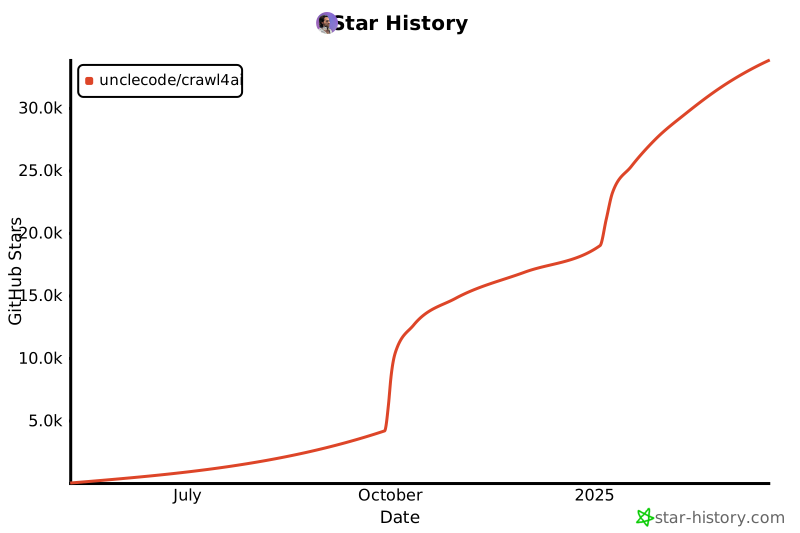](https://star-history.com/#unclecode/crawl4ai&Date)
|
||||
339
README.md
339
README.md
@@ -10,7 +10,6 @@
|
||||
[](https://badge.fury.io/py/crawl4ai)
|
||||
[](https://pypi.org/project/crawl4ai/)
|
||||
[](https://pepy.tech/project/crawl4ai)
|
||||
[](https://github.com/sponsors/unclecode)
|
||||
|
||||
<p align="center">
|
||||
<a href="https://x.com/crawl4ai">
|
||||
@@ -25,35 +24,32 @@
|
||||
</p>
|
||||
</div>
|
||||
|
||||
Crawl4AI turns the web into clean, LLM ready Markdown for RAG, agents, and data pipelines. Fast, controllable, battle tested by a 50k+ star community.
|
||||
Crawl4AI is the #1 trending GitHub repository, actively maintained by a vibrant community. It delivers blazing-fast, AI-ready web crawling tailored for LLMs, AI agents, and data pipelines. Open source, flexible, and built for real-time performance, Crawl4AI empowers developers with unmatched speed, precision, and deployment ease.
|
||||
|
||||
[✨ Check out latest update v0.7.4](#-recent-updates)
|
||||
[✨ Check out latest update v0.7.0](#-recent-updates)
|
||||
|
||||
✨ New in v0.7.4: Revolutionary LLM Table Extraction with intelligent chunking, enhanced concurrency fixes, memory management refactor, and critical stability improvements. [Release notes →](https://github.com/unclecode/crawl4ai/blob/main/docs/blog/release-v0.7.4.md)
|
||||
|
||||
✨ Recent v0.7.3: Undetected Browser Support, Multi-URL Configurations, Memory Monitoring, Enhanced Table Extraction, GitHub Sponsors. [Release notes →](https://github.com/unclecode/crawl4ai/blob/main/docs/blog/release-v0.7.3.md)
|
||||
🎉 **Version 0.7.0 is now available!** The Adaptive Intelligence Update introduces groundbreaking features: Adaptive Crawling that learns website patterns, Virtual Scroll support for infinite pages, intelligent Link Preview with 3-layer scoring, Async URL Seeder for massive discovery, and significant performance improvements. [Read the release notes →](https://docs.crawl4ai.com/blog/release-v0.7.0)
|
||||
|
||||
<details>
|
||||
<summary>🤓 <strong>My Personal Story</strong></summary>
|
||||
<summary>🤓 <strong>My Personal Story</strong></summary>
|
||||
|
||||
I grew up on an Amstrad, thanks to my dad, and never stopped building. In grad school I specialized in NLP and built crawlers for research. That’s where I learned how much extraction matters.
|
||||
My journey with computers started in childhood when my dad, a computer scientist, introduced me to an Amstrad computer. Those early days sparked a fascination with technology, leading me to pursue computer science and specialize in NLP during my postgraduate studies. It was during this time that I first delved into web crawling, building tools to help researchers organize papers and extract information from publications a challenging yet rewarding experience that honed my skills in data extraction.
|
||||
|
||||
In 2023, I needed web-to-Markdown. The “open source” option wanted an account, API token, and $16, and still under-delivered. I went turbo anger mode, built Crawl4AI in days, and it went viral. Now it’s the most-starred crawler on GitHub.
|
||||
Fast forward to 2023, I was working on a tool for a project and needed a crawler to convert a webpage into markdown. While exploring solutions, I found one that claimed to be open-source but required creating an account and generating an API token. Worse, it turned out to be a SaaS model charging $16, and its quality didn’t meet my standards. Frustrated, I realized this was a deeper problem. That frustration turned into turbo anger mode, and I decided to build my own solution. In just a few days, I created Crawl4AI. To my surprise, it went viral, earning thousands of GitHub stars and resonating with a global community.
|
||||
|
||||
I made it open source for **availability**, anyone can use it without a gate. Now I’m building the platform for **affordability**, anyone can run serious crawls without breaking the bank. If that resonates, join in, send feedback, or just crawl something amazing.
|
||||
I made Crawl4AI open-source for two reasons. First, it’s my way of giving back to the open-source community that has supported me throughout my career. Second, I believe data should be accessible to everyone, not locked behind paywalls or monopolized by a few. Open access to data lays the foundation for the democratization of AI, a vision where individuals can train their own models and take ownership of their information. This library is the first step in a larger journey to create the best open-source data extraction and generation tool the world has ever seen, built collaboratively by a passionate community.
|
||||
|
||||
Thank you to everyone who has supported this project, used it, and shared feedback. Your encouragement motivates me to dream even bigger. Join us, file issues, submit PRs, or spread the word. Together, we can build a tool that truly empowers people to access their own data and reshape the future of AI.
|
||||
</details>
|
||||
|
||||
## 🧐 Why Crawl4AI?
|
||||
|
||||
<details>
|
||||
<summary>Why developers pick Crawl4AI</summary>
|
||||
|
||||
- **LLM ready output**, smart Markdown with headings, tables, code, citation hints
|
||||
- **Fast in practice**, async browser pool, caching, minimal hops
|
||||
- **Full control**, sessions, proxies, cookies, user scripts, hooks
|
||||
- **Adaptive intelligence**, learns site patterns, explores only what matters
|
||||
- **Deploy anywhere**, zero keys, CLI and Docker, cloud friendly
|
||||
</details>
|
||||
|
||||
1. **Built for LLMs**: Creates smart, concise Markdown optimized for RAG and fine-tuning applications.
|
||||
2. **Lightning Fast**: Delivers results 6x faster with real-time, cost-efficient performance.
|
||||
3. **Flexible Browser Control**: Offers session management, proxies, and custom hooks for seamless data access.
|
||||
4. **Heuristic Intelligence**: Uses advanced algorithms for efficient extraction, reducing reliance on costly models.
|
||||
5. **Open Source & Deployable**: Fully open-source with no API keys—ready for Docker and cloud integration.
|
||||
6. **Thriving Community**: Actively maintained by a vibrant community and the #1 trending GitHub repository.
|
||||
|
||||
## 🚀 Quick Start
|
||||
|
||||
@@ -105,33 +101,6 @@ crwl https://docs.crawl4ai.com --deep-crawl bfs --max-pages 10
|
||||
crwl https://www.example.com/products -q "Extract all product prices"
|
||||
```
|
||||
|
||||
## 💖 Support Crawl4AI
|
||||
|
||||
> 🎉 **Sponsorship Program Now Open!** After powering 51K+ developers and 1 year of growth, Crawl4AI is launching dedicated support for **startups** and **enterprises**. Be among the first 50 **Founding Sponsors** for permanent recognition in our Hall of Fame.
|
||||
|
||||
Crawl4AI is the #1 trending open-source web crawler on GitHub. Your support keeps it independent, innovative, and free for the community — while giving you direct access to premium benefits.
|
||||
|
||||
<div align="">
|
||||
|
||||
[](https://github.com/sponsors/unclecode)
|
||||
[](https://github.com/sponsors/unclecode)
|
||||
|
||||
</div>
|
||||
|
||||
### 🤝 Sponsorship Tiers
|
||||
|
||||
- **🌱 Believer ($5/mo)** — Join the movement for data democratization
|
||||
- **🚀 Builder ($50/mo)** — Priority support & early access to features
|
||||
- **💼 Growing Team ($500/mo)** — Bi-weekly syncs & optimization help
|
||||
- **🏢 Data Infrastructure Partner ($2000/mo)** — Full partnership with dedicated support
|
||||
*Custom arrangements available - see [SPONSORS.md](SPONSORS.md) for details & contact*
|
||||
|
||||
**Why sponsor?**
|
||||
No rate-limited APIs. No lock-in. Build and own your data pipeline with direct guidance from the creator of Crawl4AI.
|
||||
|
||||
[See All Tiers & Benefits →](https://github.com/sponsors/unclecode)
|
||||
|
||||
|
||||
## ✨ Features
|
||||
|
||||
<details>
|
||||
@@ -304,13 +273,19 @@ The new Docker implementation includes:
|
||||
### Getting Started
|
||||
|
||||
```bash
|
||||
# Pull and run the latest release
|
||||
docker pull unclecode/crawl4ai:latest
|
||||
docker run -d -p 11235:11235 --name crawl4ai --shm-size=1g unclecode/crawl4ai:latest
|
||||
# Pull and run the latest release candidate
|
||||
docker pull unclecode/crawl4ai:0.7.0
|
||||
docker run -d -p 11235:11235 --name crawl4ai --shm-size=1g unclecode/crawl4ai:0.7.0
|
||||
|
||||
# Visit the playground at http://localhost:11235/playground
|
||||
```
|
||||
|
||||
For complete documentation, see our [Docker Deployment Guide](https://docs.crawl4ai.com/core/docker-deployment/).
|
||||
|
||||
</details>
|
||||
|
||||
---
|
||||
|
||||
### Quick Test
|
||||
|
||||
Run a quick test (works for both Docker options):
|
||||
@@ -341,11 +316,10 @@ For more examples, see our [Docker Examples](https://github.com/unclecode/crawl4
|
||||
|
||||
</details>
|
||||
|
||||
---
|
||||
|
||||
## 🔬 Advanced Usage Examples 🔬
|
||||
|
||||
You can check the project structure in the directory [docs/examples](https://github.com/unclecode/crawl4ai/tree/main/docs/examples). Over there, you can find a variety of examples; here, some popular examples are shared.
|
||||
You can check the project structure in the directory [https://github.com/unclecode/crawl4ai/docs/examples](docs/examples). Over there, you can find a variety of examples; here, some popular examples are shared.
|
||||
|
||||
<details>
|
||||
<summary>📝 <strong>Heuristic Markdown Generation with Clean and Fit Markdown</strong></summary>
|
||||
@@ -373,7 +347,7 @@ async def main():
|
||||
|
||||
async with AsyncWebCrawler(config=browser_config) as crawler:
|
||||
result = await crawler.arun(
|
||||
url="https://docs.micronaut.io/4.9.9/guide/",
|
||||
url="https://docs.micronaut.io/4.7.6/guide/",
|
||||
config=run_config
|
||||
)
|
||||
print(len(result.markdown.raw_markdown))
|
||||
@@ -425,7 +399,7 @@ async def main():
|
||||
"type": "attribute",
|
||||
"attribute": "src"
|
||||
}
|
||||
]
|
||||
}
|
||||
}
|
||||
|
||||
extraction_strategy = JsonCssExtractionStrategy(schema, verbose=True)
|
||||
@@ -504,7 +478,7 @@ if __name__ == "__main__":
|
||||
</details>
|
||||
|
||||
<details>
|
||||
<summary>🤖 <strong>Using Your own Browser with Custom User Profile</strong></summary>
|
||||
<summary>🤖 <strong>Using You own Browser with Custom User Profile</strong></summary>
|
||||
|
||||
```python
|
||||
import os, sys
|
||||
@@ -544,139 +518,20 @@ async def test_news_crawl():
|
||||
|
||||
## ✨ Recent Updates
|
||||
|
||||
<details>
|
||||
<summary><strong>Version 0.7.4 Release Highlights - The Intelligent Table Extraction & Performance Update</strong></summary>
|
||||
|
||||
- **🚀 LLMTableExtraction**: Revolutionary table extraction with intelligent chunking for massive tables:
|
||||
```python
|
||||
from crawl4ai import LLMTableExtraction, LLMConfig
|
||||
|
||||
# Configure intelligent table extraction
|
||||
table_strategy = LLMTableExtraction(
|
||||
llm_config=LLMConfig(provider="openai/gpt-4.1-mini"),
|
||||
enable_chunking=True, # Handle massive tables
|
||||
chunk_token_threshold=5000, # Smart chunking threshold
|
||||
overlap_threshold=100, # Maintain context between chunks
|
||||
extraction_type="structured" # Get structured data output
|
||||
)
|
||||
|
||||
config = CrawlerRunConfig(table_extraction_strategy=table_strategy)
|
||||
result = await crawler.arun("https://complex-tables-site.com", config=config)
|
||||
|
||||
# Tables are automatically chunked, processed, and merged
|
||||
for table in result.tables:
|
||||
print(f"Extracted table: {len(table['data'])} rows")
|
||||
```
|
||||
|
||||
- **⚡ Dispatcher Bug Fix**: Fixed sequential processing bottleneck in arun_many for fast-completing tasks
|
||||
- **🧹 Memory Management Refactor**: Consolidated memory utilities into main utils module for cleaner architecture
|
||||
- **🔧 Browser Manager Fixes**: Resolved race conditions in concurrent page creation with thread-safe locking
|
||||
- **🔗 Advanced URL Processing**: Better handling of raw:// URLs and base tag link resolution
|
||||
- **🛡️ Enhanced Proxy Support**: Flexible proxy configuration supporting both dict and string formats
|
||||
|
||||
[Full v0.7.4 Release Notes →](https://github.com/unclecode/crawl4ai/blob/main/docs/blog/release-v0.7.4.md)
|
||||
|
||||
</details>
|
||||
|
||||
<details>
|
||||
<summary><strong>Version 0.7.3 Release Highlights - The Multi-Config Intelligence Update</strong></summary>
|
||||
|
||||
- **🕵️ Undetected Browser Support**: Bypass sophisticated bot detection systems:
|
||||
```python
|
||||
from crawl4ai import AsyncWebCrawler, BrowserConfig
|
||||
|
||||
browser_config = BrowserConfig(
|
||||
browser_type="undetected", # Use undetected Chrome
|
||||
headless=True, # Can run headless with stealth
|
||||
extra_args=[
|
||||
"--disable-blink-features=AutomationControlled",
|
||||
"--disable-web-security"
|
||||
]
|
||||
)
|
||||
|
||||
async with AsyncWebCrawler(config=browser_config) as crawler:
|
||||
result = await crawler.arun("https://protected-site.com")
|
||||
# Successfully bypass Cloudflare, Akamai, and custom bot detection
|
||||
```
|
||||
|
||||
- **🎨 Multi-URL Configuration**: Different strategies for different URL patterns in one batch:
|
||||
```python
|
||||
from crawl4ai import CrawlerRunConfig, MatchMode
|
||||
|
||||
configs = [
|
||||
# Documentation sites - aggressive caching
|
||||
CrawlerRunConfig(
|
||||
url_matcher=["*docs*", "*documentation*"],
|
||||
cache_mode="write",
|
||||
markdown_generator_options={"include_links": True}
|
||||
),
|
||||
|
||||
# News/blog sites - fresh content
|
||||
CrawlerRunConfig(
|
||||
url_matcher=lambda url: 'blog' in url or 'news' in url,
|
||||
cache_mode="bypass"
|
||||
),
|
||||
|
||||
# Fallback for everything else
|
||||
CrawlerRunConfig()
|
||||
]
|
||||
|
||||
results = await crawler.arun_many(urls, config=configs)
|
||||
# Each URL gets the perfect configuration automatically
|
||||
```
|
||||
|
||||
- **🧠 Memory Monitoring**: Track and optimize memory usage during crawling:
|
||||
```python
|
||||
from crawl4ai.memory_utils import MemoryMonitor
|
||||
|
||||
monitor = MemoryMonitor()
|
||||
monitor.start_monitoring()
|
||||
|
||||
results = await crawler.arun_many(large_url_list)
|
||||
|
||||
report = monitor.get_report()
|
||||
print(f"Peak memory: {report['peak_mb']:.1f} MB")
|
||||
print(f"Efficiency: {report['efficiency']:.1f}%")
|
||||
# Get optimization recommendations
|
||||
```
|
||||
|
||||
- **📊 Enhanced Table Extraction**: Direct DataFrame conversion from web tables:
|
||||
```python
|
||||
result = await crawler.arun("https://site-with-tables.com")
|
||||
|
||||
# New way - direct table access
|
||||
if result.tables:
|
||||
import pandas as pd
|
||||
for table in result.tables:
|
||||
df = pd.DataFrame(table['data'])
|
||||
print(f"Table: {df.shape[0]} rows × {df.shape[1]} columns")
|
||||
```
|
||||
|
||||
- **💰 GitHub Sponsors**: 4-tier sponsorship system for project sustainability
|
||||
- **🐳 Docker LLM Flexibility**: Configure providers via environment variables
|
||||
|
||||
[Full v0.7.3 Release Notes →](https://github.com/unclecode/crawl4ai/blob/main/docs/blog/release-v0.7.3.md)
|
||||
|
||||
</details>
|
||||
|
||||
<details>
|
||||
<summary><strong>Version 0.7.0 Release Highlights - The Adaptive Intelligence Update</strong></summary>
|
||||
### Version 0.7.0 Release Highlights - The Adaptive Intelligence Update
|
||||
|
||||
- **🧠 Adaptive Crawling**: Your crawler now learns and adapts to website patterns automatically:
|
||||
```python
|
||||
config = AdaptiveConfig(
|
||||
confidence_threshold=0.7, # Min confidence to stop crawling
|
||||
max_depth=5, # Maximum crawl depth
|
||||
max_pages=20, # Maximum number of pages to crawl
|
||||
strategy="statistical"
|
||||
confidence_threshold=0.7,
|
||||
max_history=100,
|
||||
learning_rate=0.2
|
||||
)
|
||||
|
||||
async with AsyncWebCrawler() as crawler:
|
||||
adaptive_crawler = AdaptiveCrawler(crawler, config)
|
||||
state = await adaptive_crawler.digest(
|
||||
start_url="https://news.example.com",
|
||||
query="latest news content"
|
||||
)
|
||||
result = await crawler.arun(
|
||||
"https://news.example.com",
|
||||
config=CrawlerRunConfig(adaptive_config=config)
|
||||
)
|
||||
# Crawler learns patterns and improves extraction over time
|
||||
```
|
||||
|
||||
@@ -725,14 +580,97 @@ async def test_news_crawl():
|
||||
|
||||
Read the full details in our [0.7.0 Release Notes](https://docs.crawl4ai.com/blog/release-v0.7.0) or check the [CHANGELOG](https://github.com/unclecode/crawl4ai/blob/main/CHANGELOG.md).
|
||||
|
||||
</details>
|
||||
### Previous Version: 0.6.0 Release Highlights
|
||||
|
||||
- **🌎 World-aware Crawling**: Set geolocation, language, and timezone for authentic locale-specific content:
|
||||
```python
|
||||
crun_cfg = CrawlerRunConfig(
|
||||
url="https://browserleaks.com/geo", # test page that shows your location
|
||||
locale="en-US", # Accept-Language & UI locale
|
||||
timezone_id="America/Los_Angeles", # JS Date()/Intl timezone
|
||||
geolocation=GeolocationConfig( # override GPS coords
|
||||
latitude=34.0522,
|
||||
longitude=-118.2437,
|
||||
accuracy=10.0,
|
||||
)
|
||||
)
|
||||
```
|
||||
|
||||
- **📊 Table-to-DataFrame Extraction**: Extract HTML tables directly to CSV or pandas DataFrames:
|
||||
```python
|
||||
crawler = AsyncWebCrawler(config=browser_config)
|
||||
await crawler.start()
|
||||
|
||||
try:
|
||||
# Set up scraping parameters
|
||||
crawl_config = CrawlerRunConfig(
|
||||
table_score_threshold=8, # Strict table detection
|
||||
)
|
||||
|
||||
# Execute market data extraction
|
||||
results: List[CrawlResult] = await crawler.arun(
|
||||
url="https://coinmarketcap.com/?page=1", config=crawl_config
|
||||
)
|
||||
|
||||
# Process results
|
||||
raw_df = pd.DataFrame()
|
||||
for result in results:
|
||||
if result.success and result.media["tables"]:
|
||||
raw_df = pd.DataFrame(
|
||||
result.media["tables"][0]["rows"],
|
||||
columns=result.media["tables"][0]["headers"],
|
||||
)
|
||||
break
|
||||
print(raw_df.head())
|
||||
|
||||
finally:
|
||||
await crawler.stop()
|
||||
```
|
||||
|
||||
- **🚀 Browser Pooling**: Pages launch hot with pre-warmed browser instances for lower latency and memory usage
|
||||
|
||||
- **🕸️ Network and Console Capture**: Full traffic logs and MHTML snapshots for debugging:
|
||||
```python
|
||||
crawler_config = CrawlerRunConfig(
|
||||
capture_network=True,
|
||||
capture_console=True,
|
||||
mhtml=True
|
||||
)
|
||||
```
|
||||
|
||||
- **🔌 MCP Integration**: Connect to AI tools like Claude Code through the Model Context Protocol
|
||||
```bash
|
||||
# Add Crawl4AI to Claude Code
|
||||
claude mcp add --transport sse c4ai-sse http://localhost:11235/mcp/sse
|
||||
```
|
||||
|
||||
- **🖥️ Interactive Playground**: Test configurations and generate API requests with the built-in web interface at `http://localhost:11235//playground`
|
||||
|
||||
- **🐳 Revamped Docker Deployment**: Streamlined multi-architecture Docker image with improved resource efficiency
|
||||
|
||||
- **📱 Multi-stage Build System**: Optimized Dockerfile with platform-specific performance enhancements
|
||||
|
||||
|
||||
### Previous Version: 0.5.0 Major Release Highlights
|
||||
|
||||
- **🚀 Deep Crawling System**: Explore websites beyond initial URLs with BFS, DFS, and BestFirst strategies
|
||||
- **⚡ Memory-Adaptive Dispatcher**: Dynamically adjusts concurrency based on system memory
|
||||
- **🔄 Multiple Crawling Strategies**: Browser-based and lightweight HTTP-only crawlers
|
||||
- **💻 Command-Line Interface**: New `crwl` CLI provides convenient terminal access
|
||||
- **👤 Browser Profiler**: Create and manage persistent browser profiles
|
||||
- **🧠 Crawl4AI Coding Assistant**: AI-powered coding assistant
|
||||
- **🏎️ LXML Scraping Mode**: Fast HTML parsing using the `lxml` library
|
||||
- **🌐 Proxy Rotation**: Built-in support for proxy switching
|
||||
- **🤖 LLM Content Filter**: Intelligent markdown generation using LLMs
|
||||
- **📄 PDF Processing**: Extract text, images, and metadata from PDF files
|
||||
|
||||
Read the full details in our [0.5.0 Release Notes](https://docs.crawl4ai.com/blog/releases/0.5.0.html).
|
||||
|
||||
## Version Numbering in Crawl4AI
|
||||
|
||||
Crawl4AI follows standard Python version numbering conventions (PEP 440) to help users understand the stability and features of each release.
|
||||
|
||||
<details>
|
||||
<summary>📈 <strong>Version Numbers Explained</strong></summary>
|
||||
### Version Numbers Explained
|
||||
|
||||
Our version numbers follow this pattern: `MAJOR.MINOR.PATCH` (e.g., 0.4.3)
|
||||
|
||||
@@ -769,8 +707,6 @@ We use pre-releases to:
|
||||
|
||||
For production environments, we recommend using the stable version. For testing new features, you can opt-in to pre-releases using the `--pre` flag.
|
||||
|
||||
</details>
|
||||
|
||||
## 📖 Documentation & Roadmap
|
||||
|
||||
> 🚨 **Documentation Update Alert**: We're undertaking a major documentation overhaul next week to reflect recent updates and improvements. Stay tuned for a more comprehensive and up-to-date guide!
|
||||
@@ -783,16 +719,16 @@ To check our development plans and upcoming features, visit our [Roadmap](https:
|
||||
<summary>📈 <strong>Development TODOs</strong></summary>
|
||||
|
||||
- [x] 0. Graph Crawler: Smart website traversal using graph search algorithms for comprehensive nested page extraction
|
||||
- [x] 1. Question-Based Crawler: Natural language driven web discovery and content extraction
|
||||
- [x] 2. Knowledge-Optimal Crawler: Smart crawling that maximizes knowledge while minimizing data extraction
|
||||
- [x] 3. Agentic Crawler: Autonomous system for complex multi-step crawling operations
|
||||
- [x] 4. Automated Schema Generator: Convert natural language to extraction schemas
|
||||
- [x] 5. Domain-Specific Scrapers: Pre-configured extractors for common platforms (academic, e-commerce)
|
||||
- [x] 6. Web Embedding Index: Semantic search infrastructure for crawled content
|
||||
- [x] 7. Interactive Playground: Web UI for testing, comparing strategies with AI assistance
|
||||
- [x] 8. Performance Monitor: Real-time insights into crawler operations
|
||||
- [ ] 1. Question-Based Crawler: Natural language driven web discovery and content extraction
|
||||
- [ ] 2. Knowledge-Optimal Crawler: Smart crawling that maximizes knowledge while minimizing data extraction
|
||||
- [ ] 3. Agentic Crawler: Autonomous system for complex multi-step crawling operations
|
||||
- [ ] 4. Automated Schema Generator: Convert natural language to extraction schemas
|
||||
- [ ] 5. Domain-Specific Scrapers: Pre-configured extractors for common platforms (academic, e-commerce)
|
||||
- [ ] 6. Web Embedding Index: Semantic search infrastructure for crawled content
|
||||
- [ ] 7. Interactive Playground: Web UI for testing, comparing strategies with AI assistance
|
||||
- [ ] 8. Performance Monitor: Real-time insights into crawler operations
|
||||
- [ ] 9. Cloud Integration: One-click deployment solutions across cloud providers
|
||||
- [x] 10. Sponsorship Program: Structured support system with tiered benefits
|
||||
- [ ] 10. Sponsorship Program: Structured support system with tiered benefits
|
||||
- [ ] 11. Educational Content: "How to Crawl" video series and interactive tutorials
|
||||
|
||||
</details>
|
||||
@@ -807,13 +743,12 @@ Here's the updated license section:
|
||||
|
||||
## 📄 License & Attribution
|
||||
|
||||
This project is licensed under the Apache License 2.0, attribution is recommended via the badges below. See the [Apache 2.0 License](https://github.com/unclecode/crawl4ai/blob/main/LICENSE) file for details.
|
||||
This project is licensed under the Apache License 2.0 with a required attribution clause. See the [Apache 2.0 License](https://github.com/unclecode/crawl4ai/blob/main/LICENSE) file for details.
|
||||
|
||||
### Attribution Requirements
|
||||
When using Crawl4AI, you must include one of the following attribution methods:
|
||||
|
||||
<details>
|
||||
<summary>📈 <strong>1. Badge Attribution (Recommended)</strong></summary>
|
||||
#### 1. Badge Attribution (Recommended)
|
||||
Add one of these badges to your README, documentation, or website:
|
||||
|
||||
| Theme | Badge |
|
||||
@@ -852,15 +787,11 @@ HTML code for adding the badges:
|
||||
</a>
|
||||
```
|
||||
|
||||
</details>
|
||||
|
||||
<details>
|
||||
<summary>📖 <strong>2. Text Attribution</strong></summary>
|
||||
#### 2. Text Attribution
|
||||
Add this line to your documentation:
|
||||
```
|
||||
This project uses Crawl4AI (https://github.com/unclecode/crawl4ai) for web data extraction.
|
||||
```
|
||||
</details>
|
||||
|
||||
## 📚 Citation
|
||||
|
||||
|
||||
65
SPONSORS.md
65
SPONSORS.md
@@ -1,65 +0,0 @@
|
||||
# 💖 Sponsors & Supporters
|
||||
|
||||
Thank you to everyone supporting Crawl4AI! Your sponsorship helps keep this project open-source and actively maintained.
|
||||
|
||||
## 👑 Founding Sponsors
|
||||
*The first 50 sponsors who believed in our vision - permanently recognized*
|
||||
|
||||
<!-- Founding sponsors will be listed here with special recognition -->
|
||||
🎉 **Become a Founding Sponsor!** Only [X/50] spots remaining! [Join now →](https://github.com/sponsors/unclecode)
|
||||
|
||||
---
|
||||
|
||||
## 🏢 Data Infrastructure Partners ($2000/month)
|
||||
*These organizations are building their data sovereignty with Crawl4AI at the core*
|
||||
|
||||
<!-- Data Infrastructure Partners will be listed here -->
|
||||
*Be the first Data Infrastructure Partner! [Join us →](https://github.com/sponsors/unclecode)*
|
||||
|
||||
---
|
||||
|
||||
## 💼 Growing Teams ($500/month)
|
||||
*Teams scaling their data extraction with Crawl4AI*
|
||||
|
||||
<!-- Growing Teams will be listed here -->
|
||||
*Your team could be here! [Become a sponsor →](https://github.com/sponsors/unclecode)*
|
||||
|
||||
---
|
||||
|
||||
## 🚀 Builders ($50/month)
|
||||
*Developers and entrepreneurs building with Crawl4AI*
|
||||
|
||||
<!-- Builders will be listed here -->
|
||||
*Join the builders! [Start sponsoring →](https://github.com/sponsors/unclecode)*
|
||||
|
||||
---
|
||||
|
||||
## 🌱 Believers ($5/month)
|
||||
*The community supporting data democratization*
|
||||
|
||||
<!-- Believers will be listed here -->
|
||||
*Thank you to all our community believers!*
|
||||
|
||||
---
|
||||
|
||||
## 🤝 Want to Sponsor?
|
||||
|
||||
Crawl4AI is the #1 trending open-source web crawler. We're building the future of data extraction - where organizations own their data pipelines instead of relying on rate-limited APIs.
|
||||
|
||||
### Available Sponsorship Tiers:
|
||||
- **🌱 Believer** ($5/mo) - Support the movement
|
||||
- **🚀 Builder** ($50/mo) - Priority support & early access
|
||||
- **💼 Growing Team** ($500/mo) - Bi-weekly syncs & optimization
|
||||
- **🏢 Data Infrastructure Partner** ($2000/mo) - Full partnership & dedicated support
|
||||
|
||||
[View all tiers and benefits →](https://github.com/sponsors/unclecode)
|
||||
|
||||
### Enterprise & Custom Partnerships
|
||||
|
||||
Building data extraction at scale? Need dedicated support or infrastructure? Let's talk about a custom partnership.
|
||||
|
||||
📧 Contact: [hello@crawl4ai.com](mailto:hello@crawl4ai.com) | 📅 [Schedule a call](https://calendar.app.google/rEpvi2UBgUQjWHfJ9)
|
||||
|
||||
---
|
||||
|
||||
*This list is updated regularly. Sponsors at $50+ tiers can submit their logos via [hello@crawl4ai.com](mailto:hello@crawl4ai.com)*
|
||||
@@ -3,12 +3,12 @@ import warnings
|
||||
|
||||
from .async_webcrawler import AsyncWebCrawler, CacheMode
|
||||
# MODIFIED: Add SeedingConfig and VirtualScrollConfig here
|
||||
from .async_configs import BrowserConfig, CrawlerRunConfig, HTTPCrawlerConfig, LLMConfig, ProxyConfig, GeolocationConfig, SeedingConfig, VirtualScrollConfig, LinkPreviewConfig, MatchMode
|
||||
from .async_configs import BrowserConfig, CrawlerRunConfig, HTTPCrawlerConfig, LLMConfig, ProxyConfig, GeolocationConfig, SeedingConfig, VirtualScrollConfig
|
||||
|
||||
from .content_scraping_strategy import (
|
||||
ContentScrapingStrategy,
|
||||
WebScrapingStrategy,
|
||||
LXMLWebScrapingStrategy,
|
||||
WebScrapingStrategy, # Backward compatibility alias
|
||||
)
|
||||
from .async_logger import (
|
||||
AsyncLoggerBase,
|
||||
@@ -29,12 +29,6 @@ from .extraction_strategy import (
|
||||
)
|
||||
from .chunking_strategy import ChunkingStrategy, RegexChunking
|
||||
from .markdown_generation_strategy import DefaultMarkdownGenerator
|
||||
from .table_extraction import (
|
||||
TableExtractionStrategy,
|
||||
DefaultTableExtraction,
|
||||
NoTableExtraction,
|
||||
LLMTableExtraction,
|
||||
)
|
||||
from .content_filter_strategy import (
|
||||
PruningContentFilter,
|
||||
BM25ContentFilter,
|
||||
@@ -94,13 +88,6 @@ from .script import (
|
||||
ErrorDetail
|
||||
)
|
||||
|
||||
# Browser Adapters
|
||||
from .browser_adapter import (
|
||||
BrowserAdapter,
|
||||
PlaywrightAdapter,
|
||||
UndetectedAdapter
|
||||
)
|
||||
|
||||
from .utils import (
|
||||
start_colab_display_server,
|
||||
setup_colab_environment
|
||||
@@ -145,7 +132,6 @@ __all__ = [
|
||||
"CrawlResult",
|
||||
"CrawlerHub",
|
||||
"CacheMode",
|
||||
"MatchMode",
|
||||
"ContentScrapingStrategy",
|
||||
"WebScrapingStrategy",
|
||||
"LXMLWebScrapingStrategy",
|
||||
@@ -162,9 +148,6 @@ __all__ = [
|
||||
"ChunkingStrategy",
|
||||
"RegexChunking",
|
||||
"DefaultMarkdownGenerator",
|
||||
"TableExtractionStrategy",
|
||||
"DefaultTableExtraction",
|
||||
"NoTableExtraction",
|
||||
"RelevantContentFilter",
|
||||
"PruningContentFilter",
|
||||
"BM25ContentFilter",
|
||||
@@ -190,11 +173,6 @@ __all__ = [
|
||||
"CompilationResult",
|
||||
"ValidationResult",
|
||||
"ErrorDetail",
|
||||
# Browser Adapters
|
||||
"BrowserAdapter",
|
||||
"PlaywrightAdapter",
|
||||
"UndetectedAdapter",
|
||||
"LinkPreviewConfig"
|
||||
]
|
||||
|
||||
|
||||
|
||||
@@ -1,7 +1,7 @@
|
||||
# crawl4ai/__version__.py
|
||||
|
||||
# This is the version that will be used for stable releases
|
||||
__version__ = "0.7.4"
|
||||
__version__ = "0.7.0"
|
||||
|
||||
# For nightly builds, this gets set during build process
|
||||
__nightly_version__ = None
|
||||
|
||||
@@ -18,25 +18,17 @@ from .extraction_strategy import ExtractionStrategy, LLMExtractionStrategy
|
||||
from .chunking_strategy import ChunkingStrategy, RegexChunking
|
||||
|
||||
from .markdown_generation_strategy import MarkdownGenerationStrategy, DefaultMarkdownGenerator
|
||||
from .content_scraping_strategy import ContentScrapingStrategy, LXMLWebScrapingStrategy
|
||||
from .content_scraping_strategy import ContentScrapingStrategy, WebScrapingStrategy, LXMLWebScrapingStrategy
|
||||
from .deep_crawling import DeepCrawlStrategy
|
||||
from .table_extraction import TableExtractionStrategy, DefaultTableExtraction
|
||||
|
||||
from .cache_context import CacheMode
|
||||
from .proxy_strategy import ProxyRotationStrategy
|
||||
|
||||
from typing import Union, List, Callable
|
||||
from typing import Union, List
|
||||
import inspect
|
||||
from typing import Any, Dict, Optional
|
||||
from enum import Enum
|
||||
|
||||
# Type alias for URL matching
|
||||
UrlMatcher = Union[str, Callable[[str], bool], List[Union[str, Callable[[str], bool]]]]
|
||||
|
||||
class MatchMode(Enum):
|
||||
OR = "or"
|
||||
AND = "and"
|
||||
|
||||
# from .proxy_strategy import ProxyConfig
|
||||
|
||||
|
||||
@@ -97,16 +89,13 @@ def to_serializable_dict(obj: Any, ignore_default_value : bool = False) -> Dict:
|
||||
if value != param.default and not ignore_default_value:
|
||||
current_values[name] = to_serializable_dict(value)
|
||||
|
||||
# Don't serialize private __slots__ - they're internal implementation details
|
||||
# not constructor parameters. This was causing URLPatternFilter to fail
|
||||
# because _simple_suffixes was being serialized as 'simple_suffixes'
|
||||
# if hasattr(obj, '__slots__'):
|
||||
# for slot in obj.__slots__:
|
||||
# if slot.startswith('_'): # Handle private slots
|
||||
# attr_name = slot[1:] # Remove leading '_'
|
||||
# value = getattr(obj, slot, None)
|
||||
# if value is not None:
|
||||
# current_values[attr_name] = to_serializable_dict(value)
|
||||
if hasattr(obj, '__slots__'):
|
||||
for slot in obj.__slots__:
|
||||
if slot.startswith('_'): # Handle private slots
|
||||
attr_name = slot[1:] # Remove leading '_'
|
||||
value = getattr(obj, slot, None)
|
||||
if value is not None:
|
||||
current_values[attr_name] = to_serializable_dict(value)
|
||||
|
||||
|
||||
|
||||
@@ -394,8 +383,6 @@ class BrowserConfig:
|
||||
light_mode (bool): Disables certain background features for performance gains. Default: False.
|
||||
extra_args (list): Additional command-line arguments passed to the browser.
|
||||
Default: [].
|
||||
enable_stealth (bool): If True, applies playwright-stealth to bypass basic bot detection.
|
||||
Cannot be used with use_undetected browser mode. Default: False.
|
||||
"""
|
||||
|
||||
def __init__(
|
||||
@@ -436,7 +423,6 @@ class BrowserConfig:
|
||||
extra_args: list = None,
|
||||
debugging_port: int = 9222,
|
||||
host: str = "localhost",
|
||||
enable_stealth: bool = False,
|
||||
):
|
||||
self.browser_type = browser_type
|
||||
self.headless = headless
|
||||
@@ -452,10 +438,6 @@ class BrowserConfig:
|
||||
self.chrome_channel = ""
|
||||
self.proxy = proxy
|
||||
self.proxy_config = proxy_config
|
||||
if isinstance(self.proxy_config, dict):
|
||||
self.proxy_config = ProxyConfig.from_dict(self.proxy_config)
|
||||
if isinstance(self.proxy_config, str):
|
||||
self.proxy_config = ProxyConfig.from_string(self.proxy_config)
|
||||
|
||||
|
||||
self.viewport_width = viewport_width
|
||||
@@ -481,7 +463,6 @@ class BrowserConfig:
|
||||
self.verbose = verbose
|
||||
self.debugging_port = debugging_port
|
||||
self.host = host
|
||||
self.enable_stealth = enable_stealth
|
||||
|
||||
fa_user_agenr_generator = ValidUAGenerator()
|
||||
if self.user_agent_mode == "random":
|
||||
@@ -513,13 +494,6 @@ class BrowserConfig:
|
||||
# If persistent context is requested, ensure managed browser is enabled
|
||||
if self.use_persistent_context:
|
||||
self.use_managed_browser = True
|
||||
|
||||
# Validate stealth configuration
|
||||
if self.enable_stealth and self.use_managed_browser and self.browser_mode == "builtin":
|
||||
raise ValueError(
|
||||
"enable_stealth cannot be used with browser_mode='builtin'. "
|
||||
"Stealth mode requires a dedicated browser instance."
|
||||
)
|
||||
|
||||
@staticmethod
|
||||
def from_kwargs(kwargs: dict) -> "BrowserConfig":
|
||||
@@ -556,7 +530,6 @@ class BrowserConfig:
|
||||
extra_args=kwargs.get("extra_args", []),
|
||||
debugging_port=kwargs.get("debugging_port", 9222),
|
||||
host=kwargs.get("host", "localhost"),
|
||||
enable_stealth=kwargs.get("enable_stealth", False),
|
||||
)
|
||||
|
||||
def to_dict(self):
|
||||
@@ -591,7 +564,6 @@ class BrowserConfig:
|
||||
"verbose": self.verbose,
|
||||
"debugging_port": self.debugging_port,
|
||||
"host": self.host,
|
||||
"enable_stealth": self.enable_stealth,
|
||||
}
|
||||
|
||||
|
||||
@@ -834,6 +806,12 @@ class HTTPCrawlerConfig:
|
||||
return HTTPCrawlerConfig.from_kwargs(config)
|
||||
|
||||
class CrawlerRunConfig():
|
||||
_UNWANTED_PROPS = {
|
||||
'disable_cache' : 'Instead, use cache_mode=CacheMode.DISABLED',
|
||||
'bypass_cache' : 'Instead, use cache_mode=CacheMode.BYPASS',
|
||||
'no_cache_read' : 'Instead, use cache_mode=CacheMode.WRITE_ONLY',
|
||||
'no_cache_write' : 'Instead, use cache_mode=CacheMode.READ_ONLY',
|
||||
}
|
||||
|
||||
"""
|
||||
Configuration class for controlling how the crawler runs each crawl operation.
|
||||
@@ -884,7 +862,7 @@ class CrawlerRunConfig():
|
||||
parser_type (str): Type of parser to use for HTML parsing.
|
||||
Default: "lxml".
|
||||
scraping_strategy (ContentScrapingStrategy): Scraping strategy to use.
|
||||
Default: LXMLWebScrapingStrategy.
|
||||
Default: WebScrapingStrategy.
|
||||
proxy_config (ProxyConfig or dict or None): Detailed proxy configuration, e.g. {"server": "...", "username": "..."}.
|
||||
If None, no additional proxy config. Default: None.
|
||||
|
||||
@@ -980,8 +958,6 @@ class CrawlerRunConfig():
|
||||
Default: False.
|
||||
table_score_threshold (int): Minimum score threshold for processing a table.
|
||||
Default: 7.
|
||||
table_extraction (TableExtractionStrategy): Strategy to use for table extraction.
|
||||
Default: DefaultTableExtraction with table_score_threshold.
|
||||
|
||||
# Virtual Scroll Parameters
|
||||
virtual_scroll_config (VirtualScrollConfig or dict or None): Configuration for handling virtual scroll containers.
|
||||
@@ -1040,12 +1016,6 @@ class CrawlerRunConfig():
|
||||
|
||||
url: str = None # This is not a compulsory parameter
|
||||
"""
|
||||
_UNWANTED_PROPS = {
|
||||
'disable_cache' : 'Instead, use cache_mode=CacheMode.DISABLED',
|
||||
'bypass_cache' : 'Instead, use cache_mode=CacheMode.BYPASS',
|
||||
'no_cache_read' : 'Instead, use cache_mode=CacheMode.WRITE_ONLY',
|
||||
'no_cache_write' : 'Instead, use cache_mode=CacheMode.READ_ONLY',
|
||||
}
|
||||
|
||||
def __init__(
|
||||
self,
|
||||
@@ -1114,7 +1084,6 @@ class CrawlerRunConfig():
|
||||
image_description_min_word_threshold: int = IMAGE_DESCRIPTION_MIN_WORD_THRESHOLD,
|
||||
image_score_threshold: int = IMAGE_SCORE_THRESHOLD,
|
||||
table_score_threshold: int = 7,
|
||||
table_extraction: TableExtractionStrategy = None,
|
||||
exclude_external_images: bool = False,
|
||||
exclude_all_images: bool = False,
|
||||
# Link and Domain Handling Parameters
|
||||
@@ -1124,7 +1093,6 @@ class CrawlerRunConfig():
|
||||
exclude_domains: list = None,
|
||||
exclude_internal_links: bool = False,
|
||||
score_links: bool = False,
|
||||
preserve_https_for_internal_links: bool = False,
|
||||
# Debugging and Logging Parameters
|
||||
verbose: bool = True,
|
||||
log_console: bool = False,
|
||||
@@ -1145,9 +1113,6 @@ class CrawlerRunConfig():
|
||||
link_preview_config: Union[LinkPreviewConfig, Dict[str, Any]] = None,
|
||||
# Virtual Scroll Parameters
|
||||
virtual_scroll_config: Union[VirtualScrollConfig, Dict[str, Any]] = None,
|
||||
# URL Matching Parameters
|
||||
url_matcher: Optional[UrlMatcher] = None,
|
||||
match_mode: MatchMode = MatchMode.OR,
|
||||
# Experimental Parameters
|
||||
experimental: Dict[str, Any] = None,
|
||||
):
|
||||
@@ -1171,11 +1136,6 @@ class CrawlerRunConfig():
|
||||
self.parser_type = parser_type
|
||||
self.scraping_strategy = scraping_strategy or LXMLWebScrapingStrategy()
|
||||
self.proxy_config = proxy_config
|
||||
if isinstance(proxy_config, dict):
|
||||
self.proxy_config = ProxyConfig.from_dict(proxy_config)
|
||||
if isinstance(proxy_config, str):
|
||||
self.proxy_config = ProxyConfig.from_string(proxy_config)
|
||||
|
||||
self.proxy_rotation_strategy = proxy_rotation_strategy
|
||||
|
||||
# Browser Location and Identity Parameters
|
||||
@@ -1232,12 +1192,6 @@ class CrawlerRunConfig():
|
||||
self.exclude_external_images = exclude_external_images
|
||||
self.exclude_all_images = exclude_all_images
|
||||
self.table_score_threshold = table_score_threshold
|
||||
|
||||
# Table extraction strategy (default to DefaultTableExtraction if not specified)
|
||||
if table_extraction is None:
|
||||
self.table_extraction = DefaultTableExtraction(table_score_threshold=table_score_threshold)
|
||||
else:
|
||||
self.table_extraction = table_extraction
|
||||
|
||||
# Link and Domain Handling Parameters
|
||||
self.exclude_social_media_domains = (
|
||||
@@ -1248,7 +1202,6 @@ class CrawlerRunConfig():
|
||||
self.exclude_domains = exclude_domains or []
|
||||
self.exclude_internal_links = exclude_internal_links
|
||||
self.score_links = score_links
|
||||
self.preserve_https_for_internal_links = preserve_https_for_internal_links
|
||||
|
||||
# Debugging and Logging Parameters
|
||||
self.verbose = verbose
|
||||
@@ -1313,10 +1266,6 @@ class CrawlerRunConfig():
|
||||
else:
|
||||
raise ValueError("virtual_scroll_config must be VirtualScrollConfig object or dict")
|
||||
|
||||
# URL Matching Parameters
|
||||
self.url_matcher = url_matcher
|
||||
self.match_mode = match_mode
|
||||
|
||||
# Experimental Parameters
|
||||
self.experimental = experimental or {}
|
||||
|
||||
@@ -1372,51 +1321,6 @@ class CrawlerRunConfig():
|
||||
if "compilation error" not in str(e).lower():
|
||||
raise ValueError(f"Failed to compile C4A script: {str(e)}")
|
||||
raise
|
||||
|
||||
def is_match(self, url: str) -> bool:
|
||||
"""Check if this config matches the given URL.
|
||||
|
||||
Args:
|
||||
url: The URL to check against this config's matcher
|
||||
|
||||
Returns:
|
||||
bool: True if this config should be used for the URL or if no matcher is set.
|
||||
"""
|
||||
if self.url_matcher is None:
|
||||
return True
|
||||
|
||||
if callable(self.url_matcher):
|
||||
# Single function matcher
|
||||
return self.url_matcher(url)
|
||||
|
||||
elif isinstance(self.url_matcher, str):
|
||||
# Single pattern string
|
||||
from fnmatch import fnmatch
|
||||
return fnmatch(url, self.url_matcher)
|
||||
|
||||
elif isinstance(self.url_matcher, list):
|
||||
# List of mixed matchers
|
||||
if not self.url_matcher: # Empty list
|
||||
return False
|
||||
|
||||
results = []
|
||||
for matcher in self.url_matcher:
|
||||
if callable(matcher):
|
||||
results.append(matcher(url))
|
||||
elif isinstance(matcher, str):
|
||||
from fnmatch import fnmatch
|
||||
results.append(fnmatch(url, matcher))
|
||||
else:
|
||||
# Skip invalid matchers
|
||||
continue
|
||||
|
||||
# Apply match mode logic
|
||||
if self.match_mode == MatchMode.OR:
|
||||
return any(results) if results else False
|
||||
else: # AND mode
|
||||
return all(results) if results else False
|
||||
|
||||
return False
|
||||
|
||||
|
||||
def __getattr__(self, name):
|
||||
@@ -1510,7 +1414,6 @@ class CrawlerRunConfig():
|
||||
"image_score_threshold", IMAGE_SCORE_THRESHOLD
|
||||
),
|
||||
table_score_threshold=kwargs.get("table_score_threshold", 7),
|
||||
table_extraction=kwargs.get("table_extraction", None),
|
||||
exclude_all_images=kwargs.get("exclude_all_images", False),
|
||||
exclude_external_images=kwargs.get("exclude_external_images", False),
|
||||
# Link and Domain Handling Parameters
|
||||
@@ -1522,7 +1425,6 @@ class CrawlerRunConfig():
|
||||
exclude_domains=kwargs.get("exclude_domains", []),
|
||||
exclude_internal_links=kwargs.get("exclude_internal_links", False),
|
||||
score_links=kwargs.get("score_links", False),
|
||||
preserve_https_for_internal_links=kwargs.get("preserve_https_for_internal_links", False),
|
||||
# Debugging and Logging Parameters
|
||||
verbose=kwargs.get("verbose", True),
|
||||
log_console=kwargs.get("log_console", False),
|
||||
@@ -1541,9 +1443,6 @@ class CrawlerRunConfig():
|
||||
# Link Extraction Parameters
|
||||
link_preview_config=kwargs.get("link_preview_config"),
|
||||
url=kwargs.get("url"),
|
||||
# URL Matching Parameters
|
||||
url_matcher=kwargs.get("url_matcher"),
|
||||
match_mode=kwargs.get("match_mode", MatchMode.OR),
|
||||
# Experimental Parameters
|
||||
experimental=kwargs.get("experimental"),
|
||||
)
|
||||
@@ -1620,7 +1519,6 @@ class CrawlerRunConfig():
|
||||
"image_description_min_word_threshold": self.image_description_min_word_threshold,
|
||||
"image_score_threshold": self.image_score_threshold,
|
||||
"table_score_threshold": self.table_score_threshold,
|
||||
"table_extraction": self.table_extraction,
|
||||
"exclude_all_images": self.exclude_all_images,
|
||||
"exclude_external_images": self.exclude_external_images,
|
||||
"exclude_social_media_domains": self.exclude_social_media_domains,
|
||||
@@ -1629,7 +1527,6 @@ class CrawlerRunConfig():
|
||||
"exclude_domains": self.exclude_domains,
|
||||
"exclude_internal_links": self.exclude_internal_links,
|
||||
"score_links": self.score_links,
|
||||
"preserve_https_for_internal_links": self.preserve_https_for_internal_links,
|
||||
"verbose": self.verbose,
|
||||
"log_console": self.log_console,
|
||||
"capture_network_requests": self.capture_network_requests,
|
||||
@@ -1643,8 +1540,6 @@ class CrawlerRunConfig():
|
||||
"deep_crawl_strategy": self.deep_crawl_strategy,
|
||||
"link_preview_config": self.link_preview_config.to_dict() if self.link_preview_config else None,
|
||||
"url": self.url,
|
||||
"url_matcher": self.url_matcher,
|
||||
"match_mode": self.match_mode,
|
||||
"experimental": self.experimental,
|
||||
}
|
||||
|
||||
|
||||
File diff suppressed because it is too large
Load Diff
@@ -12,6 +12,20 @@ from playwright.async_api import TimeoutError as PlaywrightTimeoutError
|
||||
from io import BytesIO
|
||||
from PIL import Image, ImageDraw, ImageFont
|
||||
import hashlib
|
||||
|
||||
# Backward compatible stealth import
|
||||
try:
|
||||
# Try new tf-playwright-stealth API (Stealth class)
|
||||
from playwright_stealth import Stealth
|
||||
STEALTH_NEW_API = True
|
||||
except ImportError:
|
||||
try:
|
||||
# Try old playwright-stealth API (stealth_async function)
|
||||
from playwright_stealth import stealth_async
|
||||
STEALTH_NEW_API = False
|
||||
except ImportError:
|
||||
# No stealth available
|
||||
STEALTH_NEW_API = None
|
||||
import uuid
|
||||
from .js_snippet import load_js_script
|
||||
from .models import AsyncCrawlResponse
|
||||
@@ -21,7 +35,6 @@ from .async_logger import AsyncLogger
|
||||
from .ssl_certificate import SSLCertificate
|
||||
from .user_agent_generator import ValidUAGenerator
|
||||
from .browser_manager import BrowserManager
|
||||
from .browser_adapter import BrowserAdapter, PlaywrightAdapter, UndetectedAdapter
|
||||
|
||||
import aiofiles
|
||||
import aiohttp
|
||||
@@ -32,6 +45,107 @@ from types import MappingProxyType
|
||||
import contextlib
|
||||
from functools import partial
|
||||
|
||||
|
||||
# Add StealthConfig class for backward compatibility and new features
|
||||
class StealthConfig:
|
||||
"""
|
||||
Configuration class for stealth settings that works with tf-playwright-stealth.
|
||||
This maintains backward compatibility while supporting all tf-playwright-stealth features.
|
||||
"""
|
||||
def __init__(
|
||||
self,
|
||||
# Common settings
|
||||
enabled: bool = True,
|
||||
|
||||
# Core tf-playwright-stealth parameters (matching the actual library)
|
||||
chrome_app: bool = True,
|
||||
chrome_csi: bool = True,
|
||||
chrome_load_times: bool = True,
|
||||
chrome_runtime: bool = False, # Note: library default is False
|
||||
hairline: bool = True,
|
||||
iframe_content_window: bool = True,
|
||||
media_codecs: bool = True,
|
||||
navigator_hardware_concurrency: bool = True,
|
||||
navigator_languages: bool = True,
|
||||
navigator_permissions: bool = True,
|
||||
navigator_platform: bool = True,
|
||||
navigator_plugins: bool = True,
|
||||
navigator_user_agent: bool = True,
|
||||
navigator_vendor: bool = True,
|
||||
navigator_webdriver: bool = True,
|
||||
sec_ch_ua: bool = True,
|
||||
webgl_vendor: bool = True,
|
||||
|
||||
# Override parameters
|
||||
navigator_languages_override: tuple = ("en-US", "en"),
|
||||
navigator_platform_override: str = "Win32",
|
||||
navigator_user_agent_override: str = None,
|
||||
navigator_vendor_override: str = None,
|
||||
sec_ch_ua_override: str = None,
|
||||
webgl_renderer_override: str = None,
|
||||
webgl_vendor_override: str = None,
|
||||
|
||||
# Advanced parameters
|
||||
init_scripts_only: bool = False,
|
||||
script_logging: bool = False,
|
||||
|
||||
# Legacy parameters for backward compatibility
|
||||
webdriver: bool = None, # This will be mapped to navigator_webdriver
|
||||
user_agent_override: bool = None, # This will be mapped to navigator_user_agent
|
||||
window_outerdimensions: bool = None, # This parameter doesn't exist in tf-playwright-stealth
|
||||
):
|
||||
self.enabled = enabled
|
||||
|
||||
# Handle legacy parameter mapping for backward compatibility
|
||||
if webdriver is not None:
|
||||
navigator_webdriver = webdriver
|
||||
if user_agent_override is not None:
|
||||
navigator_user_agent = user_agent_override
|
||||
|
||||
# Store all stealth options for the Stealth class - filter out None values
|
||||
self.stealth_options = {
|
||||
k: v for k, v in {
|
||||
'chrome_app': chrome_app,
|
||||
'chrome_csi': chrome_csi,
|
||||
'chrome_load_times': chrome_load_times,
|
||||
'chrome_runtime': chrome_runtime,
|
||||
'hairline': hairline,
|
||||
'iframe_content_window': iframe_content_window,
|
||||
'media_codecs': media_codecs,
|
||||
'navigator_hardware_concurrency': navigator_hardware_concurrency,
|
||||
'navigator_languages': navigator_languages,
|
||||
'navigator_permissions': navigator_permissions,
|
||||
'navigator_platform': navigator_platform,
|
||||
'navigator_plugins': navigator_plugins,
|
||||
'navigator_user_agent': navigator_user_agent,
|
||||
'navigator_vendor': navigator_vendor,
|
||||
'navigator_webdriver': navigator_webdriver,
|
||||
'sec_ch_ua': sec_ch_ua,
|
||||
'webgl_vendor': webgl_vendor,
|
||||
'navigator_languages_override': navigator_languages_override,
|
||||
'navigator_platform_override': navigator_platform_override,
|
||||
'navigator_user_agent_override': navigator_user_agent_override,
|
||||
'navigator_vendor_override': navigator_vendor_override,
|
||||
'sec_ch_ua_override': sec_ch_ua_override,
|
||||
'webgl_renderer_override': webgl_renderer_override,
|
||||
'webgl_vendor_override': webgl_vendor_override,
|
||||
'init_scripts_only': init_scripts_only,
|
||||
'script_logging': script_logging,
|
||||
}.items() if v is not None
|
||||
}
|
||||
|
||||
@classmethod
|
||||
def from_dict(cls, config_dict: dict) -> 'StealthConfig':
|
||||
"""Create StealthConfig from dictionary for easy configuration"""
|
||||
return cls(**config_dict)
|
||||
|
||||
def to_dict(self) -> dict:
|
||||
"""Convert to dictionary for serialization"""
|
||||
return {
|
||||
'enabled': self.enabled,
|
||||
**self.stealth_options
|
||||
}
|
||||
|
||||
class AsyncCrawlerStrategy(ABC):
|
||||
"""
|
||||
Abstract base class for crawler strategies.
|
||||
@@ -40,7 +154,7 @@ class AsyncCrawlerStrategy(ABC):
|
||||
|
||||
@abstractmethod
|
||||
async def crawl(self, url: str, **kwargs) -> AsyncCrawlResponse:
|
||||
pass # 4 + 3
|
||||
pass # 4 + 3
|
||||
|
||||
class AsyncPlaywrightCrawlerStrategy(AsyncCrawlerStrategy):
|
||||
"""
|
||||
@@ -72,7 +186,7 @@ class AsyncPlaywrightCrawlerStrategy(AsyncCrawlerStrategy):
|
||||
"""
|
||||
|
||||
def __init__(
|
||||
self, browser_config: BrowserConfig = None, logger: AsyncLogger = None, browser_adapter: BrowserAdapter = None, **kwargs
|
||||
self, browser_config: BrowserConfig = None, logger: AsyncLogger = None, **kwargs
|
||||
):
|
||||
"""
|
||||
Initialize the AsyncPlaywrightCrawlerStrategy with a browser configuration.
|
||||
@@ -81,16 +195,11 @@ class AsyncPlaywrightCrawlerStrategy(AsyncCrawlerStrategy):
|
||||
browser_config (BrowserConfig): Configuration object containing browser settings.
|
||||
If None, will be created from kwargs for backwards compatibility.
|
||||
logger: Logger instance for recording events and errors.
|
||||
browser_adapter (BrowserAdapter): Browser adapter for handling browser-specific operations.
|
||||
If None, defaults to PlaywrightAdapter.
|
||||
**kwargs: Additional arguments for backwards compatibility and extending functionality.
|
||||
"""
|
||||
# Initialize browser config, either from provided object or kwargs
|
||||
self.browser_config = browser_config or BrowserConfig.from_kwargs(kwargs)
|
||||
self.logger = logger
|
||||
|
||||
# Initialize browser adapter
|
||||
self.adapter = browser_adapter or PlaywrightAdapter()
|
||||
|
||||
# Initialize session management
|
||||
self._downloaded_files = []
|
||||
@@ -110,9 +219,7 @@ class AsyncPlaywrightCrawlerStrategy(AsyncCrawlerStrategy):
|
||||
|
||||
# Initialize browser manager with config
|
||||
self.browser_manager = BrowserManager(
|
||||
browser_config=self.browser_config,
|
||||
logger=self.logger,
|
||||
use_undetected=isinstance(self.adapter, UndetectedAdapter)
|
||||
browser_config=self.browser_config, logger=self.logger
|
||||
)
|
||||
|
||||
async def __aenter__(self):
|
||||
@@ -228,6 +335,79 @@ class AsyncPlaywrightCrawlerStrategy(AsyncCrawlerStrategy):
|
||||
"""
|
||||
self.headers = headers
|
||||
|
||||
async def _apply_stealth(self, page: Page, stealth_config: Optional[StealthConfig] = None):
|
||||
"""
|
||||
Apply stealth measures to the page with backward compatibility and enhanced configuration.
|
||||
|
||||
This method automatically applies stealth measures and now supports configuration
|
||||
through StealthConfig while maintaining backward compatibility.
|
||||
|
||||
Currently supports:
|
||||
- tf-playwright-stealth (Stealth class with extensive configuration)
|
||||
- Old playwright-stealth v1.x (stealth_async function) - legacy support
|
||||
|
||||
Args:
|
||||
page (Page): The Playwright page object
|
||||
stealth_config (Optional[StealthConfig]): Configuration for stealth settings
|
||||
"""
|
||||
if STEALTH_NEW_API is None:
|
||||
# No stealth library available - silently continue
|
||||
if self.logger and hasattr(self.logger, 'debug'):
|
||||
self.logger.debug(
|
||||
message="playwright-stealth not available, skipping stealth measures",
|
||||
tag="STEALTH"
|
||||
)
|
||||
return
|
||||
|
||||
# Use default config if none provided
|
||||
if stealth_config is None:
|
||||
stealth_config = StealthConfig()
|
||||
|
||||
# Skip if stealth is disabled
|
||||
if not stealth_config.enabled:
|
||||
if self.logger and hasattr(self.logger, 'debug'):
|
||||
self.logger.debug(
|
||||
message="Stealth measures disabled in configuration",
|
||||
tag="STEALTH"
|
||||
)
|
||||
return
|
||||
|
||||
try:
|
||||
if STEALTH_NEW_API:
|
||||
# Use tf-playwright-stealth API with configuration support
|
||||
# Filter out any invalid parameters that might cause issues
|
||||
valid_options = {}
|
||||
for key, value in stealth_config.stealth_options.items():
|
||||
# Accept boolean parameters and specific string/tuple parameters
|
||||
if isinstance(value, (bool, str, tuple)):
|
||||
valid_options[key] = value
|
||||
|
||||
stealth = Stealth(**valid_options)
|
||||
await stealth.apply_stealth_async(page)
|
||||
|
||||
config_info = f"with {len(valid_options)} options"
|
||||
else:
|
||||
# Use old API (v1.x) - configuration options are limited
|
||||
await stealth_async(page)
|
||||
config_info = "default (v1.x legacy)"
|
||||
|
||||
# Only log if logger is available and in debug mode
|
||||
if self.logger and hasattr(self.logger, 'debug'):
|
||||
api_version = "tf-playwright-stealth" if STEALTH_NEW_API else "v1.x"
|
||||
self.logger.debug(
|
||||
message="Applied stealth measures using {version} {config}",
|
||||
tag="STEALTH",
|
||||
params={"version": api_version, "config": config_info}
|
||||
)
|
||||
except Exception as e:
|
||||
# Silently continue if stealth fails - don't break the crawling process
|
||||
if self.logger:
|
||||
self.logger.warning(
|
||||
message="Stealth measures failed, continuing without stealth: {error}",
|
||||
tag="STEALTH",
|
||||
params={"error": str(e)}
|
||||
)
|
||||
|
||||
async def smart_wait(self, page: Page, wait_for: str, timeout: float = 30000):
|
||||
"""
|
||||
Wait for a condition in a smart way. This functions works as below:
|
||||
@@ -330,7 +510,7 @@ class AsyncPlaywrightCrawlerStrategy(AsyncCrawlerStrategy):
|
||||
"""
|
||||
|
||||
try:
|
||||
result = await self.adapter.evaluate(page, wrapper_js)
|
||||
result = await page.evaluate(wrapper_js)
|
||||
return result
|
||||
except Exception as e:
|
||||
if "Error evaluating condition" in str(e):
|
||||
@@ -375,7 +555,7 @@ class AsyncPlaywrightCrawlerStrategy(AsyncCrawlerStrategy):
|
||||
|
||||
# Replace the iframe with a div containing the extracted content
|
||||
_iframe = iframe_content.replace("`", "\\`")
|
||||
await self.adapter.evaluate(page,
|
||||
await page.evaluate(
|
||||
f"""
|
||||
() => {{
|
||||
const iframe = document.getElementById('iframe-{i}');
|
||||
@@ -540,6 +720,24 @@ class AsyncPlaywrightCrawlerStrategy(AsyncCrawlerStrategy):
|
||||
# Get page for session
|
||||
page, context = await self.browser_manager.get_page(crawlerRunConfig=config)
|
||||
|
||||
# Apply stealth measures automatically (backward compatible) with optional config
|
||||
# Check multiple possible locations for stealth config for flexibility
|
||||
stealth_config = None
|
||||
if hasattr(config, 'stealth_config') and config.stealth_config:
|
||||
stealth_config = config.stealth_config
|
||||
elif hasattr(config, 'stealth') and config.stealth:
|
||||
# Alternative attribute name for backward compatibility
|
||||
stealth_config = config.stealth if isinstance(config.stealth, StealthConfig) else StealthConfig.from_dict(config.stealth)
|
||||
elif config.magic:
|
||||
# Enable more aggressive stealth in magic mode
|
||||
stealth_config = StealthConfig(
|
||||
navigator_webdriver=False, # More aggressive stealth
|
||||
webdriver=False,
|
||||
chrome_app=False
|
||||
)
|
||||
|
||||
await self._apply_stealth(page, stealth_config)
|
||||
|
||||
# await page.goto(URL)
|
||||
|
||||
# Add default cookie
|
||||
@@ -636,16 +834,91 @@ class AsyncPlaywrightCrawlerStrategy(AsyncCrawlerStrategy):
|
||||
page.on("requestfailed", handle_request_failed_capture)
|
||||
|
||||
# Console Message Capturing
|
||||
handle_console = None
|
||||
handle_error = None
|
||||
if config.capture_console_messages:
|
||||
# Set up console capture using adapter
|
||||
handle_console = await self.adapter.setup_console_capture(page, captured_console)
|
||||
handle_error = await self.adapter.setup_error_capture(page, captured_console)
|
||||
def handle_console_capture(msg):
|
||||
try:
|
||||
message_type = "unknown"
|
||||
try:
|
||||
message_type = msg.type
|
||||
except:
|
||||
pass
|
||||
|
||||
message_text = "unknown"
|
||||
try:
|
||||
message_text = msg.text
|
||||
except:
|
||||
pass
|
||||
|
||||
# Basic console message with minimal content
|
||||
entry = {
|
||||
"type": message_type,
|
||||
"text": message_text,
|
||||
"timestamp": time.time()
|
||||
}
|
||||
|
||||
captured_console.append(entry)
|
||||
|
||||
except Exception as e:
|
||||
if self.logger:
|
||||
self.logger.warning(f"Error capturing console message: {e}", tag="CAPTURE")
|
||||
# Still add something to the list even on error
|
||||
captured_console.append({
|
||||
"type": "console_capture_error",
|
||||
"error": str(e),
|
||||
"timestamp": time.time()
|
||||
})
|
||||
|
||||
def handle_pageerror_capture(err):
|
||||
try:
|
||||
error_message = "Unknown error"
|
||||
try:
|
||||
error_message = err.message
|
||||
except:
|
||||
pass
|
||||
|
||||
error_stack = ""
|
||||
try:
|
||||
error_stack = err.stack
|
||||
except:
|
||||
pass
|
||||
|
||||
captured_console.append({
|
||||
"type": "error",
|
||||
"text": error_message,
|
||||
"stack": error_stack,
|
||||
"timestamp": time.time()
|
||||
})
|
||||
except Exception as e:
|
||||
if self.logger:
|
||||
self.logger.warning(f"Error capturing page error: {e}", tag="CAPTURE")
|
||||
captured_console.append({
|
||||
"type": "pageerror_capture_error",
|
||||
"error": str(e),
|
||||
"timestamp": time.time()
|
||||
})
|
||||
|
||||
# Add event listeners directly
|
||||
page.on("console", handle_console_capture)
|
||||
page.on("pageerror", handle_pageerror_capture)
|
||||
|
||||
# Set up console logging if requested
|
||||
# Note: For undetected browsers, console logging won't work directly
|
||||
# but captured messages can still be logged after retrieval
|
||||
if config.log_console:
|
||||
def log_consol(
|
||||
msg, console_log_type="debug"
|
||||
): # Corrected the parameter syntax
|
||||
if console_log_type == "error":
|
||||
self.logger.error(
|
||||
message=f"Console error: {msg}", # Use f-string for variable interpolation
|
||||
tag="CONSOLE"
|
||||
)
|
||||
elif console_log_type == "debug":
|
||||
self.logger.debug(
|
||||
message=f"Console: {msg}", # Use f-string for variable interpolation
|
||||
tag="CONSOLE"
|
||||
)
|
||||
|
||||
page.on("console", log_consol)
|
||||
page.on("pageerror", lambda e: log_consol(e, "error"))
|
||||
|
||||
try:
|
||||
# Get SSL certificate information if requested and URL is HTTPS
|
||||
@@ -757,7 +1030,7 @@ class AsyncPlaywrightCrawlerStrategy(AsyncCrawlerStrategy):
|
||||
except Error:
|
||||
visibility_info = await self.check_visibility(page)
|
||||
|
||||
if self.browser_config.verbose:
|
||||
if self.browser_config.config.verbose:
|
||||
self.logger.debug(
|
||||
message="Body visibility info: {info}",
|
||||
tag="DEBUG",
|
||||
@@ -866,7 +1139,6 @@ class AsyncPlaywrightCrawlerStrategy(AsyncCrawlerStrategy):
|
||||
tag="VIEWPORT",
|
||||
params={"error": str(e)},
|
||||
)
|
||||
|
||||
# Handle full page scanning
|
||||
if config.scan_full_page:
|
||||
# await self._handle_full_page_scan(page, config.scroll_delay)
|
||||
@@ -931,7 +1203,7 @@ class AsyncPlaywrightCrawlerStrategy(AsyncCrawlerStrategy):
|
||||
await page.wait_for_load_state("domcontentloaded", timeout=5)
|
||||
except PlaywrightTimeoutError:
|
||||
pass
|
||||
await self.adapter.evaluate(page, update_image_dimensions_js)
|
||||
await page.evaluate(update_image_dimensions_js)
|
||||
except Exception as e:
|
||||
self.logger.error(
|
||||
message="Error updating image dimensions: {error}",
|
||||
@@ -960,7 +1232,7 @@ class AsyncPlaywrightCrawlerStrategy(AsyncCrawlerStrategy):
|
||||
|
||||
for selector in selectors:
|
||||
try:
|
||||
content = await self.adapter.evaluate(page,
|
||||
content = await page.evaluate(
|
||||
f"""Array.from(document.querySelectorAll("{selector}"))
|
||||
.map(el => el.outerHTML)
|
||||
.join('')"""
|
||||
@@ -1018,11 +1290,6 @@ class AsyncPlaywrightCrawlerStrategy(AsyncCrawlerStrategy):
|
||||
await asyncio.sleep(delay)
|
||||
return await page.content()
|
||||
|
||||
# For undetected browsers, retrieve console messages before returning
|
||||
if config.capture_console_messages and hasattr(self.adapter, 'retrieve_console_messages'):
|
||||
final_messages = await self.adapter.retrieve_console_messages(page)
|
||||
captured_console.extend(final_messages)
|
||||
|
||||
# Return complete response
|
||||
return AsyncCrawlResponse(
|
||||
html=html,
|
||||
@@ -1061,13 +1328,8 @@ class AsyncPlaywrightCrawlerStrategy(AsyncCrawlerStrategy):
|
||||
page.remove_listener("response", handle_response_capture)
|
||||
page.remove_listener("requestfailed", handle_request_failed_capture)
|
||||
if config.capture_console_messages:
|
||||
# Retrieve any final console messages for undetected browsers
|
||||
if hasattr(self.adapter, 'retrieve_console_messages'):
|
||||
final_messages = await self.adapter.retrieve_console_messages(page)
|
||||
captured_console.extend(final_messages)
|
||||
|
||||
# Clean up console capture
|
||||
await self.adapter.cleanup_console_capture(page, handle_console, handle_error)
|
||||
page.remove_listener("console", handle_console_capture)
|
||||
page.remove_listener("pageerror", handle_pageerror_capture)
|
||||
|
||||
# Close the page
|
||||
await page.close()
|
||||
@@ -1297,7 +1559,7 @@ class AsyncPlaywrightCrawlerStrategy(AsyncCrawlerStrategy):
|
||||
"""
|
||||
|
||||
# Execute virtual scroll capture
|
||||
result = await self.adapter.evaluate(page, virtual_scroll_js, config.to_dict())
|
||||
result = await page.evaluate(virtual_scroll_js, config.to_dict())
|
||||
|
||||
if result.get("replaced", False):
|
||||
self.logger.success(
|
||||
@@ -1381,7 +1643,7 @@ class AsyncPlaywrightCrawlerStrategy(AsyncCrawlerStrategy):
|
||||
remove_overlays_js = load_js_script("remove_overlay_elements")
|
||||
|
||||
try:
|
||||
await self.adapter.evaluate(page,
|
||||
await page.evaluate(
|
||||
f"""
|
||||
(() => {{
|
||||
try {{
|
||||
@@ -1780,13 +2042,11 @@ class AsyncPlaywrightCrawlerStrategy(AsyncCrawlerStrategy):
|
||||
# }}
|
||||
# }})();
|
||||
# """
|
||||
# )
|
||||
|
||||
# """ NEW VERSION:
|
||||
# When {script} contains statements (e.g., const link = …; link.click();),
|
||||
# this forms invalid JavaScript, causing Playwright execution error: SyntaxError: Unexpected token 'const'.
|
||||
# """
|
||||
result = await self.adapter.evaluate(page,
|
||||
result = await page.evaluate(
|
||||
f"""
|
||||
(async () => {{
|
||||
try {{
|
||||
@@ -1908,7 +2168,7 @@ class AsyncPlaywrightCrawlerStrategy(AsyncCrawlerStrategy):
|
||||
for script in scripts:
|
||||
try:
|
||||
# Execute the script and wait for network idle
|
||||
result = await self.adapter.evaluate(page,
|
||||
result = await page.evaluate(
|
||||
f"""
|
||||
(() => {{
|
||||
return new Promise((resolve) => {{
|
||||
@@ -1992,7 +2252,7 @@ class AsyncPlaywrightCrawlerStrategy(AsyncCrawlerStrategy):
|
||||
Returns:
|
||||
Boolean indicating visibility
|
||||
"""
|
||||
return await self.adapter.evaluate(page,
|
||||
return await page.evaluate(
|
||||
"""
|
||||
() => {
|
||||
const element = document.body;
|
||||
@@ -2033,7 +2293,7 @@ class AsyncPlaywrightCrawlerStrategy(AsyncCrawlerStrategy):
|
||||
Dict containing scroll status and position information
|
||||
"""
|
||||
try:
|
||||
result = await self.adapter.evaluate(page,
|
||||
result = await page.evaluate(
|
||||
f"""() => {{
|
||||
try {{
|
||||
const startX = window.scrollX;
|
||||
@@ -2090,7 +2350,7 @@ class AsyncPlaywrightCrawlerStrategy(AsyncCrawlerStrategy):
|
||||
Returns:
|
||||
Dict containing width and height of the page
|
||||
"""
|
||||
return await self.adapter.evaluate(page,
|
||||
return await page.evaluate(
|
||||
"""
|
||||
() => {
|
||||
const {scrollWidth, scrollHeight} = document.documentElement;
|
||||
@@ -2110,7 +2370,7 @@ class AsyncPlaywrightCrawlerStrategy(AsyncCrawlerStrategy):
|
||||
bool: True if page needs scrolling
|
||||
"""
|
||||
try:
|
||||
need_scroll = await self.adapter.evaluate(page,
|
||||
need_scroll = await page.evaluate(
|
||||
"""
|
||||
() => {
|
||||
const scrollHeight = document.documentElement.scrollHeight;
|
||||
@@ -2390,4 +2650,4 @@ class AsyncHTTPCrawlerStrategy(AsyncCrawlerStrategy):
|
||||
tag="CRAWL",
|
||||
params={"error": str(e), "url": url}
|
||||
)
|
||||
raise
|
||||
raise
|
||||
@@ -1,4 +1,4 @@
|
||||
from typing import Dict, Optional, List, Tuple, Union
|
||||
from typing import Dict, Optional, List, Tuple
|
||||
from .async_configs import CrawlerRunConfig
|
||||
from .models import (
|
||||
CrawlResult,
|
||||
@@ -22,8 +22,6 @@ from urllib.parse import urlparse
|
||||
import random
|
||||
from abc import ABC, abstractmethod
|
||||
|
||||
from .utils import get_true_memory_usage_percent
|
||||
|
||||
|
||||
class RateLimiter:
|
||||
def __init__(
|
||||
@@ -98,37 +96,11 @@ class BaseDispatcher(ABC):
|
||||
self.rate_limiter = rate_limiter
|
||||
self.monitor = monitor
|
||||
|
||||
def select_config(self, url: str, configs: Union[CrawlerRunConfig, List[CrawlerRunConfig]]) -> Optional[CrawlerRunConfig]:
|
||||
"""Select the appropriate config for a given URL.
|
||||
|
||||
Args:
|
||||
url: The URL to match against
|
||||
configs: Single config or list of configs to choose from
|
||||
|
||||
Returns:
|
||||
The matching config, or None if no match found
|
||||
"""
|
||||
# Single config - return as is
|
||||
if isinstance(configs, CrawlerRunConfig):
|
||||
return configs
|
||||
|
||||
# Empty list - return None
|
||||
if not configs:
|
||||
return None
|
||||
|
||||
# Find first matching config
|
||||
for config in configs:
|
||||
if config.is_match(url):
|
||||
return config
|
||||
|
||||
# No match found - return None to indicate URL should be skipped
|
||||
return None
|
||||
|
||||
@abstractmethod
|
||||
async def crawl_url(
|
||||
self,
|
||||
url: str,
|
||||
config: Union[CrawlerRunConfig, List[CrawlerRunConfig]],
|
||||
config: CrawlerRunConfig,
|
||||
task_id: str,
|
||||
monitor: Optional[CrawlerMonitor] = None,
|
||||
) -> CrawlerTaskResult:
|
||||
@@ -139,7 +111,7 @@ class BaseDispatcher(ABC):
|
||||
self,
|
||||
urls: List[str],
|
||||
crawler: AsyncWebCrawler, # noqa: F821
|
||||
config: Union[CrawlerRunConfig, List[CrawlerRunConfig]],
|
||||
config: CrawlerRunConfig,
|
||||
monitor: Optional[CrawlerMonitor] = None,
|
||||
) -> List[CrawlerTaskResult]:
|
||||
pass
|
||||
@@ -175,7 +147,7 @@ class MemoryAdaptiveDispatcher(BaseDispatcher):
|
||||
async def _memory_monitor_task(self):
|
||||
"""Background task to continuously monitor memory usage and update state"""
|
||||
while True:
|
||||
self.current_memory_percent = get_true_memory_usage_percent()
|
||||
self.current_memory_percent = psutil.virtual_memory().percent
|
||||
|
||||
# Enter memory pressure mode if we cross the threshold
|
||||
if self.current_memory_percent >= self.memory_threshold_percent:
|
||||
@@ -228,7 +200,7 @@ class MemoryAdaptiveDispatcher(BaseDispatcher):
|
||||
async def crawl_url(
|
||||
self,
|
||||
url: str,
|
||||
config: Union[CrawlerRunConfig, List[CrawlerRunConfig]],
|
||||
config: CrawlerRunConfig,
|
||||
task_id: str,
|
||||
retry_count: int = 0,
|
||||
) -> CrawlerTaskResult:
|
||||
@@ -236,37 +208,6 @@ class MemoryAdaptiveDispatcher(BaseDispatcher):
|
||||
error_message = ""
|
||||
memory_usage = peak_memory = 0.0
|
||||
|
||||
# Select appropriate config for this URL
|
||||
selected_config = self.select_config(url, config)
|
||||
|
||||
# If no config matches, return failed result
|
||||
if selected_config is None:
|
||||
error_message = f"No matching configuration found for URL: {url}"
|
||||
if self.monitor:
|
||||
self.monitor.update_task(
|
||||
task_id,
|
||||
status=CrawlStatus.FAILED,
|
||||
error_message=error_message
|
||||
)
|
||||
|
||||
return CrawlerTaskResult(
|
||||
task_id=task_id,
|
||||
url=url,
|
||||
result=CrawlResult(
|
||||
url=url,
|
||||
html="",
|
||||
metadata={"status": "no_config_match"},
|
||||
success=False,
|
||||
error_message=error_message
|
||||
),
|
||||
memory_usage=0,
|
||||
peak_memory=0,
|
||||
start_time=start_time,
|
||||
end_time=time.time(),
|
||||
error_message=error_message,
|
||||
retry_count=retry_count
|
||||
)
|
||||
|
||||
# Get starting memory for accurate measurement
|
||||
process = psutil.Process()
|
||||
start_memory = process.memory_info().rss / (1024 * 1024)
|
||||
@@ -316,8 +257,8 @@ class MemoryAdaptiveDispatcher(BaseDispatcher):
|
||||
retry_count=retry_count + 1
|
||||
)
|
||||
|
||||
# Execute the crawl with selected config
|
||||
result = await self.crawler.arun(url, config=selected_config, session_id=task_id)
|
||||
# Execute the crawl
|
||||
result = await self.crawler.arun(url, config=config, session_id=task_id)
|
||||
|
||||
# Measure memory usage
|
||||
end_memory = process.memory_info().rss / (1024 * 1024)
|
||||
@@ -375,7 +316,7 @@ class MemoryAdaptiveDispatcher(BaseDispatcher):
|
||||
self,
|
||||
urls: List[str],
|
||||
crawler: AsyncWebCrawler,
|
||||
config: Union[CrawlerRunConfig, List[CrawlerRunConfig]],
|
||||
config: CrawlerRunConfig,
|
||||
) -> List[CrawlerTaskResult]:
|
||||
self.crawler = crawler
|
||||
|
||||
@@ -407,34 +348,32 @@ class MemoryAdaptiveDispatcher(BaseDispatcher):
|
||||
t.cancel()
|
||||
raise exc
|
||||
|
||||
# If memory pressure is low, greedily fill all available slots
|
||||
if not self.memory_pressure_mode:
|
||||
slots = self.max_session_permit - len(active_tasks)
|
||||
while slots > 0:
|
||||
try:
|
||||
# Use get_nowait() to immediately get tasks without blocking
|
||||
priority, (url, task_id, retry_count, enqueue_time) = self.task_queue.get_nowait()
|
||||
|
||||
# Create and start the task
|
||||
task = asyncio.create_task(
|
||||
self.crawl_url(url, config, task_id, retry_count)
|
||||
# If memory pressure is low, start new tasks
|
||||
if not self.memory_pressure_mode and len(active_tasks) < self.max_session_permit:
|
||||
try:
|
||||
# Try to get a task with timeout to avoid blocking indefinitely
|
||||
priority, (url, task_id, retry_count, enqueue_time) = await asyncio.wait_for(
|
||||
self.task_queue.get(), timeout=0.1
|
||||
)
|
||||
|
||||
# Create and start the task
|
||||
task = asyncio.create_task(
|
||||
self.crawl_url(url, config, task_id, retry_count)
|
||||
)
|
||||
active_tasks.append(task)
|
||||
|
||||
# Update waiting time in monitor
|
||||
if self.monitor:
|
||||
wait_time = time.time() - enqueue_time
|
||||
self.monitor.update_task(
|
||||
task_id,
|
||||
wait_time=wait_time,
|
||||
status=CrawlStatus.IN_PROGRESS
|
||||
)
|
||||
active_tasks.append(task)
|
||||
|
||||
# Update waiting time in monitor
|
||||
if self.monitor:
|
||||
wait_time = time.time() - enqueue_time
|
||||
self.monitor.update_task(
|
||||
task_id,
|
||||
wait_time=wait_time,
|
||||
status=CrawlStatus.IN_PROGRESS
|
||||
)
|
||||
|
||||
slots -= 1
|
||||
|
||||
except asyncio.QueueEmpty:
|
||||
# No more tasks in queue, exit the loop
|
||||
break
|
||||
except asyncio.TimeoutError:
|
||||
# No tasks in queue, that's fine
|
||||
pass
|
||||
|
||||
# Wait for completion even if queue is starved
|
||||
if active_tasks:
|
||||
@@ -531,7 +470,7 @@ class MemoryAdaptiveDispatcher(BaseDispatcher):
|
||||
self,
|
||||
urls: List[str],
|
||||
crawler: AsyncWebCrawler,
|
||||
config: Union[CrawlerRunConfig, List[CrawlerRunConfig]],
|
||||
config: CrawlerRunConfig,
|
||||
) -> AsyncGenerator[CrawlerTaskResult, None]:
|
||||
self.crawler = crawler
|
||||
|
||||
@@ -561,34 +500,32 @@ class MemoryAdaptiveDispatcher(BaseDispatcher):
|
||||
for t in active_tasks:
|
||||
t.cancel()
|
||||
raise exc
|
||||
# If memory pressure is low, greedily fill all available slots
|
||||
if not self.memory_pressure_mode:
|
||||
slots = self.max_session_permit - len(active_tasks)
|
||||
while slots > 0:
|
||||
try:
|
||||
# Use get_nowait() to immediately get tasks without blocking
|
||||
priority, (url, task_id, retry_count, enqueue_time) = self.task_queue.get_nowait()
|
||||
|
||||
# Create and start the task
|
||||
task = asyncio.create_task(
|
||||
self.crawl_url(url, config, task_id, retry_count)
|
||||
# If memory pressure is low, start new tasks
|
||||
if not self.memory_pressure_mode and len(active_tasks) < self.max_session_permit:
|
||||
try:
|
||||
# Try to get a task with timeout
|
||||
priority, (url, task_id, retry_count, enqueue_time) = await asyncio.wait_for(
|
||||
self.task_queue.get(), timeout=0.1
|
||||
)
|
||||
|
||||
# Create and start the task
|
||||
task = asyncio.create_task(
|
||||
self.crawl_url(url, config, task_id, retry_count)
|
||||
)
|
||||
active_tasks.append(task)
|
||||
|
||||
# Update waiting time in monitor
|
||||
if self.monitor:
|
||||
wait_time = time.time() - enqueue_time
|
||||
self.monitor.update_task(
|
||||
task_id,
|
||||
wait_time=wait_time,
|
||||
status=CrawlStatus.IN_PROGRESS
|
||||
)
|
||||
active_tasks.append(task)
|
||||
|
||||
# Update waiting time in monitor
|
||||
if self.monitor:
|
||||
wait_time = time.time() - enqueue_time
|
||||
self.monitor.update_task(
|
||||
task_id,
|
||||
wait_time=wait_time,
|
||||
status=CrawlStatus.IN_PROGRESS
|
||||
)
|
||||
|
||||
slots -= 1
|
||||
|
||||
except asyncio.QueueEmpty:
|
||||
# No more tasks in queue, exit the loop
|
||||
break
|
||||
except asyncio.TimeoutError:
|
||||
# No tasks in queue, that's fine
|
||||
pass
|
||||
|
||||
# Process completed tasks and yield results
|
||||
if active_tasks:
|
||||
@@ -635,7 +572,7 @@ class SemaphoreDispatcher(BaseDispatcher):
|
||||
async def crawl_url(
|
||||
self,
|
||||
url: str,
|
||||
config: Union[CrawlerRunConfig, List[CrawlerRunConfig]],
|
||||
config: CrawlerRunConfig,
|
||||
task_id: str,
|
||||
semaphore: asyncio.Semaphore = None,
|
||||
) -> CrawlerTaskResult:
|
||||
@@ -643,36 +580,6 @@ class SemaphoreDispatcher(BaseDispatcher):
|
||||
error_message = ""
|
||||
memory_usage = peak_memory = 0.0
|
||||
|
||||
# Select appropriate config for this URL
|
||||
selected_config = self.select_config(url, config)
|
||||
|
||||
# If no config matches, return failed result
|
||||
if selected_config is None:
|
||||
error_message = f"No matching configuration found for URL: {url}"
|
||||
if self.monitor:
|
||||
self.monitor.update_task(
|
||||
task_id,
|
||||
status=CrawlStatus.FAILED,
|
||||
error_message=error_message
|
||||
)
|
||||
|
||||
return CrawlerTaskResult(
|
||||
task_id=task_id,
|
||||
url=url,
|
||||
result=CrawlResult(
|
||||
url=url,
|
||||
html="",
|
||||
metadata={"status": "no_config_match"},
|
||||
success=False,
|
||||
error_message=error_message
|
||||
),
|
||||
memory_usage=0,
|
||||
peak_memory=0,
|
||||
start_time=start_time,
|
||||
end_time=time.time(),
|
||||
error_message=error_message
|
||||
)
|
||||
|
||||
try:
|
||||
if self.monitor:
|
||||
self.monitor.update_task(
|
||||
@@ -685,7 +592,7 @@ class SemaphoreDispatcher(BaseDispatcher):
|
||||
async with semaphore:
|
||||
process = psutil.Process()
|
||||
start_memory = process.memory_info().rss / (1024 * 1024)
|
||||
result = await self.crawler.arun(url, config=selected_config, session_id=task_id)
|
||||
result = await self.crawler.arun(url, config=config, session_id=task_id)
|
||||
end_memory = process.memory_info().rss / (1024 * 1024)
|
||||
|
||||
memory_usage = peak_memory = end_memory - start_memory
|
||||
@@ -747,7 +654,7 @@ class SemaphoreDispatcher(BaseDispatcher):
|
||||
self,
|
||||
crawler: AsyncWebCrawler, # noqa: F821
|
||||
urls: List[str],
|
||||
config: Union[CrawlerRunConfig, List[CrawlerRunConfig]],
|
||||
config: CrawlerRunConfig,
|
||||
) -> List[CrawlerTaskResult]:
|
||||
self.crawler = crawler
|
||||
if self.monitor:
|
||||
|
||||
@@ -829,7 +829,7 @@ class AsyncUrlSeeder:
|
||||
|
||||
async def _iter_sitemap(self, url: str):
|
||||
try:
|
||||
r = await self.client.get(url, timeout=15, follow_redirects=True)
|
||||
r = await self.client.get(url, timeout=15)
|
||||
r.raise_for_status()
|
||||
except httpx.HTTPStatusError as e:
|
||||
self._log("warning", "Failed to fetch sitemap {url}: HTTP {status_code}",
|
||||
|
||||
@@ -354,7 +354,6 @@ class AsyncWebCrawler:
|
||||
###############################################################
|
||||
# Process the HTML content, Call CrawlerStrategy.process_html #
|
||||
###############################################################
|
||||
from urllib.parse import urlparse
|
||||
crawl_result: CrawlResult = await self.aprocess_html(
|
||||
url=url,
|
||||
html=html,
|
||||
@@ -365,7 +364,6 @@ class AsyncWebCrawler:
|
||||
verbose=config.verbose,
|
||||
is_raw_html=True if url.startswith("raw:") else False,
|
||||
redirected_url=async_response.redirected_url,
|
||||
original_scheme=urlparse(url).scheme,
|
||||
**kwargs,
|
||||
)
|
||||
|
||||
@@ -504,12 +502,9 @@ class AsyncWebCrawler:
|
||||
metadata = result.get("metadata", {})
|
||||
else:
|
||||
cleaned_html = sanitize_input_encode(result.cleaned_html)
|
||||
# media = result.media.model_dump()
|
||||
# tables = media.pop("tables", [])
|
||||
# links = result.links.model_dump()
|
||||
media = result.media.model_dump() if hasattr(result.media, 'model_dump') else result.media
|
||||
tables = media.pop("tables", []) if isinstance(media, dict) else []
|
||||
links = result.links.model_dump() if hasattr(result.links, 'model_dump') else result.links
|
||||
media = result.media.model_dump()
|
||||
tables = media.pop("tables", [])
|
||||
links = result.links.model_dump()
|
||||
metadata = result.metadata
|
||||
|
||||
fit_html = preprocess_html_for_schema(html_content=html, text_threshold= 500, max_size= 300_000)
|
||||
@@ -655,7 +650,7 @@ class AsyncWebCrawler:
|
||||
async def arun_many(
|
||||
self,
|
||||
urls: List[str],
|
||||
config: Optional[Union[CrawlerRunConfig, List[CrawlerRunConfig]]] = None,
|
||||
config: Optional[CrawlerRunConfig] = None,
|
||||
dispatcher: Optional[BaseDispatcher] = None,
|
||||
# Legacy parameters maintained for backwards compatibility
|
||||
# word_count_threshold=MIN_WORD_THRESHOLD,
|
||||
@@ -676,9 +671,7 @@ class AsyncWebCrawler:
|
||||
|
||||
Args:
|
||||
urls: List of URLs to crawl
|
||||
config: Configuration object(s) controlling crawl behavior. Can be:
|
||||
- Single CrawlerRunConfig: Used for all URLs
|
||||
- List[CrawlerRunConfig]: Configs with url_matcher for URL-specific settings
|
||||
config: Configuration object controlling crawl behavior for all URLs
|
||||
dispatcher: The dispatcher strategy instance to use. Defaults to MemoryAdaptiveDispatcher
|
||||
[other parameters maintained for backwards compatibility]
|
||||
|
||||
@@ -743,11 +736,7 @@ class AsyncWebCrawler:
|
||||
or task_result.result
|
||||
)
|
||||
|
||||
# Handle stream setting - use first config's stream setting if config is a list
|
||||
if isinstance(config, list):
|
||||
stream = config[0].stream if config else False
|
||||
else:
|
||||
stream = config.stream
|
||||
stream = config.stream
|
||||
|
||||
if stream:
|
||||
|
||||
|
||||
@@ -1,293 +0,0 @@
|
||||
# browser_adapter.py
|
||||
"""
|
||||
Browser adapter for Crawl4AI to support both Playwright and undetected browsers
|
||||
with minimal changes to existing codebase.
|
||||
"""
|
||||
|
||||
from abc import ABC, abstractmethod
|
||||
from typing import List, Dict, Any, Optional, Callable
|
||||
import time
|
||||
import json
|
||||
|
||||
# Import both, but use conditionally
|
||||
try:
|
||||
from playwright.async_api import Page
|
||||
except ImportError:
|
||||
Page = Any
|
||||
|
||||
try:
|
||||
from patchright.async_api import Page as UndetectedPage
|
||||
except ImportError:
|
||||
UndetectedPage = Any
|
||||
|
||||
|
||||
class BrowserAdapter(ABC):
|
||||
"""Abstract adapter for browser-specific operations"""
|
||||
|
||||
@abstractmethod
|
||||
async def evaluate(self, page: Page, expression: str, arg: Any = None) -> Any:
|
||||
"""Execute JavaScript in the page"""
|
||||
pass
|
||||
|
||||
@abstractmethod
|
||||
async def setup_console_capture(self, page: Page, captured_console: List[Dict]) -> Optional[Callable]:
|
||||
"""Setup console message capturing, returns handler function if needed"""
|
||||
pass
|
||||
|
||||
@abstractmethod
|
||||
async def setup_error_capture(self, page: Page, captured_console: List[Dict]) -> Optional[Callable]:
|
||||
"""Setup error capturing, returns handler function if needed"""
|
||||
pass
|
||||
|
||||
@abstractmethod
|
||||
async def retrieve_console_messages(self, page: Page) -> List[Dict]:
|
||||
"""Retrieve captured console messages (for undetected browsers)"""
|
||||
pass
|
||||
|
||||
@abstractmethod
|
||||
async def cleanup_console_capture(self, page: Page, handle_console: Optional[Callable], handle_error: Optional[Callable]):
|
||||
"""Clean up console event listeners"""
|
||||
pass
|
||||
|
||||
@abstractmethod
|
||||
def get_imports(self) -> tuple:
|
||||
"""Get the appropriate imports for this adapter"""
|
||||
pass
|
||||
|
||||
|
||||
class PlaywrightAdapter(BrowserAdapter):
|
||||
"""Adapter for standard Playwright"""
|
||||
|
||||
async def evaluate(self, page: Page, expression: str, arg: Any = None) -> Any:
|
||||
"""Standard Playwright evaluate"""
|
||||
if arg is not None:
|
||||
return await page.evaluate(expression, arg)
|
||||
return await page.evaluate(expression)
|
||||
|
||||
async def setup_console_capture(self, page: Page, captured_console: List[Dict]) -> Optional[Callable]:
|
||||
"""Setup console capture using Playwright's event system"""
|
||||
def handle_console_capture(msg):
|
||||
try:
|
||||
message_type = "unknown"
|
||||
try:
|
||||
message_type = msg.type
|
||||
except:
|
||||
pass
|
||||
|
||||
message_text = "unknown"
|
||||
try:
|
||||
message_text = msg.text
|
||||
except:
|
||||
pass
|
||||
|
||||
entry = {
|
||||
"type": message_type,
|
||||
"text": message_text,
|
||||
"timestamp": time.time()
|
||||
}
|
||||
|
||||
captured_console.append(entry)
|
||||
|
||||
except Exception as e:
|
||||
captured_console.append({
|
||||
"type": "console_capture_error",
|
||||
"error": str(e),
|
||||
"timestamp": time.time()
|
||||
})
|
||||
|
||||
page.on("console", handle_console_capture)
|
||||
return handle_console_capture
|
||||
|
||||
async def setup_error_capture(self, page: Page, captured_console: List[Dict]) -> Optional[Callable]:
|
||||
"""Setup error capture using Playwright's event system"""
|
||||
def handle_pageerror_capture(err):
|
||||
try:
|
||||
error_message = "Unknown error"
|
||||
try:
|
||||
error_message = err.message
|
||||
except:
|
||||
pass
|
||||
|
||||
error_stack = ""
|
||||
try:
|
||||
error_stack = err.stack
|
||||
except:
|
||||
pass
|
||||
|
||||
captured_console.append({
|
||||
"type": "error",
|
||||
"text": error_message,
|
||||
"stack": error_stack,
|
||||
"timestamp": time.time()
|
||||
})
|
||||
except Exception as e:
|
||||
captured_console.append({
|
||||
"type": "pageerror_capture_error",
|
||||
"error": str(e),
|
||||
"timestamp": time.time()
|
||||
})
|
||||
|
||||
page.on("pageerror", handle_pageerror_capture)
|
||||
return handle_pageerror_capture
|
||||
|
||||
async def retrieve_console_messages(self, page: Page) -> List[Dict]:
|
||||
"""Not needed for Playwright - messages are captured via events"""
|
||||
return []
|
||||
|
||||
async def cleanup_console_capture(self, page: Page, handle_console: Optional[Callable], handle_error: Optional[Callable]):
|
||||
"""Remove event listeners"""
|
||||
if handle_console:
|
||||
page.remove_listener("console", handle_console)
|
||||
if handle_error:
|
||||
page.remove_listener("pageerror", handle_error)
|
||||
|
||||
def get_imports(self) -> tuple:
|
||||
"""Return Playwright imports"""
|
||||
from playwright.async_api import Page, Error
|
||||
from playwright.async_api import TimeoutError as PlaywrightTimeoutError
|
||||
return Page, Error, PlaywrightTimeoutError
|
||||
|
||||
|
||||
class UndetectedAdapter(BrowserAdapter):
|
||||
"""Adapter for undetected browser automation with stealth features"""
|
||||
|
||||
def __init__(self):
|
||||
self._console_script_injected = {}
|
||||
|
||||
async def evaluate(self, page: UndetectedPage, expression: str, arg: Any = None) -> Any:
|
||||
"""Undetected browser evaluate with isolated context"""
|
||||
# For most evaluations, use isolated context for stealth
|
||||
# Only use non-isolated when we need to access our injected console capture
|
||||
isolated = not (
|
||||
"__console" in expression or
|
||||
"__captured" in expression or
|
||||
"__error" in expression or
|
||||
"window.__" in expression
|
||||
)
|
||||
|
||||
if arg is not None:
|
||||
return await page.evaluate(expression, arg, isolated_context=isolated)
|
||||
return await page.evaluate(expression, isolated_context=isolated)
|
||||
|
||||
async def setup_console_capture(self, page: UndetectedPage, captured_console: List[Dict]) -> Optional[Callable]:
|
||||
"""Setup console capture using JavaScript injection for undetected browsers"""
|
||||
if not self._console_script_injected.get(page, False):
|
||||
await page.add_init_script("""
|
||||
// Initialize console capture
|
||||
window.__capturedConsole = [];
|
||||
window.__capturedErrors = [];
|
||||
|
||||
// Store original console methods
|
||||
const originalConsole = {};
|
||||
['log', 'info', 'warn', 'error', 'debug'].forEach(method => {
|
||||
originalConsole[method] = console[method];
|
||||
console[method] = function(...args) {
|
||||
try {
|
||||
window.__capturedConsole.push({
|
||||
type: method,
|
||||
text: args.map(arg => {
|
||||
try {
|
||||
if (typeof arg === 'object') {
|
||||
return JSON.stringify(arg);
|
||||
}
|
||||
return String(arg);
|
||||
} catch (e) {
|
||||
return '[Object]';
|
||||
}
|
||||
}).join(' '),
|
||||
timestamp: Date.now()
|
||||
});
|
||||
} catch (e) {
|
||||
// Fail silently to avoid detection
|
||||
}
|
||||
|
||||
// Call original method
|
||||
originalConsole[method].apply(console, args);
|
||||
};
|
||||
});
|
||||
""")
|
||||
self._console_script_injected[page] = True
|
||||
|
||||
return None # No handler function needed for undetected browser
|
||||
|
||||
async def setup_error_capture(self, page: UndetectedPage, captured_console: List[Dict]) -> Optional[Callable]:
|
||||
"""Setup error capture using JavaScript injection for undetected browsers"""
|
||||
if not self._console_script_injected.get(page, False):
|
||||
await page.add_init_script("""
|
||||
// Capture errors
|
||||
window.addEventListener('error', (event) => {
|
||||
try {
|
||||
window.__capturedErrors.push({
|
||||
type: 'error',
|
||||
text: event.message,
|
||||
stack: event.error ? event.error.stack : '',
|
||||
filename: event.filename,
|
||||
lineno: event.lineno,
|
||||
colno: event.colno,
|
||||
timestamp: Date.now()
|
||||
});
|
||||
} catch (e) {
|
||||
// Fail silently
|
||||
}
|
||||
});
|
||||
|
||||
// Capture unhandled promise rejections
|
||||
window.addEventListener('unhandledrejection', (event) => {
|
||||
try {
|
||||
window.__capturedErrors.push({
|
||||
type: 'unhandledrejection',
|
||||
text: event.reason ? String(event.reason) : 'Unhandled Promise Rejection',
|
||||
stack: event.reason && event.reason.stack ? event.reason.stack : '',
|
||||
timestamp: Date.now()
|
||||
});
|
||||
} catch (e) {
|
||||
// Fail silently
|
||||
}
|
||||
});
|
||||
""")
|
||||
self._console_script_injected[page] = True
|
||||
|
||||
return None # No handler function needed for undetected browser
|
||||
|
||||
async def retrieve_console_messages(self, page: UndetectedPage) -> List[Dict]:
|
||||
"""Retrieve captured console messages and errors from the page"""
|
||||
messages = []
|
||||
|
||||
try:
|
||||
# Get console messages
|
||||
console_messages = await page.evaluate(
|
||||
"() => { const msgs = window.__capturedConsole || []; window.__capturedConsole = []; return msgs; }",
|
||||
isolated_context=False
|
||||
)
|
||||
messages.extend(console_messages)
|
||||
|
||||
# Get errors
|
||||
errors = await page.evaluate(
|
||||
"() => { const errs = window.__capturedErrors || []; window.__capturedErrors = []; return errs; }",
|
||||
isolated_context=False
|
||||
)
|
||||
messages.extend(errors)
|
||||
|
||||
# Convert timestamps from JS to Python format
|
||||
for msg in messages:
|
||||
if 'timestamp' in msg and isinstance(msg['timestamp'], (int, float)):
|
||||
msg['timestamp'] = msg['timestamp'] / 1000.0 # Convert from ms to seconds
|
||||
|
||||
except Exception:
|
||||
# If retrieval fails, return empty list
|
||||
pass
|
||||
|
||||
return messages
|
||||
|
||||
async def cleanup_console_capture(self, page: UndetectedPage, handle_console: Optional[Callable], handle_error: Optional[Callable]):
|
||||
"""Clean up for undetected browser - retrieve final messages"""
|
||||
# For undetected browser, we don't have event listeners to remove
|
||||
# but we should retrieve any final messages
|
||||
final_messages = await self.retrieve_console_messages(page)
|
||||
return final_messages
|
||||
|
||||
def get_imports(self) -> tuple:
|
||||
"""Return undetected browser imports"""
|
||||
from patchright.async_api import Page, Error
|
||||
from patchright.async_api import TimeoutError as PlaywrightTimeoutError
|
||||
return Page, Error, PlaywrightTimeoutError
|
||||
@@ -16,7 +16,6 @@ from .config import DOWNLOAD_PAGE_TIMEOUT
|
||||
from .async_configs import BrowserConfig, CrawlerRunConfig
|
||||
from .utils import get_chromium_path
|
||||
|
||||
|
||||
BROWSER_DISABLE_OPTIONS = [
|
||||
"--disable-background-networking",
|
||||
"--disable-background-timer-throttling",
|
||||
@@ -573,26 +572,21 @@ class BrowserManager:
|
||||
_playwright_instance = None
|
||||
|
||||
@classmethod
|
||||
async def get_playwright(cls, use_undetected: bool = False):
|
||||
if use_undetected:
|
||||
from patchright.async_api import async_playwright
|
||||
else:
|
||||
from playwright.async_api import async_playwright
|
||||
async def get_playwright(cls):
|
||||
from playwright.async_api import async_playwright
|
||||
cls._playwright_instance = await async_playwright().start()
|
||||
return cls._playwright_instance
|
||||
|
||||
def __init__(self, browser_config: BrowserConfig, logger=None, use_undetected: bool = False):
|
||||
def __init__(self, browser_config: BrowserConfig, logger=None):
|
||||
"""
|
||||
Initialize the BrowserManager with a browser configuration.
|
||||
|
||||
Args:
|
||||
browser_config (BrowserConfig): Configuration object containing all browser settings
|
||||
logger: Logger instance for recording events and errors
|
||||
use_undetected (bool): Whether to use undetected browser (Patchright)
|
||||
"""
|
||||
self.config: BrowserConfig = browser_config
|
||||
self.logger = logger
|
||||
self.use_undetected = use_undetected
|
||||
|
||||
# Browser state
|
||||
self.browser = None
|
||||
@@ -606,16 +600,7 @@ class BrowserManager:
|
||||
|
||||
# Keep track of contexts by a "config signature," so each unique config reuses a single context
|
||||
self.contexts_by_config = {}
|
||||
self._contexts_lock = asyncio.Lock()
|
||||
|
||||
# Serialize context.new_page() across concurrent tasks to avoid races
|
||||
# when using a shared persistent context (context.pages may be empty
|
||||
# for all racers). Prevents 'Target page/context closed' errors.
|
||||
self._page_lock = asyncio.Lock()
|
||||
|
||||
# Stealth-related attributes
|
||||
self._stealth_instance = None
|
||||
self._stealth_cm = None
|
||||
self._contexts_lock = asyncio.Lock()
|
||||
|
||||
# Initialize ManagedBrowser if needed
|
||||
if self.config.use_managed_browser:
|
||||
@@ -644,21 +629,9 @@ class BrowserManager:
|
||||
if self.playwright is not None:
|
||||
await self.close()
|
||||
|
||||
if self.use_undetected:
|
||||
from patchright.async_api import async_playwright
|
||||
else:
|
||||
from playwright.async_api import async_playwright
|
||||
from playwright.async_api import async_playwright
|
||||
|
||||
# Initialize playwright with or without stealth
|
||||
if self.config.enable_stealth and not self.use_undetected:
|
||||
# Import stealth only when needed
|
||||
from playwright_stealth import Stealth
|
||||
# Use the recommended stealth wrapper approach
|
||||
self._stealth_instance = Stealth()
|
||||
self._stealth_cm = self._stealth_instance.use_async(async_playwright())
|
||||
self.playwright = await self._stealth_cm.__aenter__()
|
||||
else:
|
||||
self.playwright = await async_playwright().start()
|
||||
self.playwright = await async_playwright().start()
|
||||
|
||||
if self.config.cdp_url or self.config.use_managed_browser:
|
||||
self.config.use_managed_browser = True
|
||||
@@ -1032,26 +1005,13 @@ class BrowserManager:
|
||||
context = await self.create_browser_context(crawlerRunConfig)
|
||||
ctx = self.default_context # default context, one window only
|
||||
ctx = await clone_runtime_state(context, ctx, crawlerRunConfig, self.config)
|
||||
# Avoid concurrent new_page on shared persistent context
|
||||
# See GH-1198: context.pages can be empty under races
|
||||
async with self._page_lock:
|
||||
page = await ctx.new_page()
|
||||
page = await ctx.new_page()
|
||||
else:
|
||||
context = self.default_context
|
||||
pages = context.pages
|
||||
page = next((p for p in pages if p.url == crawlerRunConfig.url), None)
|
||||
if not page:
|
||||
if pages:
|
||||
page = pages[0]
|
||||
else:
|
||||
# Double-check under lock to avoid TOCTOU and ensure only
|
||||
# one task calls new_page when pages=[] concurrently
|
||||
async with self._page_lock:
|
||||
pages = context.pages
|
||||
if pages:
|
||||
page = pages[0]
|
||||
else:
|
||||
page = await context.new_page()
|
||||
page = context.pages[0] # await context.new_page()
|
||||
else:
|
||||
# Otherwise, check if we have an existing context for this config
|
||||
config_signature = self._make_config_signature(crawlerRunConfig)
|
||||
@@ -1133,19 +1093,5 @@ class BrowserManager:
|
||||
self.managed_browser = None
|
||||
|
||||
if self.playwright:
|
||||
# Handle stealth context manager cleanup if it exists
|
||||
if hasattr(self, '_stealth_cm') and self._stealth_cm is not None:
|
||||
try:
|
||||
await self._stealth_cm.__aexit__(None, None, None)
|
||||
except Exception as e:
|
||||
if self.logger:
|
||||
self.logger.error(
|
||||
message="Error closing stealth context: {error}",
|
||||
tag="ERROR",
|
||||
params={"error": str(e)}
|
||||
)
|
||||
self._stealth_cm = None
|
||||
self._stealth_instance = None
|
||||
else:
|
||||
await self.playwright.stop()
|
||||
await self.playwright.stop()
|
||||
self.playwright = None
|
||||
|
||||
@@ -65,213 +65,6 @@ class BrowserProfiler:
|
||||
self.builtin_config_file = os.path.join(self.builtin_browser_dir, "browser_config.json")
|
||||
os.makedirs(self.builtin_browser_dir, exist_ok=True)
|
||||
|
||||
def _is_windows(self) -> bool:
|
||||
"""Check if running on Windows platform."""
|
||||
return sys.platform.startswith('win') or sys.platform == 'cygwin'
|
||||
|
||||
def _is_macos(self) -> bool:
|
||||
"""Check if running on macOS platform."""
|
||||
return sys.platform == 'darwin'
|
||||
|
||||
def _is_linux(self) -> bool:
|
||||
"""Check if running on Linux platform."""
|
||||
return sys.platform.startswith('linux')
|
||||
|
||||
def _get_quit_message(self, tag: str) -> str:
|
||||
"""Get appropriate quit message based on context."""
|
||||
if tag == "PROFILE":
|
||||
return "Closing browser and saving profile..."
|
||||
elif tag == "CDP":
|
||||
return "Closing browser..."
|
||||
else:
|
||||
return "Closing browser..."
|
||||
|
||||
async def _listen_windows(self, user_done_event, check_browser_process, tag: str):
|
||||
"""Windows-specific keyboard listener using msvcrt."""
|
||||
try:
|
||||
import msvcrt
|
||||
except ImportError:
|
||||
raise ImportError("msvcrt module not available on this platform")
|
||||
|
||||
while True:
|
||||
try:
|
||||
# Check for keyboard input
|
||||
if msvcrt.kbhit():
|
||||
raw = msvcrt.getch()
|
||||
|
||||
# Handle Unicode decoding more robustly
|
||||
key = None
|
||||
try:
|
||||
key = raw.decode("utf-8")
|
||||
except UnicodeDecodeError:
|
||||
try:
|
||||
# Try different encodings
|
||||
key = raw.decode("latin1")
|
||||
except UnicodeDecodeError:
|
||||
# Skip if we can't decode
|
||||
continue
|
||||
|
||||
# Validate key
|
||||
if not key or len(key) != 1:
|
||||
continue
|
||||
|
||||
# Check for printable characters only
|
||||
if not key.isprintable():
|
||||
continue
|
||||
|
||||
# Check for quit command
|
||||
if key.lower() == "q":
|
||||
self.logger.info(
|
||||
self._get_quit_message(tag),
|
||||
tag=tag,
|
||||
base_color=LogColor.GREEN
|
||||
)
|
||||
user_done_event.set()
|
||||
return
|
||||
|
||||
# Check if browser process ended
|
||||
if await check_browser_process():
|
||||
return
|
||||
|
||||
# Small delay to prevent busy waiting
|
||||
await asyncio.sleep(0.1)
|
||||
|
||||
except Exception as e:
|
||||
self.logger.warning(f"Error in Windows keyboard listener: {e}", tag=tag)
|
||||
# Continue trying instead of failing completely
|
||||
await asyncio.sleep(0.1)
|
||||
continue
|
||||
|
||||
async def _listen_unix(self, user_done_event: asyncio.Event, check_browser_process, tag: str):
|
||||
"""Unix/Linux/macOS keyboard listener using termios and select."""
|
||||
try:
|
||||
import termios
|
||||
import tty
|
||||
import select
|
||||
except ImportError:
|
||||
raise ImportError("termios/tty/select modules not available on this platform")
|
||||
|
||||
# Get stdin file descriptor
|
||||
try:
|
||||
fd = sys.stdin.fileno()
|
||||
except (AttributeError, OSError):
|
||||
raise ImportError("stdin is not a terminal")
|
||||
|
||||
# Save original terminal settings
|
||||
old_settings = None
|
||||
try:
|
||||
old_settings = termios.tcgetattr(fd)
|
||||
except termios.error as e:
|
||||
raise ImportError(f"Cannot get terminal attributes: {e}")
|
||||
|
||||
try:
|
||||
# Switch to non-canonical mode (cbreak mode)
|
||||
tty.setcbreak(fd)
|
||||
|
||||
while True:
|
||||
try:
|
||||
# Use select to check if input is available (non-blocking)
|
||||
# Timeout of 0.5 seconds to periodically check browser process
|
||||
readable, _, _ = select.select([sys.stdin], [], [], 0.5)
|
||||
|
||||
if readable:
|
||||
# Read one character
|
||||
key = sys.stdin.read(1)
|
||||
|
||||
if key and key.lower() == "q":
|
||||
self.logger.info(
|
||||
self._get_quit_message(tag),
|
||||
tag=tag,
|
||||
base_color=LogColor.GREEN
|
||||
)
|
||||
user_done_event.set()
|
||||
return
|
||||
|
||||
# Check if browser process ended
|
||||
if await check_browser_process():
|
||||
return
|
||||
|
||||
# Small delay to prevent busy waiting
|
||||
await asyncio.sleep(0.1)
|
||||
|
||||
except (KeyboardInterrupt, EOFError):
|
||||
# Handle Ctrl+C or EOF gracefully
|
||||
self.logger.info("Keyboard interrupt received", tag=tag)
|
||||
user_done_event.set()
|
||||
return
|
||||
except Exception as e:
|
||||
self.logger.warning(f"Error in Unix keyboard listener: {e}", tag=tag)
|
||||
await asyncio.sleep(0.1)
|
||||
continue
|
||||
|
||||
finally:
|
||||
# Always restore terminal settings
|
||||
if old_settings is not None:
|
||||
try:
|
||||
termios.tcsetattr(fd, termios.TCSADRAIN, old_settings)
|
||||
except Exception as e:
|
||||
self.logger.error(f"Failed to restore terminal settings: {e}", tag=tag)
|
||||
|
||||
async def _listen_fallback(self, user_done_event: asyncio.Event, check_browser_process, tag: str):
|
||||
"""Fallback keyboard listener using simple input() method."""
|
||||
self.logger.info("Using fallback input mode. Type 'q' and press Enter to quit.", tag=tag)
|
||||
|
||||
# Run input in a separate thread to avoid blocking
|
||||
import threading
|
||||
import queue
|
||||
|
||||
input_queue = queue.Queue()
|
||||
|
||||
def input_thread():
|
||||
"""Thread function to handle input."""
|
||||
try:
|
||||
while not user_done_event.is_set():
|
||||
try:
|
||||
# Use input() with a prompt
|
||||
user_input = input("Press 'q' + Enter to quit: ").strip().lower()
|
||||
input_queue.put(user_input)
|
||||
if user_input == 'q':
|
||||
break
|
||||
except (EOFError, KeyboardInterrupt):
|
||||
input_queue.put('q')
|
||||
break
|
||||
except Exception as e:
|
||||
self.logger.warning(f"Error in input thread: {e}", tag=tag)
|
||||
break
|
||||
except Exception as e:
|
||||
self.logger.error(f"Input thread failed: {e}", tag=tag)
|
||||
|
||||
# Start input thread
|
||||
thread = threading.Thread(target=input_thread, daemon=True)
|
||||
thread.start()
|
||||
|
||||
try:
|
||||
while not user_done_event.is_set():
|
||||
# Check for user input
|
||||
try:
|
||||
user_input = input_queue.get_nowait()
|
||||
if user_input == 'q':
|
||||
self.logger.info(
|
||||
self._get_quit_message(tag),
|
||||
tag=tag,
|
||||
base_color=LogColor.GREEN
|
||||
)
|
||||
user_done_event.set()
|
||||
return
|
||||
except queue.Empty:
|
||||
pass
|
||||
|
||||
# Check if browser process ended
|
||||
if await check_browser_process():
|
||||
return
|
||||
|
||||
# Small delay
|
||||
await asyncio.sleep(0.5)
|
||||
|
||||
except Exception as e:
|
||||
self.logger.error(f"Fallback listener failed: {e}", tag=tag)
|
||||
user_done_event.set()
|
||||
|
||||
async def create_profile(self,
|
||||
profile_name: Optional[str] = None,
|
||||
browser_config: Optional[BrowserConfig] = None) -> Optional[str]:
|
||||
@@ -387,38 +180,42 @@ class BrowserProfiler:
|
||||
|
||||
# Run keyboard input loop in a separate task
|
||||
async def listen_for_quit_command():
|
||||
"""Cross-platform keyboard listener that waits for 'q' key press."""
|
||||
import termios
|
||||
import tty
|
||||
import select
|
||||
|
||||
# First output the prompt
|
||||
self.logger.info(
|
||||
"Press {segment} when you've finished using the browser...",
|
||||
tag="PROFILE",
|
||||
params={"segment": "'q'"}, colors={"segment": LogColor.YELLOW},
|
||||
base_color=LogColor.CYAN
|
||||
)
|
||||
|
||||
async def check_browser_process():
|
||||
"""Check if browser process is still running."""
|
||||
if (
|
||||
managed_browser.browser_process
|
||||
and managed_browser.browser_process.poll() is not None
|
||||
):
|
||||
self.logger.info(
|
||||
"Browser already closed. Ending input listener.", tag="PROFILE"
|
||||
)
|
||||
user_done_event.set()
|
||||
return True
|
||||
return False
|
||||
|
||||
# Try platform-specific implementations with fallback
|
||||
self.logger.info("Press 'q' when you've finished using the browser...", tag="PROFILE")
|
||||
|
||||
# Save original terminal settings
|
||||
fd = sys.stdin.fileno()
|
||||
old_settings = termios.tcgetattr(fd)
|
||||
|
||||
try:
|
||||
if self._is_windows():
|
||||
await self._listen_windows(user_done_event, check_browser_process, "PROFILE")
|
||||
else:
|
||||
await self._listen_unix(user_done_event, check_browser_process, "PROFILE")
|
||||
except Exception as e:
|
||||
self.logger.warning(f"Platform-specific keyboard listener failed: {e}", tag="PROFILE")
|
||||
self.logger.info("Falling back to simple input mode...", tag="PROFILE")
|
||||
await self._listen_fallback(user_done_event, check_browser_process, "PROFILE")
|
||||
# Switch to non-canonical mode (no line buffering)
|
||||
tty.setcbreak(fd)
|
||||
|
||||
while True:
|
||||
# Check if input is available (non-blocking)
|
||||
readable, _, _ = select.select([sys.stdin], [], [], 0.5)
|
||||
if readable:
|
||||
key = sys.stdin.read(1)
|
||||
if key.lower() == 'q':
|
||||
self.logger.info("Closing browser and saving profile...", tag="PROFILE", base_color=LogColor.GREEN)
|
||||
user_done_event.set()
|
||||
return
|
||||
|
||||
# Check if the browser process has already exited
|
||||
if managed_browser.browser_process and managed_browser.browser_process.poll() is not None:
|
||||
self.logger.info("Browser already closed. Ending input listener.", tag="PROFILE")
|
||||
user_done_event.set()
|
||||
return
|
||||
|
||||
await asyncio.sleep(0.1)
|
||||
|
||||
finally:
|
||||
# Restore terminal settings
|
||||
termios.tcsetattr(fd, termios.TCSADRAIN, old_settings)
|
||||
|
||||
try:
|
||||
from playwright.async_api import async_playwright
|
||||
@@ -885,33 +682,42 @@ class BrowserProfiler:
|
||||
|
||||
# Run keyboard input loop in a separate task
|
||||
async def listen_for_quit_command():
|
||||
"""Cross-platform keyboard listener that waits for 'q' key press."""
|
||||
import termios
|
||||
import tty
|
||||
import select
|
||||
|
||||
# First output the prompt
|
||||
self.logger.info(
|
||||
"Press {segment} to stop the browser and exit...",
|
||||
tag="CDP",
|
||||
params={"segment": "'q'"}, colors={"segment": LogColor.YELLOW},
|
||||
base_color=LogColor.CYAN
|
||||
)
|
||||
|
||||
async def check_browser_process():
|
||||
"""Check if browser process is still running."""
|
||||
if managed_browser.browser_process and managed_browser.browser_process.poll() is not None:
|
||||
self.logger.info("Browser already closed. Ending input listener.", tag="CDP")
|
||||
user_done_event.set()
|
||||
return True
|
||||
return False
|
||||
|
||||
# Try platform-specific implementations with fallback
|
||||
self.logger.info("Press 'q' to stop the browser and exit...", tag="CDP")
|
||||
|
||||
# Save original terminal settings
|
||||
fd = sys.stdin.fileno()
|
||||
old_settings = termios.tcgetattr(fd)
|
||||
|
||||
try:
|
||||
if self._is_windows():
|
||||
await self._listen_windows(user_done_event, check_browser_process, "CDP")
|
||||
else:
|
||||
await self._listen_unix(user_done_event, check_browser_process, "CDP")
|
||||
except Exception as e:
|
||||
self.logger.warning(f"Platform-specific keyboard listener failed: {e}", tag="CDP")
|
||||
self.logger.info("Falling back to simple input mode...", tag="CDP")
|
||||
await self._listen_fallback(user_done_event, check_browser_process, "CDP")
|
||||
# Switch to non-canonical mode (no line buffering)
|
||||
tty.setcbreak(fd)
|
||||
|
||||
while True:
|
||||
# Check if input is available (non-blocking)
|
||||
readable, _, _ = select.select([sys.stdin], [], [], 0.5)
|
||||
if readable:
|
||||
key = sys.stdin.read(1)
|
||||
if key.lower() == 'q':
|
||||
self.logger.info("Closing browser...", tag="CDP")
|
||||
user_done_event.set()
|
||||
return
|
||||
|
||||
# Check if the browser process has already exited
|
||||
if managed_browser.browser_process and managed_browser.browser_process.poll() is not None:
|
||||
self.logger.info("Browser already closed. Ending input listener.", tag="CDP")
|
||||
user_done_event.set()
|
||||
return
|
||||
|
||||
await asyncio.sleep(0.1)
|
||||
|
||||
finally:
|
||||
# Restore terminal settings
|
||||
termios.tcsetattr(fd, termios.TCSADRAIN, old_settings)
|
||||
|
||||
# Function to retrieve and display CDP JSON config
|
||||
async def get_cdp_json(port):
|
||||
|
||||
@@ -27,10 +27,7 @@ from crawl4ai import (
|
||||
PruningContentFilter,
|
||||
BrowserProfiler,
|
||||
DefaultMarkdownGenerator,
|
||||
LLMConfig,
|
||||
BFSDeepCrawlStrategy,
|
||||
DFSDeepCrawlStrategy,
|
||||
BestFirstCrawlingStrategy,
|
||||
LLMConfig
|
||||
)
|
||||
from crawl4ai.config import USER_SETTINGS
|
||||
from litellm import completion
|
||||
@@ -1017,11 +1014,9 @@ def cdp_cmd(user_data_dir: Optional[str], port: int, browser_type: str, headless
|
||||
@click.option("--question", "-q", help="Ask a question about the crawled content")
|
||||
@click.option("--verbose", "-v", is_flag=True)
|
||||
@click.option("--profile", "-p", help="Use a specific browser profile (by name)")
|
||||
@click.option("--deep-crawl", type=click.Choice(["bfs", "dfs", "best-first"]), help="Enable deep crawling with specified strategy (bfs, dfs, or best-first)")
|
||||
@click.option("--max-pages", type=int, default=10, help="Maximum number of pages to crawl in deep crawl mode")
|
||||
def crawl_cmd(url: str, browser_config: str, crawler_config: str, filter_config: str,
|
||||
extraction_config: str, json_extract: str, schema: str, browser: Dict, crawler: Dict,
|
||||
output: str, output_file: str, bypass_cache: bool, question: str, verbose: bool, profile: str, deep_crawl: str, max_pages: int):
|
||||
output: str, output_file: str, bypass_cache: bool, question: str, verbose: bool, profile: str):
|
||||
"""Crawl a website and extract content
|
||||
|
||||
Simple Usage:
|
||||
@@ -1161,27 +1156,6 @@ Always return valid, properly formatted JSON."""
|
||||
|
||||
crawler_cfg.scraping_strategy = LXMLWebScrapingStrategy()
|
||||
|
||||
# Handle deep crawling configuration
|
||||
if deep_crawl:
|
||||
if deep_crawl == "bfs":
|
||||
crawler_cfg.deep_crawl_strategy = BFSDeepCrawlStrategy(
|
||||
max_depth=3,
|
||||
max_pages=max_pages
|
||||
)
|
||||
elif deep_crawl == "dfs":
|
||||
crawler_cfg.deep_crawl_strategy = DFSDeepCrawlStrategy(
|
||||
max_depth=3,
|
||||
max_pages=max_pages
|
||||
)
|
||||
elif deep_crawl == "best-first":
|
||||
crawler_cfg.deep_crawl_strategy = BestFirstCrawlingStrategy(
|
||||
max_depth=3,
|
||||
max_pages=max_pages
|
||||
)
|
||||
|
||||
if verbose:
|
||||
console.print(f"[green]Deep crawling enabled:[/green] {deep_crawl} strategy, max {max_pages} pages")
|
||||
|
||||
config = get_global_config()
|
||||
|
||||
browser_cfg.verbose = config.get("VERBOSE", False)
|
||||
@@ -1196,60 +1170,39 @@ Always return valid, properly formatted JSON."""
|
||||
verbose
|
||||
)
|
||||
|
||||
# Handle deep crawl results (list) vs single result
|
||||
if isinstance(result, list):
|
||||
if len(result) == 0:
|
||||
click.echo("No results found during deep crawling")
|
||||
return
|
||||
# Use the first result for question answering and output
|
||||
main_result = result[0]
|
||||
all_results = result
|
||||
else:
|
||||
# Single result from regular crawling
|
||||
main_result = result
|
||||
all_results = [result]
|
||||
|
||||
# Handle question
|
||||
if question:
|
||||
provider, token = setup_llm_config()
|
||||
markdown = main_result.markdown.raw_markdown
|
||||
markdown = result.markdown.raw_markdown
|
||||
anyio.run(stream_llm_response, url, markdown, question, provider, token)
|
||||
return
|
||||
|
||||
# Handle output
|
||||
if not output_file:
|
||||
if output == "all":
|
||||
if isinstance(result, list):
|
||||
output_data = [r.model_dump() for r in all_results]
|
||||
click.echo(json.dumps(output_data, indent=2))
|
||||
else:
|
||||
click.echo(json.dumps(main_result.model_dump(), indent=2))
|
||||
click.echo(json.dumps(result.model_dump(), indent=2))
|
||||
elif output == "json":
|
||||
print(main_result.extracted_content)
|
||||
extracted_items = json.loads(main_result.extracted_content)
|
||||
print(result.extracted_content)
|
||||
extracted_items = json.loads(result.extracted_content)
|
||||
click.echo(json.dumps(extracted_items, indent=2))
|
||||
|
||||
elif output in ["markdown", "md"]:
|
||||
click.echo(main_result.markdown.raw_markdown)
|
||||
click.echo(result.markdown.raw_markdown)
|
||||
elif output in ["markdown-fit", "md-fit"]:
|
||||
click.echo(main_result.markdown.fit_markdown)
|
||||
click.echo(result.markdown.fit_markdown)
|
||||
else:
|
||||
if output == "all":
|
||||
with open(output_file, "w") as f:
|
||||
if isinstance(result, list):
|
||||
output_data = [r.model_dump() for r in all_results]
|
||||
f.write(json.dumps(output_data, indent=2))
|
||||
else:
|
||||
f.write(json.dumps(main_result.model_dump(), indent=2))
|
||||
f.write(json.dumps(result.model_dump(), indent=2))
|
||||
elif output == "json":
|
||||
with open(output_file, "w") as f:
|
||||
f.write(main_result.extracted_content)
|
||||
f.write(result.extracted_content)
|
||||
elif output in ["markdown", "md"]:
|
||||
with open(output_file, "w") as f:
|
||||
f.write(main_result.markdown.raw_markdown)
|
||||
f.write(result.markdown.raw_markdown)
|
||||
elif output in ["markdown-fit", "md-fit"]:
|
||||
with open(output_file, "w") as f:
|
||||
f.write(main_result.markdown.fit_markdown)
|
||||
f.write(result.markdown.fit_markdown)
|
||||
|
||||
except Exception as e:
|
||||
raise click.ClickException(str(e))
|
||||
@@ -1401,11 +1354,9 @@ def profiles_cmd():
|
||||
@click.option("--question", "-q", help="Ask a question about the crawled content")
|
||||
@click.option("--verbose", "-v", is_flag=True)
|
||||
@click.option("--profile", "-p", help="Use a specific browser profile (by name)")
|
||||
@click.option("--deep-crawl", type=click.Choice(["bfs", "dfs", "best-first"]), help="Enable deep crawling with specified strategy")
|
||||
@click.option("--max-pages", type=int, default=10, help="Maximum number of pages to crawl in deep crawl mode")
|
||||
def default(url: str, example: bool, browser_config: str, crawler_config: str, filter_config: str,
|
||||
extraction_config: str, json_extract: str, schema: str, browser: Dict, crawler: Dict,
|
||||
output: str, bypass_cache: bool, question: str, verbose: bool, profile: str, deep_crawl: str, max_pages: int):
|
||||
output: str, bypass_cache: bool, question: str, verbose: bool, profile: str):
|
||||
"""Crawl4AI CLI - Web content extraction tool
|
||||
|
||||
Simple Usage:
|
||||
@@ -1455,9 +1406,7 @@ def default(url: str, example: bool, browser_config: str, crawler_config: str, f
|
||||
bypass_cache=bypass_cache,
|
||||
question=question,
|
||||
verbose=verbose,
|
||||
profile=profile,
|
||||
deep_crawl=deep_crawl,
|
||||
max_pages=max_pages
|
||||
profile=profile
|
||||
)
|
||||
|
||||
def main():
|
||||
|
||||
File diff suppressed because it is too large
Load Diff
@@ -47,13 +47,7 @@ class BestFirstCrawlingStrategy(DeepCrawlStrategy):
|
||||
self.url_scorer = url_scorer
|
||||
self.include_external = include_external
|
||||
self.max_pages = max_pages
|
||||
# self.logger = logger or logging.getLogger(__name__)
|
||||
# Ensure logger is always a Logger instance, not a dict from serialization
|
||||
if isinstance(logger, logging.Logger):
|
||||
self.logger = logger
|
||||
else:
|
||||
# Create a new logger if logger is None, dict, or any other non-Logger type
|
||||
self.logger = logging.getLogger(__name__)
|
||||
self.logger = logger or logging.getLogger(__name__)
|
||||
self.stats = TraversalStats(start_time=datetime.now())
|
||||
self._cancel_event = asyncio.Event()
|
||||
self._pages_crawled = 0
|
||||
|
||||
@@ -38,13 +38,7 @@ class BFSDeepCrawlStrategy(DeepCrawlStrategy):
|
||||
self.include_external = include_external
|
||||
self.score_threshold = score_threshold
|
||||
self.max_pages = max_pages
|
||||
# self.logger = logger or logging.getLogger(__name__)
|
||||
# Ensure logger is always a Logger instance, not a dict from serialization
|
||||
if isinstance(logger, logging.Logger):
|
||||
self.logger = logger
|
||||
else:
|
||||
# Create a new logger if logger is None, dict, or any other non-Logger type
|
||||
self.logger = logging.getLogger(__name__)
|
||||
self.logger = logger or logging.getLogger(__name__)
|
||||
self.stats = TraversalStats(start_time=datetime.now())
|
||||
self._cancel_event = asyncio.Event()
|
||||
self._pages_crawled = 0
|
||||
|
||||
@@ -120,9 +120,6 @@ class URLPatternFilter(URLFilter):
|
||||
"""Pattern filter balancing speed and completeness"""
|
||||
|
||||
__slots__ = (
|
||||
"patterns", # Store original patterns for serialization
|
||||
"use_glob", # Store original use_glob for serialization
|
||||
"reverse", # Store original reverse for serialization
|
||||
"_simple_suffixes",
|
||||
"_simple_prefixes",
|
||||
"_domain_patterns",
|
||||
@@ -145,11 +142,6 @@ class URLPatternFilter(URLFilter):
|
||||
reverse: bool = False,
|
||||
):
|
||||
super().__init__()
|
||||
# Store original constructor params for serialization
|
||||
self.patterns = patterns
|
||||
self.use_glob = use_glob
|
||||
self.reverse = reverse
|
||||
|
||||
self._reverse = reverse
|
||||
patterns = [patterns] if isinstance(patterns, (str, Pattern)) else patterns
|
||||
|
||||
|
||||
@@ -119,32 +119,6 @@ def install_playwright():
|
||||
logger.warning(
|
||||
f"Please run '{sys.executable} -m playwright install --with-deps' manually after the installation."
|
||||
)
|
||||
|
||||
# Install Patchright browsers for undetected browser support
|
||||
logger.info("Installing Patchright browsers for undetected mode...", tag="INIT")
|
||||
try:
|
||||
subprocess.check_call(
|
||||
[
|
||||
sys.executable,
|
||||
"-m",
|
||||
"patchright",
|
||||
"install",
|
||||
"--with-deps",
|
||||
"--force",
|
||||
"chromium",
|
||||
]
|
||||
)
|
||||
logger.success(
|
||||
"Patchright installation completed successfully.", tag="COMPLETE"
|
||||
)
|
||||
except subprocess.CalledProcessError:
|
||||
logger.warning(
|
||||
f"Please run '{sys.executable} -m patchright install --with-deps' manually after the installation."
|
||||
)
|
||||
except Exception:
|
||||
logger.warning(
|
||||
f"Please run '{sys.executable} -m patchright install --with-deps' manually after the installation."
|
||||
)
|
||||
|
||||
|
||||
def run_migration():
|
||||
|
||||
@@ -11,7 +11,7 @@ from .extraction_strategy import *
|
||||
from .crawler_strategy import *
|
||||
from typing import List
|
||||
from concurrent.futures import ThreadPoolExecutor
|
||||
from ..content_scraping_strategy import LXMLWebScrapingStrategy as WebScrapingStrategy
|
||||
from .content_scraping_strategy import WebScrapingStrategy
|
||||
from .config import *
|
||||
import warnings
|
||||
import json
|
||||
|
||||
@@ -253,16 +253,6 @@ class CrawlResult(BaseModel):
|
||||
requirements change, this is where you would update the logic.
|
||||
"""
|
||||
result = super().model_dump(*args, **kwargs)
|
||||
|
||||
# Remove any property descriptors that might have been included
|
||||
# These deprecated properties should not be in the serialized output
|
||||
for key in ['fit_html', 'fit_markdown', 'markdown_v2']:
|
||||
if key in result and isinstance(result[key], property):
|
||||
# del result[key]
|
||||
# Nasrin: I decided to convert it to string instead of removing it.
|
||||
result[key] = str(result[key])
|
||||
|
||||
# Add the markdown field properly
|
||||
if self._markdown is not None:
|
||||
result["markdown"] = self._markdown.model_dump()
|
||||
return result
|
||||
|
||||
@@ -1056,7 +1056,7 @@ Your output must:
|
||||
</output_requirements>
|
||||
"""
|
||||
|
||||
GENERATE_SCRIPT_PROMPT = r"""You are a world-class browser automation specialist. Your sole purpose is to convert a natural language objective and a snippet of HTML into the most **efficient, robust, and simple** script possible to prepare a web page for data extraction.
|
||||
GENERATE_SCRIPT_PROMPT = """You are a world-class browser automation specialist. Your sole purpose is to convert a natural language objective and a snippet of HTML into the most **efficient, robust, and simple** script possible to prepare a web page for data extraction.
|
||||
|
||||
Your scripts run **before the crawl** to handle dynamic content, user interactions, and other obstacles. You are a master of two tools: raw **JavaScript** and the high-level **Crawl4ai Script (c4a)**.
|
||||
|
||||
|
||||
File diff suppressed because it is too large
Load Diff
@@ -23,9 +23,8 @@ SeedingConfig = Union['SeedingConfigType']
|
||||
|
||||
# Content scraping types
|
||||
ContentScrapingStrategy = Union['ContentScrapingStrategyType']
|
||||
WebScrapingStrategy = Union['WebScrapingStrategyType']
|
||||
LXMLWebScrapingStrategy = Union['LXMLWebScrapingStrategyType']
|
||||
# Backward compatibility alias
|
||||
WebScrapingStrategy = Union['LXMLWebScrapingStrategyType']
|
||||
|
||||
# Proxy types
|
||||
ProxyRotationStrategy = Union['ProxyRotationStrategyType']
|
||||
@@ -115,6 +114,7 @@ if TYPE_CHECKING:
|
||||
# Content scraping imports
|
||||
from .content_scraping_strategy import (
|
||||
ContentScrapingStrategy as ContentScrapingStrategyType,
|
||||
WebScrapingStrategy as WebScrapingStrategyType,
|
||||
LXMLWebScrapingStrategy as LXMLWebScrapingStrategyType,
|
||||
)
|
||||
|
||||
|
||||
@@ -16,7 +16,7 @@ from .config import MIN_WORD_THRESHOLD, IMAGE_DESCRIPTION_MIN_WORD_THRESHOLD, IM
|
||||
import httpx
|
||||
from socket import gaierror
|
||||
from pathlib import Path
|
||||
from typing import Dict, Any, List, Optional, Callable, Generator, Tuple, Iterable
|
||||
from typing import Dict, Any, List, Optional, Callable
|
||||
from urllib.parse import urljoin
|
||||
import requests
|
||||
from requests.exceptions import InvalidSchema
|
||||
@@ -40,7 +40,8 @@ from typing import Sequence
|
||||
|
||||
from itertools import chain
|
||||
from collections import deque
|
||||
import psutil
|
||||
from typing import Generator, Iterable
|
||||
|
||||
import numpy as np
|
||||
|
||||
from urllib.parse import (
|
||||
@@ -1516,29 +1517,8 @@ def extract_metadata_using_lxml(html, doc=None):
|
||||
head = head[0]
|
||||
|
||||
# Title - using XPath
|
||||
# title = head.xpath(".//title/text()")
|
||||
# metadata["title"] = title[0].strip() if title else None
|
||||
|
||||
# === Title Extraction - New Approach ===
|
||||
# Attempt to extract <title> using XPath
|
||||
title = head.xpath(".//title/text()")
|
||||
title = title[0] if title else None
|
||||
|
||||
# Fallback: Use .find() in case XPath fails due to malformed HTML
|
||||
if not title:
|
||||
title_el = doc.find(".//title")
|
||||
title = title_el.text if title_el is not None else None
|
||||
|
||||
# Final fallback: Use OpenGraph or Twitter title if <title> is missing or empty
|
||||
if not title:
|
||||
title_candidates = (
|
||||
doc.xpath("//meta[@property='og:title']/@content") or
|
||||
doc.xpath("//meta[@name='twitter:title']/@content")
|
||||
)
|
||||
title = title_candidates[0] if title_candidates else None
|
||||
|
||||
# Strip and assign title
|
||||
metadata["title"] = title.strip() if title else None
|
||||
metadata["title"] = title[0].strip() if title else None
|
||||
|
||||
# Meta description - using XPath with multiple attribute conditions
|
||||
description = head.xpath('.//meta[@name="description"]/@content')
|
||||
@@ -1790,10 +1770,6 @@ def perform_completion_with_backoff(
|
||||
except RateLimitError as e:
|
||||
print("Rate limit error:", str(e))
|
||||
|
||||
if attempt == max_attempts - 1:
|
||||
# Last attempt failed, raise the error.
|
||||
raise
|
||||
|
||||
# Check if we have exhausted our max attempts
|
||||
if attempt < max_attempts - 1:
|
||||
# Calculate the delay and wait
|
||||
@@ -2150,9 +2126,7 @@ def normalize_url(
|
||||
drop_query_tracking=True,
|
||||
sort_query=True,
|
||||
keep_fragment=False,
|
||||
extra_drop_params=None,
|
||||
preserve_https=False,
|
||||
original_scheme=None
|
||||
extra_drop_params=None
|
||||
):
|
||||
"""
|
||||
Extended URL normalizer
|
||||
@@ -2182,17 +2156,6 @@ def normalize_url(
|
||||
|
||||
# Resolve relative paths first
|
||||
full_url = urljoin(base_url, href.strip())
|
||||
|
||||
# Preserve HTTPS if requested and original scheme was HTTPS
|
||||
if preserve_https and original_scheme == 'https':
|
||||
parsed_full = urlparse(full_url)
|
||||
parsed_base = urlparse(base_url)
|
||||
# Only preserve HTTPS for same-domain links (not protocol-relative URLs)
|
||||
# Protocol-relative URLs (//example.com) should follow the base URL's scheme
|
||||
if (parsed_full.scheme == 'http' and
|
||||
parsed_full.netloc == parsed_base.netloc and
|
||||
not href.strip().startswith('//')):
|
||||
full_url = full_url.replace('http://', 'https://', 1)
|
||||
|
||||
# Parse once, edit parts, then rebuild
|
||||
parsed = urlparse(full_url)
|
||||
@@ -2201,10 +2164,8 @@ def normalize_url(
|
||||
netloc = parsed.netloc.lower()
|
||||
|
||||
# ── path ──
|
||||
# Strip duplicate slashes and trailing "/" (except root)
|
||||
# IMPORTANT: Don't use quote(unquote()) as it mangles + signs in URLs
|
||||
# The path from urlparse is already properly encoded
|
||||
path = parsed.path
|
||||
# Strip duplicate slashes and trailing “/” (except root)
|
||||
path = quote(unquote(parsed.path))
|
||||
if path.endswith('/') and path != '/':
|
||||
path = path.rstrip('/')
|
||||
|
||||
@@ -2244,7 +2205,7 @@ def normalize_url(
|
||||
return normalized
|
||||
|
||||
|
||||
def normalize_url_for_deep_crawl(href, base_url, preserve_https=False, original_scheme=None):
|
||||
def normalize_url_for_deep_crawl(href, base_url):
|
||||
"""Normalize URLs to ensure consistent format"""
|
||||
from urllib.parse import urljoin, urlparse, urlunparse, parse_qs, urlencode
|
||||
|
||||
@@ -2255,17 +2216,6 @@ def normalize_url_for_deep_crawl(href, base_url, preserve_https=False, original_
|
||||
# Use urljoin to handle relative URLs
|
||||
full_url = urljoin(base_url, href.strip())
|
||||
|
||||
# Preserve HTTPS if requested and original scheme was HTTPS
|
||||
if preserve_https and original_scheme == 'https':
|
||||
parsed_full = urlparse(full_url)
|
||||
parsed_base = urlparse(base_url)
|
||||
# Only preserve HTTPS for same-domain links (not protocol-relative URLs)
|
||||
# Protocol-relative URLs (//example.com) should follow the base URL's scheme
|
||||
if (parsed_full.scheme == 'http' and
|
||||
parsed_full.netloc == parsed_base.netloc and
|
||||
not href.strip().startswith('//')):
|
||||
full_url = full_url.replace('http://', 'https://', 1)
|
||||
|
||||
# Parse the URL for normalization
|
||||
parsed = urlparse(full_url)
|
||||
|
||||
@@ -2303,7 +2253,7 @@ def normalize_url_for_deep_crawl(href, base_url, preserve_https=False, original_
|
||||
return normalized
|
||||
|
||||
@lru_cache(maxsize=10000)
|
||||
def efficient_normalize_url_for_deep_crawl(href, base_url, preserve_https=False, original_scheme=None):
|
||||
def efficient_normalize_url_for_deep_crawl(href, base_url):
|
||||
"""Efficient URL normalization with proper parsing"""
|
||||
from urllib.parse import urljoin
|
||||
|
||||
@@ -2313,17 +2263,6 @@ def efficient_normalize_url_for_deep_crawl(href, base_url, preserve_https=False,
|
||||
# Resolve relative URLs
|
||||
full_url = urljoin(base_url, href.strip())
|
||||
|
||||
# Preserve HTTPS if requested and original scheme was HTTPS
|
||||
if preserve_https and original_scheme == 'https':
|
||||
parsed_full = urlparse(full_url)
|
||||
parsed_base = urlparse(base_url)
|
||||
# Only preserve HTTPS for same-domain links (not protocol-relative URLs)
|
||||
# Protocol-relative URLs (//example.com) should follow the base URL's scheme
|
||||
if (parsed_full.scheme == 'http' and
|
||||
parsed_full.netloc == parsed_base.netloc and
|
||||
not href.strip().startswith('//')):
|
||||
full_url = full_url.replace('http://', 'https://', 1)
|
||||
|
||||
# Use proper URL parsing
|
||||
parsed = urlparse(full_url)
|
||||
|
||||
@@ -3403,13 +3342,7 @@ async def get_text_embeddings(
|
||||
# Default: use sentence-transformers
|
||||
else:
|
||||
# Lazy load to avoid importing heavy libraries unless needed
|
||||
try:
|
||||
from sentence_transformers import SentenceTransformer
|
||||
except ImportError:
|
||||
raise ImportError(
|
||||
"sentence-transformers is required for local embeddings. "
|
||||
"Install it with: pip install 'crawl4ai[transformer]' or pip install sentence-transformers"
|
||||
)
|
||||
from sentence_transformers import SentenceTransformer
|
||||
|
||||
# Cache the model in function attribute to avoid reloading
|
||||
if not hasattr(get_text_embeddings, '_models'):
|
||||
@@ -3454,79 +3387,3 @@ def cosine_distance(vec1: np.ndarray, vec2: np.ndarray) -> float:
|
||||
"""Calculate cosine distance (1 - similarity) between two vectors"""
|
||||
return 1 - cosine_similarity(vec1, vec2)
|
||||
|
||||
|
||||
# Memory utilities
|
||||
|
||||
def get_true_available_memory_gb() -> float:
|
||||
"""Get truly available memory including inactive pages (cross-platform)"""
|
||||
vm = psutil.virtual_memory()
|
||||
|
||||
if platform.system() == 'Darwin': # macOS
|
||||
# On macOS, we need to include inactive memory too
|
||||
try:
|
||||
# Use vm_stat to get accurate values
|
||||
result = subprocess.run(['vm_stat'], capture_output=True, text=True)
|
||||
lines = result.stdout.split('\n')
|
||||
|
||||
page_size = 16384 # macOS page size
|
||||
pages = {}
|
||||
|
||||
for line in lines:
|
||||
if 'Pages free:' in line:
|
||||
pages['free'] = int(line.split()[-1].rstrip('.'))
|
||||
elif 'Pages inactive:' in line:
|
||||
pages['inactive'] = int(line.split()[-1].rstrip('.'))
|
||||
elif 'Pages speculative:' in line:
|
||||
pages['speculative'] = int(line.split()[-1].rstrip('.'))
|
||||
elif 'Pages purgeable:' in line:
|
||||
pages['purgeable'] = int(line.split()[-1].rstrip('.'))
|
||||
|
||||
# Calculate total available (free + inactive + speculative + purgeable)
|
||||
total_available_pages = (
|
||||
pages.get('free', 0) +
|
||||
pages.get('inactive', 0) +
|
||||
pages.get('speculative', 0) +
|
||||
pages.get('purgeable', 0)
|
||||
)
|
||||
available_gb = (total_available_pages * page_size) / (1024**3)
|
||||
|
||||
return available_gb
|
||||
except:
|
||||
# Fallback to psutil
|
||||
return vm.available / (1024**3)
|
||||
else:
|
||||
# For Windows and Linux, psutil.available is accurate
|
||||
return vm.available / (1024**3)
|
||||
|
||||
|
||||
def get_true_memory_usage_percent() -> float:
|
||||
"""
|
||||
Get memory usage percentage that accounts for platform differences.
|
||||
|
||||
Returns:
|
||||
float: Memory usage percentage (0-100)
|
||||
"""
|
||||
vm = psutil.virtual_memory()
|
||||
total_gb = vm.total / (1024**3)
|
||||
available_gb = get_true_available_memory_gb()
|
||||
|
||||
# Calculate used percentage based on truly available memory
|
||||
used_percent = 100.0 * (total_gb - available_gb) / total_gb
|
||||
|
||||
# Ensure it's within valid range
|
||||
return max(0.0, min(100.0, used_percent))
|
||||
|
||||
|
||||
def get_memory_stats() -> Tuple[float, float, float]:
|
||||
"""
|
||||
Get comprehensive memory statistics.
|
||||
|
||||
Returns:
|
||||
Tuple[float, float, float]: (used_percent, available_gb, total_gb)
|
||||
"""
|
||||
vm = psutil.virtual_memory()
|
||||
total_gb = vm.total / (1024**3)
|
||||
available_gb = get_true_available_memory_gb()
|
||||
used_percent = get_true_memory_usage_percent()
|
||||
|
||||
return used_percent, available_gb, total_gb
|
||||
@@ -5,28 +5,4 @@ ANTHROPIC_API_KEY=your_anthropic_key_here
|
||||
GROQ_API_KEY=your_groq_key_here
|
||||
TOGETHER_API_KEY=your_together_key_here
|
||||
MISTRAL_API_KEY=your_mistral_key_here
|
||||
GEMINI_API_TOKEN=your_gemini_key_here
|
||||
|
||||
# Optional: Override the default LLM provider
|
||||
# Examples: "openai/gpt-4", "anthropic/claude-3-opus", "deepseek/chat", etc.
|
||||
# If not set, uses the provider specified in config.yml (default: openai/gpt-4o-mini)
|
||||
# LLM_PROVIDER=anthropic/claude-3-opus
|
||||
|
||||
# Optional: Global LLM temperature setting (0.0-2.0)
|
||||
# Controls randomness in responses. Lower = more focused, Higher = more creative
|
||||
# LLM_TEMPERATURE=0.7
|
||||
|
||||
# Optional: Global custom API base URL
|
||||
# Use this to point to custom endpoints or proxy servers
|
||||
# LLM_BASE_URL=https://api.custom.com/v1
|
||||
|
||||
# Optional: Provider-specific temperature overrides
|
||||
# These take precedence over the global LLM_TEMPERATURE
|
||||
# OPENAI_TEMPERATURE=0.5
|
||||
# ANTHROPIC_TEMPERATURE=0.3
|
||||
# GROQ_TEMPERATURE=0.8
|
||||
|
||||
# Optional: Provider-specific base URL overrides
|
||||
# Use for provider-specific proxy endpoints
|
||||
# OPENAI_BASE_URL=https://custom-openai.company.com/v1
|
||||
# GROQ_BASE_URL=https://custom-groq.company.com/v1
|
||||
GEMINI_API_TOKEN=your_gemini_key_here
|
||||
@@ -154,29 +154,6 @@ cp deploy/docker/.llm.env.example .llm.env
|
||||
# Now edit .llm.env and add your API keys
|
||||
```
|
||||
|
||||
**Flexible LLM Provider Configuration:**
|
||||
|
||||
The Docker setup now supports flexible LLM provider configuration through three methods:
|
||||
|
||||
1. **Environment Variable** (Highest Priority): Set `LLM_PROVIDER` to override the default
|
||||
```bash
|
||||
export LLM_PROVIDER="anthropic/claude-3-opus"
|
||||
# Or in your .llm.env file:
|
||||
# LLM_PROVIDER=anthropic/claude-3-opus
|
||||
```
|
||||
|
||||
2. **API Request Parameter**: Specify provider per request
|
||||
```json
|
||||
{
|
||||
"url": "https://example.com",
|
||||
"provider": "groq/mixtral-8x7b"
|
||||
}
|
||||
```
|
||||
|
||||
3. **Config File Default**: Falls back to `config.yml` (default: `openai/gpt-4o-mini`)
|
||||
|
||||
The system automatically selects the appropriate API key based on the provider.
|
||||
|
||||
#### 3. Build and Run with Compose
|
||||
|
||||
The `docker-compose.yml` file in the project root provides a simplified approach that automatically handles architecture detection using buildx.
|
||||
@@ -691,8 +668,9 @@ app:
|
||||
|
||||
# Default LLM Configuration
|
||||
llm:
|
||||
provider: "openai/gpt-4o-mini" # Can be overridden by LLM_PROVIDER env var
|
||||
# api_key: sk-... # If you pass the API key directly (not recommended)
|
||||
provider: "openai/gpt-4o-mini"
|
||||
api_key_env: "OPENAI_API_KEY"
|
||||
# api_key: sk-... # If you pass the API key directly then api_key_env will be ignored
|
||||
|
||||
# Redis Configuration (Used by internal Redis server managed by supervisord)
|
||||
redis:
|
||||
|
||||
@@ -4,8 +4,7 @@ import asyncio
|
||||
from typing import List, Tuple, Dict
|
||||
from functools import partial
|
||||
from uuid import uuid4
|
||||
from datetime import datetime, timezone
|
||||
from base64 import b64encode
|
||||
from datetime import datetime
|
||||
|
||||
import logging
|
||||
from typing import Optional, AsyncGenerator
|
||||
@@ -40,11 +39,7 @@ from utils import (
|
||||
get_base_url,
|
||||
is_task_id,
|
||||
should_cleanup_task,
|
||||
decode_redis_hash,
|
||||
get_llm_api_key,
|
||||
validate_llm_provider,
|
||||
get_llm_temperature,
|
||||
get_llm_base_url
|
||||
decode_redis_hash
|
||||
)
|
||||
|
||||
import psutil, time
|
||||
@@ -67,7 +62,7 @@ async def handle_llm_qa(
|
||||
) -> str:
|
||||
"""Process QA using LLM with crawled content as context."""
|
||||
try:
|
||||
if not url.startswith(('http://', 'https://')) and not url.startswith(("raw:", "raw://")):
|
||||
if not url.startswith(('http://', 'https://')):
|
||||
url = 'https://' + url
|
||||
# Extract base URL by finding last '?q=' occurrence
|
||||
last_q_index = url.rfind('?q=')
|
||||
@@ -93,14 +88,10 @@ async def handle_llm_qa(
|
||||
|
||||
Answer:"""
|
||||
|
||||
# api_token=os.environ.get(config["llm"].get("api_key_env", ""))
|
||||
|
||||
response = perform_completion_with_backoff(
|
||||
provider=config["llm"]["provider"],
|
||||
prompt_with_variables=prompt,
|
||||
api_token=get_llm_api_key(config), # Returns None to let litellm handle it
|
||||
temperature=get_llm_temperature(config),
|
||||
base_url=get_llm_base_url(config)
|
||||
api_token=os.environ.get(config["llm"].get("api_key_env", ""))
|
||||
)
|
||||
|
||||
return response.choices[0].message.content
|
||||
@@ -118,28 +109,20 @@ async def process_llm_extraction(
|
||||
url: str,
|
||||
instruction: str,
|
||||
schema: Optional[str] = None,
|
||||
cache: str = "0",
|
||||
provider: Optional[str] = None,
|
||||
temperature: Optional[float] = None,
|
||||
base_url: Optional[str] = None
|
||||
cache: str = "0"
|
||||
) -> None:
|
||||
"""Process LLM extraction in background."""
|
||||
try:
|
||||
# Validate provider
|
||||
is_valid, error_msg = validate_llm_provider(config, provider)
|
||||
if not is_valid:
|
||||
await redis.hset(f"task:{task_id}", mapping={
|
||||
"status": TaskStatus.FAILED,
|
||||
"error": error_msg
|
||||
})
|
||||
return
|
||||
api_key = get_llm_api_key(config, provider) # Returns None to let litellm handle it
|
||||
# If config['llm'] has api_key then ignore the api_key_env
|
||||
api_key = ""
|
||||
if "api_key" in config["llm"]:
|
||||
api_key = config["llm"]["api_key"]
|
||||
else:
|
||||
api_key = os.environ.get(config["llm"].get("api_key_env", None), "")
|
||||
llm_strategy = LLMExtractionStrategy(
|
||||
llm_config=LLMConfig(
|
||||
provider=provider or config["llm"]["provider"],
|
||||
api_token=api_key,
|
||||
temperature=temperature or get_llm_temperature(config, provider),
|
||||
base_url=base_url or get_llm_base_url(config, provider)
|
||||
provider=config["llm"]["provider"],
|
||||
api_token=api_key
|
||||
),
|
||||
instruction=instruction,
|
||||
schema=json.loads(schema) if schema else None,
|
||||
@@ -185,23 +168,12 @@ async def handle_markdown_request(
|
||||
filter_type: FilterType,
|
||||
query: Optional[str] = None,
|
||||
cache: str = "0",
|
||||
config: Optional[dict] = None,
|
||||
provider: Optional[str] = None,
|
||||
temperature: Optional[float] = None,
|
||||
base_url: Optional[str] = None
|
||||
config: Optional[dict] = None
|
||||
) -> str:
|
||||
"""Handle markdown generation requests."""
|
||||
try:
|
||||
# Validate provider if using LLM filter
|
||||
if filter_type == FilterType.LLM:
|
||||
is_valid, error_msg = validate_llm_provider(config, provider)
|
||||
if not is_valid:
|
||||
raise HTTPException(
|
||||
status_code=status.HTTP_400_BAD_REQUEST,
|
||||
detail=error_msg
|
||||
)
|
||||
decoded_url = unquote(url)
|
||||
if not decoded_url.startswith(('http://', 'https://')) and not decoded_url.startswith(("raw:", "raw://")):
|
||||
if not decoded_url.startswith(('http://', 'https://')):
|
||||
decoded_url = 'https://' + decoded_url
|
||||
|
||||
if filter_type == FilterType.RAW:
|
||||
@@ -212,10 +184,8 @@ async def handle_markdown_request(
|
||||
FilterType.BM25: BM25ContentFilter(user_query=query or ""),
|
||||
FilterType.LLM: LLMContentFilter(
|
||||
llm_config=LLMConfig(
|
||||
provider=provider or config["llm"]["provider"],
|
||||
api_token=get_llm_api_key(config, provider), # Returns None to let litellm handle it
|
||||
temperature=temperature or get_llm_temperature(config, provider),
|
||||
base_url=base_url or get_llm_base_url(config, provider)
|
||||
provider=config["llm"]["provider"],
|
||||
api_token=os.environ.get(config["llm"].get("api_key_env", None), ""),
|
||||
),
|
||||
instruction=query or "Extract main content"
|
||||
)
|
||||
@@ -259,10 +229,7 @@ async def handle_llm_request(
|
||||
query: Optional[str] = None,
|
||||
schema: Optional[str] = None,
|
||||
cache: str = "0",
|
||||
config: Optional[dict] = None,
|
||||
provider: Optional[str] = None,
|
||||
temperature: Optional[float] = None,
|
||||
api_base_url: Optional[str] = None
|
||||
config: Optional[dict] = None
|
||||
) -> JSONResponse:
|
||||
"""Handle LLM extraction requests."""
|
||||
base_url = get_base_url(request)
|
||||
@@ -292,10 +259,7 @@ async def handle_llm_request(
|
||||
schema,
|
||||
cache,
|
||||
base_url,
|
||||
config,
|
||||
provider,
|
||||
temperature,
|
||||
api_base_url
|
||||
config
|
||||
)
|
||||
|
||||
except Exception as e:
|
||||
@@ -339,14 +303,11 @@ async def create_new_task(
|
||||
schema: Optional[str],
|
||||
cache: str,
|
||||
base_url: str,
|
||||
config: dict,
|
||||
provider: Optional[str] = None,
|
||||
temperature: Optional[float] = None,
|
||||
api_base_url: Optional[str] = None
|
||||
config: dict
|
||||
) -> JSONResponse:
|
||||
"""Create and initialize a new task."""
|
||||
decoded_url = unquote(input_path)
|
||||
if not decoded_url.startswith(('http://', 'https://')) and not decoded_url.startswith(("raw:", "raw://")):
|
||||
if not decoded_url.startswith(('http://', 'https://')):
|
||||
decoded_url = 'https://' + decoded_url
|
||||
|
||||
from datetime import datetime
|
||||
@@ -366,10 +327,7 @@ async def create_new_task(
|
||||
decoded_url,
|
||||
query,
|
||||
schema,
|
||||
cache,
|
||||
provider,
|
||||
temperature,
|
||||
api_base_url
|
||||
cache
|
||||
)
|
||||
|
||||
return JSONResponse({
|
||||
@@ -413,12 +371,6 @@ async def stream_results(crawler: AsyncWebCrawler, results_gen: AsyncGenerator)
|
||||
server_memory_mb = _get_memory_mb()
|
||||
result_dict = result.model_dump()
|
||||
result_dict['server_memory_mb'] = server_memory_mb
|
||||
# Ensure fit_html is JSON-serializable
|
||||
if "fit_html" in result_dict and not (result_dict["fit_html"] is None or isinstance(result_dict["fit_html"], str)):
|
||||
result_dict["fit_html"] = None
|
||||
# If PDF exists, encode it to base64
|
||||
if result_dict.get('pdf') is not None:
|
||||
result_dict['pdf'] = b64encode(result_dict['pdf']).decode('utf-8')
|
||||
logger.info(f"Streaming result for {result_dict.get('url', 'unknown')}")
|
||||
data = json.dumps(result_dict, default=datetime_handler) + "\n"
|
||||
yield data.encode('utf-8')
|
||||
@@ -451,7 +403,7 @@ async def handle_crawl_request(
|
||||
peak_mem_mb = start_mem_mb
|
||||
|
||||
try:
|
||||
urls = [('https://' + url) if not url.startswith(('http://', 'https://')) and not url.startswith(("raw:", "raw://")) else url for url in urls]
|
||||
urls = [('https://' + url) if not url.startswith(('http://', 'https://')) else url for url in urls]
|
||||
browser_config = BrowserConfig.load(browser_config)
|
||||
crawler_config = CrawlerRunConfig.load(crawler_config)
|
||||
|
||||
@@ -491,22 +443,10 @@ async def handle_crawl_request(
|
||||
mem_delta_mb = end_mem_mb - start_mem_mb # <--- Calculate delta
|
||||
peak_mem_mb = max(peak_mem_mb if peak_mem_mb else 0, end_mem_mb) # <--- Get peak memory
|
||||
logger.info(f"Memory usage: Start: {start_mem_mb} MB, End: {end_mem_mb} MB, Delta: {mem_delta_mb} MB, Peak: {peak_mem_mb} MB")
|
||||
|
||||
# Process results to handle PDF bytes
|
||||
processed_results = []
|
||||
for result in results:
|
||||
result_dict = result.model_dump()
|
||||
# if fit_html is not a string, set it to None to avoid serialization errors
|
||||
if "fit_html" in result_dict and not (result_dict["fit_html"] is None or isinstance(result_dict["fit_html"], str)):
|
||||
result_dict["fit_html"] = None
|
||||
# If PDF exists, encode it to base64
|
||||
if result_dict.get('pdf') is not None:
|
||||
result_dict['pdf'] = b64encode(result_dict['pdf']).decode('utf-8')
|
||||
processed_results.append(result_dict)
|
||||
|
||||
|
||||
return {
|
||||
"success": True,
|
||||
"results": processed_results,
|
||||
"results": [result.model_dump() for result in results],
|
||||
"server_processing_time_s": end_time - start_time,
|
||||
"server_memory_delta_mb": mem_delta_mb,
|
||||
"server_peak_memory_mb": peak_mem_mb
|
||||
@@ -602,7 +542,7 @@ async def handle_crawl_job(
|
||||
task_id = f"crawl_{uuid4().hex[:8]}"
|
||||
await redis.hset(f"task:{task_id}", mapping={
|
||||
"status": TaskStatus.PROCESSING, # <-- keep enum values consistent
|
||||
"created_at": datetime.now(timezone.utc).replace(tzinfo=None).isoformat(),
|
||||
"created_at": datetime.utcnow().isoformat(),
|
||||
"url": json.dumps(urls), # store list as JSON string
|
||||
"result": "",
|
||||
"error": "",
|
||||
|
||||
@@ -2241,7 +2241,7 @@ docker build -t crawl4ai
|
||||
|
||||
| Argument | Description | Default | Options |
|
||||
|----------|-------------|---------|----------|
|
||||
| PYTHON_VERSION | Python version | 3.10 | 3.10, 3.11, 3.12, 3.13 |
|
||||
| PYTHON_VERSION | Python version | 3.10 | 3.8, 3.9, 3.10 |
|
||||
| INSTALL_TYPE | Feature set | default | default, all, torch, transformer |
|
||||
| ENABLE_GPU | GPU support | false | true, false |
|
||||
| APP_HOME | Install path | /app | any valid path |
|
||||
|
||||
@@ -11,7 +11,8 @@ app:
|
||||
# Default LLM Configuration
|
||||
llm:
|
||||
provider: "openai/gpt-4o-mini"
|
||||
# api_key: sk-... # If you pass the API key directly (not recommended)
|
||||
api_key_env: "OPENAI_API_KEY"
|
||||
# api_key: sk-... # If you pass the API key directly then api_key_env will be ignored
|
||||
|
||||
# Redis Configuration
|
||||
redis:
|
||||
|
||||
@@ -36,9 +36,6 @@ class LlmJobPayload(BaseModel):
|
||||
q: str
|
||||
schema: Optional[str] = None
|
||||
cache: bool = False
|
||||
provider: Optional[str] = None
|
||||
temperature: Optional[float] = None
|
||||
base_url: Optional[str] = None
|
||||
|
||||
|
||||
class CrawlJobPayload(BaseModel):
|
||||
@@ -64,9 +61,6 @@ async def llm_job_enqueue(
|
||||
schema=payload.schema,
|
||||
cache=payload.cache,
|
||||
config=_config,
|
||||
provider=payload.provider,
|
||||
temperature=payload.temperature,
|
||||
api_base_url=payload.base_url,
|
||||
)
|
||||
|
||||
|
||||
@@ -76,7 +70,7 @@ async def llm_job_status(
|
||||
task_id: str,
|
||||
_td: Dict = Depends(lambda: _token_dep())
|
||||
):
|
||||
return await handle_task_status(_redis, task_id, base_url=str(request.base_url))
|
||||
return await handle_task_status(_redis, task_id)
|
||||
|
||||
|
||||
# ---------- CRAWL job -------------------------------------------------------
|
||||
|
||||
@@ -15,9 +15,6 @@ class MarkdownRequest(BaseModel):
|
||||
f: FilterType = Field(FilterType.FIT, description="Content‑filter strategy: fit, raw, bm25, or llm")
|
||||
q: Optional[str] = Field(None, description="Query string used by BM25/LLM filters")
|
||||
c: Optional[str] = Field("0", description="Cache‑bust / revision counter")
|
||||
provider: Optional[str] = Field(None, description="LLM provider override (e.g., 'anthropic/claude-3-opus')")
|
||||
temperature: Optional[float] = Field(None, description="LLM temperature override (0.0-2.0)")
|
||||
base_url: Optional[str] = Field(None, description="LLM API base URL override")
|
||||
|
||||
|
||||
class RawCode(BaseModel):
|
||||
|
||||
@@ -237,12 +237,11 @@ async def get_markdown(
|
||||
body: MarkdownRequest,
|
||||
_td: Dict = Depends(token_dep),
|
||||
):
|
||||
if not body.url.startswith(("http://", "https://")) and not body.url.startswith(("raw:", "raw://")):
|
||||
if not body.url.startswith(("http://", "https://")):
|
||||
raise HTTPException(
|
||||
400, "Invalid URL format. Must start with http://, https://, or for raw HTML (raw:, raw://)")
|
||||
400, "URL must be absolute and start with http/https")
|
||||
markdown = await handle_markdown_request(
|
||||
body.url, body.f, body.q, body.c, config, body.provider,
|
||||
body.temperature, body.base_url
|
||||
body.url, body.f, body.q, body.c, config
|
||||
)
|
||||
return JSONResponse({
|
||||
"url": body.url,
|
||||
@@ -267,26 +266,12 @@ async def generate_html(
|
||||
Use when you need sanitized HTML structures for building schemas or further processing.
|
||||
"""
|
||||
cfg = CrawlerRunConfig()
|
||||
try:
|
||||
async with AsyncWebCrawler(config=BrowserConfig()) as crawler:
|
||||
results = await crawler.arun(url=body.url, config=cfg)
|
||||
# Check if the crawl was successful
|
||||
if not results[0].success:
|
||||
raise HTTPException(
|
||||
status_code=500,
|
||||
detail=results[0].error_message or "Crawl failed"
|
||||
)
|
||||
|
||||
raw_html = results[0].html
|
||||
from crawl4ai.utils import preprocess_html_for_schema
|
||||
processed_html = preprocess_html_for_schema(raw_html)
|
||||
return JSONResponse({"html": processed_html, "url": body.url, "success": True})
|
||||
except Exception as e:
|
||||
# Log and raise as HTTP 500 for other exceptions
|
||||
raise HTTPException(
|
||||
status_code=500,
|
||||
detail=str(e)
|
||||
)
|
||||
async with AsyncWebCrawler(config=BrowserConfig()) as crawler:
|
||||
results = await crawler.arun(url=body.url, config=cfg)
|
||||
raw_html = results[0].html
|
||||
from crawl4ai.utils import preprocess_html_for_schema
|
||||
processed_html = preprocess_html_for_schema(raw_html)
|
||||
return JSONResponse({"html": processed_html, "url": body.url, "success": True})
|
||||
|
||||
# Screenshot endpoint
|
||||
|
||||
@@ -304,29 +289,18 @@ async def generate_screenshot(
|
||||
Use when you need an image snapshot of the rendered page. Its recommened to provide an output path to save the screenshot.
|
||||
Then in result instead of the screenshot you will get a path to the saved file.
|
||||
"""
|
||||
try:
|
||||
cfg = CrawlerRunConfig(
|
||||
screenshot=True, screenshot_wait_for=body.screenshot_wait_for)
|
||||
async with AsyncWebCrawler(config=BrowserConfig()) as crawler:
|
||||
results = await crawler.arun(url=body.url, config=cfg)
|
||||
if not results[0].success:
|
||||
raise HTTPException(
|
||||
status_code=500,
|
||||
detail=results[0].error_message or "Crawl failed"
|
||||
)
|
||||
screenshot_data = results[0].screenshot
|
||||
if body.output_path:
|
||||
abs_path = os.path.abspath(body.output_path)
|
||||
os.makedirs(os.path.dirname(abs_path), exist_ok=True)
|
||||
with open(abs_path, "wb") as f:
|
||||
f.write(base64.b64decode(screenshot_data))
|
||||
return {"success": True, "path": abs_path}
|
||||
return {"success": True, "screenshot": screenshot_data}
|
||||
except Exception as e:
|
||||
raise HTTPException(
|
||||
status_code=500,
|
||||
detail=str(e)
|
||||
)
|
||||
cfg = CrawlerRunConfig(
|
||||
screenshot=True, screenshot_wait_for=body.screenshot_wait_for)
|
||||
async with AsyncWebCrawler(config=BrowserConfig()) as crawler:
|
||||
results = await crawler.arun(url=body.url, config=cfg)
|
||||
screenshot_data = results[0].screenshot
|
||||
if body.output_path:
|
||||
abs_path = os.path.abspath(body.output_path)
|
||||
os.makedirs(os.path.dirname(abs_path), exist_ok=True)
|
||||
with open(abs_path, "wb") as f:
|
||||
f.write(base64.b64decode(screenshot_data))
|
||||
return {"success": True, "path": abs_path}
|
||||
return {"success": True, "screenshot": screenshot_data}
|
||||
|
||||
# PDF endpoint
|
||||
|
||||
@@ -344,28 +318,17 @@ async def generate_pdf(
|
||||
Use when you need a printable or archivable snapshot of the page. It is recommended to provide an output path to save the PDF.
|
||||
Then in result instead of the PDF you will get a path to the saved file.
|
||||
"""
|
||||
try:
|
||||
cfg = CrawlerRunConfig(pdf=True)
|
||||
async with AsyncWebCrawler(config=BrowserConfig()) as crawler:
|
||||
results = await crawler.arun(url=body.url, config=cfg)
|
||||
if not results[0].success:
|
||||
raise HTTPException(
|
||||
status_code=500,
|
||||
detail=results[0].error_message or "Crawl failed"
|
||||
)
|
||||
pdf_data = results[0].pdf
|
||||
if body.output_path:
|
||||
abs_path = os.path.abspath(body.output_path)
|
||||
os.makedirs(os.path.dirname(abs_path), exist_ok=True)
|
||||
with open(abs_path, "wb") as f:
|
||||
f.write(pdf_data)
|
||||
return {"success": True, "path": abs_path}
|
||||
return {"success": True, "pdf": base64.b64encode(pdf_data).decode()}
|
||||
except Exception as e:
|
||||
raise HTTPException(
|
||||
status_code=500,
|
||||
detail=str(e)
|
||||
)
|
||||
cfg = CrawlerRunConfig(pdf=True)
|
||||
async with AsyncWebCrawler(config=BrowserConfig()) as crawler:
|
||||
results = await crawler.arun(url=body.url, config=cfg)
|
||||
pdf_data = results[0].pdf
|
||||
if body.output_path:
|
||||
abs_path = os.path.abspath(body.output_path)
|
||||
os.makedirs(os.path.dirname(abs_path), exist_ok=True)
|
||||
with open(abs_path, "wb") as f:
|
||||
f.write(pdf_data)
|
||||
return {"success": True, "path": abs_path}
|
||||
return {"success": True, "pdf": base64.b64encode(pdf_data).decode()}
|
||||
|
||||
|
||||
@app.post("/execute_js")
|
||||
@@ -421,23 +384,12 @@ async def execute_js(
|
||||
```
|
||||
|
||||
"""
|
||||
try:
|
||||
cfg = CrawlerRunConfig(js_code=body.scripts)
|
||||
async with AsyncWebCrawler(config=BrowserConfig()) as crawler:
|
||||
results = await crawler.arun(url=body.url, config=cfg)
|
||||
if not results[0].success:
|
||||
raise HTTPException(
|
||||
status_code=500,
|
||||
detail=results[0].error_message or "Crawl failed"
|
||||
)
|
||||
# Return JSON-serializable dict of the first CrawlResult
|
||||
data = results[0].model_dump()
|
||||
return JSONResponse(data)
|
||||
except Exception as e:
|
||||
raise HTTPException(
|
||||
status_code=500,
|
||||
detail=str(e)
|
||||
)
|
||||
cfg = CrawlerRunConfig(js_code=body.scripts)
|
||||
async with AsyncWebCrawler(config=BrowserConfig()) as crawler:
|
||||
results = await crawler.arun(url=body.url, config=cfg)
|
||||
# Return JSON-serializable dict of the first CrawlResult
|
||||
data = results[0].model_dump()
|
||||
return JSONResponse(data)
|
||||
|
||||
|
||||
@app.get("/llm/{url:path}")
|
||||
@@ -449,7 +401,7 @@ async def llm_endpoint(
|
||||
):
|
||||
if not q:
|
||||
raise HTTPException(400, "Query parameter 'q' is required")
|
||||
if not url.startswith(("http://", "https://")) and not url.startswith(("raw:", "raw://")):
|
||||
if not url.startswith(("http://", "https://")):
|
||||
url = "https://" + url
|
||||
answer = await handle_llm_qa(url, q, config)
|
||||
return JSONResponse({"answer": answer})
|
||||
@@ -482,24 +434,16 @@ async def crawl(
|
||||
):
|
||||
"""
|
||||
Crawl a list of URLs and return the results as JSON.
|
||||
For streaming responses, use /crawl/stream endpoint.
|
||||
"""
|
||||
if not crawl_request.urls:
|
||||
raise HTTPException(400, "At least one URL required")
|
||||
# Check whether it is a redirection for a streaming request
|
||||
crawler_config = CrawlerRunConfig.load(crawl_request.crawler_config)
|
||||
if crawler_config.stream:
|
||||
return await stream_process(crawl_request=crawl_request)
|
||||
results = await handle_crawl_request(
|
||||
res = await handle_crawl_request(
|
||||
urls=crawl_request.urls,
|
||||
browser_config=crawl_request.browser_config,
|
||||
crawler_config=crawl_request.crawler_config,
|
||||
config=config,
|
||||
)
|
||||
# check if all of the results are not successful
|
||||
if all(not result["success"] for result in results["results"]):
|
||||
raise HTTPException(500, f"Crawl request failed: {results['results'][0]['error_message']}")
|
||||
return JSONResponse(results)
|
||||
return JSONResponse(res)
|
||||
|
||||
|
||||
@app.post("/crawl/stream")
|
||||
@@ -511,16 +455,12 @@ async def crawl_stream(
|
||||
):
|
||||
if not crawl_request.urls:
|
||||
raise HTTPException(400, "At least one URL required")
|
||||
|
||||
return await stream_process(crawl_request=crawl_request)
|
||||
|
||||
async def stream_process(crawl_request: CrawlRequest):
|
||||
crawler, gen = await handle_stream_crawl_request(
|
||||
urls=crawl_request.urls,
|
||||
browser_config=crawl_request.browser_config,
|
||||
crawler_config=crawl_request.crawler_config,
|
||||
config=config,
|
||||
)
|
||||
)
|
||||
return StreamingResponse(
|
||||
stream_results(crawler, gen),
|
||||
media_type="application/x-ndjson",
|
||||
|
||||
@@ -371,7 +371,7 @@
|
||||
|
||||
<div class="flex items-center">
|
||||
<input id="st-stream" type="checkbox" class="mr-2">
|
||||
<label for="st-stream" class="text-sm">Enable streaming mode</label>
|
||||
<label for="st-stream" class="text-sm">Use /crawl/stream</label>
|
||||
<button id="st-run"
|
||||
class="ml-auto bg-accent text-dark px-4 py-2 rounded hover:bg-opacity-90 font-medium">
|
||||
Run Stress Test
|
||||
@@ -596,14 +596,6 @@
|
||||
forceHighlightElement(curlCodeEl);
|
||||
}
|
||||
|
||||
// Detect if stream is requested inside payload
|
||||
function shouldUseStream(payload) {
|
||||
const toBool = (v) => v === true || (typeof v === 'string' && v.toLowerCase() === 'true');
|
||||
const fromCrawler = payload && payload.crawler_config && payload.crawler_config.params && payload.crawler_config.params.stream;
|
||||
const direct = payload && payload.stream;
|
||||
return toBool(fromCrawler) || toBool(direct);
|
||||
}
|
||||
|
||||
// Main run function
|
||||
async function runCrawl() {
|
||||
const endpoint = document.getElementById('endpoint').value;
|
||||
@@ -619,24 +611,16 @@
|
||||
: { browser_config: cfgJson };
|
||||
}
|
||||
} catch (err) {
|
||||
const codeText = cm.getValue();
|
||||
const streamFlag = /stream\s*=\s*True/i.test(codeText);
|
||||
const isCrawlEndpoint = document.getElementById('endpoint').value === 'crawl';
|
||||
if (isCrawlEndpoint && streamFlag) {
|
||||
// Fallback: proceed with minimal config only for stream
|
||||
advConfig = { crawler_config: { stream: true } };
|
||||
} else {
|
||||
updateStatus('error');
|
||||
document.querySelector('#response-content code').textContent =
|
||||
JSON.stringify({ error: err.message }, null, 2);
|
||||
forceHighlightElement(document.querySelector('#response-content code'));
|
||||
return; // stop run
|
||||
}
|
||||
updateStatus('error');
|
||||
document.querySelector('#response-content code').textContent =
|
||||
JSON.stringify({ error: err.message }, null, 2);
|
||||
forceHighlightElement(document.querySelector('#response-content code'));
|
||||
return; // stop run
|
||||
}
|
||||
|
||||
const endpointMap = {
|
||||
crawl: '/crawl',
|
||||
crawl_stream: '/crawl/stream', // Keep for backward compatibility
|
||||
// crawl_stream: '/crawl/stream',
|
||||
md: '/md',
|
||||
llm: '/llm'
|
||||
};
|
||||
@@ -663,7 +647,7 @@
|
||||
// This will be handled directly in the fetch below
|
||||
payload = null;
|
||||
} else {
|
||||
// Default payload for /crawl (supports both streaming and batch modes)
|
||||
// Default payload for /crawl and /crawl/stream
|
||||
payload = {
|
||||
urls,
|
||||
...advConfig
|
||||
@@ -675,7 +659,6 @@
|
||||
try {
|
||||
const startTime = performance.now();
|
||||
let response, responseData;
|
||||
const useStreamOverride = (endpoint === 'crawl') && shouldUseStream(payload);
|
||||
|
||||
if (endpoint === 'llm') {
|
||||
// Special handling for LLM endpoint which uses URL pattern: /llm/{encoded_url}?q={query}
|
||||
@@ -698,8 +681,8 @@
|
||||
document.querySelector('#response-content code').textContent = JSON.stringify(responseData, null, 2);
|
||||
document.querySelector('#response-content code').className = 'json hljs';
|
||||
forceHighlightElement(document.querySelector('#response-content code'));
|
||||
} else if (endpoint === 'crawl_stream' || useStreamOverride) {
|
||||
// Stream processing - now handled directly by /crawl endpoint
|
||||
} else if (endpoint === 'crawl_stream') {
|
||||
// Stream processing
|
||||
response = await fetch(api, {
|
||||
method: 'POST',
|
||||
headers: { 'Content-Type': 'application/json' },
|
||||
@@ -774,7 +757,6 @@
|
||||
const question = document.getElementById('llm-question').value.trim() || "What is this page about?";
|
||||
generateSnippets(`${api}/${encodedUrl}?q=${encodeURIComponent(question)}`, null, 'GET');
|
||||
} else {
|
||||
// Use the same API endpoint for both streaming and non-streaming
|
||||
generateSnippets(api, payload);
|
||||
}
|
||||
} catch (error) {
|
||||
@@ -804,7 +786,7 @@
|
||||
document.getElementById('stress-avg-time').textContent = '0';
|
||||
document.getElementById('stress-peak-mem').textContent = '0';
|
||||
|
||||
const api = '/crawl'; // Always use /crawl - backend handles streaming internally
|
||||
const api = useStream ? '/crawl/stream' : '/crawl';
|
||||
const urls = Array.from({ length: total }, (_, i) => `https://httpbin.org/anything/stress-${i}-${Date.now()}`);
|
||||
const chunks = [];
|
||||
|
||||
|
||||
@@ -1,7 +1,6 @@
|
||||
import dns.resolver
|
||||
import logging
|
||||
import yaml
|
||||
import os
|
||||
from datetime import datetime
|
||||
from enum import Enum
|
||||
from pathlib import Path
|
||||
@@ -20,24 +19,10 @@ class FilterType(str, Enum):
|
||||
LLM = "llm"
|
||||
|
||||
def load_config() -> Dict:
|
||||
"""Load and return application configuration with environment variable overrides."""
|
||||
"""Load and return application configuration."""
|
||||
config_path = Path(__file__).parent / "config.yml"
|
||||
with open(config_path, "r") as config_file:
|
||||
config = yaml.safe_load(config_file)
|
||||
|
||||
# Override LLM provider from environment if set
|
||||
llm_provider = os.environ.get("LLM_PROVIDER")
|
||||
if llm_provider:
|
||||
config["llm"]["provider"] = llm_provider
|
||||
logging.info(f"LLM provider overridden from environment: {llm_provider}")
|
||||
|
||||
# Also support direct API key from environment if the provider-specific key isn't set
|
||||
llm_api_key = os.environ.get("LLM_API_KEY")
|
||||
if llm_api_key and "api_key" not in config["llm"]:
|
||||
config["llm"]["api_key"] = llm_api_key
|
||||
logging.info("LLM API key loaded from LLM_API_KEY environment variable")
|
||||
|
||||
return config
|
||||
return yaml.safe_load(config_file)
|
||||
|
||||
def setup_logging(config: Dict) -> None:
|
||||
"""Configure application logging."""
|
||||
@@ -71,106 +56,6 @@ def decode_redis_hash(hash_data: Dict[bytes, bytes]) -> Dict[str, str]:
|
||||
|
||||
|
||||
|
||||
def get_llm_api_key(config: Dict, provider: Optional[str] = None) -> Optional[str]:
|
||||
"""Get the appropriate API key based on the LLM provider.
|
||||
|
||||
Args:
|
||||
config: The application configuration dictionary
|
||||
provider: Optional provider override (e.g., "openai/gpt-4")
|
||||
|
||||
Returns:
|
||||
The API key if directly configured, otherwise None to let litellm handle it
|
||||
"""
|
||||
# Check if direct API key is configured (for backward compatibility)
|
||||
if "api_key" in config["llm"]:
|
||||
return config["llm"]["api_key"]
|
||||
|
||||
# Return None - litellm will automatically find the right environment variable
|
||||
return None
|
||||
|
||||
|
||||
def validate_llm_provider(config: Dict, provider: Optional[str] = None) -> tuple[bool, str]:
|
||||
"""Validate that the LLM provider has an associated API key.
|
||||
|
||||
Args:
|
||||
config: The application configuration dictionary
|
||||
provider: Optional provider override (e.g., "openai/gpt-4")
|
||||
|
||||
Returns:
|
||||
Tuple of (is_valid, error_message)
|
||||
"""
|
||||
# If a direct API key is configured, validation passes
|
||||
if "api_key" in config["llm"]:
|
||||
return True, ""
|
||||
|
||||
# Otherwise, trust that litellm will find the appropriate environment variable
|
||||
# We can't easily validate this without reimplementing litellm's logic
|
||||
return True, ""
|
||||
|
||||
|
||||
def get_llm_temperature(config: Dict, provider: Optional[str] = None) -> Optional[float]:
|
||||
"""Get temperature setting based on the LLM provider.
|
||||
|
||||
Priority order:
|
||||
1. Provider-specific environment variable (e.g., OPENAI_TEMPERATURE)
|
||||
2. Global LLM_TEMPERATURE environment variable
|
||||
3. None (to use litellm/provider defaults)
|
||||
|
||||
Args:
|
||||
config: The application configuration dictionary
|
||||
provider: Optional provider override (e.g., "openai/gpt-4")
|
||||
|
||||
Returns:
|
||||
The temperature setting if configured, otherwise None
|
||||
"""
|
||||
# Check provider-specific temperature first
|
||||
if provider:
|
||||
provider_name = provider.split('/')[0].upper()
|
||||
provider_temp = os.environ.get(f"{provider_name}_TEMPERATURE")
|
||||
if provider_temp:
|
||||
try:
|
||||
return float(provider_temp)
|
||||
except ValueError:
|
||||
logging.warning(f"Invalid temperature value for {provider_name}: {provider_temp}")
|
||||
|
||||
# Check global LLM_TEMPERATURE
|
||||
global_temp = os.environ.get("LLM_TEMPERATURE")
|
||||
if global_temp:
|
||||
try:
|
||||
return float(global_temp)
|
||||
except ValueError:
|
||||
logging.warning(f"Invalid global temperature value: {global_temp}")
|
||||
|
||||
# Return None to use litellm/provider defaults
|
||||
return None
|
||||
|
||||
|
||||
def get_llm_base_url(config: Dict, provider: Optional[str] = None) -> Optional[str]:
|
||||
"""Get base URL setting based on the LLM provider.
|
||||
|
||||
Priority order:
|
||||
1. Provider-specific environment variable (e.g., OPENAI_BASE_URL)
|
||||
2. Global LLM_BASE_URL environment variable
|
||||
3. None (to use default endpoints)
|
||||
|
||||
Args:
|
||||
config: The application configuration dictionary
|
||||
provider: Optional provider override (e.g., "openai/gpt-4")
|
||||
|
||||
Returns:
|
||||
The base URL if configured, otherwise None
|
||||
"""
|
||||
# Check provider-specific base URL first
|
||||
if provider:
|
||||
provider_name = provider.split('/')[0].upper()
|
||||
provider_url = os.environ.get(f"{provider_name}_BASE_URL")
|
||||
if provider_url:
|
||||
return provider_url
|
||||
|
||||
# Check global LLM_BASE_URL
|
||||
return os.environ.get("LLM_BASE_URL")
|
||||
|
||||
|
||||
def verify_email_domain(email: str) -> bool:
|
||||
try:
|
||||
domain = email.split('@')[1]
|
||||
|
||||
@@ -14,7 +14,6 @@ x-base-config: &base-config
|
||||
- TOGETHER_API_KEY=${TOGETHER_API_KEY:-}
|
||||
- MISTRAL_API_KEY=${MISTRAL_API_KEY:-}
|
||||
- GEMINI_API_TOKEN=${GEMINI_API_TOKEN:-}
|
||||
- LLM_PROVIDER=${LLM_PROVIDER:-} # Optional: Override default provider (e.g., "anthropic/claude-3-opus")
|
||||
volumes:
|
||||
- /dev/shm:/dev/shm # Chromium performance
|
||||
deploy:
|
||||
|
||||
@@ -10,8 +10,9 @@ Today I'm releasing Crawl4AI v0.7.0—the Adaptive Intelligence Update. This rel
|
||||
|
||||
- **Adaptive Crawling**: Your crawler now learns and adapts to website patterns
|
||||
- **Virtual Scroll Support**: Complete content extraction from infinite scroll pages
|
||||
- **Link Preview with Intelligent Scoring**: Intelligent link analysis and prioritization
|
||||
- **Link Preview with 3-Layer Scoring**: Intelligent link analysis and prioritization
|
||||
- **Async URL Seeder**: Discover thousands of URLs in seconds with intelligent filtering
|
||||
- **PDF Parsing**: Extract data from PDF documents
|
||||
- **Performance Optimizations**: Significant speed and memory improvements
|
||||
|
||||
## 🧠 Adaptive Crawling: Intelligence Through Pattern Learning
|
||||
@@ -29,41 +30,44 @@ The Adaptive Crawler maintains a persistent state for each domain, tracking:
|
||||
- Extraction confidence scores
|
||||
|
||||
```python
|
||||
from crawl4ai import AsyncWebCrawler, AdaptiveCrawler, AdaptiveConfig
|
||||
import asyncio
|
||||
from crawl4ai import AdaptiveCrawler, AdaptiveConfig, CrawlState
|
||||
|
||||
async def main():
|
||||
|
||||
# Configure adaptive crawler
|
||||
config = AdaptiveConfig(
|
||||
strategy="statistical", # or "embedding" for semantic understanding
|
||||
max_pages=10,
|
||||
confidence_threshold=0.7, # Stop at 70% confidence
|
||||
top_k_links=3, # Follow top 3 links per page
|
||||
min_gain_threshold=0.05 # Need 5% information gain to continue
|
||||
# Initialize with custom learning parameters
|
||||
config = AdaptiveConfig(
|
||||
confidence_threshold=0.7, # Min confidence to use learned patterns
|
||||
max_history=100, # Remember last 100 crawls per domain
|
||||
learning_rate=0.2, # How quickly to adapt to changes
|
||||
patterns_per_page=3, # Patterns to learn per page type
|
||||
extraction_strategy='css' # 'css' or 'xpath'
|
||||
)
|
||||
|
||||
adaptive_crawler = AdaptiveCrawler(config)
|
||||
|
||||
# First crawl - crawler learns the structure
|
||||
async with AsyncWebCrawler() as crawler:
|
||||
result = await crawler.arun(
|
||||
"https://news.example.com/article/12345",
|
||||
config=CrawlerRunConfig(
|
||||
adaptive_config=config,
|
||||
extraction_hints={ # Optional hints to speed up learning
|
||||
"title": "article h1",
|
||||
"content": "article .body-content"
|
||||
}
|
||||
)
|
||||
)
|
||||
|
||||
async with AsyncWebCrawler(verbose=False) as crawler:
|
||||
adaptive = AdaptiveCrawler(crawler, config)
|
||||
|
||||
print("Starting adaptive crawl about Python decorators...")
|
||||
result = await adaptive.digest(
|
||||
start_url="https://docs.python.org/3/glossary.html",
|
||||
query="python decorators functions wrapping"
|
||||
)
|
||||
|
||||
print(f"\n✅ Crawling Complete!")
|
||||
print(f"• Confidence Level: {adaptive.confidence:.0%}")
|
||||
print(f"• Pages Crawled: {len(result.crawled_urls)}")
|
||||
print(f"• Knowledge Base: {len(adaptive.state.knowledge_base)} documents")
|
||||
|
||||
# Get most relevant content
|
||||
relevant = adaptive.get_relevant_content(top_k=3)
|
||||
print(f"\nMost Relevant Pages:")
|
||||
for i, page in enumerate(relevant, 1):
|
||||
print(f"{i}. {page['url']} (relevance: {page['score']:.2%})")
|
||||
# Crawler identifies and stores patterns
|
||||
if result.success:
|
||||
state = adaptive_crawler.get_state("news.example.com")
|
||||
print(f"Learned {len(state.patterns)} patterns")
|
||||
print(f"Confidence: {state.avg_confidence:.2%}")
|
||||
|
||||
asyncio.run(main())
|
||||
# Subsequent crawls - uses learned patterns
|
||||
result2 = await crawler.arun(
|
||||
"https://news.example.com/article/67890",
|
||||
config=CrawlerRunConfig(adaptive_config=config)
|
||||
)
|
||||
# Automatically extracts using learned patterns!
|
||||
```
|
||||
|
||||
**Expected Real-World Impact:**
|
||||
@@ -88,7 +92,9 @@ twitter_config = VirtualScrollConfig(
|
||||
container_selector="[data-testid='primaryColumn']",
|
||||
scroll_count=20, # Number of scrolls
|
||||
scroll_by="container_height", # Smart scrolling by container size
|
||||
wait_after_scroll=1.0 # Let content load
|
||||
wait_after_scroll=1.0, # Let content load
|
||||
capture_method="incremental", # Capture new content on each scroll
|
||||
deduplicate=True # Remove duplicate elements
|
||||
)
|
||||
|
||||
# For e-commerce product grids (Instagram style)
|
||||
@@ -96,7 +102,8 @@ grid_config = VirtualScrollConfig(
|
||||
container_selector="main .product-grid",
|
||||
scroll_count=30,
|
||||
scroll_by=800, # Fixed pixel scrolling
|
||||
wait_after_scroll=1.5 # Images need time
|
||||
wait_after_scroll=1.5, # Images need time
|
||||
stop_on_no_change=True # Smart stopping
|
||||
)
|
||||
|
||||
# For news feeds with lazy loading
|
||||
@@ -104,7 +111,9 @@ news_config = VirtualScrollConfig(
|
||||
container_selector=".article-feed",
|
||||
scroll_count=50,
|
||||
scroll_by="page_height", # Viewport-based scrolling
|
||||
wait_after_scroll=0.5 # Wait for content to load
|
||||
wait_after_scroll=0.5,
|
||||
wait_for_selector=".article-card", # Wait for specific elements
|
||||
timeout=30000 # Max 30 seconds total
|
||||
)
|
||||
|
||||
# Use it in your crawl
|
||||
@@ -148,63 +157,68 @@ async with AsyncWebCrawler() as crawler:
|
||||
|
||||
**My Solution:** I implemented a three-layer scoring system that analyzes links like a human would—considering their position, context, and relevance to your goals.
|
||||
|
||||
### Intelligent Link Analysis and Scoring
|
||||
### The Three-Layer Scoring System
|
||||
|
||||
```python
|
||||
import asyncio
|
||||
from crawl4ai import CrawlerRunConfig, CacheMode, AsyncWebCrawler
|
||||
from crawl4ai.adaptive_crawler import LinkPreviewConfig
|
||||
from crawl4ai import LinkPreviewConfig
|
||||
|
||||
async def main():
|
||||
# Configure intelligent link analysis
|
||||
link_config = LinkPreviewConfig(
|
||||
include_internal=True,
|
||||
include_external=False,
|
||||
max_links=10,
|
||||
concurrency=5,
|
||||
query="python tutorial", # For contextual scoring
|
||||
score_threshold=0.3,
|
||||
verbose=True
|
||||
# Configure intelligent link analysis
|
||||
link_config = LinkPreviewConfig(
|
||||
# What to analyze
|
||||
include_internal=True,
|
||||
include_external=True,
|
||||
max_links=100, # Analyze top 100 links
|
||||
|
||||
# Relevance scoring
|
||||
query="machine learning tutorials", # Your interest
|
||||
score_threshold=0.3, # Minimum relevance score
|
||||
|
||||
# Performance
|
||||
concurrent_requests=10, # Parallel processing
|
||||
timeout_per_link=5000, # 5s per link
|
||||
|
||||
# Advanced scoring weights
|
||||
scoring_weights={
|
||||
"intrinsic": 0.3, # Link quality indicators
|
||||
"contextual": 0.5, # Relevance to query
|
||||
"popularity": 0.2 # Link prominence
|
||||
}
|
||||
)
|
||||
|
||||
# Use in your crawl
|
||||
result = await crawler.arun(
|
||||
"https://tech-blog.example.com",
|
||||
config=CrawlerRunConfig(
|
||||
link_preview_config=link_config,
|
||||
score_links=True
|
||||
)
|
||||
# Use in your crawl
|
||||
async with AsyncWebCrawler() as crawler:
|
||||
result = await crawler.arun(
|
||||
"https://www.geeksforgeeks.org/",
|
||||
config=CrawlerRunConfig(
|
||||
link_preview_config=link_config,
|
||||
score_links=True, # Enable intrinsic scoring
|
||||
cache_mode=CacheMode.BYPASS
|
||||
)
|
||||
)
|
||||
)
|
||||
|
||||
# Access scored and sorted links
|
||||
if result.success and result.links:
|
||||
for link in result.links.get("internal", []):
|
||||
text = link.get('text', 'No text')[:40]
|
||||
print(
|
||||
text,
|
||||
f"{link.get('intrinsic_score', 0):.1f}/10" if link.get('intrinsic_score') is not None else "0.0/10",
|
||||
f"{link.get('contextual_score', 0):.2f}/1" if link.get('contextual_score') is not None else "0.00/1",
|
||||
f"{link.get('total_score', 0):.3f}" if link.get('total_score') is not None else "0.000"
|
||||
)
|
||||
|
||||
asyncio.run(main())
|
||||
# Access scored and sorted links
|
||||
for link in result.links["internal"][:10]: # Top 10 internal links
|
||||
print(f"Score: {link['total_score']:.3f}")
|
||||
print(f" Intrinsic: {link['intrinsic_score']:.1f}/10") # Position, attributes
|
||||
print(f" Contextual: {link['contextual_score']:.1f}/1") # Relevance to query
|
||||
print(f" URL: {link['href']}")
|
||||
print(f" Title: {link['head_data']['title']}")
|
||||
print(f" Description: {link['head_data']['meta']['description'][:100]}...")
|
||||
```
|
||||
|
||||
**Scoring Components:**
|
||||
|
||||
1. **Intrinsic Score**: Based on link quality indicators
|
||||
1. **Intrinsic Score (0-10)**: Based on link quality indicators
|
||||
- Position on page (navigation, content, footer)
|
||||
- Link attributes (rel, title, class names)
|
||||
- Anchor text quality and length
|
||||
- URL structure and depth
|
||||
|
||||
2. **Contextual Score**: Relevance to your query using BM25 algorithm
|
||||
2. **Contextual Score (0-1)**: Relevance to your query
|
||||
- Semantic similarity using embeddings
|
||||
- Keyword matching in link text and title
|
||||
- Meta description analysis
|
||||
- Content preview scoring
|
||||
|
||||
3. **Total Score**: Combined score for final ranking
|
||||
3. **Total Score**: Weighted combination for final ranking
|
||||
|
||||
**Expected Real-World Impact:**
|
||||
- **Research Efficiency**: Find relevant papers 10x faster by following only high-score links
|
||||
@@ -221,34 +235,58 @@ asyncio.run(main())
|
||||
### Technical Architecture
|
||||
|
||||
```python
|
||||
import asyncio
|
||||
from crawl4ai import AsyncUrlSeeder, SeedingConfig
|
||||
|
||||
async def main():
|
||||
async with AsyncUrlSeeder() as seeder:
|
||||
# Discover Python tutorial URLs
|
||||
config = SeedingConfig(
|
||||
source="sitemap", # Use sitemap
|
||||
pattern="*python*", # URL pattern filter
|
||||
extract_head=True, # Get metadata
|
||||
query="python tutorial", # For relevance scoring
|
||||
scoring_method="bm25",
|
||||
score_threshold=0.2,
|
||||
max_urls=10
|
||||
)
|
||||
|
||||
print("Discovering Python async tutorial URLs...")
|
||||
urls = await seeder.urls("https://www.geeksforgeeks.org/", config)
|
||||
|
||||
print(f"\n✅ Found {len(urls)} relevant URLs:")
|
||||
for i, url_info in enumerate(urls[:5], 1):
|
||||
print(f"\n{i}. {url_info['url']}")
|
||||
if url_info.get('relevance_score'):
|
||||
print(f" Relevance: {url_info['relevance_score']:.3f}")
|
||||
if url_info.get('head_data', {}).get('title'):
|
||||
print(f" Title: {url_info['head_data']['title'][:60]}...")
|
||||
# Basic discovery - find all product pages
|
||||
seeder_config = SeedingConfig(
|
||||
# Discovery sources
|
||||
source="sitemap+cc", # Sitemap + Common Crawl
|
||||
|
||||
# Filtering
|
||||
pattern="*/product/*", # URL pattern matching
|
||||
ignore_patterns=["*/reviews/*", "*/questions/*"],
|
||||
|
||||
# Validation
|
||||
live_check=True, # Verify URLs are alive
|
||||
max_urls=5000, # Stop at 5000 URLs
|
||||
|
||||
# Performance
|
||||
concurrency=100, # Parallel requests
|
||||
hits_per_sec=10 # Rate limiting
|
||||
)
|
||||
|
||||
asyncio.run(main())
|
||||
seeder = AsyncUrlSeeder(seeder_config)
|
||||
urls = await seeder.discover("https://shop.example.com")
|
||||
|
||||
# Advanced: Relevance-based discovery
|
||||
research_config = SeedingConfig(
|
||||
source="crawl+sitemap", # Deep crawl + sitemap
|
||||
pattern="*/blog/*", # Blog posts only
|
||||
|
||||
# Content relevance
|
||||
extract_head=True, # Get meta tags
|
||||
query="quantum computing tutorials",
|
||||
scoring_method="bm25", # Or "semantic" (coming soon)
|
||||
score_threshold=0.4, # High relevance only
|
||||
|
||||
# Smart filtering
|
||||
filter_nonsense_urls=True, # Remove .xml, .txt, etc.
|
||||
min_content_length=500, # Skip thin content
|
||||
|
||||
force=True # Bypass cache
|
||||
)
|
||||
|
||||
# Discover with progress tracking
|
||||
discovered = []
|
||||
async for batch in seeder.discover_iter("https://physics-blog.com", research_config):
|
||||
discovered.extend(batch)
|
||||
print(f"Found {len(discovered)} relevant URLs so far...")
|
||||
|
||||
# Results include scores and metadata
|
||||
for url_data in discovered[:5]:
|
||||
print(f"URL: {url_data['url']}")
|
||||
print(f"Score: {url_data['score']:.3f}")
|
||||
print(f"Title: {url_data['title']}")
|
||||
```
|
||||
|
||||
**Discovery Methods:**
|
||||
@@ -271,18 +309,35 @@ This release includes significant performance improvements through optimized res
|
||||
### What We Optimized
|
||||
|
||||
```python
|
||||
# Optimized crawling with v0.7.0 improvements
|
||||
# Before v0.7.0 (slow)
|
||||
results = []
|
||||
for url in urls:
|
||||
result = await crawler.arun(
|
||||
url,
|
||||
config=CrawlerRunConfig(
|
||||
# Performance optimizations
|
||||
wait_until="domcontentloaded", # Faster than networkidle
|
||||
cache_mode=CacheMode.ENABLED # Enable caching
|
||||
)
|
||||
)
|
||||
result = await crawler.arun(url)
|
||||
results.append(result)
|
||||
|
||||
# After v0.7.0 (fast)
|
||||
# Automatic batching and connection pooling
|
||||
results = await crawler.arun_batch(
|
||||
urls,
|
||||
config=CrawlerRunConfig(
|
||||
# New performance options
|
||||
batch_size=10, # Process 10 URLs concurrently
|
||||
reuse_browser=True, # Keep browser warm
|
||||
eager_loading=False, # Load only what's needed
|
||||
streaming_extraction=True, # Stream large extractions
|
||||
|
||||
# Optimized defaults
|
||||
wait_until="domcontentloaded", # Faster than networkidle
|
||||
exclude_external_resources=True, # Skip third-party assets
|
||||
block_ads=True # Ad blocking built-in
|
||||
)
|
||||
)
|
||||
|
||||
# Memory-efficient streaming for large crawls
|
||||
async for result in crawler.arun_stream(large_url_list):
|
||||
# Process results as they complete
|
||||
await process_result(result)
|
||||
# Memory is freed after each iteration
|
||||
```
|
||||
|
||||
**Performance Gains:**
|
||||
@@ -292,6 +347,24 @@ for url in urls:
|
||||
- **Memory Usage**: 60% reduction with streaming processing
|
||||
- **Concurrent Crawls**: Handle 5x more parallel requests
|
||||
|
||||
## 📄 PDF Support
|
||||
|
||||
PDF extraction is now natively supported in Crawl4AI.
|
||||
|
||||
```python
|
||||
# Extract data from PDF documents
|
||||
result = await crawler.arun(
|
||||
"https://example.com/report.pdf",
|
||||
config=CrawlerRunConfig(
|
||||
pdf_extraction=True,
|
||||
extraction_strategy=JsonCssExtractionStrategy({
|
||||
# Works on converted PDF structure
|
||||
"title": {"selector": "h1", "type": "text"},
|
||||
"sections": {"selector": "h2", "type": "list"}
|
||||
})
|
||||
)
|
||||
)
|
||||
```
|
||||
|
||||
## 🔧 Important Changes
|
||||
|
||||
|
||||
@@ -1,43 +0,0 @@
|
||||
# 🛠️ Crawl4AI v0.7.1: Minor Cleanup Update
|
||||
|
||||
*July 17, 2025 • 2 min read*
|
||||
|
||||
---
|
||||
|
||||
A small maintenance release that removes unused code and improves documentation.
|
||||
|
||||
## 🎯 What's Changed
|
||||
|
||||
- **Removed unused StealthConfig** from `crawl4ai/browser_manager.py`
|
||||
- **Updated documentation** with better examples and parameter explanations
|
||||
- **Fixed virtual scroll configuration** examples in docs
|
||||
|
||||
## 🧹 Code Cleanup
|
||||
|
||||
Removed unused `StealthConfig` import and configuration that wasn't being used anywhere in the codebase. The project uses its own custom stealth implementation through JavaScript injection instead.
|
||||
|
||||
```python
|
||||
# Removed unused code:
|
||||
from playwright_stealth import StealthConfig
|
||||
stealth_config = StealthConfig(...) # This was never used
|
||||
```
|
||||
|
||||
## 📖 Documentation Updates
|
||||
|
||||
- Fixed adaptive crawling parameter examples
|
||||
- Updated session management documentation
|
||||
- Corrected virtual scroll configuration examples
|
||||
|
||||
## 🚀 Installation
|
||||
|
||||
```bash
|
||||
pip install crawl4ai==0.7.1
|
||||
```
|
||||
|
||||
No breaking changes - upgrade directly from v0.7.0.
|
||||
|
||||
---
|
||||
|
||||
Questions? Issues?
|
||||
- GitHub: [github.com/unclecode/crawl4ai](https://github.com/unclecode/crawl4ai)
|
||||
- Discord: [discord.gg/crawl4ai](https://discord.gg/jP8KfhDhyN)
|
||||
@@ -1,350 +0,0 @@
|
||||
# 🚀 Crawl4AI v0.7.3: The Multi-Config Intelligence Update
|
||||
|
||||
*August 6, 2025 • 5 min read*
|
||||
|
||||
---
|
||||
|
||||
Today I'm releasing Crawl4AI v0.7.3—the Multi-Config Intelligence Update. This release brings smarter URL-specific configurations, flexible Docker deployments, important bug fixes, and documentation improvements that make Crawl4AI more robust and production-ready.
|
||||
|
||||
## 🎯 What's New at a Glance
|
||||
|
||||
- **🕵️ Undetected Browser Support**: Stealth mode for bypassing bot detection systems
|
||||
- **🎨 Multi-URL Configurations**: Different crawling strategies for different URL patterns in a single batch
|
||||
- **🐳 Flexible Docker LLM Providers**: Configure LLM providers via environment variables
|
||||
- **🧠 Memory Monitoring**: Enhanced memory usage tracking and optimization tools
|
||||
- **📊 Enhanced Table Extraction**: Improved table access and DataFrame conversion
|
||||
- **💰 GitHub Sponsors**: 4-tier sponsorship system with custom arrangements
|
||||
- **🔧 Bug Fixes**: Resolved several critical issues for better stability
|
||||
- **📚 Documentation Updates**: Clearer examples and improved API documentation
|
||||
|
||||
## 🎨 Multi-URL Configurations: One Size Doesn't Fit All
|
||||
|
||||
**The Problem:** You're crawling a mix of documentation sites, blogs, and API endpoints. Each needs different handling—caching for docs, fresh content for news, structured extraction for APIs. Previously, you'd run separate crawls or write complex conditional logic.
|
||||
|
||||
**My Solution:** I implemented URL-specific configurations that let you define different strategies for different URL patterns in a single crawl batch. First match wins, with optional fallback support.
|
||||
|
||||
### Technical Implementation
|
||||
|
||||
```python
|
||||
from crawl4ai import AsyncWebCrawler, CrawlerRunConfig, MatchMode
|
||||
|
||||
# Define specialized configs for different content types
|
||||
configs = [
|
||||
# Documentation sites - aggressive caching, include links
|
||||
CrawlerRunConfig(
|
||||
url_matcher=["*docs*", "*documentation*"],
|
||||
cache_mode="write",
|
||||
markdown_generator_options={"include_links": True}
|
||||
),
|
||||
|
||||
# News/blog sites - fresh content, scroll for lazy loading
|
||||
CrawlerRunConfig(
|
||||
url_matcher=lambda url: 'blog' in url or 'news' in url,
|
||||
cache_mode="bypass",
|
||||
js_code="window.scrollTo(0, document.body.scrollHeight/2);"
|
||||
),
|
||||
|
||||
# API endpoints - structured extraction
|
||||
CrawlerRunConfig(
|
||||
url_matcher=["*.json", "*api*"],
|
||||
extraction_strategy=LLMExtractionStrategy(
|
||||
provider="openai/gpt-4o-mini",
|
||||
extraction_type="structured"
|
||||
)
|
||||
),
|
||||
|
||||
# Default fallback for everything else
|
||||
CrawlerRunConfig() # No url_matcher = matches everything
|
||||
]
|
||||
|
||||
# Crawl multiple URLs with appropriate configs
|
||||
async with AsyncWebCrawler() as crawler:
|
||||
results = await crawler.arun_many(
|
||||
urls=[
|
||||
"https://docs.python.org/3/", # → Uses documentation config
|
||||
"https://blog.python.org/", # → Uses blog config
|
||||
"https://api.github.com/users", # → Uses API config
|
||||
"https://example.com/" # → Uses default config
|
||||
],
|
||||
config=configs
|
||||
)
|
||||
```
|
||||
|
||||
**Matching Capabilities:**
|
||||
- **String Patterns**: Wildcards like `"*.pdf"`, `"*/blog/*"`
|
||||
- **Function Matchers**: Lambda functions for complex logic
|
||||
- **Mixed Matchers**: Combine strings and functions with AND/OR logic
|
||||
- **Fallback Support**: Default config when nothing matches
|
||||
|
||||
**Expected Real-World Impact:**
|
||||
- **Mixed Content Sites**: Handle blogs, docs, and downloads in one crawl
|
||||
- **Multi-Domain Crawling**: Different strategies per domain without separate runs
|
||||
- **Reduced Complexity**: No more if/else forests in your extraction code
|
||||
- **Better Performance**: Each URL gets exactly the processing it needs
|
||||
|
||||
## 🕵️ Undetected Browser Support: Stealth Mode Activated
|
||||
|
||||
**The Problem:** Modern websites employ sophisticated bot detection systems. Cloudflare, Akamai, and custom solutions block automated crawlers, limiting access to valuable content.
|
||||
|
||||
**My Solution:** I implemented undetected browser support with a flexible adapter pattern. Now Crawl4AI can bypass most bot detection systems using stealth techniques.
|
||||
|
||||
### Technical Implementation
|
||||
|
||||
```python
|
||||
from crawl4ai import AsyncWebCrawler, BrowserConfig
|
||||
|
||||
# Enable undetected mode for stealth crawling
|
||||
browser_config = BrowserConfig(
|
||||
browser_type="undetected", # Use undetected Chrome
|
||||
headless=True, # Can run headless with stealth
|
||||
extra_args=[
|
||||
"--disable-blink-features=AutomationControlled",
|
||||
"--disable-web-security",
|
||||
"--disable-features=VizDisplayCompositor"
|
||||
]
|
||||
)
|
||||
|
||||
async with AsyncWebCrawler(config=browser_config) as crawler:
|
||||
# This will bypass most bot detection systems
|
||||
result = await crawler.arun("https://protected-site.com")
|
||||
|
||||
if result.success:
|
||||
print("✅ Successfully bypassed bot detection!")
|
||||
print(f"Content length: {len(result.markdown)}")
|
||||
```
|
||||
|
||||
**Advanced Anti-Bot Strategies:**
|
||||
|
||||
```python
|
||||
# Combine multiple stealth techniques
|
||||
from crawl4ai import CrawlerRunConfig
|
||||
|
||||
config = CrawlerRunConfig(
|
||||
# Random user agents and headers
|
||||
headers={
|
||||
"Accept-Language": "en-US,en;q=0.9",
|
||||
"Accept-Encoding": "gzip, deflate, br",
|
||||
"DNT": "1"
|
||||
},
|
||||
|
||||
# Human-like behavior simulation
|
||||
js_code="""
|
||||
// Random mouse movements
|
||||
const simulateHuman = () => {
|
||||
const event = new MouseEvent('mousemove', {
|
||||
clientX: Math.random() * window.innerWidth,
|
||||
clientY: Math.random() * window.innerHeight
|
||||
});
|
||||
document.dispatchEvent(event);
|
||||
};
|
||||
setInterval(simulateHuman, 100 + Math.random() * 200);
|
||||
|
||||
// Random scrolling
|
||||
const randomScroll = () => {
|
||||
const scrollY = Math.random() * (document.body.scrollHeight - window.innerHeight);
|
||||
window.scrollTo(0, scrollY);
|
||||
};
|
||||
setTimeout(randomScroll, 500 + Math.random() * 1000);
|
||||
""",
|
||||
|
||||
# Delay to appear more human
|
||||
delay_before_return_html=2.0
|
||||
)
|
||||
|
||||
result = await crawler.arun("https://bot-protected-site.com", config=config)
|
||||
```
|
||||
|
||||
**Expected Real-World Impact:**
|
||||
- **Enterprise Scraping**: Access previously blocked corporate sites and databases
|
||||
- **Market Research**: Gather data from competitor sites with protection
|
||||
- **Price Monitoring**: Track e-commerce sites that block automated access
|
||||
- **Content Aggregation**: Collect news and social media despite anti-bot measures
|
||||
- **Compliance Testing**: Verify your own site's bot protection effectiveness
|
||||
|
||||
## 🧠 Memory Monitoring & Optimization
|
||||
|
||||
**The Problem:** Long-running crawl sessions consuming excessive memory, especially when processing large batches or heavy JavaScript sites.
|
||||
|
||||
**My Solution:** Built comprehensive memory monitoring and optimization utilities that track usage patterns and provide actionable insights.
|
||||
|
||||
### Memory Tracking Implementation
|
||||
|
||||
```python
|
||||
from crawl4ai.memory_utils import MemoryMonitor, get_memory_info
|
||||
|
||||
# Monitor memory during crawling
|
||||
monitor = MemoryMonitor()
|
||||
|
||||
async with AsyncWebCrawler() as crawler:
|
||||
# Start monitoring
|
||||
monitor.start_monitoring()
|
||||
|
||||
# Perform memory-intensive operations
|
||||
results = await crawler.arun_many([
|
||||
"https://heavy-js-site.com",
|
||||
"https://large-images-site.com",
|
||||
"https://dynamic-content-site.com"
|
||||
])
|
||||
|
||||
# Get detailed memory report
|
||||
memory_report = monitor.get_report()
|
||||
print(f"Peak memory usage: {memory_report['peak_mb']:.1f} MB")
|
||||
print(f"Memory efficiency: {memory_report['efficiency']:.1f}%")
|
||||
|
||||
# Automatic cleanup suggestions
|
||||
if memory_report['peak_mb'] > 1000: # > 1GB
|
||||
print("💡 Consider batch size optimization")
|
||||
print("💡 Enable aggressive garbage collection")
|
||||
```
|
||||
|
||||
**Expected Real-World Impact:**
|
||||
- **Production Stability**: Prevent memory-related crashes in long-running services
|
||||
- **Cost Optimization**: Right-size server resources based on actual usage
|
||||
- **Performance Tuning**: Identify memory bottlenecks and optimization opportunities
|
||||
- **Scalability Planning**: Understand memory patterns for horizontal scaling
|
||||
|
||||
## 📊 Enhanced Table Extraction
|
||||
|
||||
**The Problem:** Table data was accessed through the generic `result.media` interface, making DataFrame conversion cumbersome and unclear.
|
||||
|
||||
**My Solution:** Dedicated `result.tables` interface with direct DataFrame conversion and improved detection algorithms.
|
||||
|
||||
### New Table Access Pattern
|
||||
|
||||
```python
|
||||
# Old way (deprecated)
|
||||
# tables_data = result.media.get('tables', [])
|
||||
|
||||
# New way (v0.7.3+)
|
||||
result = await crawler.arun("https://site-with-tables.com")
|
||||
|
||||
# Direct table access
|
||||
if result.tables:
|
||||
print(f"Found {len(result.tables)} tables")
|
||||
|
||||
# Convert to pandas DataFrame instantly
|
||||
import pandas as pd
|
||||
|
||||
for i, table in enumerate(result.tables):
|
||||
df = pd.DataFrame(table['data'])
|
||||
print(f"Table {i}: {df.shape[0]} rows × {df.shape[1]} columns")
|
||||
print(df.head())
|
||||
|
||||
# Table metadata
|
||||
print(f"Source: {table.get('source_xpath', 'Unknown')}")
|
||||
print(f"Headers: {table.get('headers', [])}")
|
||||
```
|
||||
|
||||
**Expected Real-World Impact:**
|
||||
- **Data Analysis**: Faster transition from web data to analysis-ready DataFrames
|
||||
- **ETL Pipelines**: Cleaner integration with data processing workflows
|
||||
- **Reporting**: Simplified table extraction for automated reporting systems
|
||||
|
||||
## 💰 Community Support: GitHub Sponsors
|
||||
|
||||
I've launched GitHub Sponsors to ensure Crawl4AI's continued development and support our growing community.
|
||||
|
||||
**Sponsorship Tiers:**
|
||||
- **🌱 Supporter ($5/month)**: Community support + early feature previews
|
||||
- **🚀 Professional ($25/month)**: Priority support + beta access
|
||||
- **🏢 Business ($100/month)**: Direct consultation + custom integrations
|
||||
- **🏛️ Enterprise ($500/month)**: Dedicated support + feature development
|
||||
|
||||
**Why Sponsor?**
|
||||
- Ensure continuous development and maintenance
|
||||
- Get priority support and feature requests
|
||||
- Access to premium documentation and examples
|
||||
- Direct line to the development team
|
||||
|
||||
[**Become a Sponsor →**](https://github.com/sponsors/unclecode)
|
||||
|
||||
## 🐳 Docker: Flexible LLM Provider Configuration
|
||||
|
||||
**The Problem:** Hardcoded LLM providers in Docker deployments. Want to switch from OpenAI to Groq? Rebuild and redeploy. Testing different models? Multiple Docker images.
|
||||
|
||||
**My Solution:** Configure LLM providers via environment variables. Switch providers without touching code or rebuilding images.
|
||||
|
||||
### Deployment Flexibility
|
||||
|
||||
```bash
|
||||
# Option 1: Direct environment variables
|
||||
docker run -d \
|
||||
-e LLM_PROVIDER="groq/llama-3.2-3b-preview" \
|
||||
-e GROQ_API_KEY="your-key" \
|
||||
-p 11235:11235 \
|
||||
unclecode/crawl4ai:latest
|
||||
|
||||
# Option 2: Using .llm.env file (recommended for production)
|
||||
# Create .llm.env file:
|
||||
# LLM_PROVIDER=openai/gpt-4o-mini
|
||||
# OPENAI_API_KEY=your-openai-key
|
||||
# GROQ_API_KEY=your-groq-key
|
||||
|
||||
docker run -d \
|
||||
--env-file .llm.env \
|
||||
-p 11235:11235 \
|
||||
unclecode/crawl4ai:latest
|
||||
```
|
||||
|
||||
Override per request when needed:
|
||||
```python
|
||||
# Use default provider from .llm.env
|
||||
response = requests.post("http://localhost:11235/crawl", json={
|
||||
"url": "https://example.com",
|
||||
"extraction_strategy": {"type": "llm"}
|
||||
})
|
||||
|
||||
# Override to use different provider for this specific request
|
||||
response = requests.post("http://localhost:11235/crawl", json={
|
||||
"url": "https://complex-page.com",
|
||||
"extraction_strategy": {
|
||||
"type": "llm",
|
||||
"provider": "openai/gpt-4" # Override default
|
||||
}
|
||||
})
|
||||
```
|
||||
|
||||
**Expected Real-World Impact:**
|
||||
- **Cost Optimization**: Use cheaper models for simple tasks, premium for complex
|
||||
- **A/B Testing**: Compare provider performance without deployment changes
|
||||
- **Fallback Strategies**: Switch providers on-the-fly during outages
|
||||
- **Development Flexibility**: Test locally with one provider, deploy with another
|
||||
- **Secure Configuration**: Keep API keys in `.llm.env` file, not in commands
|
||||
|
||||
## 🔧 Bug Fixes & Improvements
|
||||
|
||||
This release includes several important bug fixes that improve stability and reliability:
|
||||
|
||||
- **URL Matcher Fallback**: Fixed edge cases in URL pattern matching logic
|
||||
- **Memory Management**: Resolved memory leaks in long-running crawl sessions
|
||||
- **Sitemap Processing**: Fixed redirect handling in sitemap fetching
|
||||
- **Table Extraction**: Improved table detection and extraction accuracy
|
||||
- **Error Handling**: Better error messages and recovery from network failures
|
||||
|
||||
## 📚 Documentation Enhancements
|
||||
|
||||
Based on community feedback, we've updated:
|
||||
- Clearer examples for multi-URL configuration
|
||||
- Improved CrawlResult documentation with all available fields
|
||||
- Fixed typos and inconsistencies across documentation
|
||||
- Added real-world URLs in examples for better understanding
|
||||
- New comprehensive demo showcasing all v0.7.3 features
|
||||
|
||||
## 🙏 Acknowledgments
|
||||
|
||||
Thanks to our contributors and the entire community for feedback and bug reports.
|
||||
|
||||
## 📚 Resources
|
||||
|
||||
- [Full Documentation](https://docs.crawl4ai.com)
|
||||
- [GitHub Repository](https://github.com/unclecode/crawl4ai)
|
||||
- [Discord Community](https://discord.gg/crawl4ai)
|
||||
- [Feature Demo](https://github.com/unclecode/crawl4ai/blob/main/docs/releases_review/demo_v0.7.3.py)
|
||||
|
||||
---
|
||||
|
||||
*Crawl4AI continues to evolve with your needs. This release makes it smarter, more flexible, and more stable. Try the new multi-config feature and flexible Docker deployment—they're game changers!*
|
||||
|
||||
**Happy Crawling! 🕷️**
|
||||
|
||||
*- The Crawl4AI Team*
|
||||
@@ -1,305 +0,0 @@
|
||||
# 🚀 Crawl4AI v0.7.4: The Intelligent Table Extraction & Performance Update
|
||||
|
||||
*August 17, 2025 • 6 min read*
|
||||
|
||||
---
|
||||
|
||||
Today I'm releasing Crawl4AI v0.7.4—the Intelligent Table Extraction & Performance Update. This release introduces revolutionary LLM-powered table extraction with intelligent chunking, significant performance improvements for concurrent crawling, enhanced browser management, and critical stability fixes that make Crawl4AI more robust for production workloads.
|
||||
|
||||
## 🎯 What's New at a Glance
|
||||
|
||||
- **🚀 LLMTableExtraction**: Revolutionary table extraction with intelligent chunking for massive tables
|
||||
- **⚡ Enhanced Concurrency**: True concurrency improvements for fast-completing tasks in batch operations
|
||||
- **🧹 Memory Management Refactor**: Streamlined memory utilities and better resource management
|
||||
- **🔧 Browser Manager Fixes**: Resolved race conditions in concurrent page creation
|
||||
- **⌨️ Cross-Platform Browser Profiler**: Improved keyboard handling and quit mechanisms
|
||||
- **🔗 Advanced URL Processing**: Better handling of raw URLs and base tag link resolution
|
||||
- **🛡️ Enhanced Proxy Support**: Flexible proxy configuration with dict and string formats
|
||||
- **🐳 Docker Improvements**: Better API handling and raw HTML support
|
||||
|
||||
## 🚀 LLMTableExtraction: Revolutionary Table Processing
|
||||
|
||||
**The Problem:** Complex tables with rowspan, colspan, nested structures, or massive datasets that traditional HTML parsing can't handle effectively. Large tables that exceed token limits crash extraction processes.
|
||||
|
||||
**My Solution:** I developed LLMTableExtraction—an intelligent table extraction strategy that uses Large Language Models with automatic chunking to handle tables of any size and complexity.
|
||||
|
||||
### Technical Implementation
|
||||
|
||||
```python
|
||||
from crawl4ai import (
|
||||
AsyncWebCrawler,
|
||||
CrawlerRunConfig,
|
||||
LLMConfig,
|
||||
LLMTableExtraction,
|
||||
CacheMode
|
||||
)
|
||||
|
||||
# Configure LLM for table extraction
|
||||
llm_config = LLMConfig(
|
||||
provider="openai/gpt-4.1-mini",
|
||||
api_token="env:OPENAI_API_KEY",
|
||||
temperature=0.1, # Low temperature for consistency
|
||||
max_tokens=32000
|
||||
)
|
||||
|
||||
# Create intelligent table extraction strategy
|
||||
table_strategy = LLMTableExtraction(
|
||||
llm_config=llm_config,
|
||||
verbose=True,
|
||||
max_tries=2,
|
||||
enable_chunking=True, # Handle massive tables
|
||||
chunk_token_threshold=5000, # Smart chunking threshold
|
||||
overlap_threshold=100, # Maintain context between chunks
|
||||
extraction_type="structured" # Get structured data output
|
||||
)
|
||||
|
||||
# Apply to crawler configuration
|
||||
config = CrawlerRunConfig(
|
||||
table_extraction_strategy=table_strategy,
|
||||
cache_mode=CacheMode.BYPASS
|
||||
)
|
||||
|
||||
async with AsyncWebCrawler() as crawler:
|
||||
# Extract complex tables with intelligence
|
||||
result = await crawler.arun(
|
||||
"https://en.wikipedia.org/wiki/List_of_countries_by_GDP",
|
||||
config=config
|
||||
)
|
||||
|
||||
# Access extracted tables directly
|
||||
for i, table in enumerate(result.tables):
|
||||
print(f"Table {i}: {len(table['data'])} rows × {len(table['headers'])} columns")
|
||||
|
||||
# Convert to pandas DataFrame instantly
|
||||
import pandas as pd
|
||||
df = pd.DataFrame(table['data'], columns=table['headers'])
|
||||
print(df.head())
|
||||
```
|
||||
|
||||
**Intelligent Chunking for Massive Tables:**
|
||||
|
||||
```python
|
||||
# Handle tables that exceed token limits
|
||||
large_table_strategy = LLMTableExtraction(
|
||||
llm_config=llm_config,
|
||||
enable_chunking=True,
|
||||
chunk_token_threshold=3000, # Conservative threshold
|
||||
overlap_threshold=150, # Preserve context
|
||||
max_concurrent_chunks=3, # Parallel processing
|
||||
merge_strategy="intelligent" # Smart chunk merging
|
||||
)
|
||||
|
||||
# Process Wikipedia comparison tables, financial reports, etc.
|
||||
config = CrawlerRunConfig(
|
||||
table_extraction_strategy=large_table_strategy,
|
||||
# Target specific table containers
|
||||
css_selector="div.wikitable, table.sortable",
|
||||
delay_before_return_html=2.0
|
||||
)
|
||||
|
||||
result = await crawler.arun(
|
||||
"https://en.wikipedia.org/wiki/Comparison_of_operating_systems",
|
||||
config=config
|
||||
)
|
||||
|
||||
# Tables are automatically chunked, processed, and merged
|
||||
print(f"Extracted {len(result.tables)} complex tables")
|
||||
for table in result.tables:
|
||||
print(f"Merged table: {len(table['data'])} total rows")
|
||||
```
|
||||
|
||||
**Advanced Features:**
|
||||
|
||||
- **Intelligent Chunking**: Automatically splits massive tables while preserving structure
|
||||
- **Context Preservation**: Overlapping chunks maintain column relationships
|
||||
- **Parallel Processing**: Concurrent chunk processing for speed
|
||||
- **Smart Merging**: Reconstructs complete tables from processed chunks
|
||||
- **Complex Structure Support**: Handles rowspan, colspan, nested tables
|
||||
- **Metadata Extraction**: Captures table context, captions, and relationships
|
||||
|
||||
**Expected Real-World Impact:**
|
||||
- **Financial Analysis**: Extract complex earnings tables and financial statements
|
||||
- **Research & Academia**: Process large datasets from Wikipedia, research papers
|
||||
- **E-commerce**: Handle product comparison tables with complex layouts
|
||||
- **Government Data**: Extract census data, statistical tables from official sources
|
||||
- **Competitive Intelligence**: Process competitor pricing and feature tables
|
||||
|
||||
## ⚡ Enhanced Concurrency: True Performance Gains
|
||||
|
||||
**The Problem:** The `arun_many()` method wasn't achieving true concurrency for fast-completing tasks, leading to sequential processing bottlenecks in batch operations.
|
||||
|
||||
**My Solution:** I implemented true concurrency improvements in the dispatcher that enable genuine parallel processing for fast-completing tasks.
|
||||
|
||||
### Performance Optimization
|
||||
|
||||
```python
|
||||
# Before v0.7.4: Sequential-like behavior for fast tasks
|
||||
# After v0.7.4: True concurrency
|
||||
|
||||
async with AsyncWebCrawler() as crawler:
|
||||
# These will now run with true concurrency
|
||||
urls = [
|
||||
"https://httpbin.org/delay/1",
|
||||
"https://httpbin.org/delay/1",
|
||||
"https://httpbin.org/delay/1",
|
||||
"https://httpbin.org/delay/1"
|
||||
]
|
||||
|
||||
# Processes in truly parallel fashion
|
||||
results = await crawler.arun_many(urls)
|
||||
|
||||
# Performance improvement: ~4x faster for fast-completing tasks
|
||||
print(f"Processed {len(results)} URLs with true concurrency")
|
||||
```
|
||||
|
||||
**Expected Real-World Impact:**
|
||||
- **API Crawling**: 3-4x faster processing of REST endpoints and API documentation
|
||||
- **Batch URL Processing**: Significant speedup for large URL lists
|
||||
- **Monitoring Systems**: Faster health checks and status page monitoring
|
||||
- **Data Aggregation**: Improved performance for real-time data collection
|
||||
|
||||
## 🧹 Memory Management Refactor: Cleaner Architecture
|
||||
|
||||
**The Problem:** Memory utilities were scattered and difficult to maintain, with potential import conflicts and unclear organization.
|
||||
|
||||
**My Solution:** I consolidated all memory-related utilities into the main `utils.py` module, creating a cleaner, more maintainable architecture.
|
||||
|
||||
### Improved Memory Handling
|
||||
|
||||
```python
|
||||
# All memory utilities now consolidated
|
||||
from crawl4ai.utils import get_true_memory_usage_percent, MemoryMonitor
|
||||
|
||||
# Enhanced memory monitoring
|
||||
monitor = MemoryMonitor()
|
||||
monitor.start_monitoring()
|
||||
|
||||
async with AsyncWebCrawler() as crawler:
|
||||
# Memory-efficient batch processing
|
||||
results = await crawler.arun_many(large_url_list)
|
||||
|
||||
# Get accurate memory metrics
|
||||
memory_usage = get_true_memory_usage_percent()
|
||||
memory_report = monitor.get_report()
|
||||
|
||||
print(f"Memory efficiency: {memory_report['efficiency']:.1f}%")
|
||||
print(f"Peak usage: {memory_report['peak_mb']:.1f} MB")
|
||||
```
|
||||
|
||||
**Expected Real-World Impact:**
|
||||
- **Production Stability**: More reliable memory tracking and management
|
||||
- **Code Maintainability**: Cleaner architecture for easier debugging
|
||||
- **Import Clarity**: Resolved potential conflicts and import issues
|
||||
- **Developer Experience**: Simpler API for memory monitoring
|
||||
|
||||
## 🔧 Critical Stability Fixes
|
||||
|
||||
### Browser Manager Race Condition Resolution
|
||||
|
||||
**The Problem:** Concurrent page creation in persistent browser contexts caused "Target page/context closed" errors during high-concurrency operations.
|
||||
|
||||
**My Solution:** Implemented thread-safe page creation with proper locking mechanisms.
|
||||
|
||||
```python
|
||||
# Fixed: Safe concurrent page creation
|
||||
browser_config = BrowserConfig(
|
||||
browser_type="chromium",
|
||||
use_persistent_context=True, # Now thread-safe
|
||||
max_concurrent_sessions=10 # Safely handle concurrent requests
|
||||
)
|
||||
|
||||
async with AsyncWebCrawler(config=browser_config) as crawler:
|
||||
# These concurrent operations are now stable
|
||||
tasks = [crawler.arun(url) for url in url_list]
|
||||
results = await asyncio.gather(*tasks) # No more race conditions
|
||||
```
|
||||
|
||||
### Enhanced Browser Profiler
|
||||
|
||||
**The Problem:** Inconsistent keyboard handling across platforms and unreliable quit mechanisms.
|
||||
|
||||
**My Solution:** Cross-platform keyboard listeners with improved quit handling.
|
||||
|
||||
### Advanced URL Processing
|
||||
|
||||
**The Problem:** Raw URL formats (`raw://` and `raw:`) weren't properly handled, and base tag link resolution was incomplete.
|
||||
|
||||
**My Solution:** Enhanced URL preprocessing and base tag support.
|
||||
|
||||
```python
|
||||
# Now properly handles all URL formats
|
||||
urls = [
|
||||
"https://example.com",
|
||||
"raw://static-html-content",
|
||||
"raw:file://local-file.html"
|
||||
]
|
||||
|
||||
# Base tag links are now correctly resolved
|
||||
config = CrawlerRunConfig(
|
||||
include_links=True, # Links properly resolved with base tags
|
||||
resolve_absolute_urls=True
|
||||
)
|
||||
```
|
||||
|
||||
## 🛡️ Enhanced Proxy Configuration
|
||||
|
||||
**The Problem:** Proxy configuration only accepted specific formats, limiting flexibility.
|
||||
|
||||
**My Solution:** Enhanced ProxyConfig to support both dictionary and string formats.
|
||||
|
||||
```python
|
||||
# Multiple proxy configuration formats now supported
|
||||
from crawl4ai import BrowserConfig, ProxyConfig
|
||||
|
||||
# String format
|
||||
proxy_config = ProxyConfig("http://proxy.example.com:8080")
|
||||
|
||||
# Dictionary format
|
||||
proxy_config = ProxyConfig({
|
||||
"server": "http://proxy.example.com:8080",
|
||||
"username": "user",
|
||||
"password": "pass"
|
||||
})
|
||||
|
||||
# Use with crawler
|
||||
browser_config = BrowserConfig(proxy_config=proxy_config)
|
||||
async with AsyncWebCrawler(config=browser_config) as crawler:
|
||||
result = await crawler.arun("https://httpbin.org/ip")
|
||||
```
|
||||
|
||||
## 🐳 Docker & Infrastructure Improvements
|
||||
|
||||
This release includes several Docker and infrastructure improvements:
|
||||
|
||||
- **Better API Token Handling**: Improved Docker example scripts with correct endpoints
|
||||
- **Raw HTML Support**: Enhanced Docker API to handle raw HTML content properly
|
||||
- **Documentation Updates**: Comprehensive Docker deployment examples
|
||||
- **Test Coverage**: Expanded test suite with better coverage
|
||||
|
||||
## 📚 Documentation & Examples
|
||||
|
||||
Enhanced documentation includes:
|
||||
|
||||
- **LLM Table Extraction Guide**: Comprehensive examples and best practices
|
||||
- **Migration Documentation**: Updated patterns for new table extraction methods
|
||||
- **Docker Deployment**: Complete deployment guide with examples
|
||||
- **Performance Optimization**: Guidelines for concurrent crawling
|
||||
|
||||
## 🙏 Acknowledgments
|
||||
|
||||
Thanks to our contributors and community for feedback, bug reports, and feature requests that made this release possible.
|
||||
|
||||
## 📚 Resources
|
||||
|
||||
- [Full Documentation](https://docs.crawl4ai.com)
|
||||
- [GitHub Repository](https://github.com/unclecode/crawl4ai)
|
||||
- [Discord Community](https://discord.gg/crawl4ai)
|
||||
- [LLM Table Extraction Examples](https://github.com/unclecode/crawl4ai/blob/main/docs/examples/llm_table_extraction_example.py)
|
||||
|
||||
---
|
||||
|
||||
*Crawl4AI v0.7.4 delivers intelligent table extraction and significant performance improvements. The new LLMTableExtraction strategy handles complex tables that were previously impossible to process, while concurrency improvements make batch operations 3-4x faster. Try the intelligent table extraction—it's a game changer for data extraction workflows!*
|
||||
|
||||
**Happy Crawling! 🕷️**
|
||||
|
||||
*- The Crawl4AI Team*
|
||||
@@ -3,8 +3,8 @@ C4A-Script API Usage Examples
|
||||
Shows how to use the new Result-based API in various scenarios
|
||||
"""
|
||||
|
||||
from crawl4ai.script.c4a_compile import compile, validate, compile_file
|
||||
from crawl4ai.script.c4a_result import CompilationResult, ValidationResult
|
||||
from c4a_compile import compile, validate, compile_file
|
||||
from c4a_result import CompilationResult, ValidationResult
|
||||
import json
|
||||
|
||||
|
||||
|
||||
@@ -3,7 +3,7 @@ C4A-Script Hello World
|
||||
A concise example showing how to use the C4A-Script compiler
|
||||
"""
|
||||
|
||||
from crawl4ai.script.c4a_compile import compile
|
||||
from c4a_compile import compile
|
||||
|
||||
# Define your C4A-Script
|
||||
script = """
|
||||
|
||||
@@ -3,7 +3,7 @@ C4A-Script Hello World - Error Example
|
||||
Shows how error handling works
|
||||
"""
|
||||
|
||||
from crawl4ai.script.c4a_compile import compile
|
||||
from c4a_compile import compile
|
||||
|
||||
# Define a script with an error (missing THEN)
|
||||
script = """
|
||||
|
||||
@@ -1,303 +0,0 @@
|
||||
"""
|
||||
🎯 Multi-Config URL Matching Demo
|
||||
=================================
|
||||
Learn how to use different crawler configurations for different URL patterns
|
||||
in a single crawl batch with Crawl4AI's multi-config feature.
|
||||
|
||||
Part 1: Understanding URL Matching (Pattern Testing)
|
||||
Part 2: Practical Example with Real Crawling
|
||||
"""
|
||||
|
||||
import asyncio
|
||||
from crawl4ai import (
|
||||
AsyncWebCrawler,
|
||||
CrawlerRunConfig,
|
||||
MatchMode
|
||||
)
|
||||
from crawl4ai.processors.pdf import PDFContentScrapingStrategy
|
||||
from crawl4ai.extraction_strategy import JsonCssExtractionStrategy
|
||||
from crawl4ai.content_filter_strategy import PruningContentFilter
|
||||
from crawl4ai.markdown_generation_strategy import DefaultMarkdownGenerator
|
||||
|
||||
|
||||
def print_section(title):
|
||||
"""Print a formatted section header"""
|
||||
print(f"\n{'=' * 60}")
|
||||
print(f"{title}")
|
||||
print(f"{'=' * 60}\n")
|
||||
|
||||
|
||||
def test_url_matching(config, test_urls, config_name):
|
||||
"""Test URL matching for a config and show results"""
|
||||
print(f"Config: {config_name}")
|
||||
print(f"Matcher: {config.url_matcher}")
|
||||
if hasattr(config, 'match_mode'):
|
||||
print(f"Mode: {config.match_mode.value}")
|
||||
print("-" * 40)
|
||||
|
||||
for url in test_urls:
|
||||
matches = config.is_match(url)
|
||||
symbol = "✓" if matches else "✗"
|
||||
print(f"{symbol} {url}")
|
||||
print()
|
||||
|
||||
|
||||
# ==============================================================================
|
||||
# PART 1: Understanding URL Matching
|
||||
# ==============================================================================
|
||||
|
||||
def demo_part1_pattern_matching():
|
||||
"""Part 1: Learn how URL matching works without crawling"""
|
||||
|
||||
print_section("PART 1: Understanding URL Matching")
|
||||
print("Let's explore different ways to match URLs with configs.\n")
|
||||
|
||||
# Test URLs we'll use throughout
|
||||
test_urls = [
|
||||
"https://example.com/report.pdf",
|
||||
"https://example.com/data.json",
|
||||
"https://example.com/blog/post-1",
|
||||
"https://example.com/article/news",
|
||||
"https://api.example.com/v1/users",
|
||||
"https://example.com/about"
|
||||
]
|
||||
|
||||
# 1.1 Simple String Pattern
|
||||
print("1.1 Simple String Pattern Matching")
|
||||
print("-" * 40)
|
||||
|
||||
pdf_config = CrawlerRunConfig(
|
||||
url_matcher="*.pdf"
|
||||
)
|
||||
|
||||
test_url_matching(pdf_config, test_urls, "PDF Config")
|
||||
|
||||
|
||||
# 1.2 Multiple String Patterns
|
||||
print("1.2 Multiple String Patterns (OR logic)")
|
||||
print("-" * 40)
|
||||
|
||||
blog_config = CrawlerRunConfig(
|
||||
url_matcher=["*/blog/*", "*/article/*", "*/news/*"],
|
||||
match_mode=MatchMode.OR # This is default, shown for clarity
|
||||
)
|
||||
|
||||
test_url_matching(blog_config, test_urls, "Blog/Article Config")
|
||||
|
||||
|
||||
# 1.3 Single Function Matcher
|
||||
print("1.3 Function-based Matching")
|
||||
print("-" * 40)
|
||||
|
||||
api_config = CrawlerRunConfig(
|
||||
url_matcher=lambda url: 'api' in url or url.endswith('.json')
|
||||
)
|
||||
|
||||
test_url_matching(api_config, test_urls, "API Config")
|
||||
|
||||
|
||||
# 1.4 List of Functions
|
||||
print("1.4 Multiple Functions with AND Logic")
|
||||
print("-" * 40)
|
||||
|
||||
# Must be HTTPS AND contain 'api' AND have version number
|
||||
secure_api_config = CrawlerRunConfig(
|
||||
url_matcher=[
|
||||
lambda url: url.startswith('https://'),
|
||||
lambda url: 'api' in url,
|
||||
lambda url: '/v' in url # Version indicator
|
||||
],
|
||||
match_mode=MatchMode.AND
|
||||
)
|
||||
|
||||
test_url_matching(secure_api_config, test_urls, "Secure API Config")
|
||||
|
||||
|
||||
# 1.5 Mixed: String and Function Together
|
||||
print("1.5 Mixed Patterns: String + Function")
|
||||
print("-" * 40)
|
||||
|
||||
# Match JSON files OR any API endpoint
|
||||
json_or_api_config = CrawlerRunConfig(
|
||||
url_matcher=[
|
||||
"*.json", # String pattern
|
||||
lambda url: 'api' in url # Function
|
||||
],
|
||||
match_mode=MatchMode.OR
|
||||
)
|
||||
|
||||
test_url_matching(json_or_api_config, test_urls, "JSON or API Config")
|
||||
|
||||
|
||||
# 1.6 Complex: Multiple Strings + Multiple Functions
|
||||
print("1.6 Complex Matcher: Mixed Types with AND Logic")
|
||||
print("-" * 40)
|
||||
|
||||
# Must be: HTTPS AND (.com domain) AND (blog OR article) AND NOT a PDF
|
||||
complex_config = CrawlerRunConfig(
|
||||
url_matcher=[
|
||||
lambda url: url.startswith('https://'), # Function: HTTPS check
|
||||
"*.com/*", # String: .com domain
|
||||
lambda url: any(pattern in url for pattern in ['/blog/', '/article/']), # Function: Blog OR article
|
||||
lambda url: not url.endswith('.pdf') # Function: Not PDF
|
||||
],
|
||||
match_mode=MatchMode.AND
|
||||
)
|
||||
|
||||
test_url_matching(complex_config, test_urls, "Complex Mixed Config")
|
||||
|
||||
print("\n✅ Key Takeaway: First matching config wins when passed to arun_many()!")
|
||||
|
||||
|
||||
# ==============================================================================
|
||||
# PART 2: Practical Multi-URL Crawling
|
||||
# ==============================================================================
|
||||
|
||||
async def demo_part2_practical_crawling():
|
||||
"""Part 2: Real-world example with different content types"""
|
||||
|
||||
print_section("PART 2: Practical Multi-URL Crawling")
|
||||
print("Now let's see multi-config in action with real URLs.\n")
|
||||
|
||||
# Create specialized configs for different content types
|
||||
configs = [
|
||||
# Config 1: PDF documents - only match files ending with .pdf
|
||||
CrawlerRunConfig(
|
||||
url_matcher="*.pdf",
|
||||
scraping_strategy=PDFContentScrapingStrategy()
|
||||
),
|
||||
|
||||
# Config 2: Blog/article pages with content filtering
|
||||
CrawlerRunConfig(
|
||||
url_matcher=["*/blog/*", "*/article/*", "*python.org*"],
|
||||
markdown_generator=DefaultMarkdownGenerator(
|
||||
content_filter=PruningContentFilter(threshold=0.48)
|
||||
)
|
||||
),
|
||||
|
||||
# Config 3: Dynamic pages requiring JavaScript
|
||||
CrawlerRunConfig(
|
||||
url_matcher=lambda url: 'github.com' in url,
|
||||
js_code="window.scrollTo(0, 500);" # Scroll to load content
|
||||
),
|
||||
|
||||
# Config 4: Mixed matcher - API endpoints (string OR function)
|
||||
CrawlerRunConfig(
|
||||
url_matcher=[
|
||||
"*.json", # String pattern for JSON files
|
||||
lambda url: 'api' in url or 'httpbin.org' in url # Function for API endpoints
|
||||
],
|
||||
match_mode=MatchMode.OR,
|
||||
),
|
||||
|
||||
# Config 5: Complex matcher - Secure documentation sites
|
||||
CrawlerRunConfig(
|
||||
url_matcher=[
|
||||
lambda url: url.startswith('https://'), # Must be HTTPS
|
||||
"*.org/*", # String: .org domain
|
||||
lambda url: any(doc in url for doc in ['docs', 'documentation', 'reference']), # Has docs
|
||||
lambda url: not url.endswith(('.pdf', '.json')) # Not PDF or JSON
|
||||
],
|
||||
match_mode=MatchMode.AND,
|
||||
# wait_for="css:.content, css:article" # Wait for content to load
|
||||
),
|
||||
|
||||
# Default config for everything else
|
||||
# CrawlerRunConfig() # No url_matcher means it matches everything (use it as fallback)
|
||||
]
|
||||
|
||||
# URLs to crawl - each will use a different config
|
||||
urls = [
|
||||
"https://www.w3.org/WAI/ER/tests/xhtml/testfiles/resources/pdf/dummy.pdf", # → PDF config
|
||||
"https://blog.python.org/", # → Blog config with content filter
|
||||
"https://github.com/microsoft/playwright", # → JS config
|
||||
"https://httpbin.org/json", # → Mixed matcher config (API)
|
||||
"https://docs.python.org/3/reference/", # → Complex matcher config
|
||||
"https://www.w3schools.com/", # → Default config, if you uncomment the default config line above, if not you will see `Error: No matching configuration`
|
||||
]
|
||||
|
||||
print("URLs to crawl:")
|
||||
for i, url in enumerate(urls, 1):
|
||||
print(f"{i}. {url}")
|
||||
|
||||
print("\nCrawling with appropriate config for each URL...\n")
|
||||
|
||||
async with AsyncWebCrawler() as crawler:
|
||||
results = await crawler.arun_many(
|
||||
urls=urls,
|
||||
config=configs
|
||||
)
|
||||
|
||||
# Display results
|
||||
print("Results:")
|
||||
print("-" * 60)
|
||||
|
||||
for result in results:
|
||||
if result.success:
|
||||
# Determine which config was used
|
||||
config_type = "Default"
|
||||
if result.url.endswith('.pdf'):
|
||||
config_type = "PDF Strategy"
|
||||
elif any(pattern in result.url for pattern in ['blog', 'python.org']) and 'docs' not in result.url:
|
||||
config_type = "Blog + Content Filter"
|
||||
elif 'github.com' in result.url:
|
||||
config_type = "JavaScript Enabled"
|
||||
elif 'httpbin.org' in result.url or result.url.endswith('.json'):
|
||||
config_type = "Mixed Matcher (API)"
|
||||
elif 'docs.python.org' in result.url:
|
||||
config_type = "Complex Matcher (Secure Docs)"
|
||||
|
||||
print(f"\n✓ {result.url}")
|
||||
print(f" Config used: {config_type}")
|
||||
print(f" Content size: {len(result.markdown)} chars")
|
||||
|
||||
# Show if we have fit_markdown (from content filter)
|
||||
if hasattr(result.markdown, 'fit_markdown') and result.markdown.fit_markdown:
|
||||
print(f" Fit markdown size: {len(result.markdown.fit_markdown)} chars")
|
||||
reduction = (1 - len(result.markdown.fit_markdown) / len(result.markdown)) * 100
|
||||
print(f" Content reduced by: {reduction:.1f}%")
|
||||
|
||||
# Show extracted data if using extraction strategy
|
||||
if hasattr(result, 'extracted_content') and result.extracted_content:
|
||||
print(f" Extracted data: {str(result.extracted_content)[:100]}...")
|
||||
else:
|
||||
print(f"\n✗ {result.url}")
|
||||
print(f" Error: {result.error_message}")
|
||||
|
||||
print("\n" + "=" * 60)
|
||||
print("✅ Multi-config crawling complete!")
|
||||
print("\nBenefits demonstrated:")
|
||||
print("- PDFs handled with specialized scraper")
|
||||
print("- Blog content filtered for relevance")
|
||||
print("- JavaScript executed only where needed")
|
||||
print("- Mixed matchers (string + function) for flexible matching")
|
||||
print("- Complex matchers for precise URL targeting")
|
||||
print("- Each URL got optimal configuration automatically!")
|
||||
|
||||
|
||||
async def main():
|
||||
"""Run both parts of the demo"""
|
||||
|
||||
print("""
|
||||
🎯 Multi-Config URL Matching Demo
|
||||
=================================
|
||||
Learn how Crawl4AI can use different configurations
|
||||
for different URLs in a single batch.
|
||||
""")
|
||||
|
||||
# Part 1: Pattern matching
|
||||
demo_part1_pattern_matching()
|
||||
|
||||
print("\nPress Enter to continue to Part 2...")
|
||||
try:
|
||||
input()
|
||||
except EOFError:
|
||||
# Running in non-interactive mode, skip input
|
||||
pass
|
||||
|
||||
# Part 2: Practical crawling
|
||||
await demo_part2_practical_crawling()
|
||||
|
||||
|
||||
if __name__ == "__main__":
|
||||
asyncio.run(main())
|
||||
@@ -8,20 +8,26 @@ from typing import Dict, Any
|
||||
|
||||
|
||||
class Crawl4AiTester:
|
||||
def __init__(self, base_url: str = "http://localhost:11235"):
|
||||
def __init__(self, base_url: str = "http://localhost:11235", api_token: str = None):
|
||||
self.base_url = base_url
|
||||
self.api_token = (
|
||||
api_token or os.getenv("CRAWL4AI_API_TOKEN") or "test_api_code"
|
||||
) # Check environment variable as fallback
|
||||
self.headers = (
|
||||
{"Authorization": f"Bearer {self.api_token}"} if self.api_token else {}
|
||||
)
|
||||
|
||||
def submit_and_wait(
|
||||
self, request_data: Dict[str, Any], timeout: int = 300
|
||||
) -> Dict[str, Any]:
|
||||
# Submit crawl job using async endpoint
|
||||
# Submit crawl job
|
||||
response = requests.post(
|
||||
f"{self.base_url}/crawl/job", json=request_data
|
||||
f"{self.base_url}/crawl", json=request_data, headers=self.headers
|
||||
)
|
||||
response.raise_for_status()
|
||||
job_response = response.json()
|
||||
task_id = job_response["task_id"]
|
||||
print(f"Submitted job with task_id: {task_id}")
|
||||
if response.status_code == 403:
|
||||
raise Exception("API token is invalid or missing")
|
||||
task_id = response.json()["task_id"]
|
||||
print(f"Task ID: {task_id}")
|
||||
|
||||
# Poll for result
|
||||
start_time = time.time()
|
||||
@@ -32,9 +38,8 @@ class Crawl4AiTester:
|
||||
)
|
||||
|
||||
result = requests.get(
|
||||
f"{self.base_url}/crawl/job/{task_id}"
|
||||
f"{self.base_url}/task/{task_id}", headers=self.headers
|
||||
)
|
||||
result.raise_for_status()
|
||||
status = result.json()
|
||||
|
||||
if status["status"] == "failed":
|
||||
@@ -47,10 +52,10 @@ class Crawl4AiTester:
|
||||
time.sleep(2)
|
||||
|
||||
def submit_sync(self, request_data: Dict[str, Any]) -> Dict[str, Any]:
|
||||
# Use synchronous crawl endpoint
|
||||
response = requests.post(
|
||||
f"{self.base_url}/crawl",
|
||||
f"{self.base_url}/crawl_sync",
|
||||
json=request_data,
|
||||
headers=self.headers,
|
||||
timeout=60,
|
||||
)
|
||||
if response.status_code == 408:
|
||||
@@ -58,9 +63,20 @@ class Crawl4AiTester:
|
||||
response.raise_for_status()
|
||||
return response.json()
|
||||
|
||||
def crawl_direct(self, request_data: Dict[str, Any]) -> Dict[str, Any]:
|
||||
"""Directly crawl without using task queue"""
|
||||
response = requests.post(
|
||||
f"{self.base_url}/crawl_direct", json=request_data, headers=self.headers
|
||||
)
|
||||
response.raise_for_status()
|
||||
return response.json()
|
||||
|
||||
|
||||
def test_docker_deployment(version="basic"):
|
||||
tester = Crawl4AiTester(
|
||||
base_url="http://localhost:11235",
|
||||
# base_url="https://api.crawl4ai.com" # just for example
|
||||
# api_token="test" # just for example
|
||||
)
|
||||
print(f"Testing Crawl4AI Docker {version} version")
|
||||
|
||||
@@ -79,8 +95,11 @@ def test_docker_deployment(version="basic"):
|
||||
time.sleep(5)
|
||||
|
||||
# Test cases based on version
|
||||
test_basic_crawl_direct(tester)
|
||||
test_basic_crawl(tester)
|
||||
test_basic_crawl(tester)
|
||||
test_basic_crawl_sync(tester)
|
||||
|
||||
if version in ["full", "transformer"]:
|
||||
test_cosine_extraction(tester)
|
||||
|
||||
@@ -93,129 +112,115 @@ def test_docker_deployment(version="basic"):
|
||||
|
||||
|
||||
def test_basic_crawl(tester: Crawl4AiTester):
|
||||
print("\n=== Testing Basic Crawl (Async) ===")
|
||||
print("\n=== Testing Basic Crawl ===")
|
||||
request = {
|
||||
"urls": ["https://www.nbcnews.com/business"],
|
||||
"browser_config": {},
|
||||
"crawler_config": {}
|
||||
"urls": "https://www.nbcnews.com/business",
|
||||
"priority": 10,
|
||||
"session_id": "test",
|
||||
}
|
||||
|
||||
result = tester.submit_and_wait(request)
|
||||
print(f"Basic crawl result count: {len(result['result']['results'])}")
|
||||
print(f"Basic crawl result length: {len(result['result']['markdown'])}")
|
||||
assert result["result"]["success"]
|
||||
assert len(result["result"]["results"]) > 0
|
||||
assert len(result["result"]["results"][0]["markdown"]) > 0
|
||||
assert len(result["result"]["markdown"]) > 0
|
||||
|
||||
|
||||
def test_basic_crawl_sync(tester: Crawl4AiTester):
|
||||
print("\n=== Testing Basic Crawl (Sync) ===")
|
||||
request = {
|
||||
"urls": ["https://www.nbcnews.com/business"],
|
||||
"browser_config": {},
|
||||
"crawler_config": {}
|
||||
"urls": "https://www.nbcnews.com/business",
|
||||
"priority": 10,
|
||||
"session_id": "test",
|
||||
}
|
||||
|
||||
result = tester.submit_sync(request)
|
||||
print(f"Basic crawl result count: {len(result['results'])}")
|
||||
assert result["success"]
|
||||
assert len(result["results"]) > 0
|
||||
assert len(result["results"][0]["markdown"]) > 0
|
||||
print(f"Basic crawl result length: {len(result['result']['markdown'])}")
|
||||
assert result["status"] == "completed"
|
||||
assert result["result"]["success"]
|
||||
assert len(result["result"]["markdown"]) > 0
|
||||
|
||||
|
||||
def test_basic_crawl_direct(tester: Crawl4AiTester):
|
||||
print("\n=== Testing Basic Crawl (Direct) ===")
|
||||
request = {
|
||||
"urls": "https://www.nbcnews.com/business",
|
||||
"priority": 10,
|
||||
# "session_id": "test"
|
||||
"cache_mode": "bypass", # or "enabled", "disabled", "read_only", "write_only"
|
||||
}
|
||||
|
||||
result = tester.crawl_direct(request)
|
||||
print(f"Basic crawl result length: {len(result['result']['markdown'])}")
|
||||
assert result["result"]["success"]
|
||||
assert len(result["result"]["markdown"]) > 0
|
||||
|
||||
|
||||
def test_js_execution(tester: Crawl4AiTester):
|
||||
print("\n=== Testing JS Execution ===")
|
||||
request = {
|
||||
"urls": ["https://www.nbcnews.com/business"],
|
||||
"browser_config": {"headless": True},
|
||||
"crawler_config": {
|
||||
"js_code": [
|
||||
"const loadMoreButton = Array.from(document.querySelectorAll('button')).find(button => button.textContent.includes('Load More')); if(loadMoreButton) loadMoreButton.click();"
|
||||
],
|
||||
"wait_for": "wide-tease-item__wrapper df flex-column flex-row-m flex-nowrap-m enable-new-sports-feed-mobile-design(10)"
|
||||
}
|
||||
"urls": "https://www.nbcnews.com/business",
|
||||
"priority": 8,
|
||||
"js_code": [
|
||||
"const loadMoreButton = Array.from(document.querySelectorAll('button')).find(button => button.textContent.includes('Load More')); loadMoreButton && loadMoreButton.click();"
|
||||
],
|
||||
"wait_for": "article.tease-card:nth-child(10)",
|
||||
"crawler_params": {"headless": True},
|
||||
}
|
||||
|
||||
result = tester.submit_and_wait(request)
|
||||
print(f"JS execution result count: {len(result['result']['results'])}")
|
||||
print(f"JS execution result length: {len(result['result']['markdown'])}")
|
||||
assert result["result"]["success"]
|
||||
|
||||
|
||||
def test_css_selector(tester: Crawl4AiTester):
|
||||
print("\n=== Testing CSS Selector ===")
|
||||
request = {
|
||||
"urls": ["https://www.nbcnews.com/business"],
|
||||
"browser_config": {"headless": True},
|
||||
"crawler_config": {
|
||||
"css_selector": ".wide-tease-item__description",
|
||||
"word_count_threshold": 10
|
||||
}
|
||||
"urls": "https://www.nbcnews.com/business",
|
||||
"priority": 7,
|
||||
"css_selector": ".wide-tease-item__description",
|
||||
"crawler_params": {"headless": True},
|
||||
"extra": {"word_count_threshold": 10},
|
||||
}
|
||||
|
||||
result = tester.submit_and_wait(request)
|
||||
print(f"CSS selector result count: {len(result['result']['results'])}")
|
||||
print(f"CSS selector result length: {len(result['result']['markdown'])}")
|
||||
assert result["result"]["success"]
|
||||
|
||||
|
||||
def test_structured_extraction(tester: Crawl4AiTester):
|
||||
print("\n=== Testing Structured Extraction ===")
|
||||
schema = {
|
||||
"name": "Cryptocurrency Prices",
|
||||
"baseSelector": "table[data-testid=\"prices-table\"] tbody tr",
|
||||
"name": "Coinbase Crypto Prices",
|
||||
"baseSelector": ".cds-tableRow-t45thuk",
|
||||
"fields": [
|
||||
{
|
||||
"name": "asset_name",
|
||||
"selector": "td:nth-child(2) p.cds-headline-h4steop",
|
||||
"type": "text"
|
||||
"name": "crypto",
|
||||
"selector": "td:nth-child(1) h2",
|
||||
"type": "text",
|
||||
},
|
||||
{
|
||||
"name": "asset_symbol",
|
||||
"selector": "td:nth-child(2) p.cds-label2-l1sm09ec",
|
||||
"type": "text"
|
||||
},
|
||||
{
|
||||
"name": "asset_image_url",
|
||||
"selector": "td:nth-child(2) img[alt=\"Asset Symbol\"]",
|
||||
"type": "attribute",
|
||||
"attribute": "src"
|
||||
},
|
||||
{
|
||||
"name": "asset_url",
|
||||
"selector": "td:nth-child(2) a[aria-label^=\"Asset page for\"]",
|
||||
"type": "attribute",
|
||||
"attribute": "href"
|
||||
"name": "symbol",
|
||||
"selector": "td:nth-child(1) p",
|
||||
"type": "text",
|
||||
},
|
||||
{
|
||||
"name": "price",
|
||||
"selector": "td:nth-child(3) div.cds-typographyResets-t6muwls.cds-body-bwup3gq",
|
||||
"type": "text"
|
||||
"selector": "td:nth-child(2)",
|
||||
"type": "text",
|
||||
},
|
||||
{
|
||||
"name": "change",
|
||||
"selector": "td:nth-child(7) p.cds-body-bwup3gq",
|
||||
"type": "text"
|
||||
}
|
||||
]
|
||||
],
|
||||
}
|
||||
|
||||
request = {
|
||||
"urls": ["https://www.coinbase.com/explore"],
|
||||
"browser_config": {},
|
||||
"crawler_config": {
|
||||
"type": "CrawlerRunConfig",
|
||||
"params": {
|
||||
"extraction_strategy": {
|
||||
"type": "JsonCssExtractionStrategy",
|
||||
"params": {"schema": schema}
|
||||
}
|
||||
}
|
||||
}
|
||||
"urls": "https://www.coinbase.com/explore",
|
||||
"priority": 9,
|
||||
"extraction_config": {"type": "json_css", "params": {"schema": schema}},
|
||||
}
|
||||
|
||||
result = tester.submit_and_wait(request)
|
||||
extracted = json.loads(result["result"]["results"][0]["extracted_content"])
|
||||
extracted = json.loads(result["result"]["extracted_content"])
|
||||
print(f"Extracted {len(extracted)} items")
|
||||
if extracted:
|
||||
print("Sample item:", json.dumps(extracted[0], indent=2))
|
||||
print("Sample item:", json.dumps(extracted[0], indent=2))
|
||||
assert result["result"]["success"]
|
||||
assert len(extracted) > 0
|
||||
|
||||
@@ -225,54 +230,43 @@ def test_llm_extraction(tester: Crawl4AiTester):
|
||||
schema = {
|
||||
"type": "object",
|
||||
"properties": {
|
||||
"asset_name": {
|
||||
"model_name": {
|
||||
"type": "string",
|
||||
"description": "Name of the asset.",
|
||||
"description": "Name of the OpenAI model.",
|
||||
},
|
||||
"price": {
|
||||
"input_fee": {
|
||||
"type": "string",
|
||||
"description": "Price of the asset.",
|
||||
"description": "Fee for input token for the OpenAI model.",
|
||||
},
|
||||
"change": {
|
||||
"output_fee": {
|
||||
"type": "string",
|
||||
"description": "Change in price of the asset.",
|
||||
"description": "Fee for output token for the OpenAI model.",
|
||||
},
|
||||
},
|
||||
"required": ["asset_name", "price", "change"],
|
||||
"required": ["model_name", "input_fee", "output_fee"],
|
||||
}
|
||||
|
||||
request = {
|
||||
"urls": ["https://www.coinbase.com/en-in/explore"],
|
||||
"browser_config": {},
|
||||
"crawler_config": {
|
||||
"type": "CrawlerRunConfig",
|
||||
"urls": "https://openai.com/api/pricing",
|
||||
"priority": 8,
|
||||
"extraction_config": {
|
||||
"type": "llm",
|
||||
"params": {
|
||||
"extraction_strategy": {
|
||||
"type": "LLMExtractionStrategy",
|
||||
"params": {
|
||||
"llm_config": {
|
||||
"type": "LLMConfig",
|
||||
"params": {
|
||||
"provider": "gemini/gemini-2.0-flash-exp",
|
||||
"api_token": os.getenv("GEMINI_API_KEY")
|
||||
}
|
||||
},
|
||||
"schema": schema,
|
||||
"extraction_type": "schema",
|
||||
"instruction": "From the crawled content, extract asset names along with their prices and change in price.",
|
||||
}
|
||||
},
|
||||
"word_count_threshold": 1
|
||||
}
|
||||
}
|
||||
"provider": "openai/gpt-4o-mini",
|
||||
"api_token": os.getenv("OPENAI_API_KEY"),
|
||||
"schema": schema,
|
||||
"extraction_type": "schema",
|
||||
"instruction": """From the crawled content, extract all mentioned model names along with their fees for input and output tokens.""",
|
||||
},
|
||||
},
|
||||
"crawler_params": {"word_count_threshold": 1},
|
||||
}
|
||||
|
||||
try:
|
||||
result = tester.submit_and_wait(request)
|
||||
extracted = json.loads(result["result"]["results"][0]["extracted_content"])
|
||||
print(f"Extracted {len(extracted)} asset pricing entries")
|
||||
if extracted:
|
||||
print("Sample entry:", json.dumps(extracted[0], indent=2))
|
||||
extracted = json.loads(result["result"]["extracted_content"])
|
||||
print(f"Extracted {len(extracted)} model pricing entries")
|
||||
print("Sample entry:", json.dumps(extracted[0], indent=2))
|
||||
assert result["result"]["success"]
|
||||
except Exception as e:
|
||||
print(f"LLM extraction test failed (might be due to missing API key): {str(e)}")
|
||||
@@ -280,16 +274,6 @@ def test_llm_extraction(tester: Crawl4AiTester):
|
||||
|
||||
def test_llm_with_ollama(tester: Crawl4AiTester):
|
||||
print("\n=== Testing LLM with Ollama ===")
|
||||
|
||||
# Check if Ollama is accessible first
|
||||
try:
|
||||
ollama_response = requests.get("http://localhost:11434/api/tags", timeout=5)
|
||||
ollama_response.raise_for_status()
|
||||
print("Ollama is accessible")
|
||||
except:
|
||||
print("Ollama is not accessible, skipping test")
|
||||
return
|
||||
|
||||
schema = {
|
||||
"type": "object",
|
||||
"properties": {
|
||||
@@ -310,33 +294,24 @@ def test_llm_with_ollama(tester: Crawl4AiTester):
|
||||
}
|
||||
|
||||
request = {
|
||||
"urls": ["https://www.nbcnews.com/business"],
|
||||
"browser_config": {"verbose": True},
|
||||
"crawler_config": {
|
||||
"type": "CrawlerRunConfig",
|
||||
"urls": "https://www.nbcnews.com/business",
|
||||
"priority": 8,
|
||||
"extraction_config": {
|
||||
"type": "llm",
|
||||
"params": {
|
||||
"extraction_strategy": {
|
||||
"type": "LLMExtractionStrategy",
|
||||
"params": {
|
||||
"llm_config": {
|
||||
"type": "LLMConfig",
|
||||
"params": {
|
||||
"provider": "ollama/llama3.2:latest",
|
||||
}
|
||||
},
|
||||
"schema": schema,
|
||||
"extraction_type": "schema",
|
||||
"instruction": "Extract the main article information including title, summary, and main topics.",
|
||||
}
|
||||
},
|
||||
"word_count_threshold": 1
|
||||
}
|
||||
}
|
||||
"provider": "ollama/llama2",
|
||||
"schema": schema,
|
||||
"extraction_type": "schema",
|
||||
"instruction": "Extract the main article information including title, summary, and main topics.",
|
||||
},
|
||||
},
|
||||
"extra": {"word_count_threshold": 1},
|
||||
"crawler_params": {"verbose": True},
|
||||
}
|
||||
|
||||
try:
|
||||
result = tester.submit_and_wait(request)
|
||||
extracted = json.loads(result["result"]["results"][0]["extracted_content"])
|
||||
extracted = json.loads(result["result"]["extracted_content"])
|
||||
print("Extracted content:", json.dumps(extracted, indent=2))
|
||||
assert result["result"]["success"]
|
||||
except Exception as e:
|
||||
@@ -346,30 +321,24 @@ def test_llm_with_ollama(tester: Crawl4AiTester):
|
||||
def test_cosine_extraction(tester: Crawl4AiTester):
|
||||
print("\n=== Testing Cosine Extraction ===")
|
||||
request = {
|
||||
"urls": ["https://www.nbcnews.com/business"],
|
||||
"browser_config": {},
|
||||
"crawler_config": {
|
||||
"type": "CrawlerRunConfig",
|
||||
"urls": "https://www.nbcnews.com/business",
|
||||
"priority": 8,
|
||||
"extraction_config": {
|
||||
"type": "cosine",
|
||||
"params": {
|
||||
"extraction_strategy": {
|
||||
"type": "CosineStrategy",
|
||||
"params": {
|
||||
"semantic_filter": "business finance economy",
|
||||
"word_count_threshold": 10,
|
||||
"max_dist": 0.2,
|
||||
"top_k": 3,
|
||||
}
|
||||
}
|
||||
}
|
||||
}
|
||||
"semantic_filter": "business finance economy",
|
||||
"word_count_threshold": 10,
|
||||
"max_dist": 0.2,
|
||||
"top_k": 3,
|
||||
},
|
||||
},
|
||||
}
|
||||
|
||||
try:
|
||||
result = tester.submit_and_wait(request)
|
||||
extracted = json.loads(result["result"]["results"][0]["extracted_content"])
|
||||
extracted = json.loads(result["result"]["extracted_content"])
|
||||
print(f"Extracted {len(extracted)} text clusters")
|
||||
if extracted:
|
||||
print("First cluster tags:", extracted[0]["tags"])
|
||||
print("First cluster tags:", extracted[0]["tags"])
|
||||
assert result["result"]["success"]
|
||||
except Exception as e:
|
||||
print(f"Cosine extraction test failed: {str(e)}")
|
||||
@@ -378,25 +347,20 @@ def test_cosine_extraction(tester: Crawl4AiTester):
|
||||
def test_screenshot(tester: Crawl4AiTester):
|
||||
print("\n=== Testing Screenshot ===")
|
||||
request = {
|
||||
"urls": ["https://www.nbcnews.com/business"],
|
||||
"browser_config": {"headless": True},
|
||||
"crawler_config": {
|
||||
"type": "CrawlerRunConfig",
|
||||
"params": {
|
||||
"screenshot": True
|
||||
}
|
||||
}
|
||||
"urls": "https://www.nbcnews.com/business",
|
||||
"priority": 5,
|
||||
"screenshot": True,
|
||||
"crawler_params": {"headless": True},
|
||||
}
|
||||
|
||||
result = tester.submit_and_wait(request)
|
||||
screenshot_data = result["result"]["results"][0]["screenshot"]
|
||||
print("Screenshot captured:", bool(screenshot_data))
|
||||
print("Screenshot captured:", bool(result["result"]["screenshot"]))
|
||||
|
||||
if screenshot_data:
|
||||
if result["result"]["screenshot"]:
|
||||
# Save screenshot
|
||||
screenshot_bytes = base64.b64decode(screenshot_data)
|
||||
screenshot_data = base64.b64decode(result["result"]["screenshot"])
|
||||
with open("test_screenshot.jpg", "wb") as f:
|
||||
f.write(screenshot_bytes)
|
||||
f.write(screenshot_data)
|
||||
print("Screenshot saved as test_screenshot.jpg")
|
||||
|
||||
assert result["result"]["success"]
|
||||
@@ -404,4 +368,5 @@ def test_screenshot(tester: Crawl4AiTester):
|
||||
|
||||
if __name__ == "__main__":
|
||||
version = sys.argv[1] if len(sys.argv) > 1 else "basic"
|
||||
# version = "full"
|
||||
test_docker_deployment(version)
|
||||
|
||||
@@ -1,57 +0,0 @@
|
||||
import asyncio
|
||||
from crawl4ai import (
|
||||
AsyncWebCrawler,
|
||||
BrowserConfig,
|
||||
CrawlerRunConfig,
|
||||
DefaultMarkdownGenerator,
|
||||
PruningContentFilter,
|
||||
CrawlResult,
|
||||
UndetectedAdapter
|
||||
)
|
||||
from crawl4ai.async_crawler_strategy import AsyncPlaywrightCrawlerStrategy
|
||||
|
||||
|
||||
async def main():
|
||||
# Create browser config
|
||||
browser_config = BrowserConfig(
|
||||
headless=False,
|
||||
verbose=True,
|
||||
)
|
||||
|
||||
# Create the undetected adapter
|
||||
undetected_adapter = UndetectedAdapter()
|
||||
|
||||
# Create the crawler strategy with the undetected adapter
|
||||
crawler_strategy = AsyncPlaywrightCrawlerStrategy(
|
||||
browser_config=browser_config,
|
||||
browser_adapter=undetected_adapter
|
||||
)
|
||||
|
||||
# Create the crawler with our custom strategy
|
||||
async with AsyncWebCrawler(
|
||||
crawler_strategy=crawler_strategy,
|
||||
config=browser_config
|
||||
) as crawler:
|
||||
# Configure the crawl
|
||||
crawler_config = CrawlerRunConfig(
|
||||
markdown_generator=DefaultMarkdownGenerator(
|
||||
content_filter=PruningContentFilter()
|
||||
),
|
||||
capture_console_messages=True, # Enable console capture to test adapter
|
||||
)
|
||||
|
||||
# Test on a site that typically detects bots
|
||||
print("Testing undetected adapter...")
|
||||
result: CrawlResult = await crawler.arun(
|
||||
url="https://www.helloworld.org",
|
||||
config=crawler_config
|
||||
)
|
||||
|
||||
print(f"Status: {result.status_code}")
|
||||
print(f"Success: {result.success}")
|
||||
print(f"Console messages captured: {len(result.console_messages or [])}")
|
||||
print(f"Markdown content (first 500 chars):\n{result.markdown.raw_markdown[:500]}")
|
||||
|
||||
|
||||
if __name__ == "__main__":
|
||||
asyncio.run(main())
|
||||
@@ -18,7 +18,7 @@ Usage:
|
||||
|
||||
import asyncio
|
||||
from crawl4ai import AsyncWebCrawler, CrawlerRunConfig
|
||||
from crawl4ai import LinkPreviewConfig
|
||||
from crawl4ai.async_configs import LinkPreviewConfig
|
||||
|
||||
|
||||
async def basic_link_head_extraction():
|
||||
|
||||
@@ -1,356 +0,0 @@
|
||||
#!/usr/bin/env python3
|
||||
"""
|
||||
Example demonstrating LLM-based table extraction in Crawl4AI.
|
||||
|
||||
This example shows how to use the LLMTableExtraction strategy to extract
|
||||
complex tables from web pages, including handling rowspan, colspan, and nested tables.
|
||||
"""
|
||||
|
||||
import os
|
||||
import sys
|
||||
|
||||
# Get the grandparent directory
|
||||
grandparent_dir = os.path.dirname(os.path.dirname(os.path.dirname(os.path.abspath(__file__))))
|
||||
sys.path.append(grandparent_dir)
|
||||
__location__ = os.path.realpath(os.path.join(os.getcwd(), os.path.dirname(__file__)))
|
||||
|
||||
|
||||
|
||||
import asyncio
|
||||
from crawl4ai import (
|
||||
AsyncWebCrawler,
|
||||
CrawlerRunConfig,
|
||||
LLMConfig,
|
||||
LLMTableExtraction,
|
||||
CacheMode
|
||||
)
|
||||
import pandas as pd
|
||||
|
||||
|
||||
# Example 1: Basic LLM Table Extraction
|
||||
async def basic_llm_extraction():
|
||||
"""Extract tables using LLM with default settings."""
|
||||
print("\n=== Example 1: Basic LLM Table Extraction ===")
|
||||
|
||||
# Configure LLM (using OpenAI GPT-4o-mini for cost efficiency)
|
||||
llm_config = LLMConfig(
|
||||
provider="openai/gpt-4.1-mini",
|
||||
api_token="env:OPENAI_API_KEY", # Uses environment variable
|
||||
temperature=0.1, # Low temperature for consistency
|
||||
max_tokens=32000
|
||||
)
|
||||
|
||||
# Create LLM table extraction strategy
|
||||
table_strategy = LLMTableExtraction(
|
||||
llm_config=llm_config,
|
||||
verbose=True,
|
||||
# css_selector="div.mw-content-ltr",
|
||||
max_tries=2,
|
||||
enable_chunking=True,
|
||||
chunk_token_threshold=5000, # Lower threshold to force chunking
|
||||
min_rows_per_chunk=10,
|
||||
max_parallel_chunks=3
|
||||
)
|
||||
|
||||
# Configure crawler with the strategy
|
||||
config = CrawlerRunConfig(
|
||||
cache_mode=CacheMode.BYPASS,
|
||||
table_extraction=table_strategy
|
||||
)
|
||||
|
||||
async with AsyncWebCrawler() as crawler:
|
||||
# Extract tables from a Wikipedia page
|
||||
result = await crawler.arun(
|
||||
url="https://en.wikipedia.org/wiki/List_of_chemical_elements",
|
||||
config=config
|
||||
)
|
||||
|
||||
if result.success:
|
||||
print(f"✓ Found {len(result.tables)} tables")
|
||||
|
||||
# Display first table
|
||||
if result.tables:
|
||||
first_table = result.tables[0]
|
||||
print(f"\nFirst table:")
|
||||
print(f" Headers: {first_table['headers'][:5]}...")
|
||||
print(f" Rows: {len(first_table['rows'])}")
|
||||
|
||||
# Convert to pandas DataFrame
|
||||
df = pd.DataFrame(
|
||||
first_table['rows'],
|
||||
columns=first_table['headers']
|
||||
)
|
||||
print(f"\nDataFrame shape: {df.shape}")
|
||||
print(df.head())
|
||||
else:
|
||||
print(f"✗ Extraction failed: {result.error}")
|
||||
|
||||
|
||||
# Example 2: Focused Extraction with CSS Selector
|
||||
async def focused_extraction():
|
||||
"""Extract tables from specific page sections using CSS selectors."""
|
||||
print("\n=== Example 2: Focused Extraction with CSS Selector ===")
|
||||
|
||||
# HTML with multiple tables
|
||||
test_html = """
|
||||
<html>
|
||||
<body>
|
||||
<div class="sidebar">
|
||||
<table role="presentation">
|
||||
<tr><td>Navigation</td></tr>
|
||||
</table>
|
||||
</div>
|
||||
|
||||
<div class="main-content">
|
||||
<table id="data-table">
|
||||
<caption>Quarterly Sales Report</caption>
|
||||
<thead>
|
||||
<tr>
|
||||
<th rowspan="2">Product</th>
|
||||
<th colspan="3">Q1 2024</th>
|
||||
</tr>
|
||||
<tr>
|
||||
<th>Jan</th>
|
||||
<th>Feb</th>
|
||||
<th>Mar</th>
|
||||
</tr>
|
||||
</thead>
|
||||
<tbody>
|
||||
<tr>
|
||||
<td>Widget A</td>
|
||||
<td>100</td>
|
||||
<td>120</td>
|
||||
<td>140</td>
|
||||
</tr>
|
||||
<tr>
|
||||
<td>Widget B</td>
|
||||
<td>200</td>
|
||||
<td>180</td>
|
||||
<td>220</td>
|
||||
</tr>
|
||||
</tbody>
|
||||
</table>
|
||||
</div>
|
||||
</body>
|
||||
</html>
|
||||
"""
|
||||
|
||||
llm_config = LLMConfig(
|
||||
provider="openai/gpt-4.1-mini",
|
||||
api_token="env:OPENAI_API_KEY"
|
||||
)
|
||||
|
||||
# Focus only on main content area
|
||||
table_strategy = LLMTableExtraction(
|
||||
llm_config=llm_config,
|
||||
css_selector=".main-content", # Only extract from main content
|
||||
verbose=True
|
||||
)
|
||||
|
||||
config = CrawlerRunConfig(
|
||||
cache_mode=CacheMode.BYPASS,
|
||||
table_extraction=table_strategy
|
||||
)
|
||||
|
||||
async with AsyncWebCrawler() as crawler:
|
||||
result = await crawler.arun(
|
||||
url=f"raw:{test_html}",
|
||||
config=config
|
||||
)
|
||||
|
||||
if result.success and result.tables:
|
||||
table = result.tables[0]
|
||||
print(f"✓ Extracted table: {table.get('caption', 'No caption')}")
|
||||
print(f" Headers: {table['headers']}")
|
||||
print(f" Metadata: {table['metadata']}")
|
||||
|
||||
# The LLM should have handled the rowspan/colspan correctly
|
||||
print("\nProcessed data (rowspan/colspan handled):")
|
||||
for i, row in enumerate(table['rows']):
|
||||
print(f" Row {i+1}: {row}")
|
||||
|
||||
|
||||
# Example 3: Comparing with Default Extraction
|
||||
async def compare_strategies():
|
||||
"""Compare LLM extraction with default extraction on complex tables."""
|
||||
print("\n=== Example 3: Comparing LLM vs Default Extraction ===")
|
||||
|
||||
# Complex table with nested structure
|
||||
complex_html = """
|
||||
<html>
|
||||
<body>
|
||||
<table>
|
||||
<tr>
|
||||
<th rowspan="3">Category</th>
|
||||
<th colspan="2">2023</th>
|
||||
<th colspan="2">2024</th>
|
||||
</tr>
|
||||
<tr>
|
||||
<th>H1</th>
|
||||
<th>H2</th>
|
||||
<th>H1</th>
|
||||
<th>H2</th>
|
||||
</tr>
|
||||
<tr>
|
||||
<td colspan="4">All values in millions</td>
|
||||
</tr>
|
||||
<tr>
|
||||
<td>Revenue</td>
|
||||
<td>100</td>
|
||||
<td>120</td>
|
||||
<td>130</td>
|
||||
<td>145</td>
|
||||
</tr>
|
||||
<tr>
|
||||
<td>Profit</td>
|
||||
<td>20</td>
|
||||
<td>25</td>
|
||||
<td>28</td>
|
||||
<td>32</td>
|
||||
</tr>
|
||||
</table>
|
||||
</body>
|
||||
</html>
|
||||
"""
|
||||
|
||||
async with AsyncWebCrawler() as crawler:
|
||||
# Test with default extraction
|
||||
from crawl4ai import DefaultTableExtraction
|
||||
|
||||
default_strategy = DefaultTableExtraction(
|
||||
table_score_threshold=3,
|
||||
verbose=True
|
||||
)
|
||||
|
||||
config_default = CrawlerRunConfig(
|
||||
cache_mode=CacheMode.BYPASS,
|
||||
table_extraction=default_strategy
|
||||
)
|
||||
|
||||
result_default = await crawler.arun(
|
||||
url=f"raw:{complex_html}",
|
||||
config=config_default
|
||||
)
|
||||
|
||||
# Test with LLM extraction
|
||||
llm_strategy = LLMTableExtraction(
|
||||
llm_config=LLMConfig(
|
||||
provider="openai/gpt-4.1-mini",
|
||||
api_token="env:OPENAI_API_KEY"
|
||||
),
|
||||
verbose=True
|
||||
)
|
||||
|
||||
config_llm = CrawlerRunConfig(
|
||||
cache_mode=CacheMode.BYPASS,
|
||||
table_extraction=llm_strategy
|
||||
)
|
||||
|
||||
result_llm = await crawler.arun(
|
||||
url=f"raw:{complex_html}",
|
||||
config=config_llm
|
||||
)
|
||||
|
||||
# Compare results
|
||||
print("\nDefault Extraction:")
|
||||
if result_default.tables:
|
||||
table = result_default.tables[0]
|
||||
print(f" Headers: {table.get('headers', [])}")
|
||||
print(f" Rows: {len(table.get('rows', []))}")
|
||||
for i, row in enumerate(table.get('rows', [])[:3]):
|
||||
print(f" Row {i+1}: {row}")
|
||||
|
||||
print("\nLLM Extraction (handles complex structure better):")
|
||||
if result_llm.tables:
|
||||
table = result_llm.tables[0]
|
||||
print(f" Headers: {table.get('headers', [])}")
|
||||
print(f" Rows: {len(table.get('rows', []))}")
|
||||
for i, row in enumerate(table.get('rows', [])):
|
||||
print(f" Row {i+1}: {row}")
|
||||
print(f" Metadata: {table.get('metadata', {})}")
|
||||
|
||||
# Example 4: Batch Processing Multiple Pages
|
||||
async def batch_extraction():
|
||||
"""Extract tables from multiple pages efficiently."""
|
||||
print("\n=== Example 4: Batch Table Extraction ===")
|
||||
|
||||
urls = [
|
||||
"https://www.worldometers.info/geography/alphabetical-list-of-countries/",
|
||||
# "https://en.wikipedia.org/wiki/List_of_chemical_elements",
|
||||
]
|
||||
|
||||
llm_config = LLMConfig(
|
||||
provider="openai/gpt-4.1-mini",
|
||||
api_token="env:OPENAI_API_KEY",
|
||||
temperature=0.1,
|
||||
max_tokens=1500
|
||||
)
|
||||
|
||||
table_strategy = LLMTableExtraction(
|
||||
llm_config=llm_config,
|
||||
css_selector="div.datatable-container", # Wikipedia data tables
|
||||
verbose=False,
|
||||
enable_chunking=True,
|
||||
chunk_token_threshold=5000, # Lower threshold to force chunking
|
||||
min_rows_per_chunk=10,
|
||||
max_parallel_chunks=3
|
||||
)
|
||||
|
||||
config = CrawlerRunConfig(
|
||||
table_extraction=table_strategy,
|
||||
cache_mode=CacheMode.BYPASS
|
||||
)
|
||||
|
||||
all_tables = []
|
||||
|
||||
async with AsyncWebCrawler() as crawler:
|
||||
for url in urls:
|
||||
print(f"\nProcessing: {url.split('/')[-1][:50]}...")
|
||||
result = await crawler.arun(url=url, config=config)
|
||||
|
||||
if result.success and result.tables:
|
||||
print(f" ✓ Found {len(result.tables)} tables")
|
||||
# Store first table from each page
|
||||
if result.tables:
|
||||
all_tables.append({
|
||||
'url': url,
|
||||
'table': result.tables[0]
|
||||
})
|
||||
|
||||
# Summary
|
||||
print(f"\n=== Summary ===")
|
||||
print(f"Extracted {len(all_tables)} tables from {len(urls)} pages")
|
||||
for item in all_tables:
|
||||
table = item['table']
|
||||
print(f"\nFrom {item['url'].split('/')[-1][:30]}:")
|
||||
print(f" Columns: {len(table['headers'])}")
|
||||
print(f" Rows: {len(table['rows'])}")
|
||||
|
||||
|
||||
async def main():
|
||||
"""Run all examples."""
|
||||
print("=" * 60)
|
||||
print("LLM TABLE EXTRACTION EXAMPLES")
|
||||
print("=" * 60)
|
||||
|
||||
# Run examples (comment out ones you don't want to run)
|
||||
|
||||
# Basic extraction
|
||||
await basic_llm_extraction()
|
||||
|
||||
# # Focused extraction with CSS
|
||||
# await focused_extraction()
|
||||
|
||||
# # Compare strategies
|
||||
# await compare_strategies()
|
||||
|
||||
# # Batch processing
|
||||
# await batch_extraction()
|
||||
|
||||
print("\n" + "=" * 60)
|
||||
print("ALL EXAMPLES COMPLETED")
|
||||
print("=" * 60)
|
||||
|
||||
|
||||
if __name__ == "__main__":
|
||||
asyncio.run(main())
|
||||
@@ -1,6 +1,5 @@
|
||||
import time, re
|
||||
from crawl4ai.content_scraping_strategy import LXMLWebScrapingStrategy
|
||||
# WebScrapingStrategy is now an alias for LXMLWebScrapingStrategy
|
||||
from crawl4ai.content_scraping_strategy import WebScrapingStrategy, LXMLWebScrapingStrategy
|
||||
import time
|
||||
import functools
|
||||
from collections import defaultdict
|
||||
@@ -58,7 +57,7 @@ methods_to_profile = [
|
||||
|
||||
|
||||
# Apply decorators to both strategies
|
||||
for strategy, name in [(LXMLWebScrapingStrategy, "LXML")]:
|
||||
for strategy, name in [(WebScrapingStrategy, "Original"), (LXMLWebScrapingStrategy, "LXML")]:
|
||||
for method in methods_to_profile:
|
||||
apply_decorators(strategy, method, name)
|
||||
|
||||
@@ -86,7 +85,7 @@ def generate_large_html(n_elements=1000):
|
||||
|
||||
def test_scraping():
|
||||
# Initialize both scrapers
|
||||
original_scraper = LXMLWebScrapingStrategy()
|
||||
original_scraper = WebScrapingStrategy()
|
||||
selected_scraper = LXMLWebScrapingStrategy()
|
||||
|
||||
# Generate test HTML
|
||||
|
||||
@@ -1,59 +0,0 @@
|
||||
import asyncio
|
||||
from crawl4ai import AsyncWebCrawler, BrowserConfig, CrawlerRunConfig, UndetectedAdapter
|
||||
from crawl4ai.async_crawler_strategy import AsyncPlaywrightCrawlerStrategy
|
||||
|
||||
# Example 1: Stealth Mode
|
||||
async def stealth_mode_example():
|
||||
browser_config = BrowserConfig(
|
||||
enable_stealth=True,
|
||||
headless=False
|
||||
)
|
||||
|
||||
async with AsyncWebCrawler(config=browser_config) as crawler:
|
||||
result = await crawler.arun("https://example.com")
|
||||
return result.html[:500]
|
||||
|
||||
# Example 2: Undetected Browser
|
||||
async def undetected_browser_example():
|
||||
browser_config = BrowserConfig(
|
||||
headless=False
|
||||
)
|
||||
|
||||
adapter = UndetectedAdapter()
|
||||
strategy = AsyncPlaywrightCrawlerStrategy(
|
||||
browser_config=browser_config,
|
||||
browser_adapter=adapter
|
||||
)
|
||||
|
||||
async with AsyncWebCrawler(
|
||||
crawler_strategy=strategy,
|
||||
config=browser_config
|
||||
) as crawler:
|
||||
result = await crawler.arun("https://example.com")
|
||||
return result.html[:500]
|
||||
|
||||
# Example 3: Both Combined
|
||||
async def combined_example():
|
||||
browser_config = BrowserConfig(
|
||||
enable_stealth=True,
|
||||
headless=False
|
||||
)
|
||||
|
||||
adapter = UndetectedAdapter()
|
||||
strategy = AsyncPlaywrightCrawlerStrategy(
|
||||
browser_config=browser_config,
|
||||
browser_adapter=adapter
|
||||
)
|
||||
|
||||
async with AsyncWebCrawler(
|
||||
crawler_strategy=strategy,
|
||||
config=browser_config
|
||||
) as crawler:
|
||||
result = await crawler.arun("https://example.com")
|
||||
return result.html[:500]
|
||||
|
||||
# Run examples
|
||||
if __name__ == "__main__":
|
||||
asyncio.run(stealth_mode_example())
|
||||
asyncio.run(undetected_browser_example())
|
||||
asyncio.run(combined_example())
|
||||
@@ -1,522 +0,0 @@
|
||||
"""
|
||||
Stealth Mode Example with Crawl4AI
|
||||
|
||||
This example demonstrates how to use the stealth mode feature to bypass basic bot detection.
|
||||
The stealth mode uses playwright-stealth to modify browser fingerprints and behaviors
|
||||
that are commonly used to detect automated browsers.
|
||||
|
||||
Key features demonstrated:
|
||||
1. Comparing crawling with and without stealth mode
|
||||
2. Testing against bot detection sites
|
||||
3. Accessing sites that block automated browsers
|
||||
4. Best practices for stealth crawling
|
||||
"""
|
||||
|
||||
import asyncio
|
||||
import json
|
||||
from typing import Dict, Any
|
||||
from colorama import Fore, Style, init
|
||||
|
||||
from crawl4ai import AsyncWebCrawler, BrowserConfig, CrawlerRunConfig
|
||||
from crawl4ai.async_logger import AsyncLogger
|
||||
|
||||
# Initialize colorama for colored output
|
||||
init()
|
||||
|
||||
# Create a logger for better output
|
||||
logger = AsyncLogger(verbose=True)
|
||||
|
||||
|
||||
async def test_bot_detection(use_stealth: bool = False) -> Dict[str, Any]:
|
||||
"""Test against a bot detection service"""
|
||||
|
||||
logger.info(
|
||||
f"Testing bot detection with stealth={'ON' if use_stealth else 'OFF'}",
|
||||
tag="STEALTH"
|
||||
)
|
||||
|
||||
# Configure browser with or without stealth
|
||||
browser_config = BrowserConfig(
|
||||
headless=False, # Use False to see the browser in action
|
||||
enable_stealth=use_stealth,
|
||||
viewport_width=1280,
|
||||
viewport_height=800
|
||||
)
|
||||
|
||||
async with AsyncWebCrawler(config=browser_config) as crawler:
|
||||
# JavaScript to extract bot detection results
|
||||
detection_script = """
|
||||
// Comprehensive bot detection checks
|
||||
(() => {
|
||||
const detectionResults = {
|
||||
// Basic WebDriver detection
|
||||
webdriver: navigator.webdriver,
|
||||
|
||||
// Chrome specific
|
||||
chrome: !!window.chrome,
|
||||
chromeRuntime: !!window.chrome?.runtime,
|
||||
|
||||
// Automation indicators
|
||||
automationControlled: navigator.webdriver,
|
||||
|
||||
// Permissions API
|
||||
permissionsPresent: !!navigator.permissions?.query,
|
||||
|
||||
// Plugins
|
||||
pluginsLength: navigator.plugins.length,
|
||||
pluginsArray: Array.from(navigator.plugins).map(p => p.name),
|
||||
|
||||
// Languages
|
||||
languages: navigator.languages,
|
||||
language: navigator.language,
|
||||
|
||||
// User agent
|
||||
userAgent: navigator.userAgent,
|
||||
|
||||
// Screen and window properties
|
||||
screen: {
|
||||
width: screen.width,
|
||||
height: screen.height,
|
||||
availWidth: screen.availWidth,
|
||||
availHeight: screen.availHeight,
|
||||
colorDepth: screen.colorDepth,
|
||||
pixelDepth: screen.pixelDepth
|
||||
},
|
||||
|
||||
// WebGL vendor
|
||||
webglVendor: (() => {
|
||||
try {
|
||||
const canvas = document.createElement('canvas');
|
||||
const gl = canvas.getContext('webgl') || canvas.getContext('experimental-webgl');
|
||||
const ext = gl.getExtension('WEBGL_debug_renderer_info');
|
||||
return gl.getParameter(ext.UNMASKED_VENDOR_WEBGL);
|
||||
} catch (e) {
|
||||
return 'Error';
|
||||
}
|
||||
})(),
|
||||
|
||||
// Platform
|
||||
platform: navigator.platform,
|
||||
|
||||
// Hardware concurrency
|
||||
hardwareConcurrency: navigator.hardwareConcurrency,
|
||||
|
||||
// Device memory
|
||||
deviceMemory: navigator.deviceMemory,
|
||||
|
||||
// Connection
|
||||
connection: navigator.connection?.effectiveType
|
||||
};
|
||||
|
||||
// Log results for console capture
|
||||
console.log('DETECTION_RESULTS:', JSON.stringify(detectionResults, null, 2));
|
||||
|
||||
// Return results
|
||||
return detectionResults;
|
||||
})();
|
||||
"""
|
||||
|
||||
# Crawl bot detection test page
|
||||
config = CrawlerRunConfig(
|
||||
js_code=detection_script,
|
||||
capture_console_messages=True,
|
||||
wait_until="networkidle",
|
||||
delay_before_return_html=2.0 # Give time for all checks to complete
|
||||
)
|
||||
|
||||
result = await crawler.arun(
|
||||
url="https://bot.sannysoft.com",
|
||||
config=config
|
||||
)
|
||||
|
||||
if result.success:
|
||||
# Extract detection results from console
|
||||
detection_data = None
|
||||
for msg in result.console_messages or []:
|
||||
if "DETECTION_RESULTS:" in msg.get("text", ""):
|
||||
try:
|
||||
json_str = msg["text"].replace("DETECTION_RESULTS:", "").strip()
|
||||
detection_data = json.loads(json_str)
|
||||
except:
|
||||
pass
|
||||
|
||||
# Also try to get from JavaScript execution result
|
||||
if not detection_data and result.js_execution_result:
|
||||
detection_data = result.js_execution_result
|
||||
|
||||
return {
|
||||
"success": True,
|
||||
"url": result.url,
|
||||
"detection_data": detection_data,
|
||||
"page_title": result.metadata.get("title", ""),
|
||||
"stealth_enabled": use_stealth
|
||||
}
|
||||
else:
|
||||
return {
|
||||
"success": False,
|
||||
"error": result.error_message,
|
||||
"stealth_enabled": use_stealth
|
||||
}
|
||||
|
||||
|
||||
async def test_cloudflare_site(use_stealth: bool = False) -> Dict[str, Any]:
|
||||
"""Test accessing a Cloudflare-protected site"""
|
||||
|
||||
logger.info(
|
||||
f"Testing Cloudflare site with stealth={'ON' if use_stealth else 'OFF'}",
|
||||
tag="STEALTH"
|
||||
)
|
||||
|
||||
browser_config = BrowserConfig(
|
||||
headless=True, # Cloudflare detection works better in headless mode with stealth
|
||||
enable_stealth=use_stealth,
|
||||
viewport_width=1920,
|
||||
viewport_height=1080
|
||||
)
|
||||
|
||||
async with AsyncWebCrawler(config=browser_config) as crawler:
|
||||
config = CrawlerRunConfig(
|
||||
wait_until="networkidle",
|
||||
page_timeout=30000, # 30 seconds
|
||||
delay_before_return_html=3.0
|
||||
)
|
||||
|
||||
# Test on a site that often shows Cloudflare challenges
|
||||
result = await crawler.arun(
|
||||
url="https://nowsecure.nl",
|
||||
config=config
|
||||
)
|
||||
|
||||
# Check if we hit Cloudflare challenge
|
||||
cloudflare_detected = False
|
||||
if result.html:
|
||||
cloudflare_indicators = [
|
||||
"Checking your browser",
|
||||
"Just a moment",
|
||||
"cf-browser-verification",
|
||||
"cf-challenge",
|
||||
"ray ID"
|
||||
]
|
||||
cloudflare_detected = any(indicator in result.html for indicator in cloudflare_indicators)
|
||||
|
||||
return {
|
||||
"success": result.success,
|
||||
"url": result.url,
|
||||
"cloudflare_challenge": cloudflare_detected,
|
||||
"status_code": result.status_code,
|
||||
"page_title": result.metadata.get("title", "") if result.metadata else "",
|
||||
"stealth_enabled": use_stealth,
|
||||
"html_snippet": result.html[:500] if result.html else ""
|
||||
}
|
||||
|
||||
|
||||
async def test_anti_bot_site(use_stealth: bool = False) -> Dict[str, Any]:
|
||||
"""Test against sites with anti-bot measures"""
|
||||
|
||||
logger.info(
|
||||
f"Testing anti-bot site with stealth={'ON' if use_stealth else 'OFF'}",
|
||||
tag="STEALTH"
|
||||
)
|
||||
|
||||
browser_config = BrowserConfig(
|
||||
headless=False,
|
||||
enable_stealth=use_stealth,
|
||||
# Additional browser arguments that help with stealth
|
||||
extra_args=[
|
||||
"--disable-blink-features=AutomationControlled",
|
||||
"--disable-features=site-per-process"
|
||||
] if not use_stealth else [] # These are automatically applied with stealth
|
||||
)
|
||||
|
||||
async with AsyncWebCrawler(config=browser_config) as crawler:
|
||||
# Some sites check for specific behaviors
|
||||
behavior_script = """
|
||||
(async () => {
|
||||
// Simulate human-like behavior
|
||||
const sleep = ms => new Promise(resolve => setTimeout(resolve, ms));
|
||||
|
||||
// Random mouse movement
|
||||
const moveX = Math.random() * 100;
|
||||
const moveY = Math.random() * 100;
|
||||
|
||||
// Simulate reading time
|
||||
await sleep(1000 + Math.random() * 2000);
|
||||
|
||||
// Scroll slightly
|
||||
window.scrollBy(0, 100 + Math.random() * 200);
|
||||
|
||||
console.log('Human behavior simulation complete');
|
||||
return true;
|
||||
})()
|
||||
"""
|
||||
|
||||
config = CrawlerRunConfig(
|
||||
js_code=behavior_script,
|
||||
wait_until="networkidle",
|
||||
delay_before_return_html=5.0, # Longer delay to appear more human
|
||||
capture_console_messages=True
|
||||
)
|
||||
|
||||
# Test on a site that implements anti-bot measures
|
||||
result = await crawler.arun(
|
||||
url="https://www.g2.com/",
|
||||
config=config
|
||||
)
|
||||
|
||||
# Check for common anti-bot blocks
|
||||
blocked_indicators = [
|
||||
"Access Denied",
|
||||
"403 Forbidden",
|
||||
"Security Check",
|
||||
"Verify you are human",
|
||||
"captcha",
|
||||
"challenge"
|
||||
]
|
||||
|
||||
blocked = False
|
||||
if result.html:
|
||||
blocked = any(indicator.lower() in result.html.lower() for indicator in blocked_indicators)
|
||||
|
||||
return {
|
||||
"success": result.success and not blocked,
|
||||
"url": result.url,
|
||||
"blocked": blocked,
|
||||
"status_code": result.status_code,
|
||||
"page_title": result.metadata.get("title", "") if result.metadata else "",
|
||||
"stealth_enabled": use_stealth
|
||||
}
|
||||
|
||||
|
||||
async def compare_results():
|
||||
"""Run all tests with and without stealth mode and compare results"""
|
||||
|
||||
print(f"\n{Fore.CYAN}{'='*60}{Style.RESET_ALL}")
|
||||
print(f"{Fore.CYAN}Crawl4AI Stealth Mode Comparison{Style.RESET_ALL}")
|
||||
print(f"{Fore.CYAN}{'='*60}{Style.RESET_ALL}\n")
|
||||
|
||||
# Test 1: Bot Detection
|
||||
print(f"{Fore.YELLOW}1. Bot Detection Test (bot.sannysoft.com){Style.RESET_ALL}")
|
||||
print("-" * 40)
|
||||
|
||||
# Without stealth
|
||||
regular_detection = await test_bot_detection(use_stealth=False)
|
||||
if regular_detection["success"] and regular_detection["detection_data"]:
|
||||
print(f"{Fore.RED}Without Stealth:{Style.RESET_ALL}")
|
||||
data = regular_detection["detection_data"]
|
||||
print(f" • WebDriver detected: {data.get('webdriver', 'Unknown')}")
|
||||
print(f" • Chrome: {data.get('chrome', 'Unknown')}")
|
||||
print(f" • Languages: {data.get('languages', 'Unknown')}")
|
||||
print(f" • Plugins: {data.get('pluginsLength', 'Unknown')}")
|
||||
print(f" • User Agent: {data.get('userAgent', 'Unknown')[:60]}...")
|
||||
|
||||
# With stealth
|
||||
stealth_detection = await test_bot_detection(use_stealth=True)
|
||||
if stealth_detection["success"] and stealth_detection["detection_data"]:
|
||||
print(f"\n{Fore.GREEN}With Stealth:{Style.RESET_ALL}")
|
||||
data = stealth_detection["detection_data"]
|
||||
print(f" • WebDriver detected: {data.get('webdriver', 'Unknown')}")
|
||||
print(f" • Chrome: {data.get('chrome', 'Unknown')}")
|
||||
print(f" • Languages: {data.get('languages', 'Unknown')}")
|
||||
print(f" • Plugins: {data.get('pluginsLength', 'Unknown')}")
|
||||
print(f" • User Agent: {data.get('userAgent', 'Unknown')[:60]}...")
|
||||
|
||||
# Test 2: Cloudflare Site
|
||||
print(f"\n\n{Fore.YELLOW}2. Cloudflare Protected Site Test{Style.RESET_ALL}")
|
||||
print("-" * 40)
|
||||
|
||||
# Without stealth
|
||||
regular_cf = await test_cloudflare_site(use_stealth=False)
|
||||
print(f"{Fore.RED}Without Stealth:{Style.RESET_ALL}")
|
||||
print(f" • Success: {regular_cf['success']}")
|
||||
print(f" • Cloudflare Challenge: {regular_cf['cloudflare_challenge']}")
|
||||
print(f" • Status Code: {regular_cf['status_code']}")
|
||||
print(f" • Page Title: {regular_cf['page_title']}")
|
||||
|
||||
# With stealth
|
||||
stealth_cf = await test_cloudflare_site(use_stealth=True)
|
||||
print(f"\n{Fore.GREEN}With Stealth:{Style.RESET_ALL}")
|
||||
print(f" • Success: {stealth_cf['success']}")
|
||||
print(f" • Cloudflare Challenge: {stealth_cf['cloudflare_challenge']}")
|
||||
print(f" • Status Code: {stealth_cf['status_code']}")
|
||||
print(f" • Page Title: {stealth_cf['page_title']}")
|
||||
|
||||
# Test 3: Anti-bot Site
|
||||
print(f"\n\n{Fore.YELLOW}3. Anti-Bot Site Test{Style.RESET_ALL}")
|
||||
print("-" * 40)
|
||||
|
||||
# Without stealth
|
||||
regular_antibot = await test_anti_bot_site(use_stealth=False)
|
||||
print(f"{Fore.RED}Without Stealth:{Style.RESET_ALL}")
|
||||
print(f" • Success: {regular_antibot['success']}")
|
||||
print(f" • Blocked: {regular_antibot['blocked']}")
|
||||
print(f" • Status Code: {regular_antibot['status_code']}")
|
||||
print(f" • Page Title: {regular_antibot['page_title']}")
|
||||
|
||||
# With stealth
|
||||
stealth_antibot = await test_anti_bot_site(use_stealth=True)
|
||||
print(f"\n{Fore.GREEN}With Stealth:{Style.RESET_ALL}")
|
||||
print(f" • Success: {stealth_antibot['success']}")
|
||||
print(f" • Blocked: {stealth_antibot['blocked']}")
|
||||
print(f" • Status Code: {stealth_antibot['status_code']}")
|
||||
print(f" • Page Title: {stealth_antibot['page_title']}")
|
||||
|
||||
# Summary
|
||||
print(f"\n{Fore.CYAN}{'='*60}{Style.RESET_ALL}")
|
||||
print(f"{Fore.CYAN}Summary:{Style.RESET_ALL}")
|
||||
print(f"{Fore.CYAN}{'='*60}{Style.RESET_ALL}")
|
||||
print(f"\nStealth mode helps bypass basic bot detection by:")
|
||||
print(f" • Hiding webdriver property")
|
||||
print(f" • Modifying browser fingerprints")
|
||||
print(f" • Adjusting navigator properties")
|
||||
print(f" • Emulating real browser plugin behavior")
|
||||
print(f"\n{Fore.YELLOW}Note:{Style.RESET_ALL} Stealth mode is not a silver bullet.")
|
||||
print(f"Advanced anti-bot systems may still detect automation.")
|
||||
print(f"Always respect robots.txt and website terms of service.")
|
||||
|
||||
|
||||
async def stealth_best_practices():
|
||||
"""Demonstrate best practices for using stealth mode"""
|
||||
|
||||
print(f"\n\n{Fore.CYAN}{'='*60}{Style.RESET_ALL}")
|
||||
print(f"{Fore.CYAN}Stealth Mode Best Practices{Style.RESET_ALL}")
|
||||
print(f"{Fore.CYAN}{'='*60}{Style.RESET_ALL}\n")
|
||||
|
||||
# Best Practice 1: Combine with realistic behavior
|
||||
print(f"{Fore.YELLOW}1. Combine with Realistic Behavior:{Style.RESET_ALL}")
|
||||
|
||||
browser_config = BrowserConfig(
|
||||
headless=False,
|
||||
enable_stealth=True,
|
||||
viewport_width=1920,
|
||||
viewport_height=1080
|
||||
)
|
||||
|
||||
async with AsyncWebCrawler(config=browser_config) as crawler:
|
||||
# Simulate human-like behavior
|
||||
human_behavior_script = """
|
||||
(async () => {
|
||||
// Wait random time between actions
|
||||
const randomWait = () => Math.random() * 2000 + 1000;
|
||||
|
||||
// Simulate reading
|
||||
await new Promise(resolve => setTimeout(resolve, randomWait()));
|
||||
|
||||
// Smooth scroll
|
||||
const smoothScroll = async () => {
|
||||
const totalHeight = document.body.scrollHeight;
|
||||
const viewHeight = window.innerHeight;
|
||||
let currentPosition = 0;
|
||||
|
||||
while (currentPosition < totalHeight - viewHeight) {
|
||||
const scrollAmount = Math.random() * 300 + 100;
|
||||
window.scrollBy({
|
||||
top: scrollAmount,
|
||||
behavior: 'smooth'
|
||||
});
|
||||
currentPosition += scrollAmount;
|
||||
await new Promise(resolve => setTimeout(resolve, randomWait()));
|
||||
}
|
||||
};
|
||||
|
||||
await smoothScroll();
|
||||
console.log('Human-like behavior simulation completed');
|
||||
return true;
|
||||
})()
|
||||
"""
|
||||
|
||||
config = CrawlerRunConfig(
|
||||
js_code=human_behavior_script,
|
||||
wait_until="networkidle",
|
||||
delay_before_return_html=3.0,
|
||||
capture_console_messages=True
|
||||
)
|
||||
|
||||
result = await crawler.arun(
|
||||
url="https://example.com",
|
||||
config=config
|
||||
)
|
||||
|
||||
print(f" ✓ Simulated human-like scrolling and reading patterns")
|
||||
print(f" ✓ Added random delays between actions")
|
||||
print(f" ✓ Result: {result.success}")
|
||||
|
||||
# Best Practice 2: Use appropriate viewport and user agent
|
||||
print(f"\n{Fore.YELLOW}2. Use Realistic Viewport and User Agent:{Style.RESET_ALL}")
|
||||
|
||||
# Get a realistic user agent
|
||||
from crawl4ai.user_agent_generator import UserAgentGenerator
|
||||
ua_generator = UserAgentGenerator()
|
||||
|
||||
browser_config = BrowserConfig(
|
||||
headless=True,
|
||||
enable_stealth=True,
|
||||
viewport_width=1920,
|
||||
viewport_height=1080,
|
||||
user_agent=ua_generator.generate(device_type="desktop", browser_type="chrome")
|
||||
)
|
||||
|
||||
print(f" ✓ Using realistic viewport: 1920x1080")
|
||||
print(f" ✓ Using current Chrome user agent")
|
||||
print(f" ✓ Stealth mode will ensure consistency")
|
||||
|
||||
# Best Practice 3: Manage request rate
|
||||
print(f"\n{Fore.YELLOW}3. Manage Request Rate:{Style.RESET_ALL}")
|
||||
print(f" ✓ Add delays between requests")
|
||||
print(f" ✓ Randomize timing patterns")
|
||||
print(f" ✓ Respect robots.txt")
|
||||
|
||||
# Best Practice 4: Session management
|
||||
print(f"\n{Fore.YELLOW}4. Use Session Management:{Style.RESET_ALL}")
|
||||
|
||||
browser_config = BrowserConfig(
|
||||
headless=False,
|
||||
enable_stealth=True
|
||||
)
|
||||
|
||||
async with AsyncWebCrawler(config=browser_config) as crawler:
|
||||
# Create a session for multiple requests
|
||||
session_id = "stealth_session_1"
|
||||
|
||||
config = CrawlerRunConfig(
|
||||
session_id=session_id,
|
||||
wait_until="domcontentloaded"
|
||||
)
|
||||
|
||||
# First request
|
||||
result1 = await crawler.arun(
|
||||
url="https://example.com",
|
||||
config=config
|
||||
)
|
||||
|
||||
# Subsequent request reuses the same browser context
|
||||
result2 = await crawler.arun(
|
||||
url="https://example.com/about",
|
||||
config=config
|
||||
)
|
||||
|
||||
print(f" ✓ Reused browser session for multiple requests")
|
||||
print(f" ✓ Maintains cookies and state between requests")
|
||||
print(f" ✓ More efficient and realistic browsing pattern")
|
||||
|
||||
print(f"\n{Fore.CYAN}{'='*60}{Style.RESET_ALL}")
|
||||
|
||||
|
||||
async def main():
|
||||
"""Run all examples"""
|
||||
|
||||
# Run comparison tests
|
||||
await compare_results()
|
||||
|
||||
# Show best practices
|
||||
await stealth_best_practices()
|
||||
|
||||
print(f"\n{Fore.GREEN}Examples completed!{Style.RESET_ALL}")
|
||||
print(f"\n{Fore.YELLOW}Remember:{Style.RESET_ALL}")
|
||||
print(f"• Stealth mode helps with basic bot detection")
|
||||
print(f"• Always respect website terms of service")
|
||||
print(f"• Consider rate limiting and ethical scraping practices")
|
||||
print(f"• For advanced protection, consider additional measures")
|
||||
|
||||
|
||||
if __name__ == "__main__":
|
||||
asyncio.run(main())
|
||||
@@ -1,215 +0,0 @@
|
||||
"""
|
||||
Quick Start: Using Stealth Mode in Crawl4AI
|
||||
|
||||
This example shows practical use cases for the stealth mode feature.
|
||||
Stealth mode helps bypass basic bot detection mechanisms.
|
||||
"""
|
||||
|
||||
import asyncio
|
||||
from crawl4ai import AsyncWebCrawler, BrowserConfig, CrawlerRunConfig
|
||||
|
||||
|
||||
async def example_1_basic_stealth():
|
||||
"""Example 1: Basic stealth mode usage"""
|
||||
print("\n=== Example 1: Basic Stealth Mode ===")
|
||||
|
||||
# Enable stealth mode in browser config
|
||||
browser_config = BrowserConfig(
|
||||
enable_stealth=True, # This is the key parameter
|
||||
headless=True
|
||||
)
|
||||
|
||||
async with AsyncWebCrawler(config=browser_config) as crawler:
|
||||
result = await crawler.arun(url="https://example.com")
|
||||
print(f"✓ Crawled {result.url} successfully")
|
||||
print(f"✓ Title: {result.metadata.get('title', 'N/A')}")
|
||||
|
||||
|
||||
async def example_2_stealth_with_screenshot():
|
||||
"""Example 2: Stealth mode with screenshot to show detection results"""
|
||||
print("\n=== Example 2: Stealth Mode Visual Verification ===")
|
||||
|
||||
browser_config = BrowserConfig(
|
||||
enable_stealth=True,
|
||||
headless=False # Set to False to see the browser
|
||||
)
|
||||
|
||||
async with AsyncWebCrawler(config=browser_config) as crawler:
|
||||
config = CrawlerRunConfig(
|
||||
screenshot=True,
|
||||
wait_until="networkidle"
|
||||
)
|
||||
|
||||
result = await crawler.arun(
|
||||
url="https://bot.sannysoft.com",
|
||||
config=config
|
||||
)
|
||||
|
||||
if result.success:
|
||||
print(f"✓ Successfully crawled bot detection site")
|
||||
print(f"✓ With stealth enabled, many detection tests should show as passed")
|
||||
|
||||
if result.screenshot:
|
||||
# Save screenshot for verification
|
||||
import base64
|
||||
with open("stealth_detection_results.png", "wb") as f:
|
||||
f.write(base64.b64decode(result.screenshot))
|
||||
print(f"✓ Screenshot saved as 'stealth_detection_results.png'")
|
||||
print(f" Check the screenshot to see detection results!")
|
||||
|
||||
|
||||
async def example_3_stealth_for_protected_sites():
|
||||
"""Example 3: Using stealth for sites with bot protection"""
|
||||
print("\n=== Example 3: Stealth for Protected Sites ===")
|
||||
|
||||
browser_config = BrowserConfig(
|
||||
enable_stealth=True,
|
||||
headless=True,
|
||||
viewport_width=1920,
|
||||
viewport_height=1080
|
||||
)
|
||||
|
||||
async with AsyncWebCrawler(config=browser_config) as crawler:
|
||||
# Add human-like behavior
|
||||
config = CrawlerRunConfig(
|
||||
wait_until="networkidle",
|
||||
delay_before_return_html=2.0, # Wait 2 seconds
|
||||
js_code="""
|
||||
// Simulate human-like scrolling
|
||||
window.scrollTo({
|
||||
top: document.body.scrollHeight / 2,
|
||||
behavior: 'smooth'
|
||||
});
|
||||
"""
|
||||
)
|
||||
|
||||
# Try accessing a site that might have bot protection
|
||||
result = await crawler.arun(
|
||||
url="https://www.g2.com/products/slack/reviews",
|
||||
config=config
|
||||
)
|
||||
|
||||
if result.success:
|
||||
print(f"✓ Successfully accessed protected site")
|
||||
print(f"✓ Retrieved {len(result.html)} characters of HTML")
|
||||
else:
|
||||
print(f"✗ Failed to access site: {result.error_message}")
|
||||
|
||||
|
||||
async def example_4_stealth_with_sessions():
|
||||
"""Example 4: Stealth mode with session management"""
|
||||
print("\n=== Example 4: Stealth + Session Management ===")
|
||||
|
||||
browser_config = BrowserConfig(
|
||||
enable_stealth=True,
|
||||
headless=False
|
||||
)
|
||||
|
||||
async with AsyncWebCrawler(config=browser_config) as crawler:
|
||||
session_id = "my_stealth_session"
|
||||
|
||||
# First request - establish session
|
||||
config = CrawlerRunConfig(
|
||||
session_id=session_id,
|
||||
wait_until="domcontentloaded"
|
||||
)
|
||||
|
||||
result1 = await crawler.arun(
|
||||
url="https://news.ycombinator.com",
|
||||
config=config
|
||||
)
|
||||
print(f"✓ First request completed: {result1.url}")
|
||||
|
||||
# Second request - reuse session
|
||||
await asyncio.sleep(2) # Brief delay between requests
|
||||
|
||||
result2 = await crawler.arun(
|
||||
url="https://news.ycombinator.com/best",
|
||||
config=config
|
||||
)
|
||||
print(f"✓ Second request completed: {result2.url}")
|
||||
print(f"✓ Session reused, maintaining cookies and state")
|
||||
|
||||
|
||||
async def example_5_stealth_comparison():
|
||||
"""Example 5: Compare results with and without stealth using screenshots"""
|
||||
print("\n=== Example 5: Stealth Mode Comparison ===")
|
||||
|
||||
test_url = "https://bot.sannysoft.com"
|
||||
|
||||
# First test WITHOUT stealth
|
||||
print("\nWithout stealth:")
|
||||
regular_config = BrowserConfig(
|
||||
enable_stealth=False,
|
||||
headless=True
|
||||
)
|
||||
|
||||
async with AsyncWebCrawler(config=regular_config) as crawler:
|
||||
config = CrawlerRunConfig(
|
||||
screenshot=True,
|
||||
wait_until="networkidle"
|
||||
)
|
||||
result = await crawler.arun(url=test_url, config=config)
|
||||
|
||||
if result.success and result.screenshot:
|
||||
import base64
|
||||
with open("comparison_without_stealth.png", "wb") as f:
|
||||
f.write(base64.b64decode(result.screenshot))
|
||||
print(f" ✓ Screenshot saved: comparison_without_stealth.png")
|
||||
print(f" Many tests will show as FAILED (red)")
|
||||
|
||||
# Then test WITH stealth
|
||||
print("\nWith stealth:")
|
||||
stealth_config = BrowserConfig(
|
||||
enable_stealth=True,
|
||||
headless=True
|
||||
)
|
||||
|
||||
async with AsyncWebCrawler(config=stealth_config) as crawler:
|
||||
config = CrawlerRunConfig(
|
||||
screenshot=True,
|
||||
wait_until="networkidle"
|
||||
)
|
||||
result = await crawler.arun(url=test_url, config=config)
|
||||
|
||||
if result.success and result.screenshot:
|
||||
import base64
|
||||
with open("comparison_with_stealth.png", "wb") as f:
|
||||
f.write(base64.b64decode(result.screenshot))
|
||||
print(f" ✓ Screenshot saved: comparison_with_stealth.png")
|
||||
print(f" More tests should show as PASSED (green)")
|
||||
|
||||
print("\nCompare the two screenshots to see the difference!")
|
||||
|
||||
|
||||
async def main():
|
||||
"""Run all examples"""
|
||||
print("Crawl4AI Stealth Mode Examples")
|
||||
print("==============================")
|
||||
|
||||
# Run basic example
|
||||
await example_1_basic_stealth()
|
||||
|
||||
# Run screenshot verification example
|
||||
await example_2_stealth_with_screenshot()
|
||||
|
||||
# Run protected site example
|
||||
await example_3_stealth_for_protected_sites()
|
||||
|
||||
# Run session example
|
||||
await example_4_stealth_with_sessions()
|
||||
|
||||
# Run comparison example
|
||||
await example_5_stealth_comparison()
|
||||
|
||||
print("\n" + "="*50)
|
||||
print("Tips for using stealth mode effectively:")
|
||||
print("- Use realistic viewport sizes (1920x1080, 1366x768)")
|
||||
print("- Add delays between requests to appear more human")
|
||||
print("- Combine with session management for better results")
|
||||
print("- Remember: stealth mode is for legitimate scraping only")
|
||||
print("="*50)
|
||||
|
||||
|
||||
if __name__ == "__main__":
|
||||
asyncio.run(main())
|
||||
@@ -1,62 +0,0 @@
|
||||
"""
|
||||
Simple test to verify stealth mode is working
|
||||
"""
|
||||
|
||||
import asyncio
|
||||
from crawl4ai import AsyncWebCrawler, BrowserConfig, CrawlerRunConfig
|
||||
|
||||
|
||||
async def test_stealth():
|
||||
"""Test stealth mode effectiveness"""
|
||||
|
||||
# Test WITHOUT stealth
|
||||
print("=== WITHOUT Stealth ===")
|
||||
config1 = BrowserConfig(
|
||||
headless=False,
|
||||
enable_stealth=False
|
||||
)
|
||||
|
||||
async with AsyncWebCrawler(config=config1) as crawler:
|
||||
result = await crawler.arun(
|
||||
url="https://bot.sannysoft.com",
|
||||
config=CrawlerRunConfig(
|
||||
wait_until="networkidle",
|
||||
screenshot=True
|
||||
)
|
||||
)
|
||||
print(f"Success: {result.success}")
|
||||
# Take screenshot
|
||||
if result.screenshot:
|
||||
with open("without_stealth.png", "wb") as f:
|
||||
import base64
|
||||
f.write(base64.b64decode(result.screenshot))
|
||||
print("Screenshot saved: without_stealth.png")
|
||||
|
||||
# Test WITH stealth
|
||||
print("\n=== WITH Stealth ===")
|
||||
config2 = BrowserConfig(
|
||||
headless=False,
|
||||
enable_stealth=True
|
||||
)
|
||||
|
||||
async with AsyncWebCrawler(config=config2) as crawler:
|
||||
result = await crawler.arun(
|
||||
url="https://bot.sannysoft.com",
|
||||
config=CrawlerRunConfig(
|
||||
wait_until="networkidle",
|
||||
screenshot=True
|
||||
)
|
||||
)
|
||||
print(f"Success: {result.success}")
|
||||
# Take screenshot
|
||||
if result.screenshot:
|
||||
with open("with_stealth.png", "wb") as f:
|
||||
import base64
|
||||
f.write(base64.b64decode(result.screenshot))
|
||||
print("Screenshot saved: with_stealth.png")
|
||||
|
||||
print("\nCheck the screenshots to see the difference in bot detection results!")
|
||||
|
||||
|
||||
if __name__ == "__main__":
|
||||
asyncio.run(test_stealth())
|
||||
@@ -1,276 +0,0 @@
|
||||
"""
|
||||
Example: Using Table Extraction Strategies in Crawl4AI
|
||||
|
||||
This example demonstrates how to use different table extraction strategies
|
||||
to extract tables from web pages.
|
||||
"""
|
||||
|
||||
import asyncio
|
||||
import pandas as pd
|
||||
from crawl4ai import (
|
||||
AsyncWebCrawler,
|
||||
CrawlerRunConfig,
|
||||
CacheMode,
|
||||
DefaultTableExtraction,
|
||||
NoTableExtraction,
|
||||
TableExtractionStrategy
|
||||
)
|
||||
from typing import Dict, List, Any
|
||||
|
||||
|
||||
async def example_default_extraction():
|
||||
"""Example 1: Using default table extraction (automatic)."""
|
||||
print("\n" + "="*50)
|
||||
print("Example 1: Default Table Extraction")
|
||||
print("="*50)
|
||||
|
||||
async with AsyncWebCrawler() as crawler:
|
||||
# No need to specify table_extraction - uses DefaultTableExtraction automatically
|
||||
config = CrawlerRunConfig(
|
||||
cache_mode=CacheMode.BYPASS,
|
||||
table_score_threshold=7 # Adjust sensitivity (default: 7)
|
||||
)
|
||||
|
||||
result = await crawler.arun(
|
||||
"https://en.wikipedia.org/wiki/List_of_countries_by_GDP_(nominal)",
|
||||
config=config
|
||||
)
|
||||
|
||||
if result.success and result.tables:
|
||||
print(f"Found {len(result.tables)} tables")
|
||||
|
||||
# Convert first table to pandas DataFrame
|
||||
if result.tables:
|
||||
first_table = result.tables[0]
|
||||
df = pd.DataFrame(
|
||||
first_table['rows'],
|
||||
columns=first_table['headers'] if first_table['headers'] else None
|
||||
)
|
||||
print(f"\nFirst table preview:")
|
||||
print(df.head())
|
||||
print(f"Shape: {df.shape}")
|
||||
|
||||
|
||||
async def example_custom_configuration():
|
||||
"""Example 2: Custom table extraction configuration."""
|
||||
print("\n" + "="*50)
|
||||
print("Example 2: Custom Table Configuration")
|
||||
print("="*50)
|
||||
|
||||
async with AsyncWebCrawler() as crawler:
|
||||
# Create custom extraction strategy with specific settings
|
||||
table_strategy = DefaultTableExtraction(
|
||||
table_score_threshold=5, # Lower threshold for more permissive detection
|
||||
min_rows=3, # Only extract tables with at least 3 rows
|
||||
min_cols=2, # Only extract tables with at least 2 columns
|
||||
verbose=True
|
||||
)
|
||||
|
||||
config = CrawlerRunConfig(
|
||||
cache_mode=CacheMode.BYPASS,
|
||||
table_extraction=table_strategy,
|
||||
# Target specific tables using CSS selector
|
||||
css_selector="div.main-content"
|
||||
)
|
||||
|
||||
result = await crawler.arun(
|
||||
"https://example.com/data",
|
||||
config=config
|
||||
)
|
||||
|
||||
if result.success:
|
||||
print(f"Found {len(result.tables)} tables matching criteria")
|
||||
|
||||
for i, table in enumerate(result.tables):
|
||||
print(f"\nTable {i+1}:")
|
||||
print(f" Caption: {table.get('caption', 'No caption')}")
|
||||
print(f" Size: {table['metadata']['row_count']} rows × {table['metadata']['column_count']} columns")
|
||||
print(f" Has headers: {table['metadata']['has_headers']}")
|
||||
|
||||
|
||||
async def example_disable_extraction():
|
||||
"""Example 3: Disable table extraction when not needed."""
|
||||
print("\n" + "="*50)
|
||||
print("Example 3: Disable Table Extraction")
|
||||
print("="*50)
|
||||
|
||||
async with AsyncWebCrawler() as crawler:
|
||||
# Use NoTableExtraction to skip table processing entirely
|
||||
config = CrawlerRunConfig(
|
||||
cache_mode=CacheMode.BYPASS,
|
||||
table_extraction=NoTableExtraction() # No tables will be extracted
|
||||
)
|
||||
|
||||
result = await crawler.arun(
|
||||
"https://example.com",
|
||||
config=config
|
||||
)
|
||||
|
||||
if result.success:
|
||||
print(f"Tables extracted: {len(result.tables)} (should be 0)")
|
||||
print("Table extraction disabled - better performance for non-table content")
|
||||
|
||||
|
||||
class FinancialTableExtraction(TableExtractionStrategy):
|
||||
"""
|
||||
Custom strategy for extracting financial tables with specific requirements.
|
||||
"""
|
||||
|
||||
def __init__(self, currency_symbols=None, **kwargs):
|
||||
super().__init__(**kwargs)
|
||||
self.currency_symbols = currency_symbols or ['$', '€', '£', '¥']
|
||||
|
||||
def extract_tables(self, element, **kwargs):
|
||||
"""Extract only tables that appear to contain financial data."""
|
||||
tables_data = []
|
||||
|
||||
for table in element.xpath(".//table"):
|
||||
# Check if table contains currency symbols
|
||||
table_text = ''.join(table.itertext())
|
||||
has_currency = any(symbol in table_text for symbol in self.currency_symbols)
|
||||
|
||||
if not has_currency:
|
||||
continue
|
||||
|
||||
# Extract using base logic (could reuse DefaultTableExtraction logic)
|
||||
headers = []
|
||||
rows = []
|
||||
|
||||
# Extract headers
|
||||
for th in table.xpath(".//thead//th | .//tr[1]//th"):
|
||||
headers.append(th.text_content().strip())
|
||||
|
||||
# Extract rows
|
||||
for tr in table.xpath(".//tbody//tr | .//tr[position()>1]"):
|
||||
row = []
|
||||
for td in tr.xpath(".//td"):
|
||||
cell_text = td.text_content().strip()
|
||||
# Clean currency values
|
||||
for symbol in self.currency_symbols:
|
||||
cell_text = cell_text.replace(symbol, '')
|
||||
row.append(cell_text)
|
||||
if row:
|
||||
rows.append(row)
|
||||
|
||||
if headers or rows:
|
||||
tables_data.append({
|
||||
"headers": headers,
|
||||
"rows": rows,
|
||||
"caption": table.xpath(".//caption/text()")[0] if table.xpath(".//caption") else "",
|
||||
"summary": table.get("summary", ""),
|
||||
"metadata": {
|
||||
"type": "financial",
|
||||
"has_currency": True,
|
||||
"row_count": len(rows),
|
||||
"column_count": len(headers) if headers else len(rows[0]) if rows else 0
|
||||
}
|
||||
})
|
||||
|
||||
return tables_data
|
||||
|
||||
|
||||
async def example_custom_strategy():
|
||||
"""Example 4: Custom table extraction strategy."""
|
||||
print("\n" + "="*50)
|
||||
print("Example 4: Custom Financial Table Strategy")
|
||||
print("="*50)
|
||||
|
||||
async with AsyncWebCrawler() as crawler:
|
||||
# Use custom strategy for financial tables
|
||||
config = CrawlerRunConfig(
|
||||
cache_mode=CacheMode.BYPASS,
|
||||
table_extraction=FinancialTableExtraction(
|
||||
currency_symbols=['$', '€'],
|
||||
verbose=True
|
||||
)
|
||||
)
|
||||
|
||||
result = await crawler.arun(
|
||||
"https://finance.yahoo.com/",
|
||||
config=config
|
||||
)
|
||||
|
||||
if result.success:
|
||||
print(f"Found {len(result.tables)} financial tables")
|
||||
|
||||
for table in result.tables:
|
||||
if table['metadata'].get('type') == 'financial':
|
||||
print(f" ✓ Financial table with {table['metadata']['row_count']} rows")
|
||||
|
||||
|
||||
async def example_combined_extraction():
|
||||
"""Example 5: Combine table extraction with other strategies."""
|
||||
print("\n" + "="*50)
|
||||
print("Example 5: Combined Extraction Strategies")
|
||||
print("="*50)
|
||||
|
||||
from crawl4ai import LLMExtractionStrategy, LLMConfig
|
||||
|
||||
async with AsyncWebCrawler() as crawler:
|
||||
# Define schema for structured extraction
|
||||
schema = {
|
||||
"type": "object",
|
||||
"properties": {
|
||||
"page_title": {"type": "string"},
|
||||
"main_topic": {"type": "string"},
|
||||
"key_figures": {
|
||||
"type": "array",
|
||||
"items": {"type": "string"}
|
||||
}
|
||||
}
|
||||
}
|
||||
|
||||
config = CrawlerRunConfig(
|
||||
cache_mode=CacheMode.BYPASS,
|
||||
# Table extraction
|
||||
table_extraction=DefaultTableExtraction(
|
||||
table_score_threshold=6,
|
||||
min_rows=2
|
||||
),
|
||||
# LLM extraction for structured data
|
||||
extraction_strategy=LLMExtractionStrategy(
|
||||
llm_config=LLMConfig(provider="openai"),
|
||||
schema=schema
|
||||
)
|
||||
)
|
||||
|
||||
result = await crawler.arun(
|
||||
"https://en.wikipedia.org/wiki/Economy_of_the_United_States",
|
||||
config=config
|
||||
)
|
||||
|
||||
if result.success:
|
||||
print(f"Tables found: {len(result.tables)}")
|
||||
|
||||
# Tables are in result.tables
|
||||
if result.tables:
|
||||
print(f"First table has {len(result.tables[0]['rows'])} rows")
|
||||
|
||||
# Structured data is in result.extracted_content
|
||||
if result.extracted_content:
|
||||
import json
|
||||
structured_data = json.loads(result.extracted_content)
|
||||
print(f"Page title: {structured_data.get('page_title', 'N/A')}")
|
||||
print(f"Main topic: {structured_data.get('main_topic', 'N/A')}")
|
||||
|
||||
|
||||
async def main():
|
||||
"""Run all examples."""
|
||||
print("\n" + "="*60)
|
||||
print("CRAWL4AI TABLE EXTRACTION EXAMPLES")
|
||||
print("="*60)
|
||||
|
||||
# Run examples
|
||||
await example_default_extraction()
|
||||
await example_custom_configuration()
|
||||
await example_disable_extraction()
|
||||
await example_custom_strategy()
|
||||
# await example_combined_extraction() # Requires OpenAI API key
|
||||
|
||||
print("\n" + "="*60)
|
||||
print("EXAMPLES COMPLETED")
|
||||
print("="*60)
|
||||
|
||||
|
||||
if __name__ == "__main__":
|
||||
asyncio.run(main())
|
||||
@@ -1,74 +0,0 @@
|
||||
"""
|
||||
Basic Undetected Browser Test
|
||||
Simple example to test if undetected mode works
|
||||
"""
|
||||
|
||||
import asyncio
|
||||
from crawl4ai import AsyncWebCrawler, BrowserConfig
|
||||
|
||||
async def test_regular_mode():
|
||||
"""Test with regular browser"""
|
||||
print("Testing Regular Browser Mode...")
|
||||
browser_config = BrowserConfig(
|
||||
headless=False,
|
||||
verbose=True
|
||||
)
|
||||
|
||||
async with AsyncWebCrawler(config=browser_config) as crawler:
|
||||
result = await crawler.arun(url="https://www.example.com")
|
||||
print(f"Regular Mode - Success: {result.success}")
|
||||
print(f"Regular Mode - Status: {result.status_code}")
|
||||
print(f"Regular Mode - Content length: {len(result.markdown.raw_markdown)}")
|
||||
print(f"Regular Mode - First 100 chars: {result.markdown.raw_markdown[:100]}...")
|
||||
return result.success
|
||||
|
||||
async def test_undetected_mode():
|
||||
"""Test with undetected browser"""
|
||||
print("\nTesting Undetected Browser Mode...")
|
||||
from crawl4ai import UndetectedAdapter
|
||||
from crawl4ai.async_crawler_strategy import AsyncPlaywrightCrawlerStrategy
|
||||
|
||||
browser_config = BrowserConfig(
|
||||
headless=False,
|
||||
verbose=True
|
||||
)
|
||||
|
||||
# Create undetected adapter
|
||||
undetected_adapter = UndetectedAdapter()
|
||||
|
||||
# Create strategy with undetected adapter
|
||||
crawler_strategy = AsyncPlaywrightCrawlerStrategy(
|
||||
browser_config=browser_config,
|
||||
browser_adapter=undetected_adapter
|
||||
)
|
||||
|
||||
async with AsyncWebCrawler(
|
||||
crawler_strategy=crawler_strategy,
|
||||
config=browser_config
|
||||
) as crawler:
|
||||
result = await crawler.arun(url="https://www.example.com")
|
||||
print(f"Undetected Mode - Success: {result.success}")
|
||||
print(f"Undetected Mode - Status: {result.status_code}")
|
||||
print(f"Undetected Mode - Content length: {len(result.markdown.raw_markdown)}")
|
||||
print(f"Undetected Mode - First 100 chars: {result.markdown.raw_markdown[:100]}...")
|
||||
return result.success
|
||||
|
||||
async def main():
|
||||
"""Run both tests"""
|
||||
print("🤖 Crawl4AI Basic Adapter Test\n")
|
||||
|
||||
# Test regular mode
|
||||
regular_success = await test_regular_mode()
|
||||
|
||||
# Test undetected mode
|
||||
undetected_success = await test_undetected_mode()
|
||||
|
||||
# Summary
|
||||
print("\n" + "="*50)
|
||||
print("Summary:")
|
||||
print(f"Regular Mode: {'✅ Success' if regular_success else '❌ Failed'}")
|
||||
print(f"Undetected Mode: {'✅ Success' if undetected_success else '❌ Failed'}")
|
||||
print("="*50)
|
||||
|
||||
if __name__ == "__main__":
|
||||
asyncio.run(main())
|
||||
@@ -1,155 +0,0 @@
|
||||
"""
|
||||
Bot Detection Test - Compare Regular vs Undetected
|
||||
Tests browser fingerprinting differences at bot.sannysoft.com
|
||||
"""
|
||||
|
||||
import asyncio
|
||||
from crawl4ai import (
|
||||
AsyncWebCrawler,
|
||||
BrowserConfig,
|
||||
CrawlerRunConfig,
|
||||
UndetectedAdapter,
|
||||
CrawlResult
|
||||
)
|
||||
from crawl4ai.async_crawler_strategy import AsyncPlaywrightCrawlerStrategy
|
||||
|
||||
# Bot detection test site
|
||||
TEST_URL = "https://bot.sannysoft.com"
|
||||
|
||||
def analyze_bot_detection(result: CrawlResult) -> dict:
|
||||
"""Analyze bot detection results from the page"""
|
||||
detections = {
|
||||
"webdriver": False,
|
||||
"headless": False,
|
||||
"automation": False,
|
||||
"user_agent": False,
|
||||
"total_tests": 0,
|
||||
"failed_tests": 0
|
||||
}
|
||||
|
||||
if not result.success or not result.html:
|
||||
return detections
|
||||
|
||||
# Look for specific test results in the HTML
|
||||
html_lower = result.html.lower()
|
||||
|
||||
# Check for common bot indicators
|
||||
if "webdriver" in html_lower and ("fail" in html_lower or "true" in html_lower):
|
||||
detections["webdriver"] = True
|
||||
detections["failed_tests"] += 1
|
||||
|
||||
if "headless" in html_lower and ("fail" in html_lower or "true" in html_lower):
|
||||
detections["headless"] = True
|
||||
detections["failed_tests"] += 1
|
||||
|
||||
if "automation" in html_lower and "detected" in html_lower:
|
||||
detections["automation"] = True
|
||||
detections["failed_tests"] += 1
|
||||
|
||||
# Count total tests (approximate)
|
||||
detections["total_tests"] = html_lower.count("test") + html_lower.count("check")
|
||||
|
||||
return detections
|
||||
|
||||
async def test_browser_mode(adapter_name: str, adapter=None):
|
||||
"""Test a browser mode and return results"""
|
||||
print(f"\n{'='*60}")
|
||||
print(f"Testing: {adapter_name}")
|
||||
print(f"{'='*60}")
|
||||
|
||||
browser_config = BrowserConfig(
|
||||
headless=False, # Run in headed mode for better results
|
||||
verbose=True,
|
||||
viewport_width=1920,
|
||||
viewport_height=1080,
|
||||
)
|
||||
|
||||
if adapter:
|
||||
# Use undetected mode
|
||||
crawler_strategy = AsyncPlaywrightCrawlerStrategy(
|
||||
browser_config=browser_config,
|
||||
browser_adapter=adapter
|
||||
)
|
||||
crawler = AsyncWebCrawler(
|
||||
crawler_strategy=crawler_strategy,
|
||||
config=browser_config
|
||||
)
|
||||
else:
|
||||
# Use regular mode
|
||||
crawler = AsyncWebCrawler(config=browser_config)
|
||||
|
||||
async with crawler:
|
||||
config = CrawlerRunConfig(
|
||||
delay_before_return_html=3.0, # Let detection scripts run
|
||||
wait_for_images=True,
|
||||
screenshot=True,
|
||||
simulate_user=False, # Don't simulate for accurate detection
|
||||
)
|
||||
|
||||
result = await crawler.arun(url=TEST_URL, config=config)
|
||||
|
||||
print(f"\n✓ Success: {result.success}")
|
||||
print(f"✓ Status Code: {result.status_code}")
|
||||
|
||||
if result.success:
|
||||
# Analyze detection results
|
||||
detections = analyze_bot_detection(result)
|
||||
|
||||
print(f"\n🔍 Bot Detection Analysis:")
|
||||
print(f" - WebDriver Detected: {'❌ Yes' if detections['webdriver'] else '✅ No'}")
|
||||
print(f" - Headless Detected: {'❌ Yes' if detections['headless'] else '✅ No'}")
|
||||
print(f" - Automation Detected: {'❌ Yes' if detections['automation'] else '✅ No'}")
|
||||
print(f" - Failed Tests: {detections['failed_tests']}")
|
||||
|
||||
# Show some content
|
||||
if result.markdown.raw_markdown:
|
||||
print(f"\nContent preview:")
|
||||
lines = result.markdown.raw_markdown.split('\n')
|
||||
for line in lines[:20]: # Show first 20 lines
|
||||
if any(keyword in line.lower() for keyword in ['test', 'pass', 'fail', 'yes', 'no']):
|
||||
print(f" {line.strip()}")
|
||||
|
||||
return result, detections if result.success else {}
|
||||
|
||||
async def main():
|
||||
"""Run the comparison"""
|
||||
print("🤖 Crawl4AI - Bot Detection Test")
|
||||
print(f"Testing at: {TEST_URL}")
|
||||
print("This site runs various browser fingerprinting tests\n")
|
||||
|
||||
# Test regular browser
|
||||
regular_result, regular_detections = await test_browser_mode("Regular Browser")
|
||||
|
||||
# Small delay
|
||||
await asyncio.sleep(2)
|
||||
|
||||
# Test undetected browser
|
||||
undetected_adapter = UndetectedAdapter()
|
||||
undetected_result, undetected_detections = await test_browser_mode(
|
||||
"Undetected Browser",
|
||||
undetected_adapter
|
||||
)
|
||||
|
||||
# Summary comparison
|
||||
print(f"\n{'='*60}")
|
||||
print("COMPARISON SUMMARY")
|
||||
print(f"{'='*60}")
|
||||
|
||||
print(f"\n{'Test':<25} {'Regular':<15} {'Undetected':<15}")
|
||||
print(f"{'-'*55}")
|
||||
|
||||
if regular_detections and undetected_detections:
|
||||
print(f"{'WebDriver Detection':<25} {'❌ Detected' if regular_detections['webdriver'] else '✅ Passed':<15} {'❌ Detected' if undetected_detections['webdriver'] else '✅ Passed':<15}")
|
||||
print(f"{'Headless Detection':<25} {'❌ Detected' if regular_detections['headless'] else '✅ Passed':<15} {'❌ Detected' if undetected_detections['headless'] else '✅ Passed':<15}")
|
||||
print(f"{'Automation Detection':<25} {'❌ Detected' if regular_detections['automation'] else '✅ Passed':<15} {'❌ Detected' if undetected_detections['automation'] else '✅ Passed':<15}")
|
||||
print(f"{'Failed Tests':<25} {regular_detections['failed_tests']:<15} {undetected_detections['failed_tests']:<15}")
|
||||
|
||||
print(f"\n{'='*60}")
|
||||
|
||||
if undetected_detections.get('failed_tests', 0) < regular_detections.get('failed_tests', 1):
|
||||
print("✅ Undetected browser performed better at evading detection!")
|
||||
else:
|
||||
print("ℹ️ Both browsers had similar detection results")
|
||||
|
||||
if __name__ == "__main__":
|
||||
asyncio.run(main())
|
||||
@@ -1,164 +0,0 @@
|
||||
"""
|
||||
Undetected Browser Test - Cloudflare Protected Site
|
||||
Tests the difference between regular and undetected modes on a Cloudflare-protected site
|
||||
"""
|
||||
|
||||
import asyncio
|
||||
from crawl4ai import (
|
||||
AsyncWebCrawler,
|
||||
BrowserConfig,
|
||||
CrawlerRunConfig,
|
||||
UndetectedAdapter
|
||||
)
|
||||
from crawl4ai.async_crawler_strategy import AsyncPlaywrightCrawlerStrategy
|
||||
|
||||
# Test URL with Cloudflare protection
|
||||
TEST_URL = "https://nowsecure.nl"
|
||||
|
||||
async def test_regular_browser():
|
||||
"""Test with regular browser - likely to be blocked"""
|
||||
print("=" * 60)
|
||||
print("Testing with Regular Browser")
|
||||
print("=" * 60)
|
||||
|
||||
browser_config = BrowserConfig(
|
||||
headless=False,
|
||||
verbose=True,
|
||||
viewport_width=1920,
|
||||
viewport_height=1080,
|
||||
)
|
||||
|
||||
async with AsyncWebCrawler(config=browser_config) as crawler:
|
||||
config = CrawlerRunConfig(
|
||||
delay_before_return_html=2.0,
|
||||
simulate_user=True,
|
||||
magic=True, # Try with magic mode too
|
||||
)
|
||||
|
||||
result = await crawler.arun(url=TEST_URL, config=config)
|
||||
|
||||
print(f"\n✓ Success: {result.success}")
|
||||
print(f"✓ Status Code: {result.status_code}")
|
||||
print(f"✓ HTML Length: {len(result.html)}")
|
||||
|
||||
# Check for Cloudflare challenge
|
||||
if result.html:
|
||||
cf_indicators = [
|
||||
"Checking your browser",
|
||||
"Please stand by",
|
||||
"cloudflare",
|
||||
"cf-browser-verification",
|
||||
"Access denied",
|
||||
"Ray ID"
|
||||
]
|
||||
|
||||
detected = False
|
||||
for indicator in cf_indicators:
|
||||
if indicator.lower() in result.html.lower():
|
||||
print(f"⚠️ Cloudflare Challenge Detected: '{indicator}' found")
|
||||
detected = True
|
||||
break
|
||||
|
||||
if not detected and len(result.markdown.raw_markdown) > 100:
|
||||
print("✅ Successfully bypassed Cloudflare!")
|
||||
print(f"Content preview: {result.markdown.raw_markdown[:200]}...")
|
||||
elif not detected:
|
||||
print("⚠️ Page loaded but content seems minimal")
|
||||
|
||||
return result
|
||||
|
||||
async def test_undetected_browser():
|
||||
"""Test with undetected browser - should bypass Cloudflare"""
|
||||
print("\n" + "=" * 60)
|
||||
print("Testing with Undetected Browser")
|
||||
print("=" * 60)
|
||||
|
||||
browser_config = BrowserConfig(
|
||||
headless=False, # Headless is easier to detect
|
||||
verbose=True,
|
||||
viewport_width=1920,
|
||||
viewport_height=1080,
|
||||
)
|
||||
|
||||
# Create undetected adapter
|
||||
undetected_adapter = UndetectedAdapter()
|
||||
|
||||
# Create strategy with undetected adapter
|
||||
crawler_strategy = AsyncPlaywrightCrawlerStrategy(
|
||||
browser_config=browser_config,
|
||||
browser_adapter=undetected_adapter
|
||||
)
|
||||
|
||||
async with AsyncWebCrawler(
|
||||
crawler_strategy=crawler_strategy,
|
||||
config=browser_config
|
||||
) as crawler:
|
||||
config = CrawlerRunConfig(
|
||||
delay_before_return_html=2.0,
|
||||
simulate_user=True,
|
||||
)
|
||||
|
||||
result = await crawler.arun(url=TEST_URL, config=config)
|
||||
|
||||
print(f"\n✓ Success: {result.success}")
|
||||
print(f"✓ Status Code: {result.status_code}")
|
||||
print(f"✓ HTML Length: {len(result.html)}")
|
||||
|
||||
# Check for Cloudflare challenge
|
||||
if result.html:
|
||||
cf_indicators = [
|
||||
"Checking your browser",
|
||||
"Please stand by",
|
||||
"cloudflare",
|
||||
"cf-browser-verification",
|
||||
"Access denied",
|
||||
"Ray ID"
|
||||
]
|
||||
|
||||
detected = False
|
||||
for indicator in cf_indicators:
|
||||
if indicator.lower() in result.html.lower():
|
||||
print(f"⚠️ Cloudflare Challenge Detected: '{indicator}' found")
|
||||
detected = True
|
||||
break
|
||||
|
||||
if not detected and len(result.markdown.raw_markdown) > 100:
|
||||
print("✅ Successfully bypassed Cloudflare!")
|
||||
print(f"Content preview: {result.markdown.raw_markdown[:200]}...")
|
||||
elif not detected:
|
||||
print("⚠️ Page loaded but content seems minimal")
|
||||
|
||||
return result
|
||||
|
||||
async def main():
|
||||
"""Compare regular vs undetected browser"""
|
||||
print("🤖 Crawl4AI - Cloudflare Bypass Test")
|
||||
print(f"Testing URL: {TEST_URL}\n")
|
||||
|
||||
# Test regular browser
|
||||
regular_result = await test_regular_browser()
|
||||
|
||||
# Small delay
|
||||
await asyncio.sleep(2)
|
||||
|
||||
# Test undetected browser
|
||||
undetected_result = await test_undetected_browser()
|
||||
|
||||
# Summary
|
||||
print("\n" + "=" * 60)
|
||||
print("SUMMARY")
|
||||
print("=" * 60)
|
||||
print(f"Regular Browser:")
|
||||
print(f" - Success: {regular_result.success}")
|
||||
print(f" - Content Length: {len(regular_result.markdown.raw_markdown) if regular_result.markdown else 0}")
|
||||
|
||||
print(f"\nUndetected Browser:")
|
||||
print(f" - Success: {undetected_result.success}")
|
||||
print(f" - Content Length: {len(undetected_result.markdown.raw_markdown) if undetected_result.markdown else 0}")
|
||||
|
||||
if undetected_result.success and len(undetected_result.markdown.raw_markdown) > len(regular_result.markdown.raw_markdown):
|
||||
print("\n✅ Undetected browser successfully bypassed protection!")
|
||||
print("=" * 60)
|
||||
|
||||
if __name__ == "__main__":
|
||||
asyncio.run(main())
|
||||
@@ -1,184 +0,0 @@
|
||||
"""
|
||||
Undetected vs Regular Browser Comparison
|
||||
This example demonstrates the difference between regular and undetected browser modes
|
||||
when accessing sites with bot detection services.
|
||||
|
||||
Based on tested anti-bot services:
|
||||
- Cloudflare
|
||||
- Kasada
|
||||
- Akamai
|
||||
- DataDome
|
||||
- Bet365
|
||||
- And others
|
||||
"""
|
||||
|
||||
import asyncio
|
||||
from crawl4ai import (
|
||||
AsyncWebCrawler,
|
||||
BrowserConfig,
|
||||
CrawlerRunConfig,
|
||||
PlaywrightAdapter,
|
||||
UndetectedAdapter,
|
||||
CrawlResult
|
||||
)
|
||||
from crawl4ai.async_crawler_strategy import AsyncPlaywrightCrawlerStrategy
|
||||
|
||||
|
||||
# Test URLs for various bot detection services
|
||||
TEST_SITES = {
|
||||
"Cloudflare Protected": "https://nowsecure.nl",
|
||||
# "Bot Detection Test": "https://bot.sannysoft.com",
|
||||
# "Fingerprint Test": "https://fingerprint.com/products/bot-detection",
|
||||
# "Browser Scan": "https://browserscan.net",
|
||||
# "CreepJS": "https://abrahamjuliot.github.io/creepjs",
|
||||
}
|
||||
|
||||
|
||||
async def test_with_adapter(url: str, adapter_name: str, adapter):
|
||||
"""Test a URL with a specific adapter"""
|
||||
browser_config = BrowserConfig(
|
||||
headless=False, # Better for avoiding detection
|
||||
viewport_width=1920,
|
||||
viewport_height=1080,
|
||||
verbose=True,
|
||||
)
|
||||
|
||||
# Create the crawler strategy with the adapter
|
||||
crawler_strategy = AsyncPlaywrightCrawlerStrategy(
|
||||
browser_config=browser_config,
|
||||
browser_adapter=adapter
|
||||
)
|
||||
|
||||
print(f"\n{'='*60}")
|
||||
print(f"Testing with {adapter_name} adapter")
|
||||
print(f"URL: {url}")
|
||||
print(f"{'='*60}")
|
||||
|
||||
try:
|
||||
async with AsyncWebCrawler(
|
||||
crawler_strategy=crawler_strategy,
|
||||
config=browser_config
|
||||
) as crawler:
|
||||
crawler_config = CrawlerRunConfig(
|
||||
delay_before_return_html=3.0, # Give page time to load
|
||||
wait_for_images=True,
|
||||
screenshot=True,
|
||||
simulate_user=True, # Add user simulation
|
||||
)
|
||||
|
||||
result: CrawlResult = await crawler.arun(
|
||||
url=url,
|
||||
config=crawler_config
|
||||
)
|
||||
|
||||
# Check results
|
||||
print(f"✓ Status Code: {result.status_code}")
|
||||
print(f"✓ Success: {result.success}")
|
||||
print(f"✓ HTML Length: {len(result.html)}")
|
||||
print(f"✓ Markdown Length: {len(result.markdown.raw_markdown)}")
|
||||
|
||||
# Check for common bot detection indicators
|
||||
detection_indicators = [
|
||||
"Access denied",
|
||||
"Please verify you are human",
|
||||
"Checking your browser",
|
||||
"Enable JavaScript",
|
||||
"captcha",
|
||||
"403 Forbidden",
|
||||
"Bot detection",
|
||||
"Security check"
|
||||
]
|
||||
|
||||
content_lower = result.markdown.raw_markdown.lower()
|
||||
detected = False
|
||||
for indicator in detection_indicators:
|
||||
if indicator.lower() in content_lower:
|
||||
print(f"⚠️ Possible detection: Found '{indicator}'")
|
||||
detected = True
|
||||
break
|
||||
|
||||
if not detected:
|
||||
print("✅ No obvious bot detection triggered!")
|
||||
# Show first 200 chars of content
|
||||
print(f"Content preview: {result.markdown.raw_markdown[:200]}...")
|
||||
|
||||
return result.success and not detected
|
||||
|
||||
except Exception as e:
|
||||
print(f"❌ Error: {str(e)}")
|
||||
return False
|
||||
|
||||
|
||||
async def compare_adapters(url: str, site_name: str):
|
||||
"""Compare regular and undetected adapters on the same URL"""
|
||||
print(f"\n{'#'*60}")
|
||||
print(f"# Testing: {site_name}")
|
||||
print(f"{'#'*60}")
|
||||
|
||||
# Test with regular adapter
|
||||
regular_adapter = PlaywrightAdapter()
|
||||
regular_success = await test_with_adapter(url, "Regular", regular_adapter)
|
||||
|
||||
# Small delay between tests
|
||||
await asyncio.sleep(2)
|
||||
|
||||
# Test with undetected adapter
|
||||
undetected_adapter = UndetectedAdapter()
|
||||
undetected_success = await test_with_adapter(url, "Undetected", undetected_adapter)
|
||||
|
||||
# Summary
|
||||
print(f"\n{'='*60}")
|
||||
print(f"Summary for {site_name}:")
|
||||
print(f"Regular Adapter: {'✅ Passed' if regular_success else '❌ Blocked/Detected'}")
|
||||
print(f"Undetected Adapter: {'✅ Passed' if undetected_success else '❌ Blocked/Detected'}")
|
||||
print(f"{'='*60}")
|
||||
|
||||
return regular_success, undetected_success
|
||||
|
||||
|
||||
async def main():
|
||||
"""Run comparison tests on multiple sites"""
|
||||
print("🤖 Crawl4AI Browser Adapter Comparison")
|
||||
print("Testing regular vs undetected browser modes\n")
|
||||
|
||||
results = {}
|
||||
|
||||
# Test each site
|
||||
for site_name, url in TEST_SITES.items():
|
||||
regular, undetected = await compare_adapters(url, site_name)
|
||||
results[site_name] = {
|
||||
"regular": regular,
|
||||
"undetected": undetected
|
||||
}
|
||||
|
||||
# Delay between different sites
|
||||
await asyncio.sleep(3)
|
||||
|
||||
# Final summary
|
||||
print(f"\n{'#'*60}")
|
||||
print("# FINAL RESULTS")
|
||||
print(f"{'#'*60}")
|
||||
print(f"{'Site':<30} {'Regular':<15} {'Undetected':<15}")
|
||||
print(f"{'-'*60}")
|
||||
|
||||
for site, result in results.items():
|
||||
regular_status = "✅ Passed" if result["regular"] else "❌ Blocked"
|
||||
undetected_status = "✅ Passed" if result["undetected"] else "❌ Blocked"
|
||||
print(f"{site:<30} {regular_status:<15} {undetected_status:<15}")
|
||||
|
||||
# Calculate success rates
|
||||
regular_success = sum(1 for r in results.values() if r["regular"])
|
||||
undetected_success = sum(1 for r in results.values() if r["undetected"])
|
||||
total = len(results)
|
||||
|
||||
print(f"\n{'='*60}")
|
||||
print(f"Success Rates:")
|
||||
print(f"Regular Adapter: {regular_success}/{total} ({regular_success/total*100:.1f}%)")
|
||||
print(f"Undetected Adapter: {undetected_success}/{total} ({undetected_success/total*100:.1f}%)")
|
||||
print(f"{'='*60}")
|
||||
|
||||
|
||||
if __name__ == "__main__":
|
||||
# Note: This example may take a while to run as it tests multiple sites
|
||||
# You can comment out sites in TEST_SITES to run faster tests
|
||||
asyncio.run(main())
|
||||
@@ -1,118 +0,0 @@
|
||||
"""
|
||||
Simple Undetected Browser Demo
|
||||
Demonstrates the basic usage of undetected browser mode
|
||||
"""
|
||||
|
||||
import asyncio
|
||||
from crawl4ai import (
|
||||
AsyncWebCrawler,
|
||||
BrowserConfig,
|
||||
CrawlerRunConfig,
|
||||
UndetectedAdapter
|
||||
)
|
||||
from crawl4ai.async_crawler_strategy import AsyncPlaywrightCrawlerStrategy
|
||||
|
||||
async def crawl_with_regular_browser(url: str):
|
||||
"""Crawl with regular browser"""
|
||||
print("\n[Regular Browser Mode]")
|
||||
browser_config = BrowserConfig(
|
||||
headless=False,
|
||||
verbose=True,
|
||||
)
|
||||
|
||||
async with AsyncWebCrawler(config=browser_config) as crawler:
|
||||
result = await crawler.arun(
|
||||
url=url,
|
||||
config=CrawlerRunConfig(
|
||||
delay_before_return_html=2.0
|
||||
)
|
||||
)
|
||||
|
||||
print(f"Success: {result.success}")
|
||||
print(f"Status: {result.status_code}")
|
||||
print(f"Content length: {len(result.markdown.raw_markdown)}")
|
||||
|
||||
# Check for bot detection keywords
|
||||
content = result.markdown.raw_markdown.lower()
|
||||
if any(word in content for word in ["cloudflare", "checking your browser", "please wait"]):
|
||||
print("⚠️ Bot detection triggered!")
|
||||
else:
|
||||
print("✅ Page loaded successfully")
|
||||
|
||||
return result
|
||||
|
||||
async def crawl_with_undetected_browser(url: str):
|
||||
"""Crawl with undetected browser"""
|
||||
print("\n[Undetected Browser Mode]")
|
||||
browser_config = BrowserConfig(
|
||||
headless=False,
|
||||
verbose=True,
|
||||
)
|
||||
|
||||
# Create undetected adapter and strategy
|
||||
undetected_adapter = UndetectedAdapter()
|
||||
crawler_strategy = AsyncPlaywrightCrawlerStrategy(
|
||||
browser_config=browser_config,
|
||||
browser_adapter=undetected_adapter
|
||||
)
|
||||
|
||||
async with AsyncWebCrawler(
|
||||
crawler_strategy=crawler_strategy,
|
||||
config=browser_config
|
||||
) as crawler:
|
||||
result = await crawler.arun(
|
||||
url=url,
|
||||
config=CrawlerRunConfig(
|
||||
delay_before_return_html=2.0
|
||||
)
|
||||
)
|
||||
|
||||
print(f"Success: {result.success}")
|
||||
print(f"Status: {result.status_code}")
|
||||
print(f"Content length: {len(result.markdown.raw_markdown)}")
|
||||
|
||||
# Check for bot detection keywords
|
||||
content = result.markdown.raw_markdown.lower()
|
||||
if any(word in content for word in ["cloudflare", "checking your browser", "please wait"]):
|
||||
print("⚠️ Bot detection triggered!")
|
||||
else:
|
||||
print("✅ Page loaded successfully")
|
||||
|
||||
return result
|
||||
|
||||
async def main():
|
||||
"""Demo comparing regular vs undetected modes"""
|
||||
print("🤖 Crawl4AI Undetected Browser Demo")
|
||||
print("="*50)
|
||||
|
||||
# Test URLs - you can change these
|
||||
test_urls = [
|
||||
"https://www.example.com", # Simple site
|
||||
"https://httpbin.org/headers", # Shows request headers
|
||||
]
|
||||
|
||||
for url in test_urls:
|
||||
print(f"\n📍 Testing URL: {url}")
|
||||
|
||||
# Test with regular browser
|
||||
regular_result = await crawl_with_regular_browser(url)
|
||||
|
||||
# Small delay
|
||||
await asyncio.sleep(2)
|
||||
|
||||
# Test with undetected browser
|
||||
undetected_result = await crawl_with_undetected_browser(url)
|
||||
|
||||
# Compare results
|
||||
print(f"\n📊 Comparison for {url}:")
|
||||
print(f"Regular browser content: {len(regular_result.markdown.raw_markdown)} chars")
|
||||
print(f"Undetected browser content: {len(undetected_result.markdown.raw_markdown)} chars")
|
||||
|
||||
if url == "https://httpbin.org/headers":
|
||||
# Show headers for comparison
|
||||
print("\nHeaders seen by server:")
|
||||
print("Regular:", regular_result.markdown.raw_markdown[:500])
|
||||
print("\nUndetected:", undetected_result.markdown.raw_markdown[:500])
|
||||
|
||||
if __name__ == "__main__":
|
||||
asyncio.run(main())
|
||||
221
docs/examples/website-to-api/.gitignore
vendored
221
docs/examples/website-to-api/.gitignore
vendored
@@ -1,221 +0,0 @@
|
||||
# Byte-compiled / optimized / DLL files
|
||||
__pycache__/
|
||||
*.py[codz]
|
||||
*$py.class
|
||||
|
||||
# C extensions
|
||||
*.so
|
||||
|
||||
# Distribution / packaging
|
||||
.Python
|
||||
build/
|
||||
develop-eggs/
|
||||
dist/
|
||||
downloads/
|
||||
eggs/
|
||||
.eggs/
|
||||
lib/
|
||||
lib64/
|
||||
parts/
|
||||
sdist/
|
||||
var/
|
||||
wheels/
|
||||
share/python-wheels/
|
||||
*.egg-info/
|
||||
.installed.cfg
|
||||
*.egg
|
||||
MANIFEST
|
||||
|
||||
# PyInstaller
|
||||
# Usually these files are written by a python script from a template
|
||||
# before PyInstaller builds the exe, so as to inject date/other infos into it.
|
||||
*.manifest
|
||||
*.spec
|
||||
|
||||
# Installer logs
|
||||
pip-log.txt
|
||||
pip-delete-this-directory.txt
|
||||
|
||||
# Unit test / coverage reports
|
||||
htmlcov/
|
||||
.tox/
|
||||
.nox/
|
||||
.coverage
|
||||
.coverage.*
|
||||
.cache
|
||||
nosetests.xml
|
||||
coverage.xml
|
||||
*.cover
|
||||
*.py.cover
|
||||
.hypothesis/
|
||||
.pytest_cache/
|
||||
cover/
|
||||
|
||||
# Translations
|
||||
*.mo
|
||||
*.pot
|
||||
|
||||
# Django stuff:
|
||||
*.log
|
||||
local_settings.py
|
||||
db.sqlite3
|
||||
db.sqlite3-journal
|
||||
|
||||
# Flask stuff:
|
||||
instance/
|
||||
.webassets-cache
|
||||
|
||||
# Scrapy stuff:
|
||||
.scrapy
|
||||
|
||||
# Sphinx documentation
|
||||
docs/_build/
|
||||
|
||||
# PyBuilder
|
||||
.pybuilder/
|
||||
target/
|
||||
|
||||
# Jupyter Notebook
|
||||
.ipynb_checkpoints
|
||||
|
||||
# IPython
|
||||
profile_default/
|
||||
ipython_config.py
|
||||
|
||||
# pyenv
|
||||
# For a library or package, you might want to ignore these files since the code is
|
||||
# intended to run in multiple environments; otherwise, check them in:
|
||||
# .python-version
|
||||
|
||||
# pipenv
|
||||
# According to pypa/pipenv#598, it is recommended to include Pipfile.lock in version control.
|
||||
# However, in case of collaboration, if having platform-specific dependencies or dependencies
|
||||
# having no cross-platform support, pipenv may install dependencies that don't work, or not
|
||||
# install all needed dependencies.
|
||||
#Pipfile.lock
|
||||
|
||||
# UV
|
||||
# Similar to Pipfile.lock, it is generally recommended to include uv.lock in version control.
|
||||
# This is especially recommended for binary packages to ensure reproducibility, and is more
|
||||
# commonly ignored for libraries.
|
||||
#uv.lock
|
||||
|
||||
# poetry
|
||||
# Similar to Pipfile.lock, it is generally recommended to include poetry.lock in version control.
|
||||
# This is especially recommended for binary packages to ensure reproducibility, and is more
|
||||
# commonly ignored for libraries.
|
||||
# https://python-poetry.org/docs/basic-usage/#commit-your-poetrylock-file-to-version-control
|
||||
#poetry.lock
|
||||
#poetry.toml
|
||||
|
||||
# pdm
|
||||
# Similar to Pipfile.lock, it is generally recommended to include pdm.lock in version control.
|
||||
# pdm recommends including project-wide configuration in pdm.toml, but excluding .pdm-python.
|
||||
# https://pdm-project.org/en/latest/usage/project/#working-with-version-control
|
||||
#pdm.lock
|
||||
#pdm.toml
|
||||
.pdm-python
|
||||
.pdm-build/
|
||||
|
||||
# pixi
|
||||
# Similar to Pipfile.lock, it is generally recommended to include pixi.lock in version control.
|
||||
#pixi.lock
|
||||
# Pixi creates a virtual environment in the .pixi directory, just like venv module creates one
|
||||
# in the .venv directory. It is recommended not to include this directory in version control.
|
||||
.pixi
|
||||
|
||||
# PEP 582; used by e.g. github.com/David-OConnor/pyflow and github.com/pdm-project/pdm
|
||||
__pypackages__/
|
||||
|
||||
# Celery stuff
|
||||
celerybeat-schedule
|
||||
celerybeat.pid
|
||||
|
||||
# Redis
|
||||
*.rdb
|
||||
*.aof
|
||||
*.pid
|
||||
|
||||
# RabbitMQ
|
||||
mnesia/
|
||||
rabbitmq/
|
||||
rabbitmq-data/
|
||||
|
||||
# ActiveMQ
|
||||
activemq-data/
|
||||
|
||||
# SageMath parsed files
|
||||
*.sage.py
|
||||
|
||||
# Environments
|
||||
.env
|
||||
.envrc
|
||||
.venv
|
||||
env/
|
||||
venv/
|
||||
ENV/
|
||||
env.bak/
|
||||
venv.bak/
|
||||
|
||||
# Spyder project settings
|
||||
.spyderproject
|
||||
.spyproject
|
||||
|
||||
# Rope project settings
|
||||
.ropeproject
|
||||
|
||||
# mkdocs documentation
|
||||
/site
|
||||
|
||||
# mypy
|
||||
.mypy_cache/
|
||||
.dmypy.json
|
||||
dmypy.json
|
||||
|
||||
# Pyre type checker
|
||||
.pyre/
|
||||
|
||||
# pytype static type analyzer
|
||||
.pytype/
|
||||
|
||||
# Cython debug symbols
|
||||
cython_debug/
|
||||
|
||||
# PyCharm
|
||||
# JetBrains specific template is maintained in a separate JetBrains.gitignore that can
|
||||
# be found at https://github.com/github/gitignore/blob/main/Global/JetBrains.gitignore
|
||||
# and can be added to the global gitignore or merged into this file. For a more nuclear
|
||||
# option (not recommended) you can uncomment the following to ignore the entire idea folder.
|
||||
#.idea/
|
||||
|
||||
# Abstra
|
||||
# Abstra is an AI-powered process automation framework.
|
||||
# Ignore directories containing user credentials, local state, and settings.
|
||||
# Learn more at https://abstra.io/docs
|
||||
.abstra/
|
||||
|
||||
# Visual Studio Code
|
||||
# Visual Studio Code specific template is maintained in a separate VisualStudioCode.gitignore
|
||||
# that can be found at https://github.com/github/gitignore/blob/main/Global/VisualStudioCode.gitignore
|
||||
# and can be added to the global gitignore or merged into this file. However, if you prefer,
|
||||
# you could uncomment the following to ignore the entire vscode folder
|
||||
# .vscode/
|
||||
|
||||
# Ruff stuff:
|
||||
.ruff_cache/
|
||||
|
||||
# PyPI configuration file
|
||||
.pypirc
|
||||
|
||||
# Marimo
|
||||
marimo/_static/
|
||||
marimo/_lsp/
|
||||
__marimo__/
|
||||
|
||||
# Streamlit
|
||||
.streamlit/secrets.toml
|
||||
|
||||
#directories
|
||||
models
|
||||
schemas
|
||||
saved_requests
|
||||
@@ -1,252 +0,0 @@
|
||||
# Web Scraper API with Custom Model Support
|
||||
|
||||
A powerful web scraping API that converts any website into structured data using AI. Features a beautiful minimalist frontend interface and support for custom LLM models!
|
||||
|
||||
## Features
|
||||
|
||||
- **AI-Powered Scraping**: Provide a URL and plain English query to extract structured data
|
||||
- **Beautiful Frontend**: Modern minimalist black-and-white interface with smooth UX
|
||||
- **Custom Model Support**: Use any LLM provider (OpenAI, Gemini, Anthropic, etc.) with your own API keys
|
||||
- **Model Management**: Save, list, and manage multiple model configurations via web interface
|
||||
- **Dual Scraping Approaches**: Choose between Schema-based (faster) or LLM-based (more flexible) extraction
|
||||
- **API Request History**: Automatic saving and display of all API requests with cURL commands
|
||||
- **Schema Caching**: Intelligent caching of generated schemas for faster subsequent requests
|
||||
- **Duplicate Prevention**: Avoids saving duplicate requests (same URL + query)
|
||||
- **RESTful API**: Easy-to-use HTTP endpoints for all operations
|
||||
|
||||
## Quick Start
|
||||
|
||||
### 1. Install Dependencies
|
||||
|
||||
```bash
|
||||
pip install -r requirements.txt
|
||||
```
|
||||
|
||||
### 2. Start the API Server
|
||||
|
||||
```bash
|
||||
python app.py
|
||||
```
|
||||
|
||||
The server will start on `http://localhost:8000` with a beautiful web interface!
|
||||
|
||||
### 3. Using the Web Interface
|
||||
|
||||
Once the server is running, open your browser and go to `http://localhost:8000` to access the modern web interface!
|
||||
|
||||
#### Pages:
|
||||
- **Scrape Data**: Enter URLs and queries to extract structured data
|
||||
- **Models**: Manage your AI model configurations (add, list, delete)
|
||||
- **API Requests**: View history of all scraping requests with cURL commands
|
||||
|
||||
#### Features:
|
||||
- **Minimalist Design**: Clean black-and-white theme inspired by modern web apps
|
||||
- **Real-time Results**: See extracted data in formatted JSON
|
||||
- **Copy to Clipboard**: Easy copying of results
|
||||
- **Toast Notifications**: User-friendly feedback
|
||||
- **Dual Scraping Modes**: Choose between Schema-based and LLM-based approaches
|
||||
|
||||
## Model Management
|
||||
|
||||
### Adding Models via Web Interface
|
||||
|
||||
1. Go to the **Models** page
|
||||
2. Enter your model details:
|
||||
- **Provider**: LLM provider (e.g., `gemini/gemini-2.5-flash`, `openai/gpt-4o`)
|
||||
- **API Token**: Your API key for the provider
|
||||
3. Click "Add Model"
|
||||
|
||||
### API Usage for Model Management
|
||||
|
||||
#### Save a Model Configuration
|
||||
|
||||
```bash
|
||||
curl -X POST "http://localhost:8000/models" \
|
||||
-H "Content-Type: application/json" \
|
||||
-d '{
|
||||
"provider": "gemini/gemini-2.5-flash",
|
||||
"api_token": "your-api-key-here"
|
||||
}'
|
||||
```
|
||||
|
||||
#### List Saved Models
|
||||
|
||||
```bash
|
||||
curl -X GET "http://localhost:8000/models"
|
||||
```
|
||||
|
||||
#### Delete a Model Configuration
|
||||
|
||||
```bash
|
||||
curl -X DELETE "http://localhost:8000/models/my-gemini"
|
||||
```
|
||||
|
||||
## Scraping Approaches
|
||||
|
||||
### 1. Schema-based Scraping (Faster)
|
||||
- Generates CSS selectors for targeted extraction
|
||||
- Caches schemas for repeated requests
|
||||
- Faster execution for structured websites
|
||||
|
||||
### 2. LLM-based Scraping (More Flexible)
|
||||
- Direct LLM extraction without schema generation
|
||||
- More flexible for complex or dynamic content
|
||||
- Better for unstructured data extraction
|
||||
|
||||
## Supported LLM Providers
|
||||
|
||||
The API supports any LLM provider that crawl4ai supports, including:
|
||||
|
||||
- **Google Gemini**: `gemini/gemini-2.5-flash`, `gemini/gemini-pro`
|
||||
- **OpenAI**: `openai/gpt-4`, `openai/gpt-3.5-turbo`
|
||||
- **Anthropic**: `anthropic/claude-3-opus`, `anthropic/claude-3-sonnet`
|
||||
- **And more...**
|
||||
|
||||
## API Endpoints
|
||||
|
||||
### Core Endpoints
|
||||
|
||||
- `POST /scrape` - Schema-based scraping
|
||||
- `POST /scrape-with-llm` - LLM-based scraping
|
||||
- `GET /schemas` - List cached schemas
|
||||
- `POST /clear-cache` - Clear schema cache
|
||||
- `GET /health` - Health check
|
||||
|
||||
### Model Management Endpoints
|
||||
|
||||
- `GET /models` - List saved model configurations
|
||||
- `POST /models` - Save a new model configuration
|
||||
- `DELETE /models/{model_name}` - Delete a model configuration
|
||||
|
||||
### API Request History
|
||||
|
||||
- `GET /saved-requests` - List all saved API requests
|
||||
- `DELETE /saved-requests/{request_id}` - Delete a saved request
|
||||
|
||||
## Request/Response Examples
|
||||
|
||||
### Scrape Request
|
||||
|
||||
```json
|
||||
{
|
||||
"url": "https://example.com",
|
||||
"query": "Extract the product name, price, and description",
|
||||
"model_name": "my-custom-model"
|
||||
}
|
||||
```
|
||||
|
||||
### Scrape Response
|
||||
|
||||
```json
|
||||
{
|
||||
"success": true,
|
||||
"url": "https://example.com",
|
||||
"query": "Extract the product name, price, and description",
|
||||
"extracted_data": {
|
||||
"product_name": "Example Product",
|
||||
"price": "$99.99",
|
||||
"description": "This is an example product description"
|
||||
},
|
||||
"schema_used": { ... },
|
||||
"timestamp": "2024-01-01T12:00:00Z"
|
||||
}
|
||||
```
|
||||
|
||||
### Model Configuration Request
|
||||
|
||||
```json
|
||||
{
|
||||
"provider": "gemini/gemini-2.5-flash",
|
||||
"api_token": "your-api-key-here"
|
||||
}
|
||||
```
|
||||
|
||||
## Testing
|
||||
|
||||
Run the test script to verify the model management functionality:
|
||||
|
||||
```bash
|
||||
python test_models.py
|
||||
```
|
||||
|
||||
## File Structure
|
||||
|
||||
```
|
||||
parse_example/
|
||||
├── api_server.py # FastAPI server with all endpoints
|
||||
├── web_scraper_lib.py # Core scraping library
|
||||
├── test_models.py # Test script for model management
|
||||
├── requirements.txt # Dependencies
|
||||
├── static/ # Frontend files
|
||||
│ ├── index.html # Main HTML interface
|
||||
│ ├── styles.css # CSS styles (minimalist theme)
|
||||
│ └── script.js # JavaScript functionality
|
||||
├── schemas/ # Cached schemas
|
||||
├── models/ # Saved model configurations
|
||||
├── saved_requests/ # API request history
|
||||
└── README.md # This file
|
||||
```
|
||||
|
||||
## Advanced Usage
|
||||
|
||||
### Using the Library Directly
|
||||
|
||||
```python
|
||||
from web_scraper_lib import WebScraperAgent
|
||||
|
||||
# Initialize agent
|
||||
agent = WebScraperAgent()
|
||||
|
||||
# Save a model configuration
|
||||
agent.save_model_config(
|
||||
model_name="my-model",
|
||||
provider="openai/gpt-4",
|
||||
api_token="your-api-key"
|
||||
)
|
||||
|
||||
# Schema-based scraping
|
||||
result = await agent.scrape_data(
|
||||
url="https://example.com",
|
||||
query="Extract product information",
|
||||
model_name="my-model"
|
||||
)
|
||||
|
||||
# LLM-based scraping
|
||||
result = await agent.scrape_data_with_llm(
|
||||
url="https://example.com",
|
||||
query="Extract product information",
|
||||
model_name="my-model"
|
||||
)
|
||||
```
|
||||
|
||||
### Schema Caching
|
||||
|
||||
The system automatically caches generated schemas based on URL and query combinations:
|
||||
|
||||
- **First request**: Generates schema using AI
|
||||
- **Subsequent requests**: Uses cached schema for faster extraction
|
||||
|
||||
### API Request History
|
||||
|
||||
All API requests are automatically saved with:
|
||||
- Request details (URL, query, model used)
|
||||
- Response data
|
||||
- Timestamp
|
||||
- cURL command for re-execution
|
||||
|
||||
### Duplicate Prevention
|
||||
|
||||
The system prevents saving duplicate requests:
|
||||
- Same URL + query combinations are not saved multiple times
|
||||
- Returns existing request ID for duplicates
|
||||
- Keeps the API request history clean
|
||||
|
||||
## Error Handling
|
||||
|
||||
The API provides detailed error messages for common issues:
|
||||
|
||||
- Invalid URLs
|
||||
- Missing model configurations
|
||||
- API key errors
|
||||
- Network timeouts
|
||||
- Parsing errors
|
||||
@@ -1,363 +0,0 @@
|
||||
from fastapi import FastAPI, HTTPException
|
||||
from fastapi.staticfiles import StaticFiles
|
||||
from fastapi.responses import FileResponse
|
||||
from pydantic import BaseModel, HttpUrl
|
||||
from typing import Dict, Any, Optional, Union, List
|
||||
import uvicorn
|
||||
import asyncio
|
||||
import os
|
||||
import json
|
||||
from datetime import datetime
|
||||
from web_scraper_lib import WebScraperAgent, scrape_website
|
||||
|
||||
app = FastAPI(
|
||||
title="Web Scraper API",
|
||||
description="Convert any website into a structured data API. Provide a URL and tell AI what data you need in plain English.",
|
||||
version="1.0.0"
|
||||
)
|
||||
|
||||
# Mount static files
|
||||
if os.path.exists("static"):
|
||||
app.mount("/static", StaticFiles(directory="static"), name="static")
|
||||
|
||||
# Mount assets directory
|
||||
if os.path.exists("assets"):
|
||||
app.mount("/assets", StaticFiles(directory="assets"), name="assets")
|
||||
|
||||
# Initialize the scraper agent
|
||||
scraper_agent = WebScraperAgent()
|
||||
|
||||
# Create directory for saved API requests
|
||||
os.makedirs("saved_requests", exist_ok=True)
|
||||
|
||||
class ScrapeRequest(BaseModel):
|
||||
url: HttpUrl
|
||||
query: str
|
||||
model_name: Optional[str] = None
|
||||
|
||||
class ModelConfigRequest(BaseModel):
|
||||
model_name: str
|
||||
provider: str
|
||||
api_token: str
|
||||
|
||||
class ScrapeResponse(BaseModel):
|
||||
success: bool
|
||||
url: str
|
||||
query: str
|
||||
extracted_data: Union[Dict[str, Any], list]
|
||||
schema_used: Optional[Dict[str, Any]] = None
|
||||
timestamp: Optional[str] = None
|
||||
error: Optional[str] = None
|
||||
|
||||
class SavedApiRequest(BaseModel):
|
||||
id: str
|
||||
endpoint: str
|
||||
method: str
|
||||
headers: Dict[str, str]
|
||||
body: Dict[str, Any]
|
||||
timestamp: str
|
||||
response: Optional[Dict[str, Any]] = None
|
||||
|
||||
def save_api_request(endpoint: str, method: str, headers: Dict[str, str], body: Dict[str, Any], response: Optional[Dict[str, Any]] = None) -> str:
|
||||
"""Save an API request to a JSON file."""
|
||||
|
||||
# Check for duplicate requests (same URL and query)
|
||||
if endpoint in ["/scrape", "/scrape-with-llm"] and "url" in body and "query" in body:
|
||||
existing_requests = get_saved_requests()
|
||||
for existing_request in existing_requests:
|
||||
if (existing_request.endpoint == endpoint and
|
||||
existing_request.body.get("url") == body["url"] and
|
||||
existing_request.body.get("query") == body["query"]):
|
||||
print(f"Duplicate request found for URL: {body['url']} and query: {body['query']}")
|
||||
return existing_request.id # Return existing request ID instead of creating new one
|
||||
|
||||
request_id = datetime.now().strftime("%Y%m%d_%H%M%S_%f")[:-3]
|
||||
|
||||
saved_request = SavedApiRequest(
|
||||
id=request_id,
|
||||
endpoint=endpoint,
|
||||
method=method,
|
||||
headers=headers,
|
||||
body=body,
|
||||
timestamp=datetime.now().isoformat(),
|
||||
response=response
|
||||
)
|
||||
|
||||
file_path = os.path.join("saved_requests", f"{request_id}.json")
|
||||
with open(file_path, "w") as f:
|
||||
json.dump(saved_request.dict(), f, indent=2)
|
||||
|
||||
return request_id
|
||||
|
||||
def get_saved_requests() -> List[SavedApiRequest]:
|
||||
"""Get all saved API requests."""
|
||||
requests = []
|
||||
if os.path.exists("saved_requests"):
|
||||
for filename in os.listdir("saved_requests"):
|
||||
if filename.endswith('.json'):
|
||||
file_path = os.path.join("saved_requests", filename)
|
||||
try:
|
||||
with open(file_path, "r") as f:
|
||||
data = json.load(f)
|
||||
requests.append(SavedApiRequest(**data))
|
||||
except Exception as e:
|
||||
print(f"Error loading saved request {filename}: {e}")
|
||||
|
||||
# Sort by timestamp (newest first)
|
||||
requests.sort(key=lambda x: x.timestamp, reverse=True)
|
||||
return requests
|
||||
|
||||
@app.get("/")
|
||||
async def root():
|
||||
"""Serve the frontend interface."""
|
||||
if os.path.exists("static/index.html"):
|
||||
return FileResponse("static/index.html")
|
||||
else:
|
||||
return {
|
||||
"message": "Web Scraper API",
|
||||
"description": "Convert any website into structured data with AI",
|
||||
"endpoints": {
|
||||
"/scrape": "POST - Scrape data from a website",
|
||||
"/schemas": "GET - List cached schemas",
|
||||
"/clear-cache": "POST - Clear schema cache",
|
||||
"/models": "GET - List saved model configurations",
|
||||
"/models": "POST - Save a new model configuration",
|
||||
"/models/{model_name}": "DELETE - Delete a model configuration",
|
||||
"/saved-requests": "GET - List saved API requests"
|
||||
}
|
||||
}
|
||||
|
||||
@app.post("/scrape", response_model=ScrapeResponse)
|
||||
async def scrape_website_endpoint(request: ScrapeRequest):
|
||||
"""
|
||||
Scrape structured data from any website.
|
||||
|
||||
This endpoint:
|
||||
1. Takes a URL and plain English query
|
||||
2. Generates a custom scraper using AI
|
||||
3. Returns structured data
|
||||
"""
|
||||
try:
|
||||
# Save the API request
|
||||
headers = {"Content-Type": "application/json"}
|
||||
body = {
|
||||
"url": str(request.url),
|
||||
"query": request.query,
|
||||
"model_name": request.model_name
|
||||
}
|
||||
|
||||
result = await scraper_agent.scrape_data(
|
||||
url=str(request.url),
|
||||
query=request.query,
|
||||
model_name=request.model_name
|
||||
)
|
||||
|
||||
response_data = ScrapeResponse(
|
||||
success=True,
|
||||
url=result["url"],
|
||||
query=result["query"],
|
||||
extracted_data=result["extracted_data"],
|
||||
schema_used=result["schema_used"],
|
||||
timestamp=result["timestamp"]
|
||||
)
|
||||
|
||||
# Save the request with response
|
||||
save_api_request(
|
||||
endpoint="/scrape",
|
||||
method="POST",
|
||||
headers=headers,
|
||||
body=body,
|
||||
response=response_data.dict()
|
||||
)
|
||||
|
||||
return response_data
|
||||
|
||||
except Exception as e:
|
||||
# Save the failed request
|
||||
headers = {"Content-Type": "application/json"}
|
||||
body = {
|
||||
"url": str(request.url),
|
||||
"query": request.query,
|
||||
"model_name": request.model_name
|
||||
}
|
||||
|
||||
save_api_request(
|
||||
endpoint="/scrape",
|
||||
method="POST",
|
||||
headers=headers,
|
||||
body=body,
|
||||
response={"error": str(e)}
|
||||
)
|
||||
|
||||
raise HTTPException(status_code=500, detail=f"Scraping failed: {str(e)}")
|
||||
|
||||
@app.post("/scrape-with-llm", response_model=ScrapeResponse)
|
||||
async def scrape_website_endpoint_with_llm(request: ScrapeRequest):
|
||||
"""
|
||||
Scrape structured data from any website using a custom LLM model.
|
||||
"""
|
||||
try:
|
||||
# Save the API request
|
||||
headers = {"Content-Type": "application/json"}
|
||||
body = {
|
||||
"url": str(request.url),
|
||||
"query": request.query,
|
||||
"model_name": request.model_name
|
||||
}
|
||||
|
||||
result = await scraper_agent.scrape_data_with_llm(
|
||||
url=str(request.url),
|
||||
query=request.query,
|
||||
model_name=request.model_name
|
||||
)
|
||||
|
||||
response_data = ScrapeResponse(
|
||||
success=True,
|
||||
url=result["url"],
|
||||
query=result["query"],
|
||||
extracted_data=result["extracted_data"],
|
||||
timestamp=result["timestamp"]
|
||||
)
|
||||
|
||||
# Save the request with response
|
||||
save_api_request(
|
||||
endpoint="/scrape-with-llm",
|
||||
method="POST",
|
||||
headers=headers,
|
||||
body=body,
|
||||
response=response_data.dict()
|
||||
)
|
||||
|
||||
return response_data
|
||||
|
||||
except Exception as e:
|
||||
# Save the failed request
|
||||
headers = {"Content-Type": "application/json"}
|
||||
body = {
|
||||
"url": str(request.url),
|
||||
"query": request.query,
|
||||
"model_name": request.model_name
|
||||
}
|
||||
|
||||
save_api_request(
|
||||
endpoint="/scrape-with-llm",
|
||||
method="POST",
|
||||
headers=headers,
|
||||
body=body,
|
||||
response={"error": str(e)}
|
||||
)
|
||||
|
||||
raise HTTPException(status_code=500, detail=f"Scraping failed: {str(e)}")
|
||||
|
||||
@app.get("/saved-requests")
|
||||
async def list_saved_requests():
|
||||
"""List all saved API requests."""
|
||||
try:
|
||||
requests = get_saved_requests()
|
||||
return {
|
||||
"success": True,
|
||||
"requests": [req.dict() for req in requests],
|
||||
"count": len(requests)
|
||||
}
|
||||
except Exception as e:
|
||||
raise HTTPException(status_code=500, detail=f"Failed to list saved requests: {str(e)}")
|
||||
|
||||
@app.delete("/saved-requests/{request_id}")
|
||||
async def delete_saved_request(request_id: str):
|
||||
"""Delete a saved API request."""
|
||||
try:
|
||||
file_path = os.path.join("saved_requests", f"{request_id}.json")
|
||||
if os.path.exists(file_path):
|
||||
os.remove(file_path)
|
||||
return {
|
||||
"success": True,
|
||||
"message": f"Saved request '{request_id}' deleted successfully"
|
||||
}
|
||||
else:
|
||||
raise HTTPException(status_code=404, detail=f"Saved request '{request_id}' not found")
|
||||
except Exception as e:
|
||||
raise HTTPException(status_code=500, detail=f"Failed to delete saved request: {str(e)}")
|
||||
|
||||
@app.get("/schemas")
|
||||
async def list_cached_schemas():
|
||||
"""List all cached schemas."""
|
||||
try:
|
||||
schemas = await scraper_agent.get_cached_schemas()
|
||||
return {
|
||||
"success": True,
|
||||
"cached_schemas": schemas,
|
||||
"count": len(schemas)
|
||||
}
|
||||
except Exception as e:
|
||||
raise HTTPException(status_code=500, detail=f"Failed to list schemas: {str(e)}")
|
||||
|
||||
@app.post("/clear-cache")
|
||||
async def clear_schema_cache():
|
||||
"""Clear all cached schemas."""
|
||||
try:
|
||||
scraper_agent.clear_cache()
|
||||
return {
|
||||
"success": True,
|
||||
"message": "Schema cache cleared successfully"
|
||||
}
|
||||
except Exception as e:
|
||||
raise HTTPException(status_code=500, detail=f"Failed to clear cache: {str(e)}")
|
||||
|
||||
@app.get("/models")
|
||||
async def list_models():
|
||||
"""List all saved model configurations."""
|
||||
try:
|
||||
models = scraper_agent.list_saved_models()
|
||||
return {
|
||||
"success": True,
|
||||
"models": models,
|
||||
"count": len(models)
|
||||
}
|
||||
except Exception as e:
|
||||
raise HTTPException(status_code=500, detail=f"Failed to list models: {str(e)}")
|
||||
|
||||
@app.post("/models")
|
||||
async def save_model_config(request: ModelConfigRequest):
|
||||
"""Save a new model configuration."""
|
||||
try:
|
||||
success = scraper_agent.save_model_config(
|
||||
model_name=request.model_name,
|
||||
provider=request.provider,
|
||||
api_token=request.api_token
|
||||
)
|
||||
|
||||
if success:
|
||||
return {
|
||||
"success": True,
|
||||
"message": f"Model configuration '{request.model_name}' saved successfully"
|
||||
}
|
||||
else:
|
||||
raise HTTPException(status_code=500, detail="Failed to save model configuration")
|
||||
|
||||
except Exception as e:
|
||||
raise HTTPException(status_code=500, detail=f"Failed to save model: {str(e)}")
|
||||
|
||||
@app.delete("/models/{model_name}")
|
||||
async def delete_model_config(model_name: str):
|
||||
"""Delete a model configuration."""
|
||||
try:
|
||||
success = scraper_agent.delete_model_config(model_name)
|
||||
|
||||
if success:
|
||||
return {
|
||||
"success": True,
|
||||
"message": f"Model configuration '{model_name}' deleted successfully"
|
||||
}
|
||||
else:
|
||||
raise HTTPException(status_code=404, detail=f"Model configuration '{model_name}' not found")
|
||||
|
||||
except Exception as e:
|
||||
raise HTTPException(status_code=500, detail=f"Failed to delete model: {str(e)}")
|
||||
|
||||
@app.get("/health")
|
||||
async def health_check():
|
||||
"""Health check endpoint."""
|
||||
return {"status": "healthy", "service": "web-scraper-api"}
|
||||
|
||||
if __name__ == "__main__":
|
||||
uvicorn.run(app, host="0.0.0.0", port=8000)
|
||||
@@ -1,49 +0,0 @@
|
||||
#!/usr/bin/env python3
|
||||
"""
|
||||
Startup script for the Web Scraper API with frontend interface.
|
||||
"""
|
||||
|
||||
import os
|
||||
import sys
|
||||
import uvicorn
|
||||
from pathlib import Path
|
||||
|
||||
def main():
|
||||
# Check if static directory exists
|
||||
static_dir = Path("static")
|
||||
if not static_dir.exists():
|
||||
print("❌ Static directory not found!")
|
||||
print("Please make sure the 'static' directory exists with the frontend files.")
|
||||
sys.exit(1)
|
||||
|
||||
# Check if required frontend files exist
|
||||
required_files = ["index.html", "styles.css", "script.js"]
|
||||
missing_files = []
|
||||
|
||||
for file in required_files:
|
||||
if not (static_dir / file).exists():
|
||||
missing_files.append(file)
|
||||
|
||||
if missing_files:
|
||||
print(f"❌ Missing frontend files: {', '.join(missing_files)}")
|
||||
print("Please make sure all frontend files are present in the static directory.")
|
||||
sys.exit(1)
|
||||
|
||||
print("🚀 Starting Web Scraper API with Frontend Interface")
|
||||
print("=" * 50)
|
||||
print("📁 Static files found and ready to serve")
|
||||
print("🌐 Frontend will be available at: http://localhost:8000")
|
||||
print("🔌 API endpoints available at: http://localhost:8000/docs")
|
||||
print("=" * 50)
|
||||
|
||||
# Start the server
|
||||
uvicorn.run(
|
||||
"api_server:app",
|
||||
host="0.0.0.0",
|
||||
port=8000,
|
||||
reload=True,
|
||||
log_level="info"
|
||||
)
|
||||
|
||||
if __name__ == "__main__":
|
||||
main()
|
||||

Binary file not shown.
|
Before Width: | Height: | Size: 5.8 KiB |
@@ -1,5 +0,0 @@
|
||||
crawl4ai
|
||||
fastapi
|
||||
uvicorn
|
||||
pydantic
|
||||
litellm
|
||||
@@ -1,201 +0,0 @@
|
||||
<!DOCTYPE html>
|
||||
<html lang="en">
|
||||
<head>
|
||||
<meta charset="UTF-8">
|
||||
<meta name="viewport" content="width=device-width, initial-scale=1.0">
|
||||
<title>Web2API Example</title>
|
||||
<link rel="stylesheet" href="/static/styles.css">
|
||||
<link href="https://cdnjs.cloudflare.com/ajax/libs/font-awesome/6.0.0/css/all.min.css" rel="stylesheet">
|
||||
</head>
|
||||
<body>
|
||||
<!-- Header -->
|
||||
<header class="header">
|
||||
<div class="header-content">
|
||||
<div class="logo">
|
||||
<img src="/assets/crawl4ai_logo.jpg" alt="Crawl4AI Logo" class="logo-image">
|
||||
<span>Web2API Example</span>
|
||||
</div>
|
||||
<nav class="nav-links">
|
||||
<a href="#" class="nav-link active" data-page="scrape">Scrape</a>
|
||||
<a href="#" class="nav-link" data-page="models">Models</a>
|
||||
<a href="#" class="nav-link" data-page="requests">API Requests</a>
|
||||
</nav>
|
||||
</div>
|
||||
</header>
|
||||
|
||||
<!-- Main Content -->
|
||||
<main class="main-content">
|
||||
<!-- Scrape Page -->
|
||||
<div id="scrape-page" class="page active">
|
||||
<div class="hero-section">
|
||||
<h1 class="hero-title">Turn Any Website Into An API</h1>
|
||||
<p class="hero-subtitle">This example shows how to turn any website into an API using Crawl4AI.</p>
|
||||
</div>
|
||||
|
||||
<!-- Workflow Demonstration -->
|
||||
<div class="workflow-demo">
|
||||
<div class="workflow-step">
|
||||
<h3 class="step-title">1. Your Request</h3>
|
||||
<div class="request-box">
|
||||
<div class="input-group">
|
||||
<label>URL:</label>
|
||||
<input type="url" id="url" name="url" placeholder="https://example-bookstore.com/new-releases" required>
|
||||
</div>
|
||||
<div class="input-group">
|
||||
<label>QUERY:</label>
|
||||
<textarea id="query" name="query" placeholder="Extract all the book titles, their authors, and the biography of the author" required></textarea>
|
||||
</div>
|
||||
<div class="form-options">
|
||||
<div class="option-group">
|
||||
<label for="scraping-approach">Approach:</label>
|
||||
<select id="scraping-approach" name="scraping_approach">
|
||||
<option value="llm">LLM-based (More Flexible)</option>
|
||||
<option value="schema">Schema-based (Uses LLM once!)</option>
|
||||
</select>
|
||||
</div>
|
||||
<div class="option-group">
|
||||
<label for="model-select">Model:</label>
|
||||
<select id="model-select" name="model_name" required>
|
||||
<option value="">Select a Model</option>
|
||||
</select>
|
||||
</div>
|
||||
</div>
|
||||
<button type="submit" id="extract-btn" class="extract-btn">
|
||||
<i class="fas fa-magic"></i>
|
||||
Extract Data
|
||||
</button>
|
||||
</div>
|
||||
</div>
|
||||
|
||||
<div class="workflow-arrow">→</div>
|
||||
|
||||
<div class="workflow-step">
|
||||
<h3 class="step-title">2. Your Instant API & Data</h3>
|
||||
<div class="response-container">
|
||||
<div class="api-request-box">
|
||||
<label>API Request (cURL):</label>
|
||||
<pre id="curl-example">curl -X POST http://localhost:8000/scrape -H "Content-Type: application/json" -d '{"url": "...", "query": "..."}'
|
||||
|
||||
# Or for LLM-based approach:
|
||||
curl -X POST http://localhost:8000/scrape-with-llm -H "Content-Type: application/json" -d '{"url": "...", "query": "..."}'</pre>
|
||||
</div>
|
||||
<div class="json-response-box">
|
||||
<label>JSON Response:</label>
|
||||
<pre id="json-output">{
|
||||
"success": true,
|
||||
"extracted_data": [
|
||||
{
|
||||
"title": "Example Book",
|
||||
"author": "John Doe",
|
||||
"description": "A great book..."
|
||||
}
|
||||
]
|
||||
}</pre>
|
||||
</div>
|
||||
</div>
|
||||
</div>
|
||||
</div>
|
||||
|
||||
<!-- Results Section -->
|
||||
<div id="results-section" class="results-section" style="display: none;">
|
||||
<div class="results-header">
|
||||
<h2>Extracted Data</h2>
|
||||
<button id="copy-json" class="copy-btn">
|
||||
<i class="fas fa-copy"></i>
|
||||
Copy JSON
|
||||
</button>
|
||||
</div>
|
||||
<div class="results-content">
|
||||
<div class="result-info">
|
||||
<div class="info-item">
|
||||
<span class="label">URL:</span>
|
||||
<span id="result-url" class="value"></span>
|
||||
</div>
|
||||
<div class="info-item">
|
||||
<span class="label">Query:</span>
|
||||
<span id="result-query" class="value"></span>
|
||||
</div>
|
||||
<div class="info-item">
|
||||
<span class="label">Model Used:</span>
|
||||
<span id="result-model" class="value"></span>
|
||||
</div>
|
||||
</div>
|
||||
<div class="json-display">
|
||||
<pre id="actual-json-output"></pre>
|
||||
</div>
|
||||
</div>
|
||||
</div>
|
||||
|
||||
<!-- Loading State -->
|
||||
<div id="loading" class="loading" style="display: none;">
|
||||
<div class="spinner"></div>
|
||||
<p>AI is analyzing the website and extracting data...</p>
|
||||
</div>
|
||||
</div>
|
||||
|
||||
<!-- Models Page -->
|
||||
<div id="models-page" class="page">
|
||||
<div class="models-header">
|
||||
<h1>Model Configuration</h1>
|
||||
<p>Configure and manage your AI model configurations</p>
|
||||
</div>
|
||||
|
||||
<div class="models-container">
|
||||
<!-- Add New Model Form -->
|
||||
<div class="model-form-section">
|
||||
<h3>Add New Model</h3>
|
||||
<form id="model-form" class="model-form">
|
||||
<div class="form-row">
|
||||
<div class="input-group">
|
||||
<label for="model-name">Model Name:</label>
|
||||
<input type="text" id="model-name" name="model_name" placeholder="my-gemini" required>
|
||||
</div>
|
||||
<div class="input-group">
|
||||
<label for="provider">Provider:</label>
|
||||
<input type="text" id="provider" name="provider" placeholder="gemini/gemini-2.5-flash" required>
|
||||
</div>
|
||||
</div>
|
||||
|
||||
<div class="input-group">
|
||||
<label for="api-token">API Token:</label>
|
||||
<input type="password" id="api-token" name="api_token" placeholder="Enter your API token" required>
|
||||
</div>
|
||||
|
||||
<button type="submit" class="save-btn">
|
||||
<i class="fas fa-save"></i>
|
||||
Save Model
|
||||
</button>
|
||||
</form>
|
||||
</div>
|
||||
|
||||
<!-- Saved Models List -->
|
||||
<div class="saved-models-section">
|
||||
<h3>Saved Models</h3>
|
||||
<div id="models-list" class="models-list">
|
||||
<!-- Models will be loaded here -->
|
||||
</div>
|
||||
</div>
|
||||
</div>
|
||||
</div>
|
||||
|
||||
<!-- API Requests Page -->
|
||||
<div id="requests-page" class="page">
|
||||
<div class="requests-header">
|
||||
<h1>Saved API Requests</h1>
|
||||
<p>View and manage your previous API requests</p>
|
||||
</div>
|
||||
|
||||
<div class="requests-container">
|
||||
<div class="requests-list" id="requests-list">
|
||||
<!-- Saved requests will be loaded here -->
|
||||
</div>
|
||||
</div>
|
||||
</div>
|
||||
</main>
|
||||
|
||||
<!-- Toast Notifications -->
|
||||
<div id="toast-container" class="toast-container"></div>
|
||||
|
||||
<script src="/static/script.js"></script>
|
||||
</body>
|
||||
</html>
|
||||
@@ -1,401 +0,0 @@
|
||||
// API Configuration
|
||||
const API_BASE_URL = 'http://localhost:8000';
|
||||
|
||||
// DOM Elements
|
||||
const navLinks = document.querySelectorAll('.nav-link');
|
||||
const pages = document.querySelectorAll('.page');
|
||||
const scrapeForm = document.getElementById('scrape-form');
|
||||
const modelForm = document.getElementById('model-form');
|
||||
const modelSelect = document.getElementById('model-select');
|
||||
const modelsList = document.getElementById('models-list');
|
||||
const resultsSection = document.getElementById('results-section');
|
||||
const loadingSection = document.getElementById('loading');
|
||||
const copyJsonBtn = document.getElementById('copy-json');
|
||||
|
||||
// Navigation
|
||||
navLinks.forEach(link => {
|
||||
link.addEventListener('click', (e) => {
|
||||
e.preventDefault();
|
||||
const targetPage = link.dataset.page;
|
||||
|
||||
// Update active nav link
|
||||
navLinks.forEach(l => l.classList.remove('active'));
|
||||
link.classList.add('active');
|
||||
|
||||
// Show target page
|
||||
pages.forEach(page => page.classList.remove('active'));
|
||||
document.getElementById(`${targetPage}-page`).classList.add('active');
|
||||
|
||||
// Load data for the page
|
||||
if (targetPage === 'models') {
|
||||
loadModels();
|
||||
} else if (targetPage === 'requests') {
|
||||
loadSavedRequests();
|
||||
}
|
||||
});
|
||||
});
|
||||
|
||||
// Scrape Form Handler
|
||||
document.getElementById('extract-btn').addEventListener('click', async (e) => {
|
||||
e.preventDefault();
|
||||
|
||||
// Scroll to results section immediately when button is clicked
|
||||
document.getElementById('results-section').scrollIntoView({
|
||||
behavior: 'smooth',
|
||||
block: 'start'
|
||||
});
|
||||
|
||||
const url = document.getElementById('url').value;
|
||||
const query = document.getElementById('query').value;
|
||||
const headless = true; // Always use headless mode
|
||||
const model_name = document.getElementById('model-select').value || null;
|
||||
const scraping_approach = document.getElementById('scraping-approach').value;
|
||||
|
||||
if (!url || !query) {
|
||||
showToast('Please fill in both URL and query fields', 'error');
|
||||
return;
|
||||
}
|
||||
|
||||
if (!model_name) {
|
||||
showToast('Please select a model from the dropdown or add one from the Models page', 'error');
|
||||
return;
|
||||
}
|
||||
|
||||
const data = {
|
||||
url: url,
|
||||
query: query,
|
||||
headless: headless,
|
||||
model_name: model_name
|
||||
};
|
||||
|
||||
// Show loading state
|
||||
showLoading(true);
|
||||
hideResults();
|
||||
|
||||
try {
|
||||
// Choose endpoint based on scraping approach
|
||||
const endpoint = scraping_approach === 'llm' ? '/scrape-with-llm' : '/scrape';
|
||||
|
||||
const response = await fetch(`${API_BASE_URL}${endpoint}`, {
|
||||
method: 'POST',
|
||||
headers: {
|
||||
'Content-Type': 'application/json'
|
||||
},
|
||||
body: JSON.stringify(data)
|
||||
});
|
||||
|
||||
const result = await response.json();
|
||||
|
||||
if (response.ok) {
|
||||
displayResults(result);
|
||||
showToast(`Data extracted successfully using ${scraping_approach === 'llm' ? 'LLM-based' : 'Schema-based'} approach!`, 'success');
|
||||
} else {
|
||||
throw new Error(result.detail || 'Failed to extract data');
|
||||
}
|
||||
} catch (error) {
|
||||
console.error('Scraping error:', error);
|
||||
showToast(`Error: ${error.message}`, 'error');
|
||||
} finally {
|
||||
showLoading(false);
|
||||
}
|
||||
});
|
||||
|
||||
// Model Form Handler
|
||||
modelForm.addEventListener('submit', async (e) => {
|
||||
e.preventDefault();
|
||||
|
||||
const formData = new FormData(modelForm);
|
||||
const data = {
|
||||
model_name: formData.get('model_name'),
|
||||
provider: formData.get('provider'),
|
||||
api_token: formData.get('api_token')
|
||||
};
|
||||
|
||||
try {
|
||||
const response = await fetch(`${API_BASE_URL}/models`, {
|
||||
method: 'POST',
|
||||
headers: {
|
||||
'Content-Type': 'application/json'
|
||||
},
|
||||
body: JSON.stringify(data)
|
||||
});
|
||||
|
||||
const result = await response.json();
|
||||
|
||||
if (response.ok) {
|
||||
showToast('Model saved successfully!', 'success');
|
||||
modelForm.reset();
|
||||
loadModels();
|
||||
loadModelSelect();
|
||||
} else {
|
||||
throw new Error(result.detail || 'Failed to save model');
|
||||
}
|
||||
} catch (error) {
|
||||
console.error('Model save error:', error);
|
||||
showToast(`Error: ${error.message}`, 'error');
|
||||
}
|
||||
});
|
||||
|
||||
// Copy JSON Button
|
||||
copyJsonBtn.addEventListener('click', () => {
|
||||
const actualJsonOutput = document.getElementById('actual-json-output');
|
||||
const textToCopy = actualJsonOutput.textContent;
|
||||
|
||||
navigator.clipboard.writeText(textToCopy).then(() => {
|
||||
showToast('JSON copied to clipboard!', 'success');
|
||||
}).catch(() => {
|
||||
showToast('Failed to copy JSON', 'error');
|
||||
});
|
||||
});
|
||||
|
||||
// Load Models
|
||||
async function loadModels() {
|
||||
try {
|
||||
const response = await fetch(`${API_BASE_URL}/models`);
|
||||
const result = await response.json();
|
||||
|
||||
if (response.ok) {
|
||||
displayModels(result.models);
|
||||
} else {
|
||||
throw new Error(result.detail || 'Failed to load models');
|
||||
}
|
||||
} catch (error) {
|
||||
console.error('Load models error:', error);
|
||||
showToast(`Error: ${error.message}`, 'error');
|
||||
}
|
||||
}
|
||||
|
||||
// Display Models
|
||||
function displayModels(models) {
|
||||
if (models.length === 0) {
|
||||
modelsList.innerHTML = '<p style="text-align: center; color: #7f8c8d; padding: 2rem;">No models saved yet. Add your first model above!</p>';
|
||||
return;
|
||||
}
|
||||
|
||||
modelsList.innerHTML = models.map(model => `
|
||||
<div class="model-card">
|
||||
<div class="model-info">
|
||||
<div class="model-name">${model}</div>
|
||||
<div class="model-provider">Model Configuration</div>
|
||||
</div>
|
||||
<div class="model-actions">
|
||||
<button class="btn btn-danger" onclick="deleteModel('${model}')">
|
||||
<i class="fas fa-trash"></i>
|
||||
Delete
|
||||
</button>
|
||||
</div>
|
||||
</div>
|
||||
`).join('');
|
||||
}
|
||||
|
||||
// Delete Model
|
||||
async function deleteModel(modelName) {
|
||||
if (!confirm(`Are you sure you want to delete the model "${modelName}"?`)) {
|
||||
return;
|
||||
}
|
||||
|
||||
try {
|
||||
const response = await fetch(`${API_BASE_URL}/models/${modelName}`, {
|
||||
method: 'DELETE'
|
||||
});
|
||||
|
||||
const result = await response.json();
|
||||
|
||||
if (response.ok) {
|
||||
showToast('Model deleted successfully!', 'success');
|
||||
loadModels();
|
||||
loadModelSelect();
|
||||
} else {
|
||||
throw new Error(result.detail || 'Failed to delete model');
|
||||
}
|
||||
} catch (error) {
|
||||
console.error('Delete model error:', error);
|
||||
showToast(`Error: ${error.message}`, 'error');
|
||||
}
|
||||
}
|
||||
|
||||
// Load Model Select Options
|
||||
async function loadModelSelect() {
|
||||
try {
|
||||
const response = await fetch(`${API_BASE_URL}/models`);
|
||||
const result = await response.json();
|
||||
|
||||
if (response.ok) {
|
||||
// Clear existing options
|
||||
modelSelect.innerHTML = '<option value="">Select a Model</option>';
|
||||
|
||||
// Add model options
|
||||
result.models.forEach(model => {
|
||||
const option = document.createElement('option');
|
||||
option.value = model;
|
||||
option.textContent = model;
|
||||
modelSelect.appendChild(option);
|
||||
});
|
||||
}
|
||||
} catch (error) {
|
||||
console.error('Load model select error:', error);
|
||||
}
|
||||
}
|
||||
|
||||
// Display Results
|
||||
function displayResults(result) {
|
||||
// Update result info
|
||||
document.getElementById('result-url').textContent = result.url;
|
||||
document.getElementById('result-query').textContent = result.query;
|
||||
document.getElementById('result-model').textContent = result.model_name || 'Default Model';
|
||||
|
||||
// Display JSON in the actual results section
|
||||
const actualJsonOutput = document.getElementById('actual-json-output');
|
||||
actualJsonOutput.textContent = JSON.stringify(result.extracted_data, null, 2);
|
||||
|
||||
// Don't update the sample JSON in the workflow demo - keep it as example
|
||||
|
||||
// Update the cURL example based on the approach used
|
||||
const scraping_approach = document.getElementById('scraping-approach').value;
|
||||
const endpoint = scraping_approach === 'llm' ? '/scrape-with-llm' : '/scrape';
|
||||
const curlExample = document.getElementById('curl-example');
|
||||
curlExample.textContent = `curl -X POST http://localhost:8000${endpoint} -H "Content-Type: application/json" -d '{"url": "${result.url}", "query": "${result.query}"}'`;
|
||||
|
||||
// Show results section
|
||||
resultsSection.style.display = 'block';
|
||||
resultsSection.scrollIntoView({ behavior: 'smooth' });
|
||||
}
|
||||
|
||||
// Show/Hide Loading
|
||||
function showLoading(show) {
|
||||
loadingSection.style.display = show ? 'block' : 'none';
|
||||
}
|
||||
|
||||
// Hide Results
|
||||
function hideResults() {
|
||||
resultsSection.style.display = 'none';
|
||||
}
|
||||
|
||||
// Toast Notifications
|
||||
function showToast(message, type = 'info') {
|
||||
const toastContainer = document.getElementById('toast-container');
|
||||
const toast = document.createElement('div');
|
||||
toast.className = `toast ${type}`;
|
||||
|
||||
const icon = type === 'success' ? 'fas fa-check-circle' :
|
||||
type === 'error' ? 'fas fa-exclamation-circle' :
|
||||
'fas fa-info-circle';
|
||||
|
||||
toast.innerHTML = `
|
||||
<i class="${icon}"></i>
|
||||
<span>${message}</span>
|
||||
`;
|
||||
|
||||
toastContainer.appendChild(toast);
|
||||
|
||||
// Auto remove after 5 seconds
|
||||
setTimeout(() => {
|
||||
toast.remove();
|
||||
}, 5000);
|
||||
}
|
||||
|
||||
// Load Saved Requests
|
||||
async function loadSavedRequests() {
|
||||
try {
|
||||
const response = await fetch(`${API_BASE_URL}/saved-requests`);
|
||||
const result = await response.json();
|
||||
|
||||
if (response.ok) {
|
||||
displaySavedRequests(result.requests);
|
||||
} else {
|
||||
throw new Error(result.detail || 'Failed to load saved requests');
|
||||
}
|
||||
} catch (error) {
|
||||
console.error('Load saved requests error:', error);
|
||||
showToast(`Error: ${error.message}`, 'error');
|
||||
}
|
||||
}
|
||||
|
||||
// Display Saved Requests
|
||||
function displaySavedRequests(requests) {
|
||||
const requestsList = document.getElementById('requests-list');
|
||||
|
||||
if (requests.length === 0) {
|
||||
requestsList.innerHTML = '<p style="text-align: center; color: #CCCCCC; padding: 2rem;">No saved API requests yet. Make your first request from the Scrape page!</p>';
|
||||
return;
|
||||
}
|
||||
|
||||
requestsList.innerHTML = requests.map(request => {
|
||||
const url = request.body.url;
|
||||
const query = request.body.query;
|
||||
const model = request.body.model_name || 'Default Model';
|
||||
const endpoint = request.endpoint;
|
||||
|
||||
// Create curl command
|
||||
const curlCommand = `curl -X POST http://localhost:8000${endpoint} \\
|
||||
-H "Content-Type: application/json" \\
|
||||
-d '{
|
||||
"url": "${url}",
|
||||
"query": "${query}",
|
||||
"model_name": "${model}"
|
||||
}'`;
|
||||
|
||||
return `
|
||||
<div class="request-card">
|
||||
<div class="request-header">
|
||||
<div class="request-info">
|
||||
<div class="request-url">${url}</div>
|
||||
<div class="request-query">${query}</div>
|
||||
</div>
|
||||
<div class="request-actions">
|
||||
<button class="btn-danger" onclick="deleteSavedRequest('${request.id}')">
|
||||
<i class="fas fa-trash"></i>
|
||||
Delete
|
||||
</button>
|
||||
</div>
|
||||
</div>
|
||||
|
||||
<div class="request-curl">
|
||||
<h4>cURL Command:</h4>
|
||||
<pre>${curlCommand}</pre>
|
||||
</div>
|
||||
</div>
|
||||
`;
|
||||
}).join('');
|
||||
}
|
||||
|
||||
// Delete Saved Request
|
||||
async function deleteSavedRequest(requestId) {
|
||||
if (!confirm('Are you sure you want to delete this saved request?')) {
|
||||
return;
|
||||
}
|
||||
|
||||
try {
|
||||
const response = await fetch(`${API_BASE_URL}/saved-requests/${requestId}`, {
|
||||
method: 'DELETE'
|
||||
});
|
||||
|
||||
const result = await response.json();
|
||||
|
||||
if (response.ok) {
|
||||
showToast('Saved request deleted successfully!', 'success');
|
||||
loadSavedRequests();
|
||||
} else {
|
||||
throw new Error(result.detail || 'Failed to delete saved request');
|
||||
}
|
||||
} catch (error) {
|
||||
console.error('Delete saved request error:', error);
|
||||
showToast(`Error: ${error.message}`, 'error');
|
||||
}
|
||||
}
|
||||
|
||||
// Initialize
|
||||
document.addEventListener('DOMContentLoaded', () => {
|
||||
loadModelSelect();
|
||||
|
||||
// Check if API is available
|
||||
fetch(`${API_BASE_URL}/health`)
|
||||
.then(response => {
|
||||
if (!response.ok) {
|
||||
showToast('Warning: API server might not be running', 'error');
|
||||
}
|
||||
})
|
||||
.catch(() => {
|
||||
showToast('Warning: Cannot connect to API server. Make sure it\'s running on localhost:8000', 'error');
|
||||
});
|
||||
});
|
||||
@@ -1,765 +0,0 @@
|
||||
/* Reset and Base Styles */
|
||||
* {
|
||||
margin: 0;
|
||||
padding: 0;
|
||||
box-sizing: border-box;
|
||||
}
|
||||
|
||||
body {
|
||||
font-family: -apple-system, BlinkMacSystemFont, 'Segoe UI', Roboto, sans-serif;
|
||||
background: #000000;
|
||||
color: #FFFFFF;
|
||||
line-height: 1.6;
|
||||
font-size: 16px;
|
||||
}
|
||||
|
||||
/* Header */
|
||||
.header {
|
||||
border-bottom: 1px solid #333;
|
||||
padding: 1rem 0;
|
||||
background: #000000;
|
||||
position: sticky;
|
||||
top: 0;
|
||||
z-index: 100;
|
||||
}
|
||||
|
||||
.header-content {
|
||||
max-width: 1200px;
|
||||
margin: 0 auto;
|
||||
padding: 0 2rem;
|
||||
display: flex;
|
||||
justify-content: space-between;
|
||||
align-items: center;
|
||||
}
|
||||
|
||||
.logo {
|
||||
display: flex;
|
||||
align-items: center;
|
||||
gap: 0.5rem;
|
||||
font-size: 1.5rem;
|
||||
font-weight: 600;
|
||||
color: #FFFFFF;
|
||||
}
|
||||
|
||||
.logo-image {
|
||||
width: 40px;
|
||||
height: 40px;
|
||||
border-radius: 4px;
|
||||
object-fit: contain;
|
||||
}
|
||||
|
||||
.nav-links {
|
||||
display: flex;
|
||||
gap: 2rem;
|
||||
}
|
||||
|
||||
.nav-link {
|
||||
color: #CCCCCC;
|
||||
text-decoration: none;
|
||||
font-weight: 500;
|
||||
transition: color 0.2s ease;
|
||||
}
|
||||
|
||||
.nav-link:hover,
|
||||
.nav-link.active {
|
||||
color: #FFFFFF;
|
||||
}
|
||||
|
||||
/* Main Content */
|
||||
.main-content {
|
||||
max-width: 1200px;
|
||||
margin: 0 auto;
|
||||
padding: 2rem;
|
||||
}
|
||||
|
||||
.page {
|
||||
display: none;
|
||||
}
|
||||
|
||||
.page.active {
|
||||
display: block;
|
||||
}
|
||||
|
||||
/* Hero Section */
|
||||
.hero-section {
|
||||
text-align: center;
|
||||
margin-bottom: 4rem;
|
||||
padding: 2rem 0;
|
||||
}
|
||||
|
||||
.hero-title {
|
||||
font-size: 3rem;
|
||||
font-weight: 700;
|
||||
color: #FFFFFF;
|
||||
margin-bottom: 1rem;
|
||||
line-height: 1.2;
|
||||
}
|
||||
|
||||
.hero-subtitle {
|
||||
font-size: 1.25rem;
|
||||
color: #CCCCCC;
|
||||
max-width: 600px;
|
||||
margin: 0 auto;
|
||||
}
|
||||
|
||||
/* Workflow Demo */
|
||||
.workflow-demo {
|
||||
display: grid;
|
||||
grid-template-columns: 1fr auto 1fr;
|
||||
gap: 2rem;
|
||||
align-items: start;
|
||||
margin-bottom: 4rem;
|
||||
}
|
||||
|
||||
.workflow-step {
|
||||
display: flex;
|
||||
flex-direction: column;
|
||||
gap: 1rem;
|
||||
}
|
||||
|
||||
.step-title {
|
||||
font-size: 1.25rem;
|
||||
font-weight: 600;
|
||||
color: #FFFFFF;
|
||||
text-align: center;
|
||||
margin-bottom: 1rem;
|
||||
}
|
||||
|
||||
.workflow-arrow {
|
||||
font-size: 2rem;
|
||||
font-weight: 700;
|
||||
color: #09b5a5;
|
||||
display: flex;
|
||||
align-items: center;
|
||||
justify-content: center;
|
||||
margin-top: 20rem;
|
||||
}
|
||||
|
||||
/* Request Box */
|
||||
.request-box {
|
||||
border: 2px solid #333;
|
||||
border-radius: 8px;
|
||||
padding: 2rem;
|
||||
background: #111111;
|
||||
}
|
||||
|
||||
.input-group {
|
||||
margin-bottom: 1.5rem;
|
||||
}
|
||||
|
||||
.input-group label {
|
||||
display: block;
|
||||
font-family: 'Courier New', monospace;
|
||||
font-weight: 600;
|
||||
color: #FFFFFF;
|
||||
margin-bottom: 0.5rem;
|
||||
font-size: 0.9rem;
|
||||
}
|
||||
|
||||
.input-group input,
|
||||
.input-group textarea,
|
||||
.input-group select {
|
||||
width: 100%;
|
||||
padding: 0.75rem;
|
||||
border: 1px solid #333;
|
||||
border-radius: 4px;
|
||||
font-family: 'Courier New', monospace;
|
||||
font-size: 0.9rem;
|
||||
background: #1A1A1A;
|
||||
color: #FFFFFF;
|
||||
transition: border-color 0.2s ease;
|
||||
}
|
||||
|
||||
.input-group input:focus,
|
||||
.input-group textarea:focus,
|
||||
.input-group select:focus {
|
||||
outline: none;
|
||||
border-color: #09b5a5;
|
||||
}
|
||||
|
||||
.input-group textarea {
|
||||
min-height: 80px;
|
||||
resize: vertical;
|
||||
}
|
||||
|
||||
.form-options {
|
||||
display: grid;
|
||||
grid-template-columns: 1fr 1fr;
|
||||
gap: 1rem;
|
||||
margin-bottom: 1.5rem;
|
||||
}
|
||||
|
||||
.option-group {
|
||||
display: flex;
|
||||
flex-direction: column;
|
||||
gap: 0.5rem;
|
||||
}
|
||||
|
||||
.option-group label {
|
||||
font-family: 'Courier New', monospace;
|
||||
font-weight: 600;
|
||||
color: #FFFFFF;
|
||||
font-size: 0.9rem;
|
||||
}
|
||||
|
||||
.option-group input[type="checkbox"] {
|
||||
width: auto;
|
||||
margin-right: 0.5rem;
|
||||
}
|
||||
|
||||
.extract-btn {
|
||||
width: 100%;
|
||||
padding: 1rem;
|
||||
background: #09b5a5;
|
||||
color: #000000;
|
||||
border: none;
|
||||
border-radius: 4px;
|
||||
font-size: 1rem;
|
||||
font-weight: 600;
|
||||
cursor: pointer;
|
||||
transition: background-color 0.2s ease;
|
||||
display: flex;
|
||||
align-items: center;
|
||||
justify-content: center;
|
||||
gap: 0.5rem;
|
||||
}
|
||||
|
||||
.extract-btn:hover {
|
||||
background: #09b5a5;
|
||||
}
|
||||
|
||||
/* Dropdown specific styling */
|
||||
select,
|
||||
.input-group select,
|
||||
.option-group select {
|
||||
cursor: pointer !important;
|
||||
appearance: none !important;
|
||||
-webkit-appearance: none !important;
|
||||
-moz-appearance: none !important;
|
||||
-ms-appearance: none !important;
|
||||
background-image: url("data:image/svg+xml;charset=UTF-8,%3csvg xmlns='http://www.w3.org/2000/svg' viewBox='0 0 24 24' fill='none' stroke='%23FFFFFF' stroke-width='2' stroke-linecap='round' stroke-linejoin='round'%3e%3cpolyline points='6,9 12,15 18,9'%3e%3c/polyline%3e%3c/svg%3e") !important;
|
||||
background-repeat: no-repeat !important;
|
||||
background-position: right 0.75rem center !important;
|
||||
background-size: 1rem !important;
|
||||
padding-right: 2.5rem !important;
|
||||
border: 1px solid #333 !important;
|
||||
border-radius: 4px !important;
|
||||
font-family: 'Courier New', monospace !important;
|
||||
font-size: 0.9rem !important;
|
||||
background-color: #1A1A1A !important;
|
||||
color: #FFFFFF !important;
|
||||
}
|
||||
|
||||
select:hover,
|
||||
.input-group select:hover,
|
||||
.option-group select:hover {
|
||||
border-color: #09b5a5 !important;
|
||||
}
|
||||
|
||||
select:focus,
|
||||
.input-group select:focus,
|
||||
.option-group select:focus {
|
||||
outline: none !important;
|
||||
border-color: #09b5a5 !important;
|
||||
}
|
||||
|
||||
select option,
|
||||
.input-group select option,
|
||||
.option-group select option {
|
||||
background: #1A1A1A !important;
|
||||
color: #FFFFFF !important;
|
||||
padding: 0.5rem !important;
|
||||
}
|
||||
|
||||
/* Response Container */
|
||||
.response-container {
|
||||
display: flex;
|
||||
flex-direction: column;
|
||||
gap: 1rem;
|
||||
}
|
||||
|
||||
.api-request-box,
|
||||
.json-response-box {
|
||||
border: 2px solid #333;
|
||||
border-radius: 8px;
|
||||
padding: 1.5rem;
|
||||
background: #111111;
|
||||
}
|
||||
|
||||
.api-request-box label,
|
||||
.json-response-box label {
|
||||
display: block;
|
||||
font-family: 'Courier New', monospace;
|
||||
font-weight: 600;
|
||||
color: #FFFFFF;
|
||||
margin-bottom: 0.5rem;
|
||||
font-size: 0.9rem;
|
||||
}
|
||||
|
||||
.api-request-box pre,
|
||||
.json-response-box pre {
|
||||
font-family: 'Courier New', monospace;
|
||||
font-size: 0.85rem;
|
||||
line-height: 1.5;
|
||||
color: #FFFFFF;
|
||||
background: #1A1A1A;
|
||||
padding: 1rem;
|
||||
border-radius: 4px;
|
||||
overflow-x: auto;
|
||||
white-space: pre-wrap;
|
||||
word-break: break-all;
|
||||
}
|
||||
|
||||
/* Results Section */
|
||||
.results-section {
|
||||
border: 2px solid #333;
|
||||
border-radius: 8px;
|
||||
overflow: hidden;
|
||||
margin-top: 2rem;
|
||||
background: #111111;
|
||||
}
|
||||
|
||||
.results-header {
|
||||
background: #1A1A1A;
|
||||
color: #FFFFFF;
|
||||
padding: 1rem 1.5rem;
|
||||
display: flex;
|
||||
justify-content: space-between;
|
||||
align-items: center;
|
||||
border-bottom: 1px solid #333;
|
||||
}
|
||||
|
||||
.results-header h2 {
|
||||
font-size: 1.25rem;
|
||||
font-weight: 600;
|
||||
color: #FFFFFF;
|
||||
}
|
||||
|
||||
.copy-btn {
|
||||
background: #09b5a5;
|
||||
color: #000000;
|
||||
border: none;
|
||||
padding: 0.5rem 1rem;
|
||||
border-radius: 4px;
|
||||
font-size: 0.9rem;
|
||||
font-weight: 600;
|
||||
cursor: pointer;
|
||||
display: flex;
|
||||
align-items: center;
|
||||
gap: 0.5rem;
|
||||
transition: background-color 0.2s ease;
|
||||
}
|
||||
|
||||
.copy-btn:hover {
|
||||
background: #09b5a5;
|
||||
}
|
||||
|
||||
.results-content {
|
||||
padding: 1.5rem;
|
||||
}
|
||||
|
||||
.result-info {
|
||||
display: grid;
|
||||
grid-template-columns: repeat(auto-fit, minmax(250px, 1fr));
|
||||
gap: 1rem;
|
||||
margin-bottom: 1.5rem;
|
||||
padding: 1rem;
|
||||
background: #1A1A1A;
|
||||
border-radius: 4px;
|
||||
border: 1px solid #333;
|
||||
}
|
||||
|
||||
.info-item {
|
||||
display: flex;
|
||||
flex-direction: column;
|
||||
gap: 0.25rem;
|
||||
}
|
||||
|
||||
.info-item .label {
|
||||
font-weight: 600;
|
||||
color: #FFFFFF;
|
||||
font-size: 0.9rem;
|
||||
}
|
||||
|
||||
.info-item .value {
|
||||
color: #CCCCCC;
|
||||
word-break: break-all;
|
||||
}
|
||||
|
||||
.json-display {
|
||||
background: #1A1A1A;
|
||||
border-radius: 4px;
|
||||
overflow: hidden;
|
||||
border: 1px solid #333;
|
||||
}
|
||||
|
||||
.json-display pre {
|
||||
color: #FFFFFF;
|
||||
padding: 1.5rem;
|
||||
margin: 0;
|
||||
overflow-x: auto;
|
||||
font-family: 'Courier New', monospace;
|
||||
font-size: 0.9rem;
|
||||
line-height: 1.5;
|
||||
}
|
||||
|
||||
/* Loading State */
|
||||
.loading {
|
||||
text-align: center;
|
||||
padding: 3rem;
|
||||
}
|
||||
|
||||
.spinner {
|
||||
width: 40px;
|
||||
height: 40px;
|
||||
border: 3px solid #333;
|
||||
border-top: 3px solid #09b5a5;
|
||||
border-radius: 50%;
|
||||
animation: spin 1s linear infinite;
|
||||
margin: 0 auto 1rem;
|
||||
}
|
||||
|
||||
@keyframes spin {
|
||||
0% { transform: rotate(0deg); }
|
||||
100% { transform: rotate(360deg); }
|
||||
}
|
||||
|
||||
/* Models Page */
|
||||
.models-header {
|
||||
text-align: center;
|
||||
margin-bottom: 3rem;
|
||||
}
|
||||
|
||||
.models-header h1 {
|
||||
font-size: 2.5rem;
|
||||
font-weight: 700;
|
||||
color: #FFFFFF;
|
||||
margin-bottom: 1rem;
|
||||
}
|
||||
|
||||
.models-header p {
|
||||
font-size: 1.1rem;
|
||||
color: #CCCCCC;
|
||||
}
|
||||
|
||||
/* API Requests Page */
|
||||
.requests-header {
|
||||
text-align: center;
|
||||
margin-bottom: 3rem;
|
||||
}
|
||||
|
||||
.requests-header h1 {
|
||||
font-size: 2.5rem;
|
||||
font-weight: 700;
|
||||
color: #FFFFFF;
|
||||
margin-bottom: 1rem;
|
||||
}
|
||||
|
||||
.requests-header p {
|
||||
font-size: 1.1rem;
|
||||
color: #CCCCCC;
|
||||
}
|
||||
|
||||
.requests-container {
|
||||
max-width: 1200px;
|
||||
margin: 0 auto;
|
||||
}
|
||||
|
||||
.requests-list {
|
||||
display: grid;
|
||||
gap: 1.5rem;
|
||||
}
|
||||
|
||||
.request-card {
|
||||
border: 2px solid #333;
|
||||
border-radius: 8px;
|
||||
padding: 1.5rem;
|
||||
background: #111111;
|
||||
transition: border-color 0.2s ease;
|
||||
}
|
||||
|
||||
.request-card:hover {
|
||||
border-color: #09b5a5;
|
||||
}
|
||||
|
||||
.request-header {
|
||||
display: flex;
|
||||
justify-content: space-between;
|
||||
align-items: center;
|
||||
margin-bottom: 1rem;
|
||||
padding-bottom: 1rem;
|
||||
border-bottom: 1px solid #333;
|
||||
}
|
||||
|
||||
.request-info {
|
||||
display: flex;
|
||||
flex-direction: column;
|
||||
gap: 0.5rem;
|
||||
}
|
||||
|
||||
.request-url {
|
||||
font-family: 'Courier New', monospace;
|
||||
font-weight: 600;
|
||||
color: #09b5a5;
|
||||
font-size: 1.1rem;
|
||||
word-break: break-all;
|
||||
}
|
||||
|
||||
.request-query {
|
||||
color: #CCCCCC;
|
||||
font-size: 0.9rem;
|
||||
margin-top: 0.5rem;
|
||||
word-break: break-all;
|
||||
}
|
||||
|
||||
.request-actions {
|
||||
display: flex;
|
||||
gap: 0.5rem;
|
||||
}
|
||||
|
||||
.request-curl {
|
||||
background: #1A1A1A;
|
||||
border: 1px solid #333;
|
||||
border-radius: 4px;
|
||||
padding: 1rem;
|
||||
margin-top: 1rem;
|
||||
}
|
||||
|
||||
.request-curl h4 {
|
||||
color: #FFFFFF;
|
||||
font-size: 0.9rem;
|
||||
font-weight: 600;
|
||||
margin-bottom: 0.5rem;
|
||||
font-family: 'Courier New', monospace;
|
||||
}
|
||||
|
||||
.request-curl pre {
|
||||
color: #CCCCCC;
|
||||
font-size: 0.8rem;
|
||||
line-height: 1.4;
|
||||
overflow-x: auto;
|
||||
white-space: pre-wrap;
|
||||
word-break: break-all;
|
||||
background: #111111;
|
||||
padding: 0.75rem;
|
||||
border-radius: 4px;
|
||||
border: 1px solid #333;
|
||||
}
|
||||
|
||||
.models-container {
|
||||
max-width: 800px;
|
||||
margin: 0 auto;
|
||||
}
|
||||
|
||||
.model-form-section {
|
||||
border: 2px solid #333;
|
||||
border-radius: 8px;
|
||||
padding: 2rem;
|
||||
margin-bottom: 2rem;
|
||||
background: #111111;
|
||||
}
|
||||
|
||||
.model-form-section h3 {
|
||||
font-size: 1.25rem;
|
||||
font-weight: 600;
|
||||
color: #FFFFFF;
|
||||
margin-bottom: 1.5rem;
|
||||
}
|
||||
|
||||
.model-form {
|
||||
display: flex;
|
||||
flex-direction: column;
|
||||
gap: 1.5rem;
|
||||
}
|
||||
|
||||
.form-row {
|
||||
display: grid;
|
||||
grid-template-columns: 1fr 1fr;
|
||||
gap: 1rem;
|
||||
}
|
||||
|
||||
.save-btn {
|
||||
padding: 1rem;
|
||||
background: #09b5a5;
|
||||
color: #000000;
|
||||
border: none;
|
||||
border-radius: 4px;
|
||||
font-size: 1rem;
|
||||
font-weight: 600;
|
||||
cursor: pointer;
|
||||
transition: background-color 0.2s ease;
|
||||
display: flex;
|
||||
align-items: center;
|
||||
justify-content: center;
|
||||
gap: 0.5rem;
|
||||
}
|
||||
|
||||
.save-btn:hover {
|
||||
background: #09b5a5;
|
||||
}
|
||||
|
||||
.saved-models-section h3 {
|
||||
font-size: 1.25rem;
|
||||
font-weight: 600;
|
||||
color: #FFFFFF;
|
||||
margin-bottom: 1.5rem;
|
||||
}
|
||||
|
||||
.models-list {
|
||||
display: grid;
|
||||
gap: 1rem;
|
||||
}
|
||||
|
||||
.model-card {
|
||||
border: 2px solid #333;
|
||||
border-radius: 8px;
|
||||
padding: 1.5rem;
|
||||
display: flex;
|
||||
justify-content: space-between;
|
||||
align-items: center;
|
||||
transition: border-color 0.2s ease;
|
||||
background: #111111;
|
||||
}
|
||||
|
||||
.model-card:hover {
|
||||
border-color: #09b5a5;
|
||||
}
|
||||
|
||||
.model-info {
|
||||
flex: 1;
|
||||
}
|
||||
|
||||
.model-name {
|
||||
font-weight: 600;
|
||||
color: #FFFFFF;
|
||||
font-size: 1.1rem;
|
||||
margin-bottom: 0.5rem;
|
||||
}
|
||||
|
||||
.model-provider {
|
||||
color: #CCCCCC;
|
||||
font-size: 0.9rem;
|
||||
}
|
||||
|
||||
.model-actions {
|
||||
display: flex;
|
||||
gap: 0.5rem;
|
||||
}
|
||||
|
||||
.btn-danger {
|
||||
background: #FF4444;
|
||||
color: #FFFFFF;
|
||||
border: none;
|
||||
padding: 0.5rem 1rem;
|
||||
border-radius: 4px;
|
||||
font-size: 0.9rem;
|
||||
font-weight: 600;
|
||||
cursor: pointer;
|
||||
transition: background-color 0.2s ease;
|
||||
display: flex;
|
||||
align-items: center;
|
||||
gap: 0.5rem;
|
||||
}
|
||||
|
||||
.btn-danger:hover {
|
||||
background: #CC3333;
|
||||
}
|
||||
|
||||
|
||||
|
||||
/* Toast Notifications */
|
||||
.toast-container {
|
||||
position: fixed;
|
||||
top: 20px;
|
||||
right: 20px;
|
||||
z-index: 1000;
|
||||
}
|
||||
|
||||
.toast {
|
||||
background: #111111;
|
||||
border: 2px solid #333;
|
||||
border-radius: 4px;
|
||||
padding: 1rem 1.5rem;
|
||||
margin-bottom: 0.5rem;
|
||||
display: flex;
|
||||
align-items: center;
|
||||
gap: 0.5rem;
|
||||
animation: slideIn 0.3s ease;
|
||||
max-width: 400px;
|
||||
box-shadow: 0 4px 12px rgba(0, 0, 0, 0.3);
|
||||
color: #FFFFFF;
|
||||
}
|
||||
|
||||
.toast.success {
|
||||
border-color: #09b5a5;
|
||||
background: #0A1A1A;
|
||||
}
|
||||
|
||||
.toast.error {
|
||||
border-color: #FF4444;
|
||||
background: #1A0A0A;
|
||||
}
|
||||
|
||||
.toast.info {
|
||||
border-color: #09b5a5;
|
||||
background: #0A1A1A;
|
||||
}
|
||||
|
||||
@keyframes slideIn {
|
||||
from {
|
||||
transform: translateX(100%);
|
||||
opacity: 0;
|
||||
}
|
||||
to {
|
||||
transform: translateX(0);
|
||||
opacity: 1;
|
||||
}
|
||||
}
|
||||
|
||||
/* Responsive Design */
|
||||
@media (max-width: 768px) {
|
||||
.header-content {
|
||||
padding: 0 1rem;
|
||||
}
|
||||
|
||||
.main-content {
|
||||
padding: 1rem;
|
||||
}
|
||||
|
||||
.hero-title {
|
||||
font-size: 2rem;
|
||||
}
|
||||
|
||||
.workflow-demo {
|
||||
grid-template-columns: 1fr;
|
||||
gap: 1rem;
|
||||
}
|
||||
|
||||
.workflow-arrow {
|
||||
transform: rotate(90deg);
|
||||
margin: 1rem 0;
|
||||
}
|
||||
|
||||
.form-options {
|
||||
grid-template-columns: 1fr;
|
||||
}
|
||||
|
||||
.form-row {
|
||||
grid-template-columns: 1fr;
|
||||
}
|
||||
|
||||
.result-info {
|
||||
grid-template-columns: 1fr;
|
||||
}
|
||||
|
||||
.model-card {
|
||||
flex-direction: column;
|
||||
gap: 1rem;
|
||||
text-align: center;
|
||||
}
|
||||
|
||||
.model-actions {
|
||||
width: 100%;
|
||||
justify-content: center;
|
||||
}
|
||||
}
|
||||
@@ -1,28 +0,0 @@
|
||||
import asyncio
|
||||
from web_scraper_lib import scrape_website
|
||||
import os
|
||||
|
||||
async def test_library():
|
||||
"""Test the mini library directly."""
|
||||
print("=== Testing Mini Library ===")
|
||||
|
||||
# Test 1: Scrape with a custom model
|
||||
url = "https://marketplace.mainstreet.co.in/collections/adidas-yeezy/products/adidas-yeezy-boost-350-v2-yecheil-non-reflective"
|
||||
query = "Extract the following data: Product name, Product price, Product description, Product size. DO NOT EXTRACT ANYTHING ELSE."
|
||||
if os.path.exists("models"):
|
||||
model_name = os.listdir("models")[0].split(".")[0]
|
||||
else:
|
||||
raise Exception("No models found in models directory")
|
||||
|
||||
print(f"Scraping: {url}")
|
||||
print(f"Query: {query}")
|
||||
|
||||
try:
|
||||
result = await scrape_website(url, query, model_name)
|
||||
print("✅ Library test successful!")
|
||||
print(f"Extracted data: {result['extracted_data']}")
|
||||
except Exception as e:
|
||||
print(f"❌ Library test failed: {e}")
|
||||
|
||||
if __name__ == "__main__":
|
||||
asyncio.run(test_library())
|
||||
@@ -1,67 +0,0 @@
|
||||
#!/usr/bin/env python3
|
||||
"""
|
||||
Test script for the new model management functionality.
|
||||
This script demonstrates how to save and use custom model configurations.
|
||||
"""
|
||||
|
||||
import asyncio
|
||||
import requests
|
||||
import json
|
||||
|
||||
# API base URL
|
||||
BASE_URL = "http://localhost:8000"
|
||||
|
||||
def test_model_management():
|
||||
"""Test the model management endpoints."""
|
||||
|
||||
print("=== Testing Model Management ===")
|
||||
|
||||
# 1. List current models
|
||||
print("\n1. Listing current models:")
|
||||
response = requests.get(f"{BASE_URL}/models")
|
||||
print(f"Status: {response.status_code}")
|
||||
print(f"Response: {json.dumps(response.json(), indent=2)}")
|
||||
|
||||
|
||||
# 2. Save another model configuration (OpenAI example)
|
||||
print("\n2. Saving OpenAI model configuration:")
|
||||
openai_config = {
|
||||
"model_name": "my-openai",
|
||||
"provider": "openai",
|
||||
"api_token": "your-openai-api-key-here"
|
||||
}
|
||||
|
||||
response = requests.post(f"{BASE_URL}/models", json=openai_config)
|
||||
print(f"Status: {response.status_code}")
|
||||
print(f"Response: {json.dumps(response.json(), indent=2)}")
|
||||
|
||||
# 3. List models again to see the new ones
|
||||
print("\n3. Listing models after adding new ones:")
|
||||
response = requests.get(f"{BASE_URL}/models")
|
||||
print(f"Status: {response.status_code}")
|
||||
print(f"Response: {json.dumps(response.json(), indent=2)}")
|
||||
|
||||
# 4. Delete a model configuration
|
||||
print("\n4. Deleting a model configuration:")
|
||||
response = requests.delete(f"{BASE_URL}/models/my-openai")
|
||||
print(f"Status: {response.status_code}")
|
||||
print(f"Response: {json.dumps(response.json(), indent=2)}")
|
||||
|
||||
# 5. Final list of models
|
||||
print("\n5. Final list of models:")
|
||||
response = requests.get(f"{BASE_URL}/models")
|
||||
print(f"Status: {response.status_code}")
|
||||
print(f"Response: {json.dumps(response.json(), indent=2)}")
|
||||
|
||||
if __name__ == "__main__":
|
||||
print("Model Management Test Script")
|
||||
print("Make sure the API server is running on http://localhost:8000")
|
||||
print("=" * 50)
|
||||
|
||||
try:
|
||||
test_model_management()
|
||||
except requests.exceptions.ConnectionError:
|
||||
print("Error: Could not connect to the API server.")
|
||||
print("Make sure the server is running with: python api_server.py")
|
||||
except Exception as e:
|
||||
print(f"Error: {e}")
|
||||
@@ -1,397 +0,0 @@
|
||||
from crawl4ai import (
|
||||
AsyncWebCrawler,
|
||||
BrowserConfig,
|
||||
CacheMode,
|
||||
CrawlerRunConfig,
|
||||
LLMConfig,
|
||||
JsonCssExtractionStrategy,
|
||||
LLMExtractionStrategy
|
||||
)
|
||||
import os
|
||||
import json
|
||||
import hashlib
|
||||
from typing import Dict, Any, Optional, List
|
||||
from litellm import completion
|
||||
|
||||
class ModelConfig:
|
||||
"""Configuration for LLM models."""
|
||||
|
||||
def __init__(self, provider: str, api_token: str):
|
||||
self.provider = provider
|
||||
self.api_token = api_token
|
||||
|
||||
def to_dict(self) -> Dict[str, Any]:
|
||||
return {
|
||||
"provider": self.provider,
|
||||
"api_token": self.api_token
|
||||
}
|
||||
|
||||
@classmethod
|
||||
def from_dict(cls, data: Dict[str, Any]) -> 'ModelConfig':
|
||||
return cls(
|
||||
provider=data["provider"],
|
||||
api_token=data["api_token"]
|
||||
)
|
||||
|
||||
class WebScraperAgent:
|
||||
"""
|
||||
A mini library that converts any website into a structured data API.
|
||||
|
||||
Features:
|
||||
1. Provide a URL and tell AI what data you need in plain English
|
||||
2. Generate: Agent reverse-engineers the site and deploys custom scraper
|
||||
3. Integrate: Use private API endpoint to get structured data
|
||||
4. Support for custom LLM models and API keys
|
||||
"""
|
||||
|
||||
def __init__(self, schemas_dir: str = "schemas", models_dir: str = "models"):
|
||||
self.schemas_dir = schemas_dir
|
||||
self.models_dir = models_dir
|
||||
os.makedirs(self.schemas_dir, exist_ok=True)
|
||||
os.makedirs(self.models_dir, exist_ok=True)
|
||||
|
||||
def _generate_schema_key(self, url: str, query: str) -> str:
|
||||
"""Generate a unique key for schema caching based on URL and query."""
|
||||
content = f"{url}:{query}"
|
||||
return hashlib.md5(content.encode()).hexdigest()
|
||||
|
||||
def save_model_config(self, model_name: str, provider: str, api_token: str) -> bool:
|
||||
"""
|
||||
Save a model configuration for later use.
|
||||
|
||||
Args:
|
||||
model_name: User-friendly name for the model
|
||||
provider: LLM provider (e.g., 'gemini', 'openai', 'anthropic')
|
||||
api_token: API token for the provider
|
||||
|
||||
Returns:
|
||||
True if saved successfully
|
||||
"""
|
||||
try:
|
||||
model_config = ModelConfig(provider, api_token)
|
||||
config_path = os.path.join(self.models_dir, f"{model_name}.json")
|
||||
|
||||
with open(config_path, "w") as f:
|
||||
json.dump(model_config.to_dict(), f, indent=2)
|
||||
|
||||
print(f"Model configuration saved: {model_name}")
|
||||
return True
|
||||
except Exception as e:
|
||||
print(f"Failed to save model configuration: {e}")
|
||||
return False
|
||||
|
||||
def load_model_config(self, model_name: str) -> Optional[ModelConfig]:
|
||||
"""
|
||||
Load a saved model configuration.
|
||||
|
||||
Args:
|
||||
model_name: Name of the saved model configuration
|
||||
|
||||
Returns:
|
||||
ModelConfig object or None if not found
|
||||
"""
|
||||
try:
|
||||
config_path = os.path.join(self.models_dir, f"{model_name}.json")
|
||||
if not os.path.exists(config_path):
|
||||
return None
|
||||
|
||||
with open(config_path, "r") as f:
|
||||
data = json.load(f)
|
||||
|
||||
return ModelConfig.from_dict(data)
|
||||
except Exception as e:
|
||||
print(f"Failed to load model configuration: {e}")
|
||||
return None
|
||||
|
||||
def list_saved_models(self) -> List[str]:
|
||||
"""List all saved model configurations."""
|
||||
models = []
|
||||
for filename in os.listdir(self.models_dir):
|
||||
if filename.endswith('.json'):
|
||||
models.append(filename[:-5]) # Remove .json extension
|
||||
return models
|
||||
|
||||
def delete_model_config(self, model_name: str) -> bool:
|
||||
"""
|
||||
Delete a saved model configuration.
|
||||
|
||||
Args:
|
||||
model_name: Name of the model configuration to delete
|
||||
|
||||
Returns:
|
||||
True if deleted successfully
|
||||
"""
|
||||
try:
|
||||
config_path = os.path.join(self.models_dir, f"{model_name}.json")
|
||||
if os.path.exists(config_path):
|
||||
os.remove(config_path)
|
||||
print(f"Model configuration deleted: {model_name}")
|
||||
return True
|
||||
return False
|
||||
except Exception as e:
|
||||
print(f"Failed to delete model configuration: {e}")
|
||||
return False
|
||||
|
||||
async def _load_or_generate_schema(self, url: str, query: str, session_id: str = "schema_generator", model_name: Optional[str] = None) -> Dict[str, Any]:
|
||||
"""
|
||||
Loads schema from cache if exists, otherwise generates using AI.
|
||||
This is the "Generate" step - our agent reverse-engineers the site.
|
||||
|
||||
Args:
|
||||
url: URL to scrape
|
||||
query: Query for data extraction
|
||||
session_id: Session identifier
|
||||
model_name: Name of saved model configuration to use
|
||||
"""
|
||||
schema_key = self._generate_schema_key(url, query)
|
||||
schema_path = os.path.join(self.schemas_dir, f"{schema_key}.json")
|
||||
|
||||
if os.path.exists(schema_path):
|
||||
print(f"Schema found in cache for {url}")
|
||||
with open(schema_path, "r") as f:
|
||||
return json.load(f)
|
||||
|
||||
print(f"Generating new schema for {url}")
|
||||
print(f"Query: {query}")
|
||||
query += """
|
||||
IMPORTANT:
|
||||
GENERATE THE SCHEMA WITH ONLY THE FIELDS MENTIONED IN THE QUERY. MAKE SURE THE NUMBER OF FIELDS IN THE SCHEME MATCH THE NUMBER OF FIELDS IN THE QUERY.
|
||||
"""
|
||||
|
||||
# Step 1: Fetch the page HTML
|
||||
async with AsyncWebCrawler(config=BrowserConfig(headless=True)) as crawler:
|
||||
result = await crawler.arun(
|
||||
url=url,
|
||||
config=CrawlerRunConfig(
|
||||
cache_mode=CacheMode.BYPASS,
|
||||
session_id=session_id,
|
||||
simulate_user=True,
|
||||
remove_overlay_elements=True,
|
||||
delay_before_return_html=5,
|
||||
)
|
||||
)
|
||||
html = result.fit_html
|
||||
|
||||
# Step 2: Generate schema using AI with custom model if specified
|
||||
print("AI is analyzing the page structure...")
|
||||
|
||||
# Use custom model configuration if provided
|
||||
if model_name:
|
||||
model_config = self.load_model_config(model_name)
|
||||
if model_config:
|
||||
llm_config = LLMConfig(
|
||||
provider=model_config.provider,
|
||||
api_token=model_config.api_token
|
||||
)
|
||||
print(f"Using custom model: {model_name}")
|
||||
else:
|
||||
raise ValueError(f"Model configuration '{model_name}' not found. Please add it from the Models page.")
|
||||
else:
|
||||
# Require a model to be specified
|
||||
raise ValueError("No model specified. Please select a model from the dropdown or add one from the Models page.")
|
||||
|
||||
schema = JsonCssExtractionStrategy.generate_schema(
|
||||
html=html,
|
||||
llm_config=llm_config,
|
||||
query=query
|
||||
)
|
||||
|
||||
# Step 3: Cache the generated schema
|
||||
print(f"Schema generated and cached: {json.dumps(schema, indent=2)}")
|
||||
with open(schema_path, "w") as f:
|
||||
json.dump(schema, f, indent=2)
|
||||
|
||||
return schema
|
||||
|
||||
def _generate_llm_schema(self, query: str, llm_config: LLMConfig) -> Dict[str, Any]:
|
||||
"""
|
||||
Generate a schema for a given query using a custom LLM model.
|
||||
|
||||
Args:
|
||||
query: Plain English description of what data to extract
|
||||
model_config: Model configuration to use
|
||||
"""
|
||||
# ask the model to generate a schema for the given query in the form of a json.
|
||||
prompt = f"""
|
||||
IDENTIFY THE FIELDS FOR EXTRACTION MENTIONED IN THE QUERY and GENERATE A JSON SCHEMA FOR THE FIELDS.
|
||||
eg.
|
||||
{{
|
||||
"name": "str",
|
||||
"age": "str",
|
||||
"email": "str",
|
||||
"product_name": "str",
|
||||
"product_price": "str",
|
||||
"product_description": "str",
|
||||
"product_image": "str",
|
||||
"product_url": "str",
|
||||
"product_rating": "str",
|
||||
"product_reviews": "str",
|
||||
}}
|
||||
Here is the query:
|
||||
{query}
|
||||
IMPORTANT:
|
||||
THE RESULT SHOULD BE A JSON OBJECT.
|
||||
MAKE SURE THE NUMBER OF FIELDS IN THE RESULT MATCH THE NUMBER OF FIELDS IN THE QUERY.
|
||||
THE RESULT SHOULD BE A JSON OBJECT.
|
||||
"""
|
||||
response = completion(
|
||||
model=llm_config.provider,
|
||||
messages=[{"role": "user", "content": prompt}],
|
||||
api_key=llm_config.api_token,
|
||||
result_type="json"
|
||||
)
|
||||
|
||||
return response.json()["choices"][0]["message"]["content"]
|
||||
async def scrape_data_with_llm(self, url: str, query: str, model_name: Optional[str] = None) -> Dict[str, Any]:
|
||||
"""
|
||||
Scrape structured data from any website using a custom LLM model.
|
||||
|
||||
Args:
|
||||
url: The website URL to scrape
|
||||
query: Plain English description of what data to extract
|
||||
model_name: Name of saved model configuration to use
|
||||
"""
|
||||
|
||||
if model_name:
|
||||
model_config = self.load_model_config(model_name)
|
||||
if model_config:
|
||||
llm_config = LLMConfig(
|
||||
provider=model_config.provider,
|
||||
api_token=model_config.api_token
|
||||
)
|
||||
print(f"Using custom model: {model_name}")
|
||||
else:
|
||||
raise ValueError(f"Model configuration '{model_name}' not found. Please add it from the Models page.")
|
||||
else:
|
||||
# Require a model to be specified
|
||||
raise ValueError("No model specified. Please select a model from the dropdown or add one from the Models page.")
|
||||
|
||||
query += """\n
|
||||
IMPORTANT:
|
||||
THE RESULT SHOULD BE A JSON OBJECT WITH THE ONLY THE FIELDS MENTIONED IN THE QUERY.
|
||||
MAKE SURE THE NUMBER OF FIELDS IN THE RESULT MATCH THE NUMBER OF FIELDS IN THE QUERY.
|
||||
THE RESULT SHOULD BE A JSON OBJECT.
|
||||
"""
|
||||
|
||||
schema = self._generate_llm_schema(query, llm_config)
|
||||
|
||||
print(f"Schema: {schema}")
|
||||
|
||||
llm_extraction_strategy = LLMExtractionStrategy(
|
||||
llm_config=llm_config,
|
||||
instruction=query,
|
||||
result_type="json",
|
||||
schema=schema
|
||||
)
|
||||
|
||||
async with AsyncWebCrawler() as crawler:
|
||||
result = await crawler.arun(
|
||||
url=url,
|
||||
config=CrawlerRunConfig(
|
||||
cache_mode=CacheMode.BYPASS,
|
||||
simulate_user=True,
|
||||
extraction_strategy=llm_extraction_strategy,
|
||||
)
|
||||
)
|
||||
extracted_data = result.extracted_content
|
||||
if isinstance(extracted_data, str):
|
||||
try:
|
||||
extracted_data = json.loads(extracted_data)
|
||||
except json.JSONDecodeError:
|
||||
# If it's not valid JSON, keep it as string
|
||||
pass
|
||||
|
||||
return {
|
||||
"url": url,
|
||||
"query": query,
|
||||
"extracted_data": extracted_data,
|
||||
"timestamp": result.timestamp if hasattr(result, 'timestamp') else None
|
||||
}
|
||||
|
||||
async def scrape_data(self, url: str, query: str, model_name: Optional[str] = None) -> Dict[str, Any]:
|
||||
"""
|
||||
Main method to scrape structured data from any website.
|
||||
|
||||
Args:
|
||||
url: The website URL to scrape
|
||||
query: Plain English description of what data to extract
|
||||
model_name: Name of saved model configuration to use
|
||||
|
||||
Returns:
|
||||
Structured data extracted from the website
|
||||
"""
|
||||
# Step 1: Generate or load schema (reverse-engineer the site)
|
||||
schema = await self._load_or_generate_schema(url=url, query=query, model_name=model_name)
|
||||
|
||||
# Step 2: Deploy custom high-speed scraper
|
||||
print(f"Deploying custom scraper for {url}")
|
||||
browser_config = BrowserConfig(headless=True)
|
||||
|
||||
async with AsyncWebCrawler(config=browser_config) as crawler:
|
||||
run_config = CrawlerRunConfig(
|
||||
extraction_strategy=JsonCssExtractionStrategy(schema=schema),
|
||||
)
|
||||
result = await crawler.arun(url=url, config=run_config)
|
||||
|
||||
# Step 3: Return structured data
|
||||
# Parse extracted_content if it's a JSON string
|
||||
extracted_data = result.extracted_content
|
||||
if isinstance(extracted_data, str):
|
||||
try:
|
||||
extracted_data = json.loads(extracted_data)
|
||||
except json.JSONDecodeError:
|
||||
# If it's not valid JSON, keep it as string
|
||||
pass
|
||||
|
||||
return {
|
||||
"url": url,
|
||||
"query": query,
|
||||
"extracted_data": extracted_data,
|
||||
"schema_used": schema,
|
||||
"timestamp": result.timestamp if hasattr(result, 'timestamp') else None
|
||||
}
|
||||
|
||||
async def get_cached_schemas(self) -> Dict[str, str]:
|
||||
"""Get list of cached schemas."""
|
||||
schemas = {}
|
||||
for filename in os.listdir(self.schemas_dir):
|
||||
if filename.endswith('.json'):
|
||||
schema_key = filename[:-5] # Remove .json extension
|
||||
schemas[schema_key] = filename
|
||||
return schemas
|
||||
|
||||
def clear_cache(self):
|
||||
"""Clear all cached schemas."""
|
||||
import shutil
|
||||
if os.path.exists(self.schemas_dir):
|
||||
shutil.rmtree(self.schemas_dir)
|
||||
os.makedirs(self.schemas_dir, exist_ok=True)
|
||||
print("Schema cache cleared")
|
||||
|
||||
# Convenience function for simple usage
|
||||
async def scrape_website(url: str, query: str, model_name: Optional[str] = None) -> Dict[str, Any]:
|
||||
"""
|
||||
Simple function to scrape any website with plain English instructions.
|
||||
|
||||
Args:
|
||||
url: Website URL
|
||||
query: Plain English description of what data to extract
|
||||
model_name: Name of saved model configuration to use
|
||||
|
||||
Returns:
|
||||
Extracted structured data
|
||||
"""
|
||||
agent = WebScraperAgent()
|
||||
return await agent.scrape_data(url, query, model_name)
|
||||
|
||||
async def scrape_website_with_llm(url: str, query: str, model_name: Optional[str] = None):
|
||||
"""
|
||||
Scrape structured data from any website using a custom LLM model.
|
||||
|
||||
Args:
|
||||
url: The website URL to scrape
|
||||
query: Plain English description of what data to extract
|
||||
model_name: Name of saved model configuration to use
|
||||
"""
|
||||
agent = WebScraperAgent()
|
||||
return await agent.scrape_data_with_llm(url, query, model_name)
|
||||
@@ -126,6 +126,30 @@ Factors:
|
||||
- URL depth (fewer slashes = higher authority)
|
||||
- Clean URL structure
|
||||
|
||||
### Custom Link Scoring
|
||||
|
||||
```python
|
||||
class CustomLinkScorer:
|
||||
def score(self, link: Link, query: str, state: CrawlState) -> float:
|
||||
# Prioritize specific URL patterns
|
||||
if "/api/reference/" in link.href:
|
||||
return 2.0 # Double the score
|
||||
|
||||
# Deprioritize certain sections
|
||||
if "/archive/" in link.href:
|
||||
return 0.1 # Reduce score by 90%
|
||||
|
||||
# Default scoring
|
||||
return 1.0
|
||||
|
||||
# Use with adaptive crawler
|
||||
adaptive = AdaptiveCrawler(
|
||||
crawler,
|
||||
config=config,
|
||||
link_scorer=CustomLinkScorer()
|
||||
)
|
||||
```
|
||||
|
||||
## Domain-Specific Configurations
|
||||
|
||||
### Technical Documentation
|
||||
@@ -206,12 +230,8 @@ config = AdaptiveConfig(
|
||||
|
||||
# Periodically clean state
|
||||
if len(state.knowledge_base) > 1000:
|
||||
# Keep only the top 500 most relevant docs
|
||||
top_content = adaptive.get_relevant_content(top_k=500)
|
||||
keep_indices = {d["index"] for d in top_content}
|
||||
state.knowledge_base = [
|
||||
doc for i, doc in enumerate(state.knowledge_base) if i in keep_indices
|
||||
]
|
||||
# Keep only most relevant
|
||||
state.knowledge_base = get_top_relevant(state.knowledge_base, 500)
|
||||
```
|
||||
|
||||
### Parallel Processing
|
||||
@@ -232,6 +252,18 @@ tasks = [
|
||||
results = await asyncio.gather(*tasks)
|
||||
```
|
||||
|
||||
### Caching Strategy
|
||||
|
||||
```python
|
||||
# Enable caching for repeated crawls
|
||||
async with AsyncWebCrawler(
|
||||
config=BrowserConfig(
|
||||
cache_mode=CacheMode.ENABLED
|
||||
)
|
||||
) as crawler:
|
||||
adaptive = AdaptiveCrawler(crawler, config)
|
||||
```
|
||||
|
||||
## Debugging & Analysis
|
||||
|
||||
### Enable Verbose Logging
|
||||
@@ -290,9 +322,9 @@ with open("crawl_analysis.json", "w") as f:
|
||||
### Implementing a Custom Strategy
|
||||
|
||||
```python
|
||||
from crawl4ai.adaptive_crawler import CrawlStrategy
|
||||
from crawl4ai.adaptive_crawler import BaseStrategy
|
||||
|
||||
class DomainSpecificStrategy(CrawlStrategy):
|
||||
class DomainSpecificStrategy(BaseStrategy):
|
||||
def calculate_coverage(self, state: CrawlState) -> float:
|
||||
# Custom coverage calculation
|
||||
# e.g., weight certain terms more heavily
|
||||
@@ -319,7 +351,7 @@ adaptive = AdaptiveCrawler(
|
||||
### Combining Strategies
|
||||
|
||||
```python
|
||||
class HybridStrategy(CrawlStrategy):
|
||||
class HybridStrategy(BaseStrategy):
|
||||
def __init__(self):
|
||||
self.strategies = [
|
||||
TechnicalDocStrategy(),
|
||||
|
||||
@@ -358,77 +358,9 @@ if __name__ == "__main__":
|
||||
|
||||
---
|
||||
|
||||
---
|
||||
|
||||
## 7. Anti-Bot Features (Stealth Mode & Undetected Browser)
|
||||
|
||||
Crawl4AI provides two powerful features to bypass bot detection:
|
||||
|
||||
### 7.1 Stealth Mode
|
||||
|
||||
Stealth mode uses playwright-stealth to modify browser fingerprints and behaviors. Enable it with a simple flag:
|
||||
|
||||
```python
|
||||
browser_config = BrowserConfig(
|
||||
enable_stealth=True, # Activates stealth mode
|
||||
headless=False
|
||||
)
|
||||
```
|
||||
|
||||
**When to use**: Sites with basic bot detection (checking navigator.webdriver, plugins, etc.)
|
||||
|
||||
### 7.2 Undetected Browser
|
||||
|
||||
For advanced bot detection, use the undetected browser adapter:
|
||||
|
||||
```python
|
||||
from crawl4ai import UndetectedAdapter
|
||||
from crawl4ai.async_crawler_strategy import AsyncPlaywrightCrawlerStrategy
|
||||
|
||||
# Create undetected adapter
|
||||
adapter = UndetectedAdapter()
|
||||
strategy = AsyncPlaywrightCrawlerStrategy(
|
||||
browser_config=browser_config,
|
||||
browser_adapter=adapter
|
||||
)
|
||||
|
||||
async with AsyncWebCrawler(crawler_strategy=strategy, config=browser_config) as crawler:
|
||||
# Your crawling code
|
||||
```
|
||||
|
||||
**When to use**: Sites with sophisticated bot detection (Cloudflare, DataDome, etc.)
|
||||
|
||||
### 7.3 Combining Both
|
||||
|
||||
For maximum evasion, combine stealth mode with undetected browser:
|
||||
|
||||
```python
|
||||
browser_config = BrowserConfig(
|
||||
enable_stealth=True, # Enable stealth
|
||||
headless=False
|
||||
)
|
||||
|
||||
adapter = UndetectedAdapter() # Use undetected browser
|
||||
```
|
||||
|
||||
### Choosing the Right Approach
|
||||
|
||||
| Detection Level | Recommended Approach |
|
||||
|----------------|---------------------|
|
||||
| No protection | Regular browser |
|
||||
| Basic checks | Regular + Stealth mode |
|
||||
| Advanced protection | Undetected browser |
|
||||
| Maximum evasion | Undetected + Stealth mode |
|
||||
|
||||
**Best Practice**: Start with regular browser + stealth mode. Only use undetected browser if needed, as it may be slightly slower.
|
||||
|
||||
See [Undetected Browser Mode](undetected-browser.md) for detailed examples.
|
||||
|
||||
---
|
||||
|
||||
## Conclusion & Next Steps
|
||||
|
||||
You've now explored several **advanced** features:
|
||||
You’ve now explored several **advanced** features:
|
||||
|
||||
- **Proxy Usage**
|
||||
- **PDF & Screenshot** capturing for large or critical pages
|
||||
@@ -436,10 +368,7 @@ You've now explored several **advanced** features:
|
||||
- **Custom Headers** for language or specialized requests
|
||||
- **Session Persistence** via storage state
|
||||
- **Robots.txt Compliance**
|
||||
- **Anti-Bot Features** (Stealth Mode & Undetected Browser)
|
||||
|
||||
With these power tools, you can build robust scraping workflows that mimic real user behavior, handle secure sites, capture detailed snapshots, manage sessions across multiple runs, and bypass bot detection—streamlining your entire data collection pipeline.
|
||||
With these power tools, you can build robust scraping workflows that mimic real user behavior, handle secure sites, capture detailed snapshots, and manage sessions across multiple runs—streamlining your entire data collection pipeline.
|
||||
|
||||
**Note**: In future versions, we may enable stealth mode and undetected browser by default. For now, users should explicitly enable these features when needed.
|
||||
|
||||
**Last Updated**: 2025-01-17
|
||||
**Last Updated**: 2025-01-01
|
||||
@@ -404,182 +404,7 @@ for result in results:
|
||||
print(f"Duration: {dr.end_time - dr.start_time}")
|
||||
```
|
||||
|
||||
## 6. URL-Specific Configurations
|
||||
|
||||
When crawling diverse content types, you often need different configurations for different URLs. For example:
|
||||
- PDFs need specialized extraction
|
||||
- Blog pages benefit from content filtering
|
||||
- Dynamic sites need JavaScript execution
|
||||
- API endpoints need JSON parsing
|
||||
|
||||
### 6.1 Basic URL Pattern Matching
|
||||
|
||||
```python
|
||||
from crawl4ai import AsyncWebCrawler, CrawlerRunConfig, MatchMode
|
||||
from crawl4ai.processors.pdf import PDFContentScrapingStrategy
|
||||
from crawl4ai.extraction_strategy import JsonCssExtractionStrategy
|
||||
from crawl4ai.content_filter_strategy import PruningContentFilter
|
||||
from crawl4ai.markdown_generation_strategy import DefaultMarkdownGenerator
|
||||
|
||||
async def crawl_mixed_content():
|
||||
# Configure different strategies for different content
|
||||
configs = [
|
||||
# PDF files - specialized extraction
|
||||
CrawlerRunConfig(
|
||||
url_matcher="*.pdf",
|
||||
scraping_strategy=PDFContentScrapingStrategy()
|
||||
),
|
||||
|
||||
# Blog/article pages - content filtering
|
||||
CrawlerRunConfig(
|
||||
url_matcher=["*/blog/*", "*/article/*"],
|
||||
markdown_generator=DefaultMarkdownGenerator(
|
||||
content_filter=PruningContentFilter(threshold=0.48)
|
||||
)
|
||||
),
|
||||
|
||||
# Dynamic pages - JavaScript execution
|
||||
CrawlerRunConfig(
|
||||
url_matcher=lambda url: 'github.com' in url,
|
||||
js_code="window.scrollTo(0, 500);"
|
||||
),
|
||||
|
||||
# API endpoints - JSON extraction
|
||||
CrawlerRunConfig(
|
||||
url_matcher=lambda url: 'api' in url or url.endswith('.json'),
|
||||
# Custome settings for JSON extraction
|
||||
),
|
||||
|
||||
# Default config for everything else
|
||||
CrawlerRunConfig() # No url_matcher means it matches ALL URLs (fallback)
|
||||
]
|
||||
|
||||
# Mixed URLs
|
||||
urls = [
|
||||
"https://www.w3.org/WAI/ER/tests/xhtml/testfiles/resources/pdf/dummy.pdf",
|
||||
"https://blog.python.org/",
|
||||
"https://github.com/microsoft/playwright",
|
||||
"https://httpbin.org/json",
|
||||
"https://example.com/"
|
||||
]
|
||||
|
||||
async with AsyncWebCrawler() as crawler:
|
||||
results = await crawler.arun_many(
|
||||
urls=urls,
|
||||
config=configs # Pass list of configs
|
||||
)
|
||||
|
||||
for result in results:
|
||||
print(f"{result.url}: {len(result.markdown)} chars")
|
||||
```
|
||||
|
||||
### 6.2 Advanced Pattern Matching
|
||||
|
||||
**Important**: A `CrawlerRunConfig` without `url_matcher` (or with `url_matcher=None`) matches ALL URLs. This makes it perfect as a default/fallback configuration.
|
||||
|
||||
The `url_matcher` parameter supports three types of patterns:
|
||||
|
||||
#### Glob Patterns (Strings)
|
||||
```python
|
||||
# Simple patterns
|
||||
"*.pdf" # Any PDF file
|
||||
"*/api/*" # Any URL with /api/ in path
|
||||
"https://*.example.com/*" # Subdomain matching
|
||||
"*://example.com/blog/*" # Any protocol
|
||||
```
|
||||
|
||||
#### Custom Functions
|
||||
```python
|
||||
# Complex logic with lambdas
|
||||
lambda url: url.startswith('https://') and 'secure' in url
|
||||
lambda url: len(url) > 50 and url.count('/') > 5
|
||||
lambda url: any(domain in url for domain in ['api.', 'data.', 'feed.'])
|
||||
```
|
||||
|
||||
#### Mixed Lists with AND/OR Logic
|
||||
```python
|
||||
# Combine multiple conditions
|
||||
CrawlerRunConfig(
|
||||
url_matcher=[
|
||||
"https://*", # Must be HTTPS
|
||||
lambda url: 'internal' in url, # Must contain 'internal'
|
||||
lambda url: not url.endswith('.pdf') # Must not be PDF
|
||||
],
|
||||
match_mode=MatchMode.AND # ALL conditions must match
|
||||
)
|
||||
```
|
||||
|
||||
### 6.3 Practical Example: News Site Crawler
|
||||
|
||||
```python
|
||||
async def crawl_news_site():
|
||||
dispatcher = MemoryAdaptiveDispatcher(
|
||||
memory_threshold_percent=70.0,
|
||||
rate_limiter=RateLimiter(base_delay=(1.0, 2.0))
|
||||
)
|
||||
|
||||
configs = [
|
||||
# Homepage - light extraction
|
||||
CrawlerRunConfig(
|
||||
url_matcher=lambda url: url.rstrip('/') == 'https://news.ycombinator.com',
|
||||
css_selector="nav, .headline",
|
||||
extraction_strategy=None
|
||||
),
|
||||
|
||||
# Article pages - full extraction
|
||||
CrawlerRunConfig(
|
||||
url_matcher="*/article/*",
|
||||
extraction_strategy=CosineStrategy(
|
||||
semantic_filter="article content",
|
||||
word_count_threshold=100
|
||||
),
|
||||
screenshot=True,
|
||||
excluded_tags=["nav", "aside", "footer"]
|
||||
),
|
||||
|
||||
# Author pages - metadata focus
|
||||
CrawlerRunConfig(
|
||||
url_matcher="*/author/*",
|
||||
extraction_strategy=JsonCssExtractionStrategy({
|
||||
"name": "h1.author-name",
|
||||
"bio": ".author-bio",
|
||||
"articles": "article.post-card h2"
|
||||
})
|
||||
),
|
||||
|
||||
# Everything else
|
||||
CrawlerRunConfig()
|
||||
]
|
||||
|
||||
async with AsyncWebCrawler() as crawler:
|
||||
results = await crawler.arun_many(
|
||||
urls=news_urls,
|
||||
config=configs,
|
||||
dispatcher=dispatcher
|
||||
)
|
||||
```
|
||||
|
||||
### 6.4 Best Practices
|
||||
|
||||
1. **Order Matters**: Configs are evaluated in order - put specific patterns before general ones
|
||||
2. **Default Config Behavior**:
|
||||
- A config without `url_matcher` matches ALL URLs
|
||||
- Always include a default config as the last item if you want to handle all URLs
|
||||
- Without a default config, unmatched URLs will fail with "No matching configuration found"
|
||||
3. **Test Your Patterns**: Use the config's `is_match()` method to test patterns:
|
||||
```python
|
||||
config = CrawlerRunConfig(url_matcher="*.pdf")
|
||||
print(config.is_match("https://example.com/doc.pdf")) # True
|
||||
|
||||
default_config = CrawlerRunConfig() # No url_matcher
|
||||
print(default_config.is_match("https://any-url.com")) # True - matches everything!
|
||||
```
|
||||
4. **Optimize for Performance**:
|
||||
- Disable JS for static content
|
||||
- Skip screenshots for data APIs
|
||||
- Use appropriate extraction strategies
|
||||
|
||||
## 7. Summary
|
||||
## 6. Summary
|
||||
|
||||
1. **Two Dispatcher Types**:
|
||||
|
||||
|
||||
@@ -49,75 +49,46 @@ from crawl4ai import JsonCssExtractionStrategy
|
||||
from crawl4ai.cache_context import CacheMode
|
||||
|
||||
async def crawl_dynamic_content():
|
||||
url = "https://github.com/microsoft/TypeScript/commits/main"
|
||||
session_id = "wait_for_session"
|
||||
all_commits = []
|
||||
async with AsyncWebCrawler() as crawler:
|
||||
session_id = "github_commits_session"
|
||||
url = "https://github.com/microsoft/TypeScript/commits/main"
|
||||
all_commits = []
|
||||
|
||||
js_next_page = """
|
||||
const commits = document.querySelectorAll('li[data-testid="commit-row-item"] h4');
|
||||
if (commits.length > 0) {
|
||||
window.lastCommit = commits[0].textContent.trim();
|
||||
}
|
||||
const button = document.querySelector('a[data-testid="pagination-next-button"]');
|
||||
if (button) {button.click(); console.log('button clicked') }
|
||||
"""
|
||||
# Define extraction schema
|
||||
schema = {
|
||||
"name": "Commit Extractor",
|
||||
"baseSelector": "li.Box-sc-g0xbh4-0",
|
||||
"fields": [{
|
||||
"name": "title", "selector": "h4.markdown-title", "type": "text"
|
||||
}],
|
||||
}
|
||||
extraction_strategy = JsonCssExtractionStrategy(schema)
|
||||
|
||||
wait_for = """() => {
|
||||
const commits = document.querySelectorAll('li[data-testid="commit-row-item"] h4');
|
||||
if (commits.length === 0) return false;
|
||||
const firstCommit = commits[0].textContent.trim();
|
||||
return firstCommit !== window.lastCommit;
|
||||
}"""
|
||||
|
||||
schema = {
|
||||
"name": "Commit Extractor",
|
||||
"baseSelector": "li[data-testid='commit-row-item']",
|
||||
"fields": [
|
||||
{
|
||||
"name": "title",
|
||||
"selector": "h4 a",
|
||||
"type": "text",
|
||||
"transform": "strip",
|
||||
},
|
||||
],
|
||||
}
|
||||
extraction_strategy = JsonCssExtractionStrategy(schema, verbose=True)
|
||||
|
||||
|
||||
browser_config = BrowserConfig(
|
||||
verbose=True,
|
||||
headless=False,
|
||||
)
|
||||
|
||||
async with AsyncWebCrawler(config=browser_config) as crawler:
|
||||
# JavaScript and wait configurations
|
||||
js_next_page = """document.querySelector('a[data-testid="pagination-next-button"]').click();"""
|
||||
wait_for = """() => document.querySelectorAll('li.Box-sc-g0xbh4-0').length > 0"""
|
||||
|
||||
# Crawl multiple pages
|
||||
for page in range(3):
|
||||
crawler_config = CrawlerRunConfig(
|
||||
config = CrawlerRunConfig(
|
||||
url=url,
|
||||
session_id=session_id,
|
||||
css_selector="li[data-testid='commit-row-item']",
|
||||
extraction_strategy=extraction_strategy,
|
||||
js_code=js_next_page if page > 0 else None,
|
||||
wait_for=wait_for if page > 0 else None,
|
||||
js_only=page > 0,
|
||||
cache_mode=CacheMode.BYPASS,
|
||||
capture_console_messages=True,
|
||||
cache_mode=CacheMode.BYPASS
|
||||
)
|
||||
|
||||
result = await crawler.arun(url=url, config=crawler_config)
|
||||
|
||||
if result.console_messages:
|
||||
print(f"Page {page + 1} console messages:", result.console_messages)
|
||||
|
||||
if result.extracted_content:
|
||||
# print(f"Page {page + 1} result:", result.extracted_content)
|
||||
|
||||
result = await crawler.arun(config=config)
|
||||
if result.success:
|
||||
commits = json.loads(result.extracted_content)
|
||||
all_commits.extend(commits)
|
||||
print(f"Page {page + 1}: Found {len(commits)} commits")
|
||||
else:
|
||||
print(f"Page {page + 1}: No content extracted")
|
||||
|
||||
print(f"Successfully crawled {len(all_commits)} commits across 3 pages")
|
||||
# Clean up session
|
||||
await crawler.crawler_strategy.kill_session(session_id)
|
||||
return all_commits
|
||||
```
|
||||
|
||||
---
|
||||
|
||||
@@ -1,394 +0,0 @@
|
||||
# Undetected Browser Mode
|
||||
|
||||
## Overview
|
||||
|
||||
Crawl4AI offers two powerful anti-bot features to help you access websites with bot detection:
|
||||
|
||||
1. **Stealth Mode** - Uses playwright-stealth to modify browser fingerprints and behaviors
|
||||
2. **Undetected Browser Mode** - Advanced browser adapter with deep-level patches for sophisticated bot detection
|
||||
|
||||
This guide covers both features and helps you choose the right approach for your needs.
|
||||
|
||||
## Anti-Bot Features Comparison
|
||||
|
||||
| Feature | Regular Browser | Stealth Mode | Undetected Browser |
|
||||
|---------|----------------|--------------|-------------------|
|
||||
| WebDriver Detection | ❌ | ✅ | ✅ |
|
||||
| Navigator Properties | ❌ | ✅ | ✅ |
|
||||
| Plugin Emulation | ❌ | ✅ | ✅ |
|
||||
| CDP Detection | ❌ | Partial | ✅ |
|
||||
| Deep Browser Patches | ❌ | ❌ | ✅ |
|
||||
| Performance Impact | None | Minimal | Moderate |
|
||||
| Setup Complexity | None | None | Minimal |
|
||||
|
||||
## When to Use Each Approach
|
||||
|
||||
### Use Regular Browser + Stealth Mode When:
|
||||
- Sites have basic bot detection (checking navigator.webdriver, plugins, etc.)
|
||||
- You need good performance with basic protection
|
||||
- Sites check for common automation indicators
|
||||
|
||||
### Use Undetected Browser When:
|
||||
- Sites employ sophisticated bot detection services (Cloudflare, DataDome, etc.)
|
||||
- Stealth mode alone isn't sufficient
|
||||
- You're willing to trade some performance for better evasion
|
||||
|
||||
### Best Practice: Progressive Enhancement
|
||||
1. **Start with**: Regular browser + Stealth mode
|
||||
2. **If blocked**: Switch to Undetected browser
|
||||
3. **If still blocked**: Combine Undetected browser + Stealth mode
|
||||
|
||||
## Stealth Mode
|
||||
|
||||
Stealth mode is the simpler anti-bot solution that works with both regular and undetected browsers:
|
||||
|
||||
```python
|
||||
from crawl4ai import AsyncWebCrawler, BrowserConfig
|
||||
|
||||
# Enable stealth mode with regular browser
|
||||
browser_config = BrowserConfig(
|
||||
enable_stealth=True, # Simple flag to enable
|
||||
headless=False # Better for avoiding detection
|
||||
)
|
||||
|
||||
async with AsyncWebCrawler(config=browser_config) as crawler:
|
||||
result = await crawler.arun("https://example.com")
|
||||
```
|
||||
|
||||
### What Stealth Mode Does:
|
||||
- Removes `navigator.webdriver` flag
|
||||
- Modifies browser fingerprints
|
||||
- Emulates realistic plugin behavior
|
||||
- Adjusts navigator properties
|
||||
- Fixes common automation leaks
|
||||
|
||||
## Undetected Browser Mode
|
||||
|
||||
For sites with sophisticated bot detection that stealth mode can't bypass, use the undetected browser adapter:
|
||||
|
||||
### Key Features
|
||||
|
||||
- **Drop-in Replacement**: Uses the same API as regular browser mode
|
||||
- **Enhanced Stealth**: Built-in patches to evade common detection methods
|
||||
- **Browser Adapter Pattern**: Seamlessly switch between regular and undetected modes
|
||||
- **Automatic Installation**: `crawl4ai-setup` installs all necessary browser dependencies
|
||||
|
||||
### Quick Start
|
||||
|
||||
```python
|
||||
import asyncio
|
||||
from crawl4ai import (
|
||||
AsyncWebCrawler,
|
||||
BrowserConfig,
|
||||
CrawlerRunConfig,
|
||||
UndetectedAdapter
|
||||
)
|
||||
from crawl4ai.async_crawler_strategy import AsyncPlaywrightCrawlerStrategy
|
||||
|
||||
async def main():
|
||||
# Create the undetected adapter
|
||||
undetected_adapter = UndetectedAdapter()
|
||||
|
||||
# Create browser config
|
||||
browser_config = BrowserConfig(
|
||||
headless=False, # Headless mode can be detected easier
|
||||
verbose=True,
|
||||
)
|
||||
|
||||
# Create the crawler strategy with undetected adapter
|
||||
crawler_strategy = AsyncPlaywrightCrawlerStrategy(
|
||||
browser_config=browser_config,
|
||||
browser_adapter=undetected_adapter
|
||||
)
|
||||
|
||||
# Create the crawler with our custom strategy
|
||||
async with AsyncWebCrawler(
|
||||
crawler_strategy=crawler_strategy,
|
||||
config=browser_config
|
||||
) as crawler:
|
||||
# Your crawling code here
|
||||
result = await crawler.arun(
|
||||
url="https://example.com",
|
||||
config=CrawlerRunConfig()
|
||||
)
|
||||
print(result.markdown[:500])
|
||||
|
||||
asyncio.run(main())
|
||||
```
|
||||
|
||||
## Combining Both Features
|
||||
|
||||
For maximum evasion, combine stealth mode with undetected browser:
|
||||
|
||||
```python
|
||||
from crawl4ai import AsyncWebCrawler, BrowserConfig, UndetectedAdapter
|
||||
from crawl4ai.async_crawler_strategy import AsyncPlaywrightCrawlerStrategy
|
||||
|
||||
# Create browser config with stealth enabled
|
||||
browser_config = BrowserConfig(
|
||||
enable_stealth=True, # Enable stealth mode
|
||||
headless=False
|
||||
)
|
||||
|
||||
# Create undetected adapter
|
||||
adapter = UndetectedAdapter()
|
||||
|
||||
# Create strategy with both features
|
||||
strategy = AsyncPlaywrightCrawlerStrategy(
|
||||
browser_config=browser_config,
|
||||
browser_adapter=adapter
|
||||
)
|
||||
|
||||
async with AsyncWebCrawler(
|
||||
crawler_strategy=strategy,
|
||||
config=browser_config
|
||||
) as crawler:
|
||||
result = await crawler.arun("https://protected-site.com")
|
||||
```
|
||||
|
||||
## Examples
|
||||
|
||||
### Example 1: Basic Stealth Mode
|
||||
|
||||
```python
|
||||
import asyncio
|
||||
from crawl4ai import AsyncWebCrawler, BrowserConfig, CrawlerRunConfig
|
||||
|
||||
async def test_stealth_mode():
|
||||
# Simple stealth mode configuration
|
||||
browser_config = BrowserConfig(
|
||||
enable_stealth=True,
|
||||
headless=False
|
||||
)
|
||||
|
||||
async with AsyncWebCrawler(config=browser_config) as crawler:
|
||||
result = await crawler.arun(
|
||||
url="https://bot.sannysoft.com",
|
||||
config=CrawlerRunConfig(screenshot=True)
|
||||
)
|
||||
|
||||
if result.success:
|
||||
print("✓ Successfully accessed bot detection test site")
|
||||
# Save screenshot to verify detection results
|
||||
if result.screenshot:
|
||||
import base64
|
||||
with open("stealth_test.png", "wb") as f:
|
||||
f.write(base64.b64decode(result.screenshot))
|
||||
print("✓ Screenshot saved - check for green (passed) tests")
|
||||
|
||||
asyncio.run(test_stealth_mode())
|
||||
```
|
||||
|
||||
### Example 2: Undetected Browser Mode
|
||||
|
||||
```python
|
||||
import asyncio
|
||||
from crawl4ai import (
|
||||
AsyncWebCrawler,
|
||||
BrowserConfig,
|
||||
CrawlerRunConfig,
|
||||
UndetectedAdapter
|
||||
)
|
||||
from crawl4ai.async_crawler_strategy import AsyncPlaywrightCrawlerStrategy
|
||||
|
||||
|
||||
async def main():
|
||||
# Create browser config
|
||||
browser_config = BrowserConfig(
|
||||
headless=False,
|
||||
verbose=True,
|
||||
)
|
||||
|
||||
# Create the undetected adapter
|
||||
undetected_adapter = UndetectedAdapter()
|
||||
|
||||
# Create the crawler strategy with the undetected adapter
|
||||
crawler_strategy = AsyncPlaywrightCrawlerStrategy(
|
||||
browser_config=browser_config,
|
||||
browser_adapter=undetected_adapter
|
||||
)
|
||||
|
||||
# Create the crawler with our custom strategy
|
||||
async with AsyncWebCrawler(
|
||||
crawler_strategy=crawler_strategy,
|
||||
config=browser_config
|
||||
) as crawler:
|
||||
# Configure the crawl
|
||||
crawler_config = CrawlerRunConfig(
|
||||
markdown_generator=DefaultMarkdownGenerator(
|
||||
content_filter=PruningContentFilter()
|
||||
),
|
||||
capture_console_messages=True, # Test adapter console capture
|
||||
)
|
||||
|
||||
# Test on a site that typically detects bots
|
||||
print("Testing undetected adapter...")
|
||||
result: CrawlResult = await crawler.arun(
|
||||
url="https://www.helloworld.org",
|
||||
config=crawler_config
|
||||
)
|
||||
|
||||
print(f"Status: {result.status_code}")
|
||||
print(f"Success: {result.success}")
|
||||
print(f"Console messages captured: {len(result.console_messages or [])}")
|
||||
print(f"Markdown content (first 500 chars):\n{result.markdown.raw_markdown[:500]}")
|
||||
|
||||
|
||||
if __name__ == "__main__":
|
||||
asyncio.run(main())
|
||||
```
|
||||
|
||||
## Browser Adapter Pattern
|
||||
|
||||
The undetected browser support is implemented using an adapter pattern, allowing seamless switching between different browser implementations:
|
||||
|
||||
```python
|
||||
# Regular browser adapter (default)
|
||||
from crawl4ai import PlaywrightAdapter
|
||||
regular_adapter = PlaywrightAdapter()
|
||||
|
||||
# Undetected browser adapter
|
||||
from crawl4ai import UndetectedAdapter
|
||||
undetected_adapter = UndetectedAdapter()
|
||||
```
|
||||
|
||||
The adapter handles:
|
||||
- JavaScript execution
|
||||
- Console message capture
|
||||
- Error handling
|
||||
- Browser-specific optimizations
|
||||
|
||||
## Best Practices
|
||||
|
||||
1. **Avoid Headless Mode**: Detection is easier in headless mode
|
||||
```python
|
||||
browser_config = BrowserConfig(headless=False)
|
||||
```
|
||||
|
||||
2. **Use Reasonable Delays**: Don't rush through pages
|
||||
```python
|
||||
crawler_config = CrawlerRunConfig(
|
||||
wait_time=3.0, # Wait 3 seconds after page load
|
||||
delay_before_return_html=2.0 # Additional delay
|
||||
)
|
||||
```
|
||||
|
||||
3. **Rotate User Agents**: You can customize user agents
|
||||
```python
|
||||
browser_config = BrowserConfig(
|
||||
headers={"User-Agent": "your-user-agent"}
|
||||
)
|
||||
```
|
||||
|
||||
4. **Handle Failures Gracefully**: Some sites may still detect and block
|
||||
```python
|
||||
if not result.success:
|
||||
print(f"Crawl failed: {result.error_message}")
|
||||
```
|
||||
|
||||
## Advanced Usage Tips
|
||||
|
||||
### Progressive Detection Handling
|
||||
|
||||
```python
|
||||
async def crawl_with_progressive_evasion(url):
|
||||
# Step 1: Try regular browser with stealth
|
||||
browser_config = BrowserConfig(
|
||||
enable_stealth=True,
|
||||
headless=False
|
||||
)
|
||||
|
||||
async with AsyncWebCrawler(config=browser_config) as crawler:
|
||||
result = await crawler.arun(url)
|
||||
if result.success and "Access Denied" not in result.html:
|
||||
return result
|
||||
|
||||
# Step 2: If blocked, try undetected browser
|
||||
print("Regular + stealth blocked, trying undetected browser...")
|
||||
|
||||
adapter = UndetectedAdapter()
|
||||
strategy = AsyncPlaywrightCrawlerStrategy(
|
||||
browser_config=browser_config,
|
||||
browser_adapter=adapter
|
||||
)
|
||||
|
||||
async with AsyncWebCrawler(
|
||||
crawler_strategy=strategy,
|
||||
config=browser_config
|
||||
) as crawler:
|
||||
result = await crawler.arun(url)
|
||||
return result
|
||||
```
|
||||
|
||||
## Installation
|
||||
|
||||
The undetected browser dependencies are automatically installed when you run:
|
||||
|
||||
```bash
|
||||
crawl4ai-setup
|
||||
```
|
||||
|
||||
This command installs all necessary browser dependencies for both regular and undetected modes.
|
||||
|
||||
## Limitations
|
||||
|
||||
- **Performance**: Slightly slower than regular mode due to additional patches
|
||||
- **Headless Detection**: Some sites can still detect headless mode
|
||||
- **Resource Usage**: May use more resources than regular mode
|
||||
- **Not 100% Guaranteed**: Advanced anti-bot services are constantly evolving
|
||||
|
||||
## Troubleshooting
|
||||
|
||||
### Browser Not Found
|
||||
|
||||
Run the setup command:
|
||||
```bash
|
||||
crawl4ai-setup
|
||||
```
|
||||
|
||||
### Detection Still Occurring
|
||||
|
||||
Try combining with other features:
|
||||
```python
|
||||
crawler_config = CrawlerRunConfig(
|
||||
simulate_user=True, # Add user simulation
|
||||
magic=True, # Enable magic mode
|
||||
wait_time=5.0, # Longer waits
|
||||
)
|
||||
```
|
||||
|
||||
### Performance Issues
|
||||
|
||||
If experiencing slow performance:
|
||||
```python
|
||||
# Use selective undetected mode only for protected sites
|
||||
if is_protected_site(url):
|
||||
adapter = UndetectedAdapter()
|
||||
else:
|
||||
adapter = PlaywrightAdapter() # Default adapter
|
||||
```
|
||||
|
||||
## Future Plans
|
||||
|
||||
**Note**: In future versions of Crawl4AI, we may enable stealth mode and undetected browser by default to provide better out-of-the-box success rates. For now, users should explicitly enable these features when needed.
|
||||
|
||||
## Conclusion
|
||||
|
||||
Crawl4AI provides flexible anti-bot solutions:
|
||||
|
||||
1. **Start Simple**: Use regular browser + stealth mode for most sites
|
||||
2. **Escalate if Needed**: Switch to undetected browser for sophisticated protection
|
||||
3. **Combine for Maximum Effect**: Use both features together when facing the toughest challenges
|
||||
|
||||
Remember:
|
||||
- Always respect robots.txt and website terms of service
|
||||
- Use appropriate delays to avoid overwhelming servers
|
||||
- Consider the performance trade-offs of each approach
|
||||
- Test progressively to find the minimum necessary evasion level
|
||||
|
||||
## See Also
|
||||
|
||||
- [Advanced Features](advanced-features.md) - Overview of all advanced features
|
||||
- [Proxy & Security](proxy-security.md) - Using proxies with anti-bot features
|
||||
- [Session Management](session-management.md) - Maintaining sessions across requests
|
||||
- [Identity Based Crawling](identity-based-crawling.md) - Additional anti-detection strategies
|
||||
@@ -91,12 +91,13 @@ async def crawl_twitter_timeline():
|
||||
wait_after_scroll=1.0 # Twitter needs time to load
|
||||
)
|
||||
|
||||
browser_config = BrowserConfig(headless=True) # Set to False to watch it work
|
||||
config = CrawlerRunConfig(
|
||||
virtual_scroll_config=virtual_config
|
||||
virtual_scroll_config=virtual_config,
|
||||
# Optional: Set headless=False to watch it work
|
||||
# browser_config=BrowserConfig(headless=False)
|
||||
)
|
||||
|
||||
async with AsyncWebCrawler(config=browser_config) as crawler:
|
||||
async with AsyncWebCrawler() as crawler:
|
||||
result = await crawler.arun(
|
||||
url="https://twitter.com/search?q=AI",
|
||||
config=config
|
||||
@@ -199,7 +200,7 @@ Use **scan_full_page** when:
|
||||
Virtual Scroll works seamlessly with extraction strategies:
|
||||
|
||||
```python
|
||||
from crawl4ai import LLMExtractionStrategy, LLMConfig
|
||||
from crawl4ai import LLMExtractionStrategy
|
||||
|
||||
# Define extraction schema
|
||||
schema = {
|
||||
@@ -221,7 +222,7 @@ config = CrawlerRunConfig(
|
||||
scroll_count=20
|
||||
),
|
||||
extraction_strategy=LLMExtractionStrategy(
|
||||
llm_config=LLMConfig(provider="openai/gpt-4o-mini"),
|
||||
provider="openai/gpt-4o-mini",
|
||||
schema=schema
|
||||
)
|
||||
)
|
||||
|
||||
@@ -7,7 +7,7 @@
|
||||
```python
|
||||
async def arun_many(
|
||||
urls: Union[List[str], List[Any]],
|
||||
config: Optional[Union[CrawlerRunConfig, List[CrawlerRunConfig]]] = None,
|
||||
config: Optional[CrawlerRunConfig] = None,
|
||||
dispatcher: Optional[BaseDispatcher] = None,
|
||||
...
|
||||
) -> Union[List[CrawlResult], AsyncGenerator[CrawlResult, None]]:
|
||||
@@ -15,9 +15,7 @@ async def arun_many(
|
||||
Crawl multiple URLs concurrently or in batches.
|
||||
|
||||
:param urls: A list of URLs (or tasks) to crawl.
|
||||
:param config: (Optional) Either:
|
||||
- A single `CrawlerRunConfig` applying to all URLs
|
||||
- A list of `CrawlerRunConfig` objects with url_matcher patterns
|
||||
:param config: (Optional) A default `CrawlerRunConfig` applying to each crawl.
|
||||
:param dispatcher: (Optional) A concurrency controller (e.g. MemoryAdaptiveDispatcher).
|
||||
...
|
||||
:return: Either a list of `CrawlResult` objects, or an async generator if streaming is enabled.
|
||||
@@ -97,70 +95,10 @@ results = await crawler.arun_many(
|
||||
)
|
||||
```
|
||||
|
||||
### URL-Specific Configurations
|
||||
|
||||
Instead of using one config for all URLs, provide a list of configs with `url_matcher` patterns:
|
||||
|
||||
```python
|
||||
from crawl4ai import CrawlerRunConfig, MatchMode
|
||||
from crawl4ai.processors.pdf import PDFContentScrapingStrategy
|
||||
from crawl4ai.extraction_strategy import JsonCssExtractionStrategy
|
||||
from crawl4ai.content_filter_strategy import PruningContentFilter
|
||||
from crawl4ai.markdown_generation_strategy import DefaultMarkdownGenerator
|
||||
|
||||
# PDF files - specialized extraction
|
||||
pdf_config = CrawlerRunConfig(
|
||||
url_matcher="*.pdf",
|
||||
scraping_strategy=PDFContentScrapingStrategy()
|
||||
)
|
||||
|
||||
# Blog/article pages - content filtering
|
||||
blog_config = CrawlerRunConfig(
|
||||
url_matcher=["*/blog/*", "*/article/*", "*python.org*"],
|
||||
markdown_generator=DefaultMarkdownGenerator(
|
||||
content_filter=PruningContentFilter(threshold=0.48)
|
||||
)
|
||||
)
|
||||
|
||||
# Dynamic pages - JavaScript execution
|
||||
github_config = CrawlerRunConfig(
|
||||
url_matcher=lambda url: 'github.com' in url,
|
||||
js_code="window.scrollTo(0, 500);"
|
||||
)
|
||||
|
||||
# API endpoints - JSON extraction
|
||||
api_config = CrawlerRunConfig(
|
||||
url_matcher=lambda url: 'api' in url or url.endswith('.json'),
|
||||
# Custome settings for JSON extraction
|
||||
)
|
||||
|
||||
# Default fallback config
|
||||
default_config = CrawlerRunConfig() # No url_matcher means it never matches except as fallback
|
||||
|
||||
# Pass the list of configs - first match wins!
|
||||
results = await crawler.arun_many(
|
||||
urls=[
|
||||
"https://www.w3.org/WAI/ER/tests/xhtml/testfiles/resources/pdf/dummy.pdf", # → pdf_config
|
||||
"https://blog.python.org/", # → blog_config
|
||||
"https://github.com/microsoft/playwright", # → github_config
|
||||
"https://httpbin.org/json", # → api_config
|
||||
"https://example.com/" # → default_config
|
||||
],
|
||||
config=[pdf_config, blog_config, github_config, api_config, default_config]
|
||||
)
|
||||
```
|
||||
|
||||
**URL Matching Features**:
|
||||
- **String patterns**: `"*.pdf"`, `"*/blog/*"`, `"*python.org*"`
|
||||
- **Function matchers**: `lambda url: 'api' in url`
|
||||
- **Mixed patterns**: Combine strings and functions with `MatchMode.OR` or `MatchMode.AND`
|
||||
- **First match wins**: Configs are evaluated in order
|
||||
|
||||
**Key Points**:
|
||||
- Each URL is processed by the same or separate sessions, depending on the dispatcher’s strategy.
|
||||
- `dispatch_result` in each `CrawlResult` (if using concurrency) can hold memory and timing info.
|
||||
- If you need to handle authentication or session IDs, pass them in each individual task or within your run config.
|
||||
- **Important**: Always include a default config (without `url_matcher`) as the last item if you want to handle all URLs. Otherwise, unmatched URLs will fail.
|
||||
|
||||
### Return Value
|
||||
|
||||
|
||||
@@ -155,7 +155,6 @@ If your page is a single-page app with repeated JS updates, set `js_only=True` i
|
||||
| **`exclude_external_links`** | `bool` (False) | Removes all links pointing outside the current domain. |
|
||||
| **`exclude_social_media_links`** | `bool` (False) | Strips links specifically to social sites (like Facebook or Twitter). |
|
||||
| **`exclude_domains`** | `list` ([]) | Provide a custom list of domains to exclude (like `["ads.com", "trackers.io"]`). |
|
||||
| **`preserve_https_for_internal_links`** | `bool` (False) | If `True`, preserves HTTPS scheme for internal links even when the server redirects to HTTP. Useful for security-conscious crawling. |
|
||||
|
||||
Use these for link-level content filtering (often to keep crawls “internal” or to remove spammy domains).
|
||||
|
||||
@@ -209,71 +208,6 @@ config = CrawlerRunConfig(
|
||||
|
||||
See [Virtual Scroll documentation](../../advanced/virtual-scroll.md) for detailed examples.
|
||||
|
||||
---
|
||||
|
||||
### I) **URL Matching Configuration**
|
||||
|
||||
| **Parameter** | **Type / Default** | **What It Does** |
|
||||
|------------------------|------------------------------|-------------------------------------------------------------------------------------------------------------------------------------|
|
||||
| **`url_matcher`** | `UrlMatcher` (None) | Pattern(s) to match URLs against. Can be: string (glob), function, or list of mixed types. **None means match ALL URLs** |
|
||||
| **`match_mode`** | `MatchMode` (MatchMode.OR) | How to combine multiple matchers in a list: `MatchMode.OR` (any match) or `MatchMode.AND` (all must match) |
|
||||
|
||||
The `url_matcher` parameter enables URL-specific configurations when used with `arun_many()`:
|
||||
|
||||
```python
|
||||
from crawl4ai import CrawlerRunConfig, MatchMode
|
||||
from crawl4ai.processors.pdf import PDFContentScrapingStrategy
|
||||
from crawl4ai.extraction_strategy import JsonCssExtractionStrategy
|
||||
|
||||
# Simple string pattern (glob-style)
|
||||
pdf_config = CrawlerRunConfig(
|
||||
url_matcher="*.pdf",
|
||||
scraping_strategy=PDFContentScrapingStrategy()
|
||||
)
|
||||
|
||||
# Multiple patterns with OR logic (default)
|
||||
blog_config = CrawlerRunConfig(
|
||||
url_matcher=["*/blog/*", "*/article/*", "*/news/*"],
|
||||
match_mode=MatchMode.OR # Any pattern matches
|
||||
)
|
||||
|
||||
# Function matcher
|
||||
api_config = CrawlerRunConfig(
|
||||
url_matcher=lambda url: 'api' in url or url.endswith('.json'),
|
||||
# Other settings like extraction_strategy
|
||||
)
|
||||
|
||||
# Mixed: String + Function with AND logic
|
||||
complex_config = CrawlerRunConfig(
|
||||
url_matcher=[
|
||||
lambda url: url.startswith('https://'), # Must be HTTPS
|
||||
"*.org/*", # Must be .org domain
|
||||
lambda url: 'docs' in url # Must contain 'docs'
|
||||
],
|
||||
match_mode=MatchMode.AND # ALL conditions must match
|
||||
)
|
||||
|
||||
# Combined patterns and functions with AND logic
|
||||
secure_docs = CrawlerRunConfig(
|
||||
url_matcher=["https://*", lambda url: '.doc' in url],
|
||||
match_mode=MatchMode.AND # Must be HTTPS AND contain .doc
|
||||
)
|
||||
|
||||
# Default config - matches ALL URLs
|
||||
default_config = CrawlerRunConfig() # No url_matcher = matches everything
|
||||
```
|
||||
|
||||
**UrlMatcher Types:**
|
||||
- **None (default)**: When `url_matcher` is None or not set, the config matches ALL URLs
|
||||
- **String patterns**: Glob-style patterns like `"*.pdf"`, `"*/api/*"`, `"https://*.example.com/*"`
|
||||
- **Functions**: `lambda url: bool` - Custom logic for complex matching
|
||||
- **Lists**: Mix strings and functions, combined with `MatchMode.OR` or `MatchMode.AND`
|
||||
|
||||
**Important Behavior:**
|
||||
- When passing a list of configs to `arun_many()`, URLs are matched against each config's `url_matcher` in order. First match wins!
|
||||
- If no config matches a URL and there's no default config (one without `url_matcher`), the URL will fail with "No matching configuration found"
|
||||
- Always include a default config as the last item if you want to handle all URLs
|
||||
|
||||
---## 2.2 Helper Methods
|
||||
|
||||
Both `BrowserConfig` and `CrawlerRunConfig` provide a `clone()` method to create modified copies:
|
||||
|
||||
@@ -20,22 +20,130 @@ Ever wondered why your AI coding assistant struggles with your library despite c
|
||||
|
||||
## Latest Release
|
||||
|
||||
### [Crawl4AI v0.7.4 – The Intelligent Table Extraction & Performance Update](../blog/release-v0.7.4.md)
|
||||
*August 17, 2025*
|
||||
### [Crawl4AI v0.7.0 – The Adaptive Intelligence Update](releases/0.7.0.md)
|
||||
*January 28, 2025*
|
||||
|
||||
Crawl4AI v0.7.4 introduces revolutionary LLM-powered table extraction with intelligent chunking, performance improvements for concurrent crawling, enhanced browser management, and critical stability fixes that make Crawl4AI more robust for production workloads.
|
||||
Crawl4AI v0.7.0 introduces groundbreaking intelligence features that transform how crawlers understand and adapt to websites. This release brings Adaptive Crawling that learns website patterns, Virtual Scroll support for infinite pages, intelligent Link Preview with 3-layer scoring, and the powerful Async URL Seeder for massive URL discovery.
|
||||
|
||||
Key highlights:
|
||||
- **🚀 LLMTableExtraction**: Revolutionary table extraction with intelligent chunking for massive tables
|
||||
- **⚡ Dispatcher Bug Fix**: Fixed sequential processing issue in arun_many for fast-completing tasks
|
||||
- **🧹 Memory Management Refactor**: Streamlined memory utilities and better resource management
|
||||
- **🔧 Browser Manager Fixes**: Resolved race conditions in concurrent page creation
|
||||
- **🔗 Advanced URL Processing**: Better handling of raw URLs and base tag link resolution
|
||||
- **Adaptive Crawling**: Crawlers that learn and adapt to website structures automatically
|
||||
- **Virtual Scroll Support**: Complete content extraction from modern infinite scroll pages
|
||||
- **Link Preview**: 3-layer scoring system for intelligent link prioritization
|
||||
- **Async URL Seeder**: Discover thousands of URLs in seconds with smart filtering
|
||||
- **Performance Boost**: Up to 3x faster with optimized resource handling
|
||||
|
||||
[Read full release notes →](../blog/release-v0.7.4.md)
|
||||
[Read full release notes →](releases/0.7.0.md)
|
||||
|
||||
---
|
||||
|
||||
## Previous Releases
|
||||
|
||||
### [Crawl4AI v0.6.0 – World-Aware Crawling, Pre-Warmed Browsers, and the MCP API](releases/0.6.0.md)
|
||||
*December 23, 2024*
|
||||
|
||||
Crawl4AI v0.6.0 brought major architectural upgrades including world-aware crawling (set geolocation, locale, and timezone), real-time traffic capture, and a memory-efficient crawler pool with pre-warmed pages.
|
||||
|
||||
The Docker server now exposes a full-featured MCP socket + SSE interface, supports streaming, and comes with a new Playground UI. Plus, table extraction is now native, and the new stress-test framework supports crawling 1,000+ URLs.
|
||||
|
||||
Other key changes:
|
||||
|
||||
* Native support for `result.media["tables"]` to export DataFrames
|
||||
* Full network + console logs and MHTML snapshot per crawl
|
||||
* Browser pooling and pre-warming for faster cold starts
|
||||
* New streaming endpoints via MCP API and Playground
|
||||
* Robots.txt support, proxy rotation, and improved session handling
|
||||
* Deprecated old markdown names, legacy modules cleaned up
|
||||
* Massive repo cleanup: ~36K insertions, ~5K deletions across 121 files
|
||||
|
||||
[Read full release notes →](releases/0.6.0.md)
|
||||
|
||||
---
|
||||
|
||||
### [Crawl4AI v0.5.0: Deep Crawling, Scalability, and a New CLI!](releases/0.5.0.md)
|
||||
|
||||
My dear friends and crawlers, there you go, this is the release of Crawl4AI v0.5.0! This release brings a wealth of new features, performance improvements, and a more streamlined developer experience. Here's a breakdown of what's new:
|
||||
|
||||
**Major New Features:**
|
||||
|
||||
* **Deep Crawling:** Explore entire websites with configurable strategies (BFS, DFS, Best-First). Define custom filters and URL scoring for targeted crawls.
|
||||
* **Memory-Adaptive Dispatcher:** Handle large-scale crawls with ease! Our new dispatcher dynamically adjusts concurrency based on available memory and includes built-in rate limiting.
|
||||
* **Multiple Crawler Strategies:** Choose between the full-featured Playwright browser-based crawler or a new, *much* faster HTTP-only crawler for simpler tasks.
|
||||
* **Docker Deployment:** Deploy Crawl4AI as a scalable, self-contained service with built-in API endpoints and optional JWT authentication.
|
||||
* **Command-Line Interface (CLI):** Interact with Crawl4AI directly from your terminal. Crawl, configure, and extract data with simple commands.
|
||||
* **LLM Configuration (`LLMConfig`):** A new, unified way to configure LLM providers (OpenAI, Anthropic, Ollama, etc.) for extraction, filtering, and schema generation. Simplifies API key management and switching between models.
|
||||
|
||||
**Minor Updates & Improvements:**
|
||||
|
||||
* **LXML Scraping Mode:** Faster HTML parsing with `LXMLWebScrapingStrategy`.
|
||||
* **Proxy Rotation:** Added `ProxyRotationStrategy` with a `RoundRobinProxyStrategy` implementation.
|
||||
* **PDF Processing:** Extract text, images, and metadata from PDF files.
|
||||
* **URL Redirection Tracking:** Automatically follows and records redirects.
|
||||
* **Robots.txt Compliance:** Optionally respect website crawling rules.
|
||||
* **LLM-Powered Schema Generation:** Automatically create extraction schemas using an LLM.
|
||||
* **`LLMContentFilter`:** Generate high-quality, focused markdown using an LLM.
|
||||
* **Improved Error Handling & Stability:** Numerous bug fixes and performance enhancements.
|
||||
* **Enhanced Documentation:** Updated guides and examples.
|
||||
|
||||
**Breaking Changes & Migration:**
|
||||
|
||||
This release includes several breaking changes to improve the library's structure and consistency. Here's what you need to know:
|
||||
|
||||
* **`arun_many()` Behavior:** Now uses the `MemoryAdaptiveDispatcher` by default. The return type depends on the `stream` parameter in `CrawlerRunConfig`. Adjust code that relied on unbounded concurrency.
|
||||
* **`max_depth` Location:** Moved to `CrawlerRunConfig` and now controls *crawl depth*.
|
||||
* **Deep Crawling Imports:** Import `DeepCrawlStrategy` and related classes from `crawl4ai.deep_crawling`.
|
||||
* **`BrowserContext` API:** Updated; the old `get_context` method is deprecated.
|
||||
* **Optional Model Fields:** Many data model fields are now optional. Handle potential `None` values.
|
||||
* **`ScrapingMode` Enum:** Replaced with strategy pattern (`WebScrapingStrategy`, `LXMLWebScrapingStrategy`).
|
||||
* **`content_filter` Parameter:** Removed from `CrawlerRunConfig`. Use extraction strategies or markdown generators with filters.
|
||||
* **Removed Functionality:** The synchronous `WebCrawler`, the old CLI, and docs management tools have been removed.
|
||||
* **Docker:** Significant changes to deployment. See the [Docker documentation](../deploy/docker/README.md).
|
||||
* **`ssl_certificate.json`:** This file has been removed.
|
||||
* **Config**: FastFilterChain has been replaced with FilterChain
|
||||
* **Deep-Crawl**: DeepCrawlStrategy.arun now returns Union[CrawlResultT, List[CrawlResultT], AsyncGenerator[CrawlResultT, None]]
|
||||
* **Proxy**: Removed synchronous WebCrawler support and related rate limiting configurations
|
||||
* **LLM Parameters:** Use the new `LLMConfig` object instead of passing `provider`, `api_token`, `base_url`, and `api_base` directly to `LLMExtractionStrategy` and `LLMContentFilter`.
|
||||
|
||||
**In short:** Update imports, adjust `arun_many()` usage, check for optional fields, and review the Docker deployment guide.
|
||||
|
||||
## License Change
|
||||
|
||||
Crawl4AI v0.5.0 updates the license to Apache 2.0 *with a required attribution clause*. This means you are free to use, modify, and distribute Crawl4AI (even commercially), but you *must* clearly attribute the project in any public use or distribution. See the updated `LICENSE` file for the full legal text and specific requirements.
|
||||
|
||||
**Get Started:**
|
||||
|
||||
* **Installation:** `pip install "crawl4ai[all]"` (or use the Docker image)
|
||||
* **Documentation:** [https://docs.crawl4ai.com](https://docs.crawl4ai.com)
|
||||
* **GitHub:** [https://github.com/unclecode/crawl4ai](https://github.com/unclecode/crawl4ai)
|
||||
|
||||
I'm very excited to see what you build with Crawl4AI v0.5.0!
|
||||
|
||||
---
|
||||
|
||||
### [0.4.2 - Configurable Crawlers, Session Management, and Smarter Screenshots](releases/0.4.2.md)
|
||||
*December 12, 2024*
|
||||
|
||||
The 0.4.2 update brings massive improvements to configuration, making crawlers and browsers easier to manage with dedicated objects. You can now import/export local storage for seamless session management. Plus, long-page screenshots are faster and cleaner, and full-page PDF exports are now possible. Check out all the new features to make your crawling experience even smoother.
|
||||
|
||||
[Read full release notes →](releases/0.4.2.md)
|
||||
|
||||
---
|
||||
|
||||
### [0.4.1 - Smarter Crawling with Lazy-Load Handling, Text-Only Mode, and More](releases/0.4.1.md)
|
||||
*December 8, 2024*
|
||||
|
||||
This release brings major improvements to handling lazy-loaded images, a blazing-fast Text-Only Mode, full-page scanning for infinite scrolls, dynamic viewport adjustments, and session reuse for efficient crawling. If you're looking to improve speed, reliability, or handle dynamic content with ease, this update has you covered.
|
||||
|
||||
[Read full release notes →](releases/0.4.1.md)
|
||||
|
||||
---
|
||||
|
||||
### [0.4.0 - Major Content Filtering Update](releases/0.4.0.md)
|
||||
*December 1, 2024*
|
||||
|
||||
Introduced significant improvements to content filtering, multi-threaded environment handling, and user-agent generation. This release features the new PruningContentFilter, enhanced thread safety, and improved test coverage.
|
||||
|
||||
[Read full release notes →](releases/0.4.0.md)
|
||||
|
||||
## Project History
|
||||
|
||||
Curious about how Crawl4AI has evolved? Check out our [complete changelog](https://github.com/unclecode/crawl4ai/blob/main/CHANGELOG.md) for a detailed history of all versions and updates.
|
||||
|
||||
@@ -10,8 +10,9 @@ Today I'm releasing Crawl4AI v0.7.0—the Adaptive Intelligence Update. This rel
|
||||
|
||||
- **Adaptive Crawling**: Your crawler now learns and adapts to website patterns
|
||||
- **Virtual Scroll Support**: Complete content extraction from infinite scroll pages
|
||||
- **Link Preview with Intelligent Scoring**: Intelligent link analysis and prioritization
|
||||
- **Link Preview with 3-Layer Scoring**: Intelligent link analysis and prioritization
|
||||
- **Async URL Seeder**: Discover thousands of URLs in seconds with intelligent filtering
|
||||
- **PDF Parsing**: Extract data from PDF documents
|
||||
- **Performance Optimizations**: Significant speed and memory improvements
|
||||
|
||||
## 🧠 Adaptive Crawling: Intelligence Through Pattern Learning
|
||||
@@ -29,41 +30,44 @@ The Adaptive Crawler maintains a persistent state for each domain, tracking:
|
||||
- Extraction confidence scores
|
||||
|
||||
```python
|
||||
from crawl4ai import AsyncWebCrawler, AdaptiveCrawler, AdaptiveConfig
|
||||
import asyncio
|
||||
from crawl4ai import AdaptiveCrawler, AdaptiveConfig, CrawlState
|
||||
|
||||
async def main():
|
||||
|
||||
# Configure adaptive crawler
|
||||
config = AdaptiveConfig(
|
||||
strategy="statistical", # or "embedding" for semantic understanding
|
||||
max_pages=10,
|
||||
confidence_threshold=0.7, # Stop at 70% confidence
|
||||
top_k_links=3, # Follow top 3 links per page
|
||||
min_gain_threshold=0.05 # Need 5% information gain to continue
|
||||
# Initialize with custom learning parameters
|
||||
config = AdaptiveConfig(
|
||||
confidence_threshold=0.7, # Min confidence to use learned patterns
|
||||
max_history=100, # Remember last 100 crawls per domain
|
||||
learning_rate=0.2, # How quickly to adapt to changes
|
||||
patterns_per_page=3, # Patterns to learn per page type
|
||||
extraction_strategy='css' # 'css' or 'xpath'
|
||||
)
|
||||
|
||||
adaptive_crawler = AdaptiveCrawler(config)
|
||||
|
||||
# First crawl - crawler learns the structure
|
||||
async with AsyncWebCrawler() as crawler:
|
||||
result = await crawler.arun(
|
||||
"https://news.example.com/article/12345",
|
||||
config=CrawlerRunConfig(
|
||||
adaptive_config=config,
|
||||
extraction_hints={ # Optional hints to speed up learning
|
||||
"title": "article h1",
|
||||
"content": "article .body-content"
|
||||
}
|
||||
)
|
||||
)
|
||||
|
||||
async with AsyncWebCrawler(verbose=False) as crawler:
|
||||
adaptive = AdaptiveCrawler(crawler, config)
|
||||
|
||||
print("Starting adaptive crawl about Python decorators...")
|
||||
result = await adaptive.digest(
|
||||
start_url="https://docs.python.org/3/glossary.html",
|
||||
query="python decorators functions wrapping"
|
||||
)
|
||||
|
||||
print(f"\n✅ Crawling Complete!")
|
||||
print(f"• Confidence Level: {adaptive.confidence:.0%}")
|
||||
print(f"• Pages Crawled: {len(result.crawled_urls)}")
|
||||
print(f"• Knowledge Base: {len(adaptive.state.knowledge_base)} documents")
|
||||
|
||||
# Get most relevant content
|
||||
relevant = adaptive.get_relevant_content(top_k=3)
|
||||
print(f"\nMost Relevant Pages:")
|
||||
for i, page in enumerate(relevant, 1):
|
||||
print(f"{i}. {page['url']} (relevance: {page['score']:.2%})")
|
||||
# Crawler identifies and stores patterns
|
||||
if result.success:
|
||||
state = adaptive_crawler.get_state("news.example.com")
|
||||
print(f"Learned {len(state.patterns)} patterns")
|
||||
print(f"Confidence: {state.avg_confidence:.2%}")
|
||||
|
||||
asyncio.run(main())
|
||||
# Subsequent crawls - uses learned patterns
|
||||
result2 = await crawler.arun(
|
||||
"https://news.example.com/article/67890",
|
||||
config=CrawlerRunConfig(adaptive_config=config)
|
||||
)
|
||||
# Automatically extracts using learned patterns!
|
||||
```
|
||||
|
||||
**Expected Real-World Impact:**
|
||||
@@ -88,7 +92,9 @@ twitter_config = VirtualScrollConfig(
|
||||
container_selector="[data-testid='primaryColumn']",
|
||||
scroll_count=20, # Number of scrolls
|
||||
scroll_by="container_height", # Smart scrolling by container size
|
||||
wait_after_scroll=1.0 # Let content load
|
||||
wait_after_scroll=1.0, # Let content load
|
||||
capture_method="incremental", # Capture new content on each scroll
|
||||
deduplicate=True # Remove duplicate elements
|
||||
)
|
||||
|
||||
# For e-commerce product grids (Instagram style)
|
||||
@@ -96,7 +102,8 @@ grid_config = VirtualScrollConfig(
|
||||
container_selector="main .product-grid",
|
||||
scroll_count=30,
|
||||
scroll_by=800, # Fixed pixel scrolling
|
||||
wait_after_scroll=1.5 # Images need time
|
||||
wait_after_scroll=1.5, # Images need time
|
||||
stop_on_no_change=True # Smart stopping
|
||||
)
|
||||
|
||||
# For news feeds with lazy loading
|
||||
@@ -104,7 +111,9 @@ news_config = VirtualScrollConfig(
|
||||
container_selector=".article-feed",
|
||||
scroll_count=50,
|
||||
scroll_by="page_height", # Viewport-based scrolling
|
||||
wait_after_scroll=0.5 # Wait for content to load
|
||||
wait_after_scroll=0.5,
|
||||
wait_for_selector=".article-card", # Wait for specific elements
|
||||
timeout=30000 # Max 30 seconds total
|
||||
)
|
||||
|
||||
# Use it in your crawl
|
||||
@@ -148,63 +157,68 @@ async with AsyncWebCrawler() as crawler:
|
||||
|
||||
**My Solution:** I implemented a three-layer scoring system that analyzes links like a human would—considering their position, context, and relevance to your goals.
|
||||
|
||||
### Intelligent Link Analysis and Scoring
|
||||
### The Three-Layer Scoring System
|
||||
|
||||
```python
|
||||
import asyncio
|
||||
from crawl4ai import CrawlerRunConfig, CacheMode, AsyncWebCrawler
|
||||
from crawl4ai.adaptive_crawler import LinkPreviewConfig
|
||||
from crawl4ai import LinkPreviewConfig
|
||||
|
||||
async def main():
|
||||
# Configure intelligent link analysis
|
||||
link_config = LinkPreviewConfig(
|
||||
include_internal=True,
|
||||
include_external=False,
|
||||
max_links=10,
|
||||
concurrency=5,
|
||||
query="python tutorial", # For contextual scoring
|
||||
score_threshold=0.3,
|
||||
verbose=True
|
||||
# Configure intelligent link analysis
|
||||
link_config = LinkPreviewConfig(
|
||||
# What to analyze
|
||||
include_internal=True,
|
||||
include_external=True,
|
||||
max_links=100, # Analyze top 100 links
|
||||
|
||||
# Relevance scoring
|
||||
query="machine learning tutorials", # Your interest
|
||||
score_threshold=0.3, # Minimum relevance score
|
||||
|
||||
# Performance
|
||||
concurrent_requests=10, # Parallel processing
|
||||
timeout_per_link=5000, # 5s per link
|
||||
|
||||
# Advanced scoring weights
|
||||
scoring_weights={
|
||||
"intrinsic": 0.3, # Link quality indicators
|
||||
"contextual": 0.5, # Relevance to query
|
||||
"popularity": 0.2 # Link prominence
|
||||
}
|
||||
)
|
||||
|
||||
# Use in your crawl
|
||||
result = await crawler.arun(
|
||||
"https://tech-blog.example.com",
|
||||
config=CrawlerRunConfig(
|
||||
link_preview_config=link_config,
|
||||
score_links=True
|
||||
)
|
||||
# Use in your crawl
|
||||
async with AsyncWebCrawler() as crawler:
|
||||
result = await crawler.arun(
|
||||
"https://www.geeksforgeeks.org/",
|
||||
config=CrawlerRunConfig(
|
||||
link_preview_config=link_config,
|
||||
score_links=True, # Enable intrinsic scoring
|
||||
cache_mode=CacheMode.BYPASS
|
||||
)
|
||||
)
|
||||
)
|
||||
|
||||
# Access scored and sorted links
|
||||
if result.success and result.links:
|
||||
for link in result.links.get("internal", []):
|
||||
text = link.get('text', 'No text')[:40]
|
||||
print(
|
||||
text,
|
||||
f"{link.get('intrinsic_score', 0):.1f}/10" if link.get('intrinsic_score') is not None else "0.0/10",
|
||||
f"{link.get('contextual_score', 0):.2f}/1" if link.get('contextual_score') is not None else "0.00/1",
|
||||
f"{link.get('total_score', 0):.3f}" if link.get('total_score') is not None else "0.000"
|
||||
)
|
||||
|
||||
asyncio.run(main())
|
||||
# Access scored and sorted links
|
||||
for link in result.links["internal"][:10]: # Top 10 internal links
|
||||
print(f"Score: {link['total_score']:.3f}")
|
||||
print(f" Intrinsic: {link['intrinsic_score']:.1f}/10") # Position, attributes
|
||||
print(f" Contextual: {link['contextual_score']:.1f}/1") # Relevance to query
|
||||
print(f" URL: {link['href']}")
|
||||
print(f" Title: {link['head_data']['title']}")
|
||||
print(f" Description: {link['head_data']['meta']['description'][:100]}...")
|
||||
```
|
||||
|
||||
**Scoring Components:**
|
||||
|
||||
1. **Intrinsic Score**: Based on link quality indicators
|
||||
1. **Intrinsic Score (0-10)**: Based on link quality indicators
|
||||
- Position on page (navigation, content, footer)
|
||||
- Link attributes (rel, title, class names)
|
||||
- Anchor text quality and length
|
||||
- URL structure and depth
|
||||
|
||||
2. **Contextual Score**: Relevance to your query using BM25 algorithm
|
||||
2. **Contextual Score (0-1)**: Relevance to your query
|
||||
- Semantic similarity using embeddings
|
||||
- Keyword matching in link text and title
|
||||
- Meta description analysis
|
||||
- Content preview scoring
|
||||
|
||||
3. **Total Score**: Combined score for final ranking
|
||||
3. **Total Score**: Weighted combination for final ranking
|
||||
|
||||
**Expected Real-World Impact:**
|
||||
- **Research Efficiency**: Find relevant papers 10x faster by following only high-score links
|
||||
@@ -221,34 +235,58 @@ asyncio.run(main())
|
||||
### Technical Architecture
|
||||
|
||||
```python
|
||||
import asyncio
|
||||
from crawl4ai import AsyncUrlSeeder, SeedingConfig
|
||||
|
||||
async def main():
|
||||
async with AsyncUrlSeeder() as seeder:
|
||||
# Discover Python tutorial URLs
|
||||
config = SeedingConfig(
|
||||
source="sitemap", # Use sitemap
|
||||
pattern="*python*", # URL pattern filter
|
||||
extract_head=True, # Get metadata
|
||||
query="python tutorial", # For relevance scoring
|
||||
scoring_method="bm25",
|
||||
score_threshold=0.2,
|
||||
max_urls=10
|
||||
)
|
||||
|
||||
print("Discovering Python async tutorial URLs...")
|
||||
urls = await seeder.urls("https://www.geeksforgeeks.org/", config)
|
||||
|
||||
print(f"\n✅ Found {len(urls)} relevant URLs:")
|
||||
for i, url_info in enumerate(urls[:5], 1):
|
||||
print(f"\n{i}. {url_info['url']}")
|
||||
if url_info.get('relevance_score'):
|
||||
print(f" Relevance: {url_info['relevance_score']:.3f}")
|
||||
if url_info.get('head_data', {}).get('title'):
|
||||
print(f" Title: {url_info['head_data']['title'][:60]}...")
|
||||
# Basic discovery - find all product pages
|
||||
seeder_config = SeedingConfig(
|
||||
# Discovery sources
|
||||
source="sitemap+cc", # Sitemap + Common Crawl
|
||||
|
||||
# Filtering
|
||||
pattern="*/product/*", # URL pattern matching
|
||||
ignore_patterns=["*/reviews/*", "*/questions/*"],
|
||||
|
||||
# Validation
|
||||
live_check=True, # Verify URLs are alive
|
||||
max_urls=5000, # Stop at 5000 URLs
|
||||
|
||||
# Performance
|
||||
concurrency=100, # Parallel requests
|
||||
hits_per_sec=10 # Rate limiting
|
||||
)
|
||||
|
||||
asyncio.run(main())
|
||||
seeder = AsyncUrlSeeder(seeder_config)
|
||||
urls = await seeder.discover("https://shop.example.com")
|
||||
|
||||
# Advanced: Relevance-based discovery
|
||||
research_config = SeedingConfig(
|
||||
source="crawl+sitemap", # Deep crawl + sitemap
|
||||
pattern="*/blog/*", # Blog posts only
|
||||
|
||||
# Content relevance
|
||||
extract_head=True, # Get meta tags
|
||||
query="quantum computing tutorials",
|
||||
scoring_method="bm25", # Or "semantic" (coming soon)
|
||||
score_threshold=0.4, # High relevance only
|
||||
|
||||
# Smart filtering
|
||||
filter_nonsense_urls=True, # Remove .xml, .txt, etc.
|
||||
min_content_length=500, # Skip thin content
|
||||
|
||||
force=True # Bypass cache
|
||||
)
|
||||
|
||||
# Discover with progress tracking
|
||||
discovered = []
|
||||
async for batch in seeder.discover_iter("https://physics-blog.com", research_config):
|
||||
discovered.extend(batch)
|
||||
print(f"Found {len(discovered)} relevant URLs so far...")
|
||||
|
||||
# Results include scores and metadata
|
||||
for url_data in discovered[:5]:
|
||||
print(f"URL: {url_data['url']}")
|
||||
print(f"Score: {url_data['score']:.3f}")
|
||||
print(f"Title: {url_data['title']}")
|
||||
```
|
||||
|
||||
**Discovery Methods:**
|
||||
@@ -271,18 +309,35 @@ This release includes significant performance improvements through optimized res
|
||||
### What We Optimized
|
||||
|
||||
```python
|
||||
# Optimized crawling with v0.7.0 improvements
|
||||
# Before v0.7.0 (slow)
|
||||
results = []
|
||||
for url in urls:
|
||||
result = await crawler.arun(
|
||||
url,
|
||||
config=CrawlerRunConfig(
|
||||
# Performance optimizations
|
||||
wait_until="domcontentloaded", # Faster than networkidle
|
||||
cache_mode=CacheMode.ENABLED # Enable caching
|
||||
)
|
||||
)
|
||||
result = await crawler.arun(url)
|
||||
results.append(result)
|
||||
|
||||
# After v0.7.0 (fast)
|
||||
# Automatic batching and connection pooling
|
||||
results = await crawler.arun_batch(
|
||||
urls,
|
||||
config=CrawlerRunConfig(
|
||||
# New performance options
|
||||
batch_size=10, # Process 10 URLs concurrently
|
||||
reuse_browser=True, # Keep browser warm
|
||||
eager_loading=False, # Load only what's needed
|
||||
streaming_extraction=True, # Stream large extractions
|
||||
|
||||
# Optimized defaults
|
||||
wait_until="domcontentloaded", # Faster than networkidle
|
||||
exclude_external_resources=True, # Skip third-party assets
|
||||
block_ads=True # Ad blocking built-in
|
||||
)
|
||||
)
|
||||
|
||||
# Memory-efficient streaming for large crawls
|
||||
async for result in crawler.arun_stream(large_url_list):
|
||||
# Process results as they complete
|
||||
await process_result(result)
|
||||
# Memory is freed after each iteration
|
||||
```
|
||||
|
||||
**Performance Gains:**
|
||||
@@ -292,6 +347,24 @@ for url in urls:
|
||||
- **Memory Usage**: 60% reduction with streaming processing
|
||||
- **Concurrent Crawls**: Handle 5x more parallel requests
|
||||
|
||||
## 📄 PDF Support
|
||||
|
||||
PDF extraction is now natively supported in Crawl4AI.
|
||||
|
||||
```python
|
||||
# Extract data from PDF documents
|
||||
result = await crawler.arun(
|
||||
"https://example.com/report.pdf",
|
||||
config=CrawlerRunConfig(
|
||||
pdf_extraction=True,
|
||||
extraction_strategy=JsonCssExtractionStrategy({
|
||||
# Works on converted PDF structure
|
||||
"title": {"selector": "h1", "type": "text"},
|
||||
"sections": {"selector": "h2", "type": "list"}
|
||||
})
|
||||
)
|
||||
)
|
||||
```
|
||||
|
||||
## 🔧 Important Changes
|
||||
|
||||
|
||||
@@ -1,43 +0,0 @@
|
||||
# 🛠️ Crawl4AI v0.7.1: Minor Cleanup Update
|
||||
|
||||
*July 17, 2025 • 2 min read*
|
||||
|
||||
---
|
||||
|
||||
A small maintenance release that removes unused code and improves documentation.
|
||||
|
||||
## 🎯 What's Changed
|
||||
|
||||
- **Removed unused StealthConfig** from `crawl4ai/browser_manager.py`
|
||||
- **Updated documentation** with better examples and parameter explanations
|
||||
- **Fixed virtual scroll configuration** examples in docs
|
||||
|
||||
## 🧹 Code Cleanup
|
||||
|
||||
Removed unused `StealthConfig` import and configuration that wasn't being used anywhere in the codebase. The project uses its own custom stealth implementation through JavaScript injection instead.
|
||||
|
||||
```python
|
||||
# Removed unused code:
|
||||
from playwright_stealth import StealthConfig
|
||||
stealth_config = StealthConfig(...) # This was never used
|
||||
```
|
||||
|
||||
## 📖 Documentation Updates
|
||||
|
||||
- Fixed adaptive crawling parameter examples
|
||||
- Updated session management documentation
|
||||
- Corrected virtual scroll configuration examples
|
||||
|
||||
## 🚀 Installation
|
||||
|
||||
```bash
|
||||
pip install crawl4ai==0.7.1
|
||||
```
|
||||
|
||||
No breaking changes - upgrade directly from v0.7.0.
|
||||
|
||||
---
|
||||
|
||||
Questions? Issues?
|
||||
- GitHub: [github.com/unclecode/crawl4ai](https://github.com/unclecode/crawl4ai)
|
||||
- Discord: [discord.gg/crawl4ai](https://discord.gg/jP8KfhDhyN)
|
||||
@@ -1,98 +0,0 @@
|
||||
# 🚀 Crawl4AI v0.7.2: CI/CD & Dependency Optimization Update
|
||||
|
||||
*July 25, 2025 • 3 min read*
|
||||
|
||||
---
|
||||
|
||||
This release introduces automated CI/CD pipelines for seamless releases and optimizes dependencies for a lighter, more efficient package.
|
||||
|
||||
## 🎯 What's New
|
||||
|
||||
### 🔄 Automated Release Pipeline
|
||||
- **GitHub Actions CI/CD**: Automated PyPI and Docker Hub releases on tag push
|
||||
- **Multi-platform Docker images**: Support for both AMD64 and ARM64 architectures
|
||||
- **Version consistency checks**: Ensures tag, package, and Docker versions align
|
||||
- **Automated release notes**: GitHub releases created automatically
|
||||
|
||||
### 📦 Dependency Optimization
|
||||
- **Moved sentence-transformers to optional dependencies**: Significantly reduces default installation size
|
||||
- **Lighter Docker images**: Optimized Dockerfile for faster builds and smaller images
|
||||
- **Better dependency management**: Core vs. optional dependencies clearly separated
|
||||
|
||||
## 🏗️ CI/CD Pipeline
|
||||
|
||||
The new automated release process ensures consistent, reliable releases:
|
||||
|
||||
```yaml
|
||||
# Trigger releases with a simple tag
|
||||
git tag v0.7.2
|
||||
git push origin v0.7.2
|
||||
|
||||
# Automatically:
|
||||
# ✅ Validates version consistency
|
||||
# ✅ Builds and publishes to PyPI
|
||||
# ✅ Builds multi-platform Docker images
|
||||
# ✅ Pushes to Docker Hub with proper tags
|
||||
# ✅ Creates GitHub release
|
||||
```
|
||||
|
||||
## 💾 Lighter Installation
|
||||
|
||||
Default installation is now significantly smaller:
|
||||
|
||||
```bash
|
||||
# Core installation (smaller, faster)
|
||||
pip install crawl4ai==0.7.2
|
||||
|
||||
# With ML features (includes sentence-transformers)
|
||||
pip install crawl4ai[transformer]==0.7.2
|
||||
|
||||
# Full installation
|
||||
pip install crawl4ai[all]==0.7.2
|
||||
```
|
||||
|
||||
## 🐳 Docker Improvements
|
||||
|
||||
Enhanced Docker support with multi-platform images:
|
||||
|
||||
```bash
|
||||
# Pull the latest version
|
||||
docker pull unclecode/crawl4ai:0.7.2
|
||||
docker pull unclecode/crawl4ai:latest
|
||||
|
||||
# Available tags:
|
||||
# - unclecode/crawl4ai:0.7.2 (specific version)
|
||||
# - unclecode/crawl4ai:0.7 (minor version)
|
||||
# - unclecode/crawl4ai:0 (major version)
|
||||
# - unclecode/crawl4ai:latest
|
||||
```
|
||||
|
||||
## 🔧 Technical Details
|
||||
|
||||
### Dependency Changes
|
||||
- `sentence-transformers` moved from required to optional dependencies
|
||||
- Reduces default installation by ~500MB
|
||||
- No impact on functionality when transformer features aren't needed
|
||||
|
||||
### CI/CD Configuration
|
||||
- GitHub Actions workflows for automated releases
|
||||
- Version validation before publishing
|
||||
- Parallel PyPI and Docker Hub deployments
|
||||
- Automatic tagging strategy for Docker images
|
||||
|
||||
## 🚀 Installation
|
||||
|
||||
```bash
|
||||
pip install crawl4ai==0.7.2
|
||||
```
|
||||
|
||||
No breaking changes - direct upgrade from v0.7.0 or v0.7.1.
|
||||
|
||||
---
|
||||
|
||||
Questions? Issues?
|
||||
- GitHub: [github.com/unclecode/crawl4ai](https://github.com/unclecode/crawl4ai)
|
||||
- Discord: [discord.gg/crawl4ai](https://discord.gg/jP8KfhDhyN)
|
||||
- Twitter: [@unclecode](https://x.com/unclecode)
|
||||
|
||||
*P.S. The new CI/CD pipeline will make future releases faster and more reliable. Thanks for your patience as we improve our release process!*
|
||||
@@ -1,170 +0,0 @@
|
||||
# 🚀 Crawl4AI v0.7.3: The Multi-Config Intelligence Update
|
||||
|
||||
*August 6, 2025 • 5 min read*
|
||||
|
||||
---
|
||||
|
||||
Today I'm releasing Crawl4AI v0.7.3—the Multi-Config Intelligence Update. This release brings smarter URL-specific configurations, flexible Docker deployments, important bug fixes, and documentation improvements that make Crawl4AI more robust and production-ready.
|
||||
|
||||
## 🎯 What's New at a Glance
|
||||
|
||||
- **Multi-URL Configurations**: Different crawling strategies for different URL patterns in a single batch
|
||||
- **Flexible Docker LLM Providers**: Configure LLM providers via environment variables
|
||||
- **Bug Fixes**: Resolved several critical issues for better stability
|
||||
- **Documentation Updates**: Clearer examples and improved API documentation
|
||||
|
||||
## 🎨 Multi-URL Configurations: One Size Doesn't Fit All
|
||||
|
||||
**The Problem:** You're crawling a mix of documentation sites, blogs, and API endpoints. Each needs different handling—caching for docs, fresh content for news, structured extraction for APIs. Previously, you'd run separate crawls or write complex conditional logic.
|
||||
|
||||
**My Solution:** I implemented URL-specific configurations that let you define different strategies for different URL patterns in a single crawl batch. First match wins, with optional fallback support.
|
||||
|
||||
### Technical Implementation
|
||||
|
||||
```python
|
||||
from crawl4ai import AsyncWebCrawler, CrawlerRunConfig, MatchMode
|
||||
|
||||
# Define specialized configs for different content types
|
||||
configs = [
|
||||
# Documentation sites - aggressive caching, include links
|
||||
CrawlerRunConfig(
|
||||
url_matcher=["*docs*", "*documentation*"],
|
||||
cache_mode="write",
|
||||
markdown_generator_options={"include_links": True}
|
||||
),
|
||||
|
||||
# News/blog sites - fresh content, scroll for lazy loading
|
||||
CrawlerRunConfig(
|
||||
url_matcher=lambda url: 'blog' in url or 'news' in url,
|
||||
cache_mode="bypass",
|
||||
js_code="window.scrollTo(0, document.body.scrollHeight/2);"
|
||||
),
|
||||
|
||||
# API endpoints - structured extraction
|
||||
CrawlerRunConfig(
|
||||
url_matcher=["*.json", "*api*"],
|
||||
extraction_strategy=LLMExtractionStrategy(
|
||||
provider="openai/gpt-4o-mini",
|
||||
extraction_type="structured"
|
||||
)
|
||||
),
|
||||
|
||||
# Default fallback for everything else
|
||||
CrawlerRunConfig() # No url_matcher = matches everything
|
||||
]
|
||||
|
||||
# Crawl multiple URLs with appropriate configs
|
||||
async with AsyncWebCrawler() as crawler:
|
||||
results = await crawler.arun_many(
|
||||
urls=[
|
||||
"https://docs.python.org/3/", # → Uses documentation config
|
||||
"https://blog.python.org/", # → Uses blog config
|
||||
"https://api.github.com/users", # → Uses API config
|
||||
"https://example.com/" # → Uses default config
|
||||
],
|
||||
config=configs
|
||||
)
|
||||
```
|
||||
|
||||
**Matching Capabilities:**
|
||||
- **String Patterns**: Wildcards like `"*.pdf"`, `"*/blog/*"`
|
||||
- **Function Matchers**: Lambda functions for complex logic
|
||||
- **Mixed Matchers**: Combine strings and functions with AND/OR logic
|
||||
- **Fallback Support**: Default config when nothing matches
|
||||
|
||||
**Expected Real-World Impact:**
|
||||
- **Mixed Content Sites**: Handle blogs, docs, and downloads in one crawl
|
||||
- **Multi-Domain Crawling**: Different strategies per domain without separate runs
|
||||
- **Reduced Complexity**: No more if/else forests in your extraction code
|
||||
- **Better Performance**: Each URL gets exactly the processing it needs
|
||||
|
||||
## 🐳 Docker: Flexible LLM Provider Configuration
|
||||
|
||||
**The Problem:** Hardcoded LLM providers in Docker deployments. Want to switch from OpenAI to Groq? Rebuild and redeploy. Testing different models? Multiple Docker images.
|
||||
|
||||
**My Solution:** Configure LLM providers via environment variables. Switch providers without touching code or rebuilding images.
|
||||
|
||||
### Deployment Flexibility
|
||||
|
||||
```bash
|
||||
# Option 1: Direct environment variables
|
||||
docker run -d \
|
||||
-e LLM_PROVIDER="groq/llama-3.2-3b-preview" \
|
||||
-e GROQ_API_KEY="your-key" \
|
||||
-p 11235:11235 \
|
||||
unclecode/crawl4ai:latest
|
||||
|
||||
# Option 2: Using .llm.env file (recommended for production)
|
||||
# Create .llm.env file:
|
||||
# LLM_PROVIDER=openai/gpt-4o-mini
|
||||
# OPENAI_API_KEY=your-openai-key
|
||||
# GROQ_API_KEY=your-groq-key
|
||||
|
||||
docker run -d \
|
||||
--env-file .llm.env \
|
||||
-p 11235:11235 \
|
||||
unclecode/crawl4ai:latest
|
||||
```
|
||||
|
||||
Override per request when needed:
|
||||
```python
|
||||
# Use default provider from .llm.env
|
||||
response = requests.post("http://localhost:11235/crawl", json={
|
||||
"url": "https://example.com",
|
||||
"extraction_strategy": {"type": "llm"}
|
||||
})
|
||||
|
||||
# Override to use different provider for this specific request
|
||||
response = requests.post("http://localhost:11235/crawl", json={
|
||||
"url": "https://complex-page.com",
|
||||
"extraction_strategy": {
|
||||
"type": "llm",
|
||||
"provider": "openai/gpt-4" # Override default
|
||||
}
|
||||
})
|
||||
```
|
||||
|
||||
**Expected Real-World Impact:**
|
||||
- **Cost Optimization**: Use cheaper models for simple tasks, premium for complex
|
||||
- **A/B Testing**: Compare provider performance without deployment changes
|
||||
- **Fallback Strategies**: Switch providers on-the-fly during outages
|
||||
- **Development Flexibility**: Test locally with one provider, deploy with another
|
||||
- **Secure Configuration**: Keep API keys in `.llm.env` file, not in commands
|
||||
|
||||
## 🔧 Bug Fixes & Improvements
|
||||
|
||||
This release includes several important bug fixes that improve stability and reliability:
|
||||
|
||||
- **URL Matcher Fallback**: Fixed edge cases in URL pattern matching logic
|
||||
- **Memory Management**: Resolved memory leaks in long-running crawl sessions
|
||||
- **Sitemap Processing**: Fixed redirect handling in sitemap fetching
|
||||
- **Table Extraction**: Improved table detection and extraction accuracy
|
||||
- **Error Handling**: Better error messages and recovery from network failures
|
||||
|
||||
## 📚 Documentation Enhancements
|
||||
|
||||
Based on community feedback, we've updated:
|
||||
- Clearer examples for multi-URL configuration
|
||||
- Improved CrawlResult documentation with all available fields
|
||||
- Fixed typos and inconsistencies across documentation
|
||||
- Added real-world URLs in examples for better understanding
|
||||
- New comprehensive demo showcasing all v0.7.3 features
|
||||
|
||||
## 🙏 Acknowledgments
|
||||
|
||||
Thanks to our contributors and the entire community for feedback and bug reports.
|
||||
|
||||
## 📚 Resources
|
||||
|
||||
- [Full Documentation](https://docs.crawl4ai.com)
|
||||
- [GitHub Repository](https://github.com/unclecode/crawl4ai)
|
||||
- [Discord Community](https://discord.gg/crawl4ai)
|
||||
- [Feature Demo](https://github.com/unclecode/crawl4ai/blob/main/docs/releases_review/demo_v0.7.3.py)
|
||||
|
||||
---
|
||||
|
||||
*Crawl4AI continues to evolve with your needs. This release makes it smarter, more flexible, and more stable. Try the new multi-config feature and flexible Docker deployment—they're game changers!*
|
||||
|
||||
**Happy Crawling! 🕷️**
|
||||
|
||||
*- The Crawl4AI Team*
|
||||
@@ -35,7 +35,7 @@ from crawl4ai import AsyncWebCrawler, AdaptiveCrawler
|
||||
|
||||
async def main():
|
||||
async with AsyncWebCrawler() as crawler:
|
||||
# Create an adaptive crawler (config is optional)
|
||||
# Create an adaptive crawler
|
||||
adaptive = AdaptiveCrawler(crawler)
|
||||
|
||||
# Start crawling with a query
|
||||
@@ -59,13 +59,13 @@ async def main():
|
||||
from crawl4ai import AdaptiveConfig
|
||||
|
||||
config = AdaptiveConfig(
|
||||
confidence_threshold=0.8, # Stop when 80% confident (default: 0.7)
|
||||
max_pages=30, # Maximum pages to crawl (default: 20)
|
||||
top_k_links=5, # Links to follow per page (default: 3)
|
||||
confidence_threshold=0.7, # Stop when 70% confident (default: 0.8)
|
||||
max_pages=20, # Maximum pages to crawl (default: 50)
|
||||
top_k_links=3, # Links to follow per page (default: 5)
|
||||
min_gain_threshold=0.05 # Minimum expected gain to continue (default: 0.1)
|
||||
)
|
||||
|
||||
adaptive = AdaptiveCrawler(crawler, config)
|
||||
adaptive = AdaptiveCrawler(crawler, config=config)
|
||||
```
|
||||
|
||||
## Crawling Strategies
|
||||
@@ -198,8 +198,8 @@ if result.metrics.get('is_irrelevant', False):
|
||||
The confidence score (0-1) indicates how sufficient the gathered information is:
|
||||
- **0.0-0.3**: Insufficient information, needs more crawling
|
||||
- **0.3-0.6**: Partial information, may answer basic queries
|
||||
- **0.6-0.7**: Good coverage, can answer most queries
|
||||
- **0.7-1.0**: Excellent coverage, comprehensive information
|
||||
- **0.6-0.8**: Good coverage, can answer most queries
|
||||
- **0.8-1.0**: Excellent coverage, comprehensive information
|
||||
|
||||
### Statistics Display
|
||||
|
||||
@@ -257,9 +257,9 @@ new_adaptive.import_knowledge_base("knowledge_base.jsonl")
|
||||
- Avoid overly broad queries
|
||||
|
||||
### 2. Threshold Tuning
|
||||
- Start with default (0.7) for general use
|
||||
- Lower to 0.5-0.6 for exploratory crawling
|
||||
- Raise to 0.8+ for exhaustive coverage
|
||||
- Start with default (0.8) for general use
|
||||
- Lower to 0.6-0.7 for exploratory crawling
|
||||
- Raise to 0.9+ for exhaustive coverage
|
||||
|
||||
### 3. Performance Optimization
|
||||
- Use appropriate `max_pages` limits
|
||||
|
||||
@@ -29,7 +29,6 @@ class BrowserConfig:
|
||||
text_mode=False,
|
||||
light_mode=False,
|
||||
extra_args=None,
|
||||
enable_stealth=False,
|
||||
# ... other advanced parameters omitted here
|
||||
):
|
||||
...
|
||||
@@ -85,11 +84,6 @@ class BrowserConfig:
|
||||
- Additional flags for the underlying browser.
|
||||
- E.g. `["--disable-extensions"]`.
|
||||
|
||||
11. **`enable_stealth`**:
|
||||
- If `True`, enables stealth mode using playwright-stealth.
|
||||
- Modifies browser fingerprints to avoid basic bot detection.
|
||||
- Default is `False`. Recommended for sites with bot protection.
|
||||
|
||||
### Helper Methods
|
||||
|
||||
Both configuration classes provide a `clone()` method to create modified copies:
|
||||
@@ -215,13 +209,7 @@ class CrawlerRunConfig:
|
||||
- The maximum number of concurrent crawl sessions.
|
||||
- Helps prevent overwhelming the system.
|
||||
|
||||
14. **`url_matcher`** & **`match_mode`**:
|
||||
- Enable URL-specific configurations when used with `arun_many()`.
|
||||
- Set `url_matcher` to patterns (glob, function, or list) to match specific URLs.
|
||||
- Use `match_mode` (OR/AND) to control how multiple patterns combine.
|
||||
- See [URL-Specific Configurations](../api/arun_many.md#url-specific-configurations) for examples.
|
||||
|
||||
15. **`display_mode`**:
|
||||
14. **`display_mode`**:
|
||||
- The display mode for progress information (`DETAILED`, `BRIEF`, etc.).
|
||||
- Affects how much information is printed during the crawl.
|
||||
|
||||
|
||||
@@ -52,9 +52,11 @@ That's it! In just a few lines, you've automated a complete search workflow.
|
||||
|
||||
Want to learn by doing? We've got you covered:
|
||||
|
||||
**🚀 [Live Demo](https://docs.crawl4ai.com/apps/c4a-script/)** - Try C4A-Script in your browser right now!
|
||||
**🚀 [Live Demo](https://docs.crawl4ai.com/c4a-script/demo)** - Try C4A-Script in your browser right now!
|
||||
|
||||
**📁 [Tutorial Examples](https://github.com/unclecode/crawl4ai/blob/main/docs/examples/c4a_script/)** - Complete examples with source code
|
||||
**📁 [Tutorial Examples](/examples/c4a_script/)** - Complete examples with source code
|
||||
|
||||
**🛠️ [Local Tutorial](/examples/c4a_script/tutorial/)** - Run the interactive tutorial on your machine
|
||||
|
||||
### Running the Tutorial Locally
|
||||
|
||||
|
||||
@@ -350,22 +350,15 @@ if __name__ == "__main__":
|
||||
|
||||
## 6. Scraping Modes
|
||||
|
||||
Crawl4AI uses `LXMLWebScrapingStrategy` (LXML-based) as the default scraping strategy for HTML content processing. This strategy offers excellent performance, especially for large HTML documents.
|
||||
|
||||
**Note:** For backward compatibility, `WebScrapingStrategy` is still available as an alias for `LXMLWebScrapingStrategy`.
|
||||
Crawl4AI provides two different scraping strategies for HTML content processing: `WebScrapingStrategy` (BeautifulSoup-based, default) and `LXMLWebScrapingStrategy` (LXML-based). The LXML strategy offers significantly better performance, especially for large HTML documents.
|
||||
|
||||
```python
|
||||
from crawl4ai import AsyncWebCrawler, CrawlerRunConfig, LXMLWebScrapingStrategy
|
||||
|
||||
async def main():
|
||||
# Default configuration already uses LXMLWebScrapingStrategy
|
||||
config = CrawlerRunConfig()
|
||||
|
||||
# Or explicitly specify it if desired
|
||||
config_explicit = CrawlerRunConfig(
|
||||
scraping_strategy=LXMLWebScrapingStrategy()
|
||||
config = CrawlerRunConfig(
|
||||
scraping_strategy=LXMLWebScrapingStrategy() # Faster alternative to default BeautifulSoup
|
||||
)
|
||||
|
||||
async with AsyncWebCrawler() as crawler:
|
||||
result = await crawler.arun(
|
||||
url="https://example.com",
|
||||
@@ -424,20 +417,21 @@ class CustomScrapingStrategy(ContentScrapingStrategy):
|
||||
|
||||
### Performance Considerations
|
||||
|
||||
The LXML strategy provides excellent performance, particularly when processing large HTML documents, offering up to 10-20x faster processing compared to BeautifulSoup-based approaches.
|
||||
The LXML strategy can be up to 10-20x faster than BeautifulSoup strategy, particularly when processing large HTML documents. However, please note:
|
||||
|
||||
Benefits of LXML strategy:
|
||||
- Fast processing of large HTML documents (especially >100KB)
|
||||
- Efficient memory usage
|
||||
- Good handling of well-formed HTML
|
||||
- Robust table detection and extraction
|
||||
1. LXML strategy is currently experimental
|
||||
2. In some edge cases, the parsing results might differ slightly from BeautifulSoup
|
||||
3. If you encounter any inconsistencies between LXML and BeautifulSoup results, please [raise an issue](https://github.com/codeium/crawl4ai/issues) with a reproducible example
|
||||
|
||||
### Backward Compatibility
|
||||
Choose LXML strategy when:
|
||||
- Processing large HTML documents (recommended for >100KB)
|
||||
- Performance is critical
|
||||
- Working with well-formed HTML
|
||||
|
||||
For users upgrading from earlier versions:
|
||||
- `WebScrapingStrategy` is now an alias for `LXMLWebScrapingStrategy`
|
||||
- Existing code using `WebScrapingStrategy` will continue to work without modification
|
||||
- No changes are required to your existing code
|
||||
Stick to BeautifulSoup strategy (default) when:
|
||||
- Maximum compatibility is needed
|
||||
- Working with malformed HTML
|
||||
- Exact parsing behavior is critical
|
||||
|
||||
---
|
||||
|
||||
|
||||
@@ -19,15 +19,13 @@ class MarkdownGenerationResult(BaseModel):
|
||||
class CrawlResult(BaseModel):
|
||||
url: str
|
||||
html: str
|
||||
fit_html: Optional[str] = None
|
||||
success: bool
|
||||
cleaned_html: Optional[str] = None
|
||||
media: Dict[str, List[Dict]] = {}
|
||||
links: Dict[str, List[Dict]] = {}
|
||||
downloaded_files: Optional[List[str]] = None
|
||||
js_execution_result: Optional[Dict[str, Any]] = None
|
||||
screenshot: Optional[str] = None
|
||||
pdf: Optional[bytes] = None
|
||||
pdf : Optional[bytes] = None
|
||||
mhtml: Optional[str] = None
|
||||
markdown: Optional[Union[str, MarkdownGenerationResult]] = None
|
||||
extracted_content: Optional[str] = None
|
||||
@@ -37,12 +35,6 @@ class CrawlResult(BaseModel):
|
||||
response_headers: Optional[dict] = None
|
||||
status_code: Optional[int] = None
|
||||
ssl_certificate: Optional[SSLCertificate] = None
|
||||
dispatch_result: Optional[DispatchResult] = None
|
||||
redirected_url: Optional[str] = None
|
||||
network_requests: Optional[List[Dict[str, Any]]] = None
|
||||
console_messages: Optional[List[Dict[str, Any]]] = None
|
||||
tables: List[Dict] = Field(default_factory=list)
|
||||
|
||||
class Config:
|
||||
arbitrary_types_allowed = True
|
||||
```
|
||||
@@ -53,13 +45,11 @@ class CrawlResult(BaseModel):
|
||||
|-------------------------------------------|-----------------------------------------------------------------------------------------------------|
|
||||
| **url (`str`)** | The final or actual URL crawled (in case of redirects). |
|
||||
| **html (`str`)** | Original, unmodified page HTML. Good for debugging or custom processing. |
|
||||
| **fit_html (`Optional[str]`)** | Preprocessed HTML optimized for extraction and content filtering. |
|
||||
| **success (`bool`)** | `True` if the crawl completed without major errors, else `False`. |
|
||||
| **cleaned_html (`Optional[str]`)** | Sanitized HTML with scripts/styles removed; can exclude tags if configured via `excluded_tags` etc. |
|
||||
| **media (`Dict[str, List[Dict]]`)** | Extracted media info (images, audio, etc.), each with attributes like `src`, `alt`, `score`, etc. |
|
||||
| **links (`Dict[str, List[Dict]]`)** | Extracted link data, split by `internal` and `external`. Each link usually has `href`, `text`, etc. |
|
||||
| **downloaded_files (`Optional[List[str]]`)** | If `accept_downloads=True` in `BrowserConfig`, this lists the filepaths of saved downloads. |
|
||||
| **js_execution_result (`Optional[Dict[str, Any]]`)** | Results from JavaScript execution during crawling. |
|
||||
| **screenshot (`Optional[str]`)** | Screenshot of the page (base64-encoded) if `screenshot=True`. |
|
||||
| **pdf (`Optional[bytes]`)** | PDF of the page if `pdf=True`. |
|
||||
| **mhtml (`Optional[str]`)** | MHTML snapshot of the page if `capture_mhtml=True`. Contains the full page with all resources. |
|
||||
@@ -71,11 +61,6 @@ class CrawlResult(BaseModel):
|
||||
| **response_headers (`Optional[dict]`)** | HTTP response headers, if captured. |
|
||||
| **status_code (`Optional[int]`)** | HTTP status code (e.g., 200 for OK). |
|
||||
| **ssl_certificate (`Optional[SSLCertificate]`)** | SSL certificate info if `fetch_ssl_certificate=True`. |
|
||||
| **dispatch_result (`Optional[DispatchResult]`)** | Additional concurrency and resource usage information when crawling URLs in parallel. |
|
||||
| **redirected_url (`Optional[str]`)** | The URL after any redirects (different from `url` which is the final URL). |
|
||||
| **network_requests (`Optional[List[Dict[str, Any]]]`)** | List of network requests, responses, and failures captured during the crawl if `capture_network_requests=True`. |
|
||||
| **console_messages (`Optional[List[Dict[str, Any]]]`)** | List of browser console messages captured during the crawl if `capture_console_messages=True`. |
|
||||
| **tables (`List[Dict]`)** | Table data extracted from HTML tables with structure `[{headers, rows, caption, summary}]`. |
|
||||
|
||||
---
|
||||
|
||||
@@ -187,7 +172,7 @@ Here:
|
||||
|
||||
---
|
||||
|
||||
## 5. More Fields: Links, Media, Tables and More
|
||||
## 5. More Fields: Links, Media, and More
|
||||
|
||||
### 5.1 `links`
|
||||
|
||||
@@ -207,77 +192,7 @@ for img in images:
|
||||
print("Image URL:", img["src"], "Alt:", img.get("alt"))
|
||||
```
|
||||
|
||||
### 5.3 `tables`
|
||||
|
||||
The `tables` field contains structured data extracted from HTML tables found on the crawled page. Tables are analyzed based on various criteria to determine if they are actual data tables (as opposed to layout tables), including:
|
||||
|
||||
- Presence of thead and tbody sections
|
||||
- Use of th elements for headers
|
||||
- Column consistency
|
||||
- Text density
|
||||
- And other factors
|
||||
|
||||
Tables that score above the threshold (default: 7) are extracted and stored in result.tables.
|
||||
|
||||
### Accessing Table data:
|
||||
```python
|
||||
import asyncio
|
||||
from crawl4ai import AsyncWebCrawler, CrawlerRunConfig
|
||||
|
||||
async def main():
|
||||
async with AsyncWebCrawler() as crawler:
|
||||
result = await crawler.arun(
|
||||
url="https://www.w3schools.com/html/html_tables.asp",
|
||||
config=CrawlerRunConfig(
|
||||
table_score_threshold=7 # Minimum score for table detection
|
||||
)
|
||||
)
|
||||
|
||||
if result.success and result.tables:
|
||||
print(f"Found {len(result.tables)} tables")
|
||||
|
||||
for i, table in enumerate(result.tables):
|
||||
print(f"\nTable {i+1}:")
|
||||
print(f"Caption: {table.get('caption', 'No caption')}")
|
||||
print(f"Headers: {table['headers']}")
|
||||
print(f"Rows: {len(table['rows'])}")
|
||||
|
||||
# Print first few rows as example
|
||||
for j, row in enumerate(table['rows'][:3]):
|
||||
print(f" Row {j+1}: {row}")
|
||||
|
||||
if __name__ == "__main__":
|
||||
asyncio.run(main())
|
||||
|
||||
```
|
||||
|
||||
### Configuring Table Extraction:
|
||||
|
||||
You can adjust the sensitivity of the table detection algorithm with:
|
||||
|
||||
```python
|
||||
config = CrawlerRunConfig(
|
||||
table_score_threshold=5 # Lower value = more tables detected (default: 7)
|
||||
)
|
||||
```
|
||||
|
||||
Each extracted table contains:
|
||||
|
||||
- `headers`: Column header names
|
||||
- `rows`: List of rows, each containing cell values
|
||||
- `caption`: Table caption text (if available)
|
||||
- `summary`: Table summary attribute (if specified)
|
||||
|
||||
### Table Extraction Tips
|
||||
|
||||
- Not all HTML tables are extracted - only those detected as "data tables" vs. layout tables.
|
||||
- Tables with inconsistent cell counts, nested tables, or those used purely for layout may be skipped.
|
||||
- If you're missing tables, try adjusting the `table_score_threshold` to a lower value (default is 7).
|
||||
|
||||
The table detection algorithm scores tables based on features like consistent columns, presence of headers, text density, and more. Tables scoring above the threshold are considered data tables worth extracting.
|
||||
|
||||
|
||||
### 5.4 `screenshot`, `pdf`, and `mhtml`
|
||||
### 5.3 `screenshot`, `pdf`, and `mhtml`
|
||||
|
||||
If you set `screenshot=True`, `pdf=True`, or `capture_mhtml=True` in **`CrawlerRunConfig`**, then:
|
||||
|
||||
@@ -298,7 +213,7 @@ if result.mhtml:
|
||||
|
||||
The MHTML (MIME HTML) format is particularly useful as it captures the entire web page including all of its resources (CSS, images, scripts, etc.) in a single file, making it perfect for archiving or offline viewing.
|
||||
|
||||
### 5.5 `ssl_certificate`
|
||||
### 5.4 `ssl_certificate`
|
||||
|
||||
If `fetch_ssl_certificate=True`, `result.ssl_certificate` holds details about the site’s SSL cert, such as issuer, validity dates, etc.
|
||||
|
||||
|
||||
@@ -472,17 +472,6 @@ Note that for BestFirstCrawlingStrategy, score_threshold is not needed since pag
|
||||
|
||||
5.**Balance breadth vs. depth.** Choose your strategy wisely - BFS for comprehensive coverage, DFS for deep exploration, BestFirst for focused relevance-based crawling.
|
||||
|
||||
6.**Preserve HTTPS for security.** If crawling HTTPS sites that redirect to HTTP, use `preserve_https_for_internal_links=True` to maintain secure connections:
|
||||
|
||||
```python
|
||||
config = CrawlerRunConfig(
|
||||
deep_crawl_strategy=BFSDeepCrawlStrategy(max_depth=2),
|
||||
preserve_https_for_internal_links=True # Keep HTTPS even if server redirects to HTTP
|
||||
)
|
||||
```
|
||||
|
||||
This is especially useful for security-conscious crawling or when dealing with sites that support both protocols.
|
||||
|
||||
---
|
||||
|
||||
## 10. Summary & Next Steps
|
||||
|
||||
@@ -58,15 +58,15 @@ Pull and run images directly from Docker Hub without building locally.
|
||||
|
||||
#### 1. Pull the Image
|
||||
|
||||
Our latest release is `0.7.3`. Images are built with multi-arch manifests, so Docker automatically pulls the correct version for your system.
|
||||
Our latest release candidate is `0.7.0-r1`. Images are built with multi-arch manifests, so Docker automatically pulls the correct version for your system.
|
||||
|
||||
> 💡 **Note**: The `latest` tag points to the stable `0.7.3` version.
|
||||
> ⚠️ **Important Note**: The `latest` tag currently points to the stable `0.6.0` version. After testing and validation, `0.7.0` (without -r1) will be released and `latest` will be updated. For now, please use `0.7.0-r1` to test the new features.
|
||||
|
||||
```bash
|
||||
# Pull the latest version
|
||||
docker pull unclecode/crawl4ai:0.7.3
|
||||
# Pull the release candidate (for testing new features)
|
||||
docker pull unclecode/crawl4ai:0.7.0-r1
|
||||
|
||||
# Or pull using the latest tag
|
||||
# Or pull the current stable version (0.6.0)
|
||||
docker pull unclecode/crawl4ai:latest
|
||||
```
|
||||
|
||||
@@ -89,16 +89,6 @@ ANTHROPIC_API_KEY=your-anthropic-key
|
||||
# TOGETHER_API_KEY=your-together-key
|
||||
# MISTRAL_API_KEY=your-mistral-key
|
||||
# GEMINI_API_TOKEN=your-gemini-token
|
||||
|
||||
# Optional: Global LLM settings
|
||||
# LLM_PROVIDER=openai/gpt-4o-mini
|
||||
# LLM_TEMPERATURE=0.7
|
||||
# LLM_BASE_URL=https://api.custom.com/v1
|
||||
|
||||
# Optional: Provider-specific overrides
|
||||
# OPENAI_TEMPERATURE=0.5
|
||||
# OPENAI_BASE_URL=https://custom-openai.com/v1
|
||||
# ANTHROPIC_TEMPERATURE=0.3
|
||||
EOL
|
||||
```
|
||||
> 🔑 **Note**: Keep your API keys secure! Never commit `.llm.env` to version control.
|
||||
@@ -136,7 +126,7 @@ docker stop crawl4ai && docker rm crawl4ai
|
||||
#### Docker Hub Versioning Explained
|
||||
|
||||
* **Image Name:** `unclecode/crawl4ai`
|
||||
* **Tag Format:** `LIBRARY_VERSION[-SUFFIX]` (e.g., `0.7.3`)
|
||||
* **Tag Format:** `LIBRARY_VERSION[-SUFFIX]` (e.g., `0.7.0-r1`)
|
||||
* `LIBRARY_VERSION`: The semantic version of the core `crawl4ai` Python library
|
||||
* `SUFFIX`: Optional tag for release candidates (``) and revisions (`r1`)
|
||||
* **`latest` Tag:** Points to the most recent stable version
|
||||
@@ -164,46 +154,6 @@ cp deploy/docker/.llm.env.example .llm.env
|
||||
# Now edit .llm.env and add your API keys
|
||||
```
|
||||
|
||||
**Flexible LLM Provider Configuration:**
|
||||
|
||||
The Docker setup now supports flexible LLM provider configuration through a hierarchical system:
|
||||
|
||||
1. **API Request Parameters** (Highest Priority): Specify per request
|
||||
```json
|
||||
{
|
||||
"url": "https://example.com",
|
||||
"f": "llm",
|
||||
"provider": "groq/mixtral-8x7b",
|
||||
"temperature": 0.7,
|
||||
"base_url": "https://api.custom.com/v1"
|
||||
}
|
||||
```
|
||||
|
||||
2. **Provider-Specific Environment Variables**: Override for specific providers
|
||||
```bash
|
||||
# In your .llm.env file:
|
||||
OPENAI_TEMPERATURE=0.5
|
||||
OPENAI_BASE_URL=https://custom-openai.com/v1
|
||||
ANTHROPIC_TEMPERATURE=0.3
|
||||
```
|
||||
|
||||
3. **Global Environment Variables**: Set defaults for all providers
|
||||
```bash
|
||||
# In your .llm.env file:
|
||||
LLM_PROVIDER=anthropic/claude-3-opus
|
||||
LLM_TEMPERATURE=0.7
|
||||
LLM_BASE_URL=https://api.proxy.com/v1
|
||||
```
|
||||
|
||||
4. **Config File Default**: Falls back to `config.yml` (default: `openai/gpt-4o-mini`)
|
||||
|
||||
The system automatically selects the appropriate API key based on the provider. LiteLLM handles finding the correct environment variable for each provider (e.g., OPENAI_API_KEY for OpenAI, GEMINI_API_TOKEN for Google Gemini, etc.).
|
||||
|
||||
**Supported LLM Parameters:**
|
||||
- `provider`: LLM provider and model (e.g., "openai/gpt-4", "anthropic/claude-3-opus")
|
||||
- `temperature`: Controls randomness (0.0-2.0, lower = more focused, higher = more creative)
|
||||
- `base_url`: Custom API endpoint for proxy servers or alternative endpoints
|
||||
|
||||
#### 3. Build and Run with Compose
|
||||
|
||||
The `docker-compose.yml` file in the project root provides a simplified approach that automatically handles architecture detection using buildx.
|
||||
@@ -581,101 +531,6 @@ Crucially, when sending configurations directly via JSON, they **must** follow t
|
||||
**LLM Extraction Strategy** *(Keep example, ensure schema uses type/value wrapper)*
|
||||
*(Keep Deep Crawler Example)*
|
||||
|
||||
### LLM Configuration Examples
|
||||
|
||||
The Docker API supports dynamic LLM configuration through multiple levels:
|
||||
|
||||
#### Temperature Control
|
||||
|
||||
Temperature affects the randomness of LLM responses (0.0 = deterministic, 2.0 = very creative):
|
||||
|
||||
```python
|
||||
import requests
|
||||
|
||||
# Low temperature for factual extraction
|
||||
response = requests.post(
|
||||
"http://localhost:11235/md",
|
||||
json={
|
||||
"url": "https://example.com",
|
||||
"f": "llm",
|
||||
"q": "Extract all dates and numbers from this page",
|
||||
"temperature": 0.2 # Very focused, deterministic
|
||||
}
|
||||
)
|
||||
|
||||
# High temperature for creative tasks
|
||||
response = requests.post(
|
||||
"http://localhost:11235/md",
|
||||
json={
|
||||
"url": "https://example.com",
|
||||
"f": "llm",
|
||||
"q": "Write a creative summary of this content",
|
||||
"temperature": 1.2 # More creative, varied responses
|
||||
}
|
||||
)
|
||||
```
|
||||
|
||||
#### Custom API Endpoints
|
||||
|
||||
Use custom base URLs for proxy servers or alternative API endpoints:
|
||||
|
||||
```python
|
||||
|
||||
# Using a local LLM server
|
||||
response = requests.post(
|
||||
"http://localhost:11235/md",
|
||||
json={
|
||||
"url": "https://example.com",
|
||||
"f": "llm",
|
||||
"q": "Extract key information",
|
||||
"provider": "ollama/llama2",
|
||||
"base_url": "http://localhost:11434/v1"
|
||||
}
|
||||
)
|
||||
```
|
||||
|
||||
#### Dynamic Provider Selection
|
||||
|
||||
Switch between providers based on task requirements:
|
||||
|
||||
```python
|
||||
async def smart_extraction(url: str, content_type: str):
|
||||
"""Select provider and temperature based on content type"""
|
||||
|
||||
configs = {
|
||||
"technical": {
|
||||
"provider": "openai/gpt-4",
|
||||
"temperature": 0.3,
|
||||
"query": "Extract technical specifications and code examples"
|
||||
},
|
||||
"creative": {
|
||||
"provider": "anthropic/claude-3-opus",
|
||||
"temperature": 0.9,
|
||||
"query": "Create an engaging narrative summary"
|
||||
},
|
||||
"quick": {
|
||||
"provider": "groq/mixtral-8x7b",
|
||||
"temperature": 0.5,
|
||||
"query": "Quick summary in bullet points"
|
||||
}
|
||||
}
|
||||
|
||||
config = configs.get(content_type, configs["quick"])
|
||||
|
||||
response = await httpx.post(
|
||||
"http://localhost:11235/md",
|
||||
json={
|
||||
"url": url,
|
||||
"f": "llm",
|
||||
"q": config["query"],
|
||||
"provider": config["provider"],
|
||||
"temperature": config["temperature"]
|
||||
}
|
||||
)
|
||||
|
||||
return response.json()
|
||||
```
|
||||
|
||||
### REST API Examples
|
||||
|
||||
Update URLs to use port `11235`.
|
||||
@@ -813,9 +668,9 @@ app:
|
||||
|
||||
# Default LLM Configuration
|
||||
llm:
|
||||
provider: "openai/gpt-4o-mini" # Can be overridden by LLM_PROVIDER env var
|
||||
# api_key: sk-... # If you pass the API key directly (not recommended)
|
||||
# temperature and base_url are controlled via environment variables or request parameters
|
||||
provider: "openai/gpt-4o-mini"
|
||||
api_key_env: "OPENAI_API_KEY"
|
||||
# api_key: sk-... # If you pass the API key directly then api_key_env will be ignored
|
||||
|
||||
# Redis Configuration (Used by internal Redis server managed by supervisord)
|
||||
redis:
|
||||
|
||||
@@ -28,8 +28,11 @@ This page provides a comprehensive list of example scripts that demonstrate vari
|
||||
| Example | Description | Link |
|
||||
|---------|-------------|------|
|
||||
| Deep Crawling | An extensive tutorial on deep crawling capabilities, demonstrating BFS and BestFirst strategies, stream vs. non-stream execution, filters, scorers, and advanced configurations. | [View Code](https://github.com/unclecode/crawl4ai/blob/main/docs/examples/deepcrawl_example.py) |
|
||||
<<<<<<< HEAD
|
||||
| Virtual Scroll | Comprehensive examples for handling virtualized scrolling on sites like Twitter, Instagram. Demonstrates different scrolling scenarios with local test server. | [View Code](https://github.com/unclecode/crawl4ai/blob/main/docs/examples/virtual_scroll_example.py) |
|
||||
=======
|
||||
| Adaptive Crawling | Demonstrates intelligent crawling that automatically determines when sufficient information has been gathered. | [View Code](https://github.com/unclecode/crawl4ai/blob/main/docs/examples/adaptive_crawling/) |
|
||||
>>>>>>> feature/progressive-crawling
|
||||
| Dispatcher | Shows how to use the crawl dispatcher for advanced workload management. | [View Code](https://github.com/unclecode/crawl4ai/blob/main/docs/examples/dispatcher_example.py) |
|
||||
| Storage State | Tutorial on managing browser storage state for persistence. | [View Guide](https://github.com/unclecode/crawl4ai/blob/main/docs/examples/storage_state_tutorial.md) |
|
||||
| Network Console Capture | Demonstrates how to capture and analyze network requests and console logs. | [View Code](https://github.com/unclecode/crawl4ai/blob/main/docs/examples/network_console_capture_example.py) |
|
||||
@@ -54,16 +57,6 @@ This page provides a comprehensive list of example scripts that demonstrate vari
|
||||
| Crypto Analysis | Demonstrates how to crawl and analyze cryptocurrency data. | [View Code](https://github.com/unclecode/crawl4ai/blob/main/docs/examples/crypto_analysis_example.py) |
|
||||
| SERP API | Demonstrates using Crawl4AI with search engine result pages. | [View Code](https://github.com/unclecode/crawl4ai/blob/main/docs/examples/serp_api_project_11_feb.py) |
|
||||
|
||||
## Anti-Bot & Stealth Features
|
||||
|
||||
| Example | Description | Link |
|
||||
|---------|-------------|------|
|
||||
| Stealth Mode Quick Start | Five practical examples showing how to use stealth mode for bypassing basic bot detection. | [View Code](https://github.com/unclecode/crawl4ai/blob/main/docs/examples/stealth_mode_quick_start.py) |
|
||||
| Stealth Mode Comprehensive | Comprehensive demonstration of stealth mode features with bot detection testing and comparisons. | [View Code](https://github.com/unclecode/crawl4ai/blob/main/docs/examples/stealth_mode_example.py) |
|
||||
| Undetected Browser | Simple example showing how to use the undetected browser adapter. | [View Code](https://github.com/unclecode/crawl4ai/blob/main/docs/examples/hello_world_undetected.py) |
|
||||
| Undetected Browser Demo | Basic demo comparing regular and undetected browser modes. | [View Code](https://github.com/unclecode/crawl4ai/blob/main/docs/examples/undetected_simple_demo.py) |
|
||||
| Undetected Tests | Advanced tests comparing regular vs undetected browsers on various bot detection services. | [View Folder](https://github.com/unclecode/crawl4ai/tree/main/docs/examples/undetectability/) |
|
||||
|
||||
## Customization & Security
|
||||
|
||||
| Example | Description | Link |
|
||||
@@ -124,4 +117,4 @@ Some examples may require:
|
||||
|
||||
## Contributing New Examples
|
||||
|
||||
If you've created an interesting example that demonstrates a unique use case or feature of Crawl4AI, we encourage you to contribute it to our examples collection. Please see our [contribution guidelines](https://github.com/unclecode/crawl4ai/blob/main/CONTRIBUTORS.md) for more information.
|
||||
If you've created an interesting example that demonstrates a unique use case or feature of Crawl4AI, we encourage you to contribute it to our examples collection. Please see our [contribution guidelines](https://github.com/unclecode/crawl4ai/blob/main/CONTRIBUTORS.md) for more information.
|
||||
@@ -18,7 +18,7 @@ crawl4ai-setup
|
||||
```
|
||||
|
||||
**What does it do?**
|
||||
- Installs or updates required browser dependencies for both regular and undetected modes
|
||||
- Installs or updates required Playwright browsers (Chromium, Firefox, etc.)
|
||||
- Performs OS-level checks (e.g., missing libs on Linux)
|
||||
- Confirms your environment is ready to crawl
|
||||
|
||||
|
||||
@@ -125,7 +125,7 @@ Here's a full example you can copy, paste, and run immediately:
|
||||
```python
|
||||
import asyncio
|
||||
from crawl4ai import AsyncWebCrawler, CrawlerRunConfig
|
||||
from crawl4ai import LinkPreviewConfig
|
||||
from crawl4ai.async_configs import LinkPreviewConfig
|
||||
|
||||
async def extract_link_heads_example():
|
||||
"""
|
||||
@@ -237,7 +237,7 @@ if __name__ == "__main__":
|
||||
The `LinkPreviewConfig` class supports these options:
|
||||
|
||||
```python
|
||||
from crawl4ai import LinkPreviewConfig
|
||||
from crawl4ai.async_configs import LinkPreviewConfig
|
||||
|
||||
link_preview_config = LinkPreviewConfig(
|
||||
# BASIC SETTINGS
|
||||
@@ -520,8 +520,7 @@ This approach is handy when you still want external links but need to block cert
|
||||
|
||||
### 4.1 Accessing `result.media`
|
||||
|
||||
By default, Crawl4AI collects images, audio and video URLs it finds on the page. These are stored in `result.media`, a dictionary keyed by media type (e.g., `images`, `videos`, `audio`).
|
||||
**Note: Tables have been moved from `result.media["tables"]` to the new `result.tables` format for better organization and direct access.**
|
||||
By default, Crawl4AI collects images, audio, video URLs, and data tables it finds on the page. These are stored in `result.media`, a dictionary keyed by media type (e.g., `images`, `videos`, `audio`, `tables`).
|
||||
|
||||
**Basic Example**:
|
||||
|
||||
@@ -535,6 +534,14 @@ if result.success:
|
||||
print(f" Alt text: {img.get('alt', '')}")
|
||||
print(f" Score: {img.get('score')}")
|
||||
print(f" Description: {img.get('desc', '')}\n")
|
||||
|
||||
# Get tables
|
||||
tables = result.media.get("tables", [])
|
||||
print(f"Found {len(tables)} data tables in total.")
|
||||
for i, table in enumerate(tables):
|
||||
print(f"[Table {i}] Caption: {table.get('caption', 'No caption')}")
|
||||
print(f" Columns: {len(table.get('headers', []))}")
|
||||
print(f" Rows: {len(table.get('rows', []))}")
|
||||
```
|
||||
|
||||
**Structure Example**:
|
||||
@@ -561,6 +568,19 @@ result.media = {
|
||||
"audio": [
|
||||
# Similar structure but with audio-specific fields
|
||||
],
|
||||
"tables": [
|
||||
{
|
||||
"headers": ["Name", "Age", "Location"],
|
||||
"rows": [
|
||||
["John Doe", "34", "New York"],
|
||||
["Jane Smith", "28", "San Francisco"],
|
||||
["Alex Johnson", "42", "Chicago"]
|
||||
],
|
||||
"caption": "Employee Directory",
|
||||
"summary": "Directory of company employees"
|
||||
},
|
||||
# More tables if present
|
||||
]
|
||||
}
|
||||
```
|
||||
|
||||
@@ -588,7 +608,53 @@ crawler_cfg = CrawlerRunConfig(
|
||||
|
||||
This setting attempts to discard images from outside the primary domain, keeping only those from the site you’re crawling.
|
||||
|
||||
### 4.3 Additional Media Config
|
||||
### 3.3 Working with Tables
|
||||
|
||||
Crawl4AI can detect and extract structured data from HTML tables. Tables are analyzed based on various criteria to determine if they are actual data tables (as opposed to layout tables), including:
|
||||
|
||||
- Presence of thead and tbody sections
|
||||
- Use of th elements for headers
|
||||
- Column consistency
|
||||
- Text density
|
||||
- And other factors
|
||||
|
||||
Tables that score above the threshold (default: 7) are extracted and stored in `result.media.tables`.
|
||||
|
||||
**Accessing Table Data**:
|
||||
|
||||
```python
|
||||
if result.success:
|
||||
tables = result.media.get("tables", [])
|
||||
print(f"Found {len(tables)} data tables on the page")
|
||||
|
||||
if tables:
|
||||
# Access the first table
|
||||
first_table = tables[0]
|
||||
print(f"Table caption: {first_table.get('caption', 'No caption')}")
|
||||
print(f"Headers: {first_table.get('headers', [])}")
|
||||
|
||||
# Print the first 3 rows
|
||||
for i, row in enumerate(first_table.get('rows', [])[:3]):
|
||||
print(f"Row {i+1}: {row}")
|
||||
```
|
||||
|
||||
**Configuring Table Extraction**:
|
||||
|
||||
You can adjust the sensitivity of the table detection algorithm with:
|
||||
|
||||
```python
|
||||
crawler_cfg = CrawlerRunConfig(
|
||||
table_score_threshold=5 # Lower value = more tables detected (default: 7)
|
||||
)
|
||||
```
|
||||
|
||||
Each extracted table contains:
|
||||
- `headers`: Column header names
|
||||
- `rows`: List of rows, each containing cell values
|
||||
- `caption`: Table caption text (if available)
|
||||
- `summary`: Table summary attribute (if specified)
|
||||
|
||||
### 3.4 Additional Media Config
|
||||
|
||||
- **`screenshot`**: Set to `True` if you want a full-page screenshot stored as `base64` in `result.screenshot`.
|
||||
- **`pdf`**: Set to `True` if you want a PDF version of the page in `result.pdf`.
|
||||
@@ -629,7 +695,7 @@ The MHTML format is particularly useful because:
|
||||
|
||||
---
|
||||
|
||||
## 5. Putting It All Together: Link & Media Filtering
|
||||
## 4. Putting It All Together: Link & Media Filtering
|
||||
|
||||
Here’s a combined example demonstrating how to filter out external links, skip certain domains, and exclude external images:
|
||||
|
||||
@@ -677,7 +743,7 @@ if __name__ == "__main__":
|
||||
|
||||
---
|
||||
|
||||
## 6. Common Pitfalls & Tips
|
||||
## 5. Common Pitfalls & Tips
|
||||
|
||||
1. **Conflicting Flags**:
|
||||
- `exclude_external_links=True` but then also specifying `exclude_social_media_links=True` is typically fine, but understand that the first setting already discards *all* external links. The second becomes somewhat redundant.
|
||||
@@ -696,3 +762,10 @@ if __name__ == "__main__":
|
||||
---
|
||||
|
||||
**That’s it for Link & Media Analysis!** You’re now equipped to filter out unwanted sites and zero in on the images and videos that matter for your project.
|
||||
### Table Extraction Tips
|
||||
|
||||
- Not all HTML tables are extracted - only those detected as "data tables" vs. layout tables.
|
||||
- Tables with inconsistent cell counts, nested tables, or those used purely for layout may be skipped.
|
||||
- If you're missing tables, try adjusting the `table_score_threshold` to a lower value (default is 7).
|
||||
|
||||
The table detection algorithm scores tables based on features like consistent columns, presence of headers, text density, and more. Tables scoring above the threshold are considered data tables worth extracting.
|
||||
|
||||
@@ -79,7 +79,7 @@ if __name__ == "__main__":
|
||||
asyncio.run(main())
|
||||
```
|
||||
|
||||
> IMPORTANT: By default cache mode is set to `CacheMode.BYPASS` to have fresh content. Set `CacheMode.ENABLED` to enable caching.
|
||||
> IMPORTANT: By default cache mode is set to `CacheMode.ENABLED`. So to have fresh content, you need to set it to `CacheMode.BYPASS`
|
||||
|
||||
We’ll explore more advanced config in later tutorials (like enabling proxies, PDF output, multi-tab sessions, etc.). For now, just note how you pass these objects to manage crawling.
|
||||
|
||||
|
||||
Some files were not shown because too many files have changed in this diff Show More
Reference in New Issue
Block a user