Compare commits
17 Commits
docs
...
image-filt
| Author | SHA1 | Date | |
|---|---|---|---|

|
96d1eb0d0d | ||
|
|
144cfa0eda | ||
|
|
a0dff192ae | ||
|
|
1fffeeedd2 | ||
|
|
f51b078042 | ||
|
|
b6023a51fb | ||
|
|
78cfad8b2f | ||
|
|
68b3dff74a | ||
|
|
bfc4abd6e8 | ||
|
|
8c77a760fc | ||
|
|
b9bf8ac9d7 | ||
|
|
d6182bedd7 | ||
|
|
2217904876 | ||
|
|
2c2362b4d3 | ||
|
|
612ed3fef2 | ||
|
|
fb2a6d0d04 | ||
|
|
19d3d39115 |
6
.gitignore
vendored
6
.gitignore
vendored
@@ -181,4 +181,8 @@ docs/examples/.chainlit/*
|
||||
.chainlit/translations/en-US.json
|
||||
|
||||
local/
|
||||
.files/
|
||||
.files/
|
||||
|
||||
a.txt
|
||||
.lambda_function.py
|
||||
ec2*
|
||||
@@ -1,5 +1,9 @@
|
||||
# Changelog
|
||||
|
||||
## [0.2.6] - 2024-06-22
|
||||
### Fixed
|
||||
- Fix issue #19: Update Dockerfile to ensure compatibility across multiple platforms.
|
||||
|
||||
## [0.2.5] - 2024-06-18
|
||||
### Added
|
||||
- Added five important hooks to the crawler:
|
||||
|
||||
@@ -54,7 +54,12 @@ EXPOSE 80
|
||||
|
||||
# Download models call cli "crawl4ai-download-models"
|
||||
RUN crawl4ai-download-models
|
||||
# RUN python crawl4ai/model_loader.py
|
||||
|
||||
# Instakk mkdocs
|
||||
RUN pip install mkdocs mkdocs-terminal
|
||||
|
||||
# Call mkdocs to build the documentation
|
||||
RUN mkdocs build
|
||||
|
||||
# Run uvicorn
|
||||
CMD ["uvicorn", "main:app", "--host", "0.0.0.0", "--port", "80", "--workers", "4"]
|
||||
|
||||
64
README.md
64
README.md
@@ -1,4 +1,4 @@
|
||||
# Crawl4AI v0.2.5 🕷️🤖
|
||||
# Crawl4AI v0.2.7 🕷️🤖
|
||||
|
||||
[](https://github.com/unclecode/crawl4ai/stargazers)
|
||||
[](https://github.com/unclecode/crawl4ai/network/members)
|
||||
@@ -13,6 +13,8 @@ Crawl4AI simplifies web crawling and data extraction, making it accessible for l
|
||||
- Use as REST API: [](https://colab.research.google.com/drive/1zODYjhemJ5bUmYceWpVoBMVpd0ofzNBZ?usp=sharing)
|
||||
- Use as Python library: [](https://colab.research.google.com/drive/1wz8u30rvbq6Scodye9AGCw8Qg_Z8QGsk)
|
||||
|
||||
✨ visit our [Documentation Website](https://crawl4ai.com/mkdocs/)
|
||||
|
||||
## Features ✨
|
||||
|
||||
- 🆓 Completely free and open-source
|
||||
@@ -47,9 +49,36 @@ crawler.warmup()
|
||||
result = crawler.run(url="https://www.nbcnews.com/business")
|
||||
|
||||
# Print the extracted content
|
||||
print(result.extracted_content)
|
||||
print(result.markdown)
|
||||
```
|
||||
|
||||
### Speed-First Design 🚀
|
||||
|
||||
Perhaps the most important design principle for this library is speed. We need to ensure it can handle many links and resources in parallel as quickly as possible. By combining this speed with fast LLMs like Groq, the results will be truly amazing.
|
||||
|
||||
```python
|
||||
import time
|
||||
from crawl4ai.web_crawler import WebCrawler
|
||||
crawler = WebCrawler()
|
||||
crawler.warmup()
|
||||
|
||||
start = time.time()
|
||||
url = r"https://www.nbcnews.com/business"
|
||||
result = crawler.run( url, word_count_threshold=10, bypass_cache=True)
|
||||
end = time.time()
|
||||
print(f"Time taken: {end - start}")
|
||||
```
|
||||
|
||||
Let's take a look the calculated time for the above code snippet:
|
||||
|
||||
```bash
|
||||
[LOG] 🚀 Crawling done, success: True, time taken: 1.3623387813568115 seconds
|
||||
[LOG] 🚀 Content extracted, success: True, time taken: 0.05715131759643555 seconds
|
||||
[LOG] 🚀 Extraction, time taken: 0.05750393867492676 seconds.
|
||||
Time taken: 1.439958095550537
|
||||
```
|
||||
Fetching the content from the page took 1.3623 seconds, and extracting the content took 0.0575 seconds. 🚀
|
||||
|
||||
### Extract Structured Data from Web Pages 📊
|
||||
|
||||
Crawl all OpenAI models and their fees from the official page.
|
||||
@@ -58,19 +87,30 @@ Crawl all OpenAI models and their fees from the official page.
|
||||
import os
|
||||
from crawl4ai import WebCrawler
|
||||
from crawl4ai.extraction_strategy import LLMExtractionStrategy
|
||||
from pydantic import BaseModel, Field
|
||||
|
||||
class OpenAIModelFee(BaseModel):
|
||||
model_name: str = Field(..., description="Name of the OpenAI model.")
|
||||
input_fee: str = Field(..., description="Fee for input token for the OpenAI model.")
|
||||
output_fee: str = Field(..., description="Fee for output token ßfor the OpenAI model.")
|
||||
|
||||
url = 'https://openai.com/api/pricing/'
|
||||
crawler = WebCrawler()
|
||||
crawler.warmup()
|
||||
|
||||
result = crawler.run(
|
||||
url=url,
|
||||
extraction_strategy=LLMExtractionStrategy(
|
||||
provider="openai/gpt-4",
|
||||
api_token=os.getenv('OPENAI_API_KEY'),
|
||||
instruction="Extract all model names and their fees for input and output tokens."
|
||||
),
|
||||
)
|
||||
url=url,
|
||||
word_count_threshold=1,
|
||||
extraction_strategy= LLMExtractionStrategy(
|
||||
provider= "openai/gpt-4o", api_token = os.getenv('OPENAI_API_KEY'),
|
||||
schema=OpenAIModelFee.schema(),
|
||||
extraction_type="schema",
|
||||
instruction="""From the crawled content, extract all mentioned model names along with their fees for input and output tokens.
|
||||
Do not miss any models in the entire content. One extracted model JSON format should look like this:
|
||||
{"model_name": "GPT-4", "input_fee": "US$10.00 / 1M tokens", "output_fee": "US$30.00 / 1M tokens"}."""
|
||||
),
|
||||
bypass_cache=True,
|
||||
)
|
||||
|
||||
print(result.extracted_content)
|
||||
```
|
||||
@@ -98,7 +138,7 @@ print(result.extracted_content)
|
||||
|
||||
## Documentation 📚
|
||||
|
||||
For detailed documentation, including installation instructions, advanced features, and API reference, visit our [Documentation Website](https://craw4ai.com/mkdocs/).
|
||||
For detailed documentation, including installation instructions, advanced features, and API reference, visit our [Documentation Website](https://crawl4ai.com/mkdocs/).
|
||||
|
||||
## Contributing 🤝
|
||||
|
||||
@@ -117,3 +157,7 @@ For questions, suggestions, or feedback, feel free to reach out:
|
||||
- Website: [crawl4ai.com](https://crawl4ai.com)
|
||||
|
||||
Happy Crawling! 🕸️🚀
|
||||
|
||||
## Star History
|
||||
|
||||
[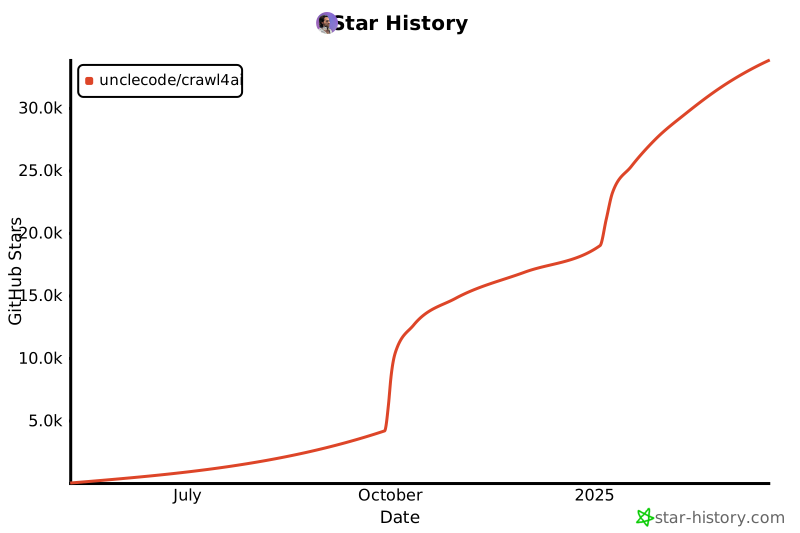](https://star-history.com/#unclecode/crawl4ai&Date)
|
||||
@@ -6,6 +6,9 @@ from selenium.webdriver.support.ui import WebDriverWait
|
||||
from selenium.webdriver.support import expected_conditions as EC
|
||||
from selenium.webdriver.chrome.options import Options
|
||||
from selenium.common.exceptions import InvalidArgumentException
|
||||
from selenium.webdriver.chrome.service import Service as ChromeService
|
||||
from webdriver_manager.chrome import ChromeDriverManager
|
||||
|
||||
import logging
|
||||
import base64
|
||||
from PIL import Image, ImageDraw, ImageFont
|
||||
@@ -118,10 +121,15 @@ class LocalSeleniumCrawlerStrategy(CrawlerStrategy):
|
||||
}
|
||||
|
||||
# chromedriver_autoinstaller.install()
|
||||
import chromedriver_autoinstaller
|
||||
crawl4ai_folder = os.path.join(Path.home(), ".crawl4ai")
|
||||
chromedriver_path = chromedriver_autoinstaller.utils.download_chromedriver(crawl4ai_folder, False)
|
||||
# import chromedriver_autoinstaller
|
||||
# crawl4ai_folder = os.path.join(Path.home(), ".crawl4ai")
|
||||
# driver = webdriver.Chrome(service=ChromeService(ChromeDriverManager().install()), options=self.options)
|
||||
# chromedriver_path = chromedriver_autoinstaller.install()
|
||||
# chromedriver_path = chromedriver_autoinstaller.utils.download_chromedriver()
|
||||
# self.service = Service(chromedriver_autoinstaller.install())
|
||||
|
||||
|
||||
chromedriver_path = ChromeDriverManager().install()
|
||||
self.service = Service(chromedriver_path)
|
||||
self.service.log_path = "NUL"
|
||||
self.driver = webdriver.Chrome(service=self.service, options=self.options)
|
||||
|
||||
@@ -10,6 +10,7 @@ from html2text import HTML2Text
|
||||
from .prompts import PROMPT_EXTRACT_BLOCKS
|
||||
from .config import *
|
||||
from pathlib import Path
|
||||
from typing import Dict, Any
|
||||
|
||||
class InvalidCSSSelectorError(Exception):
|
||||
pass
|
||||
@@ -175,16 +176,25 @@ def replace_inline_tags(soup, tags, only_text=False):
|
||||
'small': lambda tag: f"<small>{tag.text}</small>",
|
||||
'mark': lambda tag: f"=={tag.text}=="
|
||||
}
|
||||
|
||||
replacement_data = [(tag, tag_replacements.get(tag, lambda t: t.text)) for tag in tags]
|
||||
|
||||
for tag_name in tags:
|
||||
for tag_name, replacement_func in replacement_data:
|
||||
for tag in soup.find_all(tag_name):
|
||||
if not only_text:
|
||||
replacement_text = tag_replacements.get(tag_name, lambda t: t.text)(tag)
|
||||
tag.replace_with(replacement_text)
|
||||
else:
|
||||
tag.replace_with(tag.text)
|
||||
replacement_text = tag.text if only_text else replacement_func(tag)
|
||||
tag.replace_with(replacement_text)
|
||||
|
||||
return soup
|
||||
return soup
|
||||
|
||||
# for tag_name in tags:
|
||||
# for tag in soup.find_all(tag_name):
|
||||
# if not only_text:
|
||||
# replacement_text = tag_replacements.get(tag_name, lambda t: t.text)(tag)
|
||||
# tag.replace_with(replacement_text)
|
||||
# else:
|
||||
# tag.replace_with(tag.text)
|
||||
|
||||
# return soup
|
||||
|
||||
def get_content_of_website(url, html, word_count_threshold = MIN_WORD_THRESHOLD, css_selector = None, **kwargs):
|
||||
try:
|
||||
@@ -388,13 +398,21 @@ def get_content_of_website(url, html, word_count_threshold = MIN_WORD_THRESHOLD,
|
||||
markdown = h.handle(cleaned_html)
|
||||
markdown = markdown.replace(' ```', '```')
|
||||
|
||||
try:
|
||||
meta = extract_metadata(html, soup)
|
||||
except Exception as e:
|
||||
print('Error extracting metadata:', str(e))
|
||||
meta = {}
|
||||
|
||||
|
||||
# Return the Markdown content
|
||||
return{
|
||||
'markdown': markdown,
|
||||
'cleaned_html': cleaned_html,
|
||||
'success': True,
|
||||
'media': media,
|
||||
'links': links
|
||||
'links': links,
|
||||
'metadata': meta
|
||||
}
|
||||
|
||||
except Exception as e:
|
||||
@@ -402,15 +420,131 @@ def get_content_of_website(url, html, word_count_threshold = MIN_WORD_THRESHOLD,
|
||||
raise InvalidCSSSelectorError(f"Invalid CSS selector: {css_selector}") from e
|
||||
|
||||
|
||||
def get_content_of_website_optimized(url: str, html: str, word_count_threshold: int = MIN_WORD_THRESHOLD, css_selector: str = None, **kwargs) -> Dict[str, Any]:
|
||||
if not html:
|
||||
return None
|
||||
|
||||
def extract_metadata(html):
|
||||
soup = BeautifulSoup(html, 'html.parser')
|
||||
body = soup.body
|
||||
|
||||
if css_selector:
|
||||
selected_elements = body.select(css_selector)
|
||||
if not selected_elements:
|
||||
raise InvalidCSSSelectorError(f"Invalid CSS selector, No elements found for CSS selector: {css_selector}")
|
||||
body = soup.new_tag('div')
|
||||
for el in selected_elements:
|
||||
body.append(el)
|
||||
|
||||
links = {'internal': [], 'external': []}
|
||||
media = {'images': [], 'videos': [], 'audios': []}
|
||||
|
||||
def process_element(element: element.PageElement) -> None:
|
||||
if isinstance(element, NavigableString):
|
||||
if isinstance(element, Comment):
|
||||
element.extract()
|
||||
return
|
||||
|
||||
# if not isinstance(element, element.Tag):
|
||||
# return
|
||||
|
||||
if element.name in ['script', 'style', 'link', 'meta', 'noscript']:
|
||||
element.decompose()
|
||||
return
|
||||
|
||||
if element.name == 'a' and element.get('href'):
|
||||
href = element['href']
|
||||
url_base = url.split('/')[2]
|
||||
link_data = {'href': href, 'text': element.get_text()}
|
||||
if href.startswith('http') and url_base not in href:
|
||||
links['external'].append(link_data)
|
||||
else:
|
||||
links['internal'].append(link_data)
|
||||
|
||||
elif element.name == 'img':
|
||||
media['images'].append({
|
||||
'src': element.get('src'),
|
||||
'alt': element.get('alt'),
|
||||
'type': 'image'
|
||||
})
|
||||
alt_text = element.get('alt')
|
||||
if alt_text:
|
||||
element.replace_with(soup.new_string(alt_text))
|
||||
else:
|
||||
element.decompose()
|
||||
return
|
||||
|
||||
elif element.name in ['video', 'audio']:
|
||||
media[f"{element.name}s"].append({
|
||||
'src': element.get('src'),
|
||||
'alt': element.get('alt'),
|
||||
'type': element.name
|
||||
})
|
||||
|
||||
if element.name != 'pre':
|
||||
if element.name in ['b', 'i', 'u', 'span', 'del', 'ins', 'sub', 'sup', 'strong', 'em', 'code', 'kbd', 'var', 's', 'q', 'abbr', 'cite', 'dfn', 'time', 'small', 'mark']:
|
||||
if kwargs.get('only_text', False):
|
||||
element.replace_with(element.get_text())
|
||||
else:
|
||||
element.unwrap()
|
||||
elif element.name != 'img':
|
||||
element.attrs = {}
|
||||
|
||||
word_count = len(element.get_text(strip=True).split())
|
||||
if word_count < word_count_threshold:
|
||||
element.decompose()
|
||||
return
|
||||
|
||||
for child in list(element.children):
|
||||
process_element(child)
|
||||
|
||||
if not element.contents and not element.get_text(strip=True):
|
||||
element.decompose()
|
||||
|
||||
process_element(body)
|
||||
|
||||
def flatten_nested_elements(node):
|
||||
if isinstance(node, NavigableString):
|
||||
return node
|
||||
if len(node.contents) == 1 and isinstance(node.contents[0], element.Tag) and node.contents[0].name == node.name:
|
||||
return flatten_nested_elements(node.contents[0])
|
||||
node.contents = [flatten_nested_elements(child) for child in node.contents]
|
||||
return node
|
||||
|
||||
body = flatten_nested_elements(body)
|
||||
|
||||
cleaned_html = str(body).replace('\n\n', '\n').replace(' ', ' ')
|
||||
cleaned_html = sanitize_html(cleaned_html)
|
||||
|
||||
h = CustomHTML2Text()
|
||||
h.ignore_links = True
|
||||
markdown = h.handle(cleaned_html)
|
||||
markdown = markdown.replace(' ```', '```')
|
||||
|
||||
try:
|
||||
meta = extract_metadata(html, soup)
|
||||
except Exception as e:
|
||||
print('Error extracting metadata:', str(e))
|
||||
meta = {}
|
||||
|
||||
return {
|
||||
'markdown': markdown,
|
||||
'cleaned_html': cleaned_html,
|
||||
'success': True,
|
||||
'media': media,
|
||||
'links': links,
|
||||
'metadata': meta
|
||||
}
|
||||
|
||||
|
||||
def extract_metadata(html, soup = None):
|
||||
metadata = {}
|
||||
|
||||
if not html:
|
||||
return metadata
|
||||
|
||||
# Parse HTML content with BeautifulSoup
|
||||
soup = BeautifulSoup(html, 'html.parser')
|
||||
if not soup:
|
||||
soup = BeautifulSoup(html, 'html.parser')
|
||||
|
||||
# Title
|
||||
title_tag = soup.find('title')
|
||||
@@ -631,4 +765,11 @@ def wrap_text(draw, text, font, max_width):
|
||||
while words and draw.textbbox((0, 0), line + words[0], font=font)[2] <= max_width:
|
||||
line += (words.pop(0) + ' ')
|
||||
lines.append(line)
|
||||
return '\n'.join(lines)
|
||||
return '\n'.join(lines)
|
||||
|
||||
|
||||
def format_html(html_string):
|
||||
soup = BeautifulSoup(html_string, 'html.parser')
|
||||
return soup.prettify()
|
||||
|
||||
|
||||
|
||||
@@ -46,7 +46,8 @@ class WebCrawler:
|
||||
word_count_threshold=5,
|
||||
extraction_strategy= NoExtractionStrategy(),
|
||||
bypass_cache=False,
|
||||
verbose = False
|
||||
verbose = False,
|
||||
# warmup=True
|
||||
)
|
||||
self.ready = True
|
||||
print("[LOG] 🌞 WebCrawler is ready to crawl")
|
||||
@@ -140,24 +141,35 @@ class WebCrawler:
|
||||
|
||||
# Check cache first
|
||||
cached = None
|
||||
screenshot_data = None
|
||||
extracted_content = None
|
||||
if not bypass_cache and not self.always_by_pass_cache:
|
||||
cached = get_cached_url(url)
|
||||
|
||||
if kwargs.get("warmup", True) and not self.ready:
|
||||
return None
|
||||
|
||||
if cached:
|
||||
html = cached[1]
|
||||
extracted_content = cached[2]
|
||||
extracted_content = cached[4]
|
||||
if screenshot:
|
||||
screenshot = cached[9]
|
||||
screenshot_data = cached[9]
|
||||
if not screenshot_data:
|
||||
cached = None
|
||||
|
||||
else:
|
||||
if not cached or not html:
|
||||
if user_agent:
|
||||
self.crawler_strategy.update_user_agent(user_agent)
|
||||
t1 = time.time()
|
||||
html = self.crawler_strategy.crawl(url)
|
||||
t2 = time.time()
|
||||
if verbose:
|
||||
print(f"[LOG] 🚀 Crawling done for {url}, success: {bool(html)}, time taken: {t2 - t1} seconds")
|
||||
if screenshot:
|
||||
screenshot = self.crawler_strategy.take_screenshot()
|
||||
screenshot_data = self.crawler_strategy.take_screenshot()
|
||||
|
||||
|
||||
return self.process_html(url, html, extracted_content, word_count_threshold, extraction_strategy, chunking_strategy, css_selector, screenshot, verbose, bool(cached), **kwargs)
|
||||
return self.process_html(url, html, extracted_content, word_count_threshold, extraction_strategy, chunking_strategy, css_selector, screenshot_data, verbose, bool(cached), **kwargs)
|
||||
|
||||
def process_html(
|
||||
self,
|
||||
@@ -176,8 +188,14 @@ class WebCrawler:
|
||||
t = time.time()
|
||||
# Extract content from HTML
|
||||
try:
|
||||
result = get_content_of_website(url, html, word_count_threshold, css_selector=css_selector, only_text=kwargs.get("only_text", False))
|
||||
metadata = extract_metadata(html)
|
||||
# t1 = time.time()
|
||||
# result = get_content_of_website(url, html, word_count_threshold, css_selector=css_selector, only_text=kwargs.get("only_text", False))
|
||||
# print(f"[LOG] 🚀 Crawling done for {url}, success: True, time taken: {time.time() - t1} seconds")
|
||||
t1 = time.time()
|
||||
result = get_content_of_website_optimized(url, html, word_count_threshold, css_selector=css_selector, only_text=kwargs.get("only_text", False))
|
||||
if verbose:
|
||||
print(f"[LOG] 🚀 Content extracted for {url}, success: True, time taken: {time.time() - t1} seconds")
|
||||
|
||||
if result is None:
|
||||
raise ValueError(f"Failed to extract content from the website: {url}")
|
||||
except InvalidCSSSelectorError as e:
|
||||
@@ -187,9 +205,7 @@ class WebCrawler:
|
||||
markdown = result.get("markdown", "")
|
||||
media = result.get("media", [])
|
||||
links = result.get("links", [])
|
||||
|
||||
if verbose:
|
||||
print(f"[LOG] 🚀 Crawling done for {url}, success: True, time taken: {time.time() - t} seconds")
|
||||
metadata = result.get("metadata", {})
|
||||
|
||||
if extracted_content is None:
|
||||
if verbose:
|
||||
@@ -197,7 +213,7 @@ class WebCrawler:
|
||||
|
||||
sections = chunking_strategy.chunk(markdown)
|
||||
extracted_content = extraction_strategy.run(url, sections)
|
||||
extracted_content = json.dumps(extracted_content)
|
||||
extracted_content = json.dumps(extracted_content, indent=4, default=str)
|
||||
|
||||
if verbose:
|
||||
print(f"[LOG] 🚀 Extraction done for {url}, time taken: {time.time() - t} seconds.")
|
||||
@@ -217,11 +233,11 @@ class WebCrawler:
|
||||
json.dumps(metadata),
|
||||
screenshot=screenshot,
|
||||
)
|
||||
|
||||
|
||||
return CrawlResult(
|
||||
url=url,
|
||||
html=html,
|
||||
cleaned_html=cleaned_html,
|
||||
cleaned_html=format_html(cleaned_html),
|
||||
markdown=markdown,
|
||||
media=media,
|
||||
links=links,
|
||||
|
||||
@@ -15,7 +15,6 @@
|
||||
--mono-font-stack: Menlo, Monaco, Lucida Console, Liberation Mono, DejaVu Sans Mono, Bitstream Vera Sans Mono,
|
||||
Courier New, monospace, serif;
|
||||
|
||||
|
||||
--background-color: #151515; /* Dark background */
|
||||
--font-color: #eaeaea; /* Light font color for contrast */
|
||||
--invert-font-color: #151515; /* Dark color for inverted elements */
|
||||
@@ -30,12 +29,16 @@
|
||||
--global-font-color: #eaeaea; /* Light font color for global elements */
|
||||
|
||||
--background-color: #222225;
|
||||
|
||||
--background-color: #070708;
|
||||
--page-width: 70em;
|
||||
--font-color: #e8e9ed;
|
||||
--invert-font-color: #222225;
|
||||
--secondary-color: #a3abba;
|
||||
--secondary-color: #d5cec0;
|
||||
--tertiary-color: #a3abba;
|
||||
--primary-color: #09b5a5; /* Updated to the brand color */
|
||||
--primary-color: #50ffff; /* Updated to the brand color */
|
||||
--error-color: #ff3c74;
|
||||
--progress-bar-background: #3f3f44;
|
||||
--progress-bar-fill: #09b5a5; /* Updated to the brand color */
|
||||
@@ -73,11 +76,78 @@ pre, code {
|
||||
border-bottom: 1px dashed var(--secondary-color);
|
||||
} */
|
||||
|
||||
.terminal-mkdocs-main-content{
|
||||
.terminal-mkdocs-main-content {
|
||||
line-height: var(--global-line-height);
|
||||
}
|
||||
|
||||
strong, .highlight {
|
||||
strong,
|
||||
.highlight {
|
||||
/* background: url(//s2.svgbox.net/pen-brushes.svg?ic=brush-1&color=50ffff); */
|
||||
background-color: #50ffff33;
|
||||
}
|
||||
|
||||
.terminal-card > header {
|
||||
color: var(--font-color);
|
||||
text-align: center;
|
||||
background-color: var(--progress-bar-background);
|
||||
padding: 0.3em 0.5em;
|
||||
}
|
||||
.btn.btn-sm {
|
||||
color: var(--font-color);
|
||||
padding: 0.2em 0.5em;
|
||||
font-size: 0.8em;
|
||||
}
|
||||
|
||||
.loading-message {
|
||||
display: none;
|
||||
margin-top: 20px;
|
||||
}
|
||||
|
||||
.response-section {
|
||||
display: none;
|
||||
padding-top: 20px;
|
||||
}
|
||||
|
||||
.tabs {
|
||||
display: flex;
|
||||
flex-direction: column;
|
||||
}
|
||||
.tab-list {
|
||||
display: flex;
|
||||
padding: 0;
|
||||
margin: 0;
|
||||
list-style-type: none;
|
||||
border-bottom: 1px solid var(--font-color);
|
||||
}
|
||||
.tab-item {
|
||||
cursor: pointer;
|
||||
padding: 10px;
|
||||
border: 1px solid var(--font-color);
|
||||
margin-right: -1px;
|
||||
border-bottom: none;
|
||||
}
|
||||
.tab-item:hover,
|
||||
.tab-item:focus,
|
||||
.tab-item:active {
|
||||
background-color: var(--progress-bar-background);
|
||||
}
|
||||
.tab-content {
|
||||
display: none;
|
||||
border: 1px solid var(--font-color);
|
||||
border-top: none;
|
||||
}
|
||||
.tab-content:first-of-type {
|
||||
display: block;
|
||||
}
|
||||
|
||||
.tab-content header {
|
||||
padding: 0.5em;
|
||||
display: flex;
|
||||
justify-content: end;
|
||||
align-items: center;
|
||||
background-color: var(--progress-bar-background);
|
||||
}
|
||||
.tab-content pre {
|
||||
margin: 0;
|
||||
max-height: 300px; overflow: auto; border:none;
|
||||
}
|
||||
@@ -1,5 +1,13 @@
|
||||
# Changelog
|
||||
|
||||
## [0.2.7] - 2024-06-27
|
||||
### Fixed
|
||||
- Speed up twice the extraction function.
|
||||
|
||||
## [0.2.6] - 2024-06-22
|
||||
### Fixed
|
||||
- Fix issue #19: Update Dockerfile to ensure compatibility across multiple platforms.
|
||||
|
||||
## [0.2.5] - 2024-06-18
|
||||
### Added
|
||||
- Added five important hooks to the crawler:
|
||||
|
||||
198
docs/md/demo.md
Normal file
198
docs/md/demo.md
Normal file
@@ -0,0 +1,198 @@
|
||||
# Interactive Demo for Crowler
|
||||
<div id="demo">
|
||||
<form id="crawlForm" class="terminal-form">
|
||||
<fieldset>
|
||||
<legend>Enter URL and Options</legend>
|
||||
<div class="form-group">
|
||||
<label for="url">Enter URL:</label>
|
||||
<input type="text" id="url" name="url" required>
|
||||
</div>
|
||||
<div class="form-group">
|
||||
<label for="screenshot">Get Screenshot:</label>
|
||||
<input type="checkbox" id="screenshot" name="screenshot">
|
||||
</div>
|
||||
<div class="form-group">
|
||||
<button class="btn btn-default" type="submit">Submit</button>
|
||||
</div>
|
||||
</fieldset>
|
||||
</form>
|
||||
|
||||
<div id="loading" class="loading-message">
|
||||
<div class="terminal-alert terminal-alert-primary">Loading... Please wait.</div>
|
||||
</div>
|
||||
|
||||
<section id="response" class="response-section">
|
||||
<h2>Response</h2>
|
||||
<div class="tabs">
|
||||
<ul class="tab-list">
|
||||
<li class="tab-item" onclick="showTab('markdown')">Markdown</li>
|
||||
<li class="tab-item" onclick="showTab('cleanedHtml')">Cleaned HTML</li>
|
||||
<li class="tab-item" onclick="showTab('media')">Media</li>
|
||||
<li class="tab-item" onclick="showTab('extractedContent')">Extracted Content</li>
|
||||
<li class="tab-item" onclick="showTab('screenshot')">Screenshot</li>
|
||||
<li class="tab-item" onclick="showTab('pythonCode')">Python Code</li>
|
||||
</ul>
|
||||
<div class="tab-content" id="tab-markdown">
|
||||
<header>
|
||||
<div>
|
||||
<button class="btn btn-default btn-ghost btn-sm" onclick="copyToClipboard('markdownContent')">Copy</button>
|
||||
<button class="btn btn-default btn-ghost btn-sm" onclick="downloadContent('markdownContent', 'markdown.md')">Download</button>
|
||||
</div>
|
||||
</header>
|
||||
<pre><code id="markdownContent" class="language-markdown hljs"></code></pre>
|
||||
</div>
|
||||
|
||||
<div class="tab-content" id="tab-cleanedHtml" style="display: none;">
|
||||
<header >
|
||||
<div>
|
||||
<button class="btn btn-default btn-ghost btn-sm" onclick="copyToClipboard('cleanedHtmlContent')">Copy</button>
|
||||
<button class="btn btn-default btn-ghost btn-sm" onclick="downloadContent('cleanedHtmlContent', 'cleaned.html')">Download</button>
|
||||
</div>
|
||||
</header>
|
||||
<pre><code id="cleanedHtmlContent" class="language-html hljs"></code></pre>
|
||||
</div>
|
||||
|
||||
<div class="tab-content" id="tab-media" style="display: none;">
|
||||
<header >
|
||||
<div>
|
||||
<button class="btn btn-default btn-ghost btn-sm" onclick="copyToClipboard('mediaContent')">Copy</button>
|
||||
<button class="btn btn-default btn-ghost btn-sm" onclick="downloadContent('mediaContent', 'media.json')">Download</button>
|
||||
</div>
|
||||
</header>
|
||||
<pre><code id="mediaContent" class="language-json hljs"></code></pre>
|
||||
</div>
|
||||
|
||||
<div class="tab-content" id="tab-extractedContent" style="display: none;">
|
||||
<header >
|
||||
<div>
|
||||
<button class="btn btn-default btn-ghost btn-sm" onclick="copyToClipboard('extractedContentContent')">Copy</button>
|
||||
<button class="btn btn-default btn-ghost btn-sm" onclick="downloadContent('extractedContentContent', 'extracted_content.json')">Download</button>
|
||||
</div>
|
||||
</header>
|
||||
<pre><code id="extractedContentContent" class="language-json hljs"></code></pre>
|
||||
</div>
|
||||
|
||||
<div class="tab-content" id="tab-screenshot" style="display: none;">
|
||||
<header >
|
||||
<div>
|
||||
<button class="btn btn-default btn-ghost btn-sm" onclick="downloadImage('screenshotContent', 'screenshot.png')">Download</button>
|
||||
</div>
|
||||
</header>
|
||||
<pre><img id="screenshotContent" /></pre>
|
||||
</div>
|
||||
|
||||
<div class="tab-content" id="tab-pythonCode" style="display: none;">
|
||||
<header >
|
||||
<div>
|
||||
<button class="btn btn-default btn-ghost btn-sm" onclick="copyToClipboard('pythonCode')">Copy</button>
|
||||
<button class="btn btn-default btn-ghost btn-sm" onclick="downloadContent('pythonCode', 'example.py')">Download</button>
|
||||
</div>
|
||||
</header>
|
||||
<pre><code id="pythonCode" class="language-python hljs"></code></pre>
|
||||
</div>
|
||||
</div>
|
||||
</section>
|
||||
|
||||
<script>
|
||||
function showTab(tabId) {
|
||||
const tabs = document.querySelectorAll('.tab-content');
|
||||
tabs.forEach(tab => tab.style.display = 'none');
|
||||
document.getElementById(`tab-${tabId}`).style.display = 'block';
|
||||
}
|
||||
|
||||
function redo(codeBlock, codeText){
|
||||
codeBlock.classList.remove('hljs');
|
||||
codeBlock.removeAttribute('data-highlighted');
|
||||
|
||||
// Set new code and re-highlight
|
||||
codeBlock.textContent = codeText;
|
||||
hljs.highlightBlock(codeBlock);
|
||||
}
|
||||
|
||||
function copyToClipboard(elementId) {
|
||||
const content = document.getElementById(elementId).textContent;
|
||||
navigator.clipboard.writeText(content).then(() => {
|
||||
alert('Copied to clipboard');
|
||||
});
|
||||
}
|
||||
|
||||
function downloadContent(elementId, filename) {
|
||||
const content = document.getElementById(elementId).textContent;
|
||||
const blob = new Blob([content], { type: 'text/plain' });
|
||||
const url = window.URL.createObjectURL(blob);
|
||||
const a = document.createElement('a');
|
||||
a.style.display = 'none';
|
||||
a.href = url;
|
||||
a.download = filename;
|
||||
document.body.appendChild(a);
|
||||
a.click();
|
||||
window.URL.revokeObjectURL(url);
|
||||
document.body.removeChild(a);
|
||||
}
|
||||
|
||||
function downloadImage(elementId, filename) {
|
||||
const content = document.getElementById(elementId).src;
|
||||
const a = document.createElement('a');
|
||||
a.style.display = 'none';
|
||||
a.href = content;
|
||||
a.download = filename;
|
||||
document.body.appendChild(a);
|
||||
a.click();
|
||||
document.body.removeChild(a);
|
||||
}
|
||||
|
||||
document.getElementById('crawlForm').addEventListener('submit', function(event) {
|
||||
event.preventDefault();
|
||||
document.getElementById('loading').style.display = 'block';
|
||||
document.getElementById('response').style.display = 'none';
|
||||
|
||||
const url = document.getElementById('url').value;
|
||||
const screenshot = document.getElementById('screenshot').checked;
|
||||
const data = {
|
||||
urls: [url],
|
||||
bypass_cache: false,
|
||||
word_count_threshold: 5,
|
||||
screenshot: screenshot
|
||||
};
|
||||
|
||||
fetch('/crawl', {
|
||||
method: 'POST',
|
||||
headers: {
|
||||
'Content-Type': 'application/json'
|
||||
},
|
||||
body: JSON.stringify(data)
|
||||
})
|
||||
.then(response => response.json())
|
||||
.then(data => {
|
||||
data = data.results[0]; // Only one URL is requested
|
||||
document.getElementById('loading').style.display = 'none';
|
||||
document.getElementById('response').style.display = 'block';
|
||||
redo(document.getElementById('markdownContent'), data.markdown);
|
||||
redo(document.getElementById('cleanedHtmlContent'), data.cleaned_html);
|
||||
redo(document.getElementById('mediaContent'), JSON.stringify(data.media, null, 2));
|
||||
redo(document.getElementById('extractedContentContent'), data.extracted_content);
|
||||
if (screenshot) {
|
||||
document.getElementById('screenshotContent').src = `data:image/png;base64,${data.screenshot}`;
|
||||
}
|
||||
const pythonCode = `
|
||||
from crawl4ai.web_crawler import WebCrawler
|
||||
|
||||
crawler = WebCrawler()
|
||||
crawler.warmup()
|
||||
|
||||
result = crawler.run(
|
||||
url='${url}',
|
||||
screenshot=${screenshot}
|
||||
)
|
||||
print(result)
|
||||
`;
|
||||
redo(document.getElementById('pythonCode'), pythonCode);
|
||||
})
|
||||
.catch(error => {
|
||||
document.getElementById('loading').style.display = 'none';
|
||||
document.getElementById('response').style.display = 'block';
|
||||
document.getElementById('markdownContent').textContent = 'Error: ' + error;
|
||||
});
|
||||
});
|
||||
</script>
|
||||
</div>
|
||||
@@ -1,7 +1,12 @@
|
||||
# Crawl4AI Documentation
|
||||
# Crawl4AI v0.2.7
|
||||
|
||||
Welcome to the official documentation for Crawl4AI! 🕷️🤖 Crawl4AI is an open-source Python library designed to simplify web crawling and extract useful information from web pages. This documentation will guide you through the features, usage, and customization of Crawl4AI.
|
||||
|
||||
|
||||
## Try the [Demo](demo.md)
|
||||
|
||||
Just try it now and crawl different pages to see how it works. You can set the links, see the structures of the output, and also view the Python sample code on how to run it. The old demo is available at [/old_demo](/old) where you can see more details.
|
||||
|
||||
## Introduction
|
||||
|
||||
Crawl4AI has one clear task: to make crawling and data extraction from web pages easy and efficient, especially for large language models (LLMs) and AI applications. Whether you are using it as a REST API or a Python library, Crawl4AI offers a robust and flexible solution.
|
||||
|
||||
28
docs/md/interactive_content.html
Normal file
28
docs/md/interactive_content.html
Normal file
@@ -0,0 +1,28 @@
|
||||
<h1>Try Our Library</h1>
|
||||
<form id="apiForm">
|
||||
<label for="inputField">Enter some input:</label>
|
||||
<input type="text" id="inputField" name="inputField" required>
|
||||
<button type="submit">Submit</button>
|
||||
</form>
|
||||
<div id="result"></div>
|
||||
|
||||
<script>
|
||||
document.getElementById('apiForm').addEventListener('submit', function(event) {
|
||||
event.preventDefault();
|
||||
const input = document.getElementById('inputField').value;
|
||||
fetch('https://your-api-endpoint.com/api', {
|
||||
method: 'POST',
|
||||
headers: {
|
||||
'Content-Type': 'application/json'
|
||||
},
|
||||
body: JSON.stringify({ input: input })
|
||||
})
|
||||
.then(response => response.json())
|
||||
.then(data => {
|
||||
document.getElementById('result').textContent = JSON.stringify(data);
|
||||
})
|
||||
.catch(error => {
|
||||
document.getElementById('result').textContent = 'Error: ' + error;
|
||||
});
|
||||
});
|
||||
</script>
|
||||
24
main.py
24
main.py
@@ -10,6 +10,10 @@ from fastapi.responses import HTMLResponse, JSONResponse
|
||||
from fastapi.staticfiles import StaticFiles
|
||||
from fastapi.middleware.cors import CORSMiddleware
|
||||
from fastapi.templating import Jinja2Templates
|
||||
from fastapi.exceptions import RequestValidationError
|
||||
from starlette.middleware.base import BaseHTTPMiddleware
|
||||
from starlette.responses import FileResponse
|
||||
from fastapi.responses import RedirectResponse
|
||||
|
||||
from pydantic import BaseModel, HttpUrl
|
||||
from concurrent.futures import ThreadPoolExecutor, as_completed
|
||||
@@ -39,12 +43,15 @@ app.add_middleware(
|
||||
# Mount the pages directory as a static directory
|
||||
app.mount("/pages", StaticFiles(directory=__location__ + "/pages"), name="pages")
|
||||
app.mount("/mkdocs", StaticFiles(directory="site", html=True), name="mkdocs")
|
||||
site_templates = Jinja2Templates(directory=__location__ + "/site")
|
||||
templates = Jinja2Templates(directory=__location__ + "/pages")
|
||||
# chromedriver_autoinstaller.install() # Ensure chromedriver is installed
|
||||
|
||||
@lru_cache()
|
||||
def get_crawler():
|
||||
# Initialize and return a WebCrawler instance
|
||||
return WebCrawler(verbose = True)
|
||||
crawler = WebCrawler(verbose = True)
|
||||
crawler.warmup()
|
||||
return crawler
|
||||
|
||||
class CrawlRequest(BaseModel):
|
||||
urls: List[str]
|
||||
@@ -61,8 +68,11 @@ class CrawlRequest(BaseModel):
|
||||
user_agent: Optional[str] = None
|
||||
verbose: Optional[bool] = True
|
||||
|
||||
@app.get("/")
|
||||
def read_root():
|
||||
return RedirectResponse(url="/mkdocs")
|
||||
|
||||
@app.get("/", response_class=HTMLResponse)
|
||||
@app.get("/old", response_class=HTMLResponse)
|
||||
async def read_index(request: Request):
|
||||
partials_dir = os.path.join(__location__, "pages", "partial")
|
||||
partials = {}
|
||||
@@ -79,7 +89,6 @@ async def get_total_url_count():
|
||||
count = get_total_count()
|
||||
return JSONResponse(content={"count": count})
|
||||
|
||||
# Add endpoit to clear db
|
||||
@app.get("/clear-db")
|
||||
async def clear_database():
|
||||
# clear_db()
|
||||
@@ -148,7 +157,6 @@ async def crawl_urls(crawl_request: CrawlRequest, request: Request):
|
||||
|
||||
@app.get("/strategies/extraction", response_class=JSONResponse)
|
||||
async def get_extraction_strategies():
|
||||
# Load docs/extraction_strategies.json" and return as JSON response
|
||||
with open(f"{__location__}/docs/extraction_strategies.json", "r") as file:
|
||||
return JSONResponse(content=file.read())
|
||||
|
||||
@@ -156,8 +164,8 @@ async def get_extraction_strategies():
|
||||
async def get_chunking_strategies():
|
||||
with open(f"{__location__}/docs/chunking_strategies.json", "r") as file:
|
||||
return JSONResponse(content=file.read())
|
||||
|
||||
|
||||
|
||||
|
||||
if __name__ == "__main__":
|
||||
import uvicorn
|
||||
uvicorn.run(app, host="0.0.0.0", port=8080)
|
||||
uvicorn.run(app, host="0.0.0.0", port=8080)
|
||||
|
||||
15
mkdocs.yml
15
mkdocs.yml
@@ -2,9 +2,11 @@ site_name: Crawl4AI Documentation
|
||||
docs_dir: docs/md
|
||||
nav:
|
||||
- Home: index.md
|
||||
- Introduction: introduction.md
|
||||
- Installation: installation.md
|
||||
- Quick Start: quickstart.md
|
||||
- Demo: demo.md # Add this line
|
||||
- First Steps:
|
||||
- Introduction: introduction.md
|
||||
- Installation: installation.md
|
||||
- Quick Start: quickstart.md
|
||||
- Examples:
|
||||
- Intro: examples/index.md
|
||||
- LLM Extraction: examples/llm_extraction.md
|
||||
@@ -21,8 +23,9 @@ nav:
|
||||
- API Reference:
|
||||
- Core Classes and Functions: api/core_classes_and_functions.md
|
||||
- Detailed API Documentation: api/detailed_api_documentation.md
|
||||
- Change Log: changelog.md
|
||||
- Contact: contact.md
|
||||
- Miscellaneous:
|
||||
- Change Log: changelog.md
|
||||
- Contact: contact.md
|
||||
|
||||
theme:
|
||||
name: terminal
|
||||
@@ -36,4 +39,4 @@ extra_css:
|
||||
|
||||
extra_javascript:
|
||||
- assets/highlight.min.js
|
||||
- assets/highlight_init.js
|
||||
- assets/highlight_init.js
|
||||
|
||||
@@ -25,7 +25,7 @@
|
||||
<header class="bg-zinc-950 text-lime-500 py-4 flex">
|
||||
|
||||
<div class="mx-auto px-4">
|
||||
<h1 class="text-2xl font-bold">🔥🕷️ Crawl4AI: Web Data for your Thoughts v0.2.5</h1>
|
||||
<h1 class="text-2xl font-bold">🔥🕷️ Crawl4AI: Web Data for your Thoughts</h1>
|
||||
</div>
|
||||
<div class="mx-auto px-4 flex font-bold text-xl gap-2">
|
||||
<span>📊 Total Website Processed</span>
|
||||
|
||||
@@ -20,3 +20,4 @@ torch==2.3.1
|
||||
onnxruntime==1.18.0
|
||||
tokenizers==0.19.1
|
||||
pillow==10.3.0
|
||||
webdriver-manager==4.0.1
|
||||
2
setup.py
2
setup.py
@@ -33,7 +33,7 @@ class CustomInstallCommand(install):
|
||||
|
||||
setup(
|
||||
name="Crawl4AI",
|
||||
version="0.2.5",
|
||||
version="0.2.7",
|
||||
description="🔥🕷️ Crawl4AI: Open-source LLM Friendly Web Crawler & Scrapper",
|
||||
long_description=open("README.md").read(),
|
||||
long_description_content_type="text/markdown",
|
||||
|
||||
Reference in New Issue
Block a user