# 🔥🕷️ Crawl4AI: LLM Friendly Web Crawler & Scraper
[✨ Check out what's new in the latest update!](#new-in-03743)
 [](https://github.com/unclecode/crawl4ai/stargazers)

[](https://github.com/unclecode/crawl4ai/network/members)
[](https://github.com/unclecode/crawl4ai/issues)
[](https://github.com/unclecode/crawl4ai/pulls)
[](https://github.com/unclecode/crawl4ai/blob/main/LICENSE)
## 🔥 Crawl4AI: Crawl Smarter, Faster, Freely. For AI.
Crawl4AI is the #1 trending GitHub repository, actively maintained by a vibrant community. It delivers blazing-fast, AI-ready web crawling tailored for LLMs, AI agents, and data pipelines. Open source, flexible, and built for real-time performance, Crawl4AI empowers developers with unmatched speed, precision, and deployment ease.
[✨ Check out what's new in the latest update!](#new-in-03743)
## 🧐 Why Crawl4AI?
1. **Built for LLMs**: Creates **smart, concise Markdown** optimized for applications like Retrieval-Augmented Generation (RAG) and fine-tuning.
2. **Lightning Fast**: Delivers results **6x faster** than competitors with real-time, cost-efficient performance.
3. **Flexible Browser Control**: Offers session management, proxies, and custom hooks for precise, seamless data access.
4. **Heuristic Intelligence**: Leverages **advanced algorithms** to extract data efficiently, reducing reliance on costly language models.
5. **Open Source & Deployable**: 100% open-source with no API keys or registration required-ready for **Docker and cloud integration**.
6. **Thriving Community**: Actively maintained by a vibrant developer community and the **#1 trending GitHub repository** across all languages.
## 🚀 Quick Start
1. Install Crawl4AI:
```bash
pip install crawl4ai
```
2. Run a simple web crawl:
```python
import asyncio
from crawl4ai import AsyncWebCrawler, CacheMode
async def main():
async with AsyncWebCrawler(verbose=True) as crawler:
result = await crawler.arun(url="https://www.nbcnews.com/business")
# Soone will be change to result.markdown
print(result.markdown_v2.raw_markdown)
if __name__ == "__main__":
asyncio.run(main())
```
## ✨ Features
[](https://github.com/unclecode/crawl4ai/stargazers)

[](https://github.com/unclecode/crawl4ai/network/members)
[](https://github.com/unclecode/crawl4ai/issues)
[](https://github.com/unclecode/crawl4ai/pulls)
[](https://github.com/unclecode/crawl4ai/blob/main/LICENSE)
## 🔥 Crawl4AI: Crawl Smarter, Faster, Freely. For AI.
Crawl4AI is the #1 trending GitHub repository, actively maintained by a vibrant community. It delivers blazing-fast, AI-ready web crawling tailored for LLMs, AI agents, and data pipelines. Open source, flexible, and built for real-time performance, Crawl4AI empowers developers with unmatched speed, precision, and deployment ease.
[✨ Check out what's new in the latest update!](#new-in-03743)
## 🧐 Why Crawl4AI?
1. **Built for LLMs**: Creates **smart, concise Markdown** optimized for applications like Retrieval-Augmented Generation (RAG) and fine-tuning.
2. **Lightning Fast**: Delivers results **6x faster** than competitors with real-time, cost-efficient performance.
3. **Flexible Browser Control**: Offers session management, proxies, and custom hooks for precise, seamless data access.
4. **Heuristic Intelligence**: Leverages **advanced algorithms** to extract data efficiently, reducing reliance on costly language models.
5. **Open Source & Deployable**: 100% open-source with no API keys or registration required-ready for **Docker and cloud integration**.
6. **Thriving Community**: Actively maintained by a vibrant developer community and the **#1 trending GitHub repository** across all languages.
## 🚀 Quick Start
1. Install Crawl4AI:
```bash
pip install crawl4ai
```
2. Run a simple web crawl:
```python
import asyncio
from crawl4ai import AsyncWebCrawler, CacheMode
async def main():
async with AsyncWebCrawler(verbose=True) as crawler:
result = await crawler.arun(url="https://www.nbcnews.com/business")
# Soone will be change to result.markdown
print(result.markdown_v2.raw_markdown)
if __name__ == "__main__":
asyncio.run(main())
```
## ✨ Features
📝 Markdown Generation
- 🧹 **Clean Markdown**: Generates clean, structured Markdown with accurate formatting.
- 🎯 **Fit Markdown**: Heuristic-based filtering to remove noise and irrelevant parts for AI-friendly processing.
- 🔗 **Citations and References**: Converts page links into a numbered reference list with clean citations.
- 🛠️ **Custom Strategies**: Users can create their own Markdown generation strategies tailored to specific needs.
- 📚 **BM25 Algorithm**: Employs BM25-based filtering for extracting core information and removing irrelevant content.
📊 Structured Data Extraction
- 🤖 **LLM-Driven Extraction**: Supports all LLMs (open-source and proprietary) for structured data extraction.
- 🧱 **Chunking Strategies**: Implements chunking (topic-based, regex, sentence-level) for targeted content processing.
- 🌌 **Cosine Similarity**: Find relevant content chunks based on user queries for semantic extraction.
- 🔎 **CSS-Based Extraction**: Fast schema-based data extraction using XPath and CSS selectors.
- 🔧 **Schema Definition**: Define custom schemas for extracting structured JSON from repetitive patterns.
🌐 Browser Integration
- 🖥️ **Managed Browser**: Use user-owned browsers with full control, avoiding bot detection.
- 🔄 **Remote Browser Control**: Connect to Chrome Developer Tools Protocol for remote, large-scale data extraction.
- 🔒 **Session Management**: Preserve browser states and reuse them for multi-step crawling.
- 🧩 **Proxy Support**: Seamlessly connect to proxies with authentication for secure access.
- ⚙️ **Full Browser Control**: Modify headers, cookies, user agents, and more for tailored crawling setups.
- 🌍 **Multi-Browser Support**: Compatible with Chromium, Firefox, and WebKit.
🔎 Crawling & Scraping
- 🖼️ **Media Support**: Extract images, audio, videos, and responsive image formats like `srcset` and `picture`.
- 🚀 **Dynamic Crawling**: Execute JS and wait for async or sync for dynamic content extraction.
- 📸 **Screenshots**: Capture page screenshots during crawling for debugging or analysis.
- 📂 **Raw Data Crawling**: Directly process raw HTML (`raw:`) or local files (`file://`).
- 🔗 **Comprehensive Link Extraction**: Extracts internal, external links, and embedded iframe content.
- 🛠️ **Customizable Hooks**: Define hooks at every step to customize crawling behavior.
- 💾 **Caching**: Cache data for improved speed and to avoid redundant fetches.
- 📄 **Metadata Extraction**: Retrieve structured metadata from web pages.
- 📡 **IFrame Content Extraction**: Seamless extraction from embedded iframe content.
🚀 Deployment
- 🐳 **Dockerized Setup**: Optimized Docker image with API server for easy deployment.
- 🔄 **API Gateway**: One-click deployment with secure token authentication for API-based workflows.
- 🌐 **Scalable Architecture**: Designed for mass-scale production and optimized server performance.
- ⚙️ **DigitalOcean Deployment**: Ready-to-deploy configurations for DigitalOcean and similar platforms.
🎯 Additional Features
- 🕶️ **Stealth Mode**: Avoid bot detection by mimicking real users.
- 🏷️ **Tag-Based Content Extraction**: Refine crawling based on custom tags, headers, or metadata.
- 🔗 **Link Analysis**: Extract and analyze all links for detailed data exploration.
- 🛡️ **Error Handling**: Robust error management for seamless execution.
- 🔐 **CORS & Static Serving**: Supports filesystem-based caching and cross-origin requests.
- 📖 **Clear Documentation**: Simplified and updated guides for onboarding and advanced usage.
- 🙌 **Community Recognition**: Acknowledges contributors and pull requests for transparency.
## Try it Now!
✨ Play around with this [](https://colab.research.google.com/drive/1SgRPrByQLzjRfwoRNq1wSGE9nYY_EE8C?usp=sharing)
✨ Visit our [Documentation Website](https://crawl4ai.com/mkdocs/)
## 🚀 Speed Comparison
A test was conducted on **[NBC News - Business Section](https://www.nbcnews.com/business)** to compare Crawl4AI and Firecrawl, highlighting Crawl4AI's speed, efficiency, and advanced features.
📊 Results Summary
#### Results Summary
| **Method** | **Time Taken** | **Markdown Length** | **Fit Markdown** | **Images Found** |
|--------------------------------|----------------|----------------------|-------------------|------------------|
| **Firecrawl** | 6.04 seconds | 38,382 characters | - | 52 |
| **Crawl4AI (Simple Crawl)** | 1.06 seconds | 42,027 characters | - | 52 |
| **Crawl4AI (Markdown Plus)** | 1.30 seconds | 54,342 characters | 11,119 characters | 52 |
| **Crawl4AI (JavaScript)** | 1.56 seconds | 75,869 characters | 13,406 characters | 92 |
⚡ Key Takeaways
1. **Superior Speed**: Crawl4AI processes even advanced crawls up to **6x faster** than Firecrawl, with times as low as **1.06 seconds**.
2. **Rich Content Extraction**: Crawl4AI consistently captures more comprehensive content, producing a **Markdown Plus** output of **54,342 characters**, compared to Firecrawl's **38,382 characters**.
3. **AI-Optimized Output**: With **Fit Markdown**, Crawl4AI removes noise to produce concise, AI-friendly outputs (**11,119–13,406 characters**) tailored for LLM workflows.
4. **Dynamic Content Handling**: Using JavaScript execution, Crawl4AI extracted **92 images** and enriched content dynamically loaded via “Load More” buttons—unmatched by Firecrawl.
🏁 Conclusion
Crawl4AI outshines Firecrawl in speed, completeness, and flexibility. Its advanced features, including **Markdown Plus**, **Fit Markdown**, and **dynamic content handling**, make it the ideal choice for AI-ready web crawling. Whether you're targeting rich structured data or handling complex dynamic websites, Crawl4AI delivers unmatched performance and precision.
You can find the full comparison code in our repository at [docs/examples/quickstart_async.py](https://github.com/unclecode/crawl4ai/blob/main/docs/examples/quickstart_async.py).
## 🛠️ Installation 🛠️
Crawl4AI offers flexible installation options to suit various use cases. You can install it as a Python package or use Docker.
🐍 Using pip
Choose the installation option that best fits your needs:
### Basic Installation
For basic web crawling and scraping tasks:
```bash
pip install crawl4ai
```
By default, this will install the asynchronous version of Crawl4AI, using Playwright for web crawling.
👉 **Note**: When you install Crawl4AI, the setup script should automatically install and set up Playwright. However, if you encounter any Playwright-related errors, you can manually install it using one of these methods:
1. Through the command line:
```bash
playwright install
```
2. If the above doesn't work, try this more specific command:
```bash
python -m playwright install chromium
```
This second method has proven to be more reliable in some cases.
---
### Installation with Synchronous Version
The sync version is deprecated and will be removed in future versions. If you need the synchronous version using Selenium:
```bash
pip install crawl4ai[sync]
```
---
### Development Installation
For contributors who plan to modify the source code:
```bash
git clone https://github.com/unclecode/crawl4ai.git
cd crawl4ai
pip install -e . # Basic installation in editable mode
```
Install optional features:
```bash
pip install -e ".[torch]" # With PyTorch features
pip install -e ".[transformer]" # With Transformer features
pip install -e ".[cosine]" # With cosine similarity features
pip install -e ".[sync]" # With synchronous crawling (Selenium)
pip install -e ".[all]" # Install all optional features
```
🚀 One-Click Deployment
Deploy your own instance of Crawl4AI with one click:
[](https://www.digitalocean.com/?repo=https://github.com/unclecode/crawl4ai/tree/0.3.74&refcode=a0780f1bdb3d&utm_campaign=Referral_Invite&utm_medium=Referral_Program&utm_source=badge)
> 💡 **Recommended specs**: 4GB RAM minimum. Select "professional-xs" or higher when deploying for stable operation.
The deploy will:
- Set up a Docker container with Crawl4AI
- Configure Playwright and all dependencies
- Start the FastAPI server on port `11235`
- Set up health checks and auto-deployment
🐳 Using Docker
Crawl4AI is available as Docker images for easy deployment. You can either pull directly from Docker Hub (recommended) or build from the repository.
---
### Option 1: Docker Hub (Recommended)
```bash
# Pull and run from Docker Hub (choose one):
docker pull unclecode/crawl4ai:basic # Basic crawling features
docker pull unclecode/crawl4ai:all # Full installation (ML, LLM support)
docker pull unclecode/crawl4ai:gpu # GPU-enabled version
# Run the container
docker run -p 11235:11235 unclecode/crawl4ai:basic # Replace 'basic' with your chosen version
# In case you want to set platform to arm64
docker run --platform linux/arm64 -p 11235:11235 unclecode/crawl4ai:basic
# In case to allocate more shared memory for the container
docker run --shm-size=2gb -p 11235:11235 unclecode/crawl4ai:basic
```
---
### Option 2: Build from Repository
```bash
# Clone the repository
git clone https://github.com/unclecode/crawl4ai.git
cd crawl4ai
# Build the image
docker build -t crawl4ai:local \
--build-arg INSTALL_TYPE=basic \ # Options: basic, all
.
# In case you want to set platform to arm64
docker build -t crawl4ai:local \
--build-arg INSTALL_TYPE=basic \ # Options: basic, all
--platform linux/arm64 \
.
# Run your local build
docker run -p 11235:11235 crawl4ai:local
```
---
### Quick Test
Run a quick test (works for both Docker options):
```python
import requests
# Submit a crawl job
response = requests.post(
"http://localhost:11235/crawl",
json={"urls": "https://example.com", "priority": 10}
)
task_id = response.json()["task_id"]
# Get results
result = requests.get(f"http://localhost:11235/task/{task_id}")
```
For advanced configuration, environment variables, and usage examples, see our [Docker Deployment Guide](https://crawl4ai.com/mkdocs/basic/docker-deployment/).
## 🔬 Advanced Usage Examples 🔬
You can check the project structure in the directory [https://github.com/unclecode/crawl4ai/docs/examples](docs/examples). Over there, you can find a variety of examples; here, some popular examples are shared.
📝 Heuristic Markdown Generation with Clean and Fit Markdown
```python
import asyncio
from crawl4ai import AsyncWebCrawler, CacheMode
from crawl4ai.content_filter_strategy import BM25ContentFilter
from crawl4ai.markdown_generation_strategy import DefaultMarkdownGenerator
async def main():
async with AsyncWebCrawler(
headless=True,
verbose=True,
) as crawler:
result = await crawler.arun(
url="https://docs.micronaut.io/4.7.6/guide/",
cache_mode=CacheMode.ENABLED,
markdown_generator=DefaultMarkdownGenerator(
content_filter=BM25ContentFilter(user_query=None, bm25_threshold=1.0)
),
)
print(len(result.markdown))
print(len(result.fit_markdown))
print(len(result.markdown_v2.fit_markdown))
if __name__ == "__main__":
asyncio.run(main())
```
🖥️ Executing JavaScript & Extract Structured Data without LLMs
```python
import asyncio
from crawl4ai import AsyncWebCrawler, CacheMode
from crawl4ai.extraction_strategy import JsonCssExtractionStrategy
import json
async def main():
schema = {
"name": "KidoCode Courses",
"baseSelector": "section.charge-methodology .w-tab-content > div",
"fields": [
{
"name": "section_title",
"selector": "h3.heading-50",
"type": "text",
},
{
"name": "section_description",
"selector": ".charge-content",
"type": "text",
},
{
"name": "course_name",
"selector": ".text-block-93",
"type": "text",
},
{
"name": "course_description",
"selector": ".course-content-text",
"type": "text",
},
{
"name": "course_icon",
"selector": ".image-92",
"type": "attribute",
"attribute": "src"
}
]
}
extraction_strategy = JsonCssExtractionStrategy(schema, verbose=True)
async with AsyncWebCrawler(
headless=False,
verbose=True
) as crawler:
# Create the JavaScript that handles clicking multiple times
js_click_tabs = """
(async () => {
const tabs = document.querySelectorAll("section.charge-methodology .tabs-menu-3 > div");
for(let tab of tabs) {
// scroll to the tab
tab.scrollIntoView();
tab.click();
// Wait for content to load and animations to complete
await new Promise(r => setTimeout(r, 500));
}
})();
"""
result = await crawler.arun(
url="https://www.kidocode.com/degrees/technology",
extraction_strategy=JsonCssExtractionStrategy(schema, verbose=True),
js_code=[js_click_tabs],
cache_mode=CacheMode.BYPASS
)
companies = json.loads(result.extracted_content)
print(f"Successfully extracted {len(companies)} companies")
print(json.dumps(companies[0], indent=2))
if __name__ == "__main__":
asyncio.run(main())
```
📚 Extracting Structured Data with LLMs
```python
import os
import asyncio
from crawl4ai import AsyncWebCrawler, CacheMode
from crawl4ai.extraction_strategy import LLMExtractionStrategy
from pydantic import BaseModel, Field
class OpenAIModelFee(BaseModel):
model_name: str = Field(..., description="Name of the OpenAI model.")
input_fee: str = Field(..., description="Fee for input token for the OpenAI model.")
output_fee: str = Field(..., description="Fee for output token for the OpenAI model.")
async def main():
async with AsyncWebCrawler(verbose=True) as crawler:
result = await crawler.arun(
url='https://openai.com/api/pricing/',
word_count_threshold=1,
extraction_strategy=LLMExtractionStrategy(
# Here you can use any provider that Litellm library supports, for instance: ollama/qwen2
# provider="ollama/qwen2", api_token="no-token",
provider="openai/gpt-4o", api_token=os.getenv('OPENAI_API_KEY'),
schema=OpenAIModelFee.schema(),
extraction_type="schema",
instruction="""From the crawled content, extract all mentioned model names along with their fees for input and output tokens.
Do not miss any models in the entire content. One extracted model JSON format should look like this:
{"model_name": "GPT-4", "input_fee": "US$10.00 / 1M tokens", "output_fee": "US$30.00 / 1M tokens"}."""
),
cache_mode=CacheMode.BYPASS,
)
print(result.extracted_content)
if __name__ == "__main__":
asyncio.run(main())
```
🤖 Using You own Browswer with Custome User Profile
```python
import os, sys
from pathlib import Path
import asyncio, time
from crawl4ai import AsyncWebCrawler
async def test_news_crawl():
# Create a persistent user data directory
user_data_dir = os.path.join(Path.home(), ".crawl4ai", "browser_profile")
os.makedirs(user_data_dir, exist_ok=True)
async with AsyncWebCrawler(
verbose=True,
headless=True,
user_data_dir=user_data_dir,
use_persistent_context=True,
headers={
"Accept": "text/html,application/xhtml+xml,application/xml;q=0.9,image/webp,*/*;q=0.8",
"Accept-Language": "en-US,en;q=0.5",
"Accept-Encoding": "gzip, deflate, br",
"DNT": "1",
"Connection": "keep-alive",
"Upgrade-Insecure-Requests": "1",
"Sec-Fetch-Dest": "document",
"Sec-Fetch-Mode": "navigate",
"Sec-Fetch-Site": "none",
"Sec-Fetch-User": "?1",
"Cache-Control": "max-age=0",
}
) as crawler:
url = "ADDRESS_OF_A_CHALLENGING_WEBSITE"
result = await crawler.arun(
url,
cache_mode=CacheMode.BYPASS,
magic=True,
)
print(f"Successfully crawled {url}")
print(f"Content length: {len(result.markdown)}")
```
## ✨ New in 0.3.743
- 🚀 **Improved ManagedBrowser Configuration**: Dynamic host and port support for more flexible browser management.
- 📝 **Enhanced Markdown Generation**: New generator class for better formatting and customization.
- ⚡ **Fast HTML Formatting**: Significantly optimized HTML formatting in the web crawler.
- 🛠️ **Utility & Sanitization Upgrades**: Improved sanitization and expanded utility functions for streamlined workflows.
- 👥 **Acknowledgments**: Added contributor details and pull request acknowledgments for better transparency.
## 📖 Documentation & Roadmap
For detailed documentation, including installation instructions, advanced features, and API reference, visit our [Documentation Website](https://crawl4ai.com/mkdocs/).
Moreover to check our development plans and upcoming features, check out our [Roadmap](https://github.com/unclecode/crawl4ai/blob/main/ROADMAP.md).
- [x] 0. Graph Crawler: Smart website traversal using graph search algorithms for comprehensive nested page extraction
- [ ] 1. Question-Based Crawler: Natural language driven web discovery and content extraction
- [ ] 2. Knowledge-Optimal Crawler: Smart crawling that maximizes knowledge while minimizing data extraction
- [ ] 3. Agentic Crawler: Autonomous system for complex multi-step crawling operations
- [ ] 4. Automated Schema Generator: Convert natural language to extraction schemas
- [ ] 5. Domain-Specific Scrapers: Pre-configured extractors for common platforms (academic, e-commerce)
- [ ] 6. Web Embedding Index: Semantic search infrastructure for crawled content
- [ ] 7. Interactive Playground: Web UI for testing, comparing strategies with AI assistance
- [ ] 8. Performance Monitor: Real-time insights into crawler operations
- [ ] 9. Cloud Integration: One-click deployment solutions across cloud providers
- [ ] 10. Sponsorship Program: Structured support system with tiered benefits
- [ ] 11. Educational Content: "How to Crawl" video series and interactive tutorials
## 🤝 Contributing
We welcome contributions from the open-source community. Check out our [contribution guidelines](https://github.com/unclecode/crawl4ai/blob/main/CONTRIBUTING.md) for more information.
## 📄 License
Crawl4AI is released under the [Apache 2.0 License](https://github.com/unclecode/crawl4ai/blob/main/LICENSE).
## 📧 Contact
For questions, suggestions, or feedback, feel free to reach out:
- GitHub: [unclecode](https://github.com/unclecode)
- Twitter: [@unclecode](https://twitter.com/unclecode)
- Website: [crawl4ai.com](https://crawl4ai.com)
Happy Crawling! 🕸️🚀
## 🗾 Mission
Our mission is to unlock the untapped potential of personal and enterprise data in the digital age. In today's world, individuals and organizations generate vast amounts of valuable digital footprints, yet this data remains largely uncapitalized as a true asset.
Our open-source solution empowers developers and innovators to build tools for data extraction and structuring, laying the foundation for a new era of data ownership. By transforming personal and enterprise data into structured, tradeable assets, we're creating opportunities for individuals to capitalize on their digital footprints and for organizations to unlock the value of their collective knowledge.
This democratization of data represents the first step toward a shared data economy, where willing participation in data sharing drives AI advancement while ensuring the benefits flow back to data creators. Through this approach, we're building a future where AI development is powered by authentic human knowledge rather than synthetic alternatives.
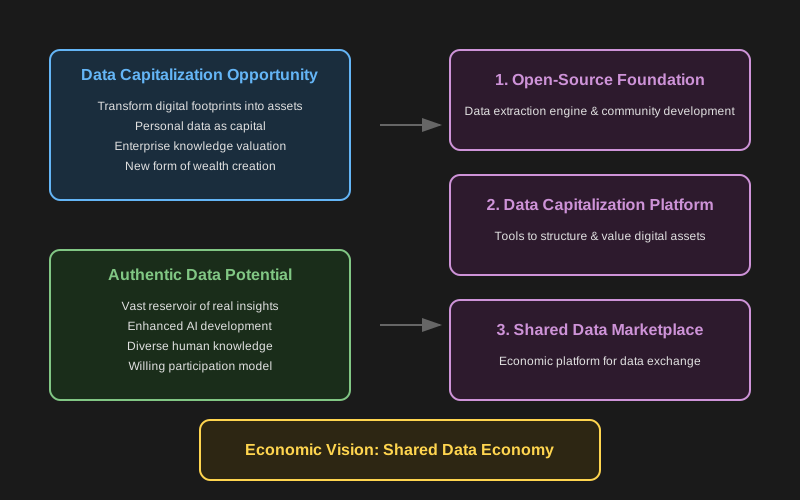
For a detailed exploration of our vision, opportunities, and pathway forward, please see our [full mission statement](./MISSION.md).
### Key Opportunities
- **Data Capitalization**: Transform digital footprints into valuable assets that can appear on personal and enterprise balance sheets
- **Authentic Data**: Unlock the vast reservoir of real human insights and knowledge for AI advancement
- **Shared Economy**: Create new value streams where data creators directly benefit from their contributions
### Development Pathway
1. **Open-Source Foundation**: Building transparent, community-driven data extraction tools
2. **Data Capitalization Platform**: Creating tools to structure and value digital assets
3. **Shared Data Marketplace**: Establishing an economic platform for ethical data exchange
For a detailed exploration of our vision, challenges, and solutions, please see our [full mission statement](./MISSION.md).
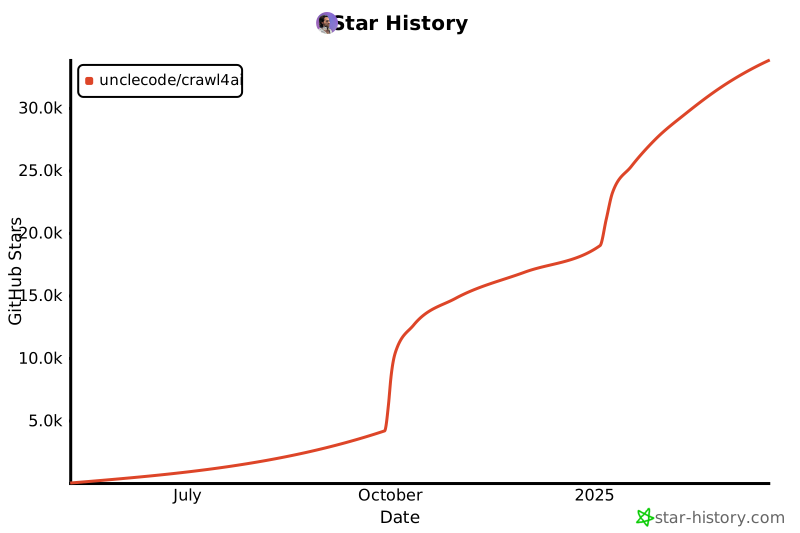
## Star History
[](https://star-history.com/#unclecode/crawl4ai&Date)